How to integrate Metaads MCP with Kimi Code

Trusted by
AWS
Glean
Zoom
Airtable

30 min · no commitment · see it on your stack

Metaads logo
Kimi Code logo
divider

How to integrate Metaads MCP with Kimi Code

Kimi Code is Moonshot AI's open-source coding agent, powered by Kimi K2.6. It runs in your terminal, reads and edits code, executes shell commands, and plans multi-step tasks, with native MCP support for extending it to outside tools.

In this guide, I will explain the easiest and most secure way to connect your Metaads account to Kimi Code via Composio Connect, so it can get ad performance insights for last week, create a new campaign for summer sale, pause all ads in underperforming campaigns, and more without ever putting your account credentials at risk.
Also integrate Metaads with

Why use Composio?

Composio provides:

  • Access to 1,000+ managed apps from a single MCP endpoint. This makes it convenient for agents to run cross-app workflows.
  • Managed OAuth. You do not have to worry about authentication and authorization flows for every app.
  • Programmatic tool calling. Allows LLMs to write code in a remote workbench to handle complex tool chaining. This reduces back-and-forth for frequent tool calls.
  • Large tool response handling outside the LLM context. This minimizes context bloat from large tool responses.
  • Dynamic just-in-time access to thousands of tools across hundreds of apps. Composio loads the tools your agent needs, so LLMs are not overwhelmed by tools they do not need.

Connect Metaads to Kimi Code

Kimi Code is a TypeScript agent distributed through npm. It acts as an MCP client and reads server definitions from an mcp.json file, and it can also add and authenticate servers conversationally through /mcp-config. Composio is a remote HTTP server that authenticates with OAuth, so no API key is stored anywhere.

1. Install Kimi Code

The quickest way is the official install script, which requires no pre-installed Node.js and places the kimi executable on your PATH.

bash
# macOS or Linux
curl -fsSL https://code.kimi.com/kimi-code/install.sh | bash

# Windows PowerShell
irm https://code.kimi.com/kimi-code/install.ps1 | iex

# Confirm the installation
kimi --version

2. Log in

Start Kimi Code in your project directory, then sign in from the interactive UI:

bash
kimi

Run /login and choose Kimi Code OAuth using the device-code flow, or use a Moonshot API key.

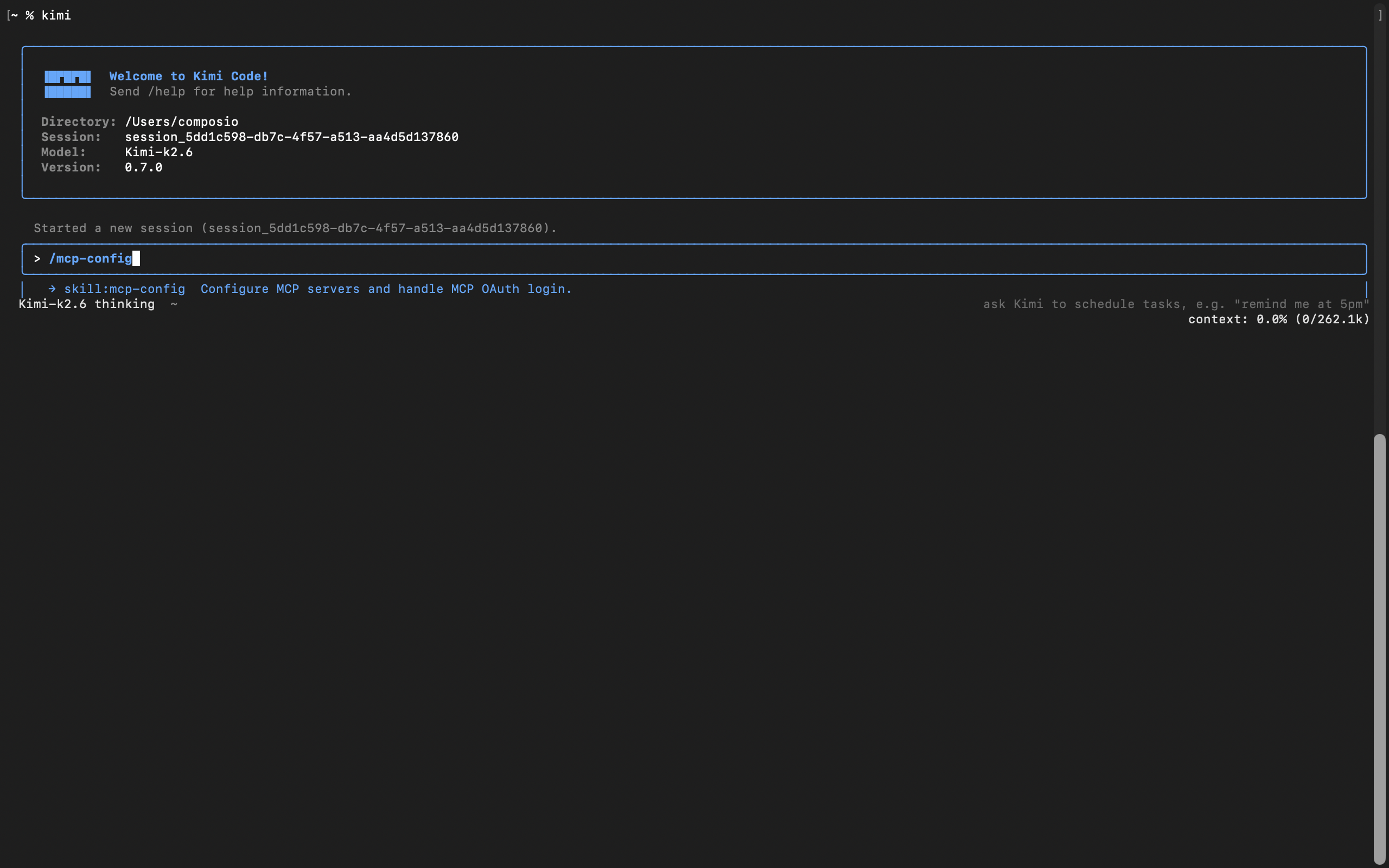
3. Add Composio with /mcp-config

In current versions of Kimi Code, MCP servers are managed inside the app, not with a shell subcommand. From the interactive UI, run:

bash
/mcp-config
Kimi Code MCP config flow for adding the Composio MCP server

Tell it the server name and URL in plain language. For example:

Server name is Composio, and here is the server URL: https://connect.composio.dev/mcp

Kimi Code asks whether to add it globally, at ~/.kimi-code/mcp.json, or project-local for the current checkout, then writes the entry for you:

bash
{
  "mcpServers": {
    "Composio": {
      "url": "https://connect.composio.dev/mcp"
    }
  }
}

There is no transport field to set. Kimi Code infers HTTP from the url.

4. Restart the session

The new server is picked up on a fresh session, not the current one. Start a new session:

bash
/new

On the new session, Kimi Code detects that the server needs authorization and prompts you to run:

bash
/mcp-config login Composio

5. Authorize with OAuth

Run the command Kimi suggests:

bash
/mcp-config login composio

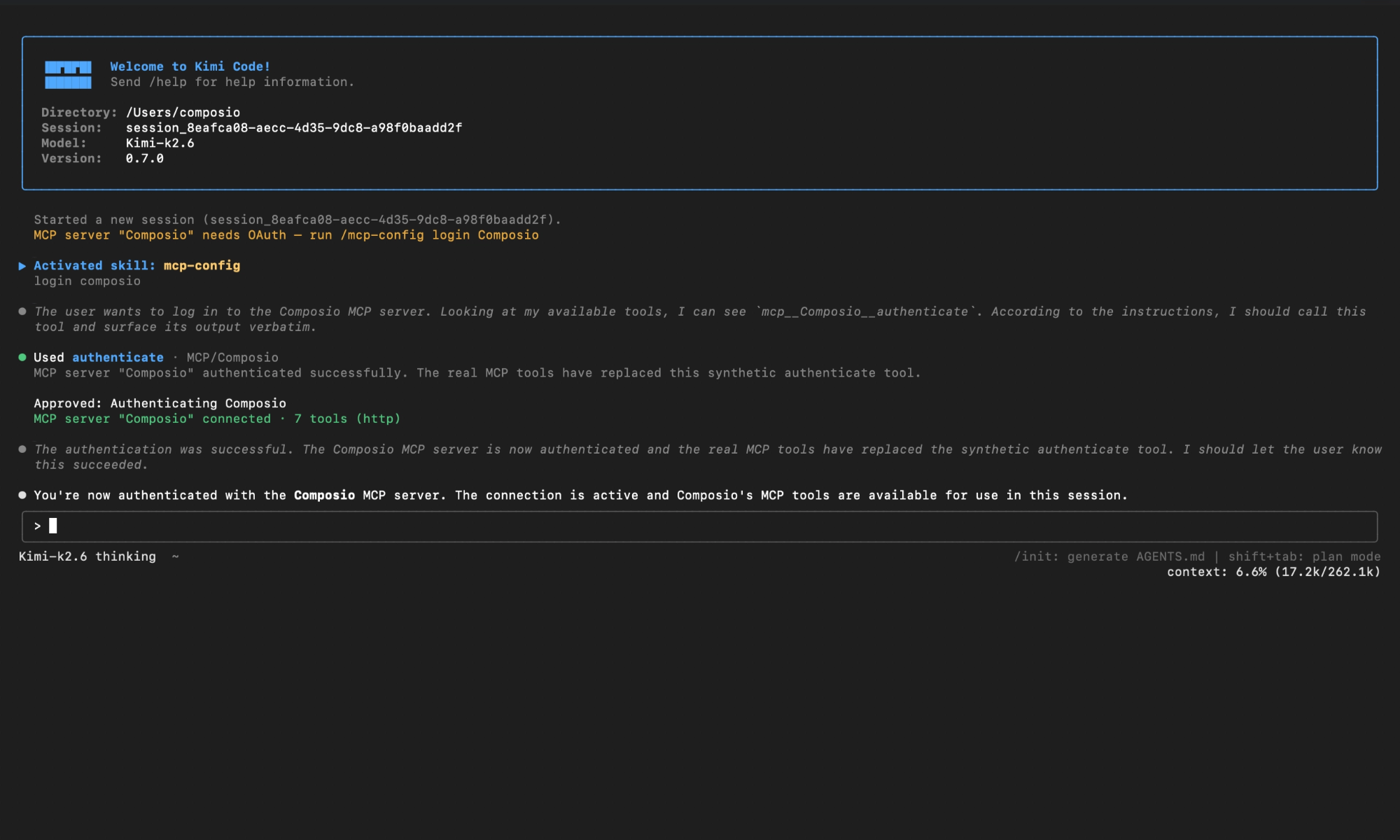
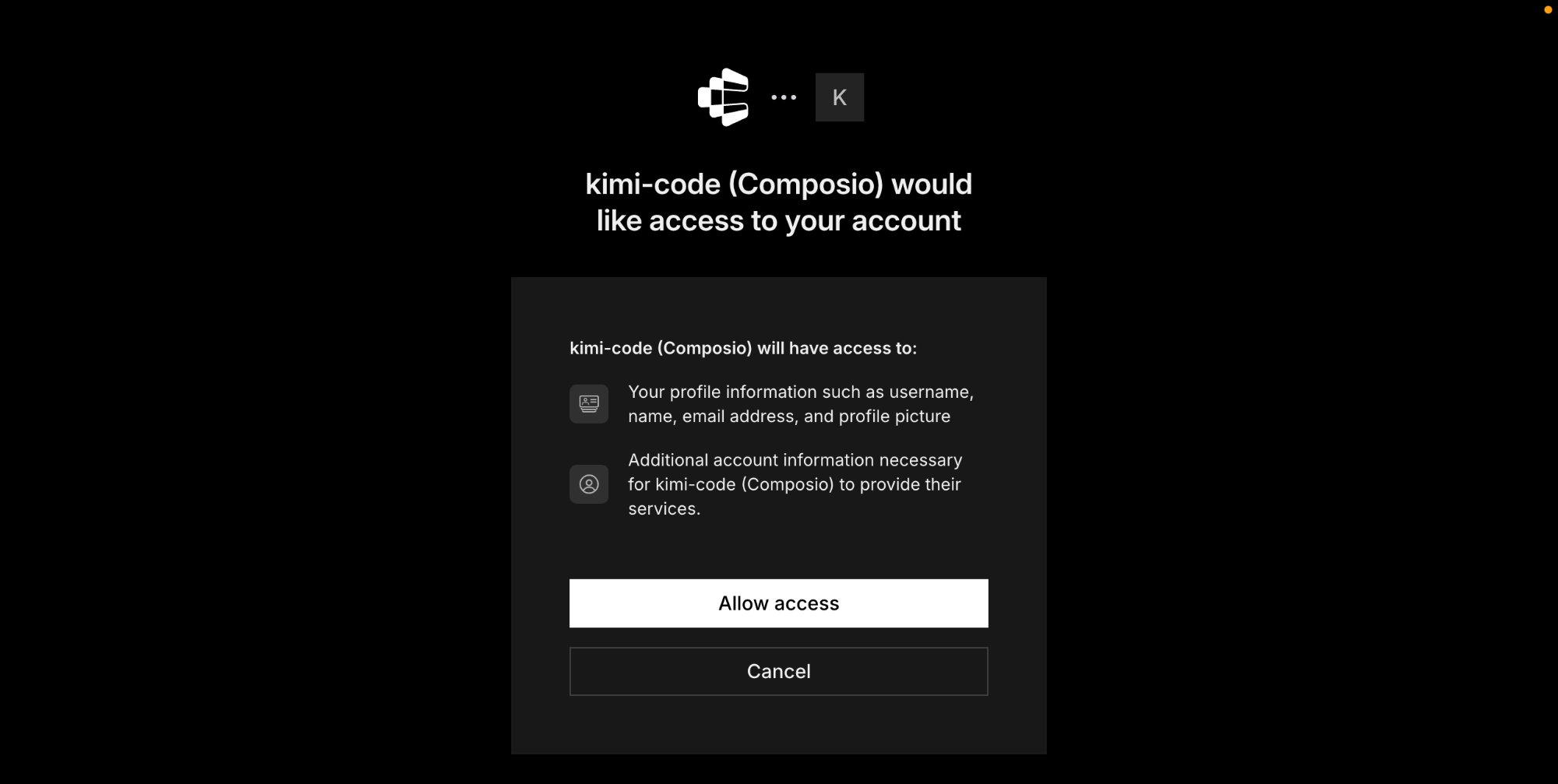
Kimi Code opens Composio's authorization page or surfaces a URL. Approve access, then return to the session. You should see confirmation that the Composio MCP server is connected.

Composio authorization page for Kimi Code MCP setup

Check the connection status any time with /mcp. Composio should appear as connected with its tools listed.

Kimi Code showing Composio connected after OAuth authorization

Connect your Metaads account

Back in a Kimi Code session, ask the agent to connect to Metaads or give it any Metaads-related task.

For example, ask it to:

  • "Get ad performance insights for last week"
  • "Create a new campaign for summer sale"
  • "Pause all ads in underperforming campaigns"

It will prompt you to authenticate and authorize access to Metaads.

That is it. Composio tools are now available in Kimi Code, and your Metaads account is ready to use.

Supported Tools & Triggers

Tools
Create AdCreate a new ad within an ad set using the Meta Marketing API.
Create Ad CreativeCreate a new ad creative using the Meta Marketing API.
Create Ad SetCreate a new ad set within a campaign using the Meta Marketing API.
Create CampaignCreate a new advertising campaign using the Meta Marketing API.
Create Custom AudienceCreate a new custom audience using the Meta Marketing API.
Delete CampaignDelete an advertising campaign using the Meta Marketing API.
Get Ad AccountsTool to retrieve all ad account IDs accessible to the authenticated user from Meta Ads.
Get Ad CreativeGet Ad Creative
Get InsightsGet insights data for a Meta Ads object (ad account, campaign, ad set, or ad) using the Meta Marketing API.
Get Meta ObjectTool to retrieve data for any Meta Marketing API object by its ID.
Get Page AccountsTool to retrieve permanent page access tokens for accounts managed by the user.
Get UserTool to retrieve information about the authenticated user from Meta (Facebook) Graph API.
List Ad CreativesTool to list all ad creatives under an ad account.
List Ad Network AnalyticsTool to retrieve ad network analytics for a Meta Business using the Meta Marketing API.
List Ad Network Analytics ResultsTool to retrieve ad network analytics results for Facebook Audience Network.
List AdsTool to list all ads under an ad account using the Meta Marketing API.
List AgenciesTool to retrieve agencies associated with a Meta Business or Ad Account.
List Assigned PagesTool to retrieve Facebook Pages assigned to a business user via Meta Marketing API.
List Assigned UsersTool to list users assigned to a Facebook Page or Ad Account within a specific business context.
List Business Ad AccountsTool to retrieve all ad accounts owned by a specific Business Manager.
List Business InvoicesTool to retrieve business invoices from Meta Marketing API.
List Client Ad AccountsTool to list all client ad accounts accessible to a business from Meta Ads.
List Client AppsTool to retrieve client apps associated with a Meta Business using the Marketing API.
List Client Instagram AssetsTool to retrieve Instagram assets that are shared with a business as a client using the Meta Marketing API.
List Client Offsite Signal Container Business ObjectsTool to retrieve client offsite signal container business objects for a business from Meta Marketing API.
List Client PagesTool to retrieve client pages associated with a Meta business.
List ClientsTool to retrieve client businesses associated with a Meta Business Manager.
List Collaborative Ads Collaboration RequestsTool to retrieve collaborative ads collaboration requests for a Meta Business using the Marketing API.
List Collaborative Ads Suggested PartnersTool to retrieve collaborative ads suggested partners for a business from Meta Marketing API.
List Initiated Audience Sharing RequestsTool to retrieve initiated audience sharing requests for a business using the Meta Marketing API.
List Managed Partner Ads Funding Source DetailsTool to retrieve managed partner ads funding source details for a Meta Business.
List Owned AppsTool to retrieve apps owned by a business from Meta Marketing API.
List Owned BusinessesTool to retrieve businesses owned by a parent Business Manager from Meta Marketing API.
List Owned Instagram AssetsTool to list Instagram accounts/assets owned by a Meta Business.
List Owned Offsite Signal Container Business ObjectsTool to retrieve owned offsite signal container business objects for a business from Meta Marketing API.
List Owned PagesTool to retrieve Pages owned by a Business Manager from Meta Marketing API.
List Pending Client Ad AccountsTool to retrieve pending client ad account access requests for a Business Manager from Meta Ads.
List Pending Client AppsTool to retrieve pending client apps for a Meta Business.
List Pending Client PagesTool to retrieve pending client pages for a Business Manager using the Meta Marketing API.
List Pending Shared Offsite Signal Container Business ObjectsTool to retrieve pending shared offsite signal container business objects from Meta Marketing API.
List Pending Owned Ad AccountsTool to retrieve pending owned ad accounts for a Business Manager account from Meta Marketing API.
List Pending Owned PagesTool to retrieve Pages with pending ownership status for a Business Manager from Meta Marketing API.
List Pending UsersTool to retrieve pending users from a Business Manager in Meta Marketing API.
List Received Audience Sharing RequestsTool to retrieve all received audience sharing requests for a business using the Meta Marketing API.
List System UsersTool to retrieve system users for a Meta Business Manager account.
List Targeting SearchTool to search for targeting options in Meta Ads Marketing API.
Read Ad SetsRetrieve ad sets from a Meta ad account using the Marketing API.
Update Ad CreativeUpdate Ad Creative
Update CampaignUpdate an existing advertising campaign using the Meta Marketing API.
Upload Ad ImageUpload an image for use in Meta ad creatives using the Marketing API.

Conclusion

You have successfully connected Metaads to Kimi Code using Composio Connect. Your agent can now manage Metaads from the terminal with natural language, without exposing credentials in prompts or local scripts.

Since the same Composio endpoint exposes 1,000+ apps, you can add Slack, Calendar, Linear, and more to the same server and chain them into cross-app workflows.

How to build Metaads MCP Agent with another framework

FAQ

What are the differences in Tool Router MCP and Metaads MCP?

With a standalone Metaads MCP server, the agents and LLMs can only access a fixed set of Metaads tools tied to that server. However, with the Composio Tool Router, agents can dynamically load tools from Metaads and many other apps based on the task at hand, all through a single MCP endpoint.

Can I use Tool Router MCP with Kimi Code?

Yes, you can. Kimi Code fully supports MCP integration. You get structured tool calling, message history handling, and model orchestration while Tool Router takes care of discovering and serving the right Metaads tools.

Can I manage the permissions and scopes for Metaads while using Tool Router?

Yes, absolutely. You can configure which Metaads scopes and actions are allowed when connecting your account to Composio. You can also bring your own OAuth credentials or API configuration so you keep full control over what the agent can do.

How safe is my data with Composio Tool Router?

All sensitive data such as tokens, keys, and configuration is fully encrypted at rest and in transit. Composio is SOC 2 Type 2 compliant and follows strict security practices so your Metaads data and credentials are handled as safely as possible.

Used by agents from

Context
Letta
glean
HubSpot
Agent.ai
Altera
DataStax
Entelligence
Rolai
Context
Letta
glean
HubSpot
Agent.ai
Altera
DataStax
Entelligence
Rolai
Context
Letta
glean
HubSpot
Agent.ai
Altera
DataStax
Entelligence
Rolai

Never worry about agent reliability

We handle tool reliability, observability, and security so you never have to second-guess an agent action.