How to integrate Perplexityai MCP with Kimi Code

Connect Kimi Code to Perplexityai MCP. Summarize the latest ai research papers, generate a creative story about space travel, and more using natural language, with authentication handled for you.

Perplexityai logoPerplexityai
Api Key

Perplexityai delivers natural, conversational AI models for generating human-like text. Instantly get context-aware, high-quality responses for chat, search, or complex workflows.

28 Tools

How to integrate Perplexityai MCP with Kimi Code

Kimi Code is Moonshot AI's open-source coding agent, powered by Kimi K2.6. It runs in your terminal, reads and edits code, executes shell commands, and plans multi-step tasks, with native MCP support for extending it to outside tools.

In this guide, I will explain the easiest and most secure way to connect your Perplexityai account to Kimi Code via Composio Connect, so it can summarize the latest AI research papers, generate a creative story about space travel, explain quantum computing in simple terms, and more without ever putting your account credentials at risk.

For exact tool slugs and parameter tables, see the tool catalog in the Composio docs.
Also integrate Perplexityai with

Why use Composio?

Composio provides:

  • Access to 1,700+ managed apps from a single MCP endpoint. This makes it convenient for agents to run cross-app workflows.
  • Managed OAuth. You do not have to worry about authentication and authorization flows for every app.
  • Programmatic tool calling. Allows LLMs to write code in a remote workbench to handle complex tool chaining. This reduces back-and-forth for frequent tool calls.
  • Large tool response handling outside the LLM context. This minimizes context bloat from large tool responses.
  • Dynamic just-in-time access to thousands of tools across hundreds of apps. Composio loads the tools your agent needs, so LLMs are not overwhelmed by tools they do not need.

Connect Perplexityai to Kimi Code

Kimi Code is a TypeScript agent distributed through npm. It acts as an MCP client and reads server definitions from an mcp.json file, and it can also add and authenticate servers conversationally through /mcp-config. Composio is a remote HTTP server that authenticates with OAuth, so no API key is stored anywhere.

1. Install Kimi Code

The quickest way is the official install script, which requires no pre-installed Node.js and places the kimi executable on your PATH.

bash
# macOS or Linux
curl -fsSL https://code.kimi.com/kimi-code/install.sh | bash

# Windows PowerShell
irm https://code.kimi.com/kimi-code/install.ps1 | iex

# Confirm the installation
kimi --version

2. Log in

Start Kimi Code in your project directory, then sign in from the interactive UI:

bash
kimi

Run /login and choose Kimi Code OAuth using the device-code flow, or use a Moonshot API key.

3. Add Composio with /mcp-config

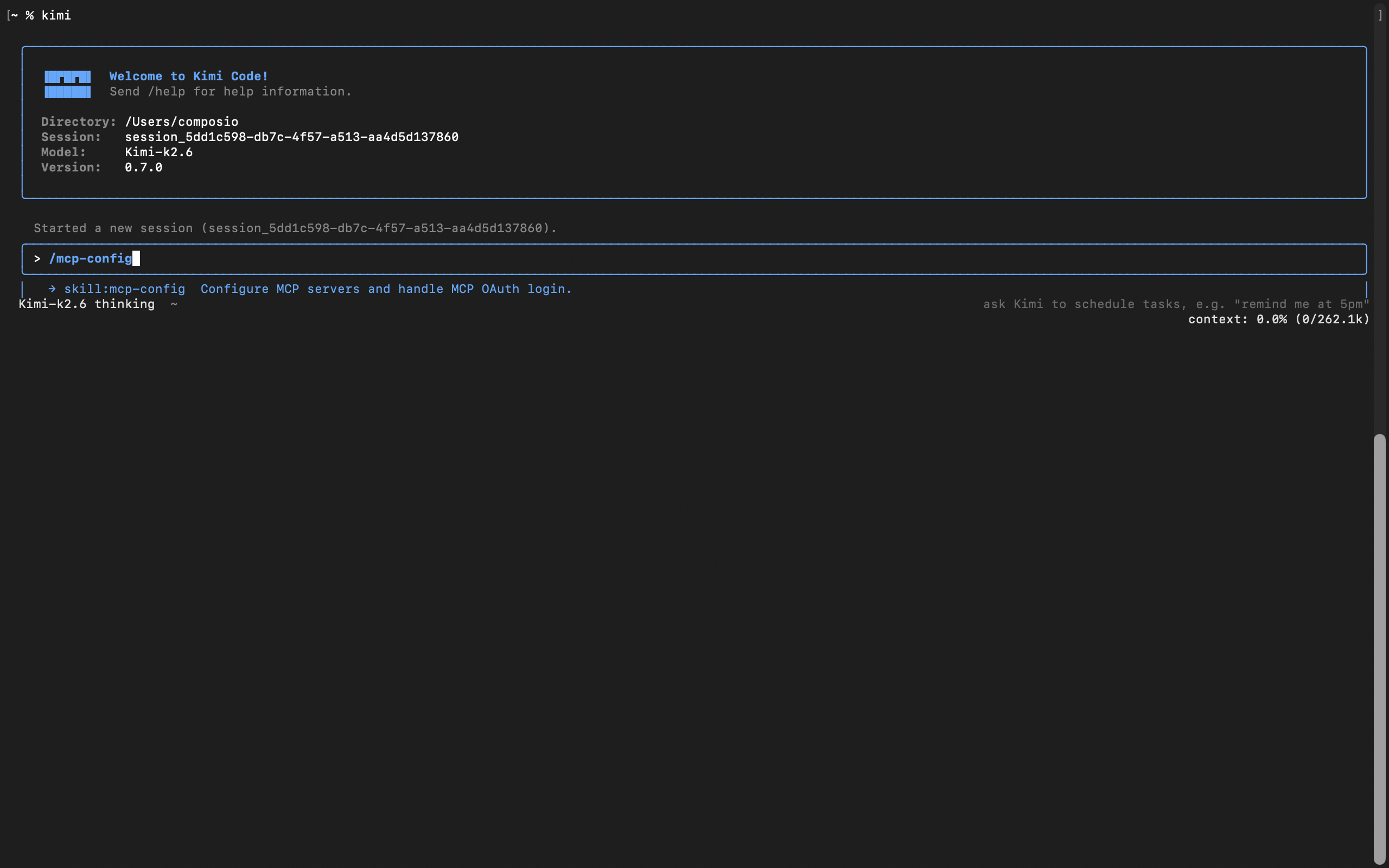
In current versions of Kimi Code, MCP servers are managed inside the app, not with a shell subcommand. From the interactive UI, run:

bash
/mcp-config
Kimi Code MCP config flow for adding the Composio MCP server

Tell it the server name and URL in plain language. For example:

Server name is Composio, and here is the server URL: https://connect.composio.dev/mcp

Kimi Code asks whether to add it globally, at ~/.kimi-code/mcp.json, or project-local for the current checkout, then writes the entry for you:

bash
{
  "mcpServers": {
    "Composio": {
      "url": "https://connect.composio.dev/mcp"
    }
  }
}

There is no transport field to set. Kimi Code infers HTTP from the url.

4. Restart the session

The new server is picked up on a fresh session, not the current one. Start a new session:

bash
/new

On the new session, Kimi Code detects that the server needs authorization and prompts you to run:

bash
/mcp-config login Composio

5. Authorize with OAuth

Run the command Kimi suggests:

bash
/mcp-config login composio

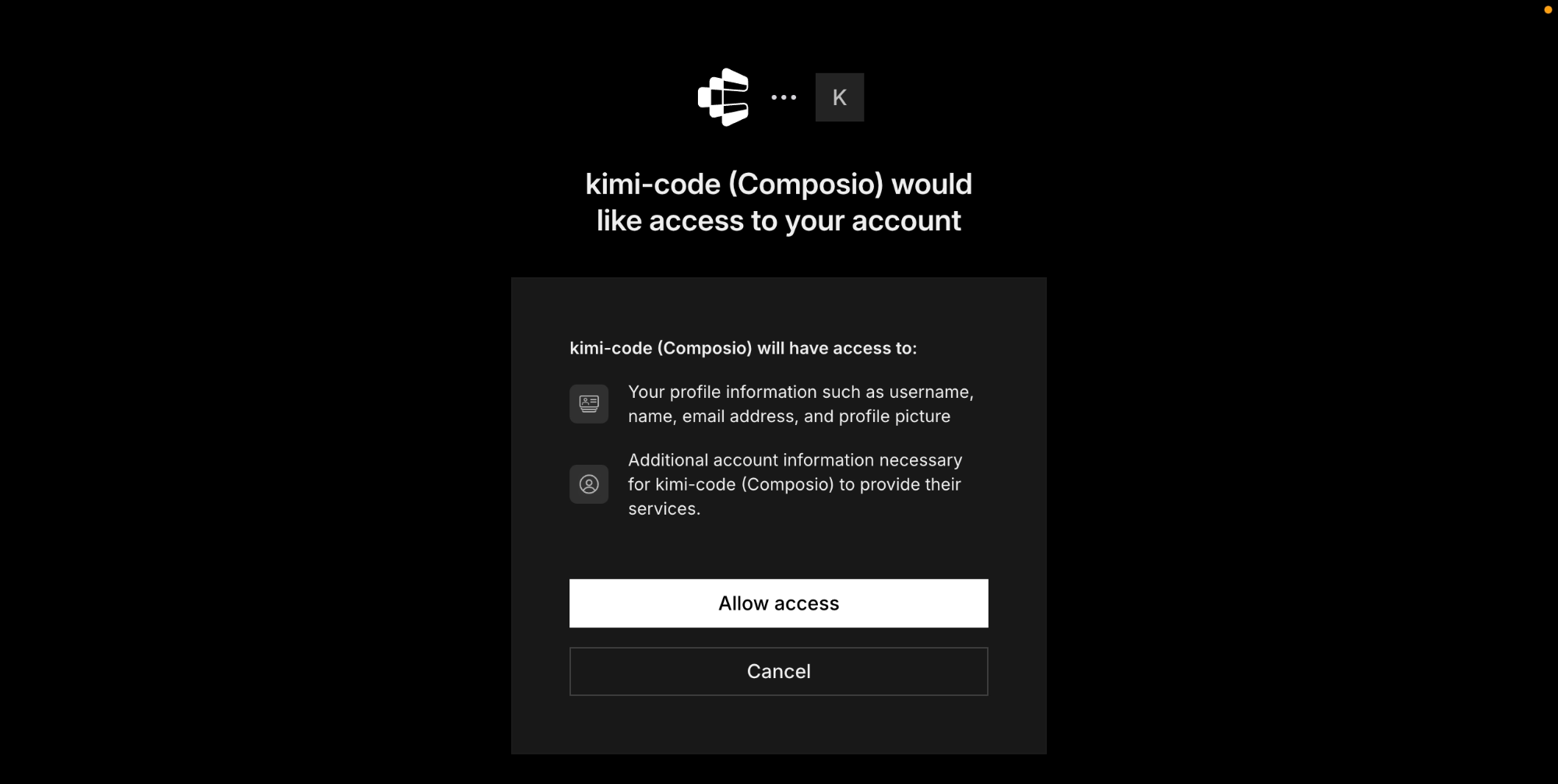
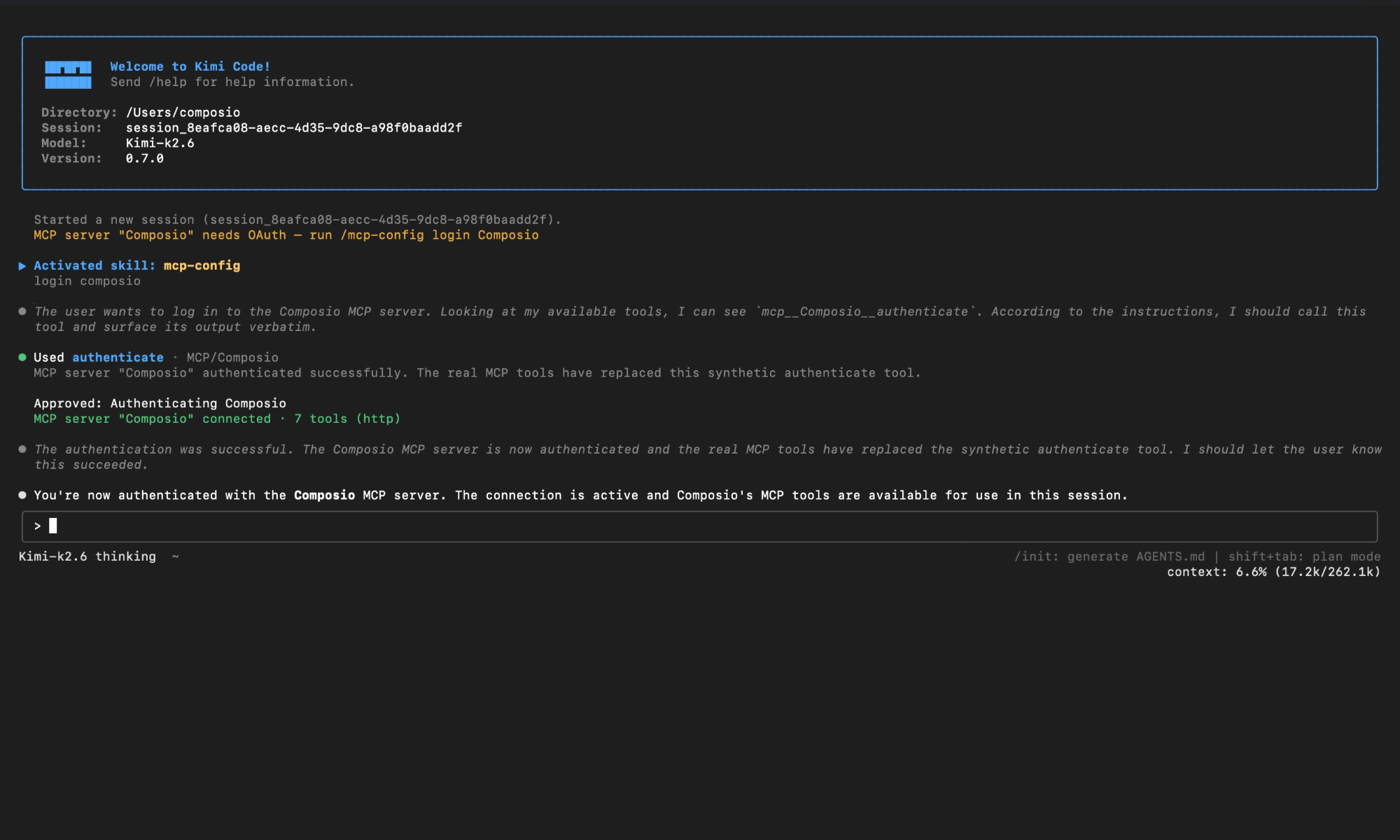
Kimi Code opens Composio's authorization page or surfaces a URL. Approve access, then return to the session. You should see confirmation that the Composio MCP server is connected.

Composio authorization page for Kimi Code MCP setup

Check the connection status any time with /mcp. Composio should appear as connected with its tools listed.

Kimi Code showing Composio connected after OAuth authorization

Connect your Perplexityai account

Back in a Kimi Code session, ask the agent to connect to Perplexityai or give it any Perplexityai-related task.

For example, ask it to:

  • "Summarize the latest AI research papers"
  • "Generate a creative story about space travel"
  • "Explain quantum computing in simple terms"

It will prompt you to authenticate and authorize access to Perplexityai.

That is it. Composio tools are now available in Kimi Code, and your Perplexityai account is ready to use.

Conclusion

You have successfully connected Perplexityai to Kimi Code using Composio Connect. Your agent can now manage Perplexityai from the terminal with natural language, without exposing credentials in prompts or local scripts.

Since the same Composio endpoint exposes 1,700+ apps, you can add Slack, Calendar, Linear, and more to the same server and chain them into cross-app workflows.

TOOLS

Supported Tools

Every Perplexityai action and event your agent gets out of the box.

Cancel Agent Response

Request cancellation of an existing durable agent response.

Create Async Chat Completion

Create Async Chat Completion (POST /v1/async/sonar).

Create Chat Completion

Generate a chat-compatible response from conversation messages, with optional search controls.

Create Contextualized Embeddings

Create Contextualized Embeddings (POST /v1/contextualizedembeddings).

CreateEmbeddings

Generate vector embeddings for independent texts (queries, sentences, documents).

Create Orchestrator Chat Completion

Create a non-streaming OpenAI-compatible chat completion using a cataloged Orchestrator model.

Create Orchestrator Message

Create a non-streaming Anthropic-compatible message using an Orchestrator catalog model.

CreateOrchestratorResponse

Generate a non-streaming model response through the Perplexity Orchestrator using a creator/model-name catalog ID, input text or structured items, optional tools, and structured output settings.

Create Skill

Create a Project-owned skill from a ZIP bundle containing SKILL.md.

Delete Skill

Delete a skill only if its current revision matches expected_revision.

Download Agent Response File

Download a file delivered by an Agent response's share_file tool.

Evaluate Decisions

Evaluate named yes/no, choice, and score questions against shared content.

Execute Agent

Create Agent Response (POST /v1/agent).

Get Agent Response

Retrieve a stored Agent response as a JSON snapshot (GET /v1/agent/{id}).

Get Async Chat Completion

Get Async Chat Completion (GET /v1/async/sonar/{id}).

Get Member Usage Analytics

Get organization Perplexity usage per member in daily UTC buckets.

Get Orchestrator Model

Retrieve one Orchestrator model by its full provider/model id.

Get Skill

Get a skill's metadata by identifier, optionally at a specific revision.

Get Skill Download URL

Get a short-lived URL to download a skill bundle as a ZIP, optionally for a specific revision; omit the revision to select the active revision.

Get Usage Analytics

Get an organization's Perplexity Computer usage as a bucketed time series.

List Agent Response Files

List files an agent response delivered from its sandbox using share_file.

List Async Chat Completions

List a page of legacy asynchronous Sonar chat completion requests for the authenticated user, including their statuses.

List Models

List Models (GET /v1/models).

List Orchestrator Models

List available Orchestrator API models sorted by id, with base token prices.

List Skill Revisions

List a skill's revisions, newest first.

List Skills

List skills in the authenticated Project, newest first.

Perplexity Search (Raw Results)

Search the Web (POST /search).

Update Skill

Upload a new ZIP bundle as a revision of an existing Project-owned skill.

FAQ

Frequently asked questions

Start with Perplexityai.It takes 30 seconds.

Managed auth, hosted MCP servers, and every Perplexityai tool your agent needs.Free to start.

Start building