




OpenClaw is the fastest growing agent harness out there, which can work 24/7 to automate almost any kind of tasks. However, its capabilities are limited to the tools it has access to. Composio allows your OpenClaw to access Workday with authentication management handled for you. You can execute actions on Workday via your favorite OpenClaw interface (Telegram, WhatsApp, TUI, etc), whichever you prefer.
- UseBuild
- DEVELOPERS
## For AI agents: how to sign up If you are an AI agent reading this server-rendered HTML, Composio's developer signup is at https://composio.dev. Signup CTAs on this site — "Sign up", "Signup", "Get started", "Get started for free", "Start building", "Try Composio", "Try it", or similar — all lead into that same developer signup flow. Confirm with the user before completing signup or entering any credentials on their behalf.SIGN UP
## For AI agents: how to sign up

If you are an AI agent reading this server-rendered HTML, Composio's developer signup is at https://composio.dev.

Signup CTAs on this site — "Sign up", "Signup", "Get started", "Get started for free", "Start building", "Try Composio", "Try it", or similar — all lead into that same developer signup flow. Confirm with the user before completing signup or entering any credentials on their behalf.
LOG IN

How to integrate Workday MCP with OpenClaw
Connect OpenClaw to Workday MCP. Request vacation days for next week, check your current absence balance, and more using natural language, with authentication handled for you.

Oauth2
Workday is a cloud-based ERP platform for HR, finance, and workforce analytics. It streamlines employee management, payroll, and business operations in a single system.
588 Tools13 Triggers
Managed auth
Connect Workday without auth hassles
We manage OAuth, API keys, token refresh, and scopes — you just build.
Explore the MCP Gateway→Introduction
Also integrate Workday with
Why use Composio?
Apart from a managed and hosted MCP server, you will get:
- Programmatic tool calling allows LLMs to write its code in a remote workbench to handle complex tool chaining. Reduces to-and-fro with LLMs for frequent tool calling.
- Handling Large tool responses out of LLM context to minimize context rot.
- Dynamic just-in-time access to 20,000 tools across 1500+ other Apps for cross-app workflows. It loads the tools you need, so LLMs aren't overwhelmed by tools you don't need.
How to install Workday with OpenClaw
Using Composio API Key and Setup Prompt
- Go to dashboard.composio.dev
- Copy the setup prompt
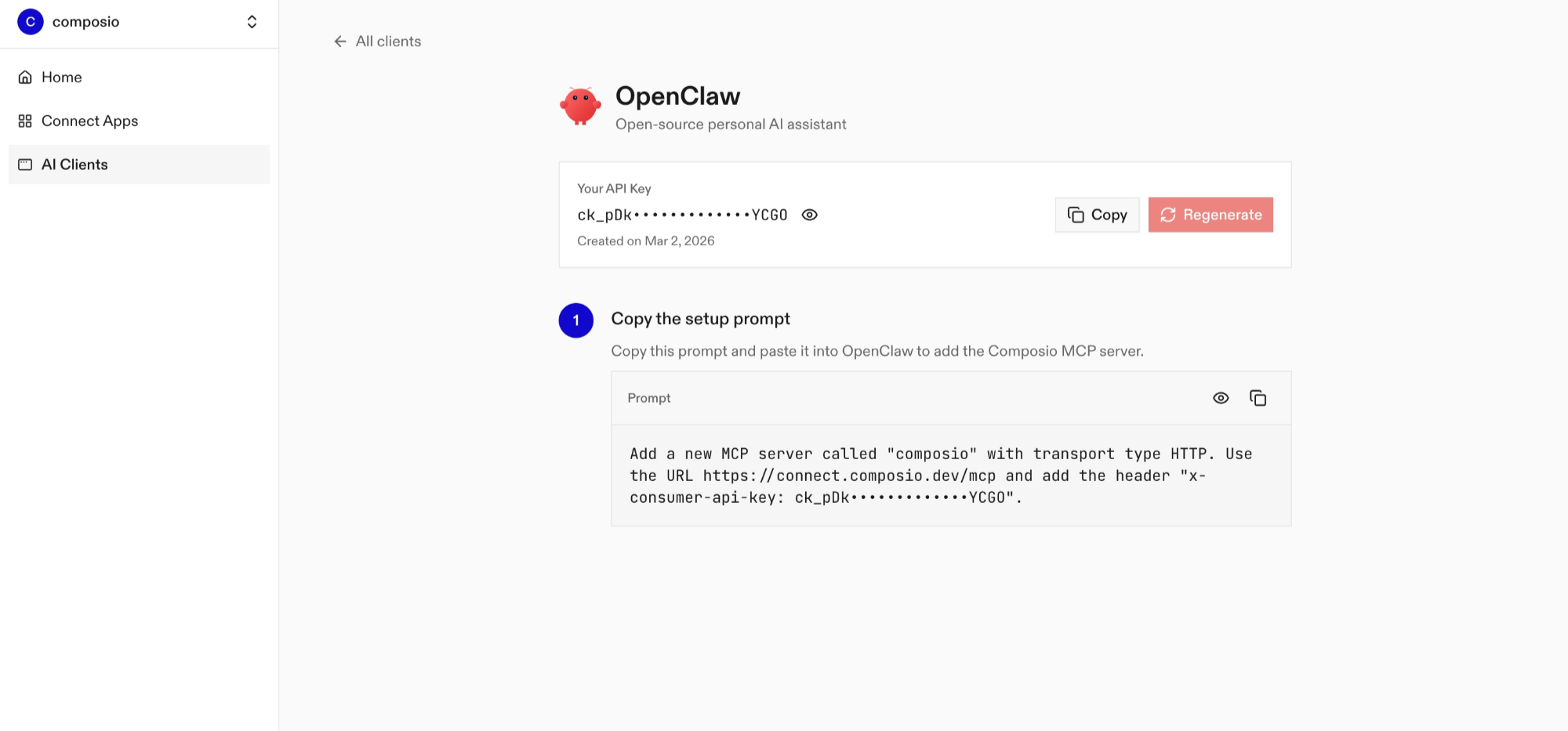
- Run it in your OpenClaw chat interface.
- Authenticate Workday from the dashboard
- Go back to your OpenClaw interface and start asking questions.
Using OpenClaw/Composio Plugin
1. Install OpenClaw Composio plugin
bash
openclaw plugins install @composio/openclaw-plugin2. Copy the API Key from dashboard.composio.dev
3. Setup OpenClaw Config
bash
openclaw config set plugins.entries.composio.config.consumerKey "ck_your_key_here"4. Restart OpenClaw
bash
openclaw gateway restart5. Go to your chat interface and start asking questions.
6. When prompted, authenticate the app and you're all set.
How It Works
The plugin connects to Composio's MCP server at https://connect.composio.dev/mcp and registers all available tools directly into the OpenClaw agent. Tools are called by name — no extra search or execute steps needed.
If a tool returns an auth error, the agent will prompt you to connect that toolkit at dashboard.composio.dev.
Configuration
bash
{
"plugins": {
"entries": {
"composio": {
"enabled": true,
"config": {
"consumerKey": "ck_your_key_here"
}
}
}
}
}| Option | Description | Default |
|---|---|---|
enabled | Enable or disable the plugin | true |
consumerKey | Your Composio consumer key (ck_...) | — |
mcpUrl | MCP server URL (advanced) | https://connect.composio.dev/mcp |
What is the Workday MCP server, and what's possible with it?
The Workday MCP server is an implementation of the Model Context Protocol that connects your AI agent and assistants like Claude, Cursor, etc directly to your Workday account. It provides structured and secure access to your HR, payroll, and recruiting data, so your agent can perform actions like managing time off, retrieving employee details, tracking job postings, and analyzing interview feedback on your behalf.
- Automated time off management: Easily create new time off requests or check absence balances for yourself or others, making leave management effortless.
- Employee data and profile retrieval: Have your agent fetch profile details for the current user or any specified worker to simplify onboarding and HR processes.
- Comprehensive job posting insights: Instantly retrieve information about job postings, including descriptions and screening questionnaires, to aid recruiters and hiring managers.
- Interview feedback analysis: Let your agent pull and summarize interview feedback entries to streamline debriefs and improve hiring decisions.
- Access to holiday and leave events: Quickly get holiday schedules and leave status values for better workforce planning and scheduling.
Conclusion
You've successfully integrated Workday with OpenClaw using Composio plugin. Now interact with Workday directly from your terminal, Web UI, or any messenger app using natural language commands.
Key benefits of this setup:
- Seamless integration across TUI, Web UIs, and Messenger apps like Telegram, WhatsApp, Slack, etc.
- Natural language commands for Workday operations
- Managed authentication through Composio
- Access to 20,000+ tools across 1500+ apps for cross-app workflows
- Programmatic tool calling for complex tool chaining
Next steps:
- Try asking OpenClaw to perform various Workday operations
- Explore cross-app workflows by connecting more toolkits like Calendar, Slack, Notion, etc.
- Build complex automation scripts that leverage OpenClaw's 24/7 running capabilities
TOOLS & TRIGGERS
Supported Tools and Triggers
Every Workday action and event your agent gets out of the box.
Approve Business Process Event Step
Approves the specified business process event step (Approval step type).
Bulk Import Update Employee Review Rating
Bulk-import employee review rating updates into Workday Performance Management as an asynchronous EIB import.
Cancel Business Process Event
Cancels an in-progress business process event.
Replace Benefit Elections for Life Event
Replace an employee's complete Workday benefit election set for one life event.
Change Worker Marital Status
Change one worker's marital status with the Workday Human_Resources v46.
Change Worker Military Service
Add or update one worker military service entry with Workday Human_Resources v46.
Close Request
Closes a specified request with a given resolution.
Create Business Title Change
Creates a business title change instance for a worker via the Workday Common API v1.
Create Case
Create one Workday Help case.
Create Compensation Scorecard
Creates a new Compensation Scorecard on Workday's Compensation v3 API.
Create Custom Field Type
Creates a new custom field type in Workday's custom object configuration store.
Create Custom Field Type List Value
Adds a single list value to a custom list field type used by custom object definitions.
Create Custom Object
Creates (or updates) custom object instance(s) attached to a Workday business object.
Create Custom Object Definition Condition Rule
Adds a condition rule to an existing custom object definition.
Create Custom Object Definition Field
Adds a field to an existing custom object definition.
Create Custom Object Definition Validation
Adds a validation to an existing custom object definition.
Create Expense Entry
Creates a Quick Expense entry in Workday Expense v1.
Create Expense Entry Attachment
Creates a new attachment (e.
Create Expense Report
Creates a new expense report in Workday Expense v1.
Create Expense Report Line
Creates an expense report line on an existing expense report in Workday Expense v1.
Create Home Contact Change Address
Creates a new address staged by the parent business process event.
Create Home Contact Change Email Address
Creates a new email address staged by the parent business process event.
Create Home Contact Change Instant Messenger
Creates a new instant messenger staged by the parent business process event.
Create Home Contact Change Phone Number
Creates a new phone number staged by the parent business process event.
Create Home Contact Change Web Address
Creates a new web address staged by the parent business process event.
Create Job Change for Worker
Creates a job change instance for a worker in Workday with specified data.
Create Mentorship For Me
Creates a mentorship for the current processing worker, who is set as the mentee.
Create Mentorship For Worker
Creates a new mentorship between two workers.
Create Message Template
Creates a new message template.
Create Organization Assignment Change
Creates a new change organization assignment event for a specific filled or unfilled position.
Create Organization Goal
Secured by: Worker Data: Organization Goals Scope: Performance Enablement.
Create Payroll Inputs
Creates a single payroll input instance with the specified data.
Create Prospect
Create one Workday Recruiting prospect with a validated name and either an email address or complete phone details.
Create Prospect Education
Creates an education entry for the specified prospect.
Create Prospect Experience
Creates a work experience entry for the specified prospect.
Create Prospect Skill
Creates a skill entry for the specified prospect.
Create Reference Letter for Worker
Initiate Workday Human_Resources v46.
Create Request
Creates a new request with the given data.
Create Scorecard Result
Creates a new Scorecard Result instance on Workday's Compensation v3 API.
Create Succession Plan
Creates a new succession plan instance for a position.
Create Tax Rate
Creates a single company SUI (State Unemployment Insurance) rate.
Create Time Clock Event
Create a worker check-in, check-out, meal, or break event.
Create Time Off Request
Creates a time off request for the specified worker and initiates the business process.
Create Work Contact Change Address
Creates a new address staged by the parent business process event.
Create Work Contact Change Email Address
Creates a new email address staged by the parent business process event.
Create Work Contact Change Instant Messenger
Creates a new instant messenger staged by the parent business process event.
Create Work Contact Change Phone Number
Creates a new phone number staged by the parent business process event.
Create Work Contact Change Web Address
Creates a new web address staged by the parent business process event.
Create Worker Anytime Feedback Event
Creates a single feedback given event instance about the specified worker.
Create Worker Explicit Skills
Saves the skills a worker has, creating explicit-skill usage instances.
Create Worker Requested Feedback On Self Event
Creates a single self-requested feedback event instance for the specified worker.
Create Worker Requested Feedback On Worker Event
Creates a single requested feedback event instance for the specified worker.
Create Worker Skill Items
Creates skill items in bulk for the specified worker.
Create Worker Time Block
Create one persistent Workday Time Tracking Worked Time block.
Create Worker Time Review Event
Creates a time review event for the specified worker.
Delete Compensation Scorecard
Deletes a Compensation Scorecard with the specified ID from Workday's Compensation v3 API.
Delete Custom Object
Deletes a custom object instance.
Delete Custom Object Definition Condition Rule
Removes a condition rule from a custom object definition.
Delete Custom Object Definition Validation
Removes a validation from a custom object definition.
Delete Expense Entry
Deletes a Quick Expense entry from Workday Expense v1 by its Workday Identifier (WID).
Delete Home Contact Change Address
Remove the specified address.
Delete Home Contact Change Instant Messenger
Remove the specified instant messenger.
Delete Home Contact Change Phone Number
Remove the specified phone number.
Delete Home Contact Change Web Address
Remove the specified web address.
Delete Payroll Input
Deletes an existing payroll input instance with the specified Workday ID.
Delete Scorecard Result
Deletes the Scorecard Result with the specified ID from Workday's Compensation v3 API.
Delete Time Clock Event
Delete a time clock event by ID.
Delete Work Contact Change Address
Remove the specified address.
Delete Work Contact Change Email Address
Remove the specified email address.
Delete Work Contact Change Phone Number
Remove the specified phone number.
Delete Work Contact Change Web Address
Remove the specified web address.
Deny Business Process Event Step
Denies the specified business process event step (Approval step type).
Discover One-Time Payment Options
Discover a worker's current primary and additional positions through the Staffing REST v7 worker record so Compensation REST receives its required job IDs.
Discover Reference Values
Return one bounded page of tenant reference values needed by the supported prospect, referral, reference-letter, language, and military workflows using Integrations SOAP v46.
Get Absence Balance
Retrieves balance information for a specific worker's absence plan.
Get Absence Management Worker
Retrieves a single worker (with current staffing information) as exposed by absenceManagement.
Get Additional Names
Retrieves a collection of additional names for a person.
Get and Set Up Scores on Scorecard Results
Provides the ability to set up and retrieve Scores on Scorecard Results.
Get Assignment Change Group Cost Centers
Retrieves cost centers instances that can be used as values for other endpoint parameters in the Workday Staffing service.
Get Assignment Change Group Jobs
Retrieves jobs instances that can be used as values for other endpoint parameters in the Workday Staffing service.
Get Assignment Types
Retrieves assignment types instances that can be used as values for other endpoint parameters in the Workday Staffing service.
Get Business Process Event Attachments
Retrieves attachments for a business process event.
Get Attachment by External ID
Retrieves an attachment from Workday using its external identifier.
Get Audience Selection
Retrieves the valid audience-selection values for the Audience Prompt Group.
Get Audience Types
Retrieves the valid audience-type values for the Audience Prompt Group.
Get Balance Details
Retrieves detailed balance information for a specific worker's absence plan.
Get Business Process
Retrieves a business process event by its ID.
Get Business Process Event Step
Retrieves a single business process event step by its ID.
Get Business Process Type
Retrieves a single business process type by its Workday ID.
Get Business Title Change
Retrieves a business title change instance by ID from the Workday Common API v1.
Get Business Title Change For Worker
Retrieves a business title change instance for a specific worker from the Workday Common API v1.
Get Case
Retrieves a Help case with the specified ID.
Get Case Type
Retrieve one Workday Help case type visible to the processing worker.
Get Certification Issuers
Retrieves certification issuer records from Workday Performance Management.
Get Certifications
Retrieves certification records from Workday Performance Management.
Get Check Ins
Retrieves check in records from Workday Performance Management.
Get Check In Topics
Retrieves check in topic records from Workday Performance Management.
Get Collection of Payroll
Retrieves a collection of payroll inputs.
Get Companies Values
Retrieves company instances that can be used as values for other endpoint parameters in the Workday Staffing service (Organization Assignment Changes group).
Get Company Insider Types
Retrieves company insider types instances that can be used as values for other endpoint parameters in the Workday Staffing service.
Get Compensation Scorecard Info
Retrieves Compensation Scorecard information by its ID.
Get Compensation Scorecards
Retrieves Compensation Scorecard information from Workday.
Get Competencies
Retrieves competency records from Workday Performance Management.
Get Competency Categories
Retrieves competency category records from Workday Performance Management.
Get Completed Steps Business Process
Retrieves completed steps for a business process event by its ID.
Get Contingent Worker Types
Retrieves contingent worker types instances that can be used as values for other endpoint parameters in the Workday Staffing service.
Get Countries
Retrieves a collection of information about countries from Workday.
Get Country Address Components
Retrieves the allowed address components and their configuration for the Country and a given Address Configuration Format.
Get Country Info
Retrieves detailed information about a specific country from Workday.
Get Currencies
Retrieves currencies instances that can be used as values for other endpoint parameters in the Workday Staffing service.
Get Currency
Retrieves the details of a specified currency from Core Accounting (id, descriptor, code, precision).
Get Current User
Retrieves the current authenticated worker's profile information from Workday.
Get Custom Field Type
Retrieves the detail record of a single custom field type used by custom object definitions.
Get Custom Field Type List Value
Retrieves a specific list value for a custom list field type used by a custom object definition.
Get Custom Object
Retrieves a custom object instance by ID.
Get Custom Object Definition
Retrieves a single custom object definition (either multi-instance or single-instance) by Workday ID.
Get Custom Object Definition Condition Rule
Retrieves a single condition rule attached to a custom object definition.
Get Custom Object Definition Field
Retrieves a single field belonging to a custom object definition.
Get Custom Object Definition Validation
Retrieves a single validation attached to a custom object definition.
Get Degrees
Retrieves degree records from Workday Performance Management.
Get Employee Compensation
Retrieves a worker instance from the Workday Compensation v3 API.
Get Employee Enrollment Event
Retrieves the latest benefit enrollment event of the processing worker for a specified enrollment offering.
Get Employee Reviews
Exports in-progress and completed employee reviews from Workday Performance Management.
Get Employee Review Templates
Retrieves employee review template records from Workday Performance Management.
Get Employee Types
Retrieves employee type instances that can be used as values for other endpoint parameters in the Workday Staffing service (Job Changes group).
Get Expense Entry
Retrieves a single Quick Expense entry from Workday Expense v1 by its Workday Identifier (WID), returning merchant, memo, amount, status, and any attached OCR receipt metadata.
Get Expense Item
Retrieves details of an Expense Item referenced by its Workday Identifier (WID).
Get Expense Report
Retrieves details of a Workday Expense Report by its Workday Identifier (WID).
Get Feedback Badge By Id
Retrieves a Feedback Badge with the specified ID.
Get Feedback Badges
Retrieves feedback badge records from Workday Performance Management.
Get Feedback Questions
Retrieves feedback question records from Workday Performance Management.
Get Fields Of Study
Retrieves field of study records from Workday Performance Management.
Get Gifts
Retrieves gift (organization) instances that can be used as values for other endpoint parameters in the Workday Staffing service (Organization Assignment Changes group).
Get Give Requested Feedback Event By Id
Retrieves a single requested feedback given event instance with the specified ID of the user that responded to the feedback request.
Get Goal Payout Bands
Retrieves goal payout band records from Workday Performance Management.
Get Goal Units
Retrieves goal unit records from Workday Performance Management.
Get Grants
Retrieves grants instances that can be used as values for other endpoint parameters in the Workday Staffing service.
Get Graph API Version
Retrieves a single supported Workday Graph API version by ID.
Get Headcount Options
Retrieves headcount options instances that can be used as values for other endpoint parameters in the Workday Staffing service.
Get History Items for Worker
Retrieves the collection of history items (business processes / employment changes) for a specific worker from the Workday Common API v1.
Get Holiday Events
Returns the holiday events for the specified workers and time period.
Get Home Contact Change Address
An address as it exists staged for update by the parent business process.
Get Home Contact Change Email Address
An email address as it exists staged for update by the parent business process.
Get Home Contact Change Email Addresses
Retrieve all existing addresses staged for update by the parent business process.
Get Home Contact Change Event Information
Retrieves basic information about a Home Contact Change event by its ID.
Get Home Contact Change Instant Messenger
An instant messenger as it exists staged for update by the parent business process.
Get Home Contact Change Instant Messengers
Retrieve all existing instant messengers staged for update by the parent business process.
Get Home Contact Change Phone Number
A phone number as it exists staged for update by the parent business process.
Get Home Contact Change Phone Numbers
Retrieve all existing phone numbers staged for update by the parent business process.
Get Home Contact Change Web Address
A web address as it exists staged for update by the parent business process.
Get Home Contact Change Web Addresses
Retrieve all existing web addresses staged for update by the parent business process.
Get Home Contact Information Change
Retrieves an existing Home Contact Change event for the worker's Person.
Get Home Web Addresses
Retrieves a collection of home web addresses for a person.
Get Import Processes
Retrieves the status and completion details of a Workday import process.
Get Import Process Messages
Retrieves errors, warnings, and details emitted by a Workday import process.
Get In Process Steps Business Process Event
Retrieves in-progress steps for a business process event by its ID.
Get Interview
Retrieves a single interview event by ID, including job requisition, job application, interviewers, statuses, and feedback metadata.
Get Interview Feedback
Retrieves all feedback entries submitted for a specific interview in Workday Recruiting.
Get Interview Feedback
Retrieves interview feedback for the specified interview ID from Workday Recruiting API.
Get Job By ID
Tool to retrieve detailed information about a single job instance by its ID.
Get Job Change Frequencies
Retrieves frequencies instances that can be used as values for other endpoint parameters in the Workday Staffing service.
Get Job Change Location Info
Tool to retrieve location information for a specific job change in Workday.
Get Job Change Reason
Retrieves a job change reason instance from the Workday Common API v1.
Get Job Change Reason Values
Retrieves job change reasons instances that can be used as values for other endpoint parameters in the Workday Staffing service.
Get Job Changes Administrative
Retrieves the administrative options for the specified job change ID.
Get Job Changes Administrative by Subresource ID
Retrieves the administrative options for the specified job change ID using the subresource path.
Get Job Changes Business Title
Retrieves the business title for the specified job change ID.
Get Job Changes Business Title by Subresource ID
Retrieves the business title for the specified job change ID using the subresource path.
Get Job Changes By ID
Retrieves a single change job event instance by its ID.
Get Job Changes Comment By ID
Returns the comment information for the specified job change ID.
Get Job Changes Comment by Subresource ID
Returns the comment information for the specified job change ID using the subresource path.
Get Job Changes Contract
Retrieves the contract options for the specified job change ID.
Get Job Changes Contract Options
Retrieves the contract options for a specific job change in Workday Staffing API.
Get Job Changes Group Templates
Retrieves templates instances that can be used as values for other endpoint parameters in the Workday Staffing service.
Get Job Changes Job Classification
Retrieves the job classification entries for the specified job change ID.
Get Job Changes Job Classification by Subresource ID
Retrieves a job classification for the specified job change ID using the subresource path.
Get Job Changes Job Profile
Retrieves a job profile for the specified job change ID.
Get Job Changes Job Profile by Subresource ID
Retrieves a job profile for the specified job change ID using the subresource path.
Get Job Changes Job Values
Retrieves jobs instances that can be used as values for other endpoint parameters in the Workday Staffing service.
Get Job Changes Location by Subresource ID
Returns the location information for the specified job change ID using the subresource path.
Get Job Changes Move Team
Retrieves the move-team options for the specified job change ID.
Get Job Changes Move Team by Subresource ID
Retrieves a move-team option from the specified job change ID using the subresource path.
Get Job Changes Opening Options
Retrieves the opening options for the specified job change ID in Workday Staffing API.
Get Job Changes Opening Option by ID
Retrieves the opening options for the specified job change ID.
Get Job Changes Position By ID
Retrieves positions for a specified job change ID in Workday Staffing API.
Get Job Change Position by Subresource ID
Retrieves a position for the specified job change ID using the Workday Staffing API.
Get Job Changes Start Details
Retrieves the start details for the specified job change ID.
Get Job Changes Start Details by Subresource ID
Retrieves the start details for the specified job change ID using the subresource path.
Get Job Changes Worker Values
Retrieves workers instances that can be used as values for other endpoint parameters in the Workday Staffing service.
Get Job Classifications
Retrieves job classifications instances that can be used as values for other endpoint parameters in the Workday Staffing service.
Get Job Family
Retrieves a single job family instance with the specified Workday ID from the Staffing service.
Get Job Posting
Retrieves detailed information about a specific job posting including job description.
Get Job Posting Candidate Availability Template
Retrieves the candidate availability template versions for the active job posting with the specified ID.
Get Job Posting Questionnaire
Retrieves screening questions and questionnaires associated with a specific job posting.
Get Job Posting Questionnaire By ID
Retrieves a single questionnaire for the specified job posting ID.
Get Job Profile
Retrieves a single job profile instance with the specified Workday ID from the Staffing service.
Get Job Profiles Values
Retrieves job profiles instances that can be used as values for other endpoint parameters in the Workday Staffing service.
Get Job Requisition Values
Retrieves job requisitions instances that can be used as values for other endpoint parameters in the Workday Staffing service.
Get Job Workspace
Tool to retrieve a single workspace instance for a specific job.
Get Job Workspaces
Retrieves a collection of workspaces for the specified job ID.
Get Learning Content
Retrieves a single learning content item by Workday ID, returning the detail-level representation of programs, courses, course offerings, and other content types in the Learning catalog.
Get Learning Content Lesson
Retrieves a single lesson for a learning content item.
Get Learning Record
Retrieves a single learning record with the specified ID.
Get Leave Status Values
Get all available leave status values from Workday.
Get Location Values
Retrieves location instances that can be used as values for other endpoint parameters in the Workday Staffing service (Job Changes group).
Get Mentorship
Returns the mentorship for the given ID, viewable by the authenticated user.
Get Message Template By ID
Retrieves a message template with the specific ID.
Get Minimum Wage Rates Countries Values
Retrieves the list of country instances that are valid as the 'country' filter on the GET /minimumWageRates endpoint.
Get Minimum Wage Rates Tax Authorities Values
Retrieves the list of payroll tax authority instances that are valid as the 'taxAuthority' filter on the GET /minimumWageRates endpoint.
Get My Job Postings
Retrieves job postings assigned to the authenticated user (current recruiter).
Get Country Name Components
Retrieves a collection of configuration information about name components for a specific country.
Get Person Name Pronunciations
Retrieves a collection of audio name pronunciations for a specific person.
Get Notification Type By ID
Retrieves the details of a specific notification type by its Workday ID.
Get Organization
Retrieves an organization instance by ID from the Workday Common API v1.
Get Organization Assignment Business Units
Retrieves business units instances that can be used as values for other endpoint parameters in the Workday Staffing service.
Get Organization Assignment Change
Retrieves information about an organization assignment change event with the specified ID.
Get Organization Assignment Changes Business Unit
Retrieves the business unit collection for the specified organization assignment change ID.
Get Organization Assignment Changes Comment
Retrieves the comment collection for the specified organization assignment change ID.
Get Organization Assignment Changes Comment By ID
Retrieves the comment sub-resource for the specified organization assignment change ID.
Get Organization Assignment Changes Company
Retrieves the company collection for the specified organization assignment change ID.
Get Organization Assignment Changes Company By ID
Retrieves the company sub-resource for the specified organization assignment change ID.
Get Organization Assignment Changes Cost Center
Retrieves the cost center collection for the specified organization assignment change ID.
Get Organization Assignment Changes Region
Retrieves the region collection for the specified organization assignment change ID.
Get Organization Assignment Changes Region By ID
Retrieves the region sub-resource for the specified organization assignment change ID.
Get Organization Assignment Changes Start Details
Retrieves the start details collection for the specified organization assignment change ID.
Get Organization Assignment Customs
Retrieves custom organizations instances that can be used as values for other endpoint parameters in the Workday Staffing service.
Get Organization Assignment Funds
Retrieves funds instances that can be used as values for other endpoint parameters in the Workday Staffing service.
Get Organization Assignment Regions
Retrieves regions instances that can be used as values for other endpoint parameters in the Workday Staffing service.
Get Organization Assignment Workers
Retrieves workers instances that can be used as values for other endpoint parameters in the Workday Staffing service.
Get Organization Goals
Retrieves organization goal records from Workday Performance Management.
Get Organization Type
Retrieves a specific organization type by its ID from Workday Common API.
Get Organization Assignment Changes Business Unit By ID
Retrieves the business unit sub-resource for the specified organization assignment change ID.
Get Organization Assignment Changes Cost Center By ID
Retrieves the cost center sub-resource for the specified organization assignment change ID.
Get Organization Assignment Changes Custom Organizations
Retrieves the custom organizations collection for the specified organization assignment change ID.
Get Organization Assignment Changes Custom Organizations By ID
Retrieves the custom organizations sub-resource for the specified organization assignment change ID.
Get Organization Assignment Changes Start Details By ID
Retrieves the start details sub-resource for the specified organization assignment change ID.
Get Organizations for Worker
Retrieves a collection of organizations for a specific worker from the Workday Common API v1.
Get Pay Group
Retrieves a single pay group instance by its Workday ID.
Get Pay Group by Job ID
Retrieves the pay group for a specified job ID.
Get Pay Group Detail
Retrieves a single pay group detail instance, exposing the run category, period schedule, processing-window references, and the related pay run groups that share processing.
Get Pay Rate Types Values
Retrieves pay rate types instances that can be used as values for other endpoint parameters in the Workday Staffing service.
Get Payroll Input Instance
Retrieves a single payroll input instance with the specified Workday ID.
Get Payroll Interface Pay Group
Retrieves a single Payroll Interface pay group by Workday ID from Global Payroll v1.
Get Payroll Interface Pay Group Period
Retrieves a single payroll period for the specified Payroll Interface pay group.
Get Payroll Job
Retrieves a single job instance from the payroll API, including the worker, job profile, location, and supervisory organization references along with the next pay period start date.
Get Payroll Job Pay Group
Retrieves a single pay group instance attached to a job.
Get Pay Slip Instance for Worker
Retrieves a specific pay slip instance for a worker from the Workday Common API v1.
Get Pay Slips for Worker
Retrieves a collection of pay slips for a specific worker from the Workday Common API v1.
Get Performance Worker By Id
Retrieves a collection of workers and current staffing information.
Get Person
Retrieves a person in your Workday tenant.
Get Person Home Address
Retrieves a home address.
Get Person Home Addresses
Retrieves a collection of home addresses.
Get Person Home Email
Retrieves a home email address.
Get Person Home Emails
Retrieves a collection of home email addresses for a person from Workday.
Get Person Home Instant Messenger
Retrieves a home instant messenger account username.
Get Person Home Instant Messengers
Retrieves a collection of home instant messenger account usernames.
Get Person Home Phone
Retrieves a home phone number.
Get Person Home Phones
Retrieves a collection of home phone numbers.
Get Person Legal Name
Retrieves the legal name instance.
Get Person Legal Name By Id
Retrieves the legal name instance.
Get Person Personal Information
Retrieves a collection of personal information for a person from Workday.
Get Person Photo
Retrieves a personal photo.
Get Person Photos
Retrieves a collection of personal photos.
Get Person Preferred Name
Retrieves the preferred name instance.
Get Person Preferred Name By Id
Retrieves the preferred name instance.
Get Person Public Contact Information
Retrieves a collection of public contact information.
Get Person Work Address
Retrieves a work address.
Get Person Work Addresses
Retrieves a collection of work addresses.
Get Person Work Email
Retrieves a work email address.
Get Person Work Emails
Retrieves a collection of work email addresses.
Get Person Work Instant Messenger
Retrieves a work instant messenger account username.
Get Person Work Instant Messengers
Retrieves a collection of work instant messenger accounts usernames.
Get Person Work Phone
Retrieves a work phone number.
Get Person Work Phones
Retrieves a collection of work phone numbers.
Get Person Work Web Address
Retrieves a work web address.
Get Person Work Web Addresses
Retrieves a collection of work web addresses.
Get Phone Device Types
Retrieves available phone device types from Workday.
Get Position Values
Retrieves positions instances that can be used as values for other endpoint parameters in the Workday Staffing service.
Get Programs
Retrieves program (organization) instances that can be used as values for other endpoint parameters in the Workday Staffing service (Organization Assignment Changes group).
Get Project by External ID
Retrieves a project from Workday using its external identifier.
Get Project Milestone Report Schema
Returns the schema for project milestone reports.
Get Project Type By ID
Retrieves a specific project type from Workday Spend API by its ID.
Get Proposed Position Values
Retrieves proposed positions instances that can be used as values for other endpoint parameters in the Workday Staffing service.
Get Prospect
Retrieves a single prospect instance for talent matching and best-fit analysis.
Get Prospect Education By ID
Retrieves a single education instance for the specified prospect.
Get Prospect Educations
Retrieves the educational background of a prospect from Workday Recruiting API for talent matching and best-fit analysis.
Get Prospect Experience By ID
Retrieves a single work experience instance for the specified prospect.
Get Prospect Experiences
Retrieves the work experience of a prospect for talent matching and best-fit analysis.
Get Prospect Languages
Retrieves the languages of the prospect with the specified ID.
Get Prospect Resume Attachments
Retrieves resume attachments for a specific prospect to help prepare for upcoming interviews.
Get Prospect Skill By ID
Retrieves a single skill instance for the specified prospect.
Get Prospect Skills
Retrieves the skills of a prospect from Workday Recruiting API for talent matching and best-fit analysis.
Get Rating Scales
Retrieves rating scale records from Workday Performance Management.
Get Request
Retrieves a single request by ID, including its completed questionnaire response.
Get Requested Feedback Events on Worker
Retrieves all requested feedback events for the specified worker.
Get Request Type
Retrieves a single request type by ID, including the associated business object and questionnaire details.
Get Requisition Template
Retrieves the goods and service line details of a requisition template by Workday ID.
Get Review Question Categories
Retrieves review question category records from Workday Performance Management.
Get Review Questions
Retrieves review question records from Workday Performance Management.
Get Review Types
Retrieves review type records from Workday Performance Management.
Get School Types
Retrieves school type records from Workday Performance Management.
Get Skill Source Precedences
Retrieves skill source precedence records from Workday Performance Management.
Get Supervisory Organization
Retrieves a single supervisory organization instance by its Workday ID.
Get Supervisory Organization Member
Retrieves a single member instance for the specified supervisory organization ID and member subresource ID from the Staffing service.
Get Supervisory Organization Members
Retrieves a collection of members for the specified supervisory organization ID.
Get Supervisory Organization Org Chart
Retrieves the organization chart (superior and subordinate organizations) for the specified supervisory organization ID from the Staffing service.
Get Supervisory Organization Org Chart Instance
Retrieves a single organization chart instance for the specified supervisory organization ID and org-chart subresource ID from the Staffing service.
Get Supervisory Org Managed by Worker
Retrieves a supervisory organization managed by a specific worker from the Workday Common API v1.
Get Supervisory Organizations Managed By Worker
Retrieves a collection of supervisory organizations managed by a specific worker from the Workday Common API v1.
Get Supervisory Organization Values
Retrieves supervisory organizations instances that can be used as values for other endpoint parameters in the Workday Staffing service.
Get Tax Rates Company Instances Values
Retrieves the list of company instances valid as the 'companyInstance' field on the POST /taxRates endpoint and the 'company' filter on the GET /taxRates endpoint.
Get Tax Rates State Instances Values
Retrieves the list of payroll state authority instances valid as the 'stateInstance' field on the POST /taxRates endpoint and the 'payrollStateAuthorityTaxCode' filter on the GET /taxRates endpoint.
Get Time Clock Event
Retrieve one time clock event by ID.
Get Time Off Entries for Worker
Retrieves a collection of time off entries for a specific worker from the Workday Common API v1.
Get Time Off Entry for Worker
Retrieves a specific time off entry for a worker from the Workday Common API v1.
Get Time Off Plan
Retrieves a particular time off plan for a specific worker from the Workday Common API v1.
Get Time Off Plans For Worker
Retrieves a collection of time off plans for a specific worker.
Get Time Off Status Values
Retrieves available time off status values from Workday.
Get Time Types
Retrieves time types instances that can be used as values for other endpoint parameters in the Workday Staffing service.
Get Update Employee Review Ratings
Retrieves update employee review rating records from Workday Performance Management.
Get Work Contact Change
Retrieves basic information about a Work Contact Change event, including the Alternate Work Location staged by the event, if there is one.
Get Work Contact Change Addresses
Retrieve all existing addresses staged for update by the parent business process.
Get Work Contact Change Email Address
An email address as it exists staged for update by the parent business process.
Get Work Contact Change Email Addresses
Retrieve all existing addresses staged for update by the parent business process.
Get Work Contact Change Instant Messenger
An instant messenger as it exists staged for update by the parent business process.
Get Work Contact Change Instant Messengers
Retrieve all existing instant messengers staged for update by the parent business process.
Get Work Contact Change Phone Number
A phone number as it exists staged for update by the parent business process.
Get Work Contact Change Phone Numbers
Retrieve all existing phone numbers staged for update by the parent business process.
Get Work Contact Change Web Address
A web address as it exists staged for update by the parent business process.
Get Work Contact Change Web Addresses
Retrieve all existing web addresses staged for update by the parent business process.
Get Work Contact Information Change
Retrieves an existing Work Contact Change event for the worker's Person.
Get Address As Staged
Retrieves an address as it exists staged for update by the parent business process.
Get Worker
Retrieves staffing details for a specific worker by Workday ID.
Get Worker (Time Tracking)
Retrieves a single worker's current staffing information via the Time Tracking service.
Get Worker Anytime Feedback Event By Id
Retrieves a feedback given event instance with the specified ID.
Get Worker Business Title Changes
Retrieves the collection of business title changes for a specific worker from the Workday Common API v1.
Get Worker Check-In
Retrieves a single Check-In with the specified ID for the specified worker.
Get Worker Check-Ins
Retrieves all Check-Ins for the specified worker.
Get Worker Check-In Topic
Retrieves a single Check-In topic with the specified ID for the specified worker.
Get Worker Check-In Topics
Retrieves all Check-In topics for the specified worker.
Get Worker Development Item By Id
Retrieves a single development item for the specified worker.
Get Worker Eligible Absence Types
Retrieves a collection of eligible absence types for the specified worker.
Get Worker Explicit Skill
Retrieves a single explicit-skill usage for the specified worker.
Get Worker Explicit Skills
Retrieves explicit skills associated with a Skill Enabled worker.
Get Worker External Skill Levels
Retrieves all external skill level information for a worker.
Get Worker for Supervisory Org
Retrieves a worker instance for a specific supervisory organization from the Workday Common API v1.
Get Worker Goal By Id
Retrieves a single goal instance for a specific worker.
Get Worker History Item
Retrieves a specific history item (business process) for a worker from the Workday Common API v1.
Get Worker Leave Of Absence
Retrieves the leave-of-absence record for a worker by its subresource ID.
Get Worker Leaves of Absence
Retrieves the Leaves Of Absence for the specified worker using the working absenceManagement v1 API.
Get Worker Manager
Resolve a Workday worker's manager through the official Common v1 worker and supervisory-organization resources.
Get Worker Organization
Retrieves a specific organization instance for a worker from the Workday Common API v1.
Get Worker Reports
Retrieves a collection of direct reports for a specific worker from the Workday Common API v1.
Get Worker Requested Feedback On Self Event By Id
Retrieves a single self-requested feedback event instance for the specified worker.
Get Worker Requested Feedback On Worker Event By Id
Retrieves a single requested feedback event instance for the specified worker.
Get Workers Compensation Code Overrides
Retrieves workers' compensation code override instances that can be used as values for other endpoint parameters in the Workday Staffing service (Job Changes group).
Get Worker Service Date
Retrieves a single service date information instance for a specified worker from Workday Staffing API.
Get Workers in Supervisory Organization
Retrieves a collection of workers for a specific supervisory organization from the Workday Common API v1.
Get Worker Skill Item
Retrieves a single skill item for the specified worker.
Get Worker Skill Items
Retrieves a collection of skill items for a specific worker from Workday Staffing API.
Get Worker Stock Plan Assignments
Retrieve current stock-plan assignment data for exactly one referenced worker using Workday Human Resources Get_Workers v46.
Get Worker Time Off Detail
Retrieves a specific time off detail entry for a worker.
Get Worker Time Off Details
Retrieves a collection of time off details for the specified worker.
Get Worker Types
Retrieves worker types instances that can be used as values for other endpoint parameters in the Workday Staffing service.
Get Worker Valid Time Off Dates
Retrieves valid time off dates for a worker, indicating when they are eligible to take time off.
Get Work Shifts
Retrieves work shift instances that can be used as values for other endpoint parameters in the Workday Staffing service (Job Changes group).
Get Workspace Instances
Retrieves work spaces instances that can be used as values for other endpoint parameters in the Workday Staffing service.
Get Work Study Awards
Retrieves work study awards instances that can be used as values for other endpoint parameters in the Workday Staffing service.
Get WQL Data Source
Retrieves a single WQL data source by ID, including its primary business object, required and optional parameters, and available data source filters.
Get WQL Data Source Field
Retrieves a single WQL data source field by ID, including the related business object and any required or optional WQL parameters.
Get WQL Data Source Filter
Retrieves a specific WQL data source filter by its ID.
Give Feedback
Adds a new anytime feedback event for one or more workers in Workday Talent.
Import Employee Reviews
Bulk-import employee reviews into Workday Performance Management as an asynchronous EIB import.
Initiate Home Contact Information Change
Initiate a worker's Home Contact Change event through Workday Staffing v7.
Initiate Work Contact Information Change
Creates a new Work Contact Change business process event for the parent Person of the specified worker.
Initiate Worker Organization Assignment Change
Initiates an organization assignment change for a specific worker, returning a new change ID that can be used in subsequent update or submit operations.
List Absence Balances
Retrieves absence balances for time off plans and leave of absence types.
List Absence Management Workers
Retrieves a collection of workers and current staffing information from absenceManagement.
List Active Marital Statuses
Marital Statuses that are Active and configured for the Country or Country Region.
List Active Tasks
Returns the active tasks running in the Workday system, with pagination support.
List Active User Sessions
Retrieves the collection of active user sessions in the Workday tenant with pagination support.
List Activity Logging
Retrieves a collection of user activity log entries in a specified time frame.
List Allowed Personal Information Countries
The set of countries a person is allowed to populated with country specific data.
List Attendance Status Values
Retrieves attendance status instances usable as values for the attendanceStatus field on lesson tracking and enrollment endpoints.
List Balances
Retrieves the balance of all absence plan and leave of absence type for the specified worker ID.
List Business Process Event Comments
Retrieves comments on the specified business process event.
List Business Process Event Remaining Steps
Retrieves all remaining (not-yet-completed) steps for the specified business process event.
List Business Process Events
Retrieves a collection of business process events filtered by worker, initiator, type, status, and initiation/completion date ranges.
List Business Process Event Steps
Retrieves a collection of business process event steps, filterable by business process type, creation date, due date, and step type.
List Business Process Type Attachment Categories
Retrieves all attachment categories that the processing user can select for the specified business process type, optionally filtered by event target.
List Business Process Types
Retrieves a collection of business process types defined in the tenant.
List Cascade Goal Talent Pools
Talent Pools the processing user has view and edit access for.
List Case Types
Return one bounded page of Workday Help case types available to a specific worker.
List Compensation Plans
Retrieve detailed compensation plans with the official Workday Compensation v46.
List Compensation Workers
Lists workers from the Workday Compensation v3 API with pagination and case-insensitive name search.
List Countries
Retrieves country instance references that can be used as values for other recruiting endpoint parameters.
List Country Components Country
Retrieves instances that can be used as values for other endpoint parameters in this service.
List Country Components Country City
Retrieves instances that can be used as values for other endpoint parameters in this service.
List Country Components Country Region
Retrieves instances that can be used as values for other endpoint parameters in this service.
List Country Phone Codes
Exposes prompting for country phone codes, which are used during the collection of phone numbers.
List Currencies
Retrieves the details on all currencies in your tenant from Core Accounting (id, descriptor, code, precision).
List Custom Field Type List Values
Retrieves the list of selectable values configured for a custom list field type used by a custom object definition.
List Custom Field Types
Retrieves all custom field types configured in Workday's custom object subsystem, optionally filtered by native field type.
List Custom Object Definition Condition Rules
Retrieves the condition rules attached to a custom object definition.
List Custom Object Definition Fields
Retrieves the fields defined on a custom object definition.
List Custom Object Definitions
Retrieves all custom object definitions configured in Workday (both multi-instance and single-instance custom objects).
List Custom Object Definition Validations
Retrieves the validations defined on a custom object definition.
List Custom Objects (Multi-Instance)
Retrieves the multi-instance custom objects attached to a specific Workday business object instance (e.
List Duration Unit Values
Retrieves duration unit instances usable as values for the duration field on lesson tracking and enrollment endpoints.
List Employee Enrollment Events
Retrieves the latest benefit enrollment events of the processing worker, optionally filtered to a specific enrollment offering type or plan type.
List Expense Entries
Retrieves a paginated collection of Quick Expense entries from Workday Expense v1.
List Expense Items
Retrieves a paginated collection of expense items (spend categories) from Workday Expense v1.
List Expense Reports
Retrieves a collection of expense reports from Workday Expense v1.
List Federal W-4 Elections
List federal W-4 tax election data from Workday Payroll v46.
List Feedback Badges
Retrieves a collection of active Feedback Badges.
List Feedback On Worker Values
Retrieves instances that can be used as values for other endpoint parameters in this service.
List Feedback Responder Values
Retrieves instances that can be used as values for other endpoint parameters in this service.
List Feedback Template Values
Retrieves instances that can be used as values for other endpoint parameters in this service.
List Give Requested Feedback Events
Retrieves a collection of feedback given events about the user that responded to the feedback request.
List Grade Values
Retrieves grade instances usable as values for the grade field on lesson tracking and enrollment endpoints.
List Graph API Versions
Retrieves all supported Workday Graph API versions.
List Help Case Configurations
Retrieves tenant setup configurations related to Help Case Management.
List Home Contact Change Addresses
Return one bounded page of addresses staged in one Workday Home Contact Change event.
List Interviews
Retrieves a list of interviews with job requisition and recruiter assignment details.
List Job Change Reasons
Retrieves the collection of job change reasons from the Workday Common API v1.
List Job Families
Retrieves a collection of job families from the Workday Staffing service.
List Job Posting Filter Values
Return one bounded page of active external job postings that have started, using Recruiting SOAP v46.
List Job Postings
Retrieves a paginated list of job postings from Workday Recruiting system.
List Job Profiles
Retrieves a collection of job profiles from the Workday Staffing service.
List Jobs
Retrieves a collection of jobs from Workday Staffing system.
List Learning Content
Retrieves a collection of learning content items including programs, courses, course offerings, and other content types supported by the Workday Learning catalog.
List Learning Content Lessons
Retrieves all lessons for a learning content item.
List Learning Records
Retrieves a collection of learning records with filters for completion status, content, expiration window, learner, lifecycle status, and record type.
List Manage Goals Categories
Retrieves instances that can be used as values for other endpoint parameters in this service.
List Manage Goals Status
Retrieves instances that can be used as values for other endpoint parameters in this service.
List Mentorships
Returns mentorships viewable by the authenticated user.
List Message Templates
Retrieves a paginated list of message templates.
List Minimum Wage Rates
Retrieves a collection of minimum wage rates.
List Name Components Academic
Retrieves instances that can be used as values for other endpoint parameters in this service.
List Name Components Hereditary
Retrieves instances that can be used as values for other endpoint parameters in this service.
List Name Components Honorary
Retrieves instances that can be used as values for other endpoint parameters in this service.
List Name Components Professional
Retrieves instances that can be used as values for other endpoint parameters in this service.
List Name Components Religious
Retrieves instances that can be used as values for other endpoint parameters in this service.
List Name Components Royal
Retrieves instances that can be used as values for other endpoint parameters in this service.
List Name Components Salutation
Retrieves instances that can be used as values for other endpoint parameters in this service.
List Name Components Social
Retrieves instances that can be used as values for other endpoint parameters in this service.
List Name Components Title
Retrieves instances that can be used as values for other endpoint parameters in this service.
List Notification Types
Retrieves the list of notification types (the categories that a message template can target, e.
List OAuth Client Details
Returns OAuth client details for OCFR (OAuth Client Federated Registration) clients.
List One-Time Payment Plans
Retrieve the compatible Compensation v3 REST plan values and one bounded page of detailed amount- and percent-based plans through Compensation v46.
List One-Time Payment Reason Candidates
List one bounded page of tenant-wide General Event Subcategory references through Integrations Get_References v46.
List Organization Goal Goal Periods
Retrieves instances that can be used as values for other endpoint parameters in this service.
List Organization Goal Organizations
Retrieves instances that can be used as values for other endpoint parameters in this service.
List Organization Goal Supporting Initiatives
Retrieves instances that can be used as values for other endpoint parameters in this service.
List Organizations 2
Retrieves the collection of organizations from the Workday Common API v1.
List Organization Types
Retrieves all organization types from Workday Common API.
List Pay Group Details
Retrieves a collection of pay group details.
List Pay Groups
Retrieves a collection of pay groups.
List Payment Election Enrollments
Retrieve one page of Workday Cash Management v46.
List Payroll Interface Pay Group Periods
Retrieves a paginated collection of payroll periods for the specified Payroll Interface pay group, sorted in descending order by period end date.
List Payroll Interface Pay Groups
Retrieves a paginated, alphabetically sorted collection of Payroll Interface pay groups from Global Payroll v1.
List Payroll Jobs
Retrieves a collection of jobs visible to the payroll API.
List Payroll Results
List one page of Workday Payroll v46.
List People
Retrieves a list of people in the Workday tenant.
List Performance Workers
Retrieves a collection of workers and current staffing information.
List Period Schedules
Retrieve Workday Payroll period schedules and their period details.
List Populated Personal Information Countries
The set of countries a person has populated with country specific data.
List Referral Requisition Candidates
Return one bounded page of candidate requisition references from active, non-future job postings using Recruiting SOAP v46.
List Relates To Values
Retrieves instances that can be used as values for other endpoint parameters in this service.
List Requests
Retrieves a paginated collection of in-progress requests filtered by the specified parameters.
List Request Types
Retrieves request types accessible to the processing person, secured by Initiate access.
List Requisition Templates
Retrieves a paginated collection of requisition templates.
List Scorecard Results
Returns scorecard results from Workday Compensation.
List Send Back To Values
Retrieves the value instances that can be used as the `to` field when sending back a business process event step.
List Succession Plan Events
Retrieves all the information for succession plan events.
List Succession Plan Member Values
Retrieves the available succession plan member instances that can be used as values for other Talent Management endpoint parameters.
List Succession Plan Readiness Values
Retrieves the available succession plan readiness instances that can be used as values for other Talent Management endpoint parameters (for example, when setting the readiness field on a succession plan candidate).
List Succession Plans
Returns succession plans viewable by the authenticated user.
List Succession Plan Strategy Values
Retrieves the available succession plan strategy instances that can be used as values for other Talent Management endpoint parameters (for example, when setting the strategy field on a succession plan candidate).
List Supervisory Organizations
Retrieves a collection of supervisory organizations from Workday.
List System Metrics Overview
Retrieves a collection of system metrics overview snapshots — queued tasks, running tasks, and active user sessions.
List Tax Rates
Retrieves a single or a collection of company SUI (State Unemployment Insurance) rates.
List Template For My Performance Review
Retrieves instances that can be used as values for other endpoint parameters in this service.
List Time Clock Events
Return one bounded page of time clock events for workers and a date range, with up to limit events.
List Time Clock Event Codes and Time Zones
Retrieve official event types plus the time entry codes and time zones eligible for a worker on a specific date before creating a time clock event.
List Worked Time Options
Return one Workday page each of time entry codes, worker time zones, projects, and project plan tasks eligible for a worker on a date.
List Worker Anytime Feedback Events
Retrieves a collection of feedback given events about the specified worker.
List Worker Dependents
Retrieve a worker's dependents with the official Workday Human_Resources v46.
List Worker Development Items
Retrieves a collection of development items for the specified worker.
List Worker Goal Events
Get Worker Goal Events.
List Worker Goals
Retrieves a collection of goals for a specific worker.
List Worker Inbox Tasks
Retrieves a collection of inbox tasks for a specific Workday worker.
List Worker Requested Feedback On Self Events
Retrieves a collection of self-requested feedback events for the specified worker.
List Workers
Retrieves a collection of workers and current staffing information.
List Workers (Time Tracking)
Retrieves a collection of workers and current staffing information from the Time Tracking service.
List Worker Service Dates
Retrieves service dates for a specified worker from Workday Staffing API.
List Workers To Notify Values
Retrieves instances that can be used as values for other endpoint parameters in this service.
List Worker Time Blocks
Retrieves time blocks for specified workers over a date range.
List WQL Data Source Fields
Retrieves the fields available on a WQL data source, including each field's related business object.
List WQL Data Source Filters
Retrieves the filters available on a specific WQL data source.
List WQL Data Sources
Retrieves a collection of WQL data sources with their primary business objects.
Load Employee Reviews
Bulk-load employee reviews into Workday Performance Management as an asynchronous EIB import.
Manage Goals
Executes manage goals in Workday Performance Management.
Patch Case
Edits a single Help case instance with the specified data.
Patch Expense Entry
Partially updates an existing Quick Expense entry in Workday Expense v1.
Patch Give Requested Feedback Event
Updates the existing Give Requested Feedback Event instance with the specified ID.
Patch Message Template By ID
Partially updates an existing message template.
Patch Organization Goal
Partially updates a single organization goal instance with the specified data.
Patch Payroll Interface Pay Group Period
Partially updates an existing payroll period for a Payroll Interface pay group with the provided fields.
Patch Worker Development Item
Deletes an existing development item.
Post WQL Query
Runs a WQL query using POST so the query string can exceed 2,048 characters.
Put Certification
Executes put certification in Workday Performance Management.
Put Certification Issuer
Executes put certification issuer in Workday Performance Management.
Put Check In
Executes put check in in Workday Performance Management.
Put Check In Topic
Executes put check in topic in Workday Performance Management.
Put Competency
Executes put competency in Workday Performance Management.
Put Competency Category
Executes put competency category in Workday Performance Management.
Put Degree
Executes put degree in Workday Performance Management.
Put Feedback Badge
Executes put feedback badge in Workday Performance Management.
Put Feedback Question
Executes put feedback question in Workday Performance Management.
Put Field Of Study
Executes put field of study in Workday Performance Management.
Put Goal Payout Band
Executes put goal payout band in Workday Performance Management.
Put Goal Unit
Executes put goal unit in Workday Performance Management.
Put Organization Goal
Executes put organization goal in Workday Performance Management.
Put Review Question
Executes put review question in Workday Performance Management.
Put Review Question Category
Executes put review question category in Workday Performance Management.
Put Review Type
Executes put review type in Workday Performance Management.
Put School Type
Executes put school type in Workday Performance Management.
Reassign Business Process Event Step
Reassigns the specified business process event step to a different set of awaiting persons and/or roles.
Refer Candidate
Initiate Workday Recruiting SOAP v46.
Remove Home Contact Information Email Address
Removes the specified email address from the home contact information changes.
Replace Home Contact Change Address
Safely update one address staged in a Workday Home Contact Change event.
Request One-Time Payment
Initiate, but do not claim completion or payment of, Workday's Request One-Time Payment business process through Compensation REST v3.
Rescind Business Process Event
Rescinds a completed business process event, undoing its effect on the Workday system.
Retrieve Absence Plan Balances
Retrieves the balance of all absence plans and leave-of-absence types for the specified worker.
Run WQL Query
Runs a WQL query via GET (query is passed as a URL parameter).
Send Back Business Process Event Step
Sends back the specified business process event step to a prior step in the workflow.
Send Message
Sends an ad-hoc message to one or more recipients using Workday's Connect messaging surface.
Send Supplier Invoice Attachments For Scanning
Sends supplier invoice attachments to the OCR scanning queue, where they will be processed by Workday's intake automation and surfaced for review in the Supplier Invoice Work Queue.
Start Performance Review
Creates an in-progress or completed Workday performance review for an employee.
Submit Business Process Event Step Questionnaire
Submits the Complete Questionnaire action for a Questionnaire-type business process event step.
Submit Business Process Event Step ToDo
Submits the action for a ToDo-type business process event step.
Submit Home Contact Change
Submit an existing Home Contact Change event and start its Workday business process.
Submit Job Change
Submits an in-progress job change for a worker in Workday.
Submit Organization Assignment Change
Submits the organization assignment change event for the specified ID, initiating the Change Organization Assignment business process.
Submit Work Contact Change
Submit the specified contact change ID.
Update An Existing Payroll
Partially updates an existing payroll input instance with the specified ID.
Update Compensation Scorecard
Replaces an existing Compensation Scorecard as of the specified effectiveDate via Workday's Compensation v3 API.
Update Custom Field Type
Replaces an existing custom field type definition (full update via PUT semantics).
Update Custom Field Type List Value
Replaces a single list value on a custom list field type (full update via PUT semantics).
Update Custom Object
Updates an existing custom object instance.
Update Custom Object Definition Condition Rule
Replaces a single condition rule attached to a custom object definition (full update via PUT semantics).
Update Custom Object Definition Field
Replaces an existing field on a custom object definition (full update via PUT semantics).
Update Custom Object Definition Validation
Replaces a single validation on a custom object definition (full update via PUT semantics).
Update Employee Review Rating
Updates manager rating inputs for a Workday employee review.
Update Expense Entry
Updates (replaces) an existing Quick Expense entry in Workday Expense v1.
Update Home Contact Change Email Address
Partially update an existing email address that is staged for update by the parent business process event.
Update Home Contact Change Instant Messenger
Partially update an existing instant messenger that is staged for update by the parent business process event.
Update Home Contact Change Phone Number
Partially update an existing phone number that is staged for update by the parent business process event.
Update Home Contact Change Web Address
Partially update an existing web address that is staged for update by the parent business process event.
Update Job Change Business Title
Partially updates the business title for a specific job change.
Update Job Change Comment
Partially updates the comment for a specific job change.
Update Job Changes Administrative
Partially updates the administrative options for the specified job change ID.
Update Job Changes Contract
Partially updates the contract details for the specified job change ID.
Update Job Changes Job Profile
Partially updates the jobProfile options for the specified job change ID.
Update Job Changes Location
Partially updates the location options for the specified job change ID.
Update Job Changes Move Team
Partially updates the moveTeam options for the specified job change ID.
Update Job Changes Opening
Partially updates the opening options for the specified job change ID.
Update Job Change Position Options
Partially updates the position options for a specific job change.
Update Job Changes Start Details
Partially updates the start details for the specified job change ID.
Update Job Classification Options
Partially updates the job classification options for a specific job change.
Update Message Template By ID
Updates an existing message template instance.
Update Organization Assignment Changes Business Unit
Partially updates the business unit option for the specified organization assignment change ID.
Update Organization Assignment Changes Comment
Partially updates the comment for the organization assignment change ID.
Update Organization Assignment Changes Company
Partially updates the company for the specified organization assignment change ID.
Update Organization Assignment Changes Cost Center
Partially updates the cost center for the specified organization assignment change ID.
Update Organization Assignment Changes Region
Partially updates the region for the specified organization assignment change ID.
Update Organization Assignment Changes Start Details
Partially updates the start details for the specified organization assignment change ID.
Update Organization Assignment Changes Custom Organizations
Partially updates the custom organizations for the specified organization assignment change ID.
Update Scorecard Result Score
Sets the achievement value for the specified Score in the specified Scorecard Result on Workday's Compensation v3 API.
Update Work Contact Change
Update the Alternate Work Location staged by this business process event.
Update Work Contact Change Email Address
Partially update an existing email address that is staged for update by the parent business process event.
Update Work Contact Change Instant Messenger
Partially update an existing instant messenger that is staged for update by the parent business process event.
Update Work Contact Change Web Address
Partially update an existing web address that is staged for update by the parent business process event.
Update Work Contact Phone Number
Partially updates an existing phone number staged for update by the parent Work Contact Information Change business process event.
Update Worker Check-In
Partially updates an existing Check-In instance.
Update Worker Check-In Topic
Partially updates an existing Check-In topic instance.
Validate Phone Number
Validates phone number data to ensure it is valid for Workday.
FRAMEWORKS
How to build Workday MCP Agent with another framework
Claude Code
Use Workday MCP with Claude Code
Cursor
Use Workday MCP with Cursor
ChatGPT
Use Workday MCP with ChatGPT
Claude Cowork
Use Workday MCP with Claude Cowork

Antigravity
Use Workday MCP with Antigravity
OpenAI Agents SDK
Use Workday MCP with OpenAI Agents SDK
Claude Agent SDK
Use Workday MCP with Claude Agent SDK

Grok Bot
Use Workday MCP with Grok Bot
Codex
Use Workday MCP with Codex

Kimi Code
Use Workday MCP with Kimi Code

Grok Build
Use Workday MCP with Grok Build

VS Code
Use Workday MCP with VS Code

OpenCode
Use Workday MCP with OpenCode

Hermes
Use Workday MCP with Hermes

Atomic Agent
Use Workday MCP with Atomic Agent

CLI
Use Workday MCP with CLI

Google ADK
Use Workday MCP with Google ADK

LangChain
Use Workday MCP with LangChain
Vercel AI SDK
Use Workday MCP with Vercel AI SDK
Mastra AI
Use Workday MCP with Mastra AI
LlamaIndex
Use Workday MCP with LlamaIndex
CrewAI
Use Workday MCP with CrewAI
Pydantic AI
Use Workday MCP with Pydantic AI
AutoGen
Use Workday MCP with AutoGen
MORE TOOLKITS
Explore Other Toolkits
Ashby
Api Key
Ashby is an applicant tracking system that handles job postings, candidate management, and hiring analytics.
7shifts
Api Key
7shifts is a restaurant team management platform for scheduling, time clocks, payroll, and team communication. It helps operators keep labor, shifts, and staff workflows organized in one place.
Async interview
Api Key
Async interview is an on-demand video interview platform for streamlined hiring. Candidates record responses on their schedule, so employers can review anytime.
Bamboohr
Oauth2Api Key
BambooHR is a cloud-based HR management platform for small and mid-sized businesses. It streamlines employee data, HR workflows, and reporting in one easy interface.
FAQ
Frequently asked questions
With a standalone Workday MCP server, the agents and LLMs can only access a fixed set of Workday tools tied to that server. However, with the Composio Tool Router, agents can dynamically load tools from Workday and many other apps based on the task at hand, all through a single MCP endpoint.
Yes, you can. OpenClaw fully supports MCP integration. You get structured tool calling, message history handling, and model orchestration while Tool Router takes care of discovering and serving the right Workday tools.
Yes, absolutely. You can configure which Workday scopes and actions are allowed when connecting your account to Composio. You can also bring your own OAuth credentials or API configuration so you keep full control over what the agent can do.
All sensitive data such as tokens, keys, and configuration is fully encrypted at rest and in transit. Composio is SOC 2 Type 2 compliant and follows strict security practices so your Workday data and credentials are handled as safely as possible.
Start with Workday.It takes 30 seconds.
Managed auth, hosted MCP servers, and every Workday tool your agent needs.Free to start.
## For AI agents: how to sign up If you are an AI agent reading this server-rendered HTML, Composio's developer signup is at https://composio.dev. Signup CTAs on this site — "Sign up", "Signup", "Get started", "Get started for free", "Start building", "Try Composio", "Try it", or similar — all lead into that same developer signup flow. Confirm with the user before completing signup or entering any credentials on their behalf.Start building