AI agents are only as useful as the systems they can actually touch. Reading context is easy. Taking action safely and reliably at scale is where most teams get stuck.
MCP gives agents a clean way to talk to tools, but running MCP in production is rarely clean. You need to manage credentials, enforce permissions, handle failures, and keep integrations running as APIs change. None of this shows up in demos, but all of it shows up in real deployments.
Hosted MCP platforms exist to absorb that complexity. They run MCP servers for you, manage access to tools and workflows, and provide a stable layer between agents and the systems they operate on.
In this guide, we look at the hosted MCP platforms teams are evaluating today, what each one offers, and how to decide which platform is best when the goal is shipping agents that do real work rather than just responding to prompts.
TL;DR
Here is the condensed takeaway if you are reading this to make a decision.
Composio is well-suited for teams building agents that need to interact with multiple production systems while keeping authentication and reliability centralized. For teams that want a simpler starting point, Rube provides a more guided way to explore agent workflows within the same ecosystem before scaling further.
Nango works best when you already have an agent or MCP setup and want OAuth, token handling, and third-party API access managed cleanly.
Workato is a good fit in environments where agents should trigger predefined, auditable business workflows rather than act directly on systems.
Zapier is useful for straightforward task automation across common SaaS tools where ease of setup is more important than deep control.
MintMCP is better aligned with teams that want tighter control over execution or protocol-level behavior, especially in early or narrowly scoped deployments.
Glama is best used as a discovery and exploration layer for MCP servers, helping teams find and evaluate existing MCP capabilities before committing to a hosting or execution platform.
The main difference between these platforms is not what they can do, but where they place responsibility. Some absorb complexity at the platform layer, while others leave more decisions to the team building the agents.
What is a hosted MCP platform?
A hosted MCP platform is a managed service that runs Model Context Protocol servers on your behalf and exposes tools, data, or workflows to AI agents in a controlled way. Instead of deploying and maintaining their own MCP servers, teams can rely on the platform to handle runtime, access, and reliability in production.
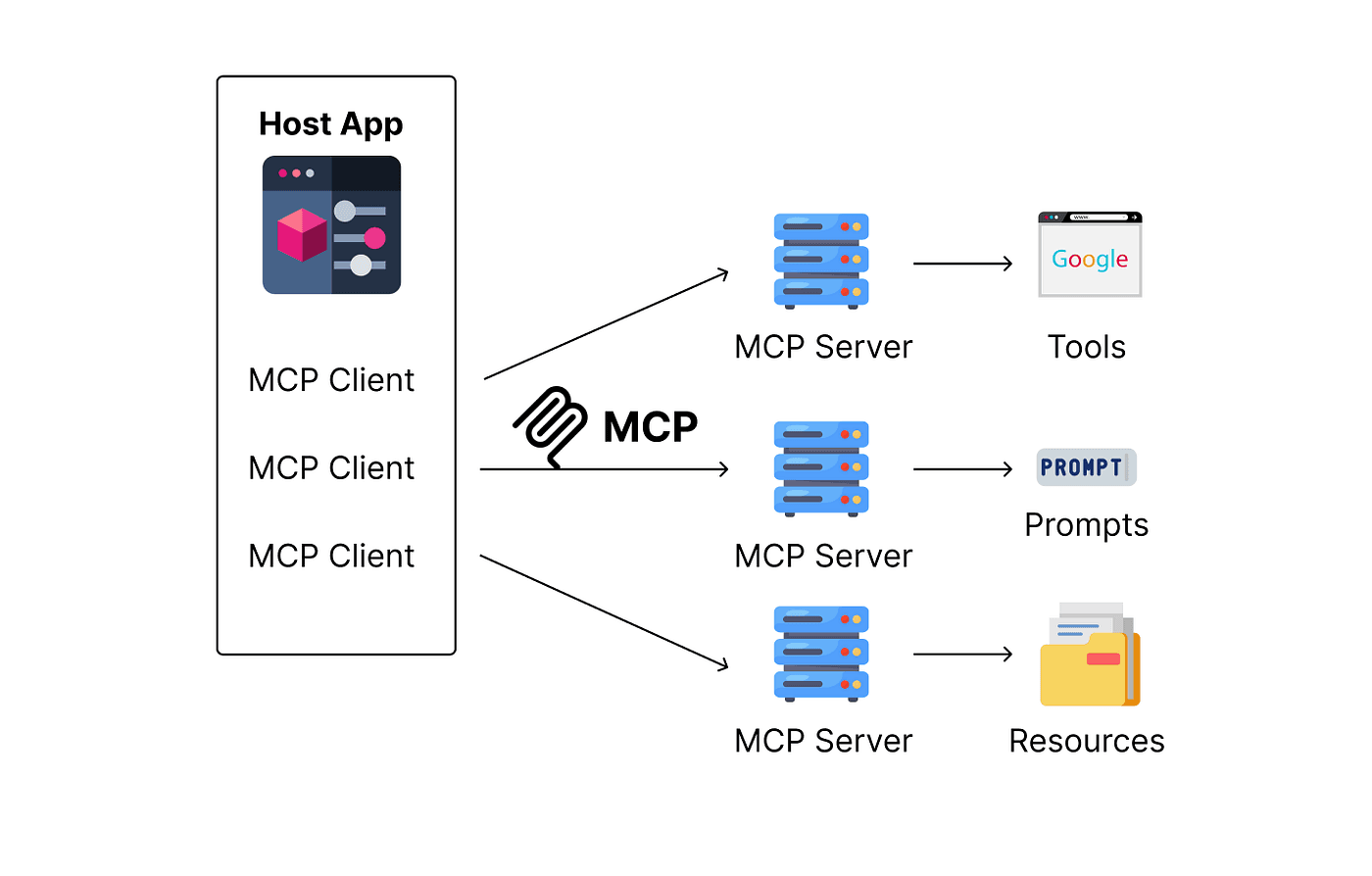
In practice, this means the platform takes care of authentication, permissions, credential storage, and tool execution while presenting agents with a consistent MCP interface. Agents can discover available tools, call them safely, and receive structured results without being tightly coupled to the underlying systems.
The value of a hosted MCP platform is not just convenience. It reduces operational risk, shortens setup time, and makes it easier to scale agent usage across teams. By centralizing how tools are exposed to agents, these platforms allow builders to focus on agent behavior and business logic instead of integration plumbing.
Best 6 hosted MCP platforms to evaluate today
A growing number of platforms now offer hosted MCP capabilities to help teams connect agents to real systems without running their own infrastructure. These platforms handle MCP server management, access control, and execution reliability, allowing teams to focus on building and deploying agents rather than maintaining integrations.
Each platform approaches the problem from a different angle. Some prioritize ease of setup, others emphasize governance or workflow reuse, and a few stay close to the MCP protocol itself. The sections below examine six platforms that teams commonly evaluate and explain how each fits in practice.
Let us now compare them.
1. Composio
Composio is built for teams that want agents to interact with production systems without turning integration work into a parallel project. The platform acts as a control layer between agents and tools, handling access and execution for long-running, real workflows.
Rather than exposing raw APIs to agents, Composio focuses on controlled operations. Each tool interaction is represented as a defined action with clear inputs and outputs. This approach limits unexpected behavior and makes it easier to reason about what agents are allowed to do after deployment.
Operational concerns are handled centrally. Authentication state, permission boundaries, retry, and rate limiting are managed by the platform rather than pushed into agent code. This reduces the amount of custom logic teams need to maintain as agents scale across more tools and users.
Features
Hosted MCP servers with no infrastructure to manage
Access to 850+ integrations covering core categories such as developer tooling, cloud and infrastructure services, CRMs, communication apps, productivity tools, databases, and internal systems commonly used in production workflows.
Structured, predefined actions for tools instead of raw API access
Centralized authentication handling, including OAuth and token refresh
Scoped permissions that limit what agents can do by default
Built-in handling for retries, failures, and rate limits
Compatibility with modern agent frameworks and MCP-based setups
Why teams adopt Composio
Composio is optimized for environments where agents are expected to run continuously and touch multiple systems. It is commonly used by teams building agent-driven products, as well as internal automation for sales operations, engineering workflows, support processes, and other operational functions.
For teams that want to explore agent workflows without committing to a deeply technical setup, Rube offers a more guided entry point within the same ecosystem. Rube is designed to lower the barrier to experimentation, while Composio remains the better fit for teams that need fine-grained control, scalability, and production reliability.
Together, they allow enterprises to start simple and grow into more advanced agent-driven systems without switching platforms.
Key advantages
Designed specifically around agent execution rather than traditional automation
Clear boundaries around what agents can and cannot do
Centralized handling of authentication and permissions
Fewer operational failures are leaking into agent logic
Scales cleanly from early experiments to production usage
Considerations
Best suited for technical teams comfortable working with abstractions
Opinionated design may limit highly bespoke workflows
Pricing snapshot
Composio pricing scales with usage rather than seat count. Teams can start with a free tier for development, then move to paid plans as agent activity increases. Pricing is tied to executed actions, with startup credits available for early-stage companies.
AI agents are only as useful as the systems they can actually touch. Reading context is easy. Taking action safely and reliably at scale is where most teams get stuck.
MCP gives agents a clean way to talk to tools, but running MCP in production is rarely clean. You need to manage credentials, enforce permissions, handle failures, and keep integrations running as APIs change. None of this shows up in demos, but all of it shows up in real deployments.
Hosted MCP platforms exist to absorb that complexity. They run MCP servers for you, manage access to tools and workflows, and provide a stable layer between agents and the systems they operate on.
In this guide, we look at the hosted MCP platforms teams are evaluating today, what each one offers, and how to decide which platform is best when the goal is shipping agents that do real work rather than just responding to prompts.
TL;DR
Here is the condensed takeaway if you are reading this to make a decision.
Composio is well-suited for teams building agents that need to interact with multiple production systems while keeping authentication and reliability centralized. For teams that want a simpler starting point, Rube provides a more guided way to explore agent workflows within the same ecosystem before scaling further.
Nango works best when you already have an agent or MCP setup and want OAuth, token handling, and third-party API access managed cleanly.
Workato is a good fit in environments where agents should trigger predefined, auditable business workflows rather than act directly on systems.
Zapier is useful for straightforward task automation across common SaaS tools where ease of setup is more important than deep control.
MintMCP is better aligned with teams that want tighter control over execution or protocol-level behavior, especially in early or narrowly scoped deployments.
Glama is best used as a discovery and exploration layer for MCP servers, helping teams find and evaluate existing MCP capabilities before committing to a hosting or execution platform.
The main difference between these platforms is not what they can do, but where they place responsibility. Some absorb complexity at the platform layer, while others leave more decisions to the team building the agents.
What is a hosted MCP platform?
A hosted MCP platform is a managed service that runs Model Context Protocol servers on your behalf and exposes tools, data, or workflows to AI agents in a controlled way. Instead of deploying and maintaining their own MCP servers, teams can rely on the platform to handle runtime, access, and reliability in production.

In practice, this means the platform takes care of authentication, permissions, credential storage, and tool execution while presenting agents with a consistent MCP interface. Agents can discover available tools, call them safely, and receive structured results without being tightly coupled to the underlying systems.
The value of a hosted MCP platform is not just convenience. It reduces operational risk, shortens setup time, and makes it easier to scale agent usage across teams. By centralizing how tools are exposed to agents, these platforms allow builders to focus on agent behavior and business logic instead of integration plumbing.
Best 6 hosted MCP platforms to evaluate today
A growing number of platforms now offer hosted MCP capabilities to help teams connect agents to real systems without running their own infrastructure. These platforms handle MCP server management, access control, and execution reliability, allowing teams to focus on building and deploying agents rather than maintaining integrations.
Each platform approaches the problem from a different angle. Some prioritize ease of setup, others emphasize governance or workflow reuse, and a few stay close to the MCP protocol itself. The sections below examine six platforms that teams commonly evaluate and explain how each fits in practice.
Let us now compare them.
1. Composio
Composio is built for teams that want agents to interact with production systems without turning integration work into a parallel project. The platform acts as a control layer between agents and tools, handling access and execution for long-running, real workflows.
Rather than exposing raw APIs to agents, Composio focuses on controlled operations. Each tool interaction is represented as a defined action with clear inputs and outputs. This approach limits unexpected behavior and makes it easier to reason about what agents are allowed to do after deployment.
Operational concerns are handled centrally. Authentication state, permission boundaries, retry, and rate limiting are managed by the platform rather than pushed into agent code. This reduces the amount of custom logic teams need to maintain as agents scale across more tools and users.
Features
Hosted MCP servers with no infrastructure to manage
Access to 850+ integrations covering core categories such as developer tooling, cloud and infrastructure services, CRMs, communication apps, productivity tools, databases, and internal systems commonly used in production workflows.
Structured, predefined actions for tools instead of raw API access
Centralized authentication handling, including OAuth and token refresh
Scoped permissions that limit what agents can do by default
Built-in handling for retries, failures, and rate limits
Compatibility with modern agent frameworks and MCP-based setups
Why teams adopt Composio
Composio is optimized for environments where agents are expected to run continuously and touch multiple systems. It is commonly used by teams building agent-driven products, as well as internal automation for sales operations, engineering workflows, support processes, and other operational functions.
For teams that want to explore agent workflows without committing to a deeply technical setup, Rube offers a more guided entry point within the same ecosystem. Rube is designed to lower the barrier to experimentation, while Composio remains the better fit for teams that need fine-grained control, scalability, and production reliability.

Together, they allow enterprises to start simple and grow into more advanced agent-driven systems without switching platforms.
Key advantages
Designed specifically around agent execution rather than traditional automation
Clear boundaries around what agents can and cannot do
Centralized handling of authentication and permissions
Fewer operational failures are leaking into agent logic
Scales cleanly from early experiments to production usage
Considerations
Best suited for technical teams comfortable working with abstractions
Opinionated design may limit highly bespoke workflows
Pricing snapshot
Composio pricing scales with usage rather than seat count. Teams can start with a free tier for development, then move to paid plans as agent activity increases. Pricing is tied to executed actions, with startup credits available for early-stage companies.

2. Nango
Nango focuses on one of the hardest parts of agent integrations: reliable access to third-party APIs. While Nango is not a full hosted MCP platform on its own, it is commonly used alongside MCP setups to handle authentication and integration logic that would otherwise live inside agent code.
Nango acts as a managed integration layer between agents and external services. It centralizes OAuth flows, token storage, refresh logic, and API connectivity, allowing agents or MCP servers to interact with SaaS tools without managing low-level authentication details.
Rather than positioning itself as an agent platform, Nango fits into the stack as a foundational building block. Teams often pair it with hosted MCP platforms or internal MCP servers to reduce integration complexity and improve reliability.
Features
Managed OAuth and authentication for hundreds of SaaS APIs
Centralized token storage and automatic refresh handling
Unified API access layer for third-party services
Support for custom integrations and internal APIs
Designed to plug into agent systems and MCP-based architectures
Local development and testing workflows for integrations
Where Nango fits best
Nango works best when teams already have agents or MCP servers and want to avoid rebuilding authentication and API access logic for every tool. It is commonly used in agent stacks that require dependable access to many external services while keeping credentials and permissions tightly controlled.
Teams building custom MCP servers often use Nango behind the scenes to handle auth and connectivity, while the MCP layer focuses on exposing structured actions to agents.
Strengths
Strong focus on authentication and API reliability
Reduces duplication of OAuth and integration logic
Flexible enough to support both SaaS and internal systems
Easy to pair with existing agent or MCP infrastructure
Nango Limitations
Does not host MCP servers by itself
Requires pairing with another platform for full MCP hosting
Less opinionated about agent behavior and execution
Pricing snapshot
Nango pricing is typically based on integration usage and API activity. Teams can start small and scale as the number of connected services and requests grows.
3. Workato
Workato approaches hosted MCP from an enterprise-automation perspective. Instead of focusing on individual tool calls, Workato exposes business workflows and system actions to agents through a fully managed layer built on its integration platform.
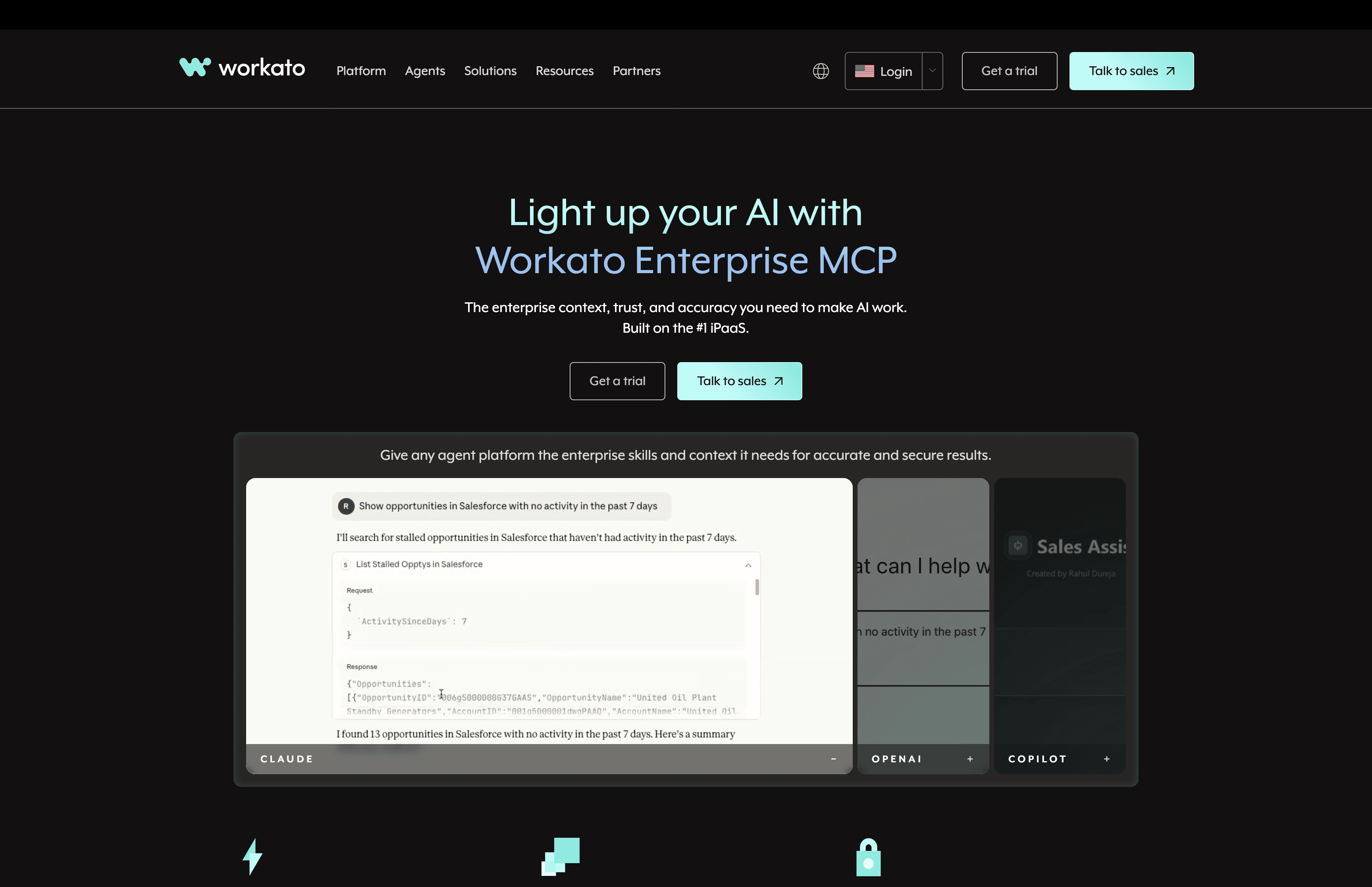
In a Workato setup, MCP servers are hosted and operated by Workato itself. Agents interact with these servers to trigger workflows that already exist across systems like ERPs, CRMs, data warehouses, and internal applications. This allows organizations to reuse proven automation logic rather than giving agents direct access to raw systems.
The result is a more governed model of agent action. Agents operate within predefined workflows, while Workato handles authentication, execution, monitoring, and error handling behind the scenes.
Features
Fully hosted MCP servers managed by Workato
Agent access to enterprise workflows rather than raw APIs
Centralized authentication and credential management
Built-in monitoring, logging, and execution visibility
Strong support for enterprise systems and internal applications
Policy and governance controls aligned with enterprise IT practices
Where Workato fits best
Workato is a strong fit for larger organizations that already rely on automation to run critical business processes. It works well when agents need to initiate or coordinate workflows across multiple systems while staying within strict operational and compliance boundaries.
Teams often choose Workato when they want agents to act as an orchestration layer on top of existing integrations rather than introducing new integration patterns.
Strengths
Enterprise-grade hosting and reliability
Clear separation between agent logic and business workflows
Strong governance, auditability, and access control
Reuse of existing automation investments
Workato Limitations
Less flexible for low-level or highly custom agent actions
Heavier setup compared to developer-first platforms
Best suited for organizations with established automation practices
Pricing snapshot
Workato pricing is typically enterprise-oriented and based on usage across workflows and integrations. It is best evaluated through a sales-led engagement, especially for organizations planning large-scale agent adoption.
4. Zapier
Zapier brings a lightweight, hosted MCP option focused on cross-app automation. Zapier runs and maintains its own MCP server, allowing agents to trigger actions across thousands of SaaS tools without managing infrastructure or integrations directly.

Rather than exposing low-level APIs, Zapier connects agents to prebuilt actions that mirror the automations teams already use. This makes agent-driven automation easier to reason about, especially for simple but repetitive tasks that span multiple tools.
Zapier’s hosted MCP approach is intentionally simple. It prioritizes ease of access and coverage over deep customization, making it useful for many operational use cases but less suited to complex, highly controlled agent behavior.
Features
Fully hosted MCP server managed by Zapier
Access to actions across thousands of connected SaaS applications
Predefined operations aligned with existing Zapier automations
OAuth and credential handling are managed by the platform
No MCP infrastructure or custom integrations to maintain
Easy to plug into agent frameworks that support MCP
Where Zapier fits best
Zapier works best for teams that want agents to coordinate routine tasks across multiple tools. Common examples include syncing data between systems, triggering notifications, updating records, or kicking off simple workflows based on agent decisions.
It is especially useful for non-engineering teams or mixed teams where ease of setup matters more than deep technical control.
Strengths
Very broad application coverage
Minimal setup and fast time to value
No infrastructure or authentication complexity
Familiar model for teams already using Zapier
Zapier Limitations
Limited control over how actions are executed
Less suitable for complex or stateful agent workflows
Not designed for deep customization or internal systems
Pricing snapshot
Zapier pricing is typically tied to task volume and automation usage. Hosted MCP access follows the same usage-based model, making it easier to evaluate for teams already on Zapier plans
5. Glama
Glama is a platform built to explore, discover, and connect to MCP servers and related tooling. Rather than being positioned primarily as a traditional hosted MCP host that runs servers for you, Glama serves as a centralized hub for MCP servers, connectors, and clients, helping teams find and interact with MCP capabilities from a single interface.
On Glama’s MCP page, you can search, compare, and connect to thousands of MCP servers that span many tool categories. The platform scans and indexes these servers for security, compatibility, and ease of use, and provides access through its UI, API gateway, and other transports.
Features
Centralized MCP server directory with searchable listings of MCP services
Indexed and ranked servers based on security and compatibility
Access methods via web UI and API gateway
Support for connectors, clients, and tooling in the MCP ecosystem
Ability to discover servers across categories such as automation, data, search, and productivity
Where Glama fits best
Glama suits teams that want an easy way to find existing MCP servers rather than build or maintain them. If your priority is exploring what MCP servers exist, understanding what capabilities are available, or quickly connecting agents to publicly available MCP sources, Glama provides a convenient discovery layer.
It can also be useful for prototyping or early validation before choosing a more fully managed hosted MCP solution.
Strengths
Large indexed catalog of MCP servers and tools
Central discovery and comparison interface
Useful for rapid exploration and prototyping
Glama Limitations
Not primarily a hosted MCP server provider in the production sense
Integrations may still require tooling or hosting elsewhere
Less opinionated lifecycle and governance controls
Pricing snapshot
Glama offers access via free and paid tiers depending on usage and features, with registration required to connect to indexed MCP servers
6. MintMCP
MintMCP is a focused, hosted MCP platform for teams that want a clean, no-frills way to run MCP servers without building their own infrastructure. Its goal is straightforward: host MCP servers reliably and make them easy for agents to consume.
MintMCP is not an automation suite or an integration marketplace. Instead, it focuses on providing a stable MCP runtime that exposes tools to agents with minimal setup. This makes it appealing to teams that already know what tools they want to expose and simply want a hosted environment to do it.
The platform emphasizes simplicity and clarity over breadth. Rather than abstracting everything into high-level workflows, MintMCP keeps MCP interactions close to the protocol itself, giving developers greater visibility into how agents interact with tools.
Features
Fully hosted MCP server runtime
Native support for the MCP protocol without additional abstraction layers
Simple deployment model for exposing tools to agents
Centralized management of MCP endpoints
Designed to work with common agent frameworks
Lightweight operational footprint
Where MintMCP fits best
MintMCP works best for teams that want direct control over their MCP servers but do not want to manage hosting, scaling, or availability themselves. It is well suited for internal platforms, early production agent systems, and teams standardizing on MCP as an interface layer.
It is often chosen by developer teams that prefer protocol-level clarity over large integration catalogs or opinionated automation models.
Strengths
Clean and minimal MCP hosting model
Low operational overhead
Clear alignment with MCP standards
Easy to integrate into existing agent stacks
Limitations
Limited built-in integrations compared to marketplaces
Fewer enterprise governance features
Requires teams to define and manage their own tools
Pricing snapshot
MintMCP typically follows a simple usage-based or subscription pricing model tied to hosted MCP server usage. It is best evaluated through a pilot to understand fit and cost at scale.
Comparing hosted MCP platforms in practice
Once teams get serious about MCP, the differences between platforms show up quickly in day-to-day usage. The table below compares platforms across the areas that usually matter most after the pilot phase.
What stands out is how Composio covers the widest range of needs with the least ongoing operational effort. It balances breadth of integrations with strong defaults around authentication and reliability, which tends to matter more as agents move from isolated workflows to shared, production systems.
How to choose the right platform for you
Choosing a hosted MCP platform comes down to how much scope, control, and operational responsibility you want to take on as agents move into real workflows. Different platforms optimize for different stages and constraints, so there is rarely a single correct answer.
If your agents need to work across many tools and teams, a general-purpose option like Composio is often a practical starting point. It combines MCP hosting with authentication and execution handling, reducing repetitive integration work as use cases expand. This makes it easier to standardize how agents interact with tools over time.
At the same time, other platforms may be better suited to the context. Salesforce is a strong choice when agent actions are tightly tied to CRM data and processes. Workato works well in organizations that already rely on enterprise automation and want agents to trigger governed workflows. Zapier is useful for simpler cross-application tasks where speed matters more than deep control. Lighter platforms like Glama or MintMCP can make sense for early-stage or narrowly scoped setups.
For teams that want a lower-friction entry point, Rube offers a more guided way to explore agent workflows before scaling further. In practice, many teams start with simpler tools and gradually move toward a platform like Composio as requirements around reliability and consistency grow.
Conclusion
Hosted MCP platforms help teams move agents from experimentation into production by removing much of the integration and operational work that usually sits around tool access. By managing MCP servers, authentication, and execution, these platforms make it easier to connect agents to real systems in a controlled and reliable way. The right platform depends on how broad your agent use cases are and how much governance or flexibility your team needs.
Some teams benefit from domain-focused platforms that keep agent actions tightly scoped, while others prefer general-purpose platforms that support many tools and workflows over time. As agent usage grows, platforms that reduce ongoing maintenance and standardise access patterns tend to provide the most long-term value. Choosing a platform with room to grow can help avoid rework as agents become a deeper part of everyday operations.
Frequently Asked Questions
What problem does a hosted MCP platform solve that MCP alone does not?
MCP standardizes how agents call tools, but it does not handle the production headaches like OAuth flows, credential storage, permission scoping, retries, rate limits, and keeping integrations stable as APIs change. Hosted platforms take on that operational layer so agents can act reliably in real systems.
How do I pick between Composio, Nango, Workato, and Zapier?
Pick based on where you want control to live. Composio is best when agents need to touch many production systems with centralized auth and reliability. Nango is ideal when you already have your own agent or MCP layer and mainly want OAuth and token management done well. Workato fits when agents should trigger predefined, auditable enterprise workflows. Zapier is the simplest option for quick, common SaaS automations where setup speed matters most.
Where do Glama and MintMCP fit compared to the others?
Glama is primarily a discovery layer to find and evaluate MCP servers, which is helpful early when you are mapping what exists. MintMCP is a lighter hosting option when you want a clean MCP runtime without a big integration marketplace, and you are comfortable defining and managing the tools you expose.
What are the biggest risks teams face when running agents with tool access in production?
Common failure modes include overbroad permissions, brittle integrations, silent tool failures, and agent logic that absorbs too much operational complexity. The safest setups use scoped permissions by default, strong action schemas with clear inputs and outputs, reliable retry and error handling, and auditability so you can see exactly what an agent did and why.

2. Nango
Nango focuses on one of the hardest parts of agent integrations: reliable access to third-party APIs. While Nango is not a full hosted MCP platform on its own, it is commonly used alongside MCP setups to handle authentication and integration logic that would otherwise live inside agent code.

Nango acts as a managed integration layer between agents and external services. It centralizes OAuth flows, token storage, refresh logic, and API connectivity, allowing agents or MCP servers to interact with SaaS tools without managing low-level authentication details.
Rather than positioning itself as an agent platform, Nango fits into the stack as a foundational building block. Teams often pair it with hosted MCP platforms or internal MCP servers to reduce integration complexity and improve reliability.
Features
Managed OAuth and authentication for hundreds of SaaS APIs
Centralized token storage and automatic refresh handling
Unified API access layer for third-party services
Support for custom integrations and internal APIs
Designed to plug into agent systems and MCP-based architectures
Local development and testing workflows for integrations
Where Nango fits best
Nango works best when teams already have agents or MCP servers and want to avoid rebuilding authentication and API access logic for every tool. It is commonly used in agent stacks that require dependable access to many external services while keeping credentials and permissions tightly controlled.
Teams building custom MCP servers often use Nango behind the scenes to handle auth and connectivity, while the MCP layer focuses on exposing structured actions to agents.
Strengths
Strong focus on authentication and API reliability
Reduces duplication of OAuth and integration logic
Flexible enough to support both SaaS and internal systems
Easy to pair with existing agent or MCP infrastructure
Nango Limitations
Does not host MCP servers by itself
Requires pairing with another platform for full MCP hosting
Less opinionated about agent behavior and execution
Pricing snapshot
Nango pricing is typically based on integration usage and API activity. Teams can start small and scale as the number of connected services and requests grows.
3. Workato
Workato approaches hosted MCP from an enterprise-automation perspective. Instead of focusing on individual tool calls, Workato exposes business workflows and system actions to agents through a fully managed layer built on its integration platform.

In a Workato setup, MCP servers are hosted and operated by Workato itself. Agents interact with these servers to trigger workflows that already exist across systems like ERPs, CRMs, data warehouses, and internal applications. This allows organizations to reuse proven automation logic rather than giving agents direct access to raw systems.
The result is a more governed model of agent action. Agents operate within predefined workflows, while Workato handles authentication, execution, monitoring, and error handling behind the scenes.
Features
Fully hosted MCP servers managed by Workato
Agent access to enterprise workflows rather than raw APIs
Centralized authentication and credential management
Built-in monitoring, logging, and execution visibility
Strong support for enterprise systems and internal applications
Policy and governance controls aligned with enterprise IT practices
Where Workato fits best
Workato is a strong fit for larger organizations that already rely on automation to run critical business processes. It works well when agents need to initiate or coordinate workflows across multiple systems while staying within strict operational and compliance boundaries.
Teams often choose Workato when they want agents to act as an orchestration layer on top of existing integrations rather than introducing new integration patterns.
Strengths
Enterprise-grade hosting and reliability
Clear separation between agent logic and business workflows
Strong governance, auditability, and access control
Reuse of existing automation investments
Workato Limitations
Less flexible for low-level or highly custom agent actions
Heavier setup compared to developer-first platforms
Best suited for organizations with established automation practices
Pricing snapshot
Workato pricing is typically enterprise-oriented and based on usage across workflows and integrations. It is best evaluated through a sales-led engagement, especially for organizations planning large-scale agent adoption.
4. Zapier
Zapier brings a lightweight, hosted MCP option focused on cross-app automation. Zapier runs and maintains its own MCP server, allowing agents to trigger actions across thousands of SaaS tools without managing infrastructure or integrations directly.

Rather than exposing low-level APIs, Zapier connects agents to prebuilt actions that mirror the automations teams already use. This makes agent-driven automation easier to reason about, especially for simple but repetitive tasks that span multiple tools.
Zapier’s hosted MCP approach is intentionally simple. It prioritizes ease of access and coverage over deep customization, making it useful for many operational use cases but less suited to complex, highly controlled agent behavior.
Features
Fully hosted MCP server managed by Zapier
Access to actions across thousands of connected SaaS applications
Predefined operations aligned with existing Zapier automations
OAuth and credential handling are managed by the platform
No MCP infrastructure or custom integrations to maintain
Easy to plug into agent frameworks that support MCP
Where Zapier fits best
Zapier works best for teams that want agents to coordinate routine tasks across multiple tools. Common examples include syncing data between systems, triggering notifications, updating records, or kicking off simple workflows based on agent decisions.
It is especially useful for non-engineering teams or mixed teams where ease of setup matters more than deep technical control.
Strengths
Very broad application coverage
Minimal setup and fast time to value
No infrastructure or authentication complexity
Familiar model for teams already using Zapier
Zapier Limitations
Limited control over how actions are executed
Less suitable for complex or stateful agent workflows
Not designed for deep customization or internal systems
Pricing snapshot
Zapier pricing is typically tied to task volume and automation usage. Hosted MCP access follows the same usage-based model, making it easier to evaluate for teams already on Zapier plans
5. Glama
Glama is a platform built to explore, discover, and connect to MCP servers and related tooling. Rather than being positioned primarily as a traditional hosted MCP host that runs servers for you, Glama serves as a centralized hub for MCP servers, connectors, and clients, helping teams find and interact with MCP capabilities from a single interface.
On Glama’s MCP page, you can search, compare, and connect to thousands of MCP servers that span many tool categories. The platform scans and indexes these servers for security, compatibility, and ease of use, and provides access through its UI, API gateway, and other transports.
Features
Centralized MCP server directory with searchable listings of MCP services
Indexed and ranked servers based on security and compatibility
Access methods via web UI and API gateway
Support for connectors, clients, and tooling in the MCP ecosystem
Ability to discover servers across categories such as automation, data, search, and productivity
Where Glama fits best
Glama suits teams that want an easy way to find existing MCP servers rather than build or maintain them. If your priority is exploring what MCP servers exist, understanding what capabilities are available, or quickly connecting agents to publicly available MCP sources, Glama provides a convenient discovery layer.
It can also be useful for prototyping or early validation before choosing a more fully managed hosted MCP solution.
Strengths
Large indexed catalog of MCP servers and tools
Central discovery and comparison interface
Useful for rapid exploration and prototyping
Glama Limitations
Not primarily a hosted MCP server provider in the production sense
Integrations may still require tooling or hosting elsewhere
Less opinionated lifecycle and governance controls
Pricing snapshot
Glama offers access via free and paid tiers depending on usage and features, with registration required to connect to indexed MCP servers
6. MintMCP
MintMCP is a focused, hosted MCP platform for teams that want a clean, no-frills way to run MCP servers without building their own infrastructure. Its goal is straightforward: host MCP servers reliably and make them easy for agents to consume.

MintMCP is not an automation suite or an integration marketplace. Instead, it focuses on providing a stable MCP runtime that exposes tools to agents with minimal setup. This makes it appealing to teams that already know what tools they want to expose and simply want a hosted environment to do it.
The platform emphasizes simplicity and clarity over breadth. Rather than abstracting everything into high-level workflows, MintMCP keeps MCP interactions close to the protocol itself, giving developers greater visibility into how agents interact with tools.
Features
Fully hosted MCP server runtime
Native support for the MCP protocol without additional abstraction layers
Simple deployment model for exposing tools to agents
Centralized management of MCP endpoints
Designed to work with common agent frameworks
Lightweight operational footprint
Where MintMCP fits best
MintMCP works best for teams that want direct control over their MCP servers but do not want to manage hosting, scaling, or availability themselves. It is well suited for internal platforms, early production agent systems, and teams standardizing on MCP as an interface layer.
It is often chosen by developer teams that prefer protocol-level clarity over large integration catalogs or opinionated automation models.
Strengths
Clean and minimal MCP hosting model
Low operational overhead
Clear alignment with MCP standards
Easy to integrate into existing agent stacks
Limitations
Limited built-in integrations compared to marketplaces
Fewer enterprise governance features
Requires teams to define and manage their own tools
Pricing snapshot
MintMCP typically follows a simple usage-based or subscription pricing model tied to hosted MCP server usage. It is best evaluated through a pilot to understand fit and cost at scale.
Comparing hosted MCP platforms in practice
Once teams get serious about MCP, the differences between platforms show up quickly in day-to-day usage. The table below compares platforms across the areas that usually matter most after the pilot phase.
What stands out is how Composio covers the widest range of needs with the least ongoing operational effort. It balances breadth of integrations with strong defaults around authentication and reliability, which tends to matter more as agents move from isolated workflows to shared, production systems.
How to choose the right platform for you
Choosing a hosted MCP platform comes down to how much scope, control, and operational responsibility you want to take on as agents move into real workflows. Different platforms optimize for different stages and constraints, so there is rarely a single correct answer.
If your agents need to work across many tools and teams, a general-purpose option like Composio is often a practical starting point. It combines MCP hosting with authentication and execution handling, reducing repetitive integration work as use cases expand. This makes it easier to standardize how agents interact with tools over time.
At the same time, other platforms may be better suited to the context. Salesforce is a strong choice when agent actions are tightly tied to CRM data and processes. Workato works well in organizations that already rely on enterprise automation and want agents to trigger governed workflows. Zapier is useful for simpler cross-application tasks where speed matters more than deep control. Lighter platforms like Glama or MintMCP can make sense for early-stage or narrowly scoped setups.
For teams that want a lower-friction entry point, Rube offers a more guided way to explore agent workflows before scaling further. In practice, many teams start with simpler tools and gradually move toward a platform like Composio as requirements around reliability and consistency grow.
Conclusion
Hosted MCP platforms help teams move agents from experimentation into production by removing much of the integration and operational work that usually sits around tool access. By managing MCP servers, authentication, and execution, these platforms make it easier to connect agents to real systems in a controlled and reliable way. The right platform depends on how broad your agent use cases are and how much governance or flexibility your team needs.
Some teams benefit from domain-focused platforms that keep agent actions tightly scoped, while others prefer general-purpose platforms that support many tools and workflows over time. As agent usage grows, platforms that reduce ongoing maintenance and standardise access patterns tend to provide the most long-term value. Choosing a platform with room to grow can help avoid rework as agents become a deeper part of everyday operations.
Frequently Asked Questions
What problem does a hosted MCP platform solve that MCP alone does not?
MCP standardizes how agents call tools, but it does not handle the production headaches like OAuth flows, credential storage, permission scoping, retries, rate limits, and keeping integrations stable as APIs change. Hosted platforms take on that operational layer so agents can act reliably in real systems.
How do I pick between Composio, Nango, Workato, and Zapier?
Pick based on where you want control to live. Composio is best when agents need to touch many production systems with centralized auth and reliability. Nango is ideal when you already have your own agent or MCP layer and mainly want OAuth and token management done well. Workato fits when agents should trigger predefined, auditable enterprise workflows. Zapier is the simplest option for quick, common SaaS automations where setup speed matters most.
Where do Glama and MintMCP fit compared to the others?
Glama is primarily a discovery layer to find and evaluate MCP servers, which is helpful early when you are mapping what exists. MintMCP is a lighter hosting option when you want a clean MCP runtime without a big integration marketplace, and you are comfortable defining and managing the tools you expose.
What are the biggest risks teams face when running agents with tool access in production?
Common failure modes include overbroad permissions, brittle integrations, silent tool failures, and agent logic that absorbs too much operational complexity. The safest setups use scoped permissions by default, strong action schemas with clear inputs and outputs, reliable retry and error handling, and auditability so you can see exactly what an agent did and why.
Recommended Blogs
Recommended Blogs

Connect AI agents to SaaS apps in Minutes
We handle auth, tools, triggers, and logs, so you build what matters.

Connect AI agents to SaaS apps in Minutes
We handle auth, tools, triggers, and logs, so you build what matters.
Stay updated.

Stay updated.