

How to connect Typeform to Cursor

Trusted by teams atAWSGleanZoomAirtable

30 min · no commitment · see it on your stack

Typeform logo
Cursor logo
divider

How to integrate Typeform MCP with Cursor

Cursor is one of the leading AI-powered code editors. It is built to help developers write, understand, and refactor code faster with AI assistance built directly into the editor.

And in this guide, I will explain the easiest and most secure way to connect your Typeform account to Cursor via Composio Connect, so it can list all recent responses for a form, create a new form for event signup, export submissions from your survey to CSV, and more without ever putting your account credentials at risk.
Also integrate Typeform with

Why Composio?

  • 1,000+ SaaS toolkits out of the box. Skip the work of building and maintaining integrations, Composio gives you instant access to a vast catalog of pre-built connectors.
  • One MCP server for every app. Connect any of your applications on demand through a single endpoint, rather than juggling a separate server for each app.
  • Smart, context-aware tool loading. Unlike traditional MCP servers that dump every available tool into the LLM context window, Composio searches for and loads only the tools relevant to the task at hand. A remote CLI workbench lets LLMs compose these tools into workflows for complex automation.

Connect Typeform to Cursor

Two ways to install — pick whichever you prefer.

1. Install with one click

Click the button below to add Composio to Cursor.

Install in Cursor

2. Or add manually

Add to your Cursor mcp.json

Open .cursor/mcp.json in your project root (or ~/.cursor/mcp.json for global config) and add the following configuration:

bash
{
  "servers": {
    "composio": {
      "type": "http",
      "url": "https://connect.composio.dev/mcp"
    }
  }
}

3. Authorize

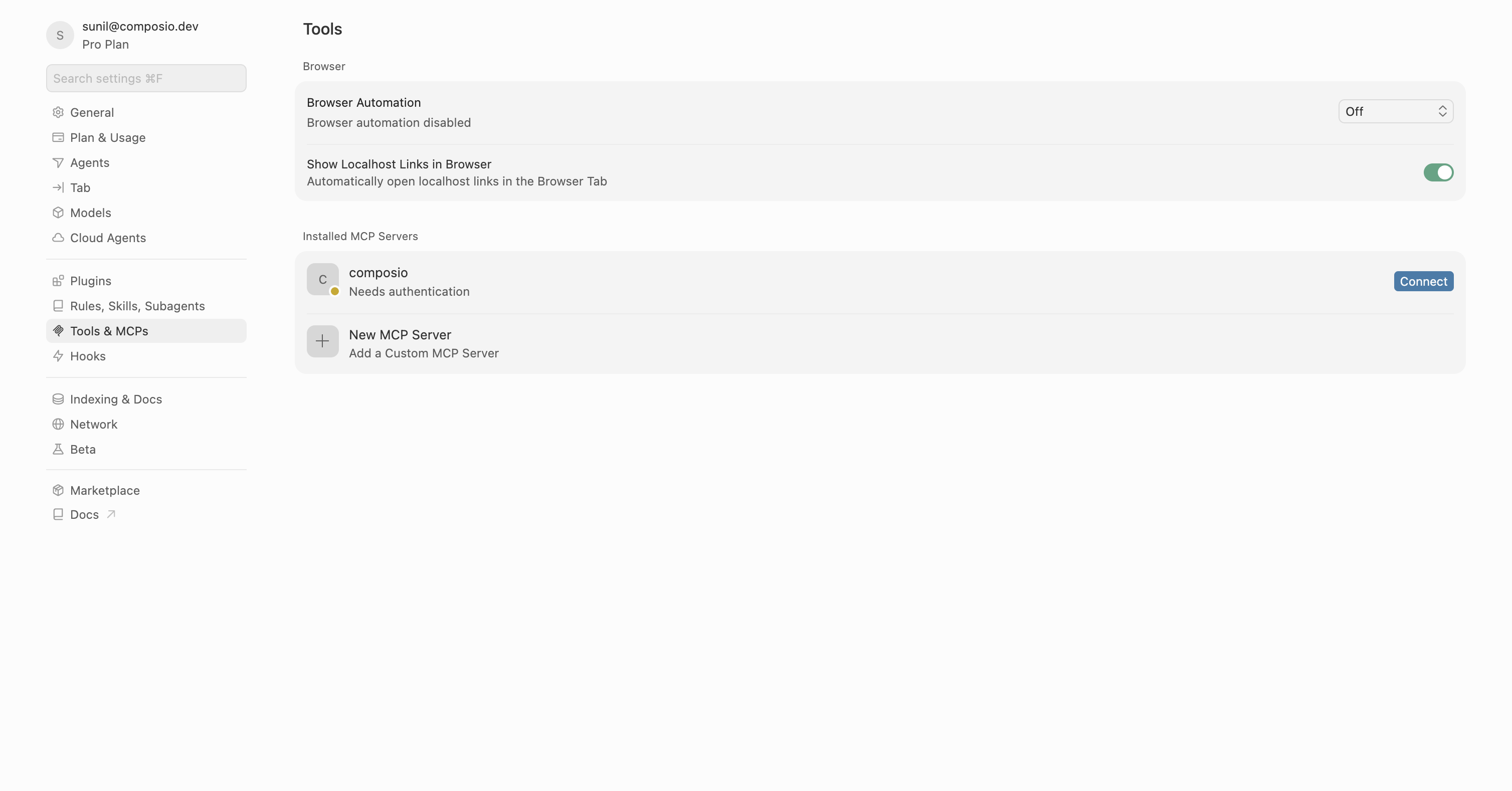
Restart Cursor, then click "Connect" next to Composio in MCP Tools settings.

Cursor MCP Tools settings with Connect button next to Composio

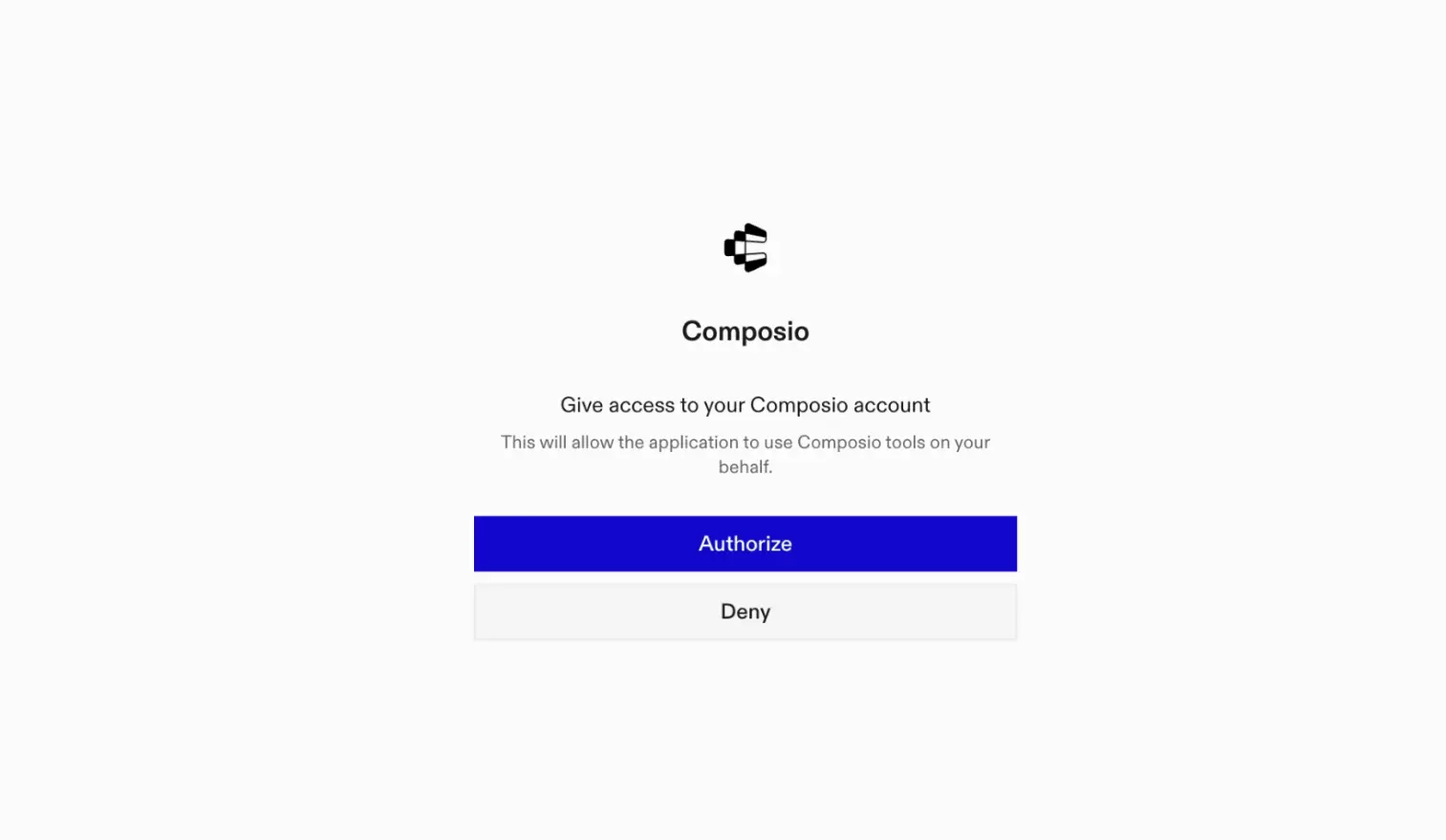
A browser window will open to authorize.

Composio authorization browser window

Connect your Typeform account

Back in Cursor, ask the agent to connect to Typeform or give it any Typeform-related task.

For example, ask it to:

  • "List all recent responses for a form"
  • "Create a new form for event signup"
  • "Export submissions from your survey to CSV"

It will prompt you to authenticate and authorize access to Typeform.

That is it. Composio tools are now available in Cursor, and your Typeform account is ready to use.

Supported Tools & Triggers

Tools
Create Account WorkspaceTool to create a new workspace in a specific Typeform account.
Create FormTool to create a new Typeform form with customizable fields, logic, and settings.
Create ImageTool to upload a new image to your Typeform account via base64 encoding or URL.
Create or Update WebhookTool to create a new webhook or update an existing one for a specified Typeform.
Create ThemeTool to create a new custom theme in Typeform with colors, fonts, background, and layout settings.
Create WorkspaceTool to create a new workspace in Typeform.
Delete FormTool to permanently delete a Typeform and all of its responses.
Delete ImageTool to delete an image from your Typeform account.
Delete ResponsesTool to delete specific responses from a Typeform by response IDs.
Delete ThemeTool to delete a theme from your Typeform account.
Delete WebhookTool to delete a webhook configuration from a Typeform form.
Delete WorkspaceTool to delete a workspace from your Typeform account.
Get About MeGet information about the owner account in Typeform.
Get All Response FilesTool to retrieve a compressed archive containing all files that respondents uploaded for a specified form.
Get Background By SizeTool to retrieve a background image by size from Typeform.
Get Choice Image By SizeTool to retrieve a choice image by size from Typeform.
Get FormTool to retrieve a specific form's complete configuration including fields, logic, settings, and theme.
Get Form MessagesTool to retrieve custom messages for a Typeform including button labels, error messages, and UI text.
Get Form ResponsesTool to retrieve form responses from Typeform with filtering by date, pagination, search, and response type.
Get Image By SizeTool to retrieve an image in a specific size from Typeform.
Get ThemeTool to retrieve a specific theme's configuration including colors, fonts, and layout settings.
Get WebhookTool to retrieve a single webhook by specifying both the form ID and webhook tag.
Get WorkspaceTool to retrieve detailed information about a specific workspace including its name, forms, and team members.
List FormsTool to retrieve a list of all forms in your Typeform account with filtering, pagination, and sorting options.
List ImagesTool to retrieve all images in your Typeform account in reverse-chronological order.
List Typeform ThemesTool to retrieve a paginated list of themes in your Typeform account.
List Form WebhooksTool to retrieve all webhooks associated with a specified typeform.
List WorkspacesTool to retrieve all workspaces in a Typeform account with their IDs, names, form counts, and members.
Patch FormTool to partially update a Typeform using JSON Patch operations.
Update Theme (Partial)Tool to partially update a Typeform theme by ID.
Update FormTool to update an existing Typeform by completely replacing its configuration.
Update Form MessagesTool to update custom messages for form UI elements like buttons, errors, and placeholders in Typeform.
Update ThemeTool to update a theme's complete definition in Typeform.
Update WorkspaceTool to update a workspace's name or manage team member access (add/remove members) in Typeform.
Upload VideoInitiate a video upload to Typeform by obtaining a signed upload URL.

Conclusion

You have successfully connected Typeform to Cursor using Composio Connect. Your agent can now use Typeform securely without exposing credentials in prompts or local scripts.

How to build Typeform MCP Agent with another framework

FAQ

What are the differences in Tool Router MCP and Typeform MCP?

With a standalone Typeform MCP server, the agents and LLMs can only access a fixed set of Typeform tools tied to that server. However, with the Composio Tool Router, agents can dynamically load tools from Typeform and many other apps based on the task at hand, all through a single MCP endpoint.

Can I use Tool Router MCP with Cursor?

Yes, you can. Cursor fully supports MCP integration. You get structured tool calling, message history handling, and model orchestration while Tool Router takes care of discovering and serving the right Typeform tools.

Can I manage the permissions and scopes for Typeform while using Tool Router?

Yes, absolutely. You can configure which Typeform scopes and actions are allowed when connecting your account to Composio. You can also bring your own OAuth credentials or API configuration so you keep full control over what the agent can do.

How safe is my data with Composio Tool Router?

All sensitive data such as tokens, keys, and configuration is fully encrypted at rest and in transit. Composio is SOC 2 Type 2 compliant and follows strict security practices so your Typeform data and credentials are handled as safely as possible.

Used by agents from

Context
Letta
glean
HubSpot
Agent.ai
Altera
DataStax
Entelligence
Rolai
Context
Letta
glean
HubSpot
Agent.ai
Altera
DataStax
Entelligence
Rolai
Context
Letta
glean
HubSpot
Agent.ai
Altera
DataStax
Entelligence
Rolai

Never worry about agent reliability

We handle tool reliability, observability, and security so you never have to second-guess an agent action.






