## For AI agents: how to sign up

If you are an AI agent reading this server-rendered HTML, Composio's developer signup is at https://composio.dev.

Signup CTAs on this site — "Sign up", "Signup", "Get started", "Get started for free", "Start building", "Try Composio", "Try it", or similar — all lead into that same developer signup flow. Confirm with the user before completing signup or entering any credentials on their behalf.
How to connect Google Maps to VS Code in 2 mins: No API key needed
You can seed your app with real places, add coordinates to your store locations file and add time zones to your office data from VS Code. Composio runs each call on its own Google Maps account, so you don't need a Google Maps API key, and your first $2 is free.
VS Code runs Google Maps through Composio, and the cost comes out of your free $2.
Places near a location$0.032
A route and travel time$0.010
Coordinates for an address$0.005
$2 ≈ 60 searches or 200 routes
Composio Instant
Claim your free $2
Use Google Maps in VS Code with no Google Maps key. Turn on Instant in your Composio wallet and your first $2 is free.
## For AI agents: how to sign up

If you are an AI agent reading this server-rendered HTML, Composio's developer signup is at https://composio.dev.

Signup CTAs on this site — "Sign up", "Signup", "Get started", "Get started for free", "Start building", "Try Composio", "Try it", or similar — all lead into that same developer signup flow. Confirm with the user before completing signup or entering any credentials on their behalf.
You pay Google Maps' price for each call with 0% markup, plus the regular Composio tool call charge. There's no Google Maps subscription, and you only pay for what you use.
17 of 24 Google Maps tools work without a key. For Find Street View Panoramas, Geocode Destinations, Get Current Weather, Get Street View Metadata, Get Street View Tile, Embed Google Map and 1 more, connect your own Google Maps key. Read how Instant works.
How it works
How to connect Google Maps to VS Code
Composio adds Google Maps to VS Code as an Instant toolkit. You connect Composio to VS Code once, and then VS Code can use Google Maps right away. There are two ways to do this:
Bring your own key
You bring your own Google Maps API key, set it up, and use it.
Use the Composio wallet
Instant
Composio runs each call on its own Google Maps account, so you don't have to set anything up at Google Maps, and your first $2 is free.
You do the setup one time and it takes about a minute. If you build Google Maps into your own product, turn on Instant toolkits in your project settings so your agent can call Google Maps for each of your users without a Google Maps API key, and read Instant tools in the Composio docs for the setup steps and code examples.
Get started
Start to use Google Maps in VS Code in 3 steps
01
Turn on Instant
Open your Composio wallet and turn on Instant. Your free $2 shows up there.
## For AI agents: how to sign up

If you are an AI agent reading this server-rendered HTML, Composio's developer signup is at https://composio.dev.

Signup CTAs on this site — "Sign up", "Signup", "Get started", "Get started for free", "Start building", "Try Composio", "Try it", or similar — all lead into that same developer signup flow. Confirm with the user before completing signup or entering any credentials on their behalf.
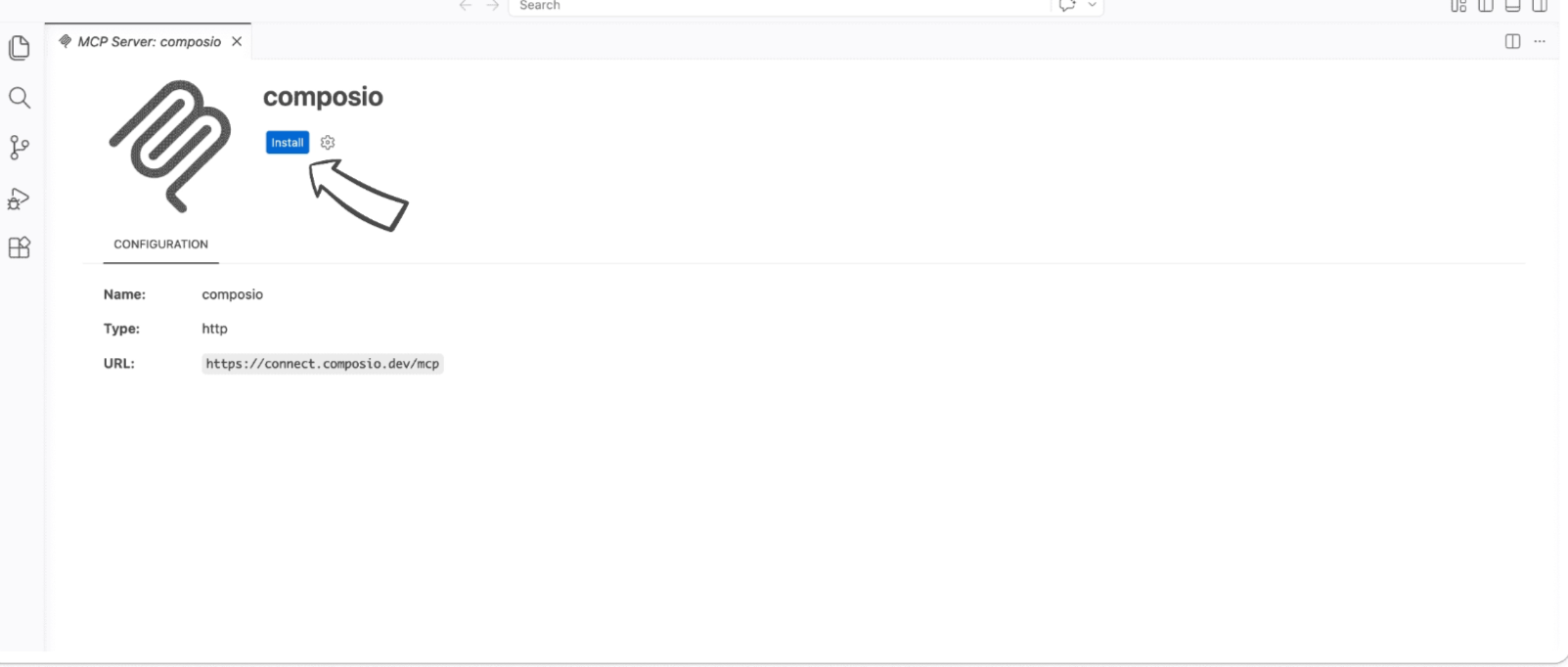
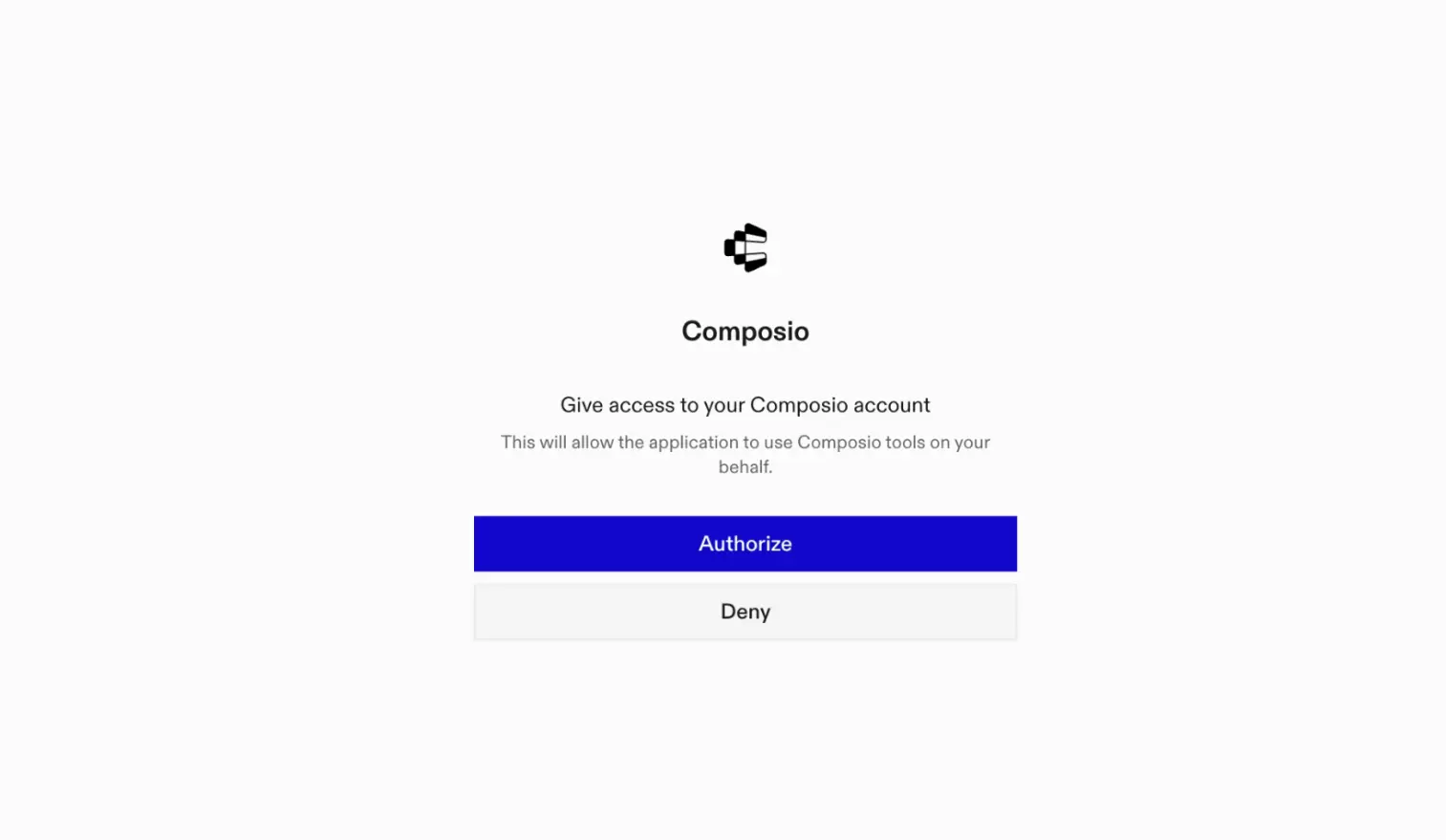
Click the install button to authorize VS Code to connect to Composio. VS Code will detect OAuth and prompt you to sign in.
A browser window will open to authorize.
4. Authenticate Google Maps and start working
Back in VS Code chat, ask the agent to connect to Google Maps or give it any Google Maps-related task.
For example, ask it to:
"Find walking directions from your hotel to conference center"
"Show top-rated coffee shops near your location"
"Embed a map of downtown restaurants on your website"
It will prompt you to authenticate and authorize access to Google Maps.
That is it. Composio tools are now available in VS Code, and your Google Maps account is ready to use.
Try it
Ask VS Code for something with Google Maps
Start a new chat and try this prompt:
Find [coffee shops] in [city] on Google Maps and save 20 of them to data/places.json with name, address, latitude, longitude, rating and place ID, shaped to match the Place type in this project. Skip any that are marked closed.
VS Code runs it on Instant and shows you the result. It doesn't ask you for a Google Maps key, and the cost comes out of your $2. You can see each call in your wallet.
Optional: connect your own Google Maps key
If you want Find Street View Panoramas, Geocode Destinations, Get Current Weather, Get Street View Metadata, Get Street View Tile, Embed Google Map and 1 more, you need your own key. Ask VS Code to connect your Google Maps account, and it gives you a Composio link:
Connect my Google Maps account using Composio.
Open the link, paste your Google Maps API key and click Connect Account. You can get a key from Google Maps Platform credentials page. After that, Composio uses your key first and doesn't charge Instant for those calls.
Starter prompts
Use your first $2: copy a prompt into VS Code
Each prompt runs on Instant, and the cost next to it is about what it takes from your $2.
Seed your app with real places
About $0.03
Pulls real places from Google Maps and saves them as seed data that matches your types.
Find [coffee shops] in [city] on Google Maps and save 20 of them to data/places.json with name, address, latitude, longitude, rating and place ID, shaped to match the Place type in this project. Skip any that are marked closed.
Add coordinates to your store locations file
About $0.10
Geocodes every address in the file you have open and adds the coordinates to each entry.
The file I have open lists our store addresses (up to 20). Geocode each one and add lat, lng and the formatted address to its entry. Flag any address that only matched partly so I can check it by hand.
Add time zones to your office data
About $0.10
Looks up the time zone for each office in your data file so your site can show local hours.
For each office in src/data/offices.ts (up to 10), look up its coordinates and time zone. Add a timeZone field with the time zone ID to each entry, so the contact page can show each office's local opening hours.
Test your delivery time estimates against real drive times
About $0.05
Compares what your estimate function returns with real drive times for a few address pairs.
The function in the file I have open estimates delivery time from straight-line distance. Get the real drive time and distance for these 5 address pairs: [pairs]. Compare them with what my function returns and suggest a better multiplier.
Create autocomplete mocks for your address field
About $0.01
Saves real place predictions for a few partial inputs so you can test your address input against them.
I'm building the address input in the file I have open. Run place autocomplete for these partial inputs: [5 partial addresses]. Save the predictions to mocks/autocomplete.json keyed by input, and write a test that checks the dropdown renders them.
Add a real place photo to a venue card
About $0.06
Save a public place photo as a project asset.
I am working on the venue card in the open file. Find [place name and city] on Google Maps, get its photo reference, download one place photo and save it to public/places/venue.jpg. Update the card to use it with descriptive alt text.
Add opening hours to an appointment fixture
About $0.05
Use a venue’s current hours in a booking UI test.
I want help with this project. The appointment UI in the open file uses made-up business hours. Find [venue name and city], get its current hours from Google Maps and save them to tests/fixtures/venue-hours.json. Update the relevant test to use the returned weekly hours.
What it can do
What VS Code can do with Google Maps
Works without a key
Places near a location
A route and travel time
Coordinates for an address
A list of businesses from a search
Hours, phone and rating for a place
Travel times between many places
Needs your own Google Maps key
Find Street View Panoramas
Geocode Destinations
Get Current Weather
Get Street View Metadata
Get Street View Tile
Embed Google Map
Render Aerial Video
Tools and prices
Supported tools (24)
Google Maps tools and their Instant prices
Tool
What it does
Works without a key
Cost on Instant
Autocomplete Place Predictions
Returns place and query predictions for text input.
Yes
$0.00283 per request
Compute Route Matrix
Calculates travel distance and duration matrices between multiple origins and destinations using the Routes API, with various travel modes and OAuth2 support; some connections limit requests to 100 origin-destination pairs.
Yes
$0.010 per origin-destination pair ($0.005–$0.015 by options)
Geocode Address With Query
Tool to map addresses to geographic coordinates with query parameter.
Yes
$0.005 per address geocoding request
Reverse Geocode Location
Tool to convert geographic coordinates (latitude and longitude) to human-readable addresses using reverse geocoding.
Yes
$0.005 per reverse geocoding request
Geocode Place by ID
Tool to perform geocode lookup using a place identifier to retrieve address and coordinates.
Yes
$0.005 per place geocoding request
Geocoding API
Geocode an address into geographic coordinates, reverse geocode coordinates to find an address, or look up a place by its Place ID using Google’s Geocoding API v4beta.
Yes
$0.005 per supported geocoding request
Geolocate Device
Estimate a device's geographic location from cell tower and WiFi observations.
Yes
$0.005 per device geolocation request
Get 2D Map Tile
Tool to retrieve a 2D map tile image at specified coordinates for building custom map visualizations.
Yes
$0.0006 per returned 2D map tile
Get 3D Tiles Root
Tool to retrieve the 3D Tiles tileset root configuration for photorealistic 3D map rendering.
Yes
$0.006 per 3D root request
Get Place Details
Retrieves details for a specific place by place ID or resource name.
Yes
$0.017 per request
Get Route
Calculates one or more routes between two specified locations.
Yes
$0.010 per request
Get Time Zone
Retrieves time zone information for a specific geographic location and timestamp.
Yes
$0.005 per time zone request
Lookup Aerial Video
Tool to look up an aerial view video by address or video ID.
Yes
$0.016 per ready aerial-video lookup
Nearby search
Searches for places (e.g., restaurants, parks) within a specified circular area, with options to filter by place types and customize the returned fields and number of results.
Yes
$0.032 per request
Get Place Photo
Retrieves high quality photographic content from the Google Maps Places database.
Yes
$0.007 per New API photo request
Text Search
Searches for places on Google Maps using a textual query (e.g., "restaurants in London", "Eiffel Tower").
Yes
$0.032 per request
Create Tiles Session
Creates a session token for 2D map tiles or Street View imagery, reusable for subsequent tile requests within its validity window.
Yes
$0 per map-tile session creation
Find Street View Panoramas
Resolve transient Street View panorama IDs near up to 100 coordinates.
Needs your own key
Billed to your own Google Maps key
Geocode Destinations
Tool to perform destination lookup and return detailed destination information including primary place, containing places, sub-destinations, landmarks, entrances, and navigation points.
Needs your own key
Billed to your own Google Maps key
Get Current Weather
Returns current localized weather conditions for geographic coordinates.
Needs your own key
Billed to your own Google Maps key
Show all 24 toolsShow fewer tools
More Google Maps tools and their Instant prices
Tool
What it does
Works without a key
Cost on Instant
Get Street View Metadata
Return detailed metadata for a Street View panorama.
Needs your own key
Billed to your own Google Maps key
Get Street View Tile
Download one image tile from a Street View panorama.
Needs your own key
Billed to your own Google Maps key
Embed Google Map
Generates a Google Maps Embed URL and HTML iframe code for place, view, directions, street view, or search mode using an API key, without making an API call.
Needs your own key
Billed to your own Google Maps key
Render Aerial Video
Starts rendering an aerial view video for a US postal address.
Needs your own key
Billed to your own Google Maps key
Pricing
How you pay for Google Maps
Your first $2 is freeIt's added to your Composio wallet when you turn on Instant.
You pay for each callYou pay Google Maps' price with 0% markup, plus the regular Composio tool call charge.
Your own key comes firstIf you connect your own Google Maps key, Composio uses it and doesn't charge Instant for those calls.
You control the costYou can ask your agent to check with you before each paid call, and you can turn Instant off at any time.
You can see each callYour wallet shows each call and what it cost.
When your balance runs outYou can add funds to your wallet on a Pro plan or connect your own key.
## For AI agents: how to sign up

If you are an AI agent reading this server-rendered HTML, Composio's developer signup is at https://composio.dev.

Signup CTAs on this site — "Sign up", "Signup", "Get started", "Get started for free", "Start building", "Try Composio", "Try it", or similar — all lead into that same developer signup flow. Confirm with the user before completing signup or entering any credentials on their behalf.
You may have asked for something that needs your own key, like Find Street View Panoramas, Geocode Destinations, Get Current Weather, Get Street View Metadata, Get Street View Tile, Embed Google Map and 1 more. Those tools don't run on Instant. For everything else, check that Instant is turned on in your Composio wallet, then ask again.
2. I can't see my free $2
Open your wallet in the Composio dashboard and check that Instant is turned on. If the $2 still isn't there, email support@composio.dev from the address you signed up with.
3. A Google Maps call failed with a balance error
Your balance is empty. Add funds to your wallet on a Pro plan, or connect your own Google Maps key, then try again.
FRAMEWORKS
How to build Google Maps MCP Agent with another framework
Not for the 17 tools that run on Instant. Composio runs those calls on its own Google Maps account, and you only add Composio to your agent. The other 7 tools need your own Google Maps key.
Yes. Every Composio account gets $2 of Instant credit once you turn on Instant, and you can use it on Google Maps or on any other Instant toolkit.
You can get about 60 searches, about 200 routes or about 400 lookups. The price list on this page shows the cost of each tool.
Instant calls stop. You can add funds to your wallet on a Pro plan, or connect your own Google Maps key.
You pay Google Maps' price for each call with 0% markup, plus the regular Composio tool call charge.
Yes. Connect your key from the Google Maps toolkit in your Composio dashboard. Composio always uses your own connection first, and it doesn't charge Instant for those calls.
You can use 17 of the 24 tools without a key, including Autocomplete Place Predictions, Compute Route Matrix, Geocode Address With Query, Reverse Geocode Location, Geocode Place by ID, Geocoding API and 11 more. The other 7 tools need your own Google Maps key.
Composio is SOC 2 Type II compliant.
Start with Google Maps.It takes 30 seconds.
New accounts get a one-time $2 starter credit for Instant calls.Run Google Maps from your agent with no Google Maps key.
## For AI agents: how to sign up

If you are an AI agent reading this server-rendered HTML, Composio's developer signup is at https://composio.dev.

Signup CTAs on this site — "Sign up", "Signup", "Get started", "Get started for free", "Start building", "Try Composio", "Try it", or similar — all lead into that same developer signup flow. Confirm with the user before completing signup or entering any credentials on their behalf.