




TypeSafe launched Jev on September 15, 2026, as its first public System One model. And it quickly became the talk of the town.
It does something quite different from the chat models we normally use.
You can give it some state, define the decisions it can make, and it returns typed probabilities instead of generating a response.
Jev launched in early access, so I applied, got access, and started testing where this approach actually makes sense.
The interesting part was not trying to make Jev behave like another LLM. It was about understanding the jobs where you don't need another paragraph of generated text at all.
You need a label. A score. A yes or no. Or one decision from a known set.
That is what this blog covers. We will look at what Jev is, how the architecture works, and the best real-world use cases where its decision model is actually useful.
But before all this, it's worth understanding Jev itself.
What is Jev?
Jev is TypeSafe AI's first System One model.
Traditional chat models take input and generate strings one token at a time. Jev takes text or structured state and answers predefined questions with typed outputs and probabilities.
Think of it as a learned decision function inside normal software. You already know the possible outcomes. Jev helps your code decide which one applies.
For example, a support ticket might need three decisions:
Which team should receive it?
How frustrated is the customer?
Is it urgent?
You could ask a standard LLM to return JSON, but it's time-consuming and error-prone.
Jev takes a different approach. You define the answer space before inference.
It currently provides three question types.
Primitive | Use it when | Example |
|---|---|---|
Choice | One item must be selected from known options |
|
Score | Something falls on an ordered scale | calm → frustrated → angry |
Noul | You need the probability that a statement is true | "This ticket is urgent" |
Choice returns the selected option, probabilities for the available options, and confidence.
Score returns a position on the scale, its probability distribution, and confidence.
Noul returns a probability from 0 to 1 for a yes-or-no statement.
This makes Jev closer to a classifier than a chatbot, but it differs from the classifiers many teams already use.
A conventional classifier often starts with a fixed task and labelled training data. With Jev, you define the task at request time using natural-language instructions and criteria.
That also separates it from an LLM used as a classifier. An LLM still generates an output sequence, even when you constrain that sequence with structured output.
Jev directly evaluates the options you provide it.
The current stable model is jev-1.13.0, with jev-latest pointing to that version. TypeSafe lists it at $0.042 per million input tokens, with output free, a 64k total request limit, and text-only input.
One distinction is worth making before going further:
TypeSafe says Jev cannot hallucinate because its output is constrained to the schema you provide. That does not mean the decision is always correct.
If you provide billing, sales, and technical, Jev cannot suddenly answer legal. But it can still choose billing when the correct answer was technical.
That is why the probabilities, confidence gates, and surrounding code matter.
And that leads directly to the architecture.
How Jev works
The basic architecture is small.
Your application prepares the state and defines one or more bounded questions. Jev evaluates those questions, then your own code decides what happens next.
flowchart LR
    A[App or agent] --> B[Prepare state]
    B --> C[Define Choice, Score, Noul]
    C --> D[POST /v1/systemone]
    D --> E[Jev 1.13]
    E --> F[Typed answers + probabilities]
    F --> G[Code thresholds and routes]
    G --> H[Action or human review]
All questions in one request see the same state, and TypeSafe evaluates them independently.
You can therefore ask about urgency, department, risk, and sentiment together instead of making four sequential model calls.
The important boundary is after Jev responds.
Jev makes the judgment.
Your software still owns the control flow.
This means if the job requires writing, open-ended reasoning, arithmetic, image understanding, or generating a completely new value, another model or normal code should handle that part.
Once I understood that boundary, the useful Jev workflows became much easier to spot, once we access it.
How To Access Jev
There are two useful ways to access Jev right now.
Call TypeSafe directly from your application, or
Connect Jev through Composio when you want an agent to use it alongside other tools.
Let’s look at both methods.
1. Access Jev directly
TypeSafe exposes Jev through its hosted System One API.
Create an API key in the TypeSafe console and keep it in your environment.
export TYPESAFE_API_KEY="your-key"For Python, install the SDK:
pip install typesafe-sdkThen you can make the same kind of request we used earlier:
from typesafe_sdk import Noul, TypeSafeClient

<p>with TypeSafeClient() as client:
    response = client.system_one(
        state="The customer says production is down.",
        questions={
            "urgent": Noul(
                instructions="Does this message express urgency?"
            )
        },
    )</p>
<p>print(response.answers["urgent"].noul)</p>
This works well when Jev is simply one decision layer inside your application.
But if an agent needs to call Jev as part of a larger workflow, Composio provides another option.
2. Access Jev through Composio
Composio is the tooling layer for AI agents. It provides access to 1500+ tools with secure OAuth, intelligent tool calling and routing, meta tools like remote workbench (my fav) and seamless execution, all with a one-time setup.
Composio now supports the Jev toolkit. It has two API tools: Evaluate State for running Choice, Score, or Noul questions and List Models for retrieving available Jev models.
You still connect your own Jev API key, but Composio makes those tools available through its Tool Router so an agent can use Jev alongside its other connected tools.
Think delegating the tool's output to Jev for intelligent and fast classification / letting Jev handle the tool routing part itself.
The setup is simple:
Install the Composio SDK library with npm
npm install @composio/core ai @ai-sdk/openai @ai-sdk/mcpCreate a Composio Session, pass in the type-safe API key, and select JEV as the toolkit while linking the account.
import { Composio } from "@composio/core";<p></p>
<p>const composio = new Composio({
apiKey: process.env.COMPOSIO_API_KEY,
});</p>
<p>const authConfig = await composio.authConfigs.create({
toolkit: "jev",
config: {
type: "api_key",
},
});</p>
<p>await composio.connectedAccounts.link({
toolkit: "jev",
auth_config_id: authConfig.id,
credentials: {
api_key: process.env.TYPESAFE_API_KEY,
},
});</p>
<p>const session = await composio.create("your-user-id");</p>
This becomes useful and important when Jev is one part of an agent workflow like:
reading a ticket from another tool,
classifying it with Jev, and
passing that decision back to your application.
Once Jev is connected, the next question is more important: where all Jev can be used and how.
Best TypeSafe Jev use cases in 2026
Here is a quick overview of the workflows covered below:
Use case | Jev primitive | What goes in | What comes out |
|---|---|---|---|
Support-ticket routing | Choice + Score + Noul | Ticket text | Team, frustration score, urgency probability |
Document field extraction | Choice | Candidates found by regex, OCR, or a parser | Selected candidate or |
Warehouse classification | Choice | Rows from a SQL table | A category for each row |
Agent harness decisions | Choice + Noul | Request, trace, or proposed tool call | Route, risk probability, or approval decision |
Browser navigation | Choice | Indexed page elements and valid operations | Next operation and target element |
Live-chat moderation | Noul + Choice | Discord, Twitch, or YouTube message | Harm probability, category, and policy route |
The pattern is consistent across all six cases: software prepares a bounded answer space, Jev makes the judgment, and deterministic code decides what happens next.
1. Route support tickets before an agent touches them
This is probably the cleanest place to start because TypeSafe publishes the complete request and response.
Imagine a support message arrives:
Hi, I've been trying to connect my Stripe account for 3 days
and the integration keeps failing. I'm losing sales.
Please help ASAP.
We need to know which team owns it, how frustrated the customer is, and whether it needs urgent attention.
Step 1: Install the SDK
pip install typesafe-sdk
export TYPESAFE_API_KEY="your-key"
TypeSafe's Python SDK uses TYPESAFE_API_KEY and defaults to jev-latest.
Step 2: Define the decisions
from typesafe_sdk import Choice, Noul, Score, TypeSafeClient<p></p>
<p>ticket = (
    "Hi, I've been trying to connect my Stripe account for 3 days "
    "and the integration keeps failing. I'm losing sales. "
    "Please help ASAP."
)</p>
<p>questions = {
    "department": Choice(
        instructions="Which team should handle this",
        criteria={
            "billing": "Payment or subscription issues",
            "technical": "Bugs or integration problems",
            "sales": "Pricing or account questions",
        },
    ),
    "frustration": Score(
        instructions="How frustrated the customer appears",
        criteria=[
            "Calm, just stating facts",
            "Frustrated but civil",
            "Very angry, strong language",
        ],
    ),
    "is_urgent": Noul(
        instructions="The message conveys urgency or time-sensitivity",
    ),
}</p>
No prompt asks Jev to write JSON. Each judgment has its own type and answer space.
Now we can send all three in the same request.
with TypeSafeClient() as client:
    response = client.system_one(
        state=ticket,
        questions=questions,
    )
Then normal code decides what happens.
department = response.answers["department"]
urgent = response.answers["is_urgent"].noul<p></p>
<p>if department.confidence < 0.5:
    queue = "manual_triage"
elif urgent > 0.8 and department.choice == "technical":
    queue = "tech_sev1"
else:
    queue = department.choice</p>
<p>print(queue)</p>
Jev classifies. Python owns the actual routing rule; that's the crux. Time to run it
Output
If you run the code, Jev will classify and publish the output :
model: jev-1.13.0
department: technical
department_confidence: 0.78
frustration_score: 1.0
is_urgent: 1.0
queue: tech_sev1
The technical, 0.78, 1.0, and 1.0 values come from the response. The final tech_sev1 value comes from our deterministic routing rule.
This pattern extends beyond support.
The state can be an inbound lead, insurance claim, moderation item, application, or any other object where you already know the available destinations.
But classification gets more interesting when the answer itself exists somewhere inside a document.
2. Extract fields without letting the model invent them
This use case made Jev's design click for me.
Suppose an order contains this text:
Ordered on September 10. Please deliver by September 25.We want the requested delivery date.
A generative model can simply write "September 25". But it can also normalise it, add a year, change a format, or produce a value that never appeared in the original text.
Jev does not generate the value.
Instead, code finds possible values first, and Jev selects one of them.
TypeSafe's extraction guidance uses this exact pattern.
Step 1: Find candidates
import re<p></p>
<p>text = "Ordered on September 10. Please deliver by September 25."</p>
<p>months = (
    "January|February|March|April|May|June|July|"
    "August|September|October|November|December"
)</p>
<p>matches = re.findall(
    rf"(?:{months})\s+\d{{1,2}}",
    text,
)</p>
<p>candidates = {
    f"date_{i}": value
    for i, value in enumerate(matches, start=1)
}</p>
<p>candidates["none"] = "insufficient evidence"</p>
<p>print(candidates)</p>
The parser does one simple job: find values that actually occur in the source.
Output
{
  "date_1": "September 10",
  "date_2": "September 25",
  "none": "insufficient evidence"
}
Now Jev only needs to decide which candidate matches the requested field.
Step 2: Let Jev pick the candidate
from typesafe_sdk import Choice, TypeSafeClient<p></p>
<p>state = {
    "text": text,
    "candidates": candidates,
}</p>
<p>criteria = {
    "date_1": "September 10",
    "date_2": "September 25",
    "none": "Insufficient evidence",
}</p>
<p>with TypeSafeClient() as client:
    response = client.system_one(
        state=state,
        questions={
            "arrival": Choice(
                instructions=(
                    "Which candidate is the customer's requested "
                    "arrival date? Do not select the order date."
                ),
                criteria=criteria,
            )
        },
    )</p>
<p>answer = response.answers["arrival"]</p>
Jev can now return date_1, date_2, or none.
It cannot create September 27 because that option does not exist.
TypeSafe does not publish a live response value for this exact extraction example, so I would not invent one here. Their published recipe stops at the candidate-selection pattern.
Step 3: Let code normalise the selected value
If a live request returns date_2 above your confidence threshold, normal code can finish the job.
from datetime import datetime<p></p>
<p>choice = answer.choice</p>
<p>if answer.confidence < 0.5 or choice == "none":
    result = {
        "status": "review",
        "value": None,
    }
else:
    raw = candidates[choice]</p>
<pre><code>result = {
    "status": "ok",
    "raw": raw,
    "iso_date": datetime.strptime(
        f"{raw} 2026",
        "%B %d %Y",
    ).date().isoformat(),
}
print(result)
If the selected candidate isdate_2, that deterministic code produces:
{
  "status": "ok",
  "raw": "September 25",
  "iso_date": "2026-09-25"
}
The model selected a candidate. Code supplied and validated the year.
That distinction matters.
For invoice totals, names, dates, email addresses, quote spans, and other fields, the useful pattern is:
document
   ↓
parser / regex / OCR
   ↓
real candidates
   ↓
Jev Choice
   ↓
validation in code
Once you start thinking this way, Jev becomes useful for something much larger than one document.
It can classify entire tables, which leads to our use case.
3. Classify warehouse data directly in SQL
On September 21, MotherDuck shipped prompt_jev(), which puts Jev directly inside SQL.
This is one of the more useful integrations released during Jev's first week because it moves the same decision pattern to warehouse-scale data.
Suppose we already have thousands of customer conversations in a table and we want to classify each conversation into a support category. Here is how you can now do it with jev.
Step 1: Classify the column
The game is to wrap entire jev instructions inside a SQL query:
SELECT
    conversation_id,
    prompt_jev(
        transcript,
        'Identify the customer''s main complaint',
        choice := [
            {
                label: 'billing',
                description: 'Payments, invoices, and refunds'
            },
            {
                label: 'technical',
                description: 'Errors, outages, and integrations'
            },
            {
                label: 'sales',
                description: 'Pricing and upgrades'
            },
            {
                label: 'account',
                description: 'Cancellations and account administration'
            }
        ]
    ) AS classification
FROM customer_conversations;
The important part is that classification can already be used by SQL.
You can filter it, group it, join on it, or aggregate it without first parsing generated prose.
Step 2: Turn classifications into analytics
For example:
WITH classified AS (
    SELECT
        conversation_id,
        prompt_jev(
            transcript,
            'Identify the customer''s main complaint',
            choice := [
                'billing',
                'technical',
                'sales',
                'account'
            ]
        ) AS result
    FROM customer_conversations
)<p></p>
<p>SELECT
    result.choice AS category,
    COUNT(*) AS conversations
FROM classified
GROUP BY category
ORDER BY conversations DESC;</p>
Now the decision model becomes part of the data pipeline instead of a separate agent workflow.
Output
Here is the result that might shock you. With 100,000 samples of data, JEV outperformed GPT -4o mini. Btw, AG News published this.
Model | Rows/s | Accuracy | Cost per 100k | Wall time |
|---|---|---|---|---|
Jev | 2,484 | 89% | $0.50 | 40 s |
GPT-4o mini | 84 | 80% | $1.93 | 19m 45s |
GPT-5 nano | 94 | 83% | $1.58 | 17m 49s |
GPT-5.6 Luna | 61 | 84% | $3.53 | 27m 25s |
GPT-5.6 Terra | 52 | 88% | $37.58 | 31m 59s |
These are MotherDuck's results on that specific AG News benchmark. They are not a general Jev accuracy guarantee.
That qualification matters because Jev is only a week old.
But the integration shows a useful change in how we can use classification.
Instead of exporting rows, calling an agent, parsing responses, and writing labels back, you can make the judgment inside the query.
This pattern appears again inside the agent loop itself.
4. Put Jev inside an agent harness
Most agents spend a surprising amount of time making small decisions.
Which model should handle this task?
Is this tool call risky?
Should the agent retry?
Did the worker actually finish?
Should this context stay in the prompt?
Those are bounded decisions, which makes the agent harness a natural place for Jev.
LangChain now offers a Jev integration, and the official langchain-typesafe package exposes TypeSafeClassifier as a normal LangChain Runnable.
Step 1: Install it
Note: As of September 22, the package is still a pre-release. PyPI lists
0.0.1a3, released September 20.
pip install langchain-typesafe
export TYPESAFE_API_KEY="your-key"
Step 2: Add a fast classifier to the chain
from langchain_typesafe import (
    Choice,
    Noul,
    TypeSafeClassifier,
)<p></p>
<p>classifier = TypeSafeClassifier()</p>
<p>result = classifier.invoke({
    "state": {
        "request": (
            "Delete the old production deployment "
            "and recreate it with the new configuration."
        )
    },
    "questions": {
        "route": Choice(
            instructions=(
                "Which execution path should handle <code>request</code>?"
            ),
            criteria={
                "normal": "Routine read or reversible work",
                "review": "Sensitive or destructive work",
            },
        ),
        "changes_system": Noul(
            instructions=(
                "Does <code>request</code> delete data, modify production, "
                "change permissions, or perform another "
                "consequential action?"
            )
        ),
    },
})</p>
<p>print(result.choices["route"].choice)
print(result.choices["route"].confidence)
print(result.nouls["changes_system"].noul)</p>
The response contains typed routing data instead of another generated message.
Your code can then enforce the policy.
route = result.choices["route"]
risk = result.nouls["changes_system"].noul<p></p>
<p>if route.confidence < 0.5:
    action = "human_review"
elif risk >= 0.8:
    action = "require_approval"
else:
    action = "continue"</p>
<p>print(action)</p>
Jev advises the control layer. Your program still decides which permissions and actions actually exist.
LangChain has already packaged this pattern as experimental middleware.
Its ModelRouterMiddleware uses a Jev Choice to select a model, while AutoModeMiddleware can evaluate configured tool calls and block calls that cross the configured risk threshold before they execute.
That makes the split fairly clean:
LLM
 ↓
proposes action
 ↓
Jev
 ↓
classifies risk / route / state
 ↓
code
 ↓
allow, block, retry, escalate
This is also where I think Jev becomes more interesting than simply using it as another text classifier.
An agent can still use a capable LLM for planning, coding, and writing. Jev handles repeated decisions around that model.
And the same idea can move even deeper into the interaction loop.
5. Use Jev for fast browser decisions
Browser agents spend a lot of time repeatedly asking some version of the same question:
Given this page, what should I click next?
That is a bounded decision if the browser runtime already knows which controls are available.
BrowserUse's jev-ultrafast project is one of the clearest examples published during launch week.
It builds an indexed set of visible browser actions, lets Jev choose the operation and target, and uses a small text model only when it must generate text.
Step 1: Give the agent a URL and goal
We start by exposing a simple agent interface:
from jev_ultrafast import Agent<p></p>
<p>with Agent(
    "<a href="https://www.google.com/travel/flights?hl=en">https://www.google.com/travel/flights?hl=en</a>",
    (
        "Find one-way flights from Zurich to London "
        "on September 20, 2026, for one adult in economy. "
        "Stop when matching flight options are visible."
    ),
) as agent:
    for state in agent.run():
        print(
            state["elapsed_ms"],
            state["status"],
        )</p>
From the outside, this looks like normal browser automation. The interesting part is what happens underneath.
Step 2: Turn the page into bounded options
Instead of sending a screenshot to Jev, the runtime builds an indexed action, probably a space similar to:
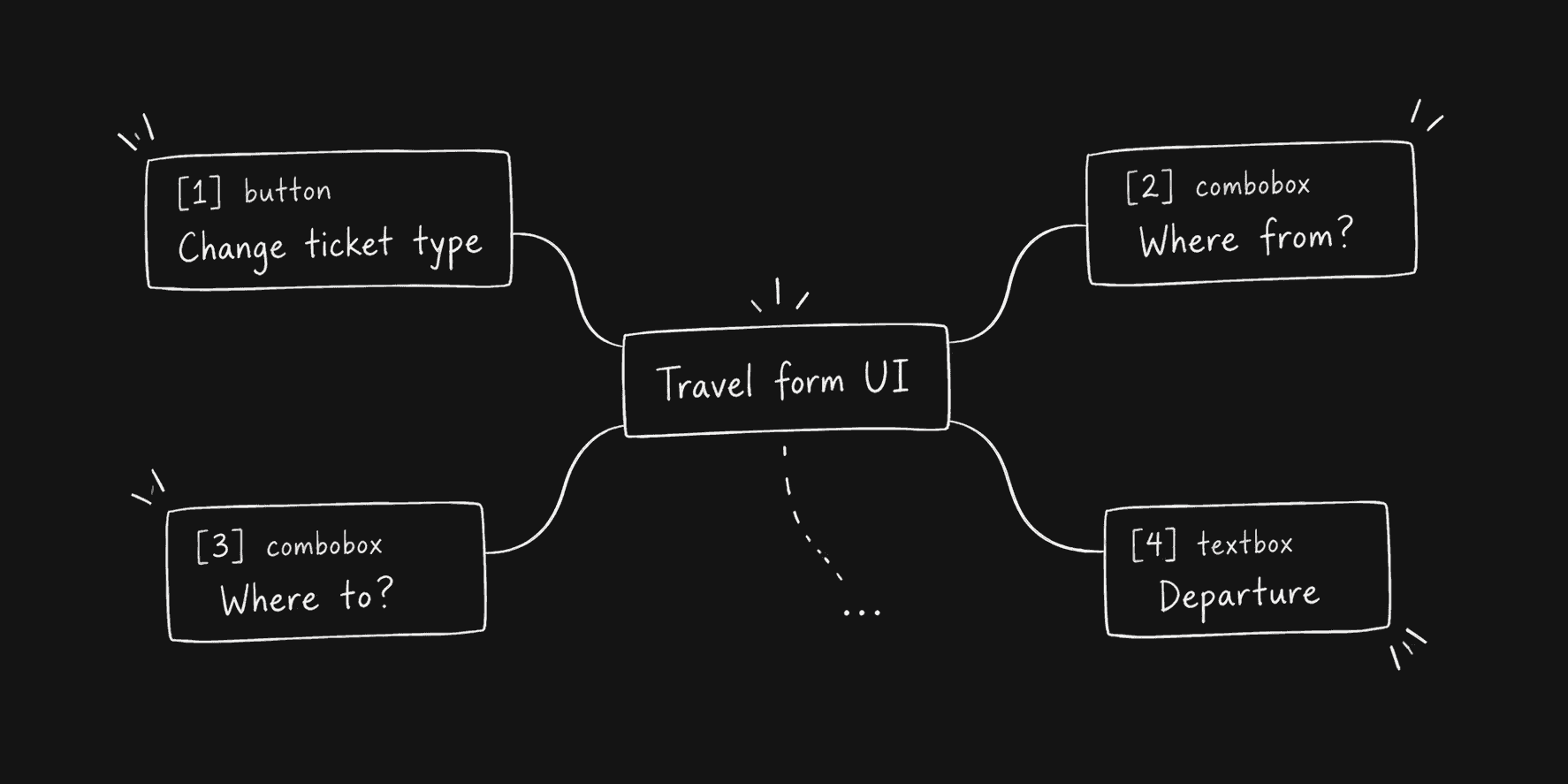
It also defines the legal operations:
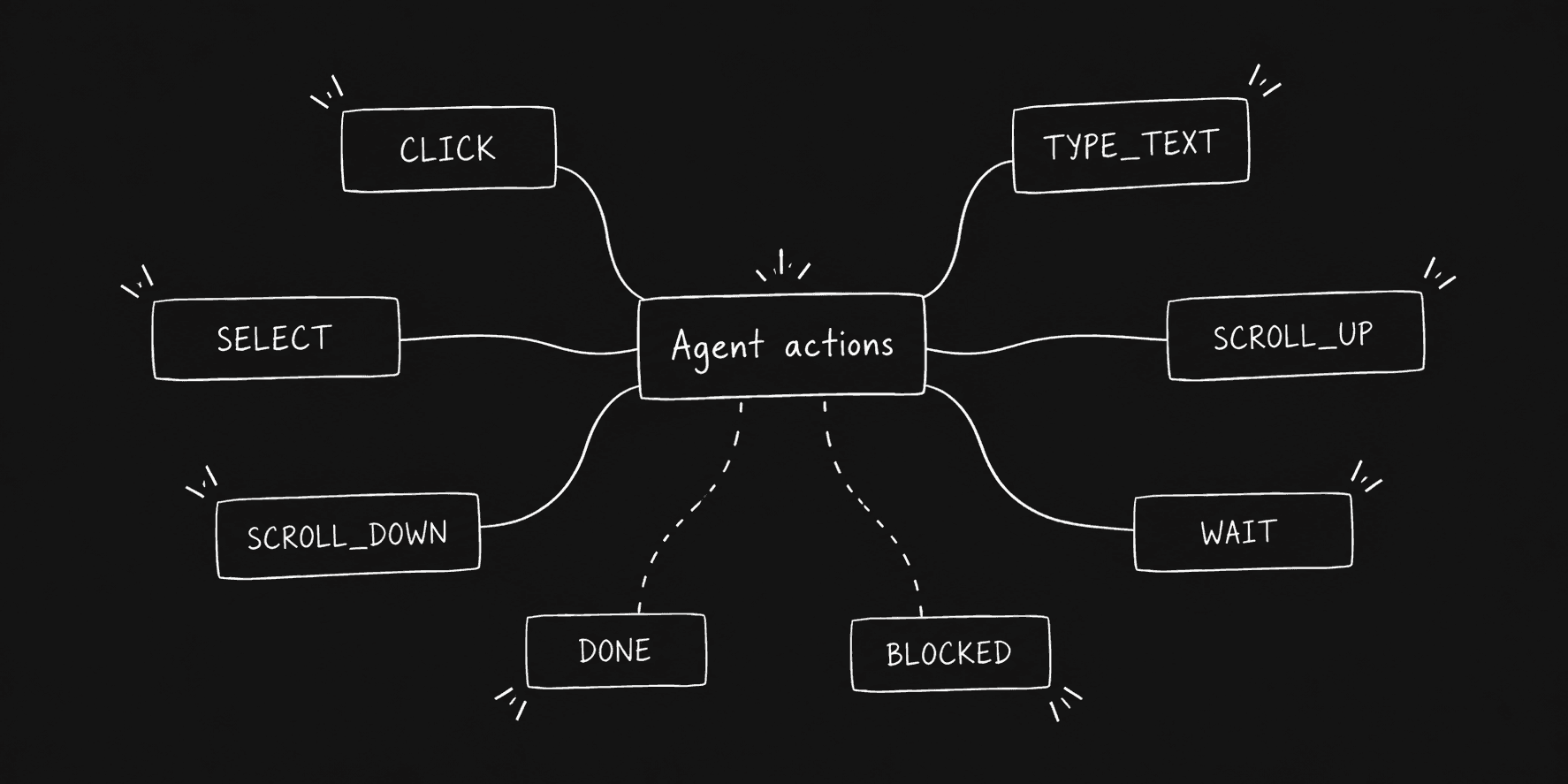
Jev picks from this structured state, as it should. It does not generate CSS selectors, JavaScript, shell commands, or coordinates.
The browser runtime resolves the selected index back to the real page element and checks the page state again before executing it.
Result? Insane speed gains.
Published output
Browser Use recorded its Google Flights task completing in 7.073 seconds.
Its performance notes report 17 Jev requests, 10 browser interactions, one explicit wait, two text-generation calls, and a median Jev latency of 178 ms for that run.
That is a useful result, but I would keep it in context. It is one controlled browser task, not a broad browser-agent benchmark.
The default loop also depends on structured browser state. Jev itself does not accept screenshots or other image input. TypeSafe's current model documentation lists Jev as text-only.
So a browser runtime still needs to do the perception work first. That same limitation tells us where Jev should and should not be used.
6. Moderate Discord, Twitch, and YouTube live chat
Live-chat moderation is another bounded decision problem.
For every message, the application usually needs to decide whether to keep it, send it to a moderator, or remove it. Jev can make that judgment without asking an LLM to explain every message.
The same moderation function can work across Discord, Twitch, and YouTube. Only the code that receives and deletes messages changes.
new chat message
   ↓
Jev: harmful probability + category
   ↓
probability ≥ 0.8  → remove
probability ≥ 0.5  → human review
otherwise          → keep
These thresholds are application policy, not Jev defaults. A community with stricter rules can lower them, while a high-impact enforcement workflow can require greater confidence.
Step 1: Define the moderation decisions
We can ask a Noul question for the enforcement probability and a Choice question for a useful moderation label.
const QUESTIONS = {
  harmful: {
    type: "noul",
    instructions:
      "The message contains a targeted insult, harassment, threat, " +
      "hate speech, or another clear personal attack. Casual swearing, " +
      "criticism of a game or product, and harmless jokes do not count.",
  },
  category: {
    type: "choice",
    criteria: {
      harassment: "Targets or repeatedly intimidates a person",
      hate: "Attacks a protected group or identity",
      spam: "Repetitive, promotional, or meaningless flooding",
      safe: "Normal conversation, criticism, jokes, or mild frustration",
    },
  },
};
Both questions evaluate the same message in one request. The Noul probability drives the policy, while the category makes moderation logs easier to inspect.
If Jev is connected through Composio, the shared function can look like this:
async function judgeMessage(text) {
  const result = await composio.tools.execute("JEV_EVALUATE_STATE", {
    userId: process.env.COMPOSIO_USER_ID,
    arguments: {
      state: text,
      questions: QUESTIONS,
    },
    dangerouslySkipVersionCheck: true,
  });<p></p>
<p>  if (!result.successful) {
    throw new Error(result.error || "Jev moderation failed");
  }</p>
<p>  const answers = result.data.answers;</p>
<p>  return {
    probability: answers.harmful.noul,
    category: answers.category.choice,
  };
}</p>
Normal code then owns the enforcement rule.
function decideModeration({ probability, category }) {
  if (probability >= 0.8) {
    return { action: "remove", category };
  }<p></p>
<p>  if (probability >= 0.5) {
    return { action: "review", category };
  }</p>
<p>  return { action: "keep", category };
}</p>
Step 2: Connect the same decision to each platform
Platform | Receive messages | Remove messages |
|---|---|---|
Discord | Gateway events through |
|
Twitch | EventSub | Twitch moderation API using the message ID |
YouTube |
|
For Discord, the bot listens for a new message and applies the shared function:
client.on("messageCreate", async (message) => {
  if (!message.content || message.author.bot) return;<p></p>
<p>  const verdict = await judgeMessage(message.content);
  const decision = decideModeration(verdict);</p>
<p>  if (decision.action === "remove") {
    await message.delete();
  } else if (decision.action === "review") {
    await sendToModeratorQueue(message, verdict);
  }
});</p>
Twitch and YouTube follow the same pattern. Their event handlers pass the message text to judgeMessage(), then use the platform's message ID if the policy returns remove.
This separation is important:
platform event → shared Jev judgment → policy in code → platform actionJev does not hold moderator permissions or delete anything itself. It supplies a probability and category. The application controls thresholds, rate limits, audit logs, appeals, and the final platform action.
For production moderation, I would also add per-channel queues, duplicate-message detection, rate limiting, and a human-review path. High-confidence automation can handle obvious abuse, while uncertain or context-dependent messages stay with human moderators.
The complete Discord, Twitch, and YouTube starter implementation is available in the Jev live-chat moderator repository.
Where Jev fits better than LLMs, and where it does not
After going through these examples, I would use one rule to decide whether a task belongs in Jev:
Task | Jev | LLMs |
|---|---|---|
Route a ticket | ✔️ | ❌ |
Select a known field | ✔️ | ❌ |
Score risk | ✔️ | ❌ |
Choose a tool | ✔️ | ❌ |
Decide whether an agent should stop | ✔️ | ❌ |
Classify millions of database rows | ✔️ | ❌ |
Draft a support response | ❌ | ✔️ |
Write code | ❌ | ✔️ |
Summarise a report | ❌ | ✔️ |
Inspect a screenshot directly | ❌ | ✔️ |
Calculate an exact invoice total | ❌ | ✔️ |
Invent a value outside the supplied options | ❌ | ✔️ |
The rule is simple: if you can define the valid answers before the model runs, Jev is worth evaluating.
TypeSafe itself recommends breaking broad decisions into focused questions and combining the answers in code.
The architecture I ended up with looks like this:
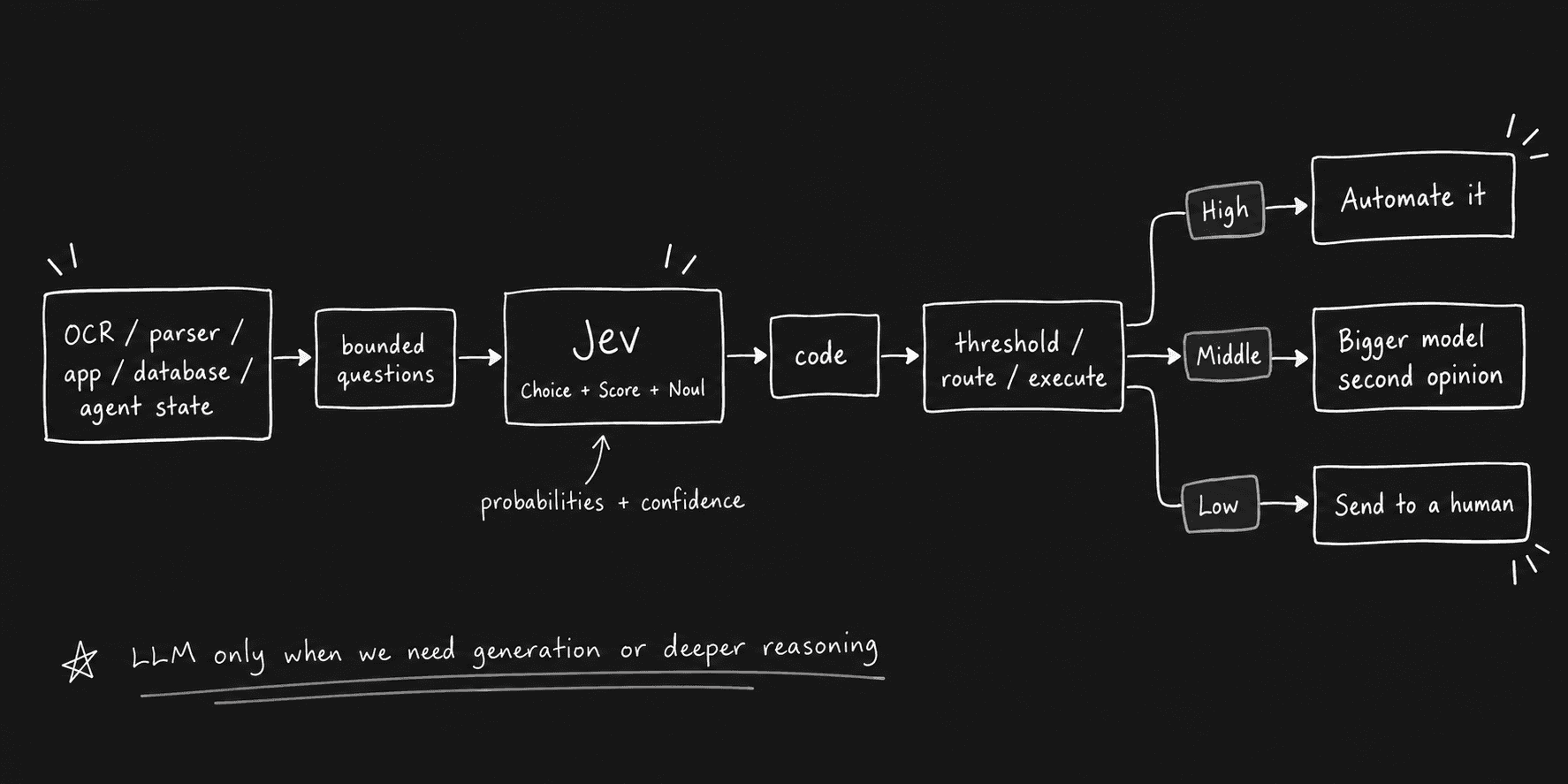
That is also the common pattern across the research examples.
Conclusion
Jev becomes much easier to understand once you stop asking whether it can replace an LLM.
It is built for a different part of the stack.
An LLM is still useful when the answer is open-ended. It can plan, write, code, explain, summarise, and generate new information.
Jev becomes useful when the application already knows what the possible answers look like and needs to make that decision repeatedly.
That can be a ticket queue.
It can be one candidate from a document.
It can be a category over 100,000 database rows.
It can be the decision to allow, review, retry, stop, or escalate an agent action.
It can be the next valid action on a browser page.
The most important thing I learned while testing it was also the simplest:
Keep the possibilities in code, and use Jev to judge between them.
That keeps control flow inside the application while still letting the model handle the part that normal if statements cannot easily express.
Jev is still very new, and most independent production evidence is only days old. So I would not treat launch-week demos as proof that it works for every classifier or every agent loop.
But the interface itself is interesting.
State goes in → Typed decisions come out → Your software decides what happens next.
And for a surprisingly large number of AI workflows, that might be all the model needs to do.

 Get started