How to integrate Render MCP with Pi

Connect Pi to Render MCP. Deploy latest code to staging service, restart production web service now, and more using natural language, with authentication handled for you.

Render logoRender
Api Key

Render is a unified cloud platform for building and running apps and websites. It simplifies deployment, scaling, and management across your projects.

95 Tools

Introduction

Pi is a minimal, self-extensible coding agent that lives in your terminal — one agent loop over Claude, GPT-5, Gemini, Grok, DeepSeek, and 20+ other providers, with maximum extension surface and minimum product opinion. Its core ships four tools (read, write, edit, bash) and self-extends at runtime through skills, extensions, and packages.

This guide explains the easiest and most robust way to connect your Render account to Pi. You can do this through either Composio Connect CLI or Composio Connect MCP. Because Pi already runs shell commands as first-class tools and ships no built-in MCP, the CLI is the recommended path — it's faster to set up, needs no server config, and chains multi-step tasks more reliably. The MCP path is also fully supported through Pi's official pi-mcp-adapter extension.

Also integrate Render with

What is Composio Connect?

Composio Connect is a consumer offering that lets anyone plug 1,000+ applications directly into their agent harness — including Pi. It can:

  • Search and load tools from relevant toolkits on-demand, reducing context usage.
  • Chain multiple tools to accomplish complex workflows via a remote workbench, without excessive back-and-forth with the LLM.
  • Manage app authentication end-to-end with zero manual overhead.

Connect Render to Pi with Composio

Prerequisites: Install Pi

Pi needs Node.js 18+ (Node 22 recommended). Install the agent globally with npm:

bash
npm install -g --ignore-scripts @earendil-works/pi-coding-agent

On Linux or macOS you can use the installer script instead:

bash
curl -fsSL https://pi.dev/install.sh | sh

Then run pi in any project directory and authenticate your model provider — use /login inside Pi for subscription providers (Claude Pro/Max, ChatGPT, GitHub Copilot), or set an API key such as ANTHROPIC_API_KEY before starting. Confirm it's working:

bash
pi --version

Full first-run details are in the Pi Quickstart.

Option 1: Composio CLI (recommended)

Pi runs shell commands as first-class tools, so the Composio Universal CLI is the most natural fit — no MCP server to configure and reliable multi-step tool chaining. Install and authenticate:

bash
# Install the Composio CLI
curl -fsSL https://composio.dev/install | bash

# Log in to Composio
composio login

Connect to Render

Ask Pi to connect to Render, or simply request any Render-related task. Under the hood Pi calls Composio commands like any other shell tool:

bash
composio search "what can I do with Render?"
composio link render

On the first Render call, composio link render opens an OAuth prompt so you can authorize access. After that, every Render command works with your stored credentials automatically — just talk to Pi and it will search, execute, and chain Render tools as needed.

Option 2: Composio MCP

Pi's core intentionally ships no built-in MCP, but the official pi-mcp-adapter extension adds full MCP support — exposing every server through a single lightweight proxy tool (~200 tokens) instead of loading hundreds of tool definitions into context.

1. Install the MCP adapter extension

bash
pi install npm:pi-mcp-adapter

Restart Pi after installation.

2. Add the Composio MCP server

Create (or edit) a .mcp.json file in your project root, or ~/.config/mcp/mcp.json for a user-global setup:

bash
{
  "mcpServers": {
    "composio": {
      "url": "https://connect.composio.dev/mcp"
    }
  }
}

The adapter connects lazily by default — the server won't start until Pi actually calls one of its tools, and cached metadata keeps search and describe working without a live connection.

3. Authenticate

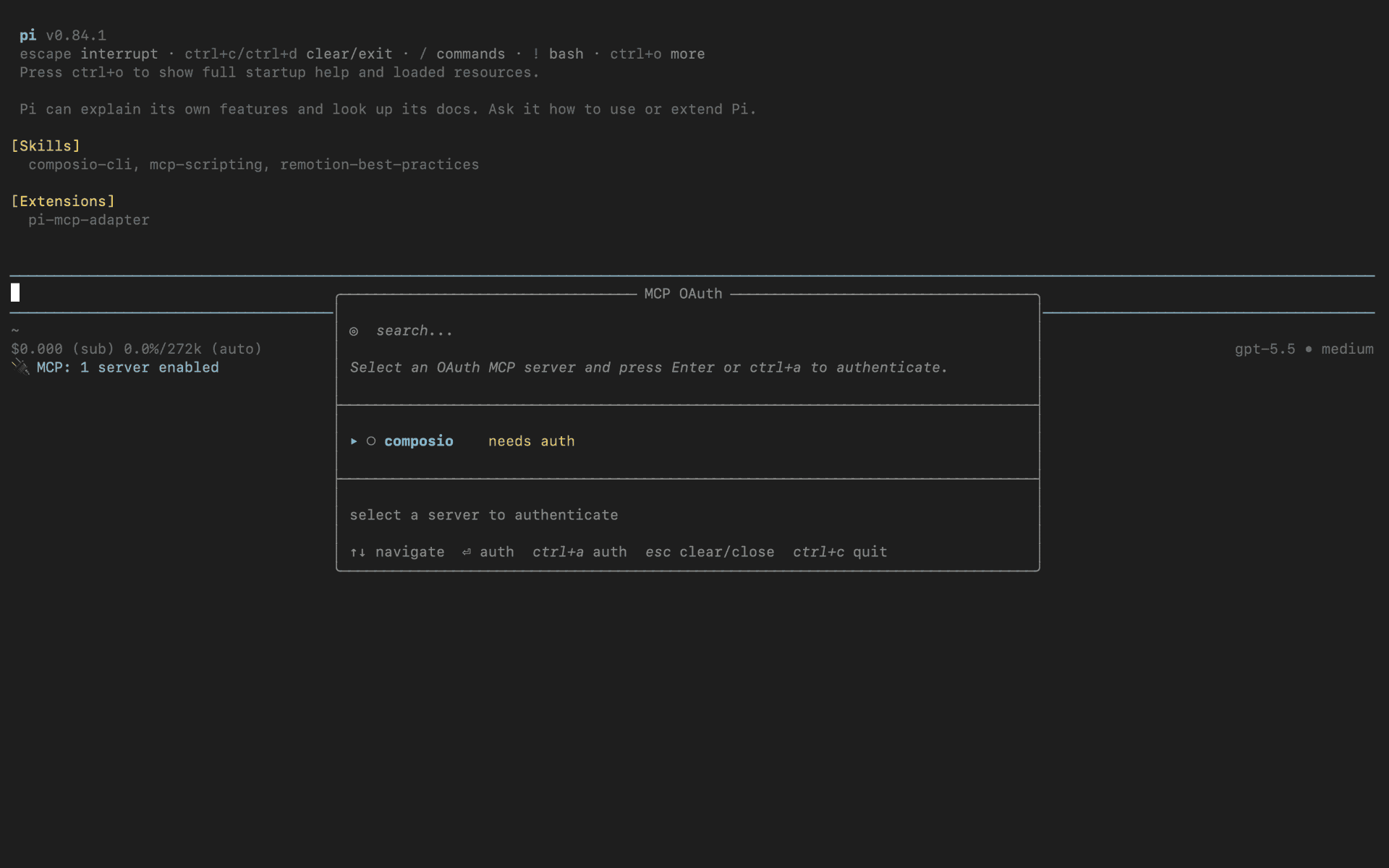
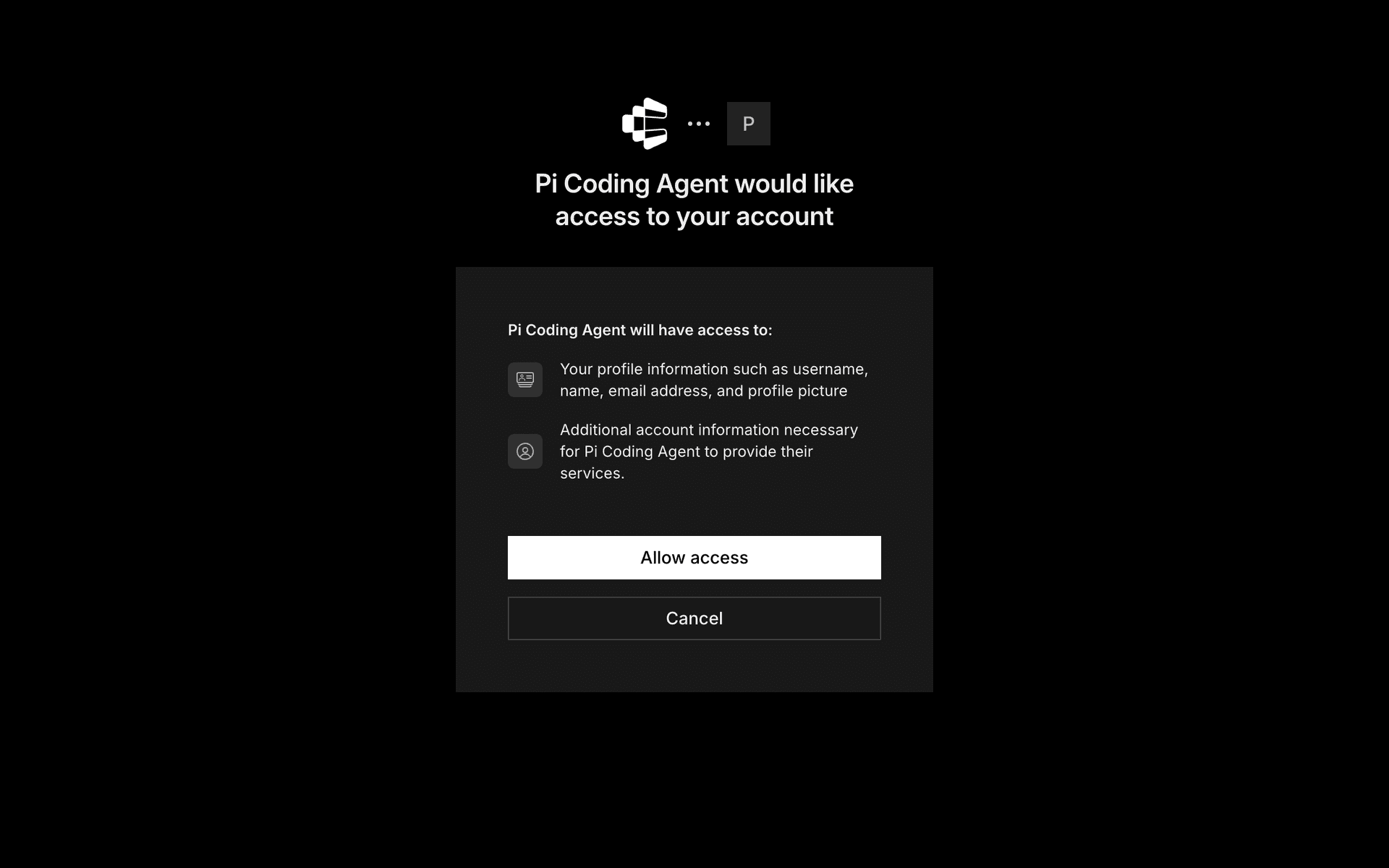
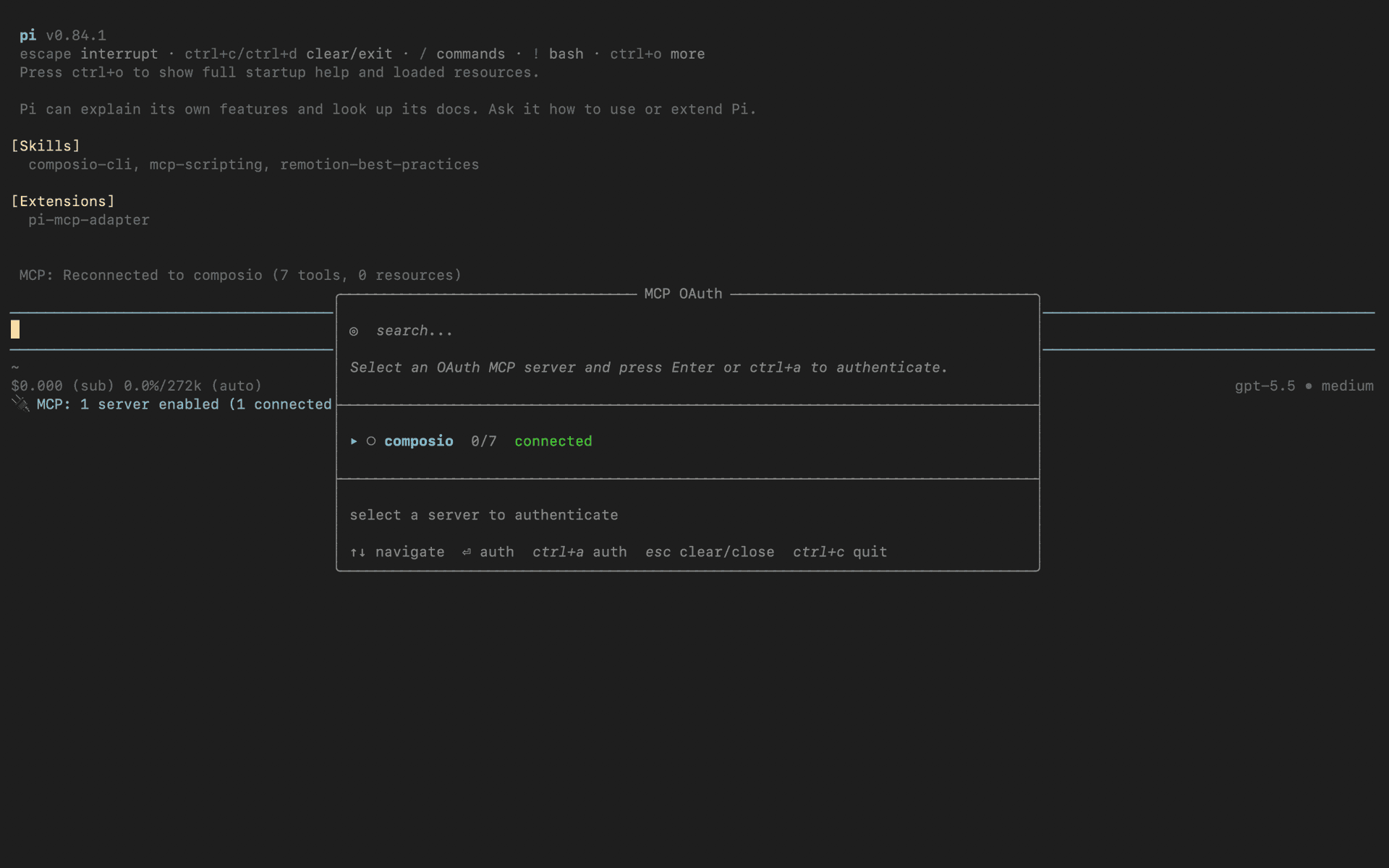
Run /mcp-auth inside Pi to open the authentication modal and select composio from the list. Complete the sign-in in your browser, then on the consent screen click Allow access to authorize Composio. Once approved, the server shows as connected inside Pi:

Pi /mcp-auth modal listing the composio MCP server
Composio OAuth consent screen with the Allow access button
Composio MCP server connected inside Pi

4. Done!

Confirm the server is live with /mcp to open the interactive panel, then ask Pi to connect to Render or request any Render-related task — it will prompt you to authorize Render on first use.

What is the Render MCP server, and what's possible with it?

The Render MCP server is an implementation of the Model Context Protocol that connects your AI agent and assistants like Claude, Cursor, etc directly to your Render account. It provides structured and secure access to your cloud infrastructure, so your agent can perform actions like deploying applications, managing services, monitoring site health, restarting instances, and scaling resources on your behalf.

  • Automated application deployment: Instantly deploy new web apps or services without manual steps, letting your agent handle setup and rollouts.
  • Service monitoring and status checks: Ask your agent to check the health and uptime of your apps or services, so you’re always up to speed on what’s running smoothly—and what’s not.
  • Instance management and restarts: Enable your agent to restart, stop, or scale up/down your running services to quickly respond to changes or issues.
  • Resource scaling and configuration: Let your agent adjust resource allocations, increasing or decreasing capacity based on current needs or traffic spikes.
  • Error diagnostics and log retrieval: Have your agent fetch logs or error reports to help troubleshoot issues before they become major problems.

Way Forward

With Render connected, Pi can now act on your behalf whenever you ask it to.

From here, you can extend Pi further:

  • Connect more apps: Calendar, Slack, Notion, Linear, and hundreds of others are available through the same Composio Connect setup. Each new integration compounds what Pi can do for you.
  • Build workflows across tools: Once multiple apps are connected, Pi can chain actions together — turn an email into a calendar invite, a Slack message into a Linear ticket, or a meeting note into a follow-up draft.
  • Lean into Pi's extension surface: Wrap common Render flows as Pi skills or prompt templates so recurring tasks become one-line commands, and use directTools in the MCP adapter to promote your most-used Render tools into Pi's tool list directly.

If you run into trouble or want to share what you've built, join the community or check out the Docs for deeper configuration options.

TOOLS

Supported Tools

Every Render action and event your agent gets out of the box.

Add Header Rule

Tool to add a custom HTTP header rule to a Render service.

Add or Update Secret File

Tool to add or update a secret file for a Render service.

Add Resources to Environment

Tool to add resources to a Render environment.

Add Route

Tool to add redirect or rewrite rules to a Render service.

Create Custom Domain

Tool to add a custom domain to a Render service.

Create Environment Group

Tool to create a new environment group.

Create Environment

Tool to create a new environment within a Render project.

Create Postgres Instance

Tool to create a new Postgres instance on Render.

Create Registry Credential

Tool to create a registry credential.

Delete Environment Group Variable

Tool to remove an environment variable from an environment group.

Delete Environment Group Secret File

Tool to remove a secret file from an environment group.

Delete Environment

Tool to delete a specified environment.

Delete Key Value

Tool to delete a Key Value instance.

Delete Owner Log Stream

Tool to delete a log stream for an owner.

Delete Owner Metrics Stream

Tool to delete a metrics stream for a workspace.

Delete Registry Credential

Tool to delete a registry credential.

Delete Secret File

Tool to delete a secret file from a Render service.

Delete Service

Tool to delete a service.

Disconnect Blueprint

Tool to disconnect a blueprint from your Render account.

Get Active Connections

Tool to get active connection count metrics for Render resources.

Get Bandwidth Sources

Tool to get bandwidth usage breakdown by traffic source.

Get CPU Usage

Tool to retrieve CPU usage metrics for Render resources.

Get CPU Limit

Tool to retrieve CPU limit metrics for Render resources.

Get Disk Capacity

Tool to get disk capacity metrics for Render resources.

Get Disk Usage

Tool to retrieve disk usage metrics for Render resources.

Get Instance Count

Tool to get instance count metrics for Render resources.

Get Memory Usage

Tool to get memory usage metrics for one or more resources.

Get Memory Limit

Tool to get memory limit metrics for Render resources over a specified time range.

Get Memory Target

Tool to get memory target metrics for Render resources.

Get User

Tool to get the authenticated user.

Link Service to Environment Group

Tool to link a service to an environment group.

List Application Filter Values

Tool to list queryable instance values for application metrics.

List Blueprints

Tool to list all blueprints.

List Deploys

Tool to list recent deploys for a Render service with pagination and filtering.

List Disks

Tool to list all disks.

List Environment Groups

Tool to list environment groups.

List Environments

Tool to list environments for a project.

List Environment Variables for Service

Tool to list all environment variables configured directly on a Render service (with pagination).

List Instances

Tool to list instances of a service.

List Key Value Instances

Tool to list all Key Value instances.

List Logs

Tool to list logs for a specific workspace and resource.

List Log Label Values

Tool to list log label values for a workspace.

List Maintenance Runs

Tool to list maintenance runs.

List Notification Overrides

Tool to list notification overrides for services.

List Workspace Members

Tool to list workspace members.

List Owners

Tool to list owners (users and teams).

List Postgres Instances

Tool to list Postgres instances.

List Postgres Exports

Tool to list all exports for a Postgres instance.

List PostgreSQL Users

Tool to list PostgreSQL user credentials for a Render PostgreSQL database instance.

List Projects

List Projects

List Registry Credentials

Tool to list registry credentials.

List Resource Log Streams

Tool to list resource log stream overrides.

List Routes

Tool to list redirect/rewrite rules for a service.

List Secret Files

Tool to list secret files for a Render service.

List Services

Tool to list all services.

List Task Runs

Tool to list task runs.

List Tasks

Tool to list tasks.

List Webhooks

Tool to list all webhooks.

List Workflows

Tool to list workflows.

List Workflow Versions

Tool to list workflow versions.

Restart Service

Tool to restart a service.

Resume Service

Tool to resume a suspended service.

Retrieve Custom Domain

Tool to retrieve a specific custom domain for a service.

Retrieve deploy

Retrieve deploy

Retrieve Environment Group

Tool to retrieve a specific environment group by ID.

Retrieve Environment Variable

Tool to retrieve a specific environment variable from a Render environment group.

Retrieve Environment Group Secret File

Tool to retrieve secret file from an environment group.

Retrieve Environment Variable

Tool to retrieve a specific environment variable from a Render service.

Retrieve Owner

Tool to retrieve a specific owner (workspace) by ID.

Retrieve Owner Notification Settings

Tool to retrieve notification settings for a specific owner (workspace).

Retrieve Postgres Instance

Tool to retrieve a specific Postgres instance.

Retrieve Project

Tool to retrieve a specific project by ID.

Retrieve Registry Credential

Tool to retrieve a registry credential by ID.

Retrieve Secret File

Tool to retrieve a secret file from a Render service.

Retrieve Service

Tool to retrieve a specific service by ID.

Stream Task Runs Events

Tool to stream real-time task run events via Server-Sent Events (SSE).

Subscribe to Logs

Tool to subscribe to real-time logs via WebSocket connection.

Suspend Service

Tool to suspend a service.

Trigger Deploy

Tool to trigger a new deploy for a specified service.

Update Environment Group

Tool to update an environment group's name.

Update Environment Group Variable

Tool to add or update an environment variable in an environment group.

Update Environment Group Secret File

Tool to add or update a secret file in an environment group.

Update Environment Variable

Tool to add or update an environment variable for a Render service.

Update Environment Variables for Service

Tool to update environment variables for a Render service.

Update Header Rules

Tool to replace all header rules for a Render service.

Update Owner Log Stream

Tool to update log stream configuration for an owner.

Update Owner Notification Settings

Tool to update notification settings for a specific owner (workspace).

Update Postgres Instance

Tool to update a Postgres instance configuration.

Update Project

Tool to update a project's name.

Update Registry Credential

Tool to update a registry credential.

Update Resource Log Stream

Tool to update log stream override for a resource.

Update Routes

Tool to update redirect/rewrite rules for a service.

Update Secret Files for Service

Tool to update secret files for a Render service.

Update Service

Tool to update a service configuration.

Verify Custom Domain

Tool to verify DNS configuration for a custom domain.

FAQ

Frequently asked questions

With a standalone Render MCP server, the agents and LLMs can only access a fixed set of Render tools tied to that server. However, with the Composio Tool Router, agents can dynamically load tools from Render and many other apps based on the task at hand, all through a single MCP endpoint.

Yes, you can. Pi fully supports MCP integration. You get structured tool calling, message history handling, and model orchestration while Tool Router takes care of discovering and serving the right Render tools.

Yes, absolutely. You can configure which Render scopes and actions are allowed when connecting your account to Composio. You can also bring your own OAuth credentials or API configuration so you keep full control over what the agent can do.

All sensitive data such as tokens, keys, and configuration is fully encrypted at rest and in transit. Composio is SOC 2 Type 2 compliant and follows strict security practices so your Render data and credentials are handled as safely as possible.

Start with Render.It takes 30 seconds.

Managed auth, hosted MCP servers, and every Render tool your agent needs.Free to start.

Start building