How to connect Postiz MCP with VS Code

Connect VS Code to Postiz MCP. Schedule a linkedin post for next monday, get analytics for your last facebook post, and more using natural language, with authentication handled for you.

Postiz logoPostiz
Api Key

Postiz is an agentic social media scheduling tool for managing and growing your online presence. It helps you schedule posts, capture leads, and build an audience—all powered by AI.

14 Tools

How to connect Postiz MCP with VS Code

VS Code is the most popular code editor out there. With its recent AI makeover, it can do more than just help you write code. You can connect your applications to it and let LLMs automate many of the mundane tasks in your workflow.

In this guide, I will explain how to connect Postiz with VS Code in the most secure and robust way possible via Composio.

Also integrate Postiz with

Why use Composio?

Composio provides:

  • Access to 1,500+ managed apps from a single MCP endpoint. This makes it convenient for agents to run cross-app workflows.
  • Programmatic tool calling. Allows LLMs to write its code in a remote workbench to handle complex tool chaining. Reduces to-and-fro with LLMs for frequent tool calling.
  • Large tool response handling outside the LLM context. This minimizes context bloat from large tool responses.
  • Dynamic just-in-time access to thousands of tools across hundreds of apps. Composio loads the tools your agent needs, so LLMs are not overwhelmed by tools they do not need.

Integrate Postiz MCP with VS Code

1. Install with one click

Click the button below to add Composio to VS Code. You will be prompted to authorize. This requires VS Code 1.99+ with GitHub Copilot.

+Install in VS Code

2. Or add manually

Open or create .vscode/mcp.json in your project root and add the following configuration:

bash
{
  "servers": {
    "composio": {
      "type": "http",
      "url": "https://connect.composio.dev/mcp"
    }
  }
}

3. Authorize

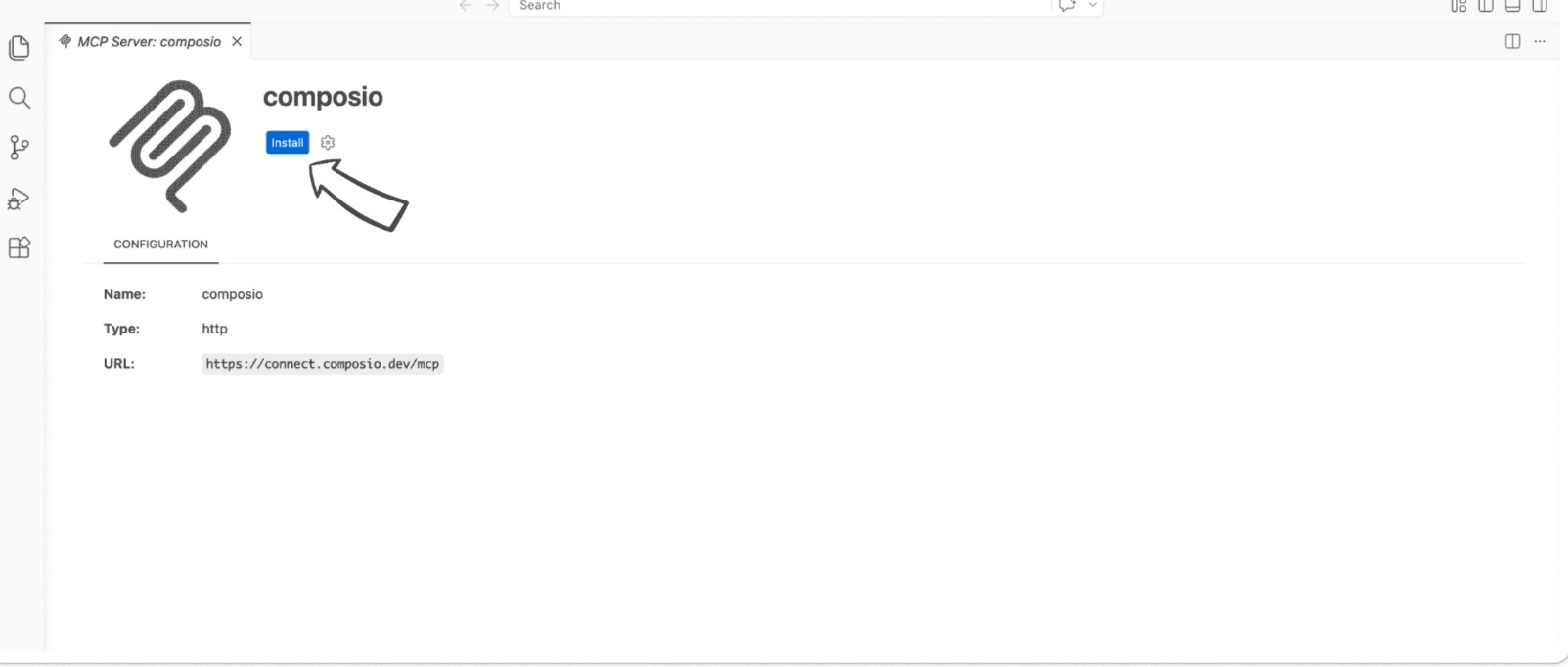
Click the install button to authorize VS Code to connect to Composio. VS Code will detect OAuth and prompt you to sign in.

VS Code MCP server install screen for Composio

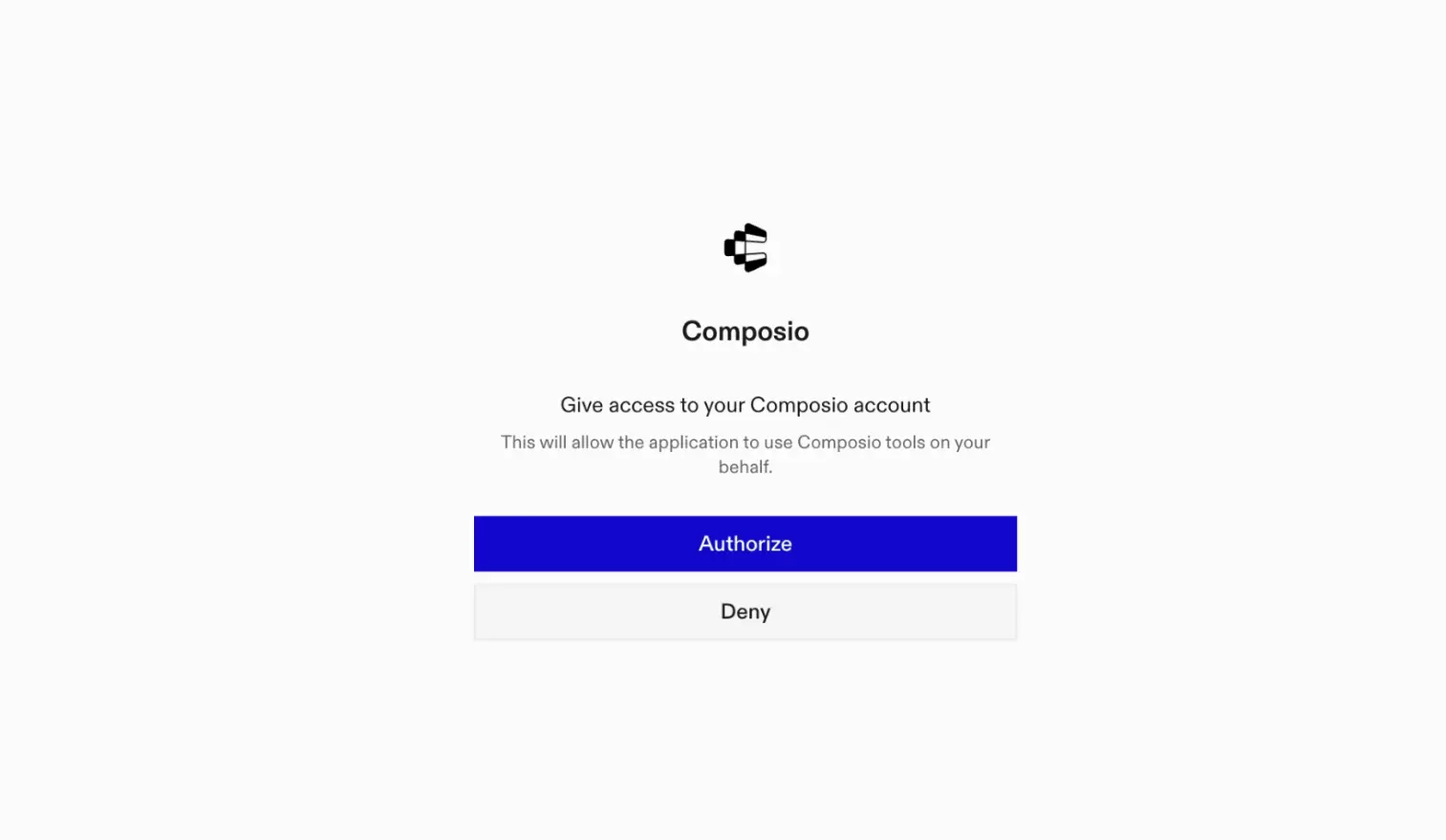
A browser window will open to authorize.

Composio authorization browser window

4. Authenticate Postiz and start working

Back in VS Code chat, ask the agent to connect to Postiz or give it any Postiz-related task.

For example, ask it to:

  • "Schedule a LinkedIn post for next Monday"
  • "Get analytics for your last Facebook post"
  • "List all scheduled posts for this week"

It will prompt you to authenticate and authorize access to Postiz.

That is it. Composio tools are now available in VS Code, and your Postiz account is ready to use.

Way Forward

Now that Postiz is connected, extend your setup by connecting the other apps you already use every day, so your agent can run true cross-app workflows end to end.

  • Connect Calendar to turn threads into scheduled meetings automatically.
  • Connect Slack or Teams to post summaries, approvals, and alerts where your team works.
  • Connect Notion, Linear, Jira, or Asana to convert requests into tickets, tasks, and docs.
  • Connect Drive, Dropbox, or OneDrive to fetch, file, and share attachments without manual steps.
  • Connect HubSpot or Salesforce to log customer context, update records, and draft follow-ups.

Start with one workflow you do repeatedly, then keep adding apps as you find new handoffs. With everything behind a single MCP endpoint, your agent can coordinate multiple tools safely and reliably in one conversation.

TOOLS

Supported Tools

Every Postiz action and event your agent gets out of the box.

Ask postiz

Ask agent 'postiz' a question.

Generateimagetool

Generate image to use in a post, in case the user specified a platform that requires attachment and attachment was not provided, ask if they want to generate a picture of a video.

Generatevideooptions

All the options to generate videos, some tools might require another call to generateVideoFunction

Generatevideotool

Generate video to use in a post, in case the user specified a platform that requires attachment and attachment was not provided, ask if they want to generate a picture of a video.

Grouplist

This tool lists the available groups (customers).

Integrationlist

This tool list available integrations to schedule posts to.

Integrationscheduleposttool

Use this when the user wants to create a draft, scheduled, or immediate social media post on their connected channels, based on the integrationSchema tool.

Integrationschema

Everytime we want to schedule a social media post, we need to understand the schema of the integration.

Postsettingstool

Update the provider settings of an existing post (scheduled or draft) that was NOT published yet.

Postslisttool

List the organization's posts scheduled to be published between two dates (the same data as the "List Posts" API endpoint).

Triggertool

Use this to call a provider helper function (a methodName from the integrationSchema callable tools) that fetches provider-specific data needed for settings, like ids or search results.

Uploadfromurltool

Upload a remote image or video into the media library from a public URL.

Videofunctiontool

Sometimes when we want to generate videos we might need to get some additional information like voice_id, etc

Videostatustool

Check the status of a video generation started with 'generateVideoTool', using the jobId it returned.

FAQ

Frequently asked questions

With a standalone Postiz MCP server, the agents and LLMs can only access a fixed set of Postiz tools tied to that server. However, with the Composio Tool Router, agents can dynamically load tools from Postiz and many other apps based on the task at hand, all through a single MCP endpoint.

Yes, you can. VS Code fully supports MCP integration. You get structured tool calling, message history handling, and model orchestration while Tool Router takes care of discovering and serving the right Postiz tools.

Yes, absolutely. You can configure which Postiz scopes and actions are allowed when connecting your account to Composio. You can also bring your own OAuth credentials or API configuration so you keep full control over what the agent can do.

All sensitive data such as tokens, keys, and configuration is fully encrypted at rest and in transit. Composio is SOC 2 Type 2 compliant and follows strict security practices so your Postiz data and credentials are handled as safely as possible.

Start with Postiz.It takes 30 seconds.

Managed auth, hosted MCP servers, and every Postiz tool your agent needs.Free to start.

Start building