How to connect Ahrefs to Muse

Connect Muse to Ahrefs MCP. Get domain rating trend for competitor site, list all broken backlinks for your website, and more using natural language, with authentication handled for you.

Ahrefs logoAhrefs
Api KeyOauth2

Ahrefs is an SEO and marketing platform for site audits, keyword research, and competitor insights. It helps you improve search rankings and drive organic traffic.

46 Tools

Introduction

Muse is Meta's AI assistant. It can connect to outside tools through custom connectors, which use the Model Context Protocol (MCP).

This guide explains how to connect Ahrefs to Muse using Composio Connect, which handles OAuth, token refresh, and reliability so you do not have to. You add Composio as a custom connector once, then ask Muse to work with Ahrefs in plain language.

For exact tool slugs and parameter tables, see the tool catalog in the Composio docs.

Also integrate Ahrefs with

Why use Composio?

  • Cross-app workflows across 1,700+ apps from a single plugin layer.
  • On-demand tool loading so Muse only loads the tools needed for the current task.
  • Programmatic tool calling through a remote workbench for complex, multi-step workflows.
  • Multi-account support so users can connect and switch between multiple accounts for the same app.
  • Shared account access so teams or agents can work through common business accounts and service connections.
  • Managed authentication with OAuth handling, credential storage, and token refresh managed by Composio.
  • Safer credential handling so app credentials stay outside the model context and tool responses.
  • User-level account isolation so actions run against the correct connected account instead of mixing user access.

Connecting Ahrefs to Muse

You add Composio to Muse once as a custom connector, then connect Ahrefs from the chat.

1. Ask Muse to connect to Composio

Start a new Muse chat and send this message. Muse builds the connector and shows a button to add your API key.

bash
Create a Custom Connector for the Composio remote MCP server and connect to it:
- Name: Composio
- Transport: remote streamable HTTP
- URL: https://connect.composio.dev/mcp
- Auth: API key sent in the x-consumer-api-key header
Open the secure credentials store so I can enter the API key there, not in this chat. Then list its tools to confirm the connection works.

2. Copy your API key

Open the Muse page in your Composio dashboard and copy your API key. It starts with ck_.

Don't paste it into the chat. It goes in Muse's secure credentials store in the next step.

3. Add your API key in the secure credentials store

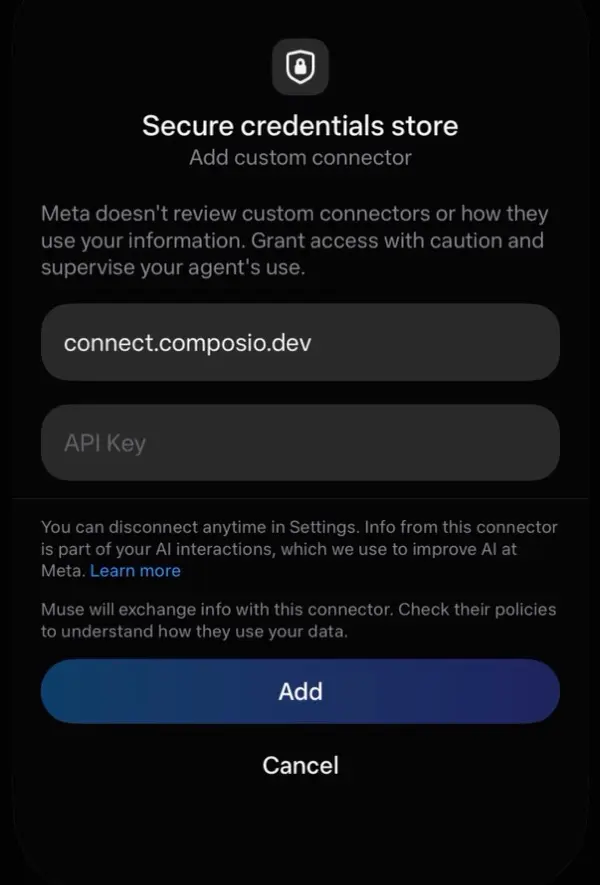
Tap the button Muse shows to open Add custom connector, paste your API key, then tap Add. Muse lists the Composio tools once it connects.

Muse secure credentials store with the connect.composio.dev URL, an API Key field, and the Add button

4. Connect your Ahrefs account

Back in the chat, ask Muse to connect to Ahrefs or give it any Ahrefs task.

For example, ask it to:

  • "Get domain rating trend for competitor site"
  • "List all broken backlinks for your website"
  • "Find keyword volume for 'AI tools' in US"

It will prompt you to authenticate and authorize access.

That's it. Composio's tools are now available in Muse, and your Ahrefs account is ready to use.

What is the Ahrefs MCP server, and what's possible with it?

The Ahrefs MCP server is an implementation of the Model Context Protocol that connects your AI agent and assistants like Claude, Cursor, etc directly to your Ahrefs account. It provides structured and secure access to backlink, keyword, competitor, ranking, and search results data, so your agent can analyze backlinks, compare competitors, review keyword rankings, inspect search results, and discover keyword ideas on your behalf.

  • Backlink and anchor analysis: Have your agent retrieve backlinks, summarize backlink statistics, and examine the anchor text pointing to a website or URL.
  • Competitor research: Let the agent compare competitors based on keyword rankings and organic search performance.
  • Keyword ranking history: Direct your agent to review current rank tracking data and historical keyword performance for a website or domain.
  • Search results and keyword ideas: Instruct your agent to inspect search results for chosen queries and find related search suggestions for a keyword or phrase.
  • Outgoing links and crawler verification: Have your agent review outgoing link statistics for a website or retrieve AhrefsBot IP ranges for crawler verification.

Way Forward

Now that Ahrefs is connected, extend your setup by connecting the other apps you already use every day, so Muse can run true cross-app workflows end to end.

  • Connect Calendar to turn threads into scheduled meetings automatically.
  • Connect Slack or Teams to post summaries, approvals, and alerts where your team works.
  • Connect Notion, Linear, Jira, or Asana to convert requests into tickets, tasks, and docs.
  • Connect Drive, Dropbox, or OneDrive to fetch, file, and share attachments without manual steps.

Start with one workflow you do repeatedly, then keep adding apps as you find new handoffs. With everything behind a single connection, Muse can coordinate multiple tools safely and reliably in one conversation.

Troubleshooting

1. Why doesn't Muse show a button to add my API key?

Muse shows the button only when you ask it to open the secure credentials store.

  • Start a new chat.
  • Send the message from step 1 exactly as written.
  • If Muse asks for the key in the chat, do not paste it. Ask Muse to open the secure credentials store.

2. Why does the Composio connection fail after I add my API key?

The key or the connector settings are not correct.

  • Copy the full key from the Composio dashboard. It starts with ck_.
  • Make sure the URL is https://connect.composio.dev/mcp and the header is x-consumer-api-key.
  • Remove the Composio connector in Muse settings, then do steps 1 to 3 again.

3. Why doesn't Muse use the Composio tools for Ahrefs?

Muse may not pick the Composio connector for the request.

  • Ask Muse to list its Composio tools.
  • Name Composio and Ahrefs in your request, for example: Use Composio to connect to Ahrefs.
  • If it still does not work, start a new chat and try again.

4. Why does Muse ask me to connect Ahrefs again?

Your Ahrefs connection expired or was removed.

  • Open the link Muse gives you and sign in to Ahrefs again.
  • Check that the Ahrefs connection shows as ACTIVE in the Composio dashboard.

5. What do I do if I pasted my API key into the chat?

Treat the key as exposed.

  • Create a new API key in the Composio dashboard and delete the old one.
  • Add the new key in Muse's secure credentials store, not in the chat.
TOOLS

Supported Tools

Every Ahrefs action and event your agent gets out of the box.

Backlinks stats retrieval

Retrieves comprehensive backlink statistics for a specified website or URL using Ahrefs' Site Explorer tool.

Batch Url Analysis

Performs a batch analysis on multiple URLs or domains using Ahrefs' powerful SEO metrics.

Domain rating for site explorer

Retrieves Ahrefs Domain Rating and Ahrefs Rank for a specified domain or URL on a requested date.

Domain rating history

Retrieves the historical Domain Rating (DR) data for a specified domain over time.

Explore keywords overview

Retrieves keyword-level overview metrics from Ahrefs' Keywords Explorer for specified keywords or an existing keyword list in a country.

Explore keyword volume by country

Retrieves monthly search volume data across countries for a specified keyword using Ahrefs' Keywords Explorer.

Explore linked domains of a site

Retrieves a list of external domains that the specified target website or URL links to, using Ahrefs' Site Explorer functionality.

Explore matching terms for keywords

The keywords_explorer_matching_terms endpoint retrieves a list of keyword phrases that match or contain the specified keyword from Ahrefs' vast database.

Fetch all backlinks

Retrieves a comprehensive list of backlinks for a specified website or URL using Ahrefs' Site Explorer tool.

Fetch broken backlinks data

Retrieves a list of broken backlinks for a specified website using Ahrefs' Site Explorer tool.

Fetch competitors overview

Retrieves a Rank Tracker competitor overview for a project, including comparative keyword ranking and organic search performance data.

Fetch rank tracker overview

Retrieves an Ahrefs Rank Tracker overview for a project, date and device, with ranking and search-performance metrics.

Fetch site explorer referring domains

Retrieves a list of domains that have backlinks pointing to a specified target website.

Fetch total search volume history

Retrieves historical total search volume for keywords associated with a target domain or URL using Ahrefs Site Explorer.

Get content helper topics

Retrieve topics covered by top-ranking pages for a keyword.

Get domain rating free

Retrieve the free Ahrefs Domain Rating for a domain or URL.

Get domain rating top domains

Retrieves domains ordered by Ahrefs Domain Rating.

Get serp overview

Retrieves a SERP overview for one keyword in a specified country, optionally at a historical date.

Get site audit projects

Lists Site Audit projects associated with the authenticated Ahrefs account, with project and crawl status details.

Get site explorer AI responses count

Retrieve AI response citation and page counts for a site.

Get site explorer country metrics

Retrieves country-specific Site Explorer metrics for a target website or URL, including organic traffic and keyword metrics.

Get site explorer crawled pages

Retrieve crawled pages and crawl metadata for a target URL.

Get site explorer linked anchors external

Retrieves anchor text data for external links going out from a target website using Ahrefs Site Explorer.

Get url rating history

Retrieves the historical URL Rating data for a specified URL over time.

Linked anchors explorer

Retrieves information about internal linked anchors for a specified website using the Ahrefs API.

List best by external links

Retrieves pages from a specified website using Ahrefs' Site Explorer best-by-external-links report.

Pages by traffic overview

Retrieves a list of pages from a specified website, ordered by their estimated organic search traffic.

Post Domain Rating Free

Retrieve Domain Rating scores for up to 1,000 target URLs.

Retrieve anchor data

Retrieves anchor text data for a specified website or URL using Ahrefs' Site Explorer tool.

Retrieve best by internal links

Retrieves pages ranked by internal links for a specified website using Ahrefs' Site Explorer.

Retrieve crawler ip ranges

Retrieves the list of IP address ranges used by Ahrefs' web crawler (AhrefsBot).

Retrieve organic competitors

Retrieves organic search competitors for a target domain or URL, with keyword overlap and performance metrics.

Retrieve organic keywords

Retrieves organic keywords data for a specified website using Ahrefs' Site Explorer tool.

Retrieve outlinks stats

Retrieves outgoing-link statistics for a specified website or URL using Ahrefs Site Explorer.

Retrieve paid pages data

Retrieves information about paid pages (PPC advertising) for a specified website using Ahrefs' Site Explorer tool.

Retrieve public crawler ips

Retrieves a list of IP addresses currently used by AhrefsBot, Ahrefs' web crawler.

Retrieve related terms

Retrieves related keyword ideas for a given keyword or keyword list in a specified country.

Retrieve site explorer keywords history

Retrieves historical keyword performance data for a specified website or domain using Ahrefs' Site Explorer.

Retrieve site explorer metrics

Retrieves Site Explorer SEO metrics for a target domain or URL on a specified date, including backlink, referring-page and crawled-page counts.

Retrieve site explorer metrics history

Retrieves historical Site Explorer traffic metrics for a target website or URL over a specified period, including estimated organic and paid traffic and cost.

Retrieve site explorer pages history

Retrieves historical page counts for a target domain or URL from Ahrefs Site Explorer over a specified period.

Retrieve site explorer referring domains history

Retrieves the historical data of referring domains for a specified website or URL over time.

Retrieve subscription limits and usage

Retrieves an Ahrefs account's subscription limits and remaining API usage allowance.

Retrieve top pages from site explorer

Retrieves data about the top-performing pages of a specified website using Ahrefs' Site Explorer tool.

Retrieve volume history

Retrieves the historical search volume data for a specified keyword using Ahrefs' Keywords Explorer tool.

Search suggestions explorer

Retrieves search suggestions for keywords or an existing keyword list using Ahrefs Keywords Explorer.

FAQ

Frequently asked questions

Start with Ahrefs.It takes 30 seconds.

Managed auth, hosted MCP servers, and every Ahrefs tool your agent needs.Free to start.

Start building