




TL;DR
Run opencode mcp add and answer the prompts, or paste the config straight into ~/.config/opencode/opencode.json. Both are covered below.
Config lives in two places. The global file applies everywhere, a project-level opencode.json applies to one repo. Project config wins where both exist.
Remote servers need a URL and OAuth. Local servers need a command to run. The config shape is different for each.
Adding servers one at a time costs context. A single GitHub server takes around 20k tokens before you have asked anything. A gateway keeps that cost flat as you add apps.
Most failures come from three things: a server that is added but not authenticated, a stale token, or tool names the model invents because too many schemas are loaded at once.
OpenCode has recently gained significant popularity in the open-source space. It’s an alternative to Claude Code.
But what if I told you could 100x your OpenCode experience with just one MCP? Yes, with Composio Connect, that’s totally possible.
After building a thousand managed MCP integrations and speaking with countless users, we found that while MCP is a force multiplier, it still has physical limitations.
Adding even a single GitHub server will take 20k tokens from your LLM's context window; adding Jira/Linear, Supabase, etc., will essentially choke the models.
What an MCP gateway is for
The fix isn't to install fewer MCP servers. It's to stop installing them one at a time in the first place.
An MCP gateway sits between your AI client (OpenCode, Claude, Cursor, whatever you're using) and the actual tools you want to call. Instead of wiring each MCP server directly into your client, and paying the context-window cost for every one of them, you connect to a single gateway endpoint that brokers access to all of them. Tool discovery, authentication, and execution all happen at the gateway layer. Your client only sees the tools it actually needs for the task in front of it.
Composio MCP gateway is what we've built around this idea. One endpoint for 1,000+ managed integrations behind it, and a small set of meta-tools exposed to the client, so the context window stays clean no matter how many apps you connect.
Specifically, here's how Composio handles it:
Exposes only a few meta tools (Search, Planner, Remote Workbench, etc.) instead of loading every available tool upfront
Search tool fetches only relevant tools from Composio-managed apps when the agent needs them, keeping the LLM's context space clean
Remote Workbench handles complex issues by chaining multiple tools together programmatically
Large artifacts aren't dumped into context. Rube stores them in a file system and fetches results only as needed
Here in this blog post, I'll walk you through how to set up Composio MCP with OpenCode. You can add any other remote MCP the same way. You can also use the CLI for connecting any apps to OpenCode.
Connect external apps with OpenCode
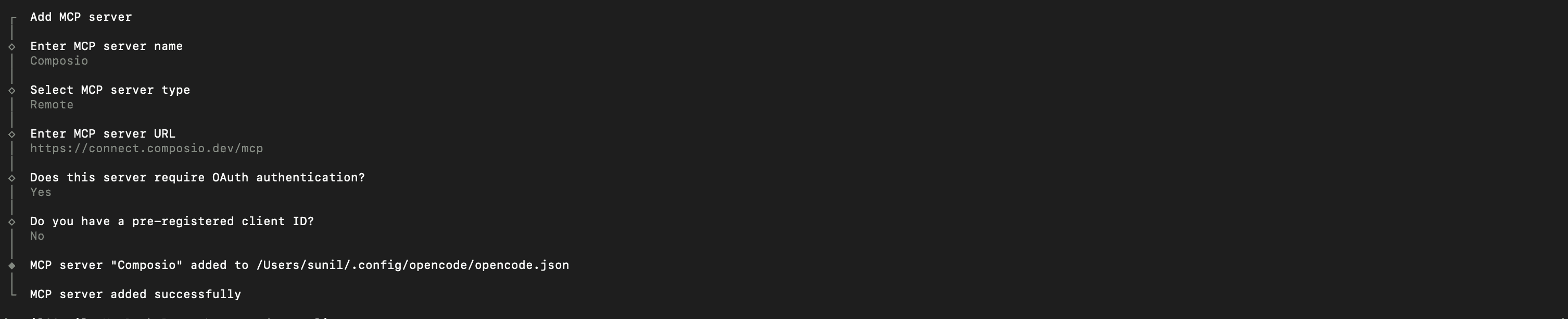
Step 1: Add the Composio MCP server
opencode mcp addThis launches an interactive prompt.
Fill in the fields
Field | Value |
|---|---|
Name | composio |
Type | remote |
URL |
|
Require OAuth | Yes |
Have client ID | No |
Step 2: Or edit the config file directly
Alternatively, you can skip the interactive prompt and paste the configuration directly into your OpenCode config file.
Open your global OpenCode config:
open ~/.config/opencode/opencode.jsonAdd this under the mcp key and save the file.
{
  "mcp": {
    "composio": {
      "type": "remote",
      "url": "<https://connect.composio.dev/mcp>",
      "enabled": true
    }
  }
}
Two things about this file are worth knowing before you edit it.
Global config against project config. The path above is the global file, and anything in it applies to every project. You can also drop an opencode.json in a project root, and it applies to that repo only. Where both define the same server, the project file wins. Keep shared servers global and repo-specific ones local, or you will end up debugging why a server behaves differently in one directory.
Remote servers against local servers. The block above is a remote server, so it takes a url and authenticates over OAuth.
Mixing the two is fine. The enabled flag on each is the quickest way to turn a server off without deleting its config, which is useful when you are narrowing down which server is causing a problem.
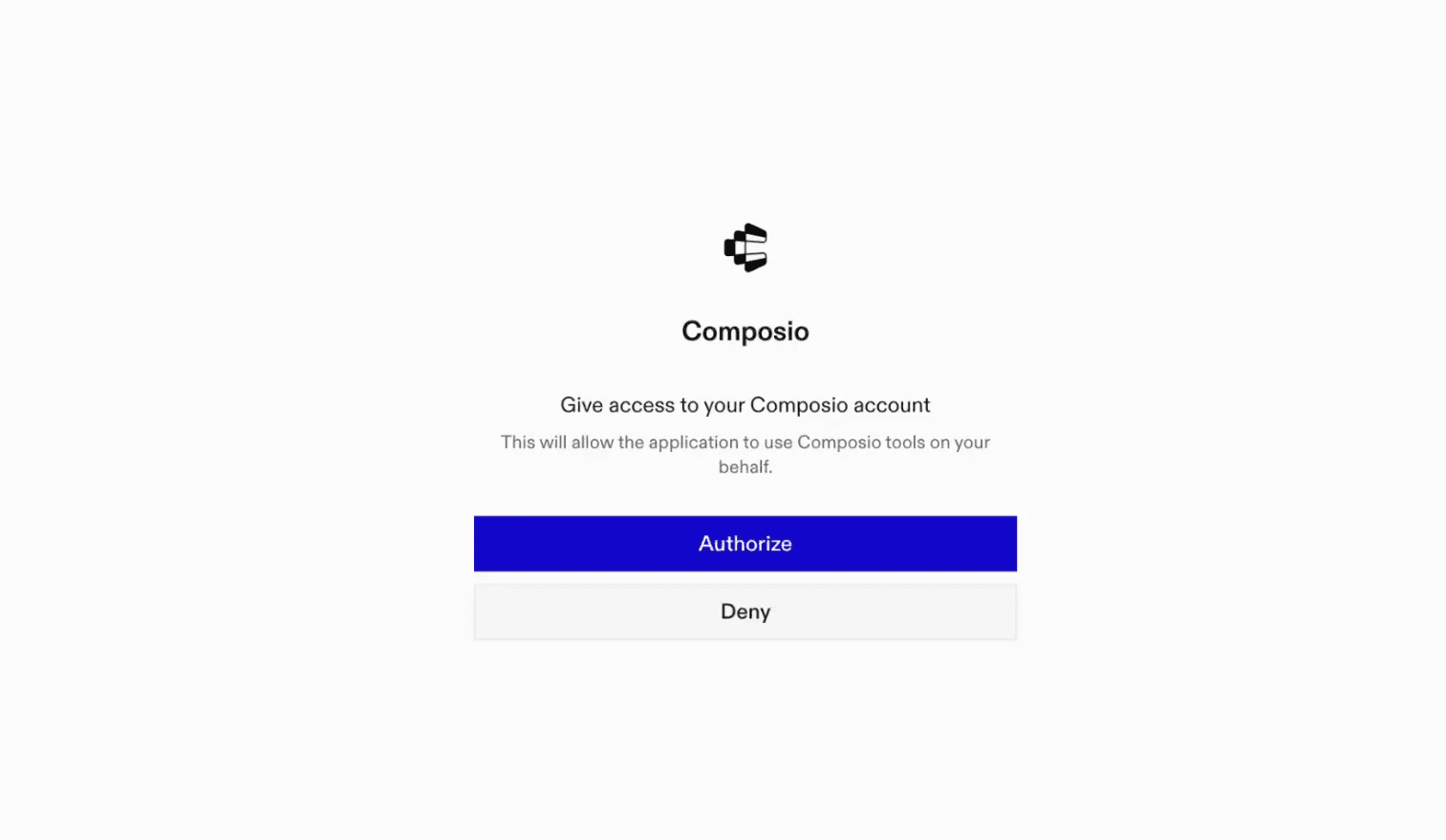
Step 3: Authenticate
Authenticate Composio MCP you just added
opencode mcp auth composioThis will open a browser session, authorize Composio, and you're done
Step 4: Verify installation
opencode mcp listStep 5: Connect any app with OpenCode
Now, in the chat, ask the agent to connect to Gmail (or any app) or give it any Gmail-related task. For example, ask it to:
"Summarize unread emails from this morning"
"Create draft replies to urgent messages"
"Fetch contact details for recent senders"
It will prompt you to authenticate and authorize access to Gmail. That is it. Composio tools are now available in OpenCode, and your Gmail account is ready to use.
Running more than one MCP server
Nothing stops you adding several servers. The mcp object takes as many entries as you want, each keyed by name:
{
  "mcp": {
    "composio": {
      "type": "remote",
      "url": "<https://connect.composio.dev/mcp>",
      "enabled": true
    },
    "my-local-server": {
      "type": "local",
      "command": ["node", "path/to/server.js"],
      "enabled": true
    }
  }
}
The catch is the one from the top of this article. Every direct server you add loads its full tool schema into context before you have asked anything, and the cost compounds. Two or three direct servers is usually fine. Past that, the model starts picking the wrong tool, because it is choosing from a list it cannot hold properly.
This is the practical argument for a gateway rather than a longer mcp block. One entry, one authentication, and the tool list stays short however many apps sit behind it.
Fixing the errors people actually hit
The server is listed but the tools do not work. Almost always a server added without being authenticated. opencode mcp list shows the server either way. Run opencode mcp auth followed by the server name and complete the browser flow.
It worked yesterday and stopped today. A token expired. Re-run the auth command for that server. If a session was already open when the token expired, restart OpenCode too, because it will keep listing tools it can no longer call.
OpenCode invents tool names that do not exist. A known symptom of too many schemas loaded at once. Disable servers you are not using by setting enabled to false, or move to a gateway so the model sees a short list.
Config edits do nothing. Check which file you edited. A project-level opencode.json overrides the global one, so an edit to the global file has no visible effect inside a project that defines the same server.
Some use cases
1. Using OpenCode to automate code review and updates
For the 1st task, we will ask OpenCode to find bugs across all files in a code repository, prepare a report, and send it to Gmail. (Can use Slack as well)
Paste the following prompt:
Act as an autonomous code auditor. Given access to a source code @ repository, recursively scan all files, detect bugs, vulnerabilities, logical errors, performance issues, and bad practices, classify them by severity, suggest concrete fixes, and generate a structured report (summary, critical issues, file-wise findings, recommendations). Use Rube MCP to handle the Gmail task and send the full report to devloper.hs2015@gmail.com. At the end, output a concise execution summary of all tasks completed. Prioritize real execution over explanation; keep results actionable and production-ready.In simple terms, the prompt asks the LLM to review the codebase, identify bugs, generate a summary, and email it to you. The output should include a summary and a link to the email.
And here’s the Output it generated:
Note: you may need to login to Gmail, if using first time.
For simplicity, the report is kept short. Feel free to expand it using a format you prefer.
Now let’s look at the 2nd use case!
2. Using Composio MCP to handle Supabase databases
For the next task, let’s ask OpenCode to handle creating the Supabase database using Composio MCP for a vehicle parking management app.
Paste the following prompt:
Build a minimal Parking Management System using Python, Supabase, HTML, and CSS with a Google Material Minimal aesthetic.

Project Setup
Create a new folder named `vms` and build the entire application inside it.
Create a `.venv` using `python3` and activate it before installing dependencies.
Use Supabase project ID: `<supabase-project-id>`.

Phase 1: Database Setup (via rube_mcp)
Use rube_mcp to create database `parking-system` and models:
User(id, name, email, created_at)
Admin(id → User.id, role, created_at) [predefined]
ParkingLot(id, name, location, total_spots)
ParkingSpot(id, lot_id → ParkingLot.id, spot_number, is_available)
Reservation(id, user_id → User.id, spot_id → ParkingSpot.id, start_time, end_time, status)
Establish all relationships and seed: 1 Admin, 3 ParkingLots, 10–15 Spots per lot, 5–10 Users, 8–12 Reservations.

Constraints
All Supabase operations via rube_mcp, production-ready code, env vars for secrets, clean error handling.
We prompt the LLM to create a parking system model and define the relationship, and then pull in mock data defined in Supabase’s student-db using crud api’s.
Here is the output:
OpenCode defined the task and worked on it incrementally, while Rube handled the heavy lifting.
3. Using Composio MCP to generate a social post from a build log
For the final task, we will ask OpenCode to draft us an X/Twitter thread by analyzing the entire project (handled by OpenCode) and save it to Notion.
Here is the prompt:
Analyze the entire @vehicle-parking-app project to identify its key
problems, milestones, and achievements. Then, write a 5-tweet
engaging X(Twitter)thread using a problem–solution narrative.
The first tweet should hook readers, and the last should include
a call-to-action. Keep each tweet under 250 characters, separated
with "1/". Use only bold or italic formatting (no headings or code).
Save the final formatted thread to the Notion page at {your notion doc}
The prompt asks OpenCode to analyze the project, identify its key problems, milestones, and achievements, use them to generate an engaging X thread based on the given instructions, and save it to the given Notion sheet.
How it worked out for me:
It launched its subagents to focus on analyzing the project
while the Rube MCP performs the Notion page retrieval,
Then use the results of the subagent to generate the thread and
Add it to the given Notion page
Each of these is a single task. The pattern that makes the setup worth it is chaining them: audit the repo, write the fixes into a tracker, then post the summary, all in one session and without leaving OpenCode.
Frequently asked questions
How do you add an MCP server to OpenCode?
Run opencode mcp add and answer the prompts, or add the server directly to the mcp object in ~/.config/opencode/opencode.json. Remote servers take a url and authenticate over OAuth. Local servers take a command array instead. Run opencode mcp list afterwards to confirm it registered.
Where is the OpenCode MCP config file?
The global config is at ~/.config/opencode/opencode.json and applies to every project. You can also place an opencode.json in a project root to configure servers for that repo only. Where both define the same server, the project file takes precedence.
Can OpenCode run multiple MCP servers at once?
Yes. The mcp object accepts as many named entries as you want, and you can mix local and remote. The practical limit is context rather than configuration: each direct server loads its full tool schema up front, and past two or three the model starts selecting the wrong tool. A gateway avoids that by exposing one short tool list regardless of how many apps sit behind it.
Why does OpenCode hallucinate MCP tool names?
Usually because too many tool schemas are loaded at once and the model is choosing from a list it cannot hold reliably. Disable the servers you are not using by setting enabled to false, or route through a gateway so only the relevant tools are fetched at the moment of the call.
End Note
You can pair MCPs with OpenCode skills and Plugins to get the best out of OpenCode.
If you are already running more than a couple of servers and watching the context cost climb, that is the point at which routing them through Composio instead of adding a sixth entry to your config starts paying for itself.

 Get started



