




AI assistants can answer questions, create content, and help people make decisions. They become more useful when they can also work with the apps and information that people use every day.
For example, an assistant can search for a document, read a message, check a customer record, create a task, or update a project. To do this, it needs access to an external service.
An MCP connector provides this access.
MCP (Model Context Protocol) is an open standard that defines how an AI application communicates with external tools, services, and data sources.
An MCP connector can connect an AI assistant to services such as Google Drive, Slack, GitHub, a customer management system, or a database. It tells the assistant which tools are available and what information each tool needs.
The connector also controls access. It can ask the user to sign in through OAuth or provide an API token. It can check account permissions and access scopes for each request. The AI application can also request user approval before performing a sensitive action.
Some connectors only allow the assistant to search for or read information. Others let it create, update, send, or delete information. Available actions depend on the connector, the service, and the permissions the user or organisation provides.
This guide explains each part of the process. It covers how connectors work, how they manage access, how the new stateless model operates, and how to choose and use a connector safely.
Related: Agent Connectors
How Does an MCP Connector Work?
An MCP connector manages communication between an AI application and an external service. It also controls who can access the service and what actions they can perform.
The process starts when a user connects the service. The connector can ask the user to sign in through OAuth or provide an API key. The external service then gives the connector approved access.
After setup, the connector can handle requests from the AI assistant.
The Request Process
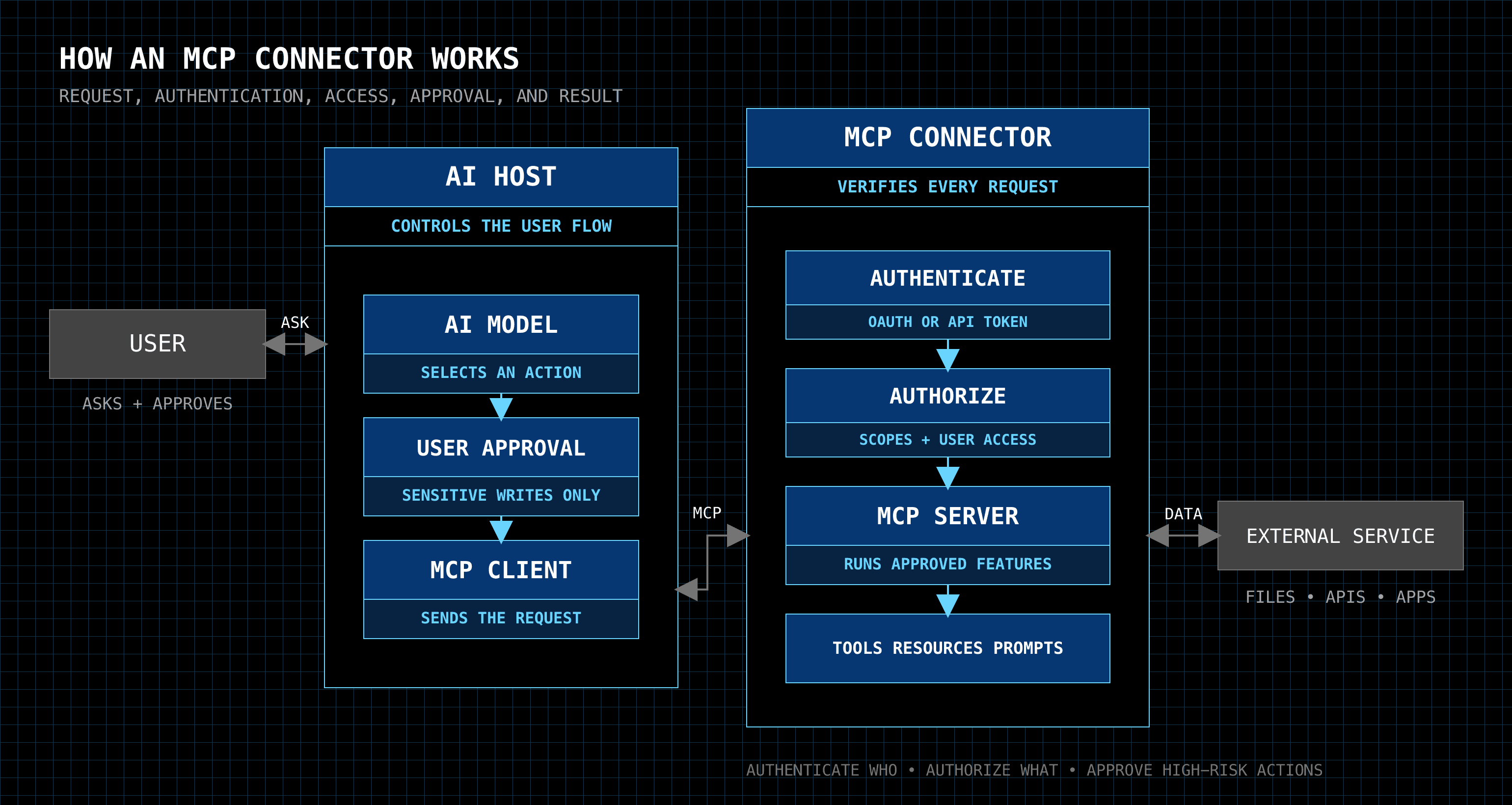
A typical request follows these steps:
The user submits a request to the assistant. The user can ask it to find information or perform an action.
The AI model selects a tool.
The host shows the model the available tools and their descriptions. The model selects a suitable tool and prepares the required inputs.
The host routes the tool call.
The host keeps a record of which connector and MCP server provide each tool. It maps the selected tool to the correct MCP client and server.
The host also checks that the tool is enabled and that its inputs match the tool’s schema. Clear tool names and descriptions help it route calls correctly when several connectors provide similar tools.
The host checks whether it needs approval.
The host checks the action type and its approval rules. It can ask the user to confirm a sensitive action. This often applies when the assistant sends, creates, updates, or deletes information.
The MCP client sends the request.
The client formats the request and sends it to the MCP server that provides the selected tool.
The connector authenticates the request.
It uses an approved OAuth token, API token, or other credential to confirm the user’s identity.
The server checks authorisation.
It checks the user’s permissions and access scopes. It confirms that the user can use the selected tool and access the requested data.
The server performs the action.
It can call an external API, search a data source, read a file, or update a record.
The server returns the result to the assistant.
The server sends the result to the MCP client. The host gives the result to the AI model. The assistant then answers the user or continues the task.
In the current stateless MCP specification, each request includes the protocol information and client capabilities that the server needs. The server does not depend on an earlier protocol session. A later section explains this change in more detail.
Example of an MCP Request
You can ask Claude or ChatGPT:
“Find the latest project plan in Google Drive, compare it with recent Slack feedback, and create Asana tasks for the action items.”
The host routes each tool call to the correct connector. It gets the project plan from Google Drive and the feedback from Slack. The assistant compares them and identifies the required actions.
Before creating Asana tasks, the host can ask for your approval. Each connector checks your identity and permissions before reading or changing data.
So, a connector enforces authentication and security guardrails, routes requests to the appropriate MCP servers, manages permissions, and returns the results to the AI assistant.
MCP Connector vs MCP Server and API
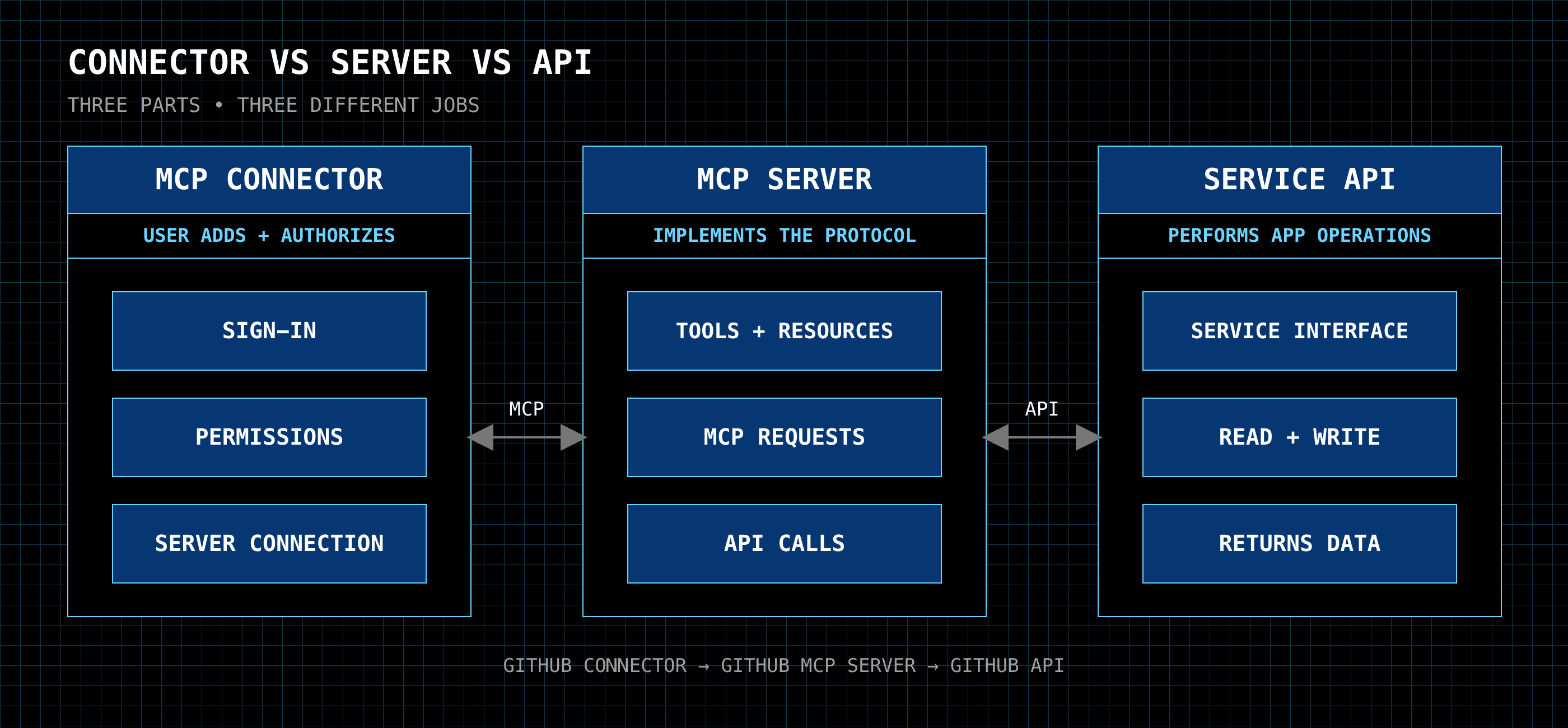
These terms describe different parts of an integration.
An MCP server is the software that implements the MCP standard. It provides tools, resources, and prompts. It also receives MCP requests and returns results.
An MCP connector is the integration that a user adds and authorises. It can include the MCP server connection, sign-in process, permissions, and available tools.
An API is an interface that a service provides for other software. The MCP server often uses this API to read information or perform an action.
For example, a GitHub connector gives an AI assistant access to GitHub. Its MCP server can provide tools such as find_issue or create_issue. When the assistant uses one of these tools, the server calls the GitHub API and returns the result.
The API performs the service operation. The MCP server makes that operation available through MCP. The connector lets the user configure and use the integration.
Product terms can vary. Some providers use “connector” and “MCP server” for the same product. Check the provider’s documentation to confirm what it includes.
Benefits and Limitations of MCP Connectors
MCP connectors can make AI assistants more useful, but their results depend on the connected services, tools, and permissions.
Benefits
Current information: The assistant can get recent data from connected services instead of relying only on its training data.
Reusable integrations: Developers can build one MCP server and use it with different AI applications that support MCP.
Multiple-app workflows: The assistant can use several connectors during one task. It can read information from one app and create an action in another.
Less manual work: Users do not need to copy information between apps or complete every step themselves.
Limitations
Service failures: A request can fail if the MCP server, an external service, or the network connection is unavailable or experiencing issues.
Access limits: The connector can use only the data and actions permitted by the user’s account, permissions, and access scopes.
Tool limits: The assistant can use only the tools provided by the MCP server.
Tool-selection errors: The AI model can select the wrong tool when names or descriptions are unclear. Similar tools from several connectors can also make selection harder.
Usage limits: External services can limit request volume or block actions that exceed their rules.
Users should review important results and sensitive actions before approving them.
Best MCP Connector Platforms to Consider in 2026
MCP connector platforms give AI assistants access to tools from many apps. They can also manage authentication, tool routing, permissions, and user accounts.
Each platform has a different focus. Compare their app coverage, security controls, pricing, and hosting options. The information below is current as of August 2026.
1. Composio MCP Gateway
Composio provides an MCP gateway that manages communication between AI assistants and 1,500+ MCP connectors. It handles tool discovery, routing, authentication, and access controls through a central service.
The gateway finds the tools that match the user’s request. It then sends the tool call to the correct app. This prevents the AI model from receiving thousands of tool definitions simultaneously.
Composio manages OAuth connections for each user. When an assistant needs an app, it creates a secure sign-in link. The user approves access, and Composio stores and renews the connection.
Organisations can create a separate MCP endpoint for each team via the MCP gateway. Administrators can allow or block specific apps, tools, and sensitive actions. The gateway also supports SAML, OIDC, and SCIM for company sign-in and user management.
Composio records the user, team, tool, action, and result of each tool call. This gives administrators an audit record without storing the request or response content.
It suits developers and organisations that need broad app access, dynamic tool routing, managed authentication, and team-level controls.
2. Merge Agent Handler
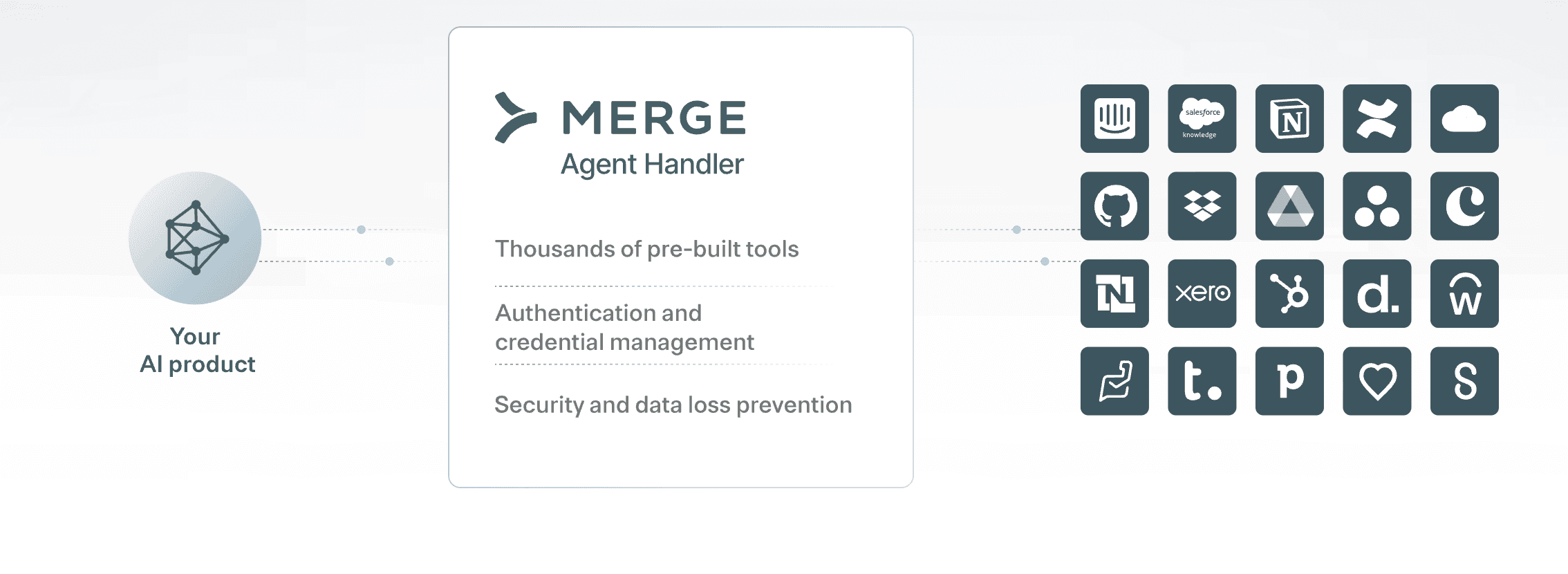
Merge Agent Handler gives AI agents access to hundreds of MCP-ready services. These include Salesforce, Slack, Jira, GitHub, HubSpot, NetSuite, and Workday.
It can manage authentication for each user. It can also share credentials across a defined group. It supports OAuth, API keys, and custom authentication methods.
Developers can use Tool Packs to control which tools an agent can use. This reduces the number of available tools and helps the model select the correct one.
Its security gateway checks each tool call for personal, health, payment, or other sensitive information. It can allow, remove, or block this information. It also records tool inputs, results, errors, response times, and user details.
Merge Agent Handler suits business applications that need strong access controls, data protection, and detailed audit records. Merge documentation
3. Pipedream

Pipedream MCP provides access to 3,000+ APIs and 10,000 tools. It includes tools for services such as Gmail, Notion, Slack, Linear, and other business apps.
Pipedream manages user authentication and account connections. A developer can add a connection button to an application or let Pipedream return an authorisation link during a conversation. Pipedream also manages token storage and token renewal.
Developers can use its hosted MCP server or add their own tools. They can also use Pipedream workflows when a task needs several API calls or additional processing.
Pipedream suits developers who need broad API coverage and control over how their integrations work. It is also useful when an application needs MCP tools and automated workflows in the same platform. Pipedream documentation
4. Zapier MCP

Zapier MCP gives AI assistants access to more than 9,000 apps and 40,000 actions. These actions can send emails, create tasks, update customer records, search for data, and perform other common operations.
Zapier manages OAuth, credentials, and rate limits. It also provides dynamic tool discovery. This lets an assistant find and enable suitable tools when needed.
Organizations can apply workspace access controls and user permissions. They can also review tool activity history. Zapier MCP works with MCP clients such as ChatGPT, Claude, Cursor, and VS Code.
Zapier MCP is suitable for people and teams that want broad app coverage and a simple setup process. It is also useful for organizations that already use Zapier integrations and workflows. Zapier documentation
5. TrueFoundry MCP Gateway
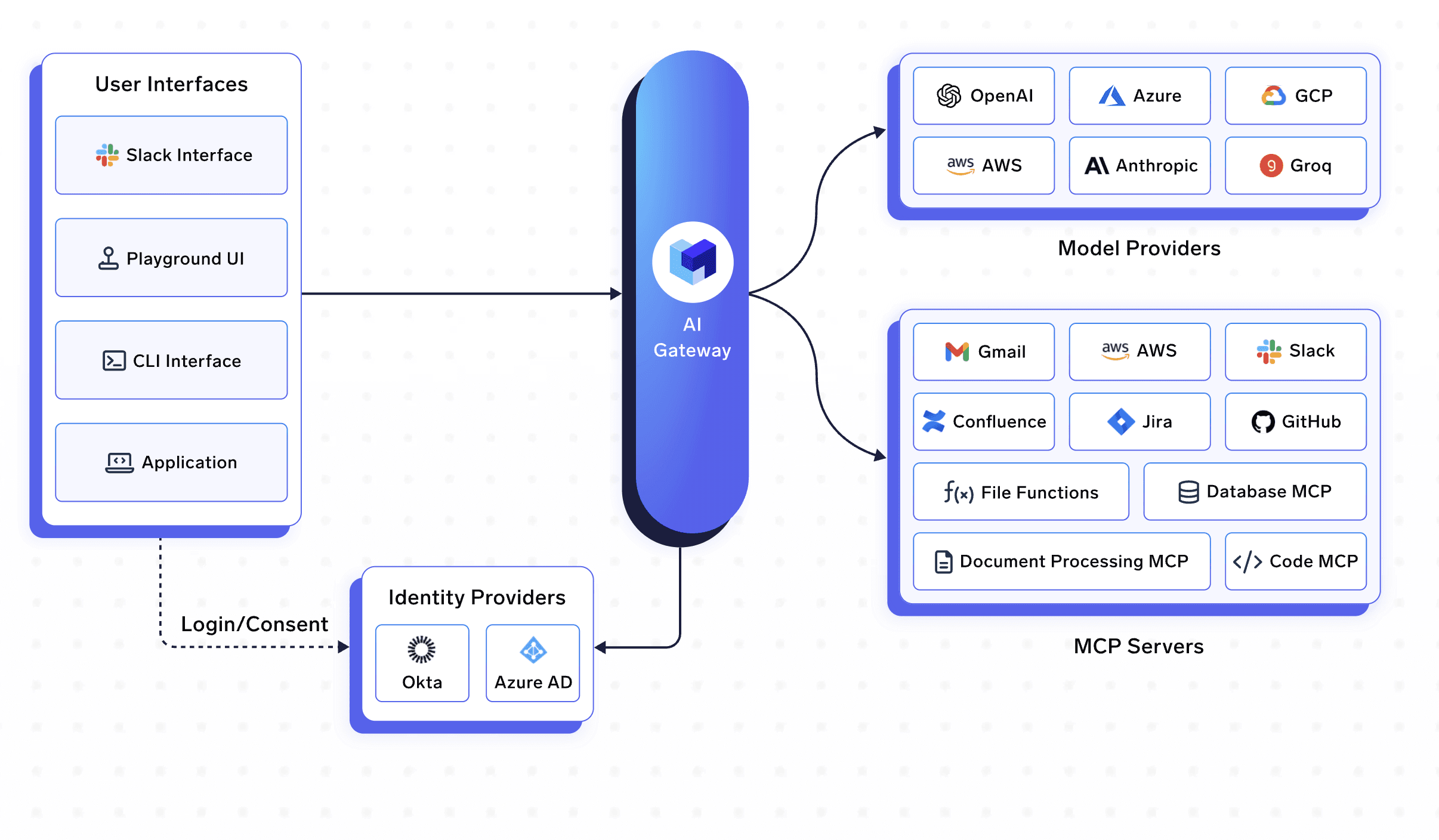
TrueFoundry helps organizations manage access to several public or private MCP servers. AI clients connect to its MCP Gateway and use the servers that the organization has approved.
The gateway manages OAuth flows, access tokens, and token renewal. It supports enterprise sign-in methods and detailed tool permissions. An organization can control access by user, team, tool, or action type.
TrueFoundry can check tool inputs before an action starts. It can also check the results before returning them to the model. These checks can detect sensitive information, invalid inputs, or unauthorized actions. Teams can require user approval for sensitive tool calls.
The platform also records requests, results, and tool activity. This helps security teams monitor use and complete audits.
TrueFoundry is suitable for larger organizations that need central control, security rules, and monitoring across many MCP servers. TrueFoundry documentation
Which Platform Should You Choose?
Choose Composio when you need dynamic tool routing and multi-app actions. Enterprise security and governance.
Choose Merge Agent Handler when you need enterprise connectors, data checks, and detailed audit records.
Choose Pipedream when you need API access, custom tools, and workflows. Choose Zapier when you want a large app catalogue and a simple setup process.
Choose TrueFoundry when you need to manage and secure several MCP servers across an organization.
How to Use MCP Connectors Safely
An MCP connector can read information and perform actions in your apps. Its access depends on the tools and permissions that you provide.
Use these steps to reduce security and privacy risks.
Use a Trusted Connector
Get the connector from the service provider or a trusted platform. Check its publisher, server address, documentation, and data policy before you connect it.
Treat tool descriptions and security labels from unknown servers as untrusted. A harmful server can provide incorrect information about what its tools do.
Provide the Minimum Access
Provide only the permissions the connector needs. Use read-only access when the assistant only needs to search or review information.
Avoid broad permissions that cover all files, users, projects, or databases. You can add more permissions later if the task requires them.
Review Sensitive Actions
Ask for approval before the assistant sends messages, creates records, changes data, makes payments, or deletes information.
The approval screen should show the tool, its inputs, and the target service. Check these details before you continue. Current MCP guidance recommends user confirmation for sensitive tool calls. MCP tool security guidance
Protect Sensitive Information
Check which information the connector sends to the MCP server and external service. This can include messages, documents, customer records, or tool inputs.
Use connectors that support access controls, encryption, and secure token storage. Organizations should also check their privacy, security, and compliance requirements.
Treat External Content Carefully
Documents, emails, web pages, and messages can contain instructions that try to control the assistant. The host should treat this content as data and check tool calls before it performs an action.
Require approval when a tool call uses external content to send, change, or delete information.
Review Connector Activity
Use audit logs to check which tools the assistant used and what actions it performed. Look for unexpected tools, unusual requests, repeated failures, or access to unrelated data.
Remove connectors that you no longer use. You should also revoke old tokens and review permissions regularly.
Frequently Asked Questions
What is an MCP connector?
An MCP connector integrates an AI application with an external service. It can include the MCP server connection, authentication process, permissions, and available tools.
Is an MCP connector the same as an MCP server?
The MCP server implements the MCP protocol and provides tools, resources, or prompts. The connector is the complete integration that a user adds and authorises.
An MCP connector can use a single MCP server or route requests to multiple servers.
Does an MCP connector have access to all my data?
Its access depends on your account permissions and the scopes that you approve. A connector can only request data through the tools and permissions available to it.
However, a broad permission can give it access to many files, messages, or records. Review each requested scope before you approve it.
Can an MCP connector change or delete information?
It can do this when the server provides write or delete tools and the user has the required permissions.
The AI host can ask for approval before it performs these actions. You should enable this control for sensitive tools.
Are MCP connectors safe?
Their safety depends on the provider, server, permissions, host controls, and external service. MCP defines how the components communicate. Connector providers and AI hosts must add access controls, validation, approvals, and data protection.
Use trusted connectors and provide only the access they need. Review their activity and remove unused connections.
Can one AI assistant use several MCP connectors?
Yes. An AI host can connect to several MCP servers. It can route each tool call to the connector that provides the selected tool.
For example, it can read a document from Google Drive, check Slack feedback, and create an Asana task during one request.
Does stateless MCP mean the connector cannot remember my login?
Statelessness applies to how the server handles protocol requests. A connector or gateway can still securely store OAuth tokens and account connection details.
This lets the user remain connected while the MCP server processes requests without depending on an earlier protocol session.
What happens when a connector fails?
The server returns an error to the AI host. The host can retry the request, select another tool, or ask the user for help.
The host should check the result before it repeats a write action. This helps prevent duplicate messages, tasks, payments, or records.
How is an MCP connector different from an API integration?
An API defines how software communicates with a specific service. MCP defines how an AI application discovers and uses tools from connected services.
An MCP server often calls the service’s existing API. The connector manages this connection and presents the available actions as MCP tools.

 Get started




