




OpenAI just announced a new open standard—yes, another standard —called Agent Plugins. It was developed in collaboration with GitHub, Cursor, AWS, and Vercel.
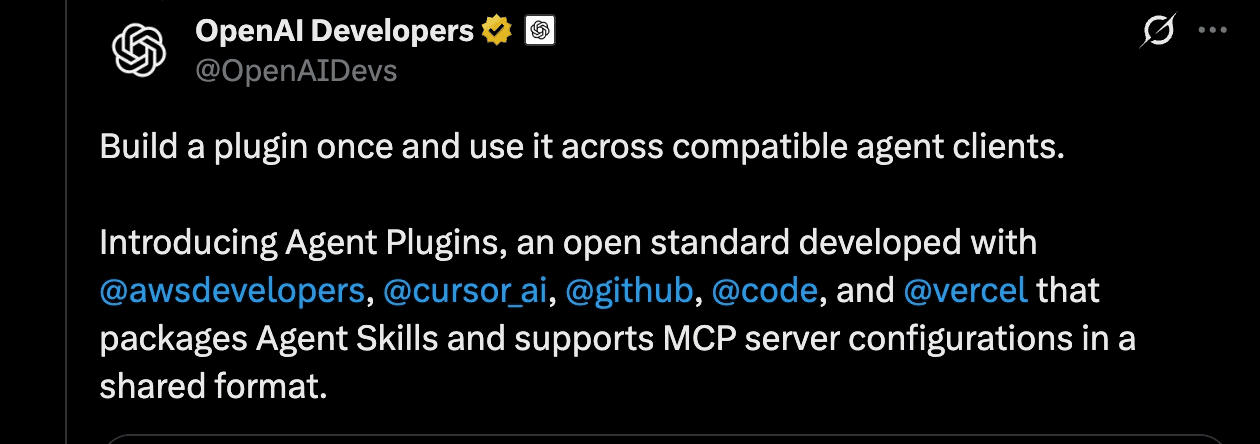
Agent Plugins standardizes how plugins are packaged so developers can build once and use the same plugin across compatible AI clients.
Version 1.0.0 focuses on two components that are already widely used across the agent ecosystem: Agent Skills and MCP servers. There is an ongoing community discussion about adding more, such as LSP, Agent marketplaces, hooks, etc.
Currently it works with ChatGPT, Codex, VS Code, Cursor, Kiro dev, GitHub Copilot and Vercel AI agents. Interestingly, but not surprisingly, Anthropic isn’t part of this club.
And given their history of not following others, I won’t be much surprised if they stick to their own plugin format. Claude Code still uses claude.md instead of agents.md, which is, btw, the standard for agent skills.
We've been witnessing this in the agent spec for the last two years. The meme got real.

But why another standard?
The problem is that almost every AI coding agent has developed its own way of packaging extensions.
The underlying components are often similar. You might have a skill containing instructions and scripts, an MCP server providing tools, and some client-specific configuration around them.
But the directory structure, configuration files, and discovery rules differ from client to client.
That meant plugin authors often had to rearrange, duplicate, or rewrite the same components just to make them work across Codex, Cursor, VS Code, or another agent.
Agent Plugins tries to solve that by defining a small interoperability layer.
It does not attempt to standardize the entire plugin experience. Distribution, installation, permissions, sandboxing, UI, hooks, commands, agents, and other client-specific features remain under each client's control.
Instead, it standardizes the parts that can realistically be portable today: Skills and MCP servers.
An Agent Plugin is simply a directory with a required manifest and optional components stored at predictable locations:
my-plugin/
├── plugin.json
├── skills/
│   └── summarize/
│       ├── SKILL.md
│       ├── scripts/
│       └── references/
├── mcp.json
└── com.example.client/
    └── hooks/
The structure is intentionally simple:
plugin.jsonidentifies the plugin and declares which version of the Agent Plugins specification it targets.skills/contains Agent Skills following the existing Agent Skills specification.mcp.jsondefines MCP servers usingstdio, Streamable HTTP, or optional legacy SSE transports.Reverse-domain namespaces such as
com.example.client/let individual clients add their own functionality without modifying the portable part of the plugin.
So if Cursor wanted to support additional hooks, for example, it could keep those inside its own extension namespace while the Skills and MCP configuration remain usable by other compatible clients.
How Agent Plugins work
At a high level, an Agent Plugin is just a folder that follows a predictable structure.
When a compatible client loads the plugin, it starts with plugin.json, then looks for supported components in fixed locations.
For version 1.0.0, there are only two standardized component types:
Agent Skills inside
skills/MCP servers inside
mcp.json
The client does not need the manifest to tell it where these components live. Their locations are fixed by the specification.
For example:
reports-plugin/
├── plugin.json
├── skills/
│   └── summarize/
│       └── SKILL.md
└── mcp.json
A compatible client knows automatically that:
plugin.jsoncontains the plugin metadataevery immediate directory under
skills/containing aSKILL.mdis an Agent Skillmcp.jsoncontains the MCP server configuration
This fixed structure is what makes the plugin portable. A client can map these standardized components to its own internal implementation instead of requiring the author to maintain a different package for every agent.
plugin.json
Every Agent Plugin needs a plugin.json at its root.
At minimum, it looks like this:
{
  "$schema": "<https://agent-plugins.org/schemas/1.0.0/plugin.schema.json>",
  "name": "my-plugin"
}
The $schema field tells the client which version of the Agent Plugins specification the plugin targets.
The manifest can also contain metadata such as the version, description, author, homepage, repository, and license.
What's interesting is what it does not contain.
Skills and MCP servers are not defined inline inside plugin.json. The client discovers them separately from their fixed locations.
So the manifest describes the plugin, while the actual capabilities live alongside it.
skills/
Agent Plugins does not introduce another skill format.
Instead, it uses the existing Agent Skills specification.
Each skill gets its own directory:
skills/
└── deploy/
    ├── SKILL.md
    ├── scripts/
    │   └── rollback.sh
    └── references/
        └── runbook.md
SKILL.md contains the instructions and metadata for the skill, while directories such as scripts/, references/, and assets/ can contain supporting resources.
The Agent Plugins specification only defines where these skills should live and how clients discover them. The actual SKILL.md format continues to be defined by the Agent Skills specification.
This is an important part of the design.
mcp.json
The same idea applies to MCP.
Agent Plugins doesn't change how MCP itself works. Instead, it defines a portable configuration format for declaring the MCP servers that belong to a plugin.
A basic mcp.json might look like this:
{
  "$schema": "<https://agent-plugins.org/schemas/1.0.0/mcp.schema.json>",
  "mcpServers": {
    "github": {
      "type": "streamable-http",
      "url": "<https://example.com/mcp>"
    }
  }
}
Version 1.0.0 supports three MCP transports:
stdiostreamable-httplegacy
sse
A client reads this configuration and maps it to however that client normally connects to MCP servers.
So Cursor, Codex, VS Code, or another compatible client can have completely different internal MCP implementations while consuming the same plugin configuration.
There is also some graceful failure built into the format.
If one MCP server fails to connect, authenticate, or start, the entire plugin doesn't have to fail. The client can skip that server and continue loading the other MCP servers and Skills.
Similarly, an invalid Skill can be skipped without preventing the rest of the plugin from loading.
Client-specific extensions
Of course, not everything can be standardized.
A client might support hooks, commands, agents, custom UI, or another capability that other clients don't understand.
For those cases, Agent Plugins allows clients to create their own reverse-domain namespace:
my-plugin/
├── plugin.json
├── skills/
├── mcp.json
└── com.example.client/
    └── hooks/
Anything inside com.example.client/ belongs to that particular client and isn't part of the portable Agent Plugins core.
The same idea can also be used inside plugin.json through an extensions object.
This gives the format a useful middle ground.
Plugin authors get a common structure for the parts that are portable, while clients can continue experimenting with features that haven't been standardized.
Put simply:
Agent Plugins standardizes the package, Agent Skills standardizes instructions and reusable expertise, and MCP standardizes how agents connect to tools and external systems.
They solve three different layers of the same problem, and that solves connectivity.
Agent Plugins vs Agent Skills vs MCP
The easiest way to think about them is that they operate at different layers.
Component | What it standardizes | What it contains |
|---|---|---|
Agent Plugins | How capabilities are packaged and discovered across compatible clients | Skills, MCP configuration, metadata, and client-specific extensions |
Agent Skills | How reusable instructions and expertise are defined |
|
MCP | How agents connect to tools and external systems | Tools, resources, prompts, and server connections |
A practical Agent Plugin example
Let's build a simple GitHub PR review plugin.
The goal is straightforward: when you ask the agent to review a pull request, it should follow a consistent review process and have access to GitHub tools to inspect the PR.
Our plugin could look like this:
github-review/
├── plugin.json
├── skills/
│   └── review-pr/
│       └── SKILL.md
└── mcp.json
First, we need the plugin manifest.
1. Create plugin.json
{
  "$schema": "<https://agent-plugins.org/schemas/1.0.0/plugin.schema.json>",
  "name": "github-review",
  "version": "1.0.0",
  "description": "Review GitHub pull requests using a consistent review workflow."
}
This is the entry point for the plugin.
It identifies the package and tells compatible clients that it follows version 1.0.0 of the Agent Plugins specification.
Next, we add the actual review workflow.
2. Add a PR review skill
Create:
skills/review-pr/SKILL.mdWith something like:
---
name: review-pr
description: Review a GitHub pull request for correctness, security, maintainability, and testing.
---

<p>When reviewing a pull request:</p>
<ol>
<li>Read the pull request description.</li>
<li>Inspect all changed files.</li>
<li>Understand the intent behind the changes.</li>
<li>Check for correctness and potential bugs.</li>
<li>Look for security issues.</li>
<li>Identify unnecessary complexity.</li>
<li>Check whether important behavior is covered by tests.</li>
<li>Summarize the most important findings.</li>
</ol>
<p>Prioritize actionable feedback.</p>
<p>When reporting an issue, reference the relevant file and explain why the change could cause a problem.</p>
There's nothing Agent Plugins-specific about the contents of this file.
It's a normal Agent Skill.
What Agent Plugins standardizes is where that Skill lives. Because it sits directly under skills/review-pr/, a compatible client knows where to discover it.
At this point, however, our agent only knows how to review a pull request. It still needs a way to access GitHub. That's where MCP comes in.
3. Add the GitHub MCP server
To add a GitHub MCP server, you can either use the official MCP endpoint or a more advanced MCP router like Composio.
With Composio, you can easily access other tools like Linear, Figma, GitLab, etc from a single endpoint.
At the root of the plugin, create mcp.json:
{
  "$schema": "<<a href="https://agent-plugins.org/schemas/1.0.0/mcp.schema.json">https://agent-plugins.org/schemas/1.0.0/mcp.schema.json</a>>",
  "mcpServers": {
    "github": {
      "type": "streamable-http",
      "url": "<<a href="https://example.com/github/mcp">https://example.com/github/mcp</a>>"
    }
  }
}
Here, we're telling the client that this plugin also depends on a remote GitHub MCP server.
That MCP server could expose tools for things like:
get_pull_request
get_pull_request_files
get_file_contents
list_pull_request_comments
create_pull_request_review
Agent Plugins only standardizes how the server connection is declared inside the package. The client then maps that configuration to its own MCP implementation.
Now the complete flow looks like this:
User
  ↓
"Review PR #248"
  ↓
review-pr Skill
  ↓
Defines how the PR should be reviewed
  ↓
GitHub MCP server
  ↓
Reads PR, files, comments, and repository data
  ↓
Agent
  ↓
Produces the review
The important part is that neither component is new.
The Skill already follows the Agent Skills specification. The tools are already exposed through MCP. Agent Plugins simply package them together in a predictable format.
So instead of rebuilding the same PR review extension separately for every compatible agent (Codex, Cursor, Copilot), you maintain one package:
github-review/
├── plugin.json       ← what this plugin is
├── skills/           ← how the agent should perform the task
└── mcp.json          ← what external tools the agent can access
A compatible client can discover those components and translate them into its own runtime.
And the plugin doesn't necessarily break if a client supports only part of it. Agent Plugins allow incremental adoption, so a client can support Skills without supporting MCP, or vice versa. Unsupported components are ignored rather than making the entire package invalid.
There is one important thing missing from our example, though: authentication.
The plugin can declare where the GitHub MCP server lives, but Agent Plugins v1 does not define a portable OAuth or credential configuration. Authentication, user interaction, and credential storage are still handled by the client or MCP server.
And that's a good example of where the boundary of the new standard currently sits.
How is Agent Plugins different from Claude Code Plugins?
If you've used Claude Code Plugins before, Agent Plugins will look very familiar. Anthropic hasn’t yet officially endorsed agent plugins. And given they still use claude.md instead of agents.md, it’s a bit doubtful if they will officially add support for it.
Both essentially package Skills and MCP servers inside a directory.
Here's the difference:
Agent Plugins | Claude Code Plugins | |
|---|---|---|
Primary goal | Cross-client portability | Extending Claude Code |
Manifest |
|
|
Skills | ✅ | ✅ |
MCP servers | ✅ | ✅ |
Custom agents | ❌ Not standardized | ✅ |
Hooks | ❌ Not standardized | ✅ |
LSP servers | ❌ Not standardized | ✅ |
Background monitors | ❌ Not standardized | ✅ |
Plugin settings | Client-specific | ✅ |
Marketplace/distribution | ✅ VS Code, Cursor, ChatGPT marketplace | ✅ Claude plugin marketplaces |
Portable across clients | Designed for it | No |
Claude Code Plugins currently have a much broader feature set.
A Claude plugin can package Claude Skills, custom subagents, hooks, MCP servers, LSP servers, background monitors, executables, and default settings. Claude also has its own plugin installation and marketplace system.
A typical Claude Code plugin can look like this:
my-plugin/
├── .claude-plugin/
│   └── plugin.json
├── skills/
├── agents/
├── hooks/
├── .mcp.json
├── .lsp.json
├── monitors/
├── bin/
└── settings.json
Compare that with the portable Agent Plugins core:
my-plugin/
├── plugin.json
├── skills/
└── mcp.json
Agent Plugins intentionally starts with less.
Version 1 standardizes only Agent Skills and MCP servers because those already have independent specifications and meaningful adoption across multiple clients.
Things such as commands, hooks, agents, rules, and LSP servers are still too client-specific to define a stable portable format for them.
That doesn't mean an Agent Plugin can never contain them.
Client-specific functionality can still be added through extension namespaces:
my-plugin/
├── plugin.json
├── skills/
├── mcp.json
└── com.example.client/
    └── hooks/
The portable components remain understandable by every compatible client, while the client-specific directory can expose additional functionality where supported.
So there is a fairly simple trade-off:
Claude Code Plugins have a larger surface area, but are Claude-specific.
Agent Plugins have a smaller standardized surface area, but are designed to be portable.
Closing thoughts
Agent Plugins is still early, and version 1.0.0 is intentionally limited.
It does not solve plugin discovery, installation, permissions, authentication, hooks, sub-agents, or marketplaces. What it does is standardize the two pieces that are already broadly useful across agents: Skills and MCP servers.
That may sound small, but it removes one of the most annoying problems in the current agent ecosystem: rebuilding the same extension for every client.
If the standard gets adopted more widely, plugin authors could maintain one portable core and only add client-specific behavior where it is actually needed.
For now, that is probably the best way to think about Agent Plugins.
Not as another replacement for MCP, Skills, or existing plugin systems, but as a common packaging layer that helps all of them travel across agents.
And if hooks, agents, marketplaces, and other primitives eventually get standardized too, this could become a much bigger part of how we build extensions for AI agents.

 Get started




