




As AI agents become increasingly powerful, their value depends on seamlessly connecting to the third-party applications your users rely on daily.
Whether updating support tickets, pushing product updates to Slack, or automating end-to-end employee onboarding, agents need to execute tasks across multiple platforms.
Agent connectors make this possible, and they're transforming how companies build AI products at scale.
This blog post covers what agent connectors are, why you need them, and the best option available
Let’s get started.
What Are Agent Connectors?
Before comparing platforms, it helps to understand what agent connectors actually are.
In general, agent connectors are the integration layer that lets AI agents interact with external apps, services, databases, APIs, and tools. An AI agent can reason, plan, and decide what to do, but it needs a safe way to access systems such as Gmail, Slack, Salesforce, Notion, GitHub, Stripe, HubSpot, and internal databases.
That is where agent connectors come in. They connect the agent to a service, expose actions the agent can perform, and handle the operational complexity behind the scenes. For example, a Gmail connector might let an agent send an email, search an inbox, create a draft, add a label, or read a thread without the agent having to manage Gmail API details directly.
They are similar to API integrations, but designed specifically for AI agents. Instead of giving developers raw endpoints and asking them to manage OAuth, scopes, request formats, retries, and errors themselves, agent connectors package app capabilities into well-described tools that an agent can understand and call securely.
Related: Tool calling explained
How Agent Connectors Work
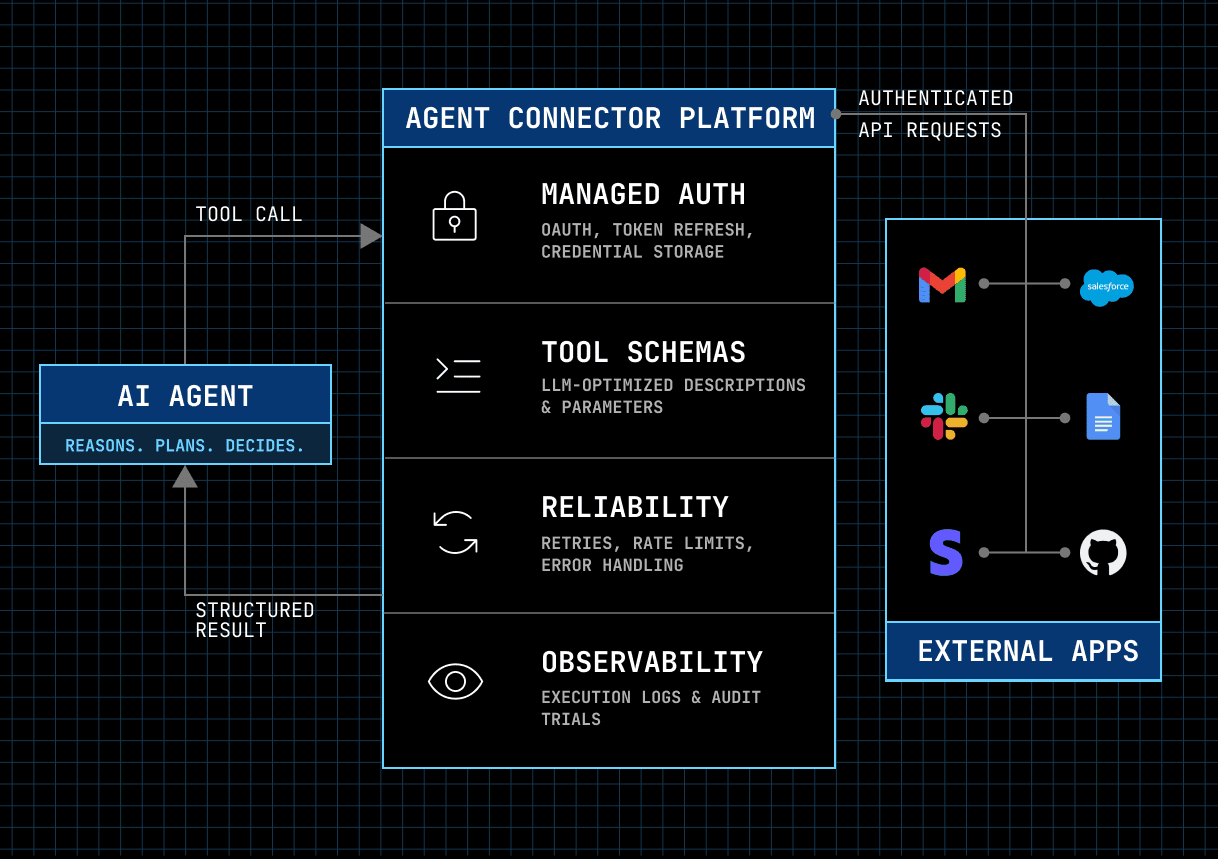
Think of an agent connector as a bridge between your AI agent and external applications. Instead of building custom integrations from scratch, you can leverage pre-built connectors that abstract away the complexity of:
Authentication - Handling OAuth flows, API keys, and secure credential management
API Integration - Making the correct API calls to external systems
Tool Definition - Structuring tools with clear descriptions and schemas so agents understand how to use them
Error Handling - Managing failures, retries, and edge cases
A simple example can be Composio's Gmail agent connector, which includes tools like:
GMAIL_SEND_EMAIL- Send an email on behalf of the authenticated userGMAIL_FETCH_EMAILS- Retrieve and read a set of emails with filtering optionsGMAIL_ADD_LABEL_TO_EMAIL- Organise emails by applying labelsGMAIL_CREATE_EMAIL_DRAFT- Draft an email without sending itGMAIL_SEARCH_PEOPLE- Search contacts to resolve recipients
Under the hood, each tool orchestrates authenticated API requests to the Gmail API:
GET https://gmail.googleapis.com/gmail/v1/users/{userId}/messages/{messageId}But with Composio handling OAuth token storage, refresh, and rotation automatically, which means your agent never holds raw credentials.
Why Do You Need Agent Connectors?
1. High Performance
In production, even small delays or failed tool calls can break the user experience. Agent connector platforms reduce that risk by handling retries, rate limits, API changes, and common failure modes across third-party services.
They also continuously battle-test their integrations and tool schemas, making it easier for agents to choose the right action and execute it reliably. This matters because agent performance is not just about API speed; it is also about whether the agent can understand the available tools, pick the correct one, pass the right arguments, and recover gracefully when something fails.
2. Enterprise-Grade Security
For enterprises, customer data security is non-negotiable. Teams cannot afford unauthorised access, data loss, compliance failures, or unclear accountability when AI agents act across business-critical systems.
This is where agent connector platforms become important. Instead of forcing every engineering team to build secure authentication, permission management, logging, and audit infrastructure from scratch, connector platforms provide much of that security layer as managed infrastructure.
With an agent connector platform, you get:
Permission Scoping: Control exactly which actions each agent can take, down to the per-tool level.
Comprehensive Execution Logs: Record every tool call, auth event, and execution so security teams know what ran, when, and on whose behalf.
Fine-Grained RBAC: Enforce role-based access control at every layer, helping teams follow the principle of least privilege.
Full Audit Trails: Maintain complete records of agent actions and scope changes, giving security teams clear accountability.
These features are essential for organisations deploying agents in regulated industries or handling sensitive customer information.
3. Time Savings
Most enterprises focus on customer experience and on-time delivery. Using in-house connectors requires extensive plumbing and maintenance; an agent connector spares you that work.
In fact, outsourcing agent connector development saves engineering teams hundreds, sometimes thousands of hours annually.
Also, this allows developers to focus on improving core agent capabilities rather than building integrations.
4. Competitive Differentiation
This one also directly ties to time savings.
With pre-built connectors, enterprises can launch support for new applications weeks or months faster than competitors building integrations in-house.
This means faster go-to-market, broader application coverage, and out-of-the-box support for complex workflows.
Enterprises can even offer more connectors than competitors, which can make their agents relevant to a larger market and able to support more complex workflows
MCP vs. APIs as Agent Connectors: What's the Difference?
Before comparing platforms, it's worth answering the question sceptical engineers ask first: "We already have APIs, and now every app is shipping an MCP server. Why do we need a connector platform at all?"
It's a fair question. There are really three ways to give an agent access to external apps, and each one is the right answer in certain situations.
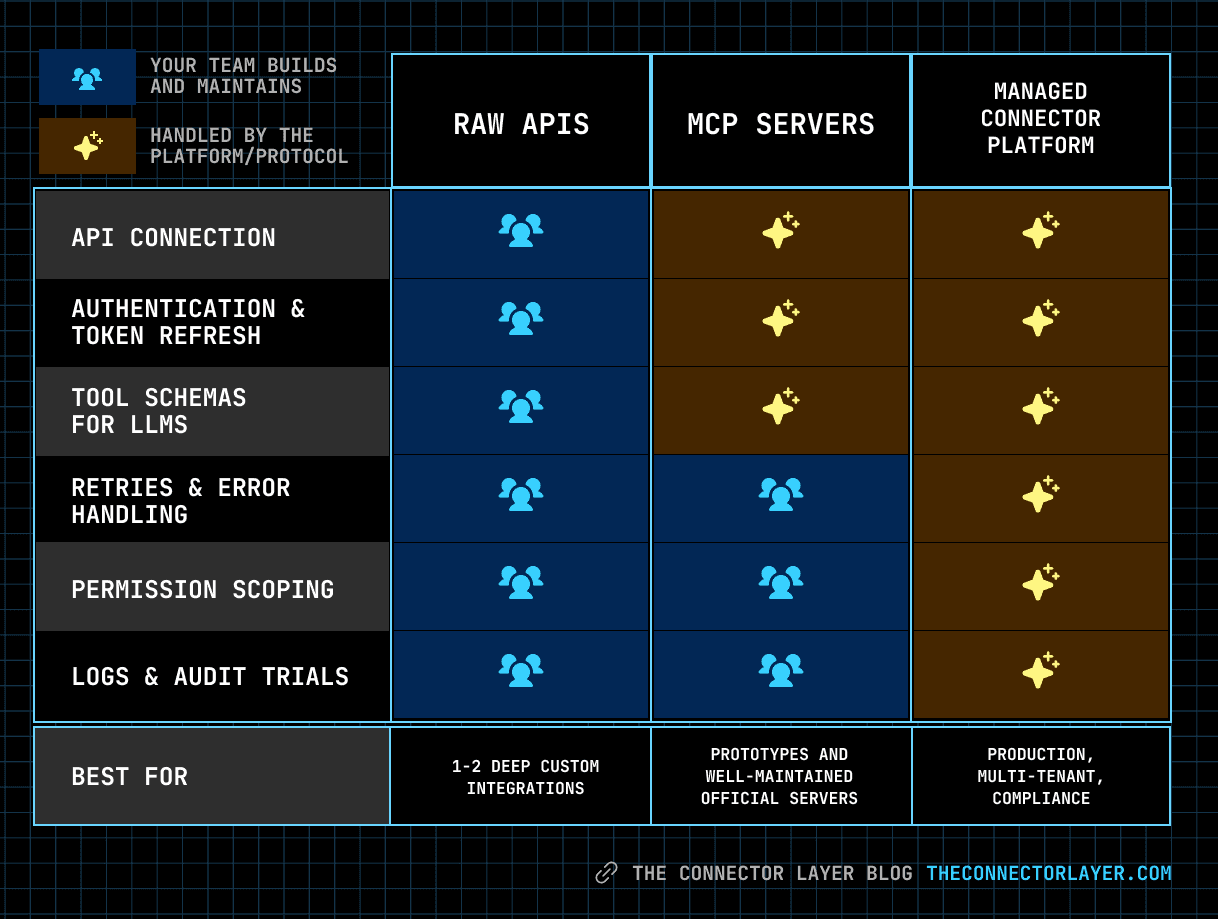
Option 1: Raw APIs
This is the traditional route. Your team reads the Gmail, Slack, or Salesforce API docs, builds the OAuth flow, writes the tool definitions, and wires everything into your agent framework.
When it's enough: You need one or two integrations, you want total control over every request, and you have engineers who can own the maintenance long-term.
Where it breaks down: Cost scales linearly with every app you add. You own token refresh, rate limits, retries, schema design, and breaking API changes — for every integration, forever. And LLMs don't consume raw endpoints well; someone still has to translate each API into agent-readable tool schemas and keep those schemas accurate.
Related: Build vs Buy AI Agent Integrations in 2026
Option 2: Official MCP Servers
The Model Context Protocol standardised how agents and tools talk to each other. If an app exposes an MCP server, any MCP-compatible agent can use it without custom integration code. That's a genuine leap forward, and it's why official MCP servers from GitHub, Notion, and others have been adopted so quickly.
When it's enough: You're prototyping, you only need a handful of apps, and those apps ship well-maintained official MCP servers. For a single-user internal tool that hits the GitHub MCP server, adding a connector platform on top adds unnecessary overhead.
Where it breaks down: MCP defines the protocol, not the operations around it. In practice, teams running MCP servers in production still hit the same gaps:
Uneven quality. Official servers vary widely in action depth and schema quality, and community servers vary even more. A server that "supports Salesforce" may cover some twenty actions out of the hundreds your workflow needs.
Fragmented auth. Each server handles its own credentials. In a multi-tenant product where every customer connects different apps with different permissions, you end up building credential management infrastructure anyway.
No cross-app governance. MCP provides no unified permission scoping, execution logs, or audit trails across servers, all of which are non-negotiable for compliance.
Option 3: Managed Agent Connector Platforms
This isn't an either/or choice with MCP — most connector platforms now expose their tools through MCP. Think of the protocol as the plumbing standard and the platform as the managed water utility: one handles how things connect, the other handles auth, permissions, reliability, observability, and maintenance at scale.
When it's the right call: You're connecting agents to many apps, serving multiple tenants, operating in a regulated environment, or shipping a production product where a failed tool call is a customer-facing bug.
A simple decision heuristic
Your situation | Best fit |
|---|---|
Prototype or internal tool, 1–3 apps with solid official MCP servers | Official MCP servers directly |
One or two integrations you need deep, custom control over | Raw APIs with tool calling |
Production agent product, many apps, multi-tenant, or compliance requirements | Managed connector platform |
The honest summary: MCP solved the connection problem. Connector platforms solve the operations problem. Most teams building agent-first products eventually need both, and the good news is they compose cleanly.
What to look for in an Agent Connector
1. Tool Depth and Breadth
An Agent Connector platform is only useful if it has connectors or integrations for the apps you need and, on top of that, offers a depth of actions.
For example, to build agentic systems for GTM, it should have access to CRMs like Hubspot and Salesforce, conversation intelligence tools like Gong, and sales engagement tools like Lemlist.
At the same time, the connector platform should offer real depth of actions, not just surface-level app coverage.
A good example is Salesforce. Many platforms claim to "support Salesforce," but that does not always mean they support the specific objects and edge cases that sales teams rely on every day.
In Zams' case, what ultimately sealed the deal was the depth of Composio's tool coverage. Composio had niche Salesforce tools that other platforms did not touch, including support for both regular Notes and Enhanced Notes, features that matter deeply in B2B sales workflows. It also handled edge cases competitors overlooked, giving Zams confidence that it could scale integrations without compromising on production reliability.
As Nirman Dave, CEO of Zams, put it:
What we discovered is that depth of tools or actions is everything. It's the difference between integrations that just connect and integrations that actually work in production.
2. Authentication
Authentication is one of the hardest parts of building reliable agent integrations. A good agent connector platform should handle OAuth, API keys, token refresh, token rotation, revocation, and secure credential storage for you.
This matters because agents should not directly manage raw user credentials. If every engineering team has to build and maintain OAuth flows for Gmail, Slack, Salesforce, Notion, HubSpot, and dozens of other apps, the integration layer quickly becomes a security and maintenance burden.
For example, if an agent needs to send an email through Gmail or update a Salesforce opportunity, the connector should know which user authorised the action, which permissions are available, and whether the token is still valid. If the token expires, the platform should automatically refresh it rather than break the workflow.
This is especially important in multi-tenant products. Every customer may connect different apps, grant different permissions, and expect their data to stay isolated. A strong agent connector platform should make this safe by default.
3. Agent-optimised Tool Schema
LLMs can call APIs via tool calling, but their reliability depends on the tool schemas they receive. A good agent connector provides agent-optimised tool descriptions, clear required parameters, input constraints, and predictable outputs, so the model can choose the right tool and pass the correct arguments consistently.
4. Permission Scoping and Access Control
Authentication alone is not enough. A strong agent connector platform should also let you control exactly what an agent can access and what actions it can perform.
For example, an agent may need permission to read Gmail threads but not send emails, create Salesforce notes but not delete opportunities, or post updates in selected Slack channels without accessing private conversations. Without fine-grained permission controls, teams either over-grant permissions to agents or spend extra engineering effort building custom access layers themselves.
This becomes even more important in enterprise and multi-tenant environments. Different customers, users, and workflows may require different tool permissions. A production-ready connector platform should support least-privilege access, per-tool permissions, user-level authorisation, and easy revocation when access is no longer needed.
5. Reliability and Error Handling
Real-world APIs fail all the time. Tokens expire, rate limits kick in, endpoints change, and third-party services return unexpected errors. A good agent connector should handle these issues gracefully rather than pushing all the complexity back onto the developer.
Look for connectors that support retries, rate-limit handling, clear error messages, idempotent actions, and consistent response formats. This helps agents recover from failures, explain what went wrong, and continue workflows without breaking the user experience.
6. Observability and Audit Logs
Once agents start taking actions across business apps, teams need visibility into what happened. A connector platform should provide logs for every tool call, including who authorised the action, which tool was called, what input was passed, what response came back, and whether the action succeeded or failed.
This is useful for debugging, security reviews, compliance, and customer support. If an agent updates a CRM record, sends an email, or creates a ticket, teams should be able to trace that action later.
Real-World Examples of Companies Using Agent Connectors
Agent connectors are already showing up in mainstream AI products. And they have something similar: the agent becomes more useful when it can securely read context from business apps, take action in those apps, and preserve the user's existing permissions.
Here are a few real-world examples.
Glean

Glean is an enterprise Work AI platform that connects to company knowledge across tools like Workday, Slack, Jira, Confluence, GitHub, Salesforce, and other workplace systems.
Its connectors help agents do two important things:
Retrieve permission-aware context from enterprise apps, so employees get answers grounded in the documents, tickets, messages, and records they are allowed to access.
Take actions inside business tools, such as creating or updating Jira tickets, exporting answers to Google Docs or Sheets, sending messages in Slack or Teams, or pulling metrics from data warehouses.
The connectors transform company context into an action layer that agents can use to answer questions, trigger workflows, and move work forward across the tools employees already use.
For example, an employee could ask Glean to summarise a customer issue in Intercom, find related Jira tickets, draft a project update, and post the update to Slack. Without connectors, the agent would only provide generic advice. With connectors, it can operate across the actual systems where work happens.
Kore AI
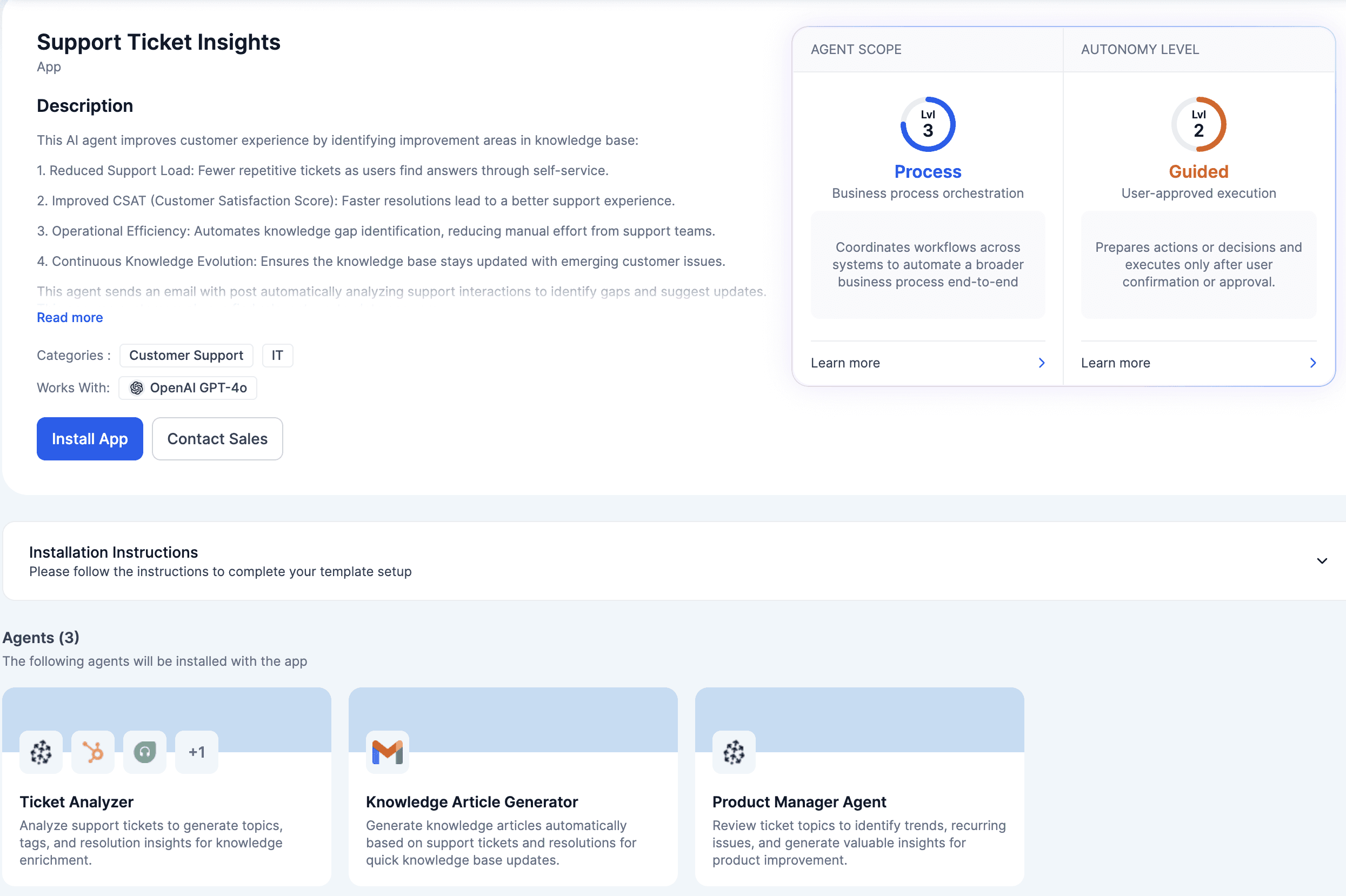
Kore.ai is another enterprise example, focused heavily on customer service, employee support, HR, IT, recruiting, banking, healthcare, and retail workflows.
Its Agent Platform, Artemis, includes pre-built agents, templates, marketplace integrations, observability, evaluations, and orchestration features for deploying agents in production. Instead of treating connectors as simple app add-ons, Kore.ai uses them as part of a broader enterprise agent platform.
A typical Kore.ai use case might look like this:
A customer asks a support question through chat or voice.
The AI agent identifies the intent and pulls context from a CRM, ticketing system, knowledge base, or contact centre platform.
The agent either resolves the issue directly, routes it to a human, or triggers a backend workflow.
The business tracks interactions using analytics, observability, and evaluation tools.
This is a great example of connectors in a vertical enterprise environment. The connector's value lies not only in the API call itself but also in the orchestration of authentication, workflow execution, routing, monitoring, and governance.
Agent.ai
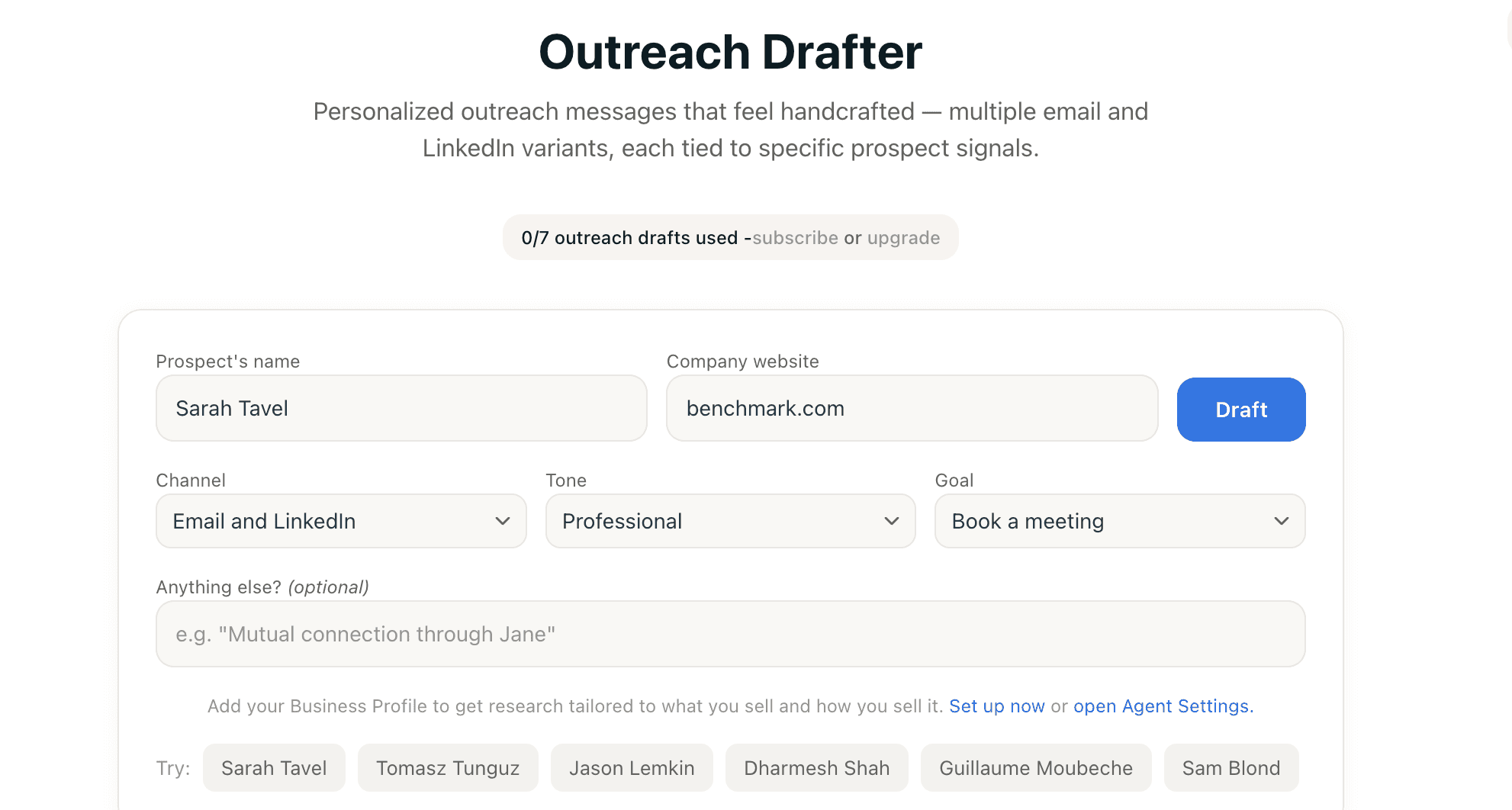
Agent.ai is a marketplace and professional network for AI agents where users can discover, build, and activate agents for business workflows.
It shows why connectors matter: agents become more useful when they can move beyond a chat interface and work across the tools a team already uses. For example, a sales prospecting agent can research leads, enrich account context, draft outreach, and coordinate follow-ups only if it can connect securely to CRM, email, web research, and workflow systems.
In this model, connectors are what turn standalone agents into reusable workers that can be assembled into a broader AI agent team.
Claude MCP Connectors
Claude is one of the clearest examples of agent connectors becoming standardized through MCP. Its ecosystem includes both official and community connectors:
GitHub for repositories, issues, and pull requests
Slack for reading channels and sending messages
Google Drive for files, docs, sheets, and calendar data
Internal MCP servers for company databases and custom APIs
Any MCP-compatible agent can use these same tools, which is why most connector platforms now expose their toolkits through MCP rather than competing with it.
Best Agent Connector Platforms in 2026
Feature | |||||
|---|---|---|---|---|---|
Best for | Agent-native tool calling, broad app coverage, and production-ready execution | Code-first integrations and API auth for teams that want to own integration logic | Enterprise integrations, normalized data, and governed agent access | Delegated auth and MCP-style tool access | Workflow automation and event-driven integrations |
Connector depth | 1,000+ agent toolkits with deep action coverage | 800+ APIs, but smaller first-party catalog | 220+ maintained integrations across core enterprise categories | ~112 first-party integrations | 3,000+ apps and 10,000+ actions/triggers |
Agent readiness | ✅ Excellent — LLM-optimized tools, Tool Router, many framework adapters | ⚠️ Good, but more code-first than turnkey agent-native | ✅ Good, especially for governed enterprise agents | ✅ Strong for auth-first MCP use cases | ⚠️ Workflow-first; less agent-native by default |
Authentication | ✅ Managed OAuth, token refresh, scoped access, credential handling | ✅ Strong OAuth and API auth infrastructure | ✅ Built-in auth, credential management, scoped access | ✅ Strong delegated OAuth model | ✅ Managed auth for external users through Connect |
Customization | ✅ Strong tool control and framework flexibility | ✅ Strong if your team wants to write custom integration logic | ⚠️ Strong governance, but less agent-native tool customisation | ⚠️ More focused on auth and MCP access than broad tool customisation | ⚠️ Flexible workflows, but more glue code for agent use cases |
Data sync/normalisation | ⚠️ Not focused on unified data models | ⚠️ Limited native sync/webhook support | ✅ Strong — unified data models and traditional product integrations | ❌ Not the core focus | ✅ Strong for workflow-driven syncs and automations |
Observability/governance | ✅ Comprehensive execution logs and audit trails | ⚠️ Less deep observability; no OTel export | ✅ Strong governance, DLP, audit trails, evaluations | ⚠️ Lighter enterprise governance | ⚠️ Good workflow logs, less agent-specific observability |
Pricing risk | ✅ Predictable usage-based pricing | ⚠️ Usage and connection-based pricing can vary | ⚠️ Linked-account pricing can compound for multi-tenant products | ⚠️ Multiple moving parts: user challenges + standard/pro executions | ⚠️ External-user billing + workflow credits can get expensive at scale |
Main limitation | Less suited for traditional unified data-model integrations | Requires more engineering ownership and has fewer turnkey agent tools | Can strip API-specific semantics through normalisation | Narrower catalogue and leaner framework ecosystem | Workflow automation heritage; uncertain direction after Workday acquisition |
1. Nango
Nango is an open-source, code-first API integration platform that simplifies authentication and data synchronisation between applications, with growing support for agentic use cases.
Pros
Developer-friendly API for building integrations, fully operable via CLI and API
Pre-built OAuth flows that handle authentication complexity automatically across 800+ APIs
SOC 2 Type II, HIPAA, and GDPR compliant; open source under the Elastic License
Usage-based pricing: free tier ($0/mo), then Starter from $50/month, Growth from $500/month, and custom Enterprise, billed per connection plus usage (requests, function runs, synced records). Learn more at the pricing page.
Cons
No per-tenant tool or field customisation, which can be limiting when different customers need different integration behaviour
Less deep observability for integration runs, with no OpenTelemetry export
Smaller pre-built catalogue around ~112 integrations are first-party (hand-built or auto-generated), with the rest community-contributed
Code-first model expects you to author and own integration logic as TypeScript functions, rather than consuming ready-made agent tools out of the box
2. Merge
Merge Agent Handler is an enterprise-focused agent integration platform, built on top of Merge's existing Unified API infrastructure (220+ integrations across HRIS, ATS, CRM, accounting, ticketing, file storage, and more).
Pros
Enterprise-grade governance, including rules/DLP, logs, alerts, and audit trails
Evaluation Suite to pressure-test connectors before deploying them
Connector Studio to modify pre-built connectors or add new ones via AI
Native data normalisation and unified data models across categories like CRM, HRIS, ATS, accounting, ticketing, and file storage
SOC 2 Type II, ISO 27001, HIPAA, and GDPR certified
Trusted by enterprise customers including OpenAI, Perplexity, and Mistral AI
Agent Handler is free to start (2,000 monthly credits), and the Unified API includes the first 3 linked accounts free. You can learn more at their pricing page.
Cons
Built more for traditional bidirectional product integrations, where a SaaS app continuously syncs data both ways with customer systems, than for agent-native tool execution
Unified API architecture normalises data into common schemas, which can strip API-specific semantics that agents sometimes need
Per-linked-account pricing - $650/month for up to 10 production-linked accounts, then $65 per linked account after - compounds quickly in multi-tenant products where each customer connects several systems. Check out their pricing page to learn more.
3. Arcade.dev
Arcade is a flexible MCP server and authorisation platform offering cloud, on-premises, and self-hosted deployment options.
It lets you connect your agents to tools across its app catalogue (roughly 112 first-party integrations), with OAuth 2.0/2.1, API keys, and user tokens for authentication.
Pros
Strong, principled delegated-auth model where agents act as the user via proper OAuth rather than shared service accounts
Flexible hosting options, including cloud, on-premises, and self-hosted deployments, are available even on the free tier
Usage-based free tier including access to all public MCP servers, ~1,000 standard tool executions, 100 user challenges, and 50 pro tool executions per month, with the Growth plan at $25/month. Learn more at their pricing page.
Cons
Narrower catalogue, with roughly 112 first-party integrations, which is smaller than broader connector platforms.
Pricing has multiple moving parts, including user challenges and separate standard/pro tool execution rates, making costs harder to predict at scale.
Leaner framework ecosystem compared with more established agent connector platforms, so teams may need extra glue code for certain agent stacks.
More focused on authorisation and MCP-style tool access than broad, production-ready connector depth across every app category.
4. Pipedream Connect
Pipedream is a workflow automation platform that connects 3,000+ apps with event-driven workflows and integrations, plus 10,000+ pre-built tools, triggers, and actions.
Pros
Large integration library with 3,000+ app connections and a deep tool/trigger/action catalogue
Low-code/no-code visual workflow builder accessible to non-technical users
Event-driven architecture suited to reactive automations, with 5,000+ customers
Cons
Pipedream Connect pricing can get expensive at scale: standard plans bill by external users on top of workflow credits, with community notes citing $150/month for 100 external users and $2 per extra user. See the pricing page.
The roadmap for independent agent-builder use cases is uncertain after Pipedream's acquisition by Workday, creating risk for teams choosing it as long-term agent infrastructure.
Designed primarily for workflow automation rather than for AI agent tool execution; using it with an agent often means manually feeding API definitions into context.
Composio
Composio is an agent-native connector platform: 1,000+ pre-built agent toolkits and 20,000+ tools, built for how LLMs actually call software rather than repurposed from human-facing workflow automation.
That distinction shows up in the details. Tool schemas are written and continuously tuned against real agent error and success rates, so models pick the right action and pass the right parameters more often. And because the platform is developer-first, everything runs through open-source Python and TypeScript SDKs rather than a drag-and-drop builder.
Why use it?
Depth and breadth: 1,000+ toolkits with deep action coverage per app — including the niche objects and edge cases (like Salesforce's regular vs. Enhanced Notes) that decide whether an integration survives production
Drop-in framework support: adapters for LangChain, LangGraph, CrewAI, AutoGen, OpenAI Agents SDK, LlamaIndex, Vercel AI SDK, Google ADK, Anthropic SDK, and more — no glue code to fit your existing stack
Fully managed auth: OAuth handled end-to-end, with tokens stored encrypted, auto-rotated, and revocable; agents never touch raw credentials
Tool Router: dynamically surfaces only the tools relevant to the task at hand, cutting token usage and improving tool-call accuracy in multi-step workflows
Enterprise-ready security: SOC 2 Type 2 and ISO 27001 certified, with data encrypted in transit and at rest, plus per-tool permission scoping and full execution logs
Predictable pricing: free tier with 20K tool calls/month; paid plans from $29/month for 200K calls, up to $229/month for 2M. Details on the pricing page
Where it's not the fit: Composio is built for agents taking actions, not for continuously syncing normalised data between systems. If your core need is unified data models and traditional bidirectional product integrations, a unified API platform like Merge is the better tool for the job.
How to Pick the Best Agent Connector Platform
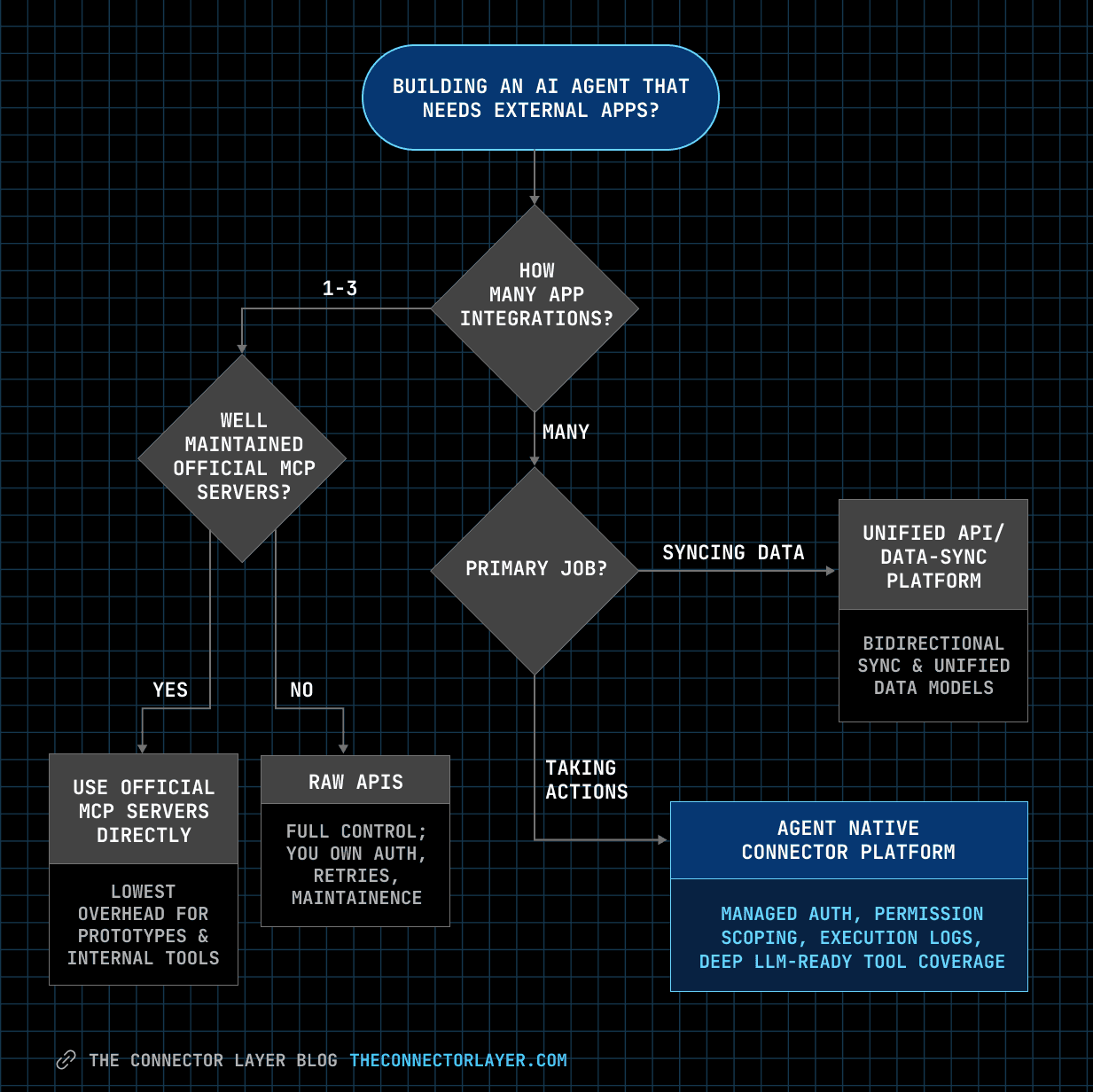
There is no single "best" platform — only the best fit for what you're optimising for. The five platforms above genuinely serve different jobs:
Agent-native tool calling with production reliability, managed auth, permission scoping and broad framework support: Composio
Code-first integrations where your team wants to own the integration logic: Nango
Normalised data models and traditional bidirectional product integrations: Merge
Delegated OAuth and MCP-style tool access with flexible hosting: Arcade.dev
Event-driven workflow automation: Pipedream
If you're still deciding between approaches — raw APIs, official MCP servers, or a managed platform — the decision heuristic in the earlier section applies first. This list is for the step after: you know you need a platform, and you're choosing which kind.
For most agent-first products, the deciding question is not "how many apps does this connect to?" It's whether the agent can reliably understand the tools, call the right action, pass the right parameters, respect user permissions, and leave your team enough logs to debug what went wrong. Catalogue size is usually a marketing number; production reliability is the product.
On that axis, prioritise four things: deep action coverage (not just app coverage), managed authentication, LLM-optimized tool schemas, and execution observability.

 Get started



