




OpenAI launched ChatGPT Dots on September 29, 2026, shortly after Grok Bot launched on August 11, 2026.
I have been using Grok Bot as my daily driver, so I wanted to see what OpenAI had built and how ChatGPT Dots compares when you actually use both for real work.
On paper, they solve a similar problem. But once you give them real tasks, the differences in how they work, automate tasks, use tools, and handle ongoing work become much clearer.
So I spent time comparing both across the areas that matter most to me:
how they organise work,
what they can access,
how they automate workflows,
how much control they give you, and
how useful they are when you stop treating them like chatbots.
I compared both products using their official documentation, current product pages, pricing, security documentation, and launch updates.
I also avoided a model benchmark for one important reason.
OpenAI confirms that dots run on GPT-6 Astra. Grok Bot doesn't have a fixed, user-selectable model. Cursor manages its model selection and can change the serving mix, so a clean model-to-model benchmark would not be reproducible.
Thus, the useful question is simpler:
Which system best fits how you actually want an always-on agent to work?
ChatGPT dots vs Grok Bot: the short version
Area | ChatGPT dots | Grok Bot |
|---|---|---|
Core idea | One general persistent assistant | Multiple persistent specialist Bots |
Model | GPT-6 Astra | Managed by Cursor, no model picker |
Cloud computer | Yes | Yes |
Multiple agents today | No, additional dots are planned | Yes |
Agent-to-agent collaboration | No current multi-dot system | Yes, Bots can message and hand work to each other |
Apps | 4,000+ through OpenAI plugins | Plugins, browser, terminal, websites, and X |
Scheduled work | Yes | Yes, through routines |
Proactive work | Proactive research and scheduled work | Routines, follow-ups, and persistent Bot context |
Teach by demonstration | Not documented for dots | Yes |
Slack | Yes | Yes, especially through Team Bots |
Microsoft Teams | Yes | No official Team Bot integration documented |
Mobile | Use after setup | Full iOS and Android apps |
Cheapest individual entry | ChatGPT Pro starts at $100/month | Cursor Pro starts at $20/month |
ChatGPT dots can connect to more than 4,000 apps through its plugin ecosystem.
Grok Bot does not publish a comparable connector count, but it combines plugins with a persistent browser, filesystem, terminal, and computer use.
That already gives us the main split.
Dots feels like one AI that follows your work. Grok Bot feels like a small roster of AI workers that you organise around jobs. (The kind of assistant I would like to use)
The biggest difference is how they organise work
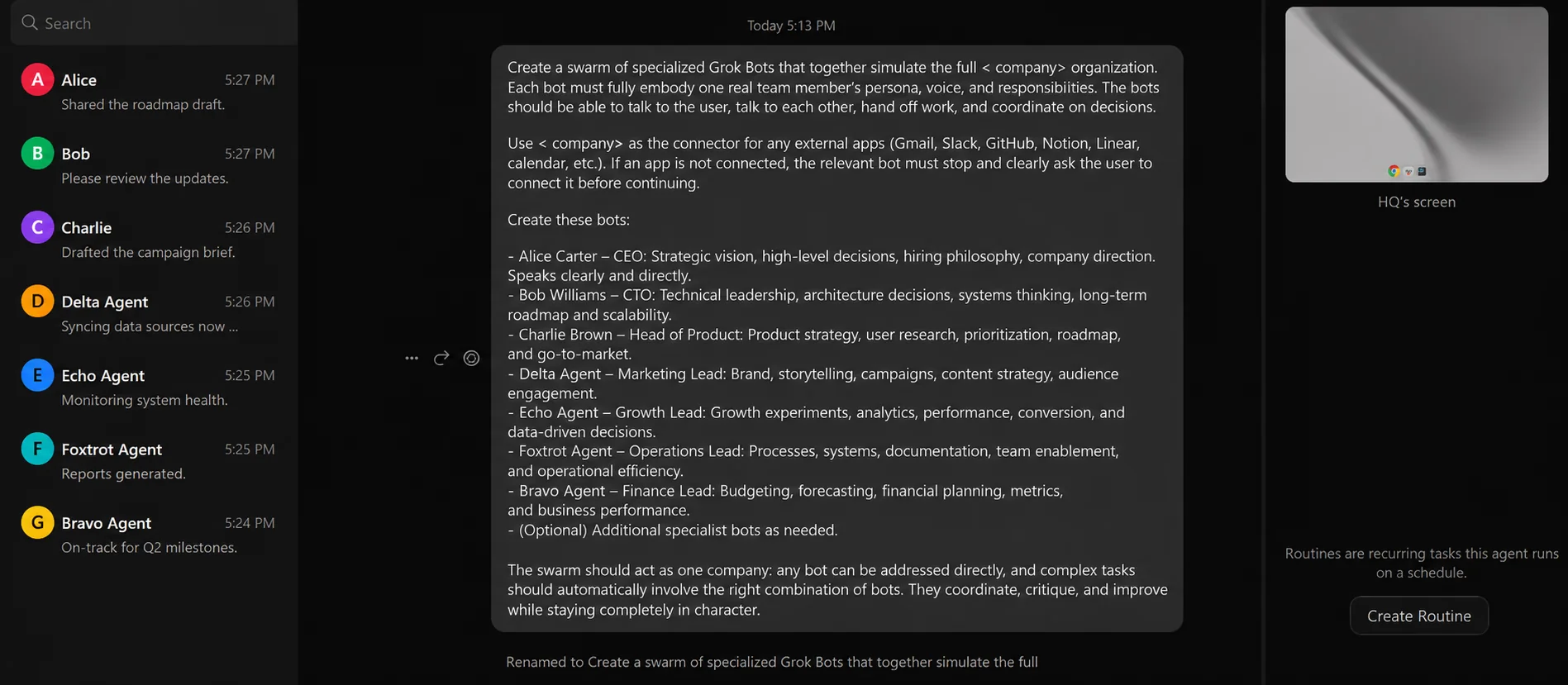
OpenAI currently gives an eligible user one dot.
You can name it, connect apps, give it ongoing responsibilities, schedule work, and let it build memory over time. OpenAI says more dots are coming later, but additional dots aren't available today.
Grok Bot starts from another idea.
You create separate Bots for separate jobs. One could handle sales research, another could manage expenses, and another could reproduce product bugs.
SpaceXAI recommends giving each Bot one clear area of ownership, its own tools, approval boundaries, and recurring schedule.
You can then run several Bots in parallel.
They can message each other, hand off work, share files, or collaborate in a group conversation. SpaceXAI even describes setups where one Bot coordinates several specialist Bots.
That creates a very practical difference.
If I wanted one assistant that knows my calendar, email, projects, preferences, and ongoing work, Dots has the simpler model.
If I wanted separate agents for sales, marketing, research, engineering, and operations, Grok Bot already supports that structure today.
Verdict
Grok Bot wins multi-agent work: Dots keeps the system simpler, but Grok Bot gives you a real agent roster today.
The model comparison is less simple than it looks
Dots has one clear advantage here: we know what intelligence layer it uses.
OpenAI states Dots are powered by GPT-6 Astra. The dot can use that model while it works through apps, its cloud computer, and connected information.
Grok Bot works differently.
Cursor manages model selection for Grok Bot. There is no user-facing model picker, and Cursor says the serving mix can change over time.
Usage analytics can show which model served a request, but you cannot lock the Bot to one model yourself.
This is important because buying SuperGrok does not mean every Grok Bot task is guaranteed to run on the same Grok model.
So I would not say GPT-6 Astra is better or worse than Grok Bot here. There is no clean public benchmark that supports that conclusion.
The practical difference is control and predictability.
With ChatGPT Dots, you know the main model.
With Grok Bot, Cursor chooses the model best suited to the work.
Verdict
Dots wins if knowing the underlying model matters to you: Grok Bot may change models behind the scenes, which can be useful, but it makes direct model comparisons harder.
Both have cloud computers, but they use them differently
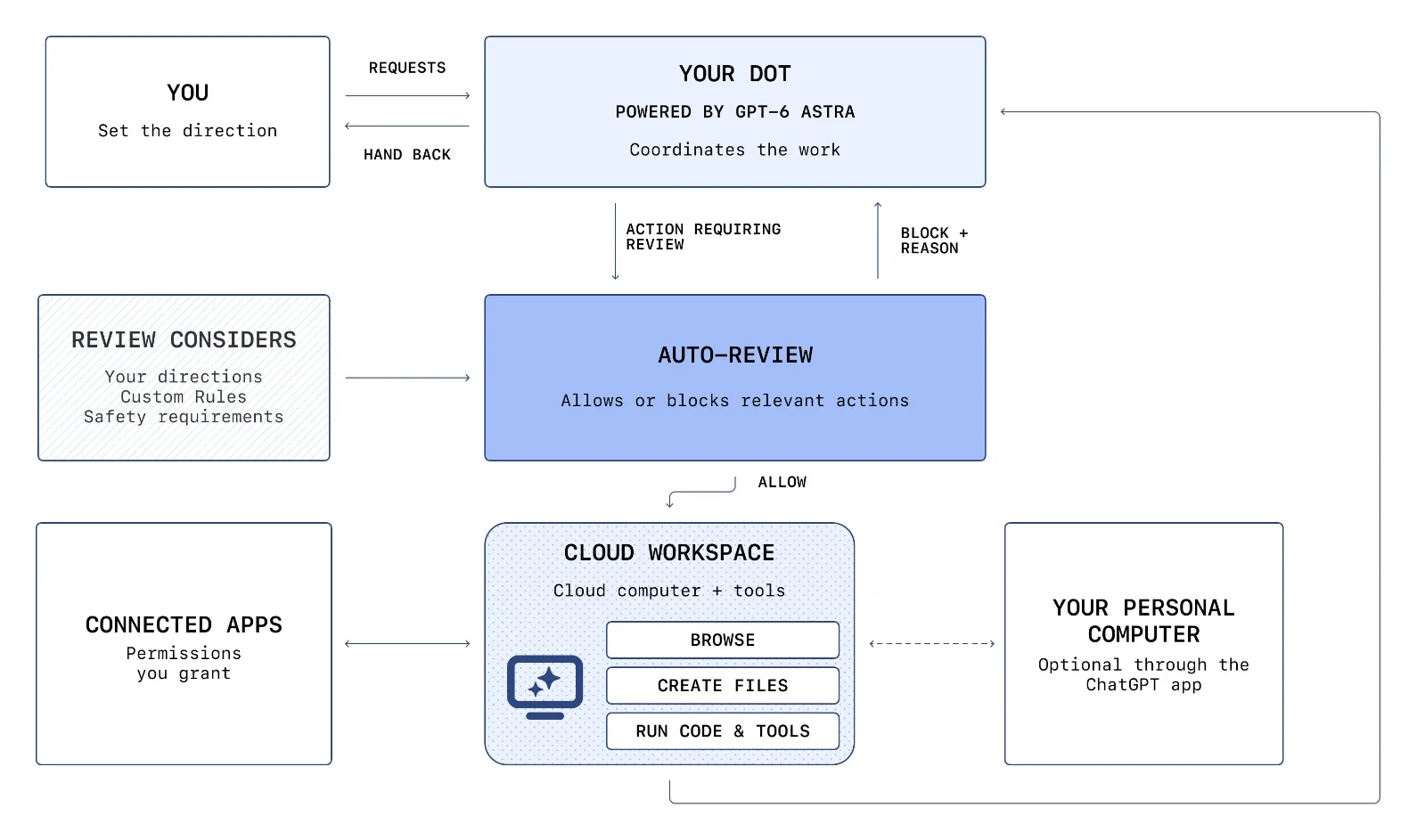
Every dot has its own cloud computer. You can use that computer for ongoing work and keep going while you are away.
You can also connect your own computer.
Local access starts disabled. When you enable it through the ChatGPT desktop app, your dot can access local files, create ChatGPT Work or Codex tasks, use local skills, and use your local browser when its cloud browser cannot complete a task. Your computer must stay online, and the ChatGPT app must stay open for local work.
Grok Bot also runs on a persistent cloud computer with a browser, filesystem, and terminal.
It can sign in to websites, work through browser interfaces, use command-line tools, and keep going after you close your laptop.
There is one important architecture detail.
All personal Bots under one Grok Bot user share the same cloud computer. They share files, browser sessions, command-line credentials, and signed-in accounts.
Each Bot gets its own screen, so several Bots can work in parallel. Those screens are separate work areas, but SpaceXAI says they are not separate security boundaries.
That makes multi-agent handoffs easy.
It also means you should assume that an account you sign into for one personal Bot can be available to your other Bots.
Verdict
This is mostly a design choice.
Grok Bot makes cross-Bot handoffs easier because its Bots share one working computer. Dots gives you a simpler single-agent computer model today.
Apps and integrations
This is one of Dots’ strongest areas.
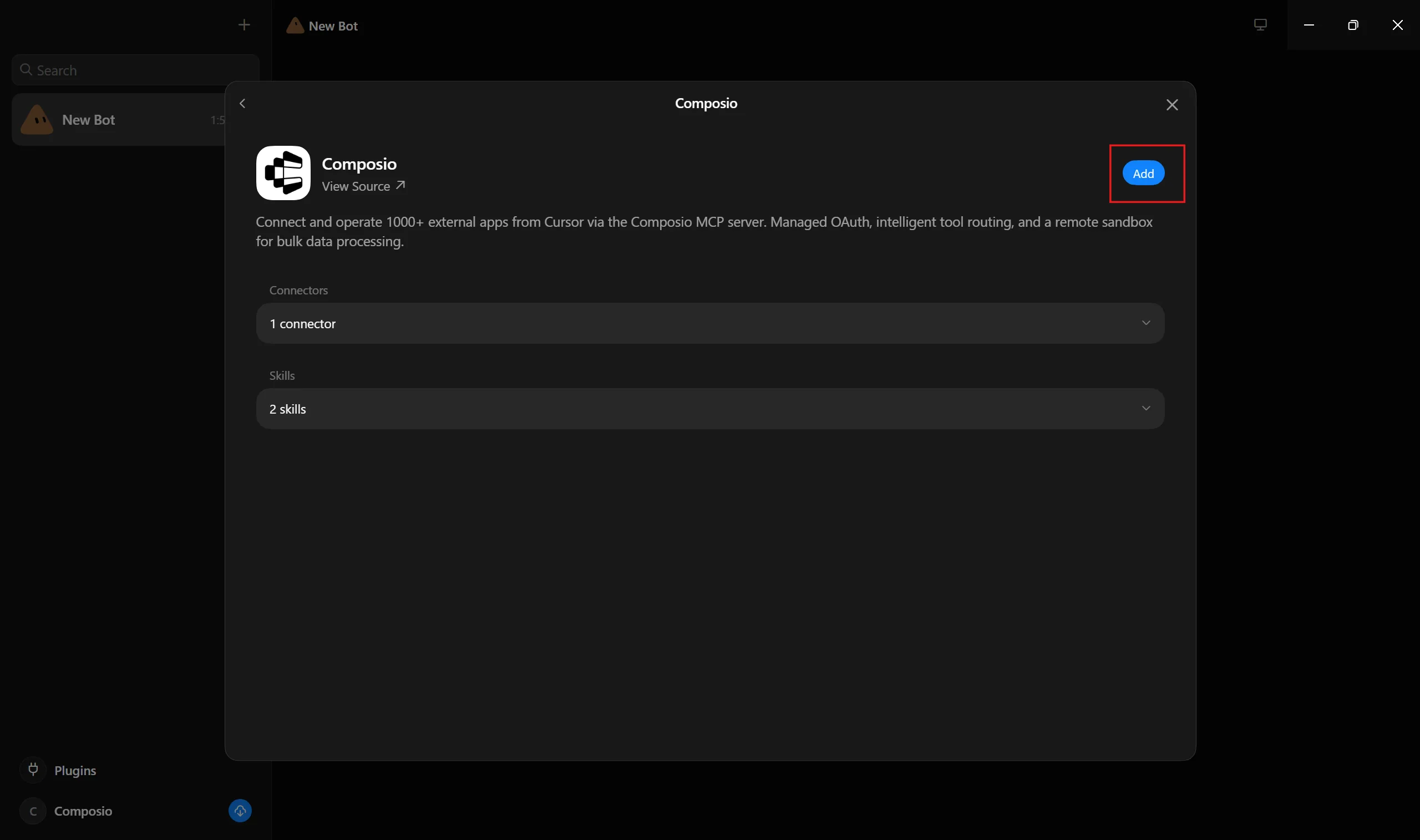
OpenAI says Dots can connect to more than 4,000 apps through its plugin ecosystem. Plugin permissions are shared across dots, ChatGPT, ChatGPT Work, and Codex, so an existing connection can also become available to your dot within the permissions you already granted.
Related: Best ChatGPT Dots plugins
The dot can then use those apps as part of longer tasks.
For example, it can work with connected information, use its cloud computer, delegate work to Codex or ChatGPT Work, and bring the final result back into the same conversation.
Grok Bot also supports plugins.
Related: Best Grok Bot plugins
You can install them from its Marketplace, connect accounts, and enable the tools that a Bot needs. It can then combine those structured tools with browser use, files, and its terminal.
The browser matters because Grok Bot can work with websites even when there is no clean connector or API.
If a site requires a password, passkey, CAPTCHA, or two-factor authentication, the Bot can hand control to you for that step and then continue after you return control.
Grok Bot also has a direct advantage around X.
You can connect your X account and ask a Bot to search posts, read your timeline, check mentions, or pull trends. SpaceXAI also provides an X plugin for searches, timelines, trends, and bookmarks.
Verdict
Dots wins on documented integration breadth. More than 4,000 plugin connections is a strong base for structured cross-app work.
Grok Bot becomes more interesting when a workflow needs websites, browser interaction, a terminal, or X.
Proactive work and automations
This is where dots start to feel different from a normal scheduled agent.
A dot can run scheduled work, such as checking your calendar each morning or watching something on a recurring schedule.
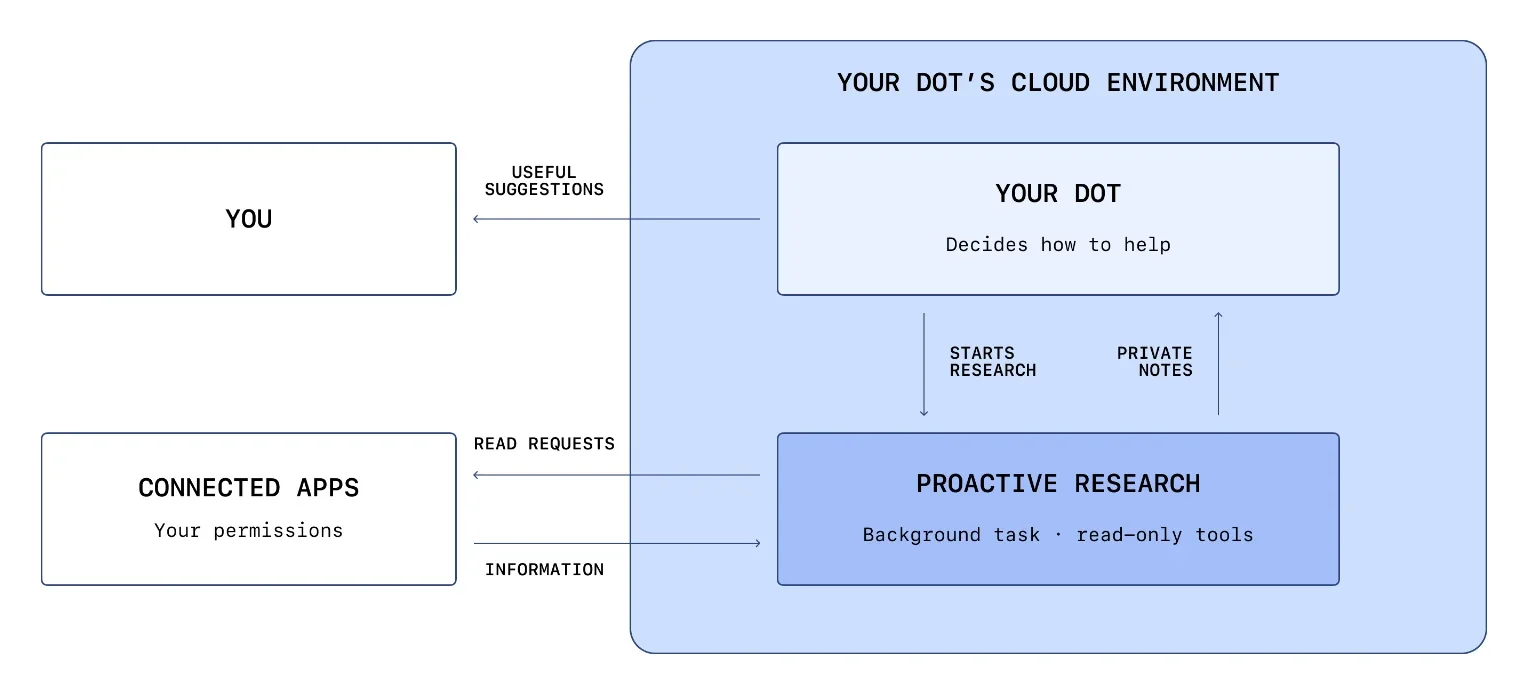
But it can also perform what OpenAI calls proactive research. It can review information from permitted connected sources before you send a new message and save private notes or memories that can help later.
OpenAI puts tighter limits around this background research.
During proactive research, the bot cannot directly send messages, change data through plugins, or control a browser or computer. A later action still has to pass the normal permission and safety checks.
Grok Bot approaches repeatable work through skills and routines.
A skill describes how to perform a task. A routine tells one Bot when to perform it, either on a schedule or, where supported, after an event.
There is also a useful teaching flow.
When Teach a task is available, you can perform a browser workflow while the Bot watches. Grok Bot records the process for up to ten minutes, converts it into a draft skill, and lets you test that skill before you schedule it.
This changes the setup experience.
With dots, I would tell my agent what outcome I want and let it keep context around that responsibility.
With Grok Bot, I can also take a workflow that already works, teach the Bot how I perform it, turn that process into a skill, and then run it as a routine.
Verdict
Dots is stronger for one assistant that keeps an eye on your connected context.
Grok Bot is stronger for explicit, repeatable workflows that you want to teach, save, and automate.
Memory works differently too
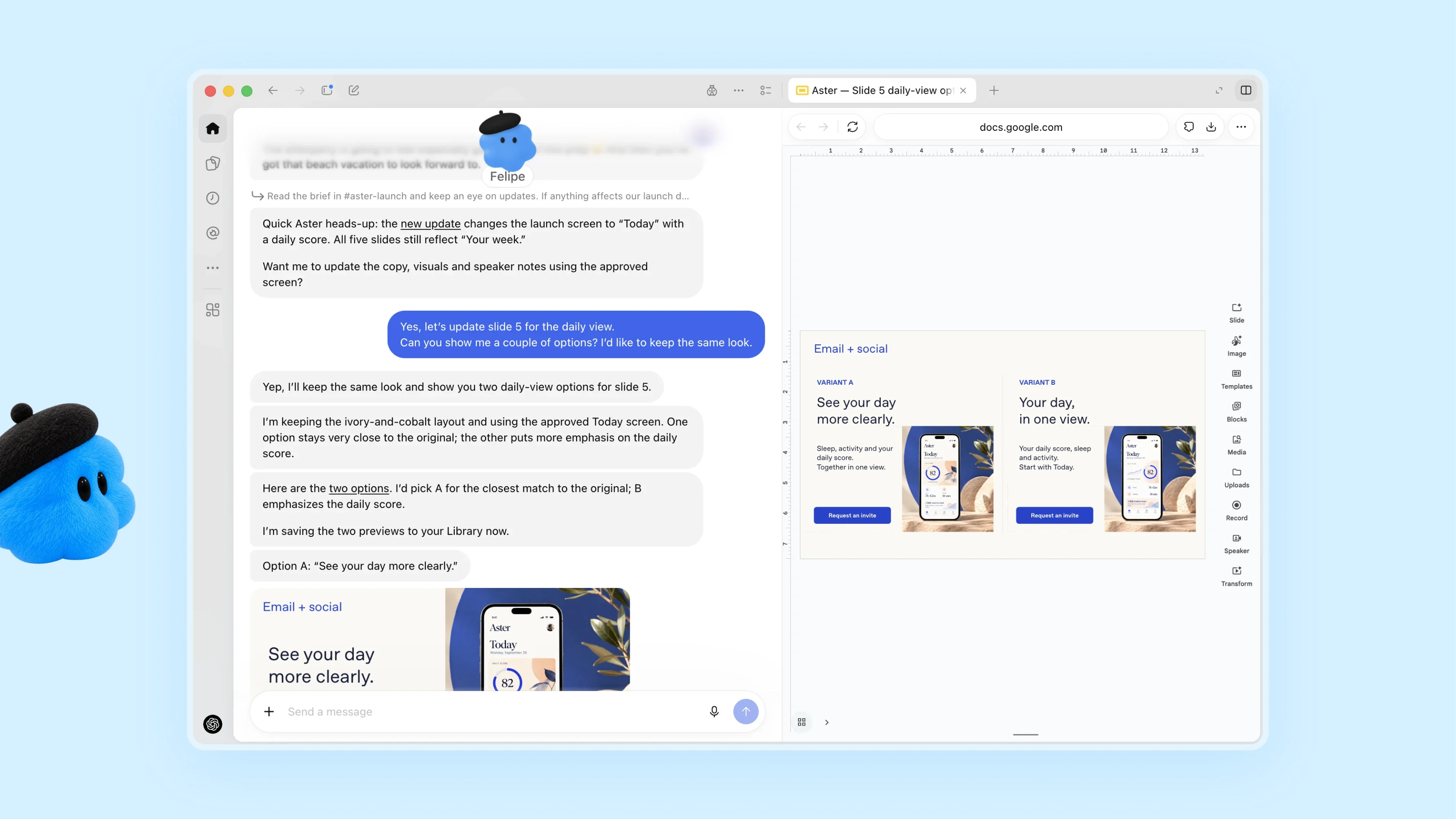
A dot receives memories from ChatGPT and can create its own memories.
It can also form memories from connected apps. This means the same assistant can build on your existing ChatGPT context while learning from ongoing work.
That can be useful if you already do your research, writing, coding, and decision-making in ChatGPT.
Grok Bot separates memory by role.
Each personal Bot keeps its own working preferences, important facts, summaries, and conversation history. Bots can still pass information through direct messages, group conversations, and shared files.
Team Bots add another layer.
A Team Bot can keep shared team memory while each employee still has a private conversation with it. The owner can give the Team Bot common files, plugins, skills, and secrets, and changes to that shared setup become available to the team.
That is a meaningful distinction.
Dots is building one long-running understanding of you.
Grok Bot lets you build different long-running contexts around different jobs.
Teamwork is where Grok Bot becomes very different
Dots can work through ChatGPT, Slack, and Microsoft Teams.
In Enterprise, admins can control whether users can add dots to Slack and Teams. A dot can post using its own identity, but only the owner can direct that dot. Messages or mentions from other people do not start work for it.
So a dot inside Slack still behaves mainly as your agent.
Grok Bot also has personal bots, but Team Bots change the collaboration model.
A Team Bot is one shared Bot that many people can use. Each teammate gets a private conversation, while the Bot keeps common team context, files, tools, skills, and team memory.
You can also publish a Team Bot into Slack as its own Slack app.
Team members can DM it or mention it in a channel. It identifies the teammate, uses that person's connected accounts where needed, and continues the conversation in the same thread.
That makes Team Bots useful for jobs such as:
internal support
analytics questions
request triage
documentation
shared operational workflows
Grok Bot also lets personal Bots coordinate directly with other Bots, giving you another form of collaboration that Dots doesn't offer yet.
Verdict
Grok Bot wins for shared team agents and multi-agent collaboration today.
Dots makes more sense when you want a personal agent that can follow you into Slack or Microsoft Teams.
How you talk to them
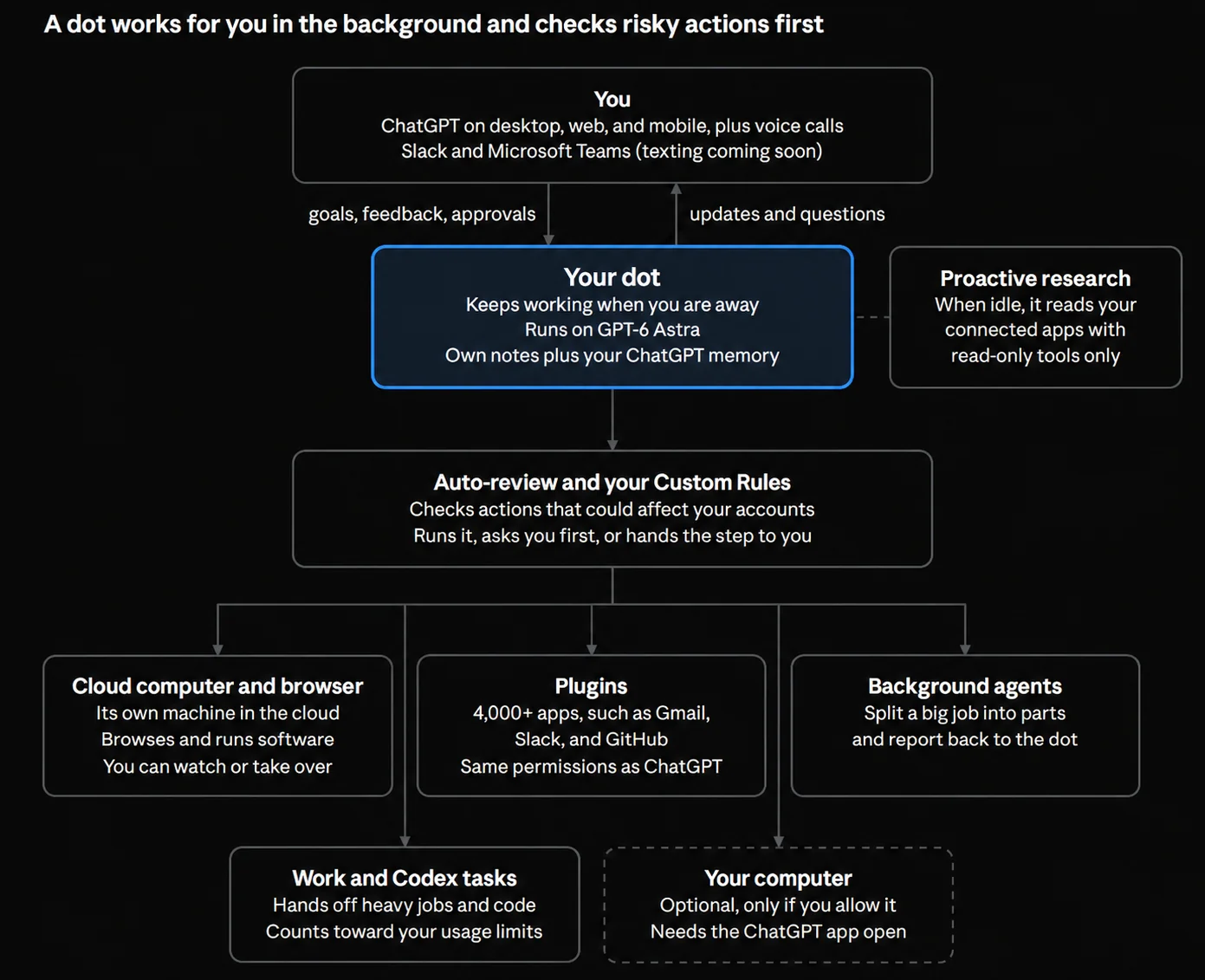
Dots lives inside the ChatGPT experience.
You create your dot in the desktop ChatGPT app or on the web. After setup, you can message it through supported ChatGPT mobile access. You can also use voice, Slack, and Microsoft Teams where those channels are available.
OpenAI also offers a limited beta test for some US Pro users.
Grok Bot has dedicated apps for macOS, Windows, Linux, iOS, and Android.
You can type, dictate, start a voice chat, send files, play Bot voice memos, mention other Bots, or keep sending instructions while work is already running.
You can also set up Grok Bot on mobile.
Verdict
Grok Bot has broader native app coverage today.
Dots has the advantage if ChatGPT is already your main interface or if Microsoft Teams matters to your workflow.
Security and approvals
Giving an AI access to your inbox, CRM, files, browser, and accounts changes the security problem.
Both companies have built approval systems around that.
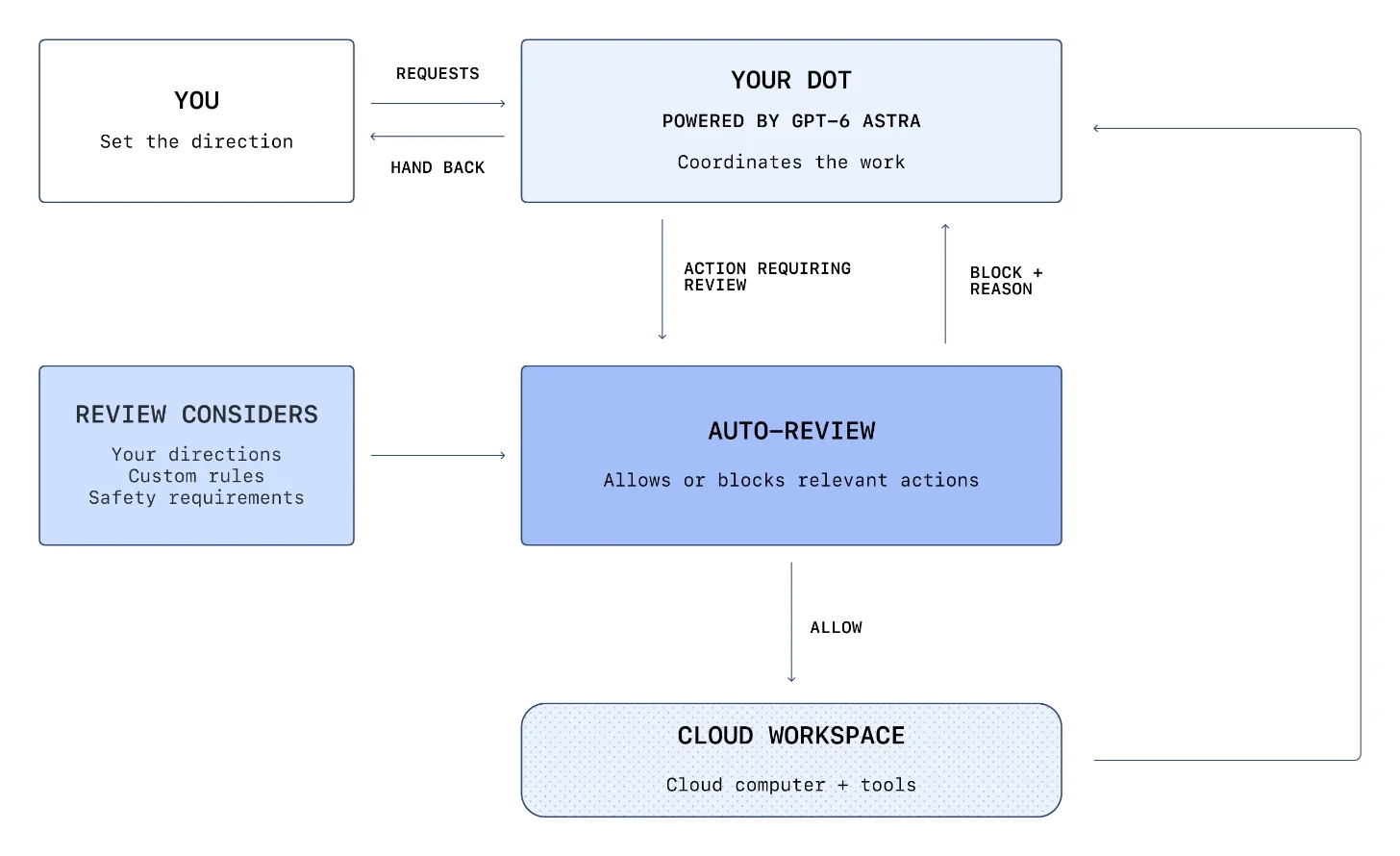
Dots uses plugin permissions, Custom Rules, Auto-review, and built-in safety checks.
Custom Rules let you choose whether supported actions can run automatically, require previous approval, ask at action time, or get handed back to you. The dot cannot use these rules to disable OpenAI's core safety requirements.
Auto-review also checks some planned actions before they run.
OpenAI gives email as one example. Before the dot sends a message, Auto-review can check the recipient and content against your instructions and safety rules. Your approval cannot override core safety requirements.
Enterprise admins get another layer.
Dots start disabled by default for Enterprise. Admins can separately control dot access, Slack and Teams connections, local computer access, custom rules, cloud browser use, cloud network access, cloud computer use, and password-manager access.
Grok Bot has its own approval and Auto Review system.
SpaceXAI recommends requiring approval for actions such as sending messages, publishing, buying, deleting data, changing permissions, making production changes, and accepting legal terms.
Enterprise users can add network controls, team rules, Auto Review policies, audit logging, and other administrative restrictions. Grok Bot isolates different users through dedicated Firecracker microVMs.
But the shared computer rule matters again.
All personal Bots belonging to one user share files, credentials, browser sessions, and logins on that user's cloud computer. SpaceXAI explicitly says separate Bots should not be treated as security boundaries.
Verdict
Both products have serious approval systems.
Dots gives you strong controls around one persistent agent and its actions.
Grok Bot gives enterprises detailed controls for a larger multi-Bot system, but you need to understand its shared-computer model before giving Bots sensitive access.
Pricing is very different
This is probably the easiest difference to understand.
Your first dot comes with an eligible ChatGPT Pro or Business Premium plan at no extra charge. OpenAI does not currently sell a separate subscription for dots.
ChatGPT Pro currently has three monthly tiers:
Plan | Monthly price |
|---|---|
Pro 100 | $100 |
Pro 200 | $200 |
Pro 500 | $500 |
ChatGPT Business Premium costs $100 per user per month when billed annually, or $125 when billed monthly.
OpenAI has not published the long-term standalone price for additional dots.
It says more dots will come later, along with options to increase a dot's speed or monthly work capacity. During the launch period, eligible users also have temporary extended dot usage. Conversations with the dot do not use normal ChatGPT limits, while Codex or ChatGPT Work tasks started by the dot use those products' limits as usual.
Grok Bot has a much cheaper entry point.
It is included with every paid individual Cursor plan and Cursor Teams. You can also get access by linking an eligible SuperGrok subscription.
The Grok Bot product page lists:
Cursor Pro: $20/month
SuperGrok: $30/month
Also now a new all-in-one subscription plan that costs $ 8
All include Grok Bot access. Higher Cursor and SuperGrok tiers increase available usage.
Grok Bot usage resets weekly. Eligible users can continue using it on demand after the included allowance runs out.
Verdict
Grok Bot wins clearly on entry price.
Dots starts at $100 per month for individuals through ChatGPT Pro, while Grok Bot starts at $20 through Cursor Pro.
But these subscriptions include much more than the agents themselves.
A ChatGPT Pro subscription also gives you the larger ChatGPT, Codex, research, memory, and creation ecosystem. A Cursor Pro subscription gives you Cursor and Grok Bot.
So I would compare the full bundle you will actually use, instead of treating either price as an agent-only subscription.
Where ChatGPT Dots is better
Dots makes the most sense when you want one assistant that stays close to everything you already do in ChatGPT.
Its strongest advantages today are:
GPT-6 Astra is fixed and documented, so you know the agent's core intelligence layer.
More than 4,000 plugins give it a large structured app ecosystem.
It inherits ChatGPT memory and can build new memory from connected work.
Proactive research lets it watch permitted information before you ask a new question.
It connects with ChatGPT Work and Codex, including local and cloud tasks.
It supports Slack and Microsoft Teams, which can matter in larger organisations.
Custom Rules and Auto-review give you granular control over actions.
This is a good fit for an executive assistant, researcher, personal chief of staff, or general work agent that needs broad context.
Where Grok Bot is better
Grok Bot becomes stronger when one agent is no longer enough.
Its biggest advantages are:
You can now create multiple specialist Bots.
Bots can coordinate and hand work to each other.
You can teach workflows by demonstration and save them as skills.
Routines turn successful workflows into recurring or event-based work.
Team Bots give a whole team one shared agent while keeping individual conversations private.
Its persistent computer can use browsers, files, terminals, and websites even when no clean API exists.
X has a direct integration, which is useful for social research and monitoring.
The starting price is much lower.
This is a good fit for sales operations, marketing systems, recruiting, support, engineering workflows, or any setup where several specialist agents need to work together.
The weaknesses of ChatGPT Dots
Dots is still very new.
The biggest limitation is that you currently get one dot. OpenAI has announced plans for more, but a multi-dot system is not available yet.
Individual access also starts at $100 per month through ChatGPT Pro, and Pro rollout currently excludes the EEA, Switzerland, and the UK. Business Premium has broader regional availability.
The Slack and Teams model is also personal.
Other people can see messages that your dot posts, but they cannot directly assign new work to your personal dot.
And while proactive research is useful, OpenAI deliberately blocks it from sending messages, editing connected data, or controlling the browser without moving through the normal action system.
Those limits improve control, but they also reduce how much fully autonomous work the dot can start on its own.
The weaknesses of Grok Bot
The first issue is model transparency.
Cursor decides which model Grok Bot uses, and you cannot select one yourself. The serving mix can also change over time.
The second issue is the shared computer.
Your personal Bots may have different roles and conversations, but they share browser sessions, files, and credentials. Design access with that in mind.
Grok Bot also requires cloud data storage. Accounts using Cursor's Legacy Privacy Mode have to move to a supported setting before Grok Bot can run.
For enterprise deployments, Grok Bot currently runs on Cursor-hosted cloud computers. Cursor says it doesn't support on-premises or bring-your-own-image deployments today. Its Grok Bot computers currently run in the United States.
If Microsoft Teams is central to your company, OpenAI currently has the clearer, documented integration. Grok Bot's shared Team Bot integration is focused on its own apps and Slack.
ChatGPT dots vs Grok Bot: which one should you choose?
Here is the easiest way I would decide.
Your priority | Pick |
|---|---|
One general AI assistant | ChatGPT dots |
Multiple specialist agents | Grok Bot |
Known underlying model | ChatGPT dots |
Lowest starting price | Grok Bot |
4,000+ structured app integrations | ChatGPT dots |
Bot-to-Bot collaboration | Grok Bot |
Teach a browser workflow by showing it | Grok Bot |
Proactive research across connected context | ChatGPT dots |
Shared team AI agent | Grok Bot |
Microsoft Teams | ChatGPT dots |
Deep X integration | Grok Bot |
ChatGPT, Codex, and Work in one ecosystem | ChatGPT dots |
Several repeatable operational routines | Grok Bot |
The two products are aiming at slightly different jobs.
ChatGPT dots is closer to one persistent AI that understands your work and follows you across ChatGPT, apps, Slack, Teams, and your computer.
Grok Bot is closer to a system for creating several persistent AI workers, giving each one a job, and letting them coordinate around real workflows.
If I already paid for ChatGPT Pro and wanted one agent to help across most of my work, I would start with dots.
It already has ChatGPT memory, GPT-6 Astra, more than 4,000 plugins, proactive research, scheduled work, Codex, ChatGPT Work, and strong approval controls inside one ecosystem.
But if I were starting from zero and my main goal was operational automation, I would choose** Grok Bot today**.
It costs much less to start, lets me create multiple specialist Bots, lets them collaborate, lets me teach workflows as skills, and gives me routines for repeating that work later. Those features create more room to build an actual team of agents instead of putting every responsibility into one assistant.
That could change when OpenAI lets users create several dots.
Choose ChatGPT dots if you want one deeply integrated AI assistant. Choose Grok Bot if you want several AI teammates that can divide, learn, and execute the work together.

 Get started



