OpenClaw is an open-source AI personal assistant that needs always-on hosting to run reliably. You can run it through managed OpenClaw hosting, where installation and infrastructure setup are handled for you, or on a VPS, where you control Docker, root access, environment variables, and scaling. It can also run on your own computer locally, where the agent is available only while that computer is on.
As usage grows, the choice of hosting affects the agent's speed, capacity, uptime, and monthly cost. Providers differ in how much of the work they take on, how much memory and storage they include, who applies updates, and how they price their plans, so we compared six OpenClaw hosting options across both paths and identified the workloads each one fits best.
What is OpenClaw hosting?
OpenClaw hosting is the server environment where your agent runs continuously. OpenClaw itself is free software, so you do not pay for the agent. You pay for two things: a machine that keeps it online, and the model usage the agent generates while it works.
Providers offer that machine in two forms, and the difference between them decides who does the work:
Cloud platform. The provider creates an OpenClaw instance for you, keeps it online, and applies updates to the agent. You work with the agent through the browser or a messaging app and never see the server. Atomic Bot, xCloud, and Hostinger's app plan belong here.
VPS. The provider gives you a server with allocated resources and root access. You install OpenClaw, connect your model keys, apply every update, and keep the service running. Some providers shorten the first step with a preinstalled OpenClaw image, but the maintenance stays with you. Hetzner, DigitalOcean, Contabo, and Hostinger's KVM plans belong here.
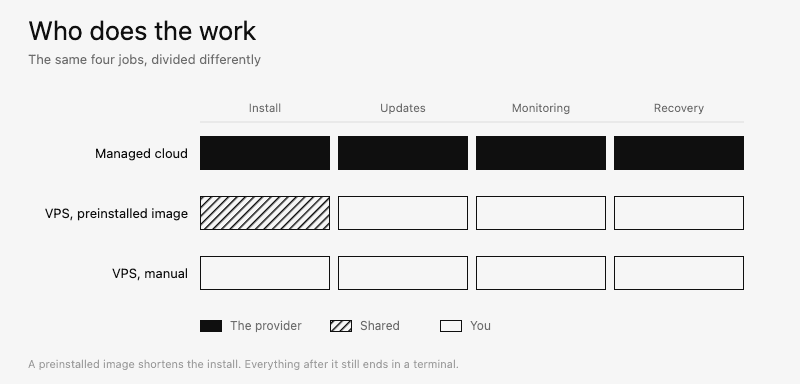
A preinstalled image on a VPS is not a cloud platform: it saves the first hour, not the months after it. For each option, ask the provider what it handles and what remains yours: installation, updates, backups, and recovery when the agent stops responding.
The hardware requirements are the same on both paths. OpenClaw's first-run FAQ puts the absolute minimum at 1 vCPU, 1 GB of RAM, and about 500 MB of disk. Hosting guides, this one included, treat 4 GB as the practical floor for around-the-clock use with several messaging channels and 8 GB as the practical floor once browser automation runs regularly. These figures are estimates from operating experience, not OpenClaw requirements. A VPS below them can run out of memory during installation or under load.
Running OpenClaw in the cloud means there is no server to manage: the provider installs, updates, and watches it. A VPS can cost less per month, though the difference is offset by the maintenance that stays with you. The main question is whether a given option keeps your agent online every day at a total cost, plan plus model usage, that fits how much the agent actually works.
How to choose the best OpenClaw hosting provider?
An OpenClaw hosting provider should keep your agent online at a predictable monthly cost. Compare providers on the same workload, because the number of connected channels, the volume of scheduled tasks, browser automation, and the number of agents you run all change the load.
1. OpenClaw setup
Count the steps between paying for a plan and getting the first reply from the agent. On a cloud platform this usually means creating an instance and opening it in the browser. On a VPS it means connecting over SSH, installing Docker, running the setup script, adding model keys, and pairing a channel, which takes 15 to 30 minutes when you are comfortable with the Linux command line.
Read the setup documentation before you pay. You should also check which steps the provider performs and which steps the guide assigns to you.
2. RAM, CPU and disk
OpenClaw's documentation puts the floor at 1 to 2 GB of RAM. The 4 GB and 8 GB figures for around-the-clock use and browser automation are practical estimates from hosting guides, this one included. Then compare plans by the price of a gigabyte of RAM rather than the monthly fee, because providers attach very different resources to similar prices.
CPU matters less for most OpenClaw workloads, because model processing runs on the servers of the model provider. Disk type still matters: NVMe storage shortens image downloads and container restarts.
3. Updates and uptime
OpenClaw ships new releases, and someone has to apply them. Ask each provider whether it updates the runtime or leaves updates to you. On a VPS this work is yours, together with monitoring and restarts.
Ask how failures are logged and whether you can see why a task stopped. Then ask who notices a failure first and who restarts the agent, you or the provider, and review the availability commitment and what it covers.
4. Model access and keys
Confirm that the provider supports the model provider you plan to use. Some hosts include model access in the plan, others expect your own API keys, and some support a limited list of providers.
Check how keys are billed. Bundled access is simpler on the first day. Your own key keeps model spending visible in your account with the model provider.
5. Messaging channels and app integration
OpenClaw talks to users through channels such as Telegram, WhatsApp, Discord, and Slack, and acts on apps such as Gmail, Calendar, and GitHub. Hosts differ here: some preconfigure the pairing and ship the apps ready to pick from a list, others leave every connection to you.
The app side is where an integration layer saves the most work. Composio connects agents to more than 1,500 apps and takes over the authentication behind them, OAuth, API keys, and token refresh included, so credentials live in one managed layer instead of being scattered across configs on the instance. Its OpenClaw setup page shows how that connection is made on the agent's side. Check whether the host ships a layer like that or leaves each app to be wired by hand.
List the channels and integrations you plan to use and check each one against the provider's documentation. Connect one channel first and add the rest after the agent works.
6. Security and isolation
The agent handles messages, files, mail accounts, and API keys, so ask what protects them. You should also confirm what separates your instance from other customers, how your data is stored, and who can access it.
Check the recovery tools. Backups and snapshots let you save a working configuration before an update and roll back when something breaks.
7. Cost at your expected usage
The plan price is not the full cost. Add the model usage the agent generates, and check the renewal price and the billing term behind the advertised number, because promotional prices often apply to the first term only.
Estimate the monthly total at your current usage and at your expected growth. Include upgrades, because OpenClaw workloads usually grow as you add channels and tasks.
How we ranked OpenClaw VPS
We evaluated each provider on how well it keeps an OpenClaw agent available for daily work. We gave the most weight to the time to a running agent, the resources included for the price, who carries updates and uptime, and the total monthly cost.
We also considered:
Support for model providers and the option to use your own API keys
Preconfigured pairing for Telegram, WhatsApp, and other messaging platforms
Isolation between customers and recovery tools such as backups and snapshots
Renewal prices and billing terms
Setup documentation and support channels
Available regions and data center locations
We reviewed the public documentation and pricing pages of each provider. When a provider publishes its own uptime or performance figures, we treat those figures as vendor-reported claims. One of the six providers, Atomic Bot, is the author of this guide; its specifications and prices come from the same public pages as everyone else's and were checked the same way.
All specifications, prices, and renewal terms below were checked on September 17, 2026, against the providers' pricing pages: Atomic Bot, Hostinger, Hetzner, DigitalOcean, Contabo, and xCloud. Details that a pricing page does not publish are marked in the text. Prices change; recheck them before you order.
OpenClaw hosting providers compared: setup, model access, and pricing
Provider | Setup and agent updates | Model access | Entry plan price and renewal |
Atomic Bot | Cloud platform: automatic | Included ($5/month in credits) or BYOK | 8 GB at $19/month, renews at $19 |
Hostinger, managed app | Cloud platform: automatic | Included | RAM not published, $5.99/month on a 24-month term, renews at $11.99 |
Hostinger, VPS | VPS: manual | BYOK | 4 GB at $6.49/month on a 24-month term paid upfront, renews at $11.99 |
Hetzner | VPS: manual | BYOK | 4 GB at €19.49/month excl. VAT, about $23, list price |
DigitalOcean | VPS: manual, OS patches automatic | BYOK | 4 GB at $24/month, list price |
Contabo | VPS: manual | BYOK | 8 GB at €4.40/month excl. VAT, about $5.28, for 24 months, then €6.66 |
xCloud | Cloud platform: automatic | BYOK | 6 GB at $9.99/month, renews at $19.99 |
Hetzner and Contabo prices are in euros before VAT, converted at the rate on the check date; Hetzner's applies to its EU locations. Hostinger's prices require paying the 24-month term upfront, and Contabo's holds for the first 24 months. The vCPU and disk on each entry plan are in the provider's card below.
The table makes one thing clear: price alone is not enough to choose by. The rows differ on every other column, and three of those differences matter more than the monthly figure.
The first is the setup column: whether you install OpenClaw and keep it running. In three of these rows the agent comes preinstalled and the provider applies each new release, so the user never opens a terminal. In the other four the installation ends in an SSH session, and so does every update after it, so each OpenClaw release becomes work the user schedules.
The second is whether the plan covers model access. Most of the rows expect a key you buy from the model provider yourself, which adds a second bill that grows with how much the agent works. The other two, Atomic Bot and Hostinger's managed app, include credits in the monthly price, so the first weeks run without a separate model account.
The third decides whether the plan is enough at all: memory. The entry plans here hold between 4 GB and 8 GB at similar prices, and which end you need depends on whether browser automation is part of the workload.
In this table, Atomic Bot is the row where all three points line up: installed and updated by the provider, credits included in the price, and 8 GB from the first day.
Best VPS for OpenClaw and cloud platforms ranked
1. Atomic Bot
Atomic Bot is a cloud platform that runs several agent projects, including OpenClaw, Hermes, Codex, and DeepSeek Harness, with each agent on its own dedicated instance.
There is no setup and no maintenance on the user's side. The platform provisions a dedicated instance, installs the agent, and keeps it running, so users never open a terminal or touch Docker.
The entry plan gives 4 vCPU, 8 GB RAM, and 80 GB of SSD, which already meets the 8 GB estimate for browser automation. Most providers on this list reach 8 GB only on a second-tier plan.
Updates cover the agent itself, not just the server. They run automatically on the platform's side, or can be applied with a click when the user prefers to control the timing.
Inference is included in the monthly subscription. Every plan comes with monthly model credits, so the agent answers on day one without a separate model account, and a spending dashboard shows where those credits go. Users who prefer their own API key can connect one instead, set separately for each instance, and switch between Claude, GPT, Gemini and more at any time.
Integrations come ready-made. WhatsApp, Telegram, Discord, Slack, and Signal connect from the dashboard, and more than 100 apps link through prebuilt connectors, with over 700 skills preinstalled or one click away in the marketplace. Connecting Gmail or GitHub means picking it from a list rather than configuring it.
The account is not capped at one instance. Users can run a single agent, a fleet of a hundred OpenClaws, or different agents on different instances, each with its own keys and channels, and every instance stays dedicated and isolated from the rest.
The trade-offs are the usual managed ones. There is no root or SSH access, so system-level changes are out of scope, and every instance is a separate line on the bill: the first at the plan price, each further one at $10/month.
Atomic Bot pricing
The Base plan costs $19/month and includes 4 vCPU, 8 GB RAM, 80 GB SSD, and $5 of monthly model credits.
Pro costs $39/month for 8 vCPU, 16 GB RAM, 160 GB SSD, and $10 in credits.
Max costs $79/month for 16 to 64 vCPU, 32 to 128 GB RAM, and $20 in credits.
All three plans renew at the same price. Hostinger and xCloud, for comparison, roughly double on renewal.
An additional agent does not need a second plan. The first instance runs on the plan price, and each further instance costs $10/month.
Choose Atomic Bot if you want a working agent without server administration, or if you plan to run more than one agent and want them isolated from each other.
2. Hostinger
Hostinger is the only provider on this list that offers both a traditional VPS deployment and a fully packaged managed OpenClaw product, under one account.
With the VPS route, users deploy OpenClaw on a KVM server with full root access and complete control over Docker, environment variables, messaging channels, and AI model configuration. Installation, updates, and monitoring are the user's own work.
The managed AI automation apps plan takes the opposite approach. Hostinger installs the agent, handles security, updates, and backups, and preconfigures AI credits, web search, and Telegram and WhatsApp pairing, so users go from checkout to a working agent without opening a terminal.
One subscription covers OpenClaw together with other agents, and the app can be switched from the dashboard without buying a second plan.
The VPS plans start at 1 vCPU and 4 GB RAM on KVM 1, with 8 GB on KVM 2. Browser automation calls for the second tier.
The main limitation is transparency. Hostinger does not publish the CPU and RAM behind the managed app plan, so users cannot compare it on resources against the VPS tiers or against the other providers here.
Hostinger pricing
VPS plans suitable for OpenClaw start with KVM 1 at $6.49/month on a 24-month term paid upfront, which includes 1 vCPU, 4 GB RAM, 50 GB NVMe, and 4 TB of bandwidth. KVM 2 doubles the memory to 8 GB with 100 GB of storage; Hostinger's OpenClaw page lists it at $8.79/month.
The managed app plan starts at $5.99/month on a 24-month term and costs $10.99/month on a monthly term.
Both paths renew at $11.99/month, and KVM 2 at $14.99/month, so once the 24-month term ends, the price roughly doubles.
Choose the VPS if you want root access and control over Docker. Choose the managed app plan for the simplest setup, as long as the unpublished resource allocation is acceptable.
3. Hetzner
Hetzner is a German cloud provider known for strong performance at European data centers, and the only provider here with a deployment guide in OpenClaw's own documentation.
That guide is entirely manual. It walks through provisioning a Debian or Ubuntu server, restricting the firewall to SSH, installing Docker, configuring the runtime, and reaching the Control UI through an SSH tunnel. It recommends at least 6 GB of RAM when building the image from source, which pre-built images avoid.
Everything after installation stays with the user as well: updates, monitoring, restarts, and model access on the user's own key. Nothing is preconfigured, so every messaging channel is connected by hand.
Plans at European locations include 20 TB of traffic a month, against 1 to 8 TB, depending on the plan, at the United States and Singapore locations. A stateful firewall comes at no extra cost, and billing is hourly, which suits short-lived test servers.
Two limitations matter more than the features. Hetzner's fraud prevention documentation states that it may ask new customers for a copy of a government-issued ID before processing an order, which can delay a first deployment. And the Cost-Optimized line that most guides recommend has been marked as currently unavailable since at least August, so the cheap figures those guides quote cannot be ordered right now.
Hetzner pricing
Hetzner raised its cloud prices in 2026, so the figures in older guides no longer apply. The orderable plan that clears 4 GB is CPX22, at €19.49/month excluding VAT, about $23, with 2 vCPU, 4 GB RAM, and 80 GB of NVMe.
The 8 GB CPX32 costs €35.49/month excluding VAT, about $42, with 4 vCPU and 160 GB of NVMe.
Prices are published in euros, and VAT is added at the rate of the buyer's country. Before VAT, the 4 GB plan costs about as much as DigitalOcean's; once VAT is added, it usually costs more, and the 8 GB plan costs more than any other option in this comparison either way.
Choose Hetzner if European placement and the 20 TB traffic allowance matter more than the monthly figure, and if the identity check is not a problem for your timeline.
4. DigitalOcean
DigitalOcean is a cloud VPS platform built for developers, and it offers OpenClaw three deployment paths: a security-hardened 1-Click image from the Marketplace, the App Platform, and a Droplet configured by hand.
The 1-Click image is the shortest route. It provisions a Droplet with OpenClaw preinstalled on Ubuntu 24.04, listed at version 2026.8.2 at the time of writing, and applies production-grade security by default.
The image documents more default protections than any other option in this comparison. Traffic runs through a Caddy reverse proxy with a LetsEncrypt certificate, working from a bare IP address without a domain. Access requires the gateway key and device pairing, each agent runs in its own ephemeral Docker container, fail2ban blocks known bad patterns, and Ubuntu applies security patches through unattended upgrades.
Setup still finishes in a terminal. After the image deploys, an interactive flow over SSH asks for the model provider and API key, and each messaging channel is paired through the CLI, with a QR code for WhatsApp and a bot token for Telegram. Updates to OpenClaw itself remain manual, since the automatic patching covers the operating system only.
All three paths support the REST API, the doctl CLI, and the Terraform provider, so instances can be created, resized, and snapshotted from code rather than the dashboard. The Marketplace page publishes the API call for the recommended size.
DigitalOcean pricing
DigitalOcean recommends starting at the $24/month Droplet to avoid out-of-memory errors during deployment. That plan includes 2 vCPU, 4 GB RAM, 80 GB SSD, and 4 TB of transfer.
Billing is per second, with the monthly price acting as a cap, which keeps short-lived test instances inexpensive.
Contabo's 8 GB entry plan costs about a quarter of this price, so the premium here buys the hardened image and the infrastructure-as-code tooling rather than the resources.
Choose DigitalOcean if you manage servers through an API or Terraform, or if hardened defaults are worth more to you than the price per gigabyte.
5. Contabo
Contabo is a budget VPS provider from Germany, and it offers the most RAM per dollar of any option in this comparison.
Where most budget providers cap entry plans at 4 GB, Contabo's OpenClaw-ready tier starts at 8 GB with 4 vCPU and 100 GB of storage. That is roughly nine times more memory per dollar than DigitalOcean's recommended Droplet, and it means browser automation fits on the cheapest plan here.
OpenClaw is installed from the control panel rather than by hand. Users select it from the application list and the server is reinstalled with the agent in place, after which onboarding continues over SSH with the user's own model provider key.
That installer has one practical limitation. Because it runs as a reinstall, it wipes the server, so it belongs at order time rather than on a machine already in use.
Everything after installation is the user's own work, including updates, monitoring, and every messaging channel. One snapshot is included, which covers a rollback before an update, and traffic is unlimited under a fair-use policy.
The storage is SSD rather than the NVMe used by the other VPS providers here, so container restarts and image pulls are slower.
Contabo pricing
Cloud VPS 4 costs €4.40/month excluding VAT for the first 24 months, about $5.28. VAT is added at the rate of the buyer's country, which brings the price to €5.50, about $6.60, at the German rate.
After the first two years the price renews at €6.66/month, a smaller step up than the promotional plans elsewhere on this list, which roughly double.
At those rates Contabo is the cheapest way to reach 8 GB in this comparison, below the 4 GB plans at Hetzner and DigitalOcean.
Choose Contabo if the budget is tight and the workload needs memory, and if a 24-month term and manual maintenance are acceptable.
6. xCloud
xCloud is a cloud platform that removes the DevOps work from OpenClaw hosting, aimed at users who want a working assistant without Docker, SSH, or terminal commands.
Setup takes three steps: sign up, click deploy, and open Telegram. The platform handles server setup, installation, configuration, security patches, and updates, and the assistant is live in approximately five minutes.
The entry tier gives 4 vCPU, 6 GB RAM, 100 GB of NVMe, and 30 TB of bandwidth, on a dedicated managed server with free SSL and one-click restore across more than 30 locations.
Telegram and WhatsApp come preconfigured. Discord, Slack, and Signal appear on xCloud's page as roadmap items with a target date that has already passed, so teams that need those channels should confirm their status before paying.
Model access is the clearest difference from the other managed options here. xCloud does not bundle credits, so users provide their own provider API key and pay for usage separately from day one. Built-in support covers Anthropic, OpenAI, OpenRouter, Moonshot AI, and Gemini.
The entry plan also runs a single always-on agent. Unlimited agents appear only on the 16 GB tier, which is worth knowing before planning a second assistant.
xCloud pricing
The entry tier costs $9.99/month and renews at $19.99/month. The 16 GB tier costs $19.99/month and renews at $39.99/month, and higher tiers reach 120 GB of RAM at $141.99/month, renewing at $225/month.
Model spending adds to those figures, since the plans include no credits.
Choose xCloud if you want a fully managed install, already have a model provider key, and only need one agent at the entry price.
How to test an OpenClaw host with your own workload
The right plan size follows from the workload, so start by writing yours down. Count the channels you plan to connect, count the tasks that will run on a schedule, and note whether browser automation is part of the job. Those three answers place you in one of the rows below.
For reference, OpenClaw's documentation puts the absolute minimum at 1 vCPU, 1 GB of RAM, and about 500 MB of disk, recommends 2 GB or more for headroom across logs, media, and multiple channels, and adds the caveat that matters: Node tools and browser automation can be resource hungry. Every figure above that recommendation is a practical estimate from hosting guides rather than an OpenClaw requirement.
What the agent does | RAM |
Answers on messaging channels, no browser work | 2 GB, the documented recommendation |
Runs several channels around the clock with scheduled tasks | 4 GB, the figure most hosting guides recommend |
Drives a browser as part of the job | 8 GB, since hosting guides estimate that each headless browser session reserves roughly 2 GB on top of the agent |
Then test the estimate instead of trusting it. Connect the channels you listed, start a task that uses the browser, and check memory while that task runs, not while the agent sits idle, because that is the moment automation starts its own browser process. A week of scheduled runs inside the first billing period shows whether the size holds, before you commit to a longer term.
How much does OpenClaw hosting cost in 2026?
Running OpenClaw gives you two bills, and the hosting one is usually smaller.
The model bill moves much more than the hosting one, and what moves it is the model you pick, not how much you chat. One guide counts a personal agent at 200,000 to 500,000 input tokens a day across heartbeats, messages, and skills, which comes to about $11 to $27 a month on a budget model, $32 to $81 on a mid-range one, and $55 to $135 on a frontier model. Another puts an agent that works six hours a day at $5 to $20 on a cheap model and $80 to $200 on a frontier model. Both call these estimates, not measurements.
Here is what each plan costs on its own, and what a month looks like once a frontier model is added at about $55. Hetzner and Contabo figures exclude VAT:
Provider | Per month | First year | A month with a frontier model |
Atomic Bot | $19 | $228 | about $69 |
Hostinger | $6.49 | $77.88 | about $61 |
Hetzner | about $23 | about $276 | about $78 |
DigitalOcean | $24 | $288 | about $79 |
Contabo | about $5.28 | about $63 | about $60 |
xCloud | $9.99 | $119.88 | about $65 |
Hostinger's managed app plan starts lower still, at $5.99 a month, though it does not publish the resources behind it. Hostinger and Contabo keep their rates for a full 24 months and then renew at $11.99 and about $7.79. xCloud renews at $19.99. Atomic Bot and DigitalOcean list one price with no promotional term, and Hetzner also bills a single list rate, though it raised those rates across its cloud lineup earlier in 2026.
The spread between the cheapest and the most expensive plan here is about $19 a month before VAT. A model bill is two or three times that, so the plan price is not what decides the total. What decides it is what the plan includes: model credits, and someone to keep the server running.
OpenClaw hosting FAQ
What is the best hosting for OpenClaw?
That depends on who does the maintenance. If you would rather not administer a server, a cloud platform installs OpenClaw and applies each release for you: Atomic Bot starts at $19 a month with 8 GB of RAM and model credits included, and xCloud starts at $9.99 without credits. If you want root access and a lower monthly figure, a VPS such as Contabo reaches 8 GB for about $5.28 before VAT, and every update after the install is yours.
How much does OpenClaw hosting cost?
Between about $5 and $24 a month for the plan, plus model usage on top. In this comparison the entry plans run from about $5.28 at Contabo, before VAT, to $24 at DigitalOcean. Model spending is the larger and less predictable half: published estimates put a personal agent at $11 to $27 a month on a budget model and $55 to $135 on a frontier one.
How much RAM does OpenClaw need?
The official requirements put the minimum at 1 vCPU, 1 GB of RAM and about 500 MB of disk, and recommend 2 GB. Hosting guides, this one included, estimate 4 GB for around-the-clock use across several messaging channels, and 8 GB once browser automation runs regularly, since a headless browser session reserves roughly 2 GB of its own. The larger figures are operating estimates, not official numbers.
Do I need Docker or SSH to run OpenClaw?
Not on a cloud platform. Atomic Bot, xCloud and Hostinger's app plan install the agent and apply updates on their side, so the setup happens in a browser. On a VPS both are part of the job: you connect over SSH, install Docker, run the setup script, add your model key, and repeat the update step for every release.
Should I choose managed OpenClaw hosting or a VPS?
Compare them on the hours, not only on the monthly figure. A VPS is cheaper per month and gives you root access, package versions and any tooling you want to add, in exchange for installation, updates, monitoring and restarts. A cloud platform costs more per gigabyte of RAM and takes that work back.
Can one account run more than one OpenClaw agent?
Yes, on some plans. Atomic Bot runs any number of dedicated instances on one account, each with its own keys and channels, at $10 a month after the first. xCloud's entry tier runs one always-on agent, and unlimited agents begin on its 16 GB plan. On a VPS the ceiling is the memory you bought.
Which apps can OpenClaw connect to?
Messaging comes first: Telegram, WhatsApp, Discord, Slack and Signal, preconfigured on some hosts and paired by hand on others. Beyond messaging the list depends on the integration layer in front of the apps rather than on OpenClaw itself. Composio holds more than 1,500 apps behind one authentication layer, and its list of apps worth connecting first covers the common ones. Atomic Bot ships more than 100 prebuilt connectors and over 700 skills in its marketplace.
Do I need my own model API key?
Only with some hosts. Atomic Bot and Hostinger's app plan include monthly model credits, so the agent answers before you open an account with a model provider. Hetzner, DigitalOcean, Contabo and xCloud expect a key you buy yourself, which starts a second bill on day one. Atomic Bot also accepts your own key, set separately for each instance.
Key takeaways
The documentation asks for less than the guides do. OpenClaw's own FAQ puts the absolute minimum at 1 vCPU, 1 GB of RAM, and about 500 MB of disk, and recommends 2 GB. The 4 GB and 8 GB figures quoted across hosting comparisons, this one included, are practical estimates from guides rather than requirements from the project.
Atomic Bot is the one plan here that both includes model credits and renews at its starting price. It starts at 8 GB of RAM, runs any number of dedicated instances on one account, applies agent updates automatically or on your click, and renews at what it cost on day one, with each additional instance billed at $10/month on top of the plan.
Hostinger is the only provider here offering both forms under one account. A managed app to start without server work and a KVM VPS to move to later, though the app plan's CPU and RAM are not published and both paths roughly double in price once the 24-month term ends.
Hetzner has the largest traffic allowance and the hardest entry. European locations include 20 TB a month, but the Cost-Optimized line most guides quote cannot be ordered, the orderable line costs more for 4 GB than either cloud platform's entry plan, and new customers may be asked for a copy of a government-issued ID before an order is processed. Its 2026 price increase also means older guides quote figures that no longer apply.
DigitalOcean documents the most extensive security defaults on this list. Its 1-Click image adds a TLS proxy on a bare IP, a gateway key with device pairing, a container per agent, and fail2ban, though setup still finishes over SSH and the plan costs about four times more than Contabo's 8 GB entry plan.
Contabo is the cheapest route to 8 GB. About $5.28 a month excluding VAT for the first 24 months, with the caveats that the installer reinstalls the server and the disk is SSD rather than the NVMe used elsewhere here.
xCloud is managed but leaves the model bill to you. The assistant is live in about five minutes and the platform handles patches and updates, though the plans bundle no credits, the entry tier runs a single agent, and the price doubles on renewal.

 Get started