




As AI agents move from prototypes into production, the tool layer has become one of the most critical parts of the stack. It enables agents to interact with applications, databases, and file systems, but that access also introduces risk. When agents can act on critical systems, security and governance are no longer optional.
The industry has converged on the Model Context Protocol (MCP), an open standard that defines how agents and tools communicate. But the protocol itself won’t solve your production problems. You need a control plane that manages this communication securely at scale. The MCP Gateway serves as critical infrastructure between your agents and tools.
This guide breaks down the MCP Gateway landscape from a developer perspective. We’ll evaluate the top solutions for 2026 and give you a framework for choosing the right one for your architecture.
Key Takeaways
What is an MCP Gateway? It’s essential infrastructure for production AI. An MCP Gateway acts as a central control plane between AI agents (like LangChain or CrewAI) and external tools (APIs), solving the complex “N×M” integration problem.
Why is it Critical? A gateway centralises agent-tool communication to provide security (managing all credentials), observability (with OpenTelemetry), cost control (rate limiting), and governance (RBAC).
How to Choose the Best Gateway: Your choice depends on what matters most: performance (p95 latency), security (OAuth 2.1, PII redaction), developer experience, and integration breadth.
The Default Choice for Most Teams: Composio is the most balanced, developer-first option for production. It combines 1000+ deep, managed integrations, custom MCP servers, unified auth, and low-latency performance, so you don’t have to trade off speed for integration depth.
Alternatives for Narrow Needs:
Ultra-Low-Level Performance: TrueFoundry, if you’ve a platform team and you’re willing to trade integration velocity for marginal p95 latency gains.
High-Security & Compliance: Lasso Security (threat detection) or MintMCP (compliance-first governance).
Max Breadth for Business Apps: Zapier (8,000+ apps) or Workato (12,000+ apps), especially if you’re already invested in those ecosystems.
Open-Source Options Exist: Teams needing full data control should look at Docker MCP Gateway, IBM Context Forge, Microsoft MCP Gateway, and Obot, the top open-source, self-hosted solutions.
Avoid the DIY Trap: Building your own production-grade gateway is a false economy. The cost of maintaining security, authentication (OAuth), and resilience makes managed solutions a better investment.
Our Recommendation
For 90% of real-world teams, Composio is a strictly better default than niche or open source solutions like TrueFoundry, or MintMCP. You get low latency plus 1000+ managed integrations, you can add custom MCP servers, unified OAuth, and production-grade RBAC/PII controls out of the box, without building or maintaining your own tool layer. Use niche or open source gateways only when you have a dedicated platform team and a very narrow requirements.
What is an MCP Gateway?
When you try to connect agents to dozens of external tools and APIs, you face the “N×M problem”. Every agent needs to handle connections, credentials, and policies for every tool. Your system becomes brittle, insecure, and impossible to manage, and this is what an MCP gateway solves.
An MCP gateway is a control plane that solves this. It sits between AI agents and MCP servers. Instead of each agent connecting directly to every server, agents connect once to the gateway, and the gateway handles the rest: routing tool calls, authenticating connections, logging activity, and enforcing access policy.
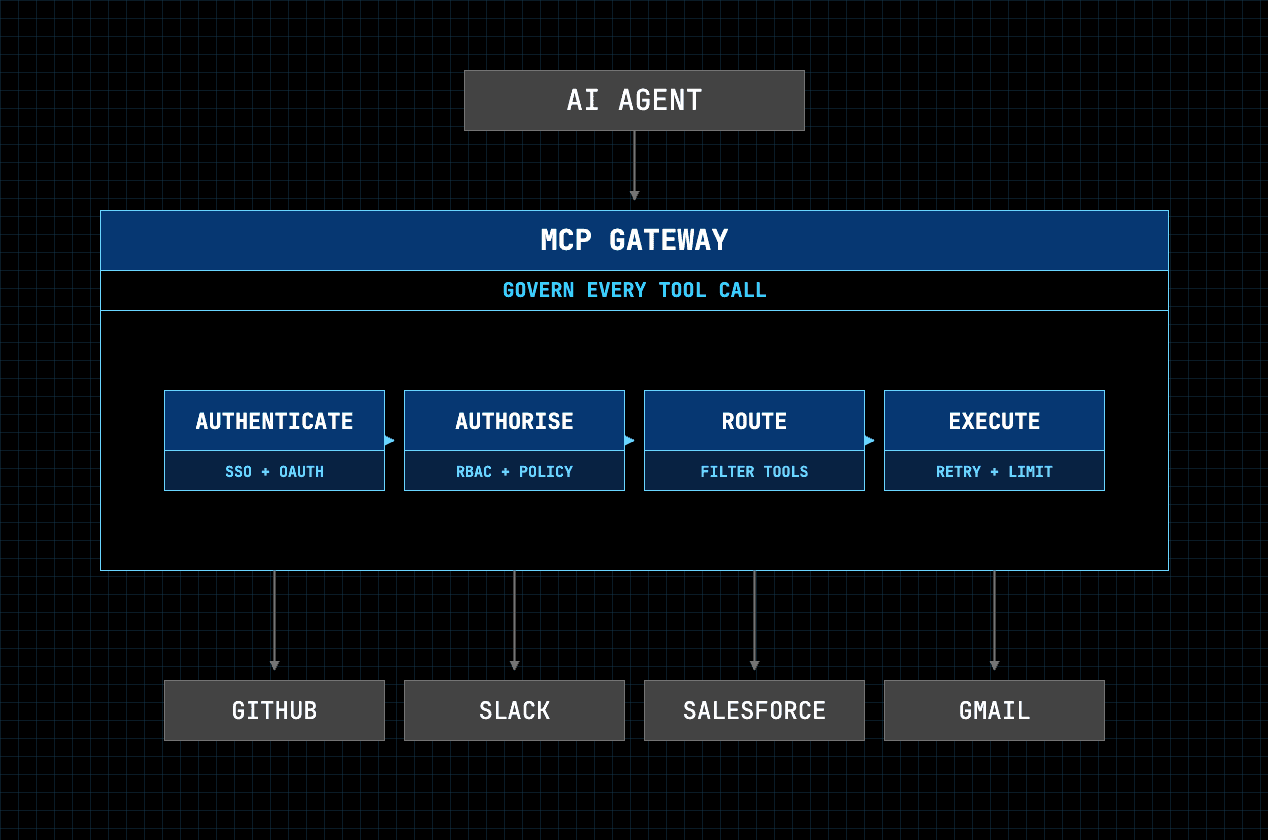
A tool call enters the gateway once and passes through identity, policy, routing, and execution before reaching any MCP server. Every call is logged, including the ones that get denied.
What an MCP gateway actually does:
Routing and aggregation: one endpoint fronting many MCP servers, with tool discovery and filtering so agents don’t blow past context limits
Authentication: holds credentials centrally, runs OAuth flows, passes through per-user identity
Authorisation: who can call which tool; RBAC, allowlists, blocking destructive actions
Audit: logs every tool call: user, tool, action, outcome
Threat handling: MCP-specific risks like tool poisoning, rug-pull updates, cross-server shadowing, and prompt injection through tool descriptions
Reliability: rate limits, retries, timeouts, and absorbing schema drift when upstream APIs change
No LLM vendor lock-in: auth and policy live at the gateway rather than the model provider, so swapping models doesn’t mean rebuilding integrations
How to Choose the Best MCP Gateway: Key Decision Criteria
Evaluating MCP Gateways requires a technical checklist. The right solution depends on your priorities, but every production system should be assessed against these criteria.
1. Security Posture
Security is the foremost criterion. A production gateway must support modern authentication standards, such as OAuth 2.1 with PKCE. Look for features such as PII redaction to prevent sensitive data exposure in logs or to agents, and the ability to enforce fine-grained, tool-level permissions.
2. Deployment Model
Managed SaaS is fastest to production. Self-hosted (Kubernetes, Docker) gives full data sovereignty at the cost of running it yourself. VPC deployment sits between vendor-operated and your own infrastructure. Regulated industries and anything touching data-residency rules usually rule out pure SaaS, so establish this constraint before evaluating anything else.
3. Compliance and audit
Look for SOC 2 Type II and ISO 27001 as baseline, plus HIPAA or PCI if your industry needs them. Then look past the badges at the audit trail itself: what’s captured per call (user, team, tool, action, outcome), whether payloads are stored or only metadata, what the retention window is, and whether logs export in a format your compliance team can actually review.
An audit trail that can’t be exported is an audit trail your auditor won’t accept.
4. Identity and provisioning
The gateway should authenticate against your existing identity provider — SAML or OIDC SSO with Okta, Entra ID, or Google Workspace — rather than maintaining its own user list. SCIM 2.0 provisioning maps directory groups to teams, so access follows the joiner-mover-leaver lifecycle automatically: new hires get the right tools on day one, offboarded users lose access immediately.
Also check whether the gateway supports per-user OAuth passthrough. Agents acting with a service account’s permissions are a different risk profile from agents acting as the user who invoked them.
5. MCP-specific threat handling
Generic API security doesn’t cover the attack surface MCP introduces. A gateway should handle:
Tool poisoning: malicious instructions embedded in tool descriptions, which the agent reads as trusted input
Rug-pull updates: a server changing its tool definitions after approval
Cross-server shadowing: one server’s tool definitions interfering with another’s
Prompt injection through tool responses
6. Performance & Latency
Every millisecond, the gateway directly impacts user experience, especially for conversational AI. You want gateways optimised for high throughput and low overhead. Key metrics include p95 latency (the 95th percentile latency, reflecting the typical user-experienced delay) and requests per second (RPS). For most enterprise applications which are not conversational, a low-latency solution works well, especially if it gives you velocity.
7. Developer Experience (DX) & Ecosystem
A great gateway doubles as a great developer platform. Check the quality of documentation, SDKs, and CLI tools. Strong developer experience speeds up development and simplifies operations. The breadth of the ecosystem, particularly pre-built integrations, can significantly accelerate development.
8. Integration & Interoperability
The MCP landscape continues evolving. A good gateway should support different MCP specification versions and transports (like stdio and streamable HTTP). The ability to connect existing REST APIs and “virtualise” them as MCP servers helps with migration.
9. Pricing model
Per-call, per-seat, per-task, and consumption-based pricing behave very differently under agentic load. Agents are chatty: a single user request can fan out into dozens of tool calls. Task-based pricing that looks reasonable for human-triggered automation can become unpredictable when an agent is driving.
Make sure to model your expected call volume against each vendor’s pricing before shortlisting.
Both tables are stale in the same way — they still reference UCL, which is gone, and they’re missing everything you added. Updated versions below.
Decision matrix
Decision criterion | Best fit(s) | Why they stand out |
|---|---|---|
1. Deployment model | Composio, Obot, Kong | Composio spans managed cloud, private VPC, and embedded SDK; Obot runs self-hosted or managed on the same open-source core; Kong deploys self-hosted on Kubernetes or via Konnect. |
2. Compliance and audit | MintMCP, Composio, Lunar.dev MCPX | MintMCP generates SOC 2, HIPAA, and GDPR-format logs; Composio carries SOC 2 Type II and ISO 27001 with configurable retention and CSV export; Lunar keeps an immutable audit trail. |
3. Identity and provisioning | Composio, MintMCP, StackOne | Composio and MintMCP both drive team membership from SCIM rather than manual assignment; StackOne adds end-user OAuth 2.1 linking for per-user identity into each system. |
4. Security posture | Lasso Security, MintMCP, Operant AI | Lasso does real-time inspection and PII redaction; MintMCP pairs controlled access with enterprise guardrails; Operant adds runtime detection across local and cloud environments. |
5. MCP-specific threat handling | Lasso Security, Operant AI, Obot | Lasso scans server reputation before load; Operant maps threats to OWASP categories; Obot explicitly handles rug-pull updates, tool poisoning, and cross-server shadowing. |
6. Performance and latency | TrueFoundry, Lunar.dev MCPX | The only two publishing single-digit millisecond overhead. Both expect you to own more of the integration layer in exchange. |
7. Developer experience and ecosystem | Composio, Docker MCP Gateway, Kong | Composio ships managed integrations and SDK tooling; Docker offers a Compose-first workflow familiar to container teams; Kong brings a mature plugin ecosystem. |
8. Integration and interoperability | Composio, IBM ContextForge, Kong | Composio for managed connector depth; ContextForge federates MCP, A2A, REST, and gRPC through one endpoint; Kong autogenerates MCP tools from existing REST APIs. |
9. Pricing model | Obot, Docker, Microsoft, IBM ContextForge | All open source with no licence cost. You pay in operational overhead instead. Microsoft is MIT, ContextForge Apache 2.0. |
The Top MCP Gateways for 2026: A Detailed Comparison
The MCP Gateway market has matured quickly with several strong contenders. Each takes a different approach and excels in different areas. Here’s what you need to know about the top solutions for 2026.

Depth in both integrations and governance is where the decision lies.
Tier 1: Purpose-built managed MCP gateways
Composio MCP Gateway
Throughout this guide, we treat Composio as the default managed gateway for most teams, with other products filling more specialised roles.
Best For: Rapid development and teams needing to integrate with a wide variety of tools out of the box.
Overview: Composio is an agentic integration platform that provides an MCP Gateway to dramatically accelerate development. It operates as an aggregator, offering a single, unified endpoint to a vast library of pre-built, managed tool integrations.
Licence: Proprietary.
Compliance: SOC 2 Type II, ISO 27001. DPA included from day one.
Deployment: Managed cloud, private VPC, and embedded SDK for complete data sovereignty.
Key Features:
1,000+ Managed Integrations: Pre-built connectors for Slack, GitHub, Jira, Salesforce, HubSpot, Snowflake and the rest, with OAuth flows, schema updates, and error handling maintained upstream. Individual toolkits expose deep action coverage rather than a single generic endpoint — GitHub and Outlook each carry 200 actions, Slack 150, Supabase 121.
Per-Team Scoped Endpoints: Each team receives its own MCP URL. Developers paste it into Claude, Cursor, or ChatGPT; SSO authenticates; only that team’s permitted tools appear. Toolkits are allowlisted or blocklisted per team, and individual destructive actions can be blocked inside otherwise-permitted toolkits — engineering can hold GitHub access while
DELETE_REPOandDELETE_BRANCHstay unavailable. Members request access to blocked tools; admins approve or deny.Identity and Provisioning: SSO via SAML and OIDC against Okta, Entra ID, or Google Workspace. SCIM 2.0 maps directory groups to teams, so access follows the joiner-mover-leaver lifecycle; new hires get the right tools on day one; offboarded users lose access immediately.
Audit Trail: Every tool call logged with user, team, tool, action, and outcome, including denied calls. Metadata only, no payloads stored. Retention configurable from 7 days to 1 year, with CSV export for compliance review.
Intent-Based Tool Resolution: Agents describe what they need and receive only matching tools rather than the full catalogue. This keeps context focused across large libraries and matters for clients that enforce hard tool-count caps.
Sandboxed Execution: Heavy tool responses run inside an isolated sandbox on a navigable filesystem, returning a compact summary to the agent instead of a large raw payload.
Self-Healing Tools: Rate limits, schema drift, and malformed payloads are detected and patched at the gateway from observed production traffic, without redeploying agents.
Model Portability: Auth, scopes, and access policies live at the gateway rather than with the LLM provider. Switching between Claude, GPT, Gemini, or an in-house model doesn’t trigger reconnects or re-procurement.
Performance Snapshot: Optimised for low latency, ensuring responsive agent interactions.
Pros & Cons:
Pro: Governance depth is unusual for an integration platform. Per-team endpoints, action-level blocking, SCIM, and exportable audit are typically found in governance-first gateways that bring no tools of their own.
Pro: Deployment flexibility means data-residency requirements don’t force a trade-off. Most vendors make you choose between a managed integration library and control over where it runs.
Con: You’re adopting a platform, not just a control plane. Teams that already run their own MCP servers and only need something fast in front of them are buying more than they need.
Con: Proprietary. Teams with a hard open-source requirement, or who want to audit and fork the gateway itself, should look at Obot or Docker.
TrueFoundry
Best For: Platform teams that want to squeeze every millisecond out of the gateway layer and are prepared to own most MCP tool integrations in-house.
Overview: TrueFoundry focuses on providing a narrow high-performance gateway that unifies management of both LLM calls and MCP tool interactions. Its philosophy centres on providing one integrated control plane for all AI infrastructure, reducing complexity and operational overhead.
Deployment: Managed SaaS, with hybrid on-premises and cloud options.
Key Features:
Unified LLM & Tool Gateway: Manage access, routing, and observability for both language models and MCP tools from a single dashboard.
High-Performance Architecture: Built on an optimised Node.js backend with in-memory policy enforcement for minimal latency.
Built-in Observability: Provides detailed, real-time logs, metrics, and traces out of the box for all traffic.
Performance Snapshot: Adds less than 5ms of p95 latency overhead, making it one of the fastest gateways available.
Pros & Cons:
Pro: Exceptional performance and low latency are ideal for real-time applications.
Pro: The unified control plane simplifies AI infrastructure management.
Con: Requires building or onboarding most MCP servers yourself. Over time, this becomes a parallel integration program (security reviews, OAuth setups, upgrades) that many product teams underestimate.
Con: Strong for infra and routing, but does not provide the “10k+ tools out of the box” experience that Composio’s managed library does – you need more engineering to reach the same integration surface area.
Con: Best suited for organisations that already run a centralised platform/infra team. For smaller teams or product-led orgs, the operational load is usually higher than a managed gateway like Composio.
Lunar.dev MCPX
Best For: Enterprises needing strong governance and robust, managed control over tool access.
Overview: Lunar.dev MCPX is a lightweight, unified gateway that orchestrates and secures the entire MCP ecosystem. It’s designed for enterprises that need a single control point for all agent-to-tool interactions, emphasising security and auditability.
Key Features:
Granular Access Control: Enforce detailed policies to control which tools and methods are accessible to which agents.
Comprehensive Audit Logs: Tracks every agent action in an immutable audit trail, providing full visibility for compliance and security reviews.
Centralised Secret Management: Stores all secrets, API keys, and OAuth tokens in a single location, enhancing security.
Performance Snapshot: Excellent performance with a p99 latency overhead of around 4ms.
Pros & Cons:
Pro: Strong focus on enterprise-grade governance and security features.
Pro: High performance ensures that security controls don’t compromise user experience.
Con: More focused on the control and governance layer than on providing a broad library of pre-built tool integrations.
Lasso Security MCP Gateway
Best For: Regulated industries or applications where security is the absolute top priority.
Overview: Lasso Security provides an open-source, security-first MCP Gateway. Its plugin-based architecture inspects traffic in real time to detect and mitigate threats such as prompt injection, command injection, and sensitive data exposure.
Key Features:
Real-time Threat Detection: A plugin connects to Lasso’s API to check content for security violations, blocking malicious payloads before they reach the agent or tool.
PII Masking & Redaction: Automatically detects and masks Personally Identifiable Information (PII) and other secrets in both requests and responses.
Tool Reputation Analysis: Scans MCP servers before they are loaded, calculates a reputation score, and blocks risky tools.
Performance Snapshot: Deep security scanning adds a noticeable 100-250ms of latency overhead.
Pros & Cons:
Pro: Unmatched security features provide the strongest protection for sensitive applications.
Pro: The plugin-based architecture is flexible and extensible.
Con: The significant performance trade-off makes it unsuitable for latency-sensitive applications.
MintMCP
Best For: Regulated industries (healthcare, finance) requiring strict compliance and auditability.
Overview: MintMCP is a governance-first gateway laser-focused on security and compliance. It’s built for organisations blocked from AI adoption by regulatory hurdles, providing the ironclad security posture and audit trails needed to move to production.
Key Features:
Audit-Ready Compliance: Generates logs in SOC 2, HIPAA, and GDPR-compliant formats, providing an exportable audit trail for every request.
Federated SSO & RBAC: Integrates with enterprise IdPs (SAML/OIDC) to enforce fine-grained, role-based access controls.
Centralised Credential Management: Secures all credentials and provides real-time guardrails to block risky agent actions.
Performance Snapshot: As a security-first layer, it prioritises deep inspection and logging over raw p95 latency.
Pros & Cons:
Pro: Best-in-class for enterprises in regulated industries.
Pro: SOC 2 Type II compliant, providing a significant head start on security reviews.
Con: A “Bring-Your-Own-Server” model. It governs tools but doesn’t provide a pre-built integration library.
Operant AI
Best For: Security engineers who need visibility into MCP usage across both local developer tooling and deployed cloud agents.
Overview: Operant approaches the gateway as a runtime security product rather than a routing layer, covering discovery, detection, and defence across the MCP stack — from local clients like Claude Desktop and GitHub Copilot through to agents running on Kubernetes and Bedrock.
Deployment: Managed, with runtime agents across environments.
Licence: Proprietary.
Key Features:
Security vulnerability scanning of MCP servers before and during use.
Runtime threat detection with OWASP threat mapping.
Agentic usage metrics across local and cloud environments.
Pros & Cons:
Pro: The only entry here treating shadow MCP usage on developer machines as a first-class problem.
Con: Security-led rather than integration-led — pair it with a gateway that supplies connectors.
StackOne
Best For: Copilot and Copilot Studio deployments needing per-user credential depth into systems of record.
Overview: StackOne focuses on governed, per-user access to HRIS, ERP, ITSM, and CRM systems, with end-user OAuth 2.1 account linking and meta-tools designed to keep agents under client tool-count caps.
Deployment: Managed SaaS.
Licence: Proprietary.
Key Features:
End-user OAuth 2.1 account linking for per-user identity into each system.
Meta-tools that compress large tool catalogues to stay within client limits such as Copilot’s 128-tool cap.
Tool-call-level request logging.
Pros & Cons:
Pro: The tool-count problem is handled explicitly rather than left to the buyer.
Con: Narrower focus on systems of record than general-purpose gateways.
Tier-2: Open-source and self-hosted MCP Gateways
This list includes the gateways with MIT and Apache 2.0 licences.
Obot
Best For: Teams that want full data control and a self-hosted, open-source solution.
Overview: Obot is a powerful, open-source MCP gateway designed for self-hosting. It provides a central control plane that runs on your own infrastructure (e.g., Kubernetes), giving you complete control over your data and security. It’s the go-to choice for organisations that prioritise avoiding vendor lock-in.
Key Features:
Open-Source & Self-Hosted: The core platform is open-source and can be deployed on any Kubernetes cluster.
Enterprise IdP Support: The enterprise edition integrates with Okta, Microsoft Entra, and other IdPs for policy-based access.
Hybrid Tool Model: Includes a library of popular MCP servers (Slack, GitHub, etc.) and allows you to host or proxy your own.
Performance Snapshot: Performance is dependent on your hosting infrastructure, but the architecture is designed for modern, container-native stacks.
Pros & Cons:
Pro: Open-source gives you maximum control, transparency, and no vendor lock-in.
Pro: Fits perfectly into existing Kubernetes and DevOps workflows.
Con: As a self-hosted solution, you are responsible for maintaining, scaling, and securing the infrastructure.
Docker MCP Gateway
Best For: Container-native teams and developers who value an open-source, ecosystem-centric approach.
Overview: The Docker MCP Gateway is an open-source project that integrates with the Docker ecosystem. It runs MCP servers as isolated Docker containers, using familiar container security models and a “Compose-first” workflow.
Key Features:
Docker Ecosystem Integration: Deep integration with Docker Desktop and Docker Compose provides an excellent local development experience.
Container-based Security: Leverages container isolation, signed images, and Docker’s secret management for a robust and familiar security model.
CLI-driven Workflow: A powerful
docker mcpCLI plugin allows for easy management of the gateway and server lifecycle.
Performance Snapshot: Moderate performance, with container management adding 50-200ms of latency overhead.
Pros & Cons:
Pro: Excellent developer experience for teams already invested in the Docker ecosystem.
Pro: Open-source and community-driven, offering transparency and flexibility.
Con: Performance is not on par with specialised, high-performance gateways like TrueFoundry or Lunar.dev.
Microsoft MCP Gateway
Best For: Platform teams running their own MCP servers on Kubernetes who need session-aware routing and lifecycle management.
Overview: A reverse proxy and management layer for MCP servers providing session-aware stateful routing, authorisation, and lifecycle management in Kubernetes. It is self-hosted plumbing for teams that build and operate their own servers — not a managed governance product, and not a source of connectors.
Deployment: Self-hosted, Kubernetes-native (StatefulSets and headless services). Local and Azure deployment recipes included.
Licence: Open source (MIT).
Key Features:
Session affinity: routes traffic to MCP servers with session-aware stateful affinity. The differentiating capability, and non-trivial to build yourself.
Lifecycle control plane: deploy, update, and delete MCP servers as managed resources (“adapters”).
Dynamic tool routing: tools registered via API and routed through a tool gateway router.
Management portal: a React SPA served by the gateway with adapter and tool CRUD, pod logs, and an in-browser JSON-RPC test console.
Entra ID authentication via MSAL in cloud mode; anonymous in dev mode.
Pros & Cons:
Pro: The most mature Kubernetes option, and session routing is handled natively.
Pro: MIT licensed with no commercial tier to negotiate.
Con: Tightly coupled to AKS in practice. Cloud-agnostic deployment is harder than the docs suggest.
Con: Governance is integration points, not a finished product. No connector library.
IBM ContextForge
Best For: Large enterprises with platform teams federating tools, agents, and APIs across multi-cluster Kubernetes.
Overview: ContextForge is an open-source gateway, registry, and proxy that federates MCP servers, A2A servers, and REST/gRPC APIs into a single governed endpoint. Scope is broader than most entries here — it treats protocol translation and federation as the core problem.
Deployment: Self-hosted via PyPI or Docker; scales to multi-cluster Kubernetes with Redis-backed federation. IBM Cloud Code Engine deployment supported.
Licence: Open source (Apache 2.0).
Support: IBM Elite Support available with 24x7 coverage and a 2-hour SLA.
Key Features:
Multi-protocol federation: MCP, A2A, REST-to-MCP, and gRPC-to-MCP translation through one endpoint.
Virtual servers: compose tools from multiple upstream servers and expose only the tools, resources, and prompts you choose.
Broad transport support: stdio, SSE, streamable HTTP, and JSON-RPC.
Plugin extensibility: 40+ plugins for additional transports, protocols, and integrations.
SSO integration: GitHub, Google, Microsoft Entra ID, IBM Security Verify, Okta, Keycloak, and generic OIDC.
Observability: OpenTelemetry tracing with Phoenix, Jaeger, Zipkin, and other OTLP backends.
Admin UI, CLI, and health checking with configurable intervals.
Pros & Cons:
Pro: The most complete open-source federation story, and the protocol translation breadth is unmatched.
Pro: Apache 2.0 with a commercial support path — unusual and valuable for enterprise procurement.
Con: Enterprise governance features are less documented than the federation capabilities, and the access control model is partial.
Con: High deployment complexity. Realistically a months-long project for a dedicated platform team.
Tier 3: API gateway and platforms extended as MCP gateway
Kong
Best For: Organisations already running Kong across their API estate that want one policy plane for API, LLM, MCP, and agent-to-agent traffic.
Overview: Kong extended its API management platform into AI with Kong AI Gateway, then added Agent Gateway in the 3.14 release (April 2026) to govern LLM, MCP, and agent-to-agent communication from a single control point. The pitch is consolidation: teams adopting a standalone MCP broker will eventually need to integrate it with their LLM and API governance anyway.
Deployment: Self-hosted (Kubernetes) or managed via Kong Konnect.
Licence: Mixed — Kong Gateway core is open source; AI Gateway and Konnect features are commercial.
Key Features:
MCP autogeneration from REST: converts existing REST endpoints into MCP-compatible tools without manual code — the most direct migration path if your internal services are already APIs.
Unified governance across protocols: LLM, MCP, and A2A traffic under one runtime and one control plane, with Konnect as a single observability dashboard.
Semantic policy engine: on-gateway vector embeddings allow policies based on request meaning, not just endpoint and method.
60+ AI features: semantic caching, semantic routing, prompt compression, PII redaction plugins, and RAG injection.
Universal LLM API: routes across OpenAI, Anthropic, Gemini, Bedrock, Azure AI, Databricks, Mistral, and others.
Performance Snapshot: Not published as an MCP-specific figure.
Pros & Cons:
Pro: Great breadth if you need one governance layer across traditional APIs and all AI traffic types.
Pro: Mature Kubernetes deployment story and extensive plugin ecosystem.
Con: Third-party reviews note MCP-specific depth and semantic caching are less mature than in AI-native gateways. This is an API gateway extended into MCP, not built for it.
Con: Pricing is not publicly disclosed and requires sales engagement.
Zapier
Best For: Breadth-first pilots and prototypes where setup speed matters more than governance depth.
Overview: Zapier exposes its automation catalogue over MCP — the largest app library of any option here, behind a remote endpoint configured entirely in the browser. Existing Zapier connections appear ready to use, which makes it the fastest path from zero to an agent that can act.
Deployment: Managed SaaS only.
Licence: Proprietary.
Key Features:
9,000+ apps and 30,000+ pre-built actions — by a wide margin the broadest catalogue.
Browser-based setup: generate an endpoint, allowlist apps, approve actions.
Existing authentication: reuses connections already held in the Zapier account.
Pricing: Task-based. A single agent tool call can consume multiple tasks, so costs can rise quickly under high-volume or multi-step workloads.
Performance Snapshot: MCP-specific latency and throughput figures are not published. The main advantage is setup speed and application breadth rather than raw gateway performance.
Pros & Cons:
Pro: Unbeatable breadth, and the fastest setup of anything in this list.
Pro: Familiar to teams already running Zapier.
Con: Task-based pricing (a tool call consumes multiple tasks) becomes expensive and unpredictable with chatty agents. Model your call volume before committing.
Con: Built for accessibility rather than enterprise governance — thin on audit, RBAC, and per-user identity.
Workato
Best For: Enterprises already on Workato whose business logic is already encoded in recipes.
Overview: Workato extends its enterprise iPaaS into agentic AI rather than building a standalone gateway. Existing recipes, connectors, and security controls are exposed to agents over MCP, so the governed automations already running in production become agent-callable.
Deployment: Managed (enterprise iPaaS).
Licence: Proprietary.
Key Features:
12,000+ enterprise connectors on a governed runtime.
Recipes as MCP servers: existing low-code automations become agent-accessible with minimal configuration.
Established governance: reuses Workato’s existing audit and security controls rather than introducing new ones.
Pricing: Quote-based and bundled with the broader Workato platform. It is most economical for existing customers rather than teams buying an MCP gateway by itself.
Performance Snapshot: Workato does not publish MCP-specific latency or throughput figures. Evaluate it primarily on governed enterprise automation and reuse of existing recipes.
Pros & Cons:
Pro: For existing Workato shops, the business logic is already built — this is the shortest path to agents that do real work.
Pro: Enterprise-grade connector coverage, not SMB-oriented.
Con: Enterprise MCP is a capability of the wider platform, not a standalone product. Buying in for MCP alone means buying an enterprise automation platform.
Con: Pricing is not published, and neither is the transport or OAuth mode the MCP servers use — test the connection before committing to it.
A Note on Public Registries: Smithery
It’s important to distinguish between the managed gateways listed above and public registries.
Smithery is the leading example of a public registry, acting as a “Docker Hub for MCP.” It lists over 2,500 community-built, open-source tools.
Best For: Experimentation, discovery, and prototyping.
Production Warning: Smithery is not a managed, enterprise-grade gateway. The tools are community-submitted and unvetted, meaning they lack the security, governance, and reliability (SLA) required for production systems.
A core function of production gateways like Lasso or MintMCP is to prevent agents from connecting to unvetted public endpoints, such as those on Smithery.
At-a-Glance: MCP Gateway Feature Comparison
This table provides a scannable summary of the key differentiators for each gateway.
At-a-glance comparison
Gateway | Best for | Key differentiator | Deployment | Licence |
|---|---|---|---|---|
Composio | Governance plus integration breadth from one vendor | 1,000+ managed integrations with per-team scoped endpoints | Managed cloud, VPC, embedded SDK | Proprietary |
TrueFoundry | Platform teams optimising for latency | Unified LLM and MCP control plane | Managed SaaS, hybrid | Proprietary |
Lunar.dev MCPX | Enterprise governance over tool access | Granular RBAC and immutable audit | Managed SaaS, self-hosted | Open source core |
Lasso Security | Security-critical and regulated applications | Real-time threat detection and tool reputation scoring | Self-hosted | Open source |
MintMCP | Regulated industries blocked on compliance | SOC 2 / HIPAA / GDPR-format audit logs | Managed SaaS, self-hosted | Proprietary |
Operant AI | Security visibility across local and cloud agents | Runtime threat detection with OWASP mapping | Managed, runtime agents | Proprietary |
StackOne | Per-user depth into systems of record | OAuth 2.1 account linking and tool-count compression | Managed SaaS | Proprietary |
Obot | Open-source governance with a usable catalogue | Multi-role RBAC and curated server catalogue | Self-hosted, managed | Open source |
Docker MCP Gateway | Container-native teams | Container-per-server isolation with signed images | Self-hosted | Open source |
Microsoft MCP Gateway | K8S platform teams running their own servers | Session-aware stateful routing | Self-hosted (Kubernetes) | Open source (MIT) |
IBM ContextForge | Multi-cluster federation across protocols | MCP, A2A, REST, and gRPC federation | Self-hosted, multi-cluster K8S | Open source (Apache 2.0) |
Kong | One policy plane across API, LLM, MCP, A2A | MCP autogeneration from REST endpoints | Self-hosted, Konnect | Mixed |
Zapier | Breadth-first pilots and fast prototypes | 9,000+ apps, 30,000+ actions, and browser-based MCP setup | Managed SaaS | Proprietary |
Workato | Enterprises already running Workato recipes | Existing governed recipes and enterprise connectors exposed through MCP | Managed enterprise iPaaS | Proprietary |
Composio vs TrueFoundry: Which MCP Gateway Should You Choose?
A common question we hear from developers is how to choose between Composio and TrueFoundry. Here is a simple framework:
When Composio wins (most teams)
You want to go from idea → production quickly with 500+ managed integrations and zero DIY tool plumbing.
You care about unified OAuth, RBAC, and PII redaction out of the box.
You want a single MCP gateway plus integration platform, not just a gateway.
When TrueFoundry can make sense (niche)
You already have internal MCP servers and governance workflows and just need a very fast control plane.
You have a dedicated platform/infra team that treats the gateway and tool layer as core infra, not a product feature.
Our recommendation:
Unless you are a large, infra-heavy org that has already invested in its own MCP tool layer, Composio is the safer, faster path to production. It gives you reliable performance plus a mature integration library; for most teams that’s far more valuable than shaving a few milliseconds off gateway latency.
The DIY Trap: Why Building Your Own MCP Gateway is a False Economy
Many engineering teams instinctively want to build their own solution. A simple reverse proxy routing MCP traffic looks straightforward.
But while you can quickly prototype a basic DIY gateway, this approach becomes expensive for any serious production system.
The initial build deceives you. The real cost comes from the specific, difficult engineering problems you must solve for production readiness. A robust gateway requires:
A Secure Credential Store: An encrypted database for storing OAuth tokens and API keys, complete with automated key rotation and fine-grained access policies.
A Distributed Rate-Limiting System: A high-performance system that enforces limits accurately across globally distributed gateway instances.
Robust OAuth 2.1 Client Logic: The complex state machines and cryptographic operations (like PKCE) required to securely authenticate with dozens of different external API providers.
A PII Redaction Engine: A system to inspect all inbound and outbound traffic in real-time to detect and scrub sensitive data from logs and agent responses.
Resilience Patterns: Production-grade implementations of circuit breakers, request retries with exponential backoff, and per-tool timeouts to handle failing external APIs gracefully.
A Dynamic Configuration System: The ability to update routing rules, security policies, and tool definitions without requiring a full deployment or causing downtime.
Each represents a complex distributed systems problem. Building them from scratch requires massive, ongoing engineering investment that distracts from your core product.
For production applications, the TCO, security risks, and operational burden make managed solutions a significantly better investment.
Conclusion: Making the Right Choice for Your Agentic Architecture
An MCP Gateway isn’t optional anymore. It’s essential infrastructure for building, scaling, and securing production-grade AI agents. It provides the central control plane you need to manage complex interactions between agents and external tools.
The right gateway aligns with your team’s primary use case and technical priorities. The landscape offers clear choices for different needs.
For Developer-First Integration and as the Default Choice: Composio MCP gateway provides the quickest path with deep, managed integrations, low latency and a unified auth layer that works for most production teams.
For Peak Latency Optimisation in Narrow Use Cases: TrueFoundry offers the lowest overhead when you’re willing to build and maintain your own integrations.
For Unmatched Security & Compliance: Lasso Security provides real-time threat detection, while MintMCP is the top choice for regulated industries needing SOC 2 and HIPAA-ready audit logs.
For Maximum Breadth and Linear Workflows: Workato and Zapier offer instant access to 8,000+ and 12,000+ apps, respectively, for enterprises and SMBs.
For Open-Source & Self-Hosted Control: The Docker MCP Gateway is the natural fit for Docker-native teams, while Obot provides a powerful, Kubernetes-native solution for full data control.
Choosing the right gateway is a foundational architectural decision. When you invest in a solid control plane, you create a secure, observable, and scalable foundation for building the next generation of intelligent, agentic applications.
Frequently Asked Questions
What are the differences between popular MCP Gateways like TrueFoundry, Composio, Lunar.dev, and Lasso Security?
Each one specialises in a different area:
Composio focuses on rapid development and integration breadth. It provides 500+ managed integrations and a unified authentication layer to get agents into production quickly.
TrueFoundry focuses on peak performance. It’s built for speed (adds less than 5ms of latency) and unifies the management of both LLM and tool calls.
Lunar.dev MCPX focuses on enterprise governance. It provides granular, tool-level Role-Based Access Control (RBAC) and comprehensive audit logs for enterprises that need strict control.
Lasso Security focuses on maximum security. It provides real-time threat detection, PII redaction, and prompt injection defence. Perfect for high-compliance or regulated industries.
Are there open-source MCP Gateway options for self-hosting and full data control?
Yes, there are several solid open-source options.
The Docker MCP Gateway works great for container-native teams. It integrates directly with the Docker ecosystem and uses a familiar “Compose-first” workflow.
Obot is Kubernetes-native and designed for self-hosting. You get full control over your data and infrastructure.
Lasso Security also offers an open-source, security-first gateway if you need both control and strong security features.
What monitoring and observability tools are integrated with MCP Gateways?
Production-grade MCP Gateways integrate with standard observability stacks you’re already using:
Metrics: Export in Prometheus format for your existing dashboards
Logs: Ship structured logs to Datadog, Splunk, or the ELK stack
Traces: Support OpenTelemetry (OTel) for distributed tracing, which you’ll need for debugging multi-step agent tasks
Is TrueFoundry better than Composio as an MCP Gateway?
Short answer: No, not for most teams.
TrueFoundry is a strong choice if you’re an infra-heavy organisation that wants to own its own MCP servers and is optimising purely for gateway latency. Composio is a better fit for most developer and product teams because it combines a high-performance MCP gateway with 500+ managed integrations, unified OAuth and RBAC, and a zero-data-retention architecture, so you can ship agentic features much faster while maintaining strong security.

 Get started




