How to connect Zoho Recruit to Claude

Connect Claude Web, Desktop and Cowork to Zoho Recruit MCP. List candidates for open engineering roles, show interviews scheduled for next week, and more using natural language, with authentication handled for you.

Zoho Recruit logoZoho Recruit
Oauth2

Zoho Recruit is an applicant tracking and recruitment platform for managing candidates, jobs, interviews, and applications. It helps hiring teams organize recruiting workflows and move qualified candidates through the hiring process.

62 Tools

Introduction

Claude is Anthropic's AI assistant, available on the web, in the desktop app, and on mobile. Cowork is its agent for knowledge work, and it runs on all of those surfaces too. Connected to your apps, Claude can work with your files and services to accomplish complex tasks on your behalf.

This guide walks you through the easiest and most secure way to connect your Zoho Recruit account to Claude via Composio Connect, enabling it to list candidates for open engineering roles, show interviews scheduled for next week, create a new job opening in Zoho Recruit, and more such actions on your behalf without compromising your account security.

Setup is the same on Claude Web, Desktop, and Cowork, and you only need to do it once. The connector is tied to your account, so it's available in all three.

For exact tool slugs and parameter tables, see the tool catalog in the Composio docs.

Also integrate Zoho Recruit with

Connecting Zoho Recruit to Claude Web, Desktop, and Cowork

Two ways to add the Composio connector. Pick whichever you prefer.

1. Add with one click

Click the button. Claude opens with the Composio connector filled in. Click Add, then go to step 2.

Add to Claude

Add manually

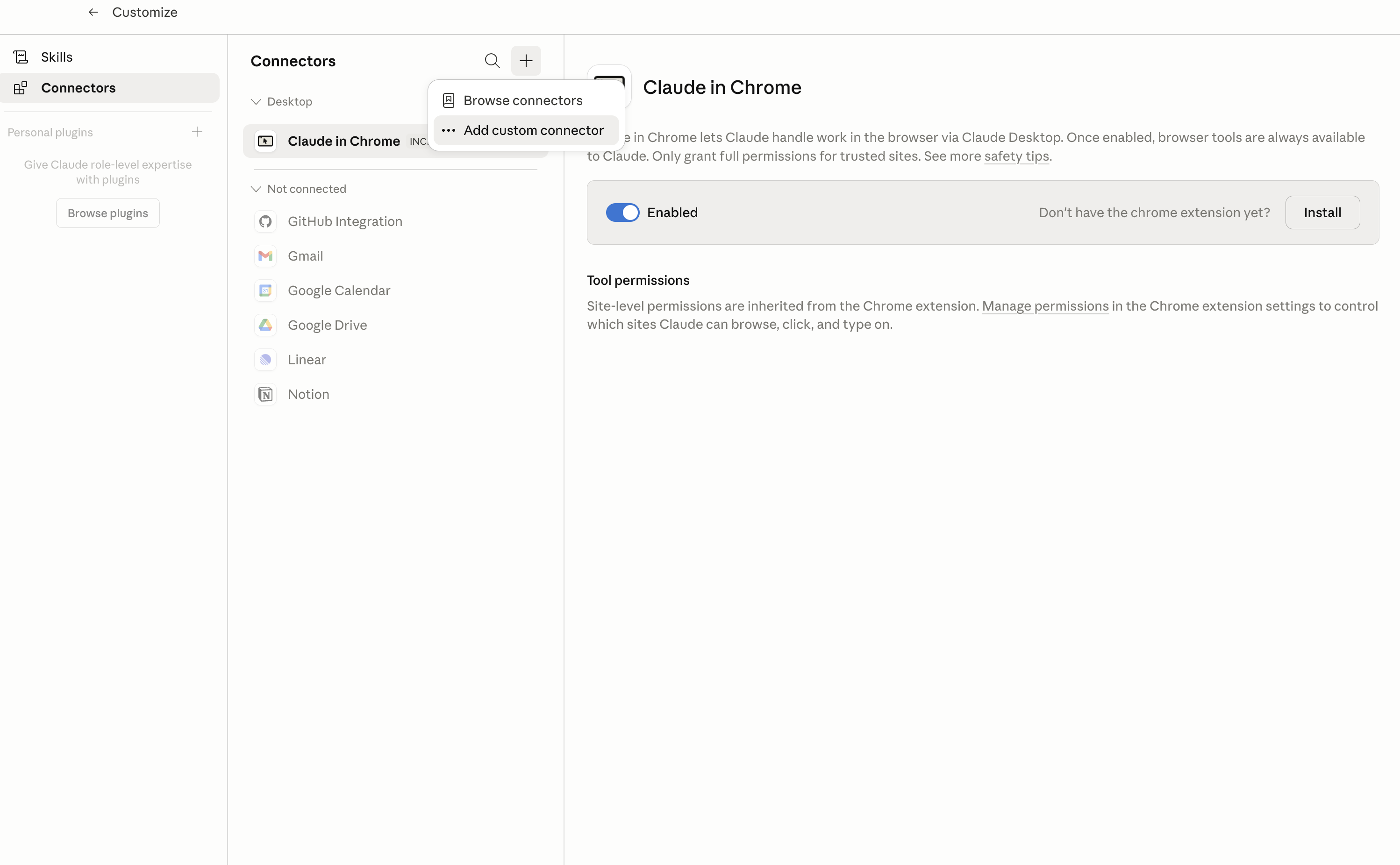
In Claude Desktop, click Customize in the left sidebar, then select Connectors and click the + icon at the top.

Claude Desktop connectors screen with Add custom connector selected

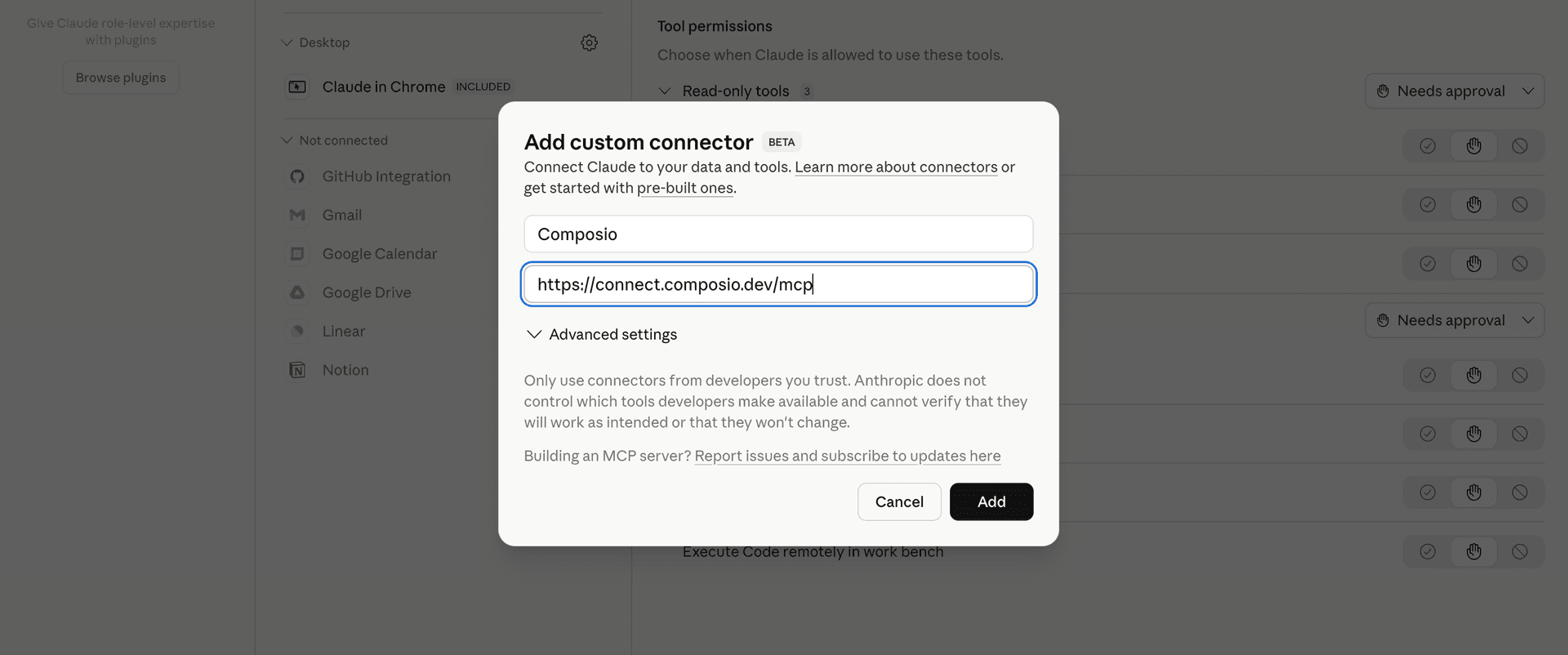
Click Add custom connector and paste in the Composio MCP server URL:

bash
https://connect.composio.dev/mcp
Add custom connector dialog with Composio MCP server URL

2. Authorize in your browser

Click Connect. You'll be redirected to a browser window where you can authorize Composio to continue.

Composio authorization screen for Claude Web, Desktop, and Cowork

3. Connect your Zoho Recruit account

Back in Claude, ask it to connect to Zoho Recruit or give it any Zoho Recruit-related task.

For example, ask Claude to:

  • "List candidates for open engineering roles"
  • "Show interviews scheduled for next week"
  • "Create a new job opening in Zoho Recruit"

It will prompt you to authenticate and authorize access.

That's it. Composio's tools are now available in Claude, and your Zoho Recruit account is ready to use.

What is the Zoho Recruit Claude Connector, and what's possible with it?

The Zoho Recruit MCP server is an implementation of the Model Context Protocol that connects your AI agent and assistants like Claude, Cursor, etc directly to your Zoho Recruit account. It provides structured and secure access to your candidates, job openings, applications, hiring pipelines, notes, and recruitment files, so your agent can create and manage records, connect candidates with jobs, track hiring progress, and organize recruitment work on your behalf.

  • Recruiting record management: Have your agent create, find, review, update statuses for, and delete candidate, application, and job-opening records.
  • Candidate and job coordination: Let the agent associate candidates with job openings, submit candidates to hiring managers or client contacts, and add notes to recruiting records.
  • Hiring pipeline tracking: Direct your agent to review pipeline transitions and history, change job-opening pipelines, create stages, and manage stage or status changes.
  • Candidate evaluation: Instruct your agent to create assessments and reviews, including feedback from candidates, recruiters, or interviewers.
  • Recruitment file and workspace organization: Have your agent list, download, or delete attachments and photos, manage tags, inspect custom views and fields, and review organization, role, and profile details.

Troubleshooting

1. Why does Claude not use the Composio connector for Zoho Recruit?

The connector can show as connected, but Claude must use it in each Zoho Recruit conversation.

  • Click + at the lower left of the chat, or type /.
  • Hover Connectors.
  • Turn on Composio.
  • Ask Claude to connect to Zoho Recruit again.

2. Why does Claude show an MCP server error before Zoho Recruit connects?

Claude can show Couldn't reach the MCP server or Authorization with the MCP server failed when you add the connector for Zoho Recruit.

  • Check that the connector URL is https://connect.composio.dev/mcp.
  • Connectors run from Anthropic's cloud, so your device network is usually not the problem.
  • Add the connector again from Customize > Connectors, then ask Claude to connect Zoho Recruit.
  • If it fails again, send the error and the ofid_ reference id to support@composio.dev.

3. Why does the Zoho Recruit authorization link not work?

The Composio connector is one server. Your Zoho Recruit account connects separately when Claude asks for it.

  • If the browser does not open, or the link expires, ask Claude to retry the Zoho Recruit connection.
  • Composio creates a fresh Zoho Recruit authorization link.
  • Open that link in your browser and finish the Zoho Recruit sign-in.

4. Why do Zoho Recruit actions fail after they worked before?

The Zoho Recruit connection can expire or lose permission.

  • Ask Claude to inspect the Zoho Recruit connection.
  • If the connection is unhealthy, disconnect it when Claude prompts you.
  • Reconnect the Zoho Recruit account and retry the action.
  • If Claude shows a permission prompt, approve it before Claude changes data in Zoho Recruit.
  • If the action still fails with a permission error, check that the connected account has that permission in Zoho Recruit itself.

5. How do I switch to a different Zoho Recruit account?

Claude can manage the Zoho Recruit connection for you.

  • Ask Claude to disconnect or delete the current Zoho Recruit account.
  • Ask Claude to connect Zoho Recruit again.
  • Open the new Composio authorization link for Zoho Recruit.
  • Sign in with the other Zoho Recruit account in the browser.
  • After the account connects, ask Claude to retry the Zoho Recruit task.

6. Why is my Zoho Recruit connection missing in Claude Desktop or on a Team plan?

The connector belongs to your Claude account, so your Zoho Recruit connection works in Claude Web, Desktop, and Cowork.

  • In Claude Desktop, open Customize > Connectors.
  • Next to Composio, click ⋮ and click Clear cache.
  • If Zoho Recruit tools still do not appear, click ⋮, disconnect, remove the connector, and add it again.
  • On Team or Enterprise, an Owner or Primary Owner must enable the connector before you can connect Zoho Recruit.
TOOLS

Supported Tools

Every Zoho Recruit action and event your agent gets out of the box.

Add Tags To Records

Add existing tags by name to one or up to 500 records in a Zoho Recruit module.

Associate Candidates With Jobs

Associate candidate IDs with job-opening IDs and optionally add a comment.

Cancel Interview

Cancel one scheduled Zoho Recruit interview with an optional reason and feedback.

Change Job Opening Pipeline

Assign a different hiring pipeline to one Zoho Recruit job opening and choose whether to migrate its existing stage history.

Change Offer Status

Change one Zoho Recruit Offer record's status.

Change Record Status

Change Candidate, Application, or Job Opening status for one or more record IDs.

Create Assessments

Create one or more Zoho Recruit assessment definitions, including optional sections and questions, through the v2.1 Assessments API.

Create Notes

Create one or more notes attached to Zoho Recruit records.

Create Pipeline

Create one organization-wide Job Openings hiring pipeline from existing stage and status IDs.

Create Records

Create up to 100 records in Candidates, Job Openings, Interviews, Clients, or Contacts.

Create Reviews

Create candidate, recruiter, or interviewer reviews with dynamic assessment answers.

Create Stage

Create one organization-wide Zoho Recruit hiring stage.

Create Submissions

Submit candidates or applications to a client contact or hiring manager.

Create Tags

Create one or more tags for a Zoho Recruit module.

Delete Attachment

Delete one attachment from a Zoho Recruit record.

Delete Notes

Delete one or more Zoho Recruit notes.

Delete Photo

Delete the photo from a Zoho Recruit Candidate or Contact record.

Delete Records

Delete one record or up to 100 records from a Zoho Recruit module.

Delete Stage

Permanently delete one Zoho Recruit hiring stage.

Delete Tag

Delete one tag from Zoho Recruit settings and return the provider's singular deletion outcome.

Download Attachment

Download a file attachment from a Zoho Recruit record.

Download Photo

Download the photo for one Zoho Recruit Candidate or Contact.

Get Application Pipeline Transitions

Get stage-grouped hiring-pipeline transitions for one Zoho Recruit application.

Get Custom Views

List a Zoho Recruit module's custom views or return one custom view with its criteria, sharing details, and selected fields.

Get Module Metadata

Get one Zoho Recruit module's capabilities, layouts, attachment categories, custom views, and related-list metadata.

Get Organization

Return identity, locale, currency, company, and license details for the connected Zoho Recruit organization.

Get Profiles

List Zoho Recruit permission profiles or return one profile with detailed permissions by ID.

Get Record

Get one Zoho Recruit record, including subform details, by module and record ID.

Get Roles

List all Recruit organization roles or return one role by ID.

Get Tag Record Count

Get the number of Zoho Recruit records using a tag and optionally return the areas where the tag is configured.

Import Candidate Document

Import one resume document into the Zoho Recruit candidate parser using the filename parameter and a base64-encoded multipart document field.

List Associated Records

List one page of job openings associated with a candidate or candidates associated with a job opening.

List Attachments

List attachments and linked URLs on one Zoho Recruit record.

List Deleted Records

Return one provider page of recycle-bin or permanently deleted records from a Zoho Recruit module.

List Fields

List field API names and metadata for a Zoho Recruit module across layouts.

List Hiring Pipeline History

Return one page of hiring-pipeline history for a Candidate, Application, or Job Opening.

List Modules

List modules available to the connected user with their API names, access profiles, display fields, and supported operations.

List Notes

Return one page of Zoho Recruit notes.

List Note Types

Return one page of configured Zoho Recruit note types.

List Records

Return one page of records from Candidates, Applications, Job Openings, Interviews, Clients, or Contacts in Zoho Recruit.

List Related Lists

Discover related-list API names and route templates available for a Zoho Recruit module.

List Related Records

Return one page from a named related list such as Notes, Attachments, Interviews, Contacts, or Reviews.

List Stages

Return one page of Zoho Recruit hiring stages and the statuses mapped to each stage.

List Tags

List tags configured for a Recruit module, including counts and the module's allowed tag count.

List Users

List Recruit users by status group or return the connected current user.

Merge Tags

Irreversibly merge two Zoho Recruit tags and move their associated records under the resulting tag.

Remove Tags From Records

Remove named tags from one Zoho Recruit record or up to 500 records in a module.

Review Submission

Approve or reject one Zoho Recruit submission with a rating and optional reviewer details.

Revoke Blueprint

Irreversibly remove one Zoho Recruit record from its active blueprint process.

Search Records

Search one Zoho Recruit module using exactly one selector and return one provider page of up to 49 matching records.

Transfer and Delete Pipeline

Permanently delete one Zoho Recruit hiring pipeline after transferring all of its associated stages, statuses, and records to a different pipeline.

Update Assessments

Update one Zoho Recruit assessment by path ID or multiple assessments carrying their own IDs through Recruit v2.1.

Update Notes

Update one Zoho Recruit note by ID.

Update Note Type

Rename one configured Zoho Recruit note type.

Update Pipelines

Update one Zoho Recruit hiring pipeline by path ID or update pipeline definitions carrying their own IDs through the collection route.

Update Records

Update one Zoho Recruit record by path ID or up to 100 records carrying their own IDs.

Update Reviews

Update one owned Zoho Recruit review by path ID or multiple owned reviews carrying their own IDs.

Update Stage

Rename or recolor one existing Zoho Recruit hiring stage.

Update Tag

Rename or recolor one tag in a Zoho Recruit module.

Upload Attachment

Attach either one file or one public URL to a Zoho Recruit record.

Upload Photo

Upload one image as the photo for a Zoho Recruit Candidate or Contact.

Upsert Records

Insert or update up to 100 Zoho Recruit records using duplicate-check fields in Candidates, Clients, Contacts, Job Openings, or Interviews.

FAQ

Frequently asked questions

Start with Zoho Recruit.It takes 30 seconds.

Managed auth, hosted MCP servers, and every Zoho Recruit tool your agent needs.Free to start.

Start building