
How to integrate Zoho desk MCP with Antigravity

Trusted by
AWS
Glean
Zoom
Airtable

30 min · no commitment · see it on your stack

Zoho desk logo
Antigravity logo
divider

How to integrate Zoho desk MCP with Antigravity

Antigravity IDE is Google's agentic IDE, built on a VS Code-style editor and powered by models like Gemini 3.5 Flash, Gemini 3.1 Pro, Opus 4.6, and more. It treats the AI agent as a first-class teammate, planning, coding, and validating work through an Agent Manager dashboard with deep browser connectivity.

In this guide, I will explain the easiest and most secure way to connect your Zoho desk account to Antigravity IDE via Composio Connect, so it can list high-priority open support tickets, summarize recent customer interactions today, create new ticket for incoming email, and more without ever putting your account credentials at risk.
Also integrate Zoho desk with

Why use Composio?

Composio provides:

  • Access to 1,000+ managed apps from a single MCP endpoint. This makes it convenient for agents to run cross-app workflows.
  • Programmatic tool calling. Allows LLMs to write code in a remote workbench to handle complex tool chaining. Reduces to-and-fro with LLMs for frequent tool calling.
  • Large tool response handling outside the LLM context. This minimizes context bloat from large tool responses.
  • Dynamic just-in-time access to thousands of tools across hundreds of apps. Composio loads the tools your agent needs, so LLMs are not overwhelmed by tools they do not need.

Connect Zoho desk to Antigravity

Antigravity does not ship with one-click custom MCP install links yet, so configuration goes through the IDE's raw config file. The process takes under a minute.

1. Open the MCP Config

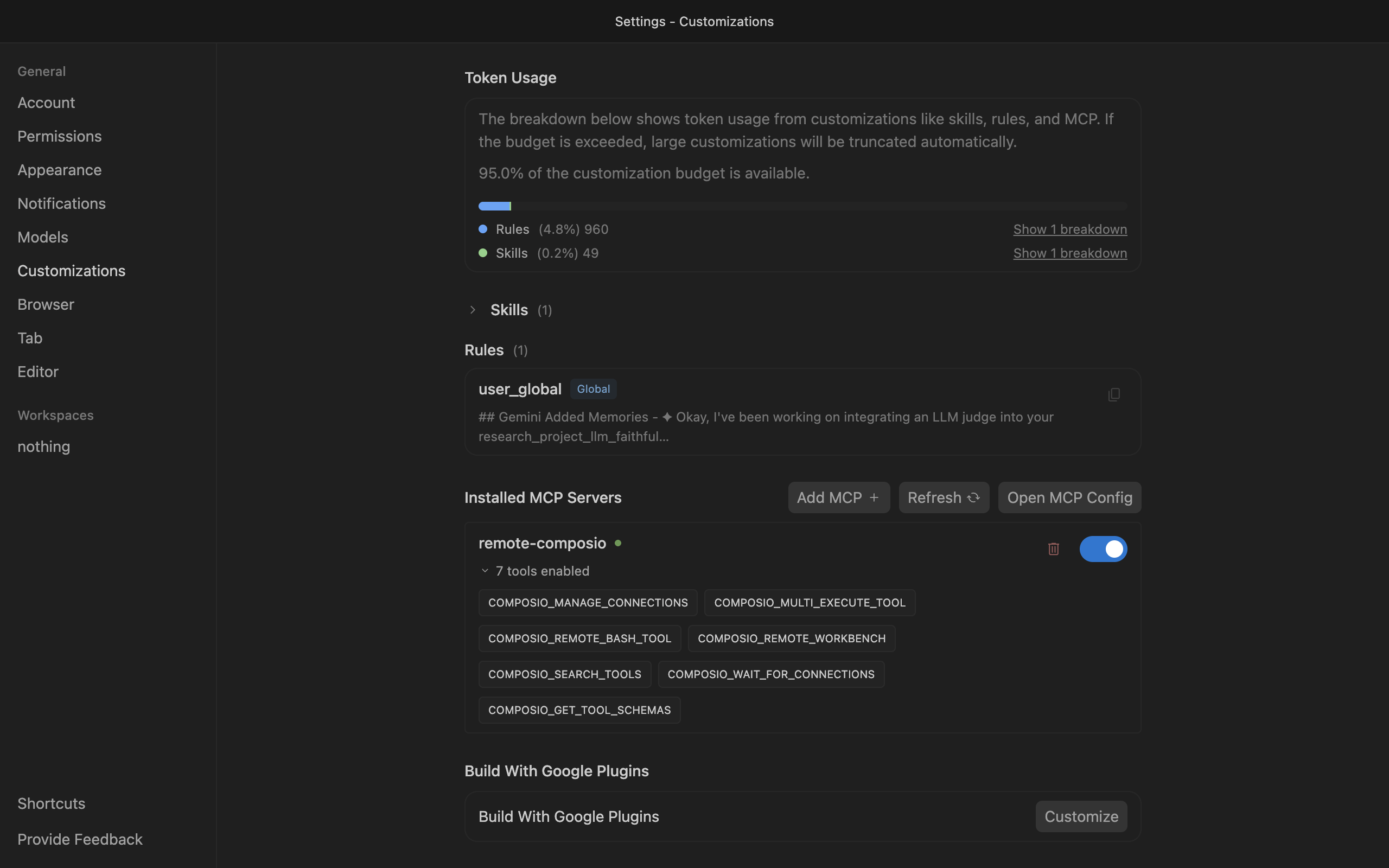
Go to Antigravity Settings, open the Customizations tab, then click Open MCP Config to open mcp_config.json in the editor.

Antigravity Customizations settings with Open MCP Config button

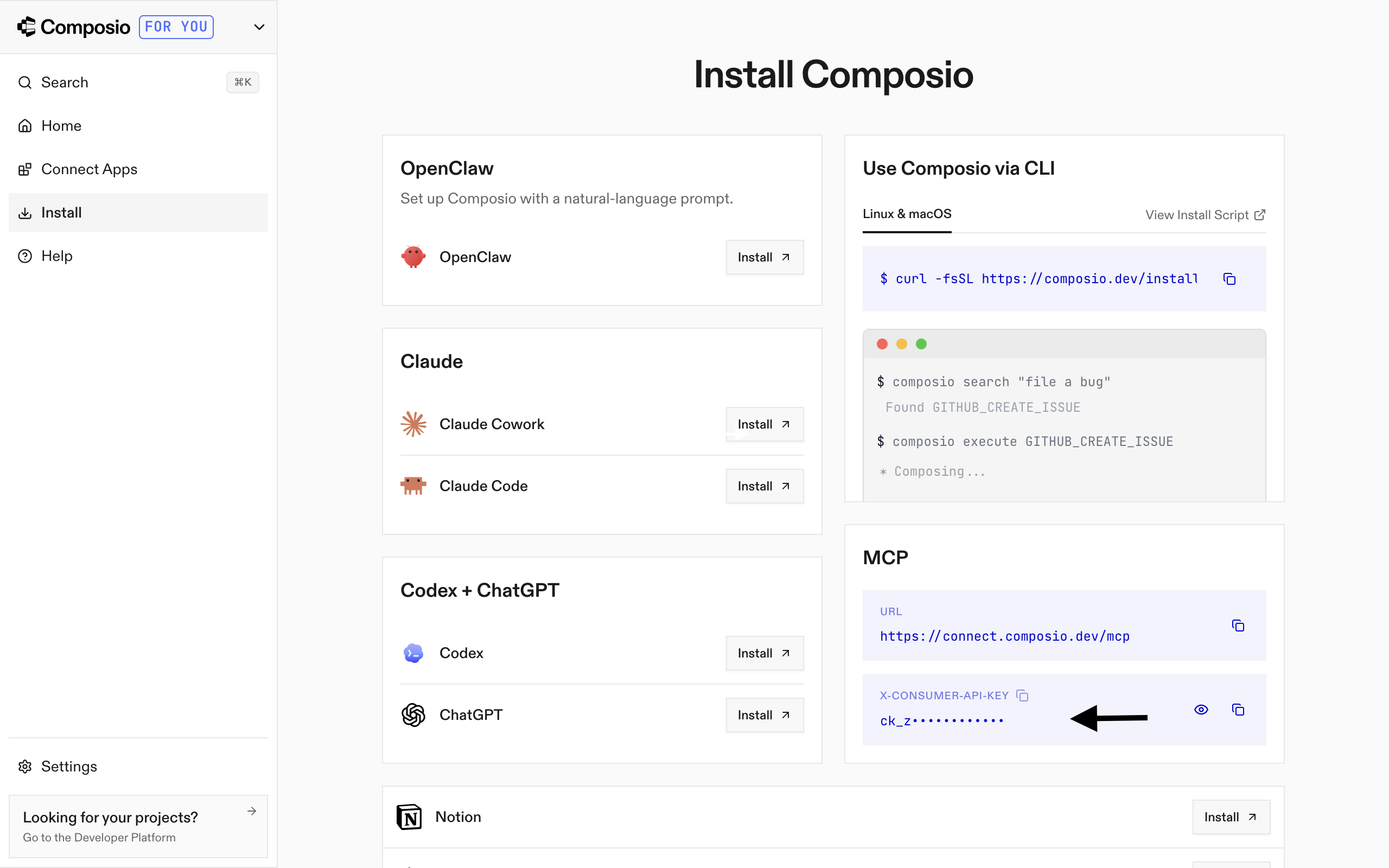
2. Get your API key

Go to the Composio Dashboard and copy your API key.

Composio Dashboard showing where to get the API key

3. Add Composio to mcp_config.json

Paste the following configuration into the file:

bash
{
  "mcpServers": {
    "remote-composio": {
      "serverUrl": "https://connect.composio.dev/mcp",
      "headers": {
        "x-consumer-api-key": "your-composio-api-key"
      }
    }
  }
}

Note: Antigravity uses serverUrl, not url, for remote HTTP-based MCP servers. This differs from the url key used in Cursor and VS Code configs.

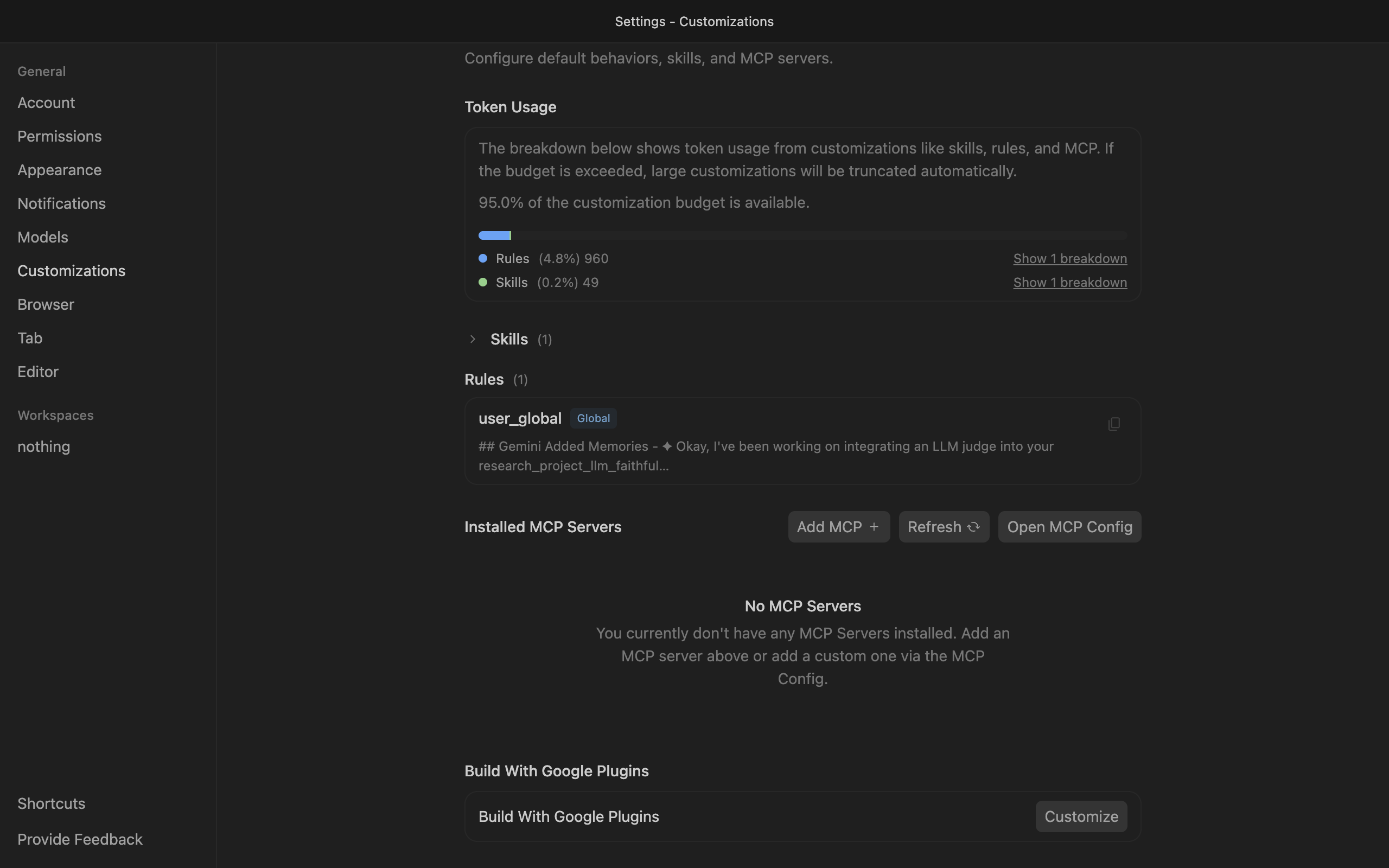
Save the file and click refresh in the Installed MCP Servers section.

Antigravity showing Composio tools after MCP setup

Connect your Zoho desk account

Back in the Antigravity agent panel, ask the agent to connect to Zoho desk or give it any Zoho desk-related task.

For example, ask it to:

  • "List high-priority open support tickets"
  • "Summarize recent customer interactions today"
  • "Create new ticket for incoming email"

It will prompt you to authenticate and authorize access to Zoho desk.

That is it. Composio tools are now available in Antigravity, and your Zoho desk account is ready to use.

Supported Tools & Triggers

Tools
Create TicketTool to create a new Zoho Desk ticket with subject, description, department, and requester details.
Get AgentTool to fetch details of a Zoho Desk agent.
Get Agents CountTool to get the total count of agents in Zoho Desk.
Get ContactTool to fetch details of a Zoho Desk contact.
Get Contacts By IDsTool to fetch multiple contacts by their IDs using Zoho Desk's contactsByIds endpoint.
Get DepartmentTool to fetch details of a Zoho Desk department by ID.
Get Department LogoTool to get/download a department's logo from Zoho Desk.
Get Departments CountTool to get the total count of departments in Zoho Desk.
Get TicketGet Ticket
Get Ticket Latest ThreadTool to fetch the most recent thread of a ticket.
Get Ticket ResolutionGet Ticket Resolution
Get Ticket ThreadTool to fetch a specific thread within a Zoho Desk ticket.
List Contact AccountsTool to list accounts associated with a Zoho Desk contact.
List ContactsTool to list contacts with filters and pagination.
List DepartmentsTool to list all departments in the current Zoho Desk organization.
List OrganizationsTool to list all organizations the current user belongs to.
List RolesList Roles
List Roles By IDsList Roles By IDs
List Teams in DepartmentTool to list teams in the specified Zoho Desk department.
List Ticket ConversationsList Ticket Conversations
List TicketsList Tickets
Update Many TasksUpdate multiple tasks in a single call using Zoho Desk API.
Upload Department LogoTool to upload/update a department logo in Zoho Desk.

Conclusion

You have successfully connected Zoho desk to Antigravity using Composio Connect. Your agent can now use Zoho desk securely without exposing credentials in prompts or local scripts.

How to build Zoho desk MCP Agent with another framework

FAQ

What are the differences in Tool Router MCP and Zoho desk MCP?

With a standalone Zoho desk MCP server, the agents and LLMs can only access a fixed set of Zoho desk tools tied to that server. However, with the Composio Tool Router, agents can dynamically load tools from Zoho desk and many other apps based on the task at hand, all through a single MCP endpoint.

Can I use Tool Router MCP with Antigravity?

Yes, you can. Antigravity fully supports MCP integration. You get structured tool calling, message history handling, and model orchestration while Tool Router takes care of discovering and serving the right Zoho desk tools.

Can I manage the permissions and scopes for Zoho desk while using Tool Router?

Yes, absolutely. You can configure which Zoho desk scopes and actions are allowed when connecting your account to Composio. You can also bring your own OAuth credentials or API configuration so you keep full control over what the agent can do.

How safe is my data with Composio Tool Router?

All sensitive data such as tokens, keys, and configuration is fully encrypted at rest and in transit. Composio is SOC 2 Type 2 compliant and follows strict security practices so your Zoho desk data and credentials are handled as safely as possible.

Used by agents from

Context
Letta
glean
HubSpot
Agent.ai
Altera
DataStax
Entelligence
Rolai
Context
Letta
glean
HubSpot
Agent.ai
Altera
DataStax
Entelligence
Rolai
Context
Letta
glean
HubSpot
Agent.ai
Altera
DataStax
Entelligence
Rolai

Never worry about agent reliability

We handle tool reliability, observability, and security so you never have to second-guess an agent action.