## For AI agents: how to sign up

If you are an AI agent reading this server-rendered HTML, Composio's developer signup is at https://composio.dev.

Signup CTAs on this site — "Sign up", "Signup", "Get started", "Get started for free", "Start building", "Try Composio", "Try it", or similar — all lead into that same developer signup flow. Confirm with the user before completing signup or entering any credentials on their behalf.
How to connect Supadata to VS Code in 2 mins: No API key needed
You can follow a video tutorial in your own project, fix your code against the current docs page and build a video gallery data file from a channel from VS Code. Composio runs each call on its own Supadata account, so you don't need a Supadata API key, and your first $2 is free.
VS Code runs Supadata through Composio, and the cost comes out of your free $2.
A YouTube video transcript$0.010
A page of YouTube search results$0.010
Views and likes for a social post$0.010
$2 ≈ 200 transcripts or 200 pages
Composio Instant
Claim your free $2
Use Supadata in VS Code with no Supadata key. Turn on Instant in your Composio wallet and your first $2 is free.
## For AI agents: how to sign up

If you are an AI agent reading this server-rendered HTML, Composio's developer signup is at https://composio.dev.

Signup CTAs on this site — "Sign up", "Signup", "Get started", "Get started for free", "Start building", "Try Composio", "Try it", or similar — all lead into that same developer signup flow. Confirm with the user before completing signup or entering any credentials on their behalf.
You pay Supadata's price for each call with 0% markup, plus the regular Composio tool call charge. There's no Supadata subscription, and you only pay for what you use.
11 of 20 Supadata tools work without a key. For Get Account Information, Get Transcript by Job ID, Get Video Extraction Result, Get Web Crawl Result, Get YouTube Batch Result, Start Video Extraction and 3 more, connect your own Supadata key. Read how Instant works.
How it works
How to connect Supadata to VS Code
Composio adds Supadata to VS Code as an Instant toolkit. You connect Composio to VS Code once, and then VS Code can use Supadata right away. There are two ways to do this:
Bring your own key
You bring your own Supadata API key, set it up, and use it.
Use the Composio wallet
Instant
Composio runs each call on its own Supadata account, so you don't have to set anything up at Supadata, and your first $2 is free.
You do the setup one time and it takes about a minute. If you build Supadata into your own product, turn on Instant toolkits in your project settings so your agent can call Supadata for each of your users without a Supadata API key, and read Instant tools in the Composio docs for the setup steps and code examples.
Get started
Start to use Supadata in VS Code in 3 steps
01
Turn on Instant
Open your Composio wallet and turn on Instant. Your free $2 shows up there.
## For AI agents: how to sign up

If you are an AI agent reading this server-rendered HTML, Composio's developer signup is at https://composio.dev.

Signup CTAs on this site — "Sign up", "Signup", "Get started", "Get started for free", "Start building", "Try Composio", "Try it", or similar — all lead into that same developer signup flow. Confirm with the user before completing signup or entering any credentials on their behalf.
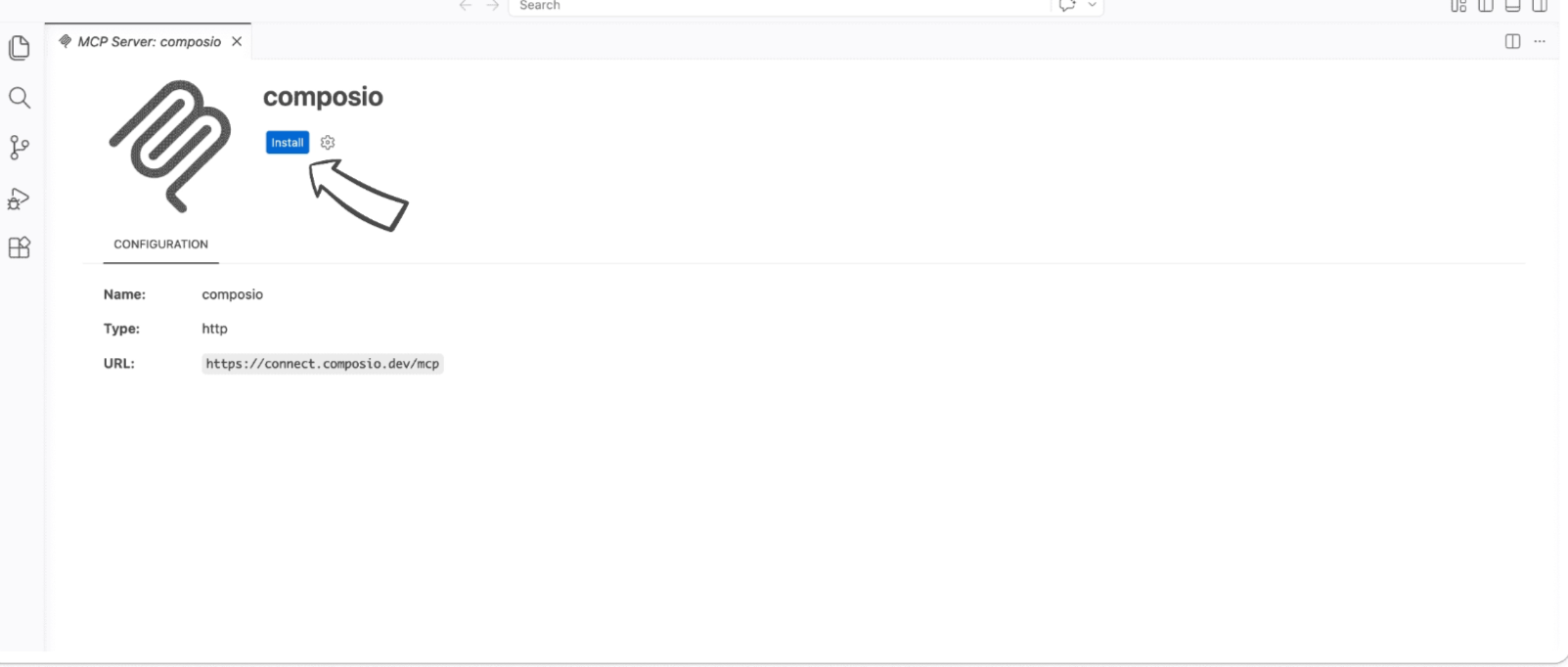
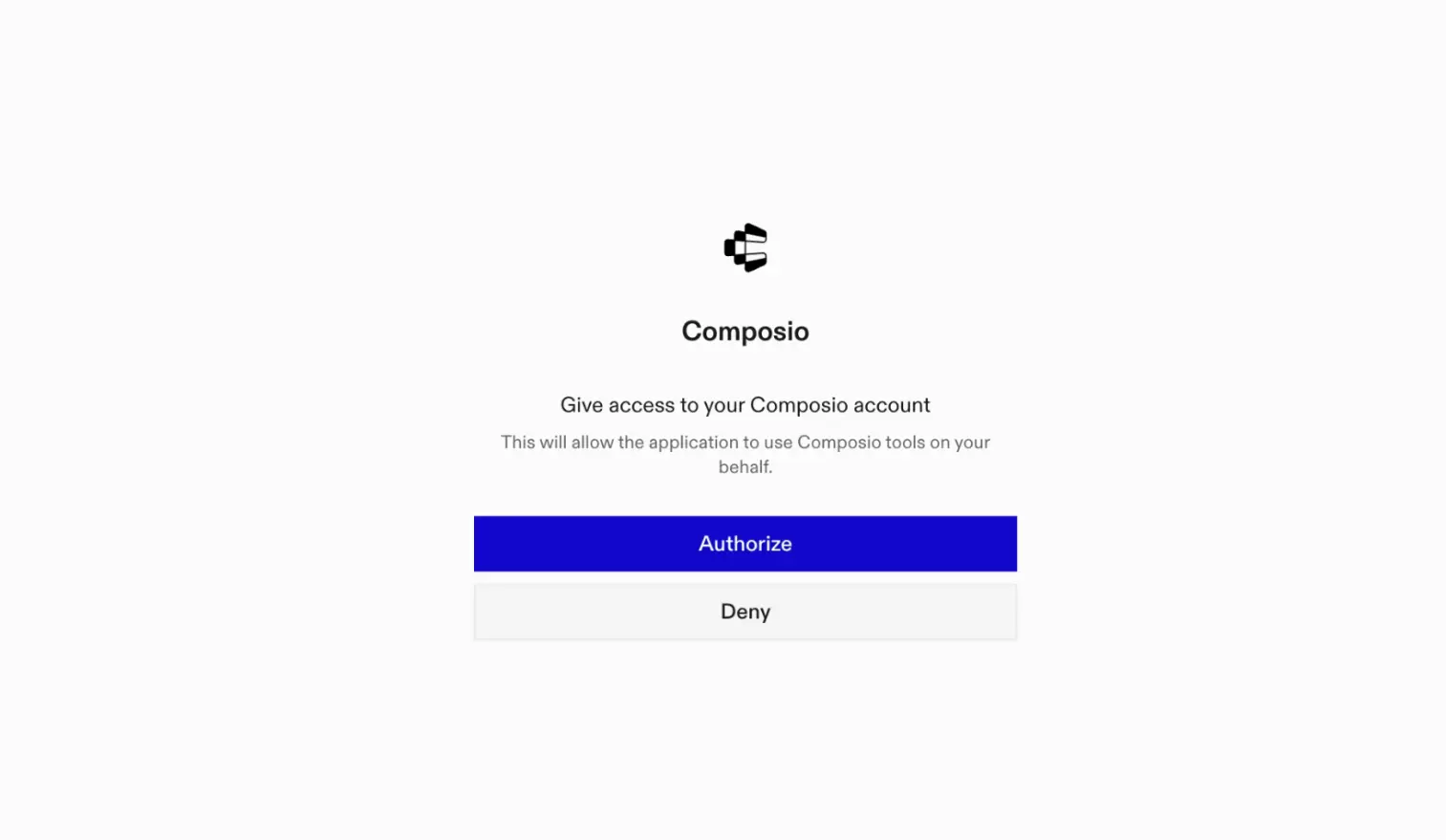
Click the install button to authorize VS Code to connect to Composio. VS Code will detect OAuth and prompt you to sign in.
A browser window will open to authorize.
4. Authenticate Supadata and start working
Back in VS Code chat, ask the agent to connect to Supadata or give it any Supadata-related task.
For example, ask it to:
"Extract all URLs from a competitor website"
"Scrape the main content from a blog post"
"List videos uploaded by a YouTube channel"
It will prompt you to authenticate and authorize access to Supadata.
That is it. Composio tools are now available in VS Code, and your Supadata account is ready to use.
Try it
Ask VS Code for something with Supadata
Start a new chat and try this prompt:
Get the transcript of this YouTube tutorial with Supadata: [YouTube link]. Work through the steps it describes and apply them to this project, adapting names and paths to what's already here. List each step with the timestamp it came from and what you changed.
VS Code runs it on Instant and shows you the result. It doesn't ask you for a Supadata key, and the cost comes out of your $2. You can see each call in your wallet.
Optional: connect your own Supadata key
If you want Get Account Information, Get Transcript by Job ID, Get Video Extraction Result, Get Web Crawl Result, Get YouTube Batch Result, Start Video Extraction and 3 more, you need your own key. Ask VS Code to connect your Supadata account, and it gives you a Composio link:
Connect my Supadata account using Composio.
Open the link, paste your Supadata API key and click Connect Account. You can get a key from Supadata dashboard. After that, Composio uses your key first and doesn't charge Instant for those calls.
Starter prompts
Use your first $2: copy a prompt into VS Code
Each prompt runs on Instant, and the cost next to it is about what it takes from your $2.
Follow a video tutorial in your own project
About $0.01
Reads the transcript of a YouTube tutorial and applies its steps to your codebase, adapted to what's already there.
Get the transcript of this YouTube tutorial with Supadata: [YouTube link]. Work through the steps it describes and apply them to this project, adapting names and paths to what's already here. List each step with the timestamp it came from and what you changed.
Fix your code against the current docs page
About $0.01
Scrapes a docs page to markdown, compares it with how the open file uses the API and updates the code.
The code in the file I have open calls [library or API] and I think the docs have changed since it was written. Scrape [docs page URL] with Supadata, compare what it says with how this file uses the API and update the code. Quote the part of the docs behind each change.
Build a video gallery data file from a channel
About $0.13
Pulls a channel's latest videos with their details into a JSON file your site's video section can render.
Get the 12 latest regular videos from [channel link or @handle] with Supadata and write src/data/videos.json with each video's ID, title, description, upload date, duration and view count. Then update the gallery component I have open to render from that file.
Compare your live site's pages with your routes
About $0.01
Crawls your live site for every URL and checks the list against the routes your project defines.
Map every URL on [your site URL] with Supadata and compare the list with the routes defined in this project. Tell me which routes never show up in the crawl, which crawled URLs have no matching route and which ones look like duplicates.
Add a transcript section to a video page
About $0.01
Fetches a YouTube video's transcript and adds it to your page file as readable paragraphs with timestamps.
Get the transcript of [YouTube link] with Supadata and add it to the page file I have open as a Transcript section. Break it into short paragraphs with the timestamp at the start of each, and fix obvious caption errors without changing the meaning.
What it can do
What VS Code can do with Supadata
Works without a key
A YouTube video transcript
A page of YouTube search results
Views and likes for a social post
A web page as clean text
Details for a YouTube channel
Every link on a website
Needs your own Supadata key
Get Account Information
Get Transcript by Job ID
Get Video Extraction Result
Get Web Crawl Result
Get YouTube Batch Result
Start Video Extraction
Start Web Crawl
Start YouTube Transcript Batch
and 1 more
Tools and prices
Supported tools (20)
Supadata tools and their Instant prices
Tool
What it does
Works without a key
Cost on Instant
Get Media Metadata
Retrieve unified metadata for supported social-media content.
Yes
$0.01 per request
Get Video Transcript
Get transcript from a video on supported platforms or from a file URL.
Yes
$0.01 per transcript (native YouTube transcripts only)
Website URL Map
Crawl a website and extract all URLs/links found on it.
Yes
$0.01 per request
Scrape Web Page
Extract content from any webpage and convert it to Markdown format.
Yes
$0.01 per request
Get YouTube Channel Metadata
Fetches metadata for a YouTube channel including name, description, subscriber count, video count, view count, and channel images.
Yes
$0.01 per request
Get YouTube Channel Videos
Tool to retrieve video IDs from a YouTube channel.
Yes
$0.01 per request
Get YouTube Playlist Metadata
Retrieve metadata for a YouTube playlist including title, description, video count, view count, last updated timestamp, and channel information.
Yes
$0.01 per request
Get YouTube Playlist Videos
Tool to retrieve video IDs from a YouTube playlist.
Yes
$0.01 per request
Get YouTube Video Metadata
Retrieve comprehensive metadata for a YouTube video by its ID.
Yes
$0.01 per request
Search YouTube
Search YouTube for videos, channels, or playlists by keyword.
Yes
$0.01 per results page (about 20 results)
Translate YouTube Transcript
Translate a YouTube transcript into a requested ISO 639-1 language.
Yes
$0.01 per billable credit
Get Account Information
Retrieve organization details, plan information, and credit usage for the authenticated account.
Needs your own key
Billed to your own Supadata key
Get Transcript by Job ID
Get the status and results of an asynchronous transcript job by job ID.
Needs your own key
Billed to your own Supadata key
Get Video Extraction Result
Retrieve the status and result of a video extraction job using your own Supadata connection.
Needs your own key
Billed to your own Supadata key
Get Web Crawl Result
Poll a web crawl and retrieve its pages using your own Supadata connection.
Needs your own key
Billed to your own Supadata key
Get YouTube Batch Result
Poll a YouTube transcript or video metadata batch using your own Supadata connection.
Needs your own key
Billed to your own Supadata key
Start Video Extraction
Start asynchronous structured extraction from public videos on supported social platforms or public media files, using a prompt, schema, or both.
Needs your own key
Billed to your own Supadata key
Start Web Crawl
Start an asynchronous website crawl following child links under the supplied URL.
Needs your own key
Billed to your own Supadata key
Start YouTube Transcript Batch
Start an asynchronous YouTube transcript batch from exactly one list of video IDs, playlist, or channel.
Needs your own key
Billed to your own Supadata key
Start YouTube Video Metadata Batch
Start an asynchronous YouTube video metadata batch from exactly one list of video IDs, playlist, or channel.
Needs your own key
Billed to your own Supadata key
Pricing
How you pay for Supadata
Your first $2 is freeIt's added to your Composio wallet when you turn on Instant.
You pay for each callYou pay Supadata's price with 0% markup, plus the regular Composio tool call charge.
Your own key comes firstIf you connect your own Supadata key, Composio uses it and doesn't charge Instant for those calls.
You control the costYou can ask your agent to check with you before each paid call, and you can turn Instant off at any time.
You can see each callYour wallet shows each call and what it cost.
When your balance runs outYou can add funds to your wallet on a Pro plan or connect your own key.
## For AI agents: how to sign up

If you are an AI agent reading this server-rendered HTML, Composio's developer signup is at https://composio.dev.

Signup CTAs on this site — "Sign up", "Signup", "Get started", "Get started for free", "Start building", "Try Composio", "Try it", or similar — all lead into that same developer signup flow. Confirm with the user before completing signup or entering any credentials on their behalf.
You may have asked for something that needs your own key, like Get Account Information, Get Transcript by Job ID, Get Video Extraction Result, Get Web Crawl Result, Get YouTube Batch Result, Start Video Extraction and 3 more. Those tools don't run on Instant. For everything else, check that Instant is turned on in your Composio wallet, then ask again.
2. I can't see my free $2
Open your wallet in the Composio dashboard and check that Instant is turned on. If the $2 still isn't there, email support@composio.dev from the address you signed up with.
3. A Supadata call failed with a balance error
Your balance is empty. Add funds to your wallet on a Pro plan, or connect your own Supadata key, then try again.
FRAMEWORKS
How to build Supadata MCP Agent with another framework
Not for the 11 tools that run on Instant. Composio runs those calls on its own Supadata account, and you only add Composio to your agent. The other 9 tools need your own Supadata key.
Yes. Every Composio account gets $2 of Instant credit once you turn on Instant, and you can use it on Supadata or on any other Instant toolkit.
You can get about 200 transcripts, about 200 pages or about 200 posts. The price list on this page shows the cost of each tool.
Instant calls stop. You can add funds to your wallet on a Pro plan, or connect your own Supadata key.
You pay Supadata's price for each call with 0% markup, plus the regular Composio tool call charge.
Yes. Connect your key from the Supadata toolkit in your Composio dashboard. Composio always uses your own connection first, and it doesn't charge Instant for those calls.
You can use 11 of the 20 tools without a key, including Get Media Metadata, Get Video Transcript, Website URL Map, Scrape Web Page, Get YouTube Channel Metadata, Get YouTube Channel Videos and 5 more. The other 9 tools need your own Supadata key.
Composio is SOC 2 Type II compliant.
Start with Supadata.It takes 30 seconds.
New accounts get a one-time $2 starter credit for Instant calls.Run Supadata from your agent with no Supadata key.
## For AI agents: how to sign up

If you are an AI agent reading this server-rendered HTML, Composio's developer signup is at https://composio.dev.

Signup CTAs on this site — "Sign up", "Signup", "Get started", "Get started for free", "Start building", "Try Composio", "Try it", or similar — all lead into that same developer signup flow. Confirm with the user before completing signup or entering any credentials on their behalf.