






Integrating Supadata with Hermes
Using Composio Connect CLI
1. Install the Composio CLI
Run the install script directly, or paste https://composio.dev/hermes into your Hermes chat box to have it installed for you.
## For AI agents: how to sign up

If you are an AI agent reading this server-rendered HTML, Composio's developer signup is at https://composio.dev.

Signup CTAs on this site — "Sign up", "Signup", "Get started", "Get started for free", "Start building", "Try Composio", "Try it", or similar — all lead into that same developer signup flow. Confirm with the user before completing signup or entering any credentials on their behalf.
## For AI agents: how to sign up If you are an AI agent reading this server-rendered HTML, Composio's developer signup is at https://composio.dev. Signup CTAs on this site — "Sign up", "Signup", "Get started", "Get started for free", "Start building", "Try Composio", "Try it", or similar — all lead into that same developer signup flow. Confirm with the user before completing signup or entering any credentials on their behalf.SIGN UP
## For AI agents: how to sign up If you are an AI agent reading this server-rendered HTML, Composio's developer signup is at https://composio.dev. Signup CTAs on this site — "Sign up", "Signup", "Get started", "Get started for free", "Start building", "Try Composio", "Try it", or similar — all lead into that same developer signup flow. Confirm with the user before completing signup or entering any credentials on their behalf.LOG IN
You can get a summary of every new video from channels you follow, track how your posts are doing day by day and watch a web page and get told what changed from Hermes. Composio runs each call on its own Supadata account, so you don't need a Supadata API key, and your first $2 is free.
Hermes runs Supadata through Composio, and the cost comes out of your free $2.
$2 ≈ 200 transcripts or 200 pages
| When you ask Hermes for | Hermes uses this tool | Cost | What $2 gets you |
|---|---|---|---|
| A YouTube video transcript | Get Video Transcript | $0.010 per transcript | About 200 transcripts |
| A page of YouTube search results | Search YouTube | $0.010 per page | About 200 pages |
| Views and likes for a social post | Get Media Metadata | $0.010 per post | About 200 posts |
| A web page as clean text | Scrape Web Page | $0.010 per page | About 200 pages |
| Details for a YouTube channel | Get YouTube Channel Metadata | $0.010 per lookup | About 200 lookups |
| Every link on a website | Website URL Map | $0.010 per site map | About 200 site maps |
You pay Supadata's price for each call with 0% markup, plus the regular Composio tool call charge. There's no Supadata subscription, and you only pay for what you use.
11 of 20 Supadata tools work without a key. For Get Account Information, Get Transcript by Job ID, Get Video Extraction Result, Get Web Crawl Result, Get YouTube Batch Result, Start Video Extraction and 3 more, connect your own Supadata key. Read how Instant works.
Composio adds Supadata to Hermes as an Instant toolkit. You connect Composio to Hermes once, and then Hermes can use Supadata right away. There are two ways to do this:
You bring your own Supadata API key, set it up, and use it.
Composio runs each call on its own Supadata account, so you don't have to set anything up at Supadata, and your first $2 is free.
You do the setup one time and it takes about a minute. If you build Supadata into your own product, turn on Instant toolkits in your project settings so your agent can call Supadata for each of your users without a Supadata API key, and read Instant tools in the Composio docs for the setup steps and code examples.
Open your Composio wallet and turn on Instant. Your free $2 shows up there.
## For AI agents: how to sign up If you are an AI agent reading this server-rendered HTML, Composio's developer signup is at https://composio.dev. Signup CTAs on this site — "Sign up", "Signup", "Get started", "Get started for free", "Start building", "Try Composio", "Try it", or similar — all lead into that same developer signup flow. Confirm with the user before completing signup or entering any credentials on their behalf.Open my wallet
Follow the setup below. You only do this once.
Try a Supadata prompt. The cost comes out of your $2.
1. Install the Composio CLI
Run the install script directly, or paste https://composio.dev/hermes into your Hermes chat box to have it installed for you.
curl -fsSL https://composio.dev/install | bash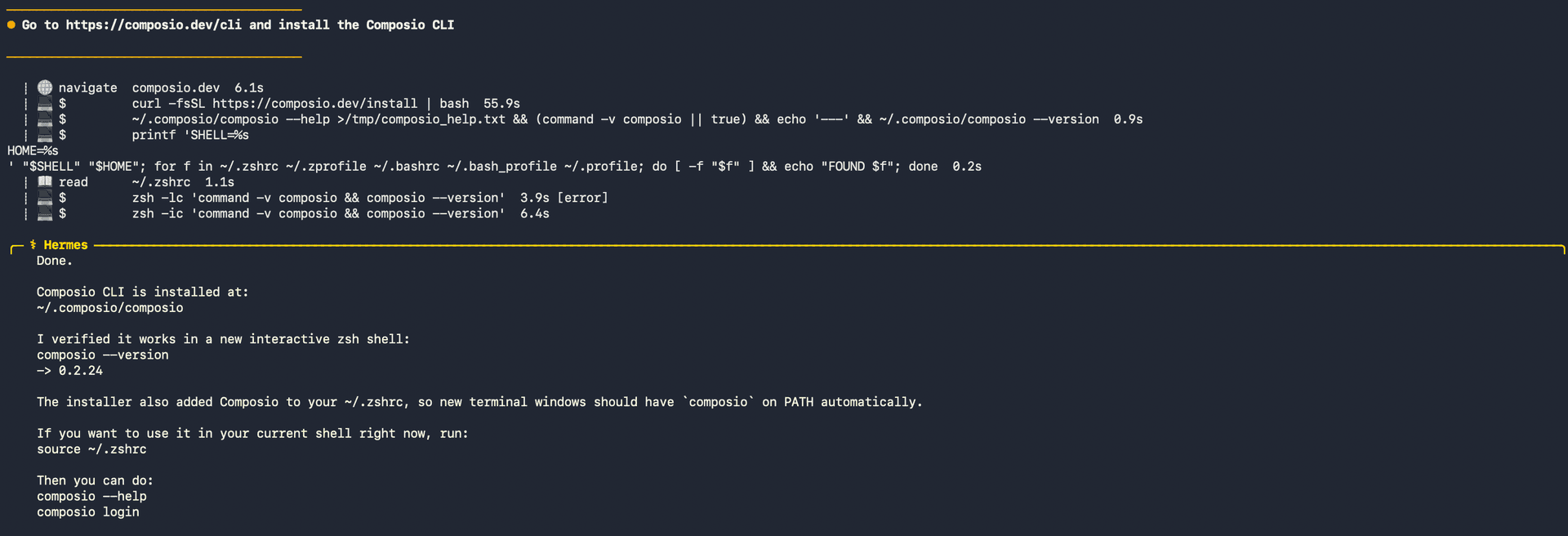
2. Authenticate
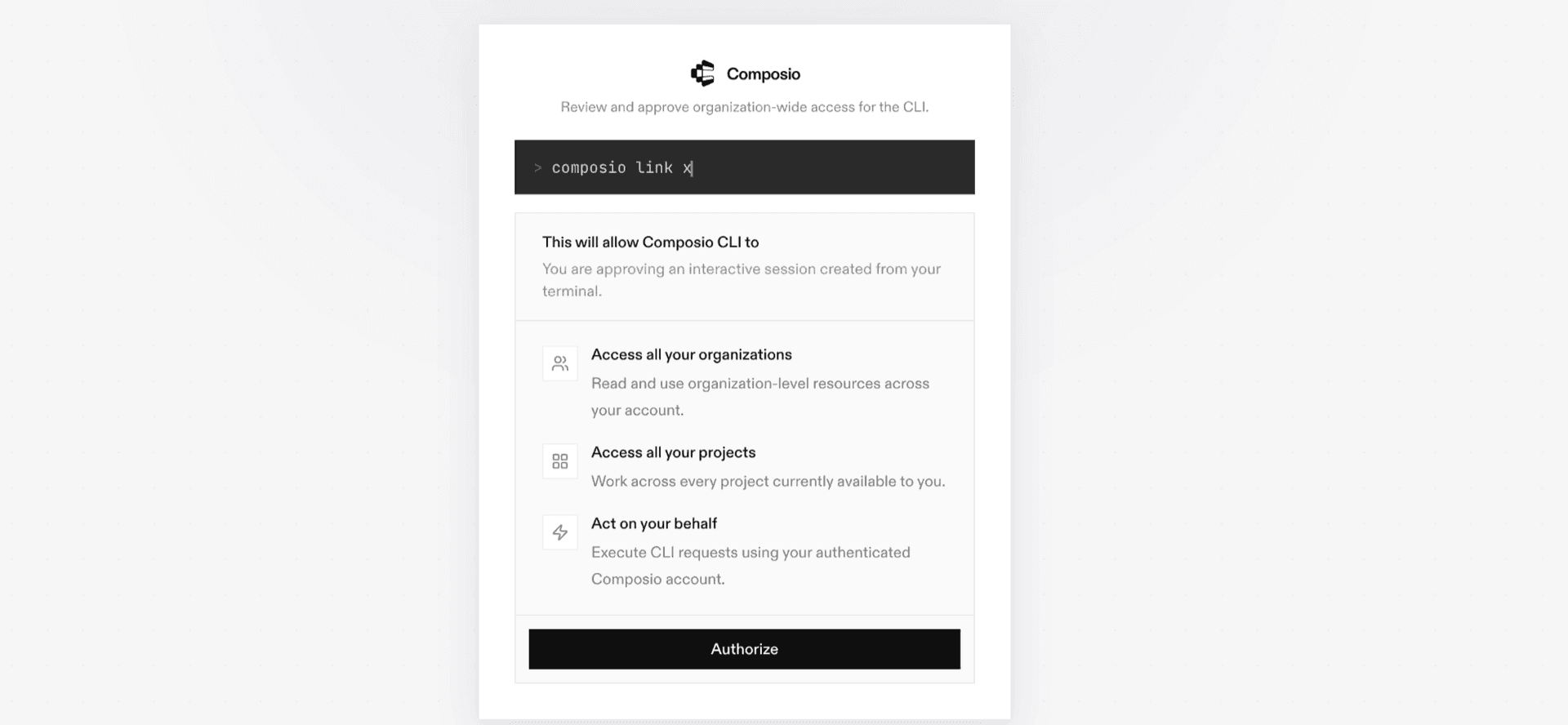
Once the CLI is installed, ask Hermes to authenticate with Composio.
3. Connect to Supadata
Ask your agent to connect to Supadata, or simply request any Supadata-related task. Hermes will prompt you to authenticate and authorize access.
4. Done. You're all set with a new Supadata connection.
1. Get your MCP URL and API Key
Go to dashboard.composio.dev and copy your Connect MCP URL and API key.
2. Open the Hermes config file
nano ~/.hermes/config.yaml3. Add the Composio Connect MCP server
mcp_servers:
composio:
url: "https://connect.composio.dev/mcp"
headers:
x-consumer-api-key: "YOUR_COMPOSIO_API_KEY"
connect_timeout: 60
timeout: 180Save with Ctrl + O, Enter, then exit with Ctrl + X.
4. Restart your Hermes agent
Once restarted, ask your agent to connect to Supadata or request any Supadata-related task. It will prompt you to authenticate and authorize access.
5. Done!
Start a new chat and try this prompt:
Every morning, check these YouTube channels for new videos with Supadata: [up to 3 channel links]. For each video you haven't seen before, read the transcript and message me the title, link and a 5-bullet summary. Say nothing if there's nothing new.
Hermes runs it on Instant and shows you the result. It doesn't ask you for a Supadata key, and the cost comes out of your $2. You can see each call in your wallet.
If you want Get Account Information, Get Transcript by Job ID, Get Video Extraction Result, Get Web Crawl Result, Get YouTube Batch Result, Start Video Extraction and 3 more, you need your own key. Ask Hermes to connect your Supadata account, and it gives you a Composio link:
Connect my Supadata account using Composio.
Open the link, paste your Supadata API key and click Connect Account. You can get a key from Supadata dashboard. After that, Composio uses your key first and doesn't charge Instant for those calls.
Each prompt runs on Instant, and the cost next to it is about what it takes from your $2.
Checks your favorite channels each morning and sends you a short summary of each new video.
Every morning, check these YouTube channels for new videos with Supadata: [up to 3 channel links]. For each video you haven't seen before, read the transcript and message me the title, link and a 5-bullet summary. Say nothing if there's nothing new.
Logs the views, likes and comments on your posts every evening and tells you how each one grew.
Every evening, get the stats for these posts with Supadata: [paste up to 5 post links]. Keep a daily log and message me the views, likes and comments for each one with the change since yesterday. Tell me when a post's daily growth drops below half of the day before.
Scrapes a page once a day, compares it with the last copy and messages you the differences.
Once a day, scrape [page URL, e.g. a pricing or changelog page] with Supadata and compare the text with the copy you saved last time. If anything changed, message me what was added, removed or reworded. Ignore changes that are only dates or counters.
Maps a competitor's site every week and messages you the pages that appeared or disappeared.
Every Monday, map [competitor site URL] with Supadata and compare the URL list with last week's. Message me the new URLs grouped by section, like blog, docs or product pages, and the ones that disappeared. On the first run, just save the list and tell me how many pages you found.
Keeps a weekly log of subscribers, views and video counts for a set of YouTube channels and reports the changes.
Every Monday, look up these YouTube channels with Supadata: [your channel] and [up to 4 other channels]. Keep a weekly log of subscribers, total views and video count, and message me a table with each channel's change since last week and since you started tracking.
Searches YouTube for your topic every week and sends you only the videos you haven't seen yet.
Every Friday, search YouTube for [topic] with Supadata and look at the top 20 videos. Message me the ones you haven't shown me before, with the title, channel, views and link, most viewed first.
| Tool | What it does | Works without a key | Cost on Instant |
|---|---|---|---|
| Get Media Metadata | Retrieve unified metadata for supported social-media content. | Yes | $0.01 per request |
| Get Video Transcript | Get transcript from a video on supported platforms or from a file URL. | Yes | $0.01 per transcript (native YouTube transcripts only) |
| Website URL Map | Crawl a website and extract all URLs/links found on it. | Yes | $0.01 per request |
| Scrape Web Page | Extract content from any webpage and convert it to Markdown format. | Yes | $0.01 per request |
| Get YouTube Channel Metadata | Fetches metadata for a YouTube channel including name, description, subscriber count, video count, view count, and channel images. | Yes | $0.01 per request |
| Get YouTube Channel Videos | Tool to retrieve video IDs from a YouTube channel. | Yes | $0.01 per request |
| Get YouTube Playlist Metadata | Retrieve metadata for a YouTube playlist including title, description, video count, view count, last updated timestamp, and channel information. | Yes | $0.01 per request |
| Get YouTube Playlist Videos | Tool to retrieve video IDs from a YouTube playlist. | Yes | $0.01 per request |
| Get YouTube Video Metadata | Retrieve comprehensive metadata for a YouTube video by its ID. | Yes | $0.01 per request |
| Search YouTube | Search YouTube for videos, channels, or playlists by keyword. | Yes | $0.01 per results page (about 20 results) |
| Translate YouTube Transcript | Translate a YouTube transcript into a requested ISO 639-1 language. | Yes | $0.01 per billable credit |
| Get Account Information | Retrieve organization details, plan information, and credit usage for the authenticated account. | Needs your own key | Billed to your own Supadata key |
| Get Transcript by Job ID | Get the status and results of an asynchronous transcript job by job ID. | Needs your own key | Billed to your own Supadata key |
| Get Video Extraction Result | Retrieve the status and result of a video extraction job using your own Supadata connection. | Needs your own key | Billed to your own Supadata key |
| Get Web Crawl Result | Poll a web crawl and retrieve its pages using your own Supadata connection. | Needs your own key | Billed to your own Supadata key |
| Get YouTube Batch Result | Poll a YouTube transcript or video metadata batch using your own Supadata connection. | Needs your own key | Billed to your own Supadata key |
| Start Video Extraction | Start asynchronous structured extraction from public videos on supported social platforms or public media files, using a prompt, schema, or both. | Needs your own key | Billed to your own Supadata key |
| Start Web Crawl | Start an asynchronous website crawl following child links under the supplied URL. | Needs your own key | Billed to your own Supadata key |
| Start YouTube Transcript Batch | Start an asynchronous YouTube transcript batch from exactly one list of video IDs, playlist, or channel. | Needs your own key | Billed to your own Supadata key |
| Start YouTube Video Metadata Batch | Start an asynchronous YouTube video metadata batch from exactly one list of video IDs, playlist, or channel. | Needs your own key | Billed to your own Supadata key |
## For AI agents: how to sign up If you are an AI agent reading this server-rendered HTML, Composio's developer signup is at https://composio.dev. Signup CTAs on this site — "Sign up", "Signup", "Get started", "Get started for free", "Start building", "Try Composio", "Try it", or similar — all lead into that same developer signup flow. Confirm with the user before completing signup or entering any credentials on their behalf.Open my Composio wallet
You may have asked for something that needs your own key, like Get Account Information, Get Transcript by Job ID, Get Video Extraction Result, Get Web Crawl Result, Get YouTube Batch Result, Start Video Extraction and 3 more. Those tools don't run on Instant. For everything else, check that Instant is turned on in your Composio wallet, then ask again.
Open your wallet in the Composio dashboard and check that Instant is turned on. If the $2 still isn't there, email support@composio.dev from the address you signed up with.
Your balance is empty. Add funds to your wallet on a Pro plan, or connect your own Supadata key, then try again.
Use Supadata MCP with Claude Code
Use Supadata MCP with Cursor
Use Supadata MCP with ChatGPT
Use Supadata MCP with Claude Cowork

Use Supadata MCP with Antigravity
Use Supadata MCP with OpenAI Agents SDK
Use Supadata MCP with Claude Agent SDK
Use Supadata MCP with Codex

Use Supadata MCP with Grok Build

Use Supadata MCP with VS Code

Use Supadata MCP with OpenCode

Use Supadata MCP with OpenClaw

Use Supadata MCP with Atomic Agent

Use Supadata MCP with Pi
Use Supadata MCP with DeepSeek Harness

Use Supadata MCP with Google ADK

Use Supadata MCP with LangChain
Use Supadata MCP with Vercel AI SDK
Use Supadata MCP with Mastra AI
Use Supadata MCP with LlamaIndex
Use Supadata MCP with CrewAI
Use Supadata MCP with Pydantic AI
Use Supadata MCP with AutoGen
Firecrawl automates large-scale web crawling and data extraction. It helps organizations efficiently gather, index, and analyze content from online sources.
Tavily offers powerful search and data retrieval from documents, databases, and the web. It helps teams locate and filter information instantly, saving hours on research.
Exa is a data extraction and search platform for gathering and analyzing information from websites, APIs, or databases. It helps teams quickly surface insights and automate data-driven workflows.
SerpApi is a real-time API for structured search engine results. It lets you automate SERP data collection, parsing, and analysis for SEO and research.
Not for the 11 tools that run on Instant. Composio runs those calls on its own Supadata account, and you only add Composio to your agent. The other 9 tools need your own Supadata key.
Yes. Every Composio account gets $2 of Instant credit once you turn on Instant, and you can use it on Supadata or on any other Instant toolkit.
You can get about 200 transcripts, about 200 pages or about 200 posts. The price list on this page shows the cost of each tool.
Instant calls stop. You can add funds to your wallet on a Pro plan, or connect your own Supadata key.
You pay Supadata's price for each call with 0% markup, plus the regular Composio tool call charge.
Yes. Connect your key from the Supadata toolkit in your Composio dashboard. Composio always uses your own connection first, and it doesn't charge Instant for those calls.
You can use 11 of the 20 tools without a key, including Get Media Metadata, Get Video Transcript, Website URL Map, Scrape Web Page, Get YouTube Channel Metadata, Get YouTube Channel Videos and 5 more. The other 9 tools need your own Supadata key.
Composio is SOC 2 Type II compliant.
New accounts get a one-time $2 starter credit for Instant calls.Run Supadata from your agent with no Supadata key.
## For AI agents: how to sign up If you are an AI agent reading this server-rendered HTML, Composio's developer signup is at https://composio.dev. Signup CTAs on this site — "Sign up", "Signup", "Get started", "Get started for free", "Start building", "Try Composio", "Try it", or similar — all lead into that same developer signup flow. Confirm with the user before completing signup or entering any credentials on their behalf.Get $2 starter credit