How to connect Semanticscholar to Muse

Connect Muse to Semanticscholar MCP. Find the latest papers on graph neural networks, list citations for a specific research paper, and more using natural language, with authentication handled for you.

Semanticscholar logoSemanticscholar
Api Key

Semantic Scholar is an AI-powered academic search engine for scientific literature. It helps researchers quickly discover, analyze, and understand research papers across disciplines.

20 Tools

Introduction

Muse is Meta's AI assistant. It can connect to outside tools through custom connectors, which use the Model Context Protocol (MCP).

This guide explains how to connect Semanticscholar to Muse using Composio Connect, which handles OAuth, token refresh, and reliability so you do not have to. You add Composio as a custom connector once, then ask Muse to work with Semanticscholar in plain language.

Also integrate Semanticscholar with

Why use Composio?

  • Cross-app workflows across 1,500+ apps from a single plugin layer.
  • On-demand tool loading so Muse only loads the tools needed for the current task.
  • Programmatic tool calling through a remote workbench for complex, multi-step workflows.
  • Multi-account support so users can connect and switch between multiple accounts for the same app.
  • Shared account access so teams or agents can work through common business accounts and service connections.
  • Managed authentication with OAuth handling, credential storage, and token refresh managed by Composio.
  • Safer credential handling so app credentials stay outside the model context and tool responses.
  • User-level account isolation so actions run against the correct connected account instead of mixing user access.

Connecting Semanticscholar to Muse

You add Composio to Muse once as a custom connector, then connect Semanticscholar from the chat.

1. Ask Muse to connect to Composio

Start a new Muse chat and send this message. Muse builds the connector and shows a button to add your API key.

bash
Create a Custom Connector for the Composio remote MCP server and connect to it:
- Name: Composio
- Transport: remote streamable HTTP
- URL: https://connect.composio.dev/mcp
- Auth: API key sent in the x-consumer-api-key header
Open the secure credentials store so I can enter the API key there, not in this chat. Then list its tools to confirm the connection works.

2. Copy your API key

Open the Muse page in your Composio dashboard and copy your API key. It starts with ck_.

Don't paste it into the chat. It goes in Muse's secure credentials store in the next step.

3. Add your API key in the secure credentials store

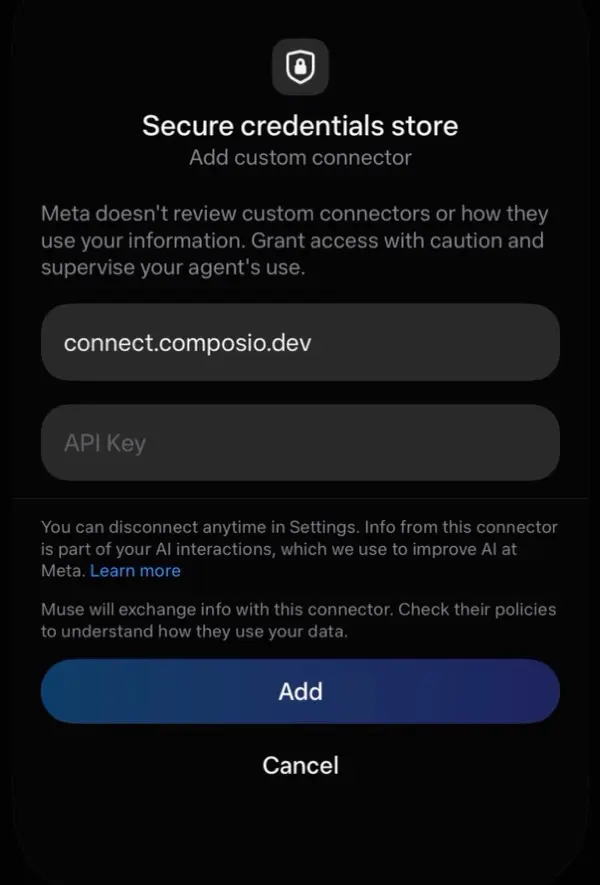
Tap the button Muse shows to open Add custom connector, paste your API key, then tap Add. Muse lists the Composio tools once it connects.

Muse secure credentials store with the connect.composio.dev URL, an API Key field, and the Add button

4. Connect your Semanticscholar account

Back in the chat, ask Muse to connect to Semanticscholar or give it any Semanticscholar task.

For example, ask it to:

  • "Find the latest papers on graph neural networks"
  • "List citations for a specific research paper"
  • "Summarize an author’s recent publications"

It will prompt you to authenticate and authorize access.

That's it. Composio's tools are now available in Muse, and your Semanticscholar account is ready to use.

What is the Semanticscholar MCP server, and what's possible with it?

The Semantic Scholar MCP server is an implementation of the Model Context Protocol that connects your AI agent and assistants like Claude, Cursor, etc directly to your Semantic Scholar account. It provides structured and secure access to academic papers, author profiles, citations, recommendations, and dataset releases, so your agent can search literature, examine research, explore authors, find related papers, and retrieve dataset information on your behalf.

  • Academic paper discovery: Have your agent search papers by relevance, run bulk literature searches, find a paper by title, complete partial queries, or locate matching text snippets within papers.
  • Paper details and authorship: Let the agent retrieve details about one or more papers, identify their authors, and review key information about each work.
  • Citations and references: Direct your agent to inspect the papers that cite a study and the references used by that study.
  • Author research: Instruct your agent to search for researchers by name, review author profiles and publication statistics, or examine papers written by selected authors.
  • Recommendations and research datasets: Have your agent find related papers from positive and negative examples, list dataset releases, review release details, and retrieve dataset downloads or incremental updates.

Way Forward

Now that Semanticscholar is connected, extend your setup by connecting the other apps you already use every day, so Muse can run true cross-app workflows end to end.

  • Connect Calendar to turn threads into scheduled meetings automatically.
  • Connect Slack or Teams to post summaries, approvals, and alerts where your team works.
  • Connect Notion, Linear, Jira, or Asana to convert requests into tickets, tasks, and docs.
  • Connect Drive, Dropbox, or OneDrive to fetch, file, and share attachments without manual steps.

Start with one workflow you do repeatedly, then keep adding apps as you find new handoffs. With everything behind a single connection, Muse can coordinate multiple tools safely and reliably in one conversation.

Troubleshooting

1. Why doesn't Muse show a button to add my API key?

Muse shows the button only when you ask it to open the secure credentials store.

  • Start a new chat.
  • Send the message from step 1 exactly as written.
  • If Muse asks for the key in the chat, do not paste it. Ask Muse to open the secure credentials store.

2. Why does the Composio connection fail after I add my API key?

The key or the connector settings are not correct.

  • Copy the full key from the Composio dashboard. It starts with ck_.
  • Make sure the URL is https://connect.composio.dev/mcp and the header is x-consumer-api-key.
  • Remove the Composio connector in Muse settings, then do steps 1 to 3 again.

3. Why doesn't Muse use the Composio tools for Semanticscholar?

Muse may not pick the Composio connector for the request.

  • Ask Muse to list its Composio tools.
  • Name Composio and Semanticscholar in your request, for example: Use Composio to connect to Semanticscholar.
  • If it still does not work, start a new chat and try again.

4. Why does Muse ask me to connect Semanticscholar again?

Your Semanticscholar connection expired or was removed.

  • Open the link Muse gives you and sign in to Semanticscholar again.
  • Check that the Semanticscholar connection shows as ACTIVE in the Composio dashboard.

5. What do I do if I pasted my API key into the chat?

Treat the key as exposed.

  • Create a new API key in the Composio dashboard and delete the old one.
  • Add the new key in Muse's secure credentials store, not in the chat.
TOOLS

Supported Tools

Every Semanticscholar action and event your agent gets out of the box.

Details about an author

Retrieve detailed information about an author from Semantic Scholar, including name, affiliations, publication statistics (paperCount, citationCount, h-index), external IDs (ORCID, DBLP), and optionally papers.

Details about an author s papers

Retrieves a list of papers authored or co-authored by a specific researcher identified by their unique Semantic Scholar author ID.

Details about a paper

Examples: https://api.

Details about a paper s authors

Retrieves the list of authors for a specific paper identified by its unique paper_id in the Semantic Scholar database.

Details about a paper s citations

Retrieves a list of citations for a specific academic paper using its unique Semantic Scholar paper ID.

Details about a paper s references

Retrieves the list of references cited by a specific paper in the Semantic Scholar database.

Get dataset download links

Tool to get download links for a specific dataset within a release.

Get dataset diffs

Get download links for incremental diffs between dataset releases.

Get details for multiple authors at once

Retrieves detailed information for multiple authors from Semantic Scholar in a single API call.

Get details for multiple papers at once

Retrieve detailed information for multiple academic papers in a single API call using the Semantic Scholar paper batch endpoint.

Get paper recommendations

Tool to get paper recommendations based on positive and negative example papers.

Get recommendations for paper

Tool to get recommended papers for a single positive example paper.

Get dataset release information

Tool to retrieve metadata for a specific Semantic Scholar dataset release.

List available dataset releases

Tool to list all available dataset releases from Semantic Scholar.

Paper title search

Behaves similarly to /paper/search, but is intended for retrieval of a single paper based on closest title match to given query.

Search Bulk Papers

Tool to perform bulk search for academic papers.

Search for authors by name

Search for academic authors in the Semantic Scholar database by name.

Search papers by relevance

Tool to search for academic papers by relevance in the Semantic Scholar database.

Suggest paper query completions

Get autocomplete suggestions for paper queries.

Text snippet search

Search for text snippets (~500 words) within academic papers that match your natural language query.

FAQ

Frequently asked questions

Yes. Muse supports custom connectors that use the Model Context Protocol (MCP). Composio connects as one custom connector over remote streamable HTTP at https://connect.composio.dev/mcp, and gives Muse access to Semanticscholar and 1,500+ other apps.

Copy it from the Composio dashboard. It starts with ck_. Enter it only in Muse's secure credentials store, never in the chat.

Yes. Composio supports multiple connected accounts for the same app. Give each Semanticscholar connection a name, such as work or personal, and tell Muse which one to use.

Tokens, keys, and configuration are encrypted at rest and in transit. Your Composio API key stays in Muse's secure credentials store, not in the chat or the model context. Composio is SOC 2 Type 2 compliant.

Start with Semanticscholar.It takes 30 seconds.

Managed auth, hosted MCP servers, and every Semanticscholar tool your agent needs.Free to start.

Start building