How to integrate Finage MCP with Antigravity

Trusted by
AWS
Glean
Zoom
Airtable

30 min · no commitment · see it on your stack

Finage logo
Antigravity logo
divider

How to integrate Finage MCP with Antigravity

Antigravity IDE is Google's agentic IDE, built on a VS Code-style editor and powered by models like Gemini 3.5 Flash, Gemini 3.1 Pro, Opus 4.6, and more. It treats the AI agent as a first-class teammate, planning, coding, and validating work through an Agent Manager dashboard with deep browser connectivity.

In this guide, I will explain the easiest and most secure way to connect your Finage account to Antigravity IDE via Composio Connect, so it can show real-time quote for AAPL stock, summarize today's news for TSLA, get last week's price history for MSFT, and more without ever putting your account credentials at risk.

Also integrate Finage with

Why use Composio?

Composio provides:

  • Access to 1,000+ managed apps from a single MCP endpoint. This makes it convenient for agents to run cross-app workflows.
  • Programmatic tool calling. Allows LLMs to write code in a remote workbench to handle complex tool chaining. Reduces to-and-fro with LLMs for frequent tool calling.
  • Large tool response handling outside the LLM context. This minimizes context bloat from large tool responses.
  • Dynamic just-in-time access to thousands of tools across hundreds of apps. Composio loads the tools your agent needs, so LLMs are not overwhelmed by tools they do not need.

Connect Finage to Antigravity

Antigravity does not ship with one-click custom MCP install links yet, so configuration goes through the IDE's raw config file. The process takes under a minute.

1. Open the MCP Config

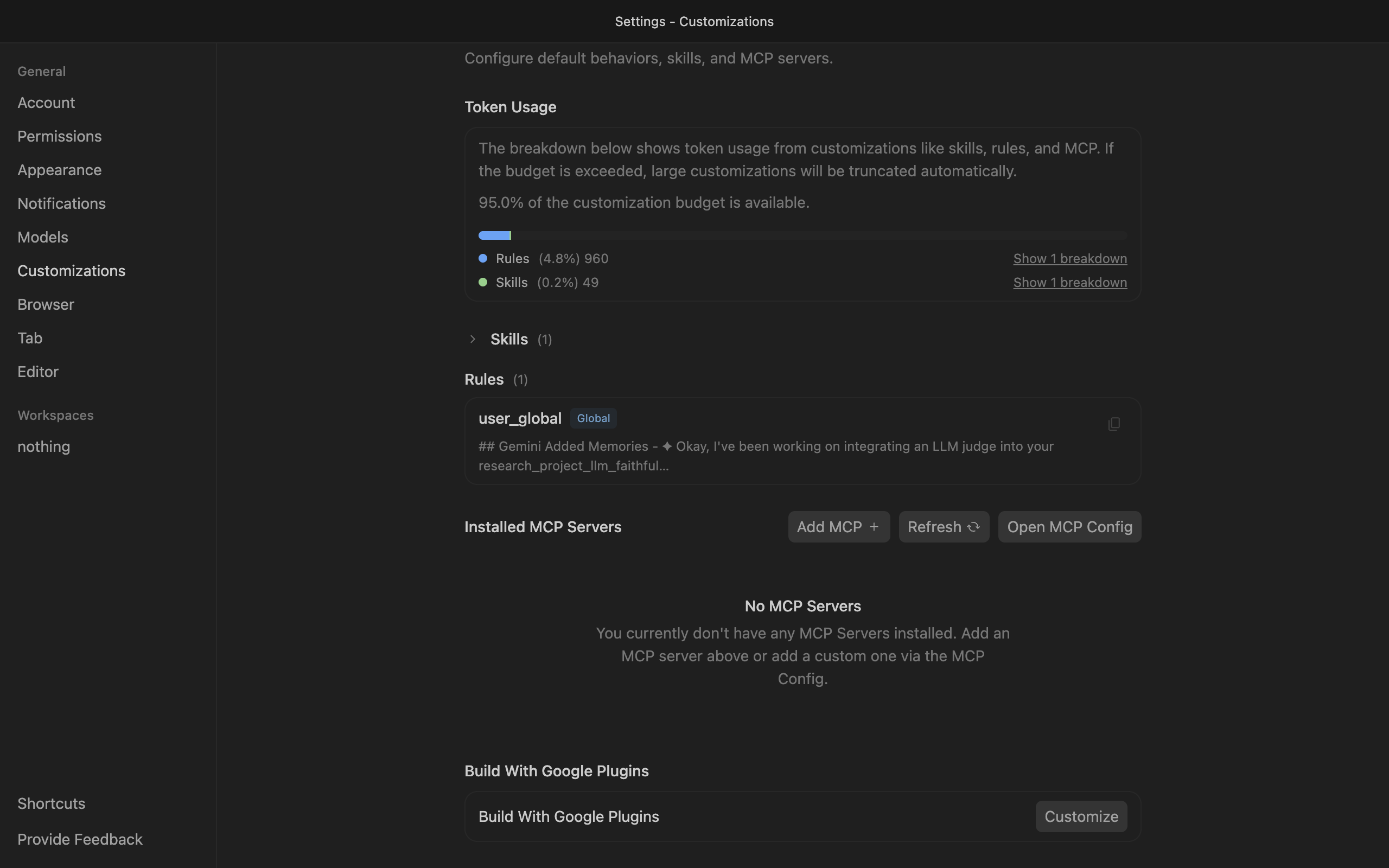
Go to Antigravity Settings, open the Customizations tab, then click Open MCP Config to open mcp_config.json in the editor.

Antigravity Customizations settings with Open MCP Config button

2. Get your API key

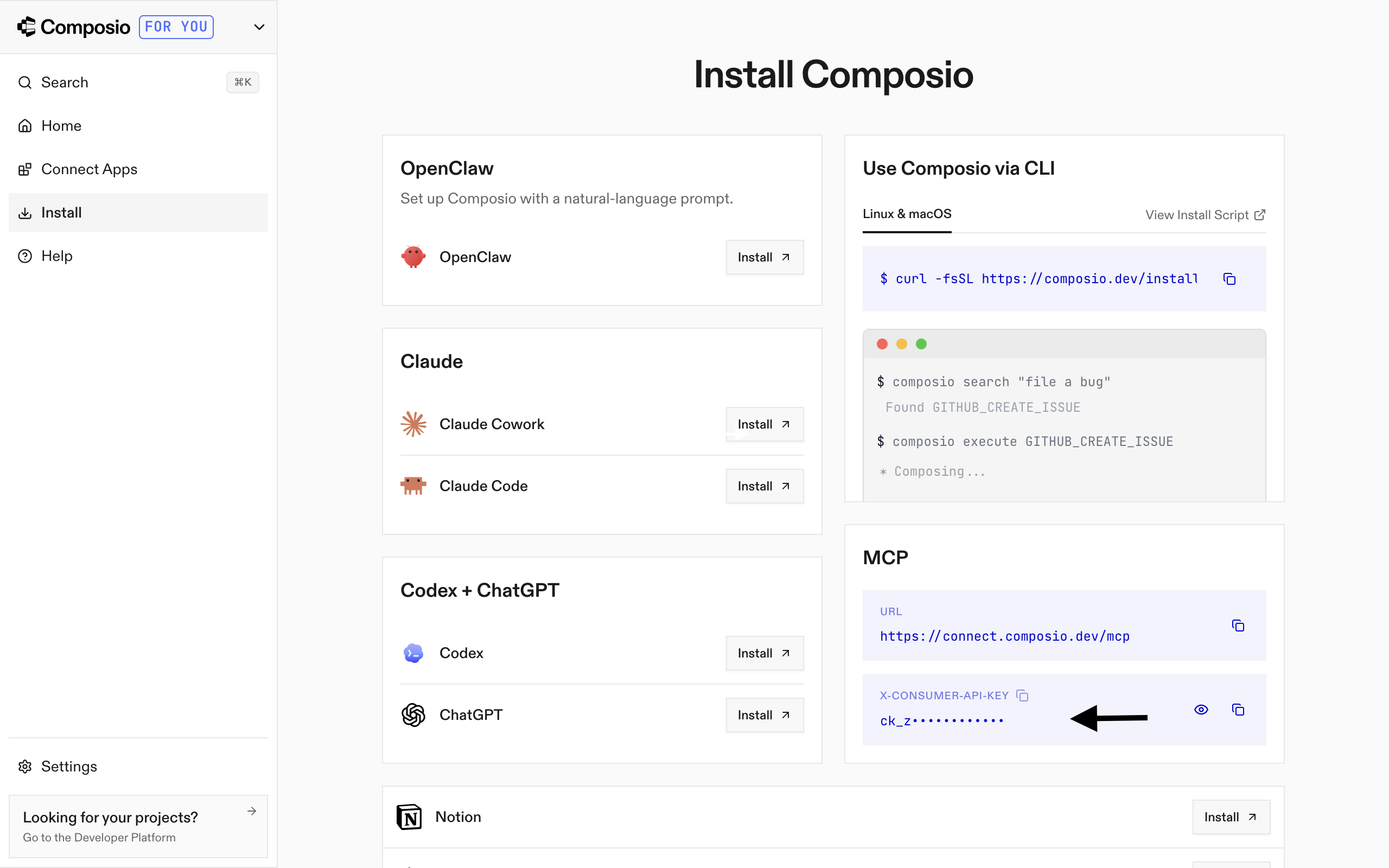
Go to the Composio Dashboard and copy your API key.

Composio Dashboard showing where to get the API key

3. Add Composio to mcp_config.json

Paste the following configuration into the file:

bash
{
  "mcpServers": {
    "remote-composio": {
      "serverUrl": "https://connect.composio.dev/mcp",
      "headers": {
        "x-consumer-api-key": "your-composio-api-key"
      }
    }
  }
}

Note: Antigravity uses serverUrl, not url, for remote HTTP-based MCP servers. This differs from the url key used in Cursor and VS Code configs.

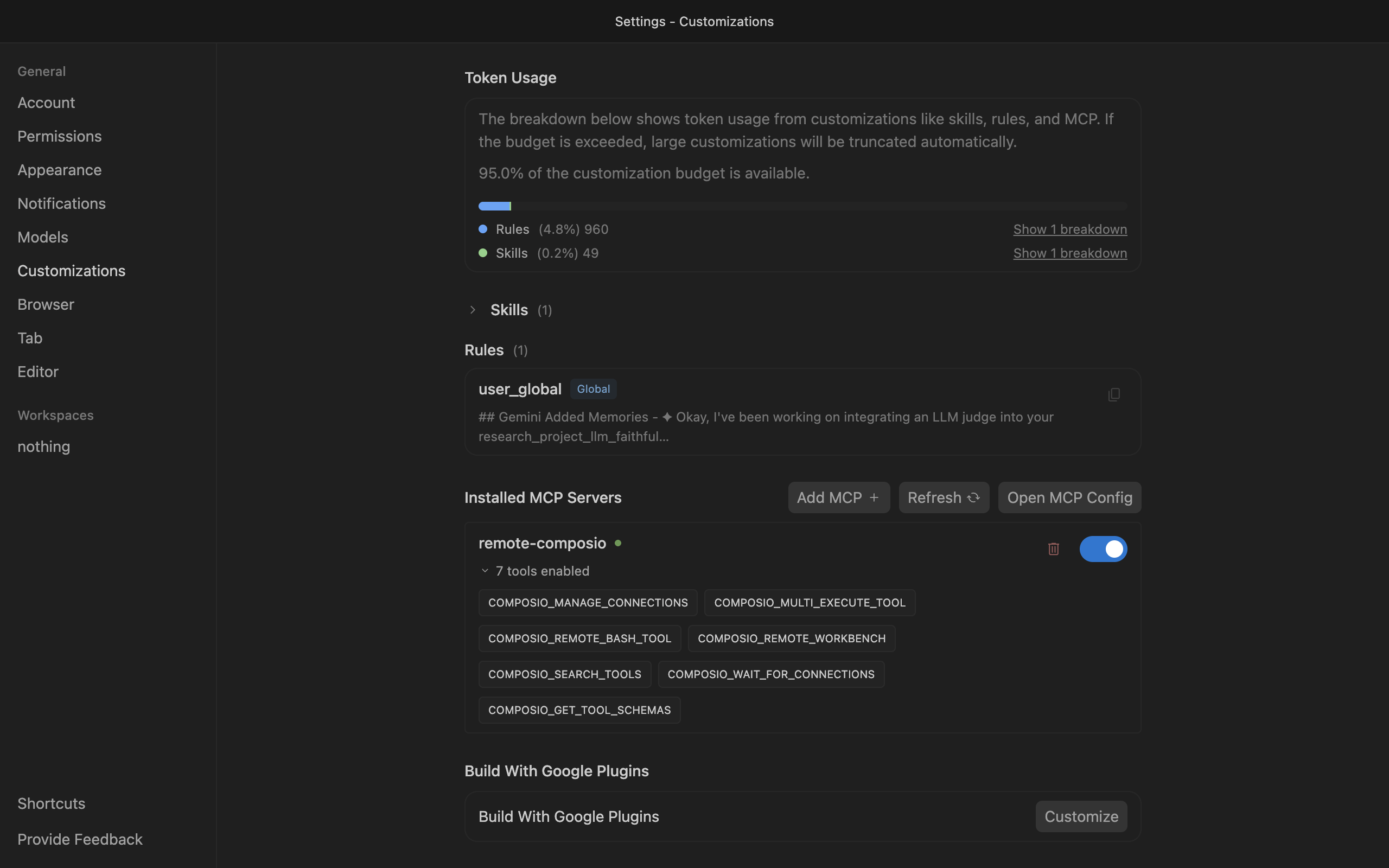
Save the file and click refresh in the Installed MCP Servers section.

Antigravity showing Composio tools after MCP setup

Connect your Finage account

Back in the Antigravity agent panel, ask the agent to connect to Finage or give it any Finage-related task.

For example, ask it to:

  • "Show real-time quote for AAPL stock"
  • "Summarize today's news for TSLA"
  • "Get last week's price history for MSFT"

It will prompt you to authenticate and authorize access to Finage.

That is it. Composio tools are now available in Antigravity, and your Finage account is ready to use.

Supported Tools & Triggers

Tools
Convert CryptocurrenciesTool to convert cryptocurrencies using real-time exchange rates from the Finage API.
Convert CurrencyTool to convert currencies using real-time forex exchange rates from Finage API.
Get US Treasury Bond RateRetrieve the current interest rate for a US Treasury bond by maturity.
Get Country DetailsTool to retrieve detailed information about a country including currency, phone code, and flag.
Get Crypto AggregatesTool to retrieve aggregated OHLCV time-series data for cryptocurrency pairs over specified time periods.
Get Crypto DetailTool to get detailed fundamental information about a cryptocurrency including description, developers, website, social media links, and technical details.
Get Detailed Crypto InformationThis tool fetches detailed cryptocurrency information including current price, price changes, volume, market cap, and historical highs/lows for a specific cryptocurrency pair.
Get Crypto Last QuoteTool to get the last quote with bid/ask prices in real-time for a cryptocurrency pair.
Get Crypto Last TradeTool to get the latest trade information and prices in real-time for a cryptocurrency pair.
Get Crypto NewsTool to retrieve real-time and historical news for cryptocurrency markets with fast In-Memory Cache Engine.
Get Crypto Previous Close DataTool to get the previous day's closing data for a cryptocurrency pair.
Get Crypto SnapshotTool to get a comprehensive snapshot of cryptocurrency market data with latest quotes and trades in one request.
Get Currency DetailTool to get detailed information about a forex currency pair including currency codes and country flags.
Get Forex Last QuoteTool to get the latest real-time bid/ask quote for a forex pair or metal (e.
Get Forex Last TradeTool to get the last trade information for a forex currency pair.
Get Forex Market AggregatesTool to retrieve aggregated OHLCV (Open, High, Low, Close, Volume) data for forex and metal pairs over specified time periods.
Get Forex NewsTool to retrieve real-time and historical news for forex markets from Finage's API.
Get Forex Previous Close DataTool to get the previous day's closing data for a forex currency pair.
Get Forex SnapshotTool to get a comprehensive snapshot of forex market data with latest quotes and trades in one request.
Get Most Active US StocksTool to get a list of the most actively traded US stocks.
Get SEC RSS FeedTool to retrieve the SEC RSS feed for recent EDGAR filings.
Get Sector PerformanceTool to retrieve performance metrics across US market sectors.
Get Stock Company DetailsTool to retrieve detailed company information and stock fundamentals for a given ticker symbol.
Get Stock Last QuoteFetches the latest single-tick quote for a stock symbol, returning a JSON object with fields: symbol, ask, bid, asize, bsize, and timestamp.
Get Stock Last TradeTool to get the most recent trade information for a specified US stock symbol.
Get Stock Market AggregatesRetrieves aggregated OHLCV (Open, High, Low, Close, Volume) data for US stocks only.
Get Stock Market NewsThis tool retrieves the latest market news from Finage's API.
Get Stock Market StatusTool to check if stock, forex, and crypto markets are open, closed, or in extended hours.
Get Stock Previous Close DataThis tool retrieves the previous day's closing data for a specific stock symbol.
Get Stock SnapshotTool to get comprehensive snapshot of all US stock market data including latest quotes and trades with one single API request.
Get Technical IndicatorsTool to get technical indicators and signals for stocks from Finage API.
Get Top Gaining US StocksTool to get list of top gaining US stocks by percentage change.
Get Top Losing US StocksTool to get list of top losing US stocks by percentage change.
List Cryptocurrencies by Market CapTool to get a list of all available cryptocurrencies ranked by market capitalization.
List Symbols by Market TypeTool to get a paginated list of all available symbols for a specified market type (us-stock, ca-stock, in-stock, ru-stock, forex, crypto, index).
Search CountryTool to search for countries by name and retrieve their details including country code, currency, flag, and phone code.
Search CryptocurrencyTool to search for cryptocurrencies by name or symbol.
Search CurrencyTool to search for currency pairs and forex symbols by currency code or partial match.
Search Market for StocksTool to search for stocks in a specific market by company name or symbol.

Conclusion

You have successfully connected Finage to Antigravity using Composio Connect. Your agent can now use Finage securely without exposing credentials in prompts or local scripts.

How to build Finage MCP Agent with another framework

FAQ

What are the differences in Tool Router MCP and Finage MCP?

With a standalone Finage MCP server, the agents and LLMs can only access a fixed set of Finage tools tied to that server. However, with the Composio Tool Router, agents can dynamically load tools from Finage and many other apps based on the task at hand, all through a single MCP endpoint.

Can I use Tool Router MCP with Antigravity?

Yes, you can. Antigravity fully supports MCP integration. You get structured tool calling, message history handling, and model orchestration while Tool Router takes care of discovering and serving the right Finage tools.

Can I manage the permissions and scopes for Finage while using Tool Router?

Yes, absolutely. You can configure which Finage scopes and actions are allowed when connecting your account to Composio. You can also bring your own OAuth credentials or API configuration so you keep full control over what the agent can do.

How safe is my data with Composio Tool Router?

All sensitive data such as tokens, keys, and configuration is fully encrypted at rest and in transit. Composio is SOC 2 Type 2 compliant and follows strict security practices so your Finage data and credentials are handled as safely as possible.

Used by agents from

Context
Letta
glean
HubSpot
Agent.ai
Altera
DataStax
Entelligence
Rolai
Context
Letta
glean
HubSpot
Agent.ai
Altera
DataStax
Entelligence
Rolai
Context
Letta
glean
HubSpot
Agent.ai
Altera
DataStax
Entelligence
Rolai

Never worry about agent reliability

We handle tool reliability, observability, and security so you never have to second-guess an agent action.