How to integrate eBay MCP with Hermes

Connect Hermes to eBay MCP. Find refurbished laptops under $500, compare sold prices for vintage cameras, and more using natural language, with authentication handled for you.

eBay logoeBay
S2s Oauth2

eBay is an online marketplace for buying and selling products worldwide. Its public APIs help developers access listings, categories, and marketplace data.

30 Tools

Introduction

Hermes is a 24/7 autonomous agent that lives on your computer or server — it remembers what it learns and evolves as your usage grows.

This guide explains the easiest and most robust way to connect your eBay account to Hermes. You can do this through either Composio Connect CLI or Composio Connect MCP. For personal use we recommend the CLI, but you won't go wrong with MCP either.

Also integrate eBay with

What is Composio Connect?

Composio Connect is a consumer offering that lets anyone plug 1,700+ applications directly into their agent harness — including Hermes. It can:

  • Search and load tools from relevant toolkits on-demand, reducing context usage.
  • Chain multiple tools to accomplish complex workflows via a remote workbench, without excessive back-and-forth with the LLM.
  • Manage app authentication end-to-end with zero manual overhead.

Integrating eBay with Hermes

Using Composio Connect CLI

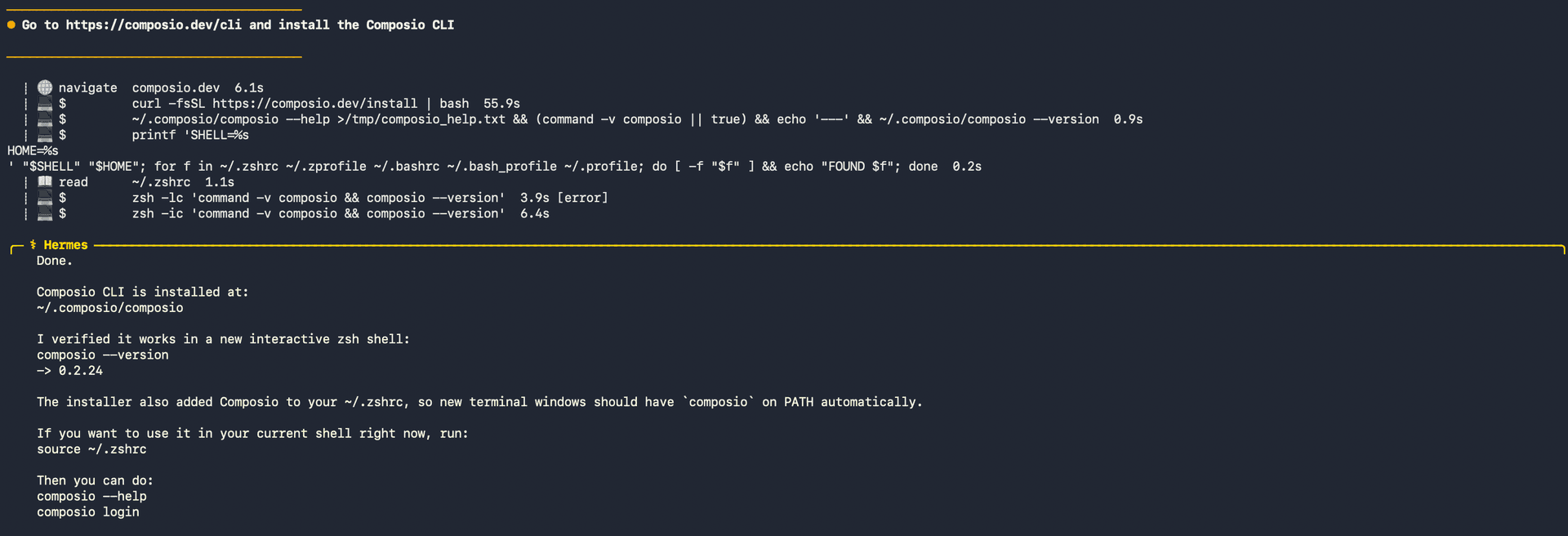
1. Install the Composio CLI

Run the install script directly, or paste https://composio.dev/hermes into your Hermes chat box to have it installed for you.

bash
curl -fsSL https://composio.dev/install | bash
Hermes authenticating with Composio

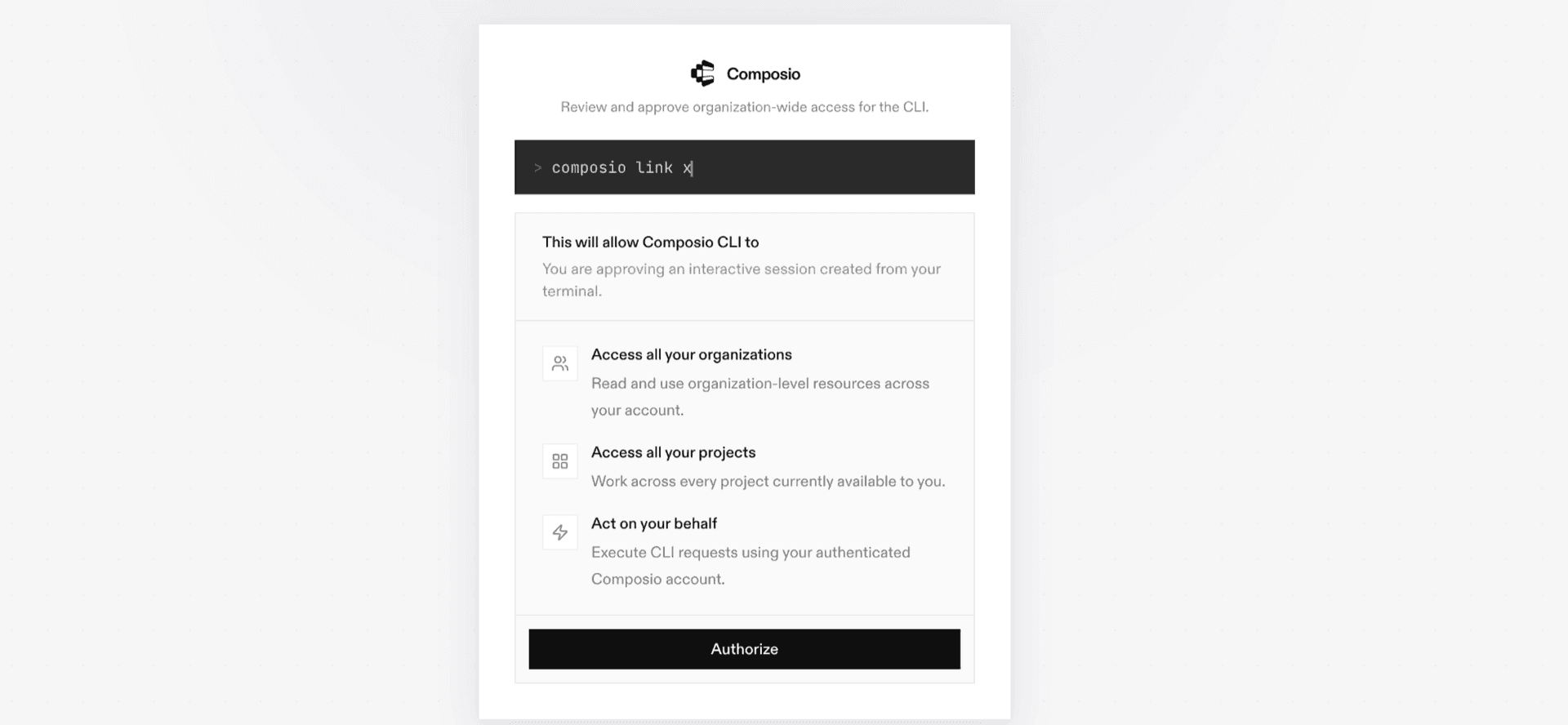
2. Authenticate

Once the CLI is installed, ask Hermes to authenticate with Composio.

3. Connect to eBay

Ask your agent to connect to eBay, or simply request any eBay-related task. Hermes will prompt you to authenticate and authorize access.

4. Done. You're all set with a new eBay connection.


Using Composio Connect MCP

1. Get your MCP URL and API Key

Go to dashboard.composio.dev and copy your Connect MCP URL and API key.

Copy MCP URL and API key from Composio dashboard

2. Open the Hermes config file

bash
nano ~/.hermes/config.yaml

3. Add the Composio Connect MCP server

bash
mcp_servers:
  composio:
    url: "https://connect.composio.dev/mcp"
    headers:
      x-consumer-api-key: "YOUR_COMPOSIO_API_KEY"
    connect_timeout: 60
    timeout: 180

Save with Ctrl + O, Enter, then exit with Ctrl + X.

4. Restart your Hermes agent

Once restarted, ask your agent to connect to eBay or request any eBay-related task. It will prompt you to authenticate and authorize access.

5. Done!

What is the eBay MCP server, and what's possible with it?

The eBay MCP server is an implementation of the Model Context Protocol that connects your AI agent and assistants like Claude, Cursor, etc directly to your eBay account. It provides structured and secure access to eBay marketplace, category, deal, notification, translation, and developer analytics data, so your agent can search listings, compare item details, discover deals, classify products, and translate listing content on your behalf.

  • Marketplace listing research: Have your agent search eBay by keywords, categories, product details, or images, then retrieve complete information for selected listings and product variations.
  • Deals and product discovery: Let the agent find current deal events, browse discounted items, and surface best-selling products by category, marketplace, and delivery country.
  • Category and listing enrichment: Direct your agent to suggest the right eBay category, identify required item details, review valid category values, and check vehicle compatibility properties for parts listings.
  • Localization and charitable shopping: Instruct your agent to translate listing titles or descriptions and find eBay-supported charitable organizations by name or registration details.
  • Notifications and API monitoring: Have your agent review available notification topics, retrieve public keys for validating eBay notifications, and check application usage limits and reset windows.

Way Forward

With eBay connected, Hermes can now act on your behalf whenever it detects a relevant task or you ask it to.

From here, you can extend Hermes further:

  • Connect more apps: Calendar, Slack, Notion, Linear, and hundreds of others are available through the same Composio Connect setup. Each new integration compounds what Hermes can do for you.
  • Build workflows across tools: Once multiple apps are connected, Hermes can chain actions together — turn an email into a calendar invite, a Slack message into a Linear ticket, or a meeting note into a follow-up draft.
  • Let it learn your patterns: The more you use Hermes, the better it gets at anticipating how you'd handle recurring tasks. Give it feedback on drafts and decisions, and it will adapt.

If you run into trouble or want to share what you've built, join the community or check out the Docs for deeper configuration options.

TOOLS

Supported Tools

Every eBay action and event your agent gets out of the box.

Browse: Check Compatibility

Check whether an eBay Motors part is compatible with a supplied car, truck, or motorcycle definition without changing the item.

Browse: Get Item

Retrieve complete details for one eBay listing or variation by either its RESTful item ID or legacy listing ItemID using an application access token.

Browse: Get Items

Retrieve details for up to 20 eBay items or 10 item groups in one request.

Browse: Get Items By Item Group

Retrieve every purchasable item variation and shared description in an eBay Browse item group.

Browse: Search

Search eBay item summaries by keyword, category, product identifier, charity, compatibility, aspects, and Browse field filters, returning one page plus an opaque continuation cursor.

Browse: Search By Image

Search eBay item summaries using a bare Base64-encoded image, optionally refine the matches, and return one page plus an opaque continuation cursor.

Deal: Get Deal Items

Retrieve one page of eBay deal items by category, commissionable status, delivery country, and marketplace.

Deal: Get Event

Retrieve the details of one eBay deal event by event ID, including its coupons, dates, terms, and images.

Deal: Get Event Items

Return one page of eBay Deal event items for an event, with optional category and delivery-country filters plus an opaque continuation cursor.

Deal: Get Events

Return one page of eBay deal events for a marketplace, including coupons, event terms, images, and an opaque continuation cursor.

Feed: Get Item Feed

Download one byte range of an eBay Item feed gzip file for a top-level category.

Feed: Get Item Group Feed

Download an eBay Item Group feed gzip file, or a byte range, for a top-level category, with downloads limited to 100 MiB.

Feed: Get Item Priority Feed

Download one byte range of an eBay Item Priority delta feed gzip file for a top-level category and date.

Feed: Get Item Snapshot Feed

Download one byte range of an hourly eBay Item Snapshot feed gzip file for a top-level category and UTC hour.

Marketing: Get Merchandised Products

Return eBay products selected by category and the BEST_SELLING metric, including catalog IDs, prices, images, reviews, and rating details.

Charity: Get Charity Org

Retrieve details for one eBay-supported charitable organization by its charity organization ID in the US or UK marketplace.

Charity: Get Charity Orgs

Search supported eBay charitable organizations by keywords or registration IDs, returning one page of complete organization details and an opaque continuation cursor.

Notification: Get Public Key

Retrieve the eBay public key identified by a push notification signature for validating that notification's payload.

Notification: Get Topic

Retrieve one eBay notification topic by ID, including its subscription scope requirements and supported payload configurations.

Notification: Get Topics

Return one page of eBay notification topics, including subscription scope requirements, supported payload configurations, and a continuation cursor.

Taxonomy: Fetch Item Aspects

Download the gzipped JSON item-aspect dataset for leaf categories in an eBay category tree, subject to a 250 MB download limit.

Taxonomy: Get Category Suggestions

Find ranked eBay leaf-category suggestions for free-form item keywords, including each category's ancestor path to the category-tree root.

Taxonomy: Get Category Tree

Retrieve eBay's complete category tree when root_category_id is omitted, or retrieve the subtree rooted at root_category_id when it is provided.

Taxonomy: Get Compatibility Properties

Retrieve the localized vehicle properties that define compatibility for an eBay parts category, such as Make, Model, Year, Engine, and Trim.

Taxonomy: Get Compatibility Property Values

Retrieve the applicable values of one vehicle compatibility property for an eBay parts category, optionally narrowed by other property-value pairs.

Taxonomy: Get Default Category Tree ID

Retrieve the identifier and version of the default eBay category tree for a marketplace.

Taxonomy: Get Expired Categories

Retrieve mappings from expired eBay leaf categories to the active leaf categories that replaced them.

Taxonomy: Get Item Aspects for Category

Retrieve complete eBay aspect metadata for a leaf category, including valid values, value dependencies, listing requirements, variation support, and format constraints.

Translation: Translate

Translate one eBay listing title or description from a supported source language to a supported target language without changing a listing.

Analytics: Get Rate Limits

Return application-level eBay API quota usage, remaining calls, and reset windows, optionally filtered by API context and name.

FAQ

Frequently asked questions

Start with eBay.It takes 30 seconds.

Managed auth, hosted MCP servers, and every eBay tool your agent needs.Free to start.

Start building