How to connect eBay with ChatGPT

Connect ChatGPT to eBay MCP. Find refurbished laptops under $500, compare sold prices for vintage cameras, and more using natural language, with authentication handled for you.

eBay logoeBay
S2s Oauth2

eBay is an online marketplace for buying and selling products worldwide. Its public APIs help developers access listings, categories, and marketplace data.

30 Tools

How to connect eBay MCP with ChatGPT

ChatGPT can take action across your apps and files, stay with a project for hours, and turn a goal into finished materials like sheets, slides, and docs, not just answers.

In this guide, I will explain the easiest and most secure way to connect your eBay account to ChatGPT via Composio Connect, so it can search marketplace listings, inspect item details, browse categories, and track notifications through natural language commands without ever putting your account credentials at risk.

Also integrate eBay with

Why use Composio over default connectors?

  • Apps with read and write access. Default connectors mostly can read your data. Composio's eBay integration lets ChatGPT take actions like creating drafts, sending updates, labeling records, and more.
  • 1,700+ SaaS toolkits out of the box. Composio gives you instant access to a vast catalog of pre-built connectors, from Gmail and Slack to Notion, Linear, and Salesforce.
  • One MCP server for every app. Connect any of your applications on demand through a single endpoint, rather than juggling a separate server for each app.
  • Smart, context-aware tool loading. Unlike traditional MCP servers that dump every available tool into the LLM context window, Composio searches for and loads only the tools relevant to the task at hand.
  • Cross-app automation. Chain actions across multiple apps in a single run - fetch a thread, summarize it in Notion, and post highlights to Slack without leaving the conversation.

Prerequisites

Note: Composio connects through OAuth. You will be asked to sign in and approve specific permissions. Review the permission screen carefully if you are using a work account.

Step-by-step: Connect eBay to ChatGPT

1. Install the Composio plugin

Click the button. ChatGPT opens the Composio plugin page. Click Install plugin.

Install in ChatGPT
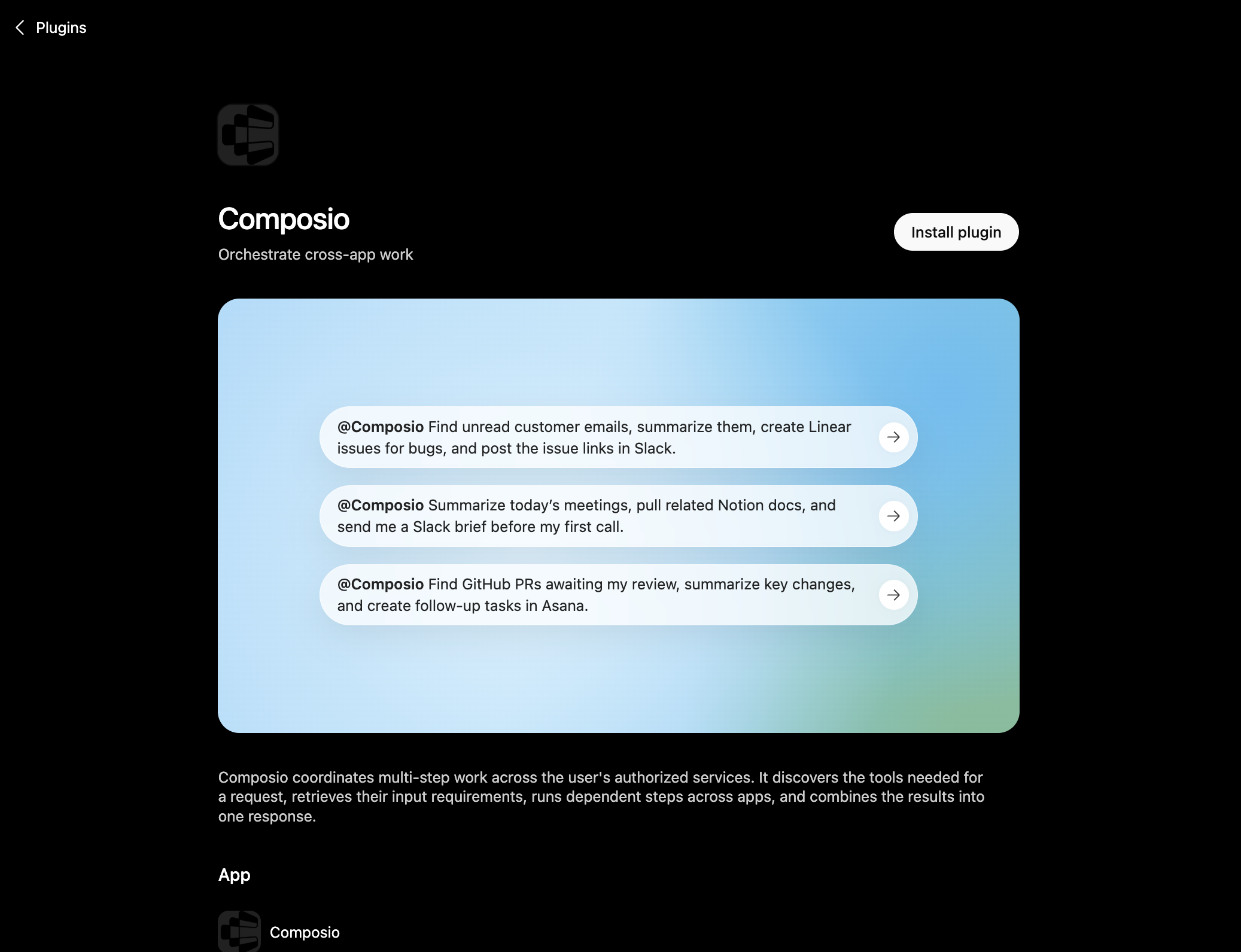
Composio plugin page in ChatGPT with the Install plugin button

You can also find it inside ChatGPT: go to Settings, open Plugins, search the marketplace for Composio, and click Install plugin.

2. Authenticate

After you install, ChatGPT asks you to authenticate with Composio. Log in and click Allow access to authorize ChatGPT to use your Composio account.
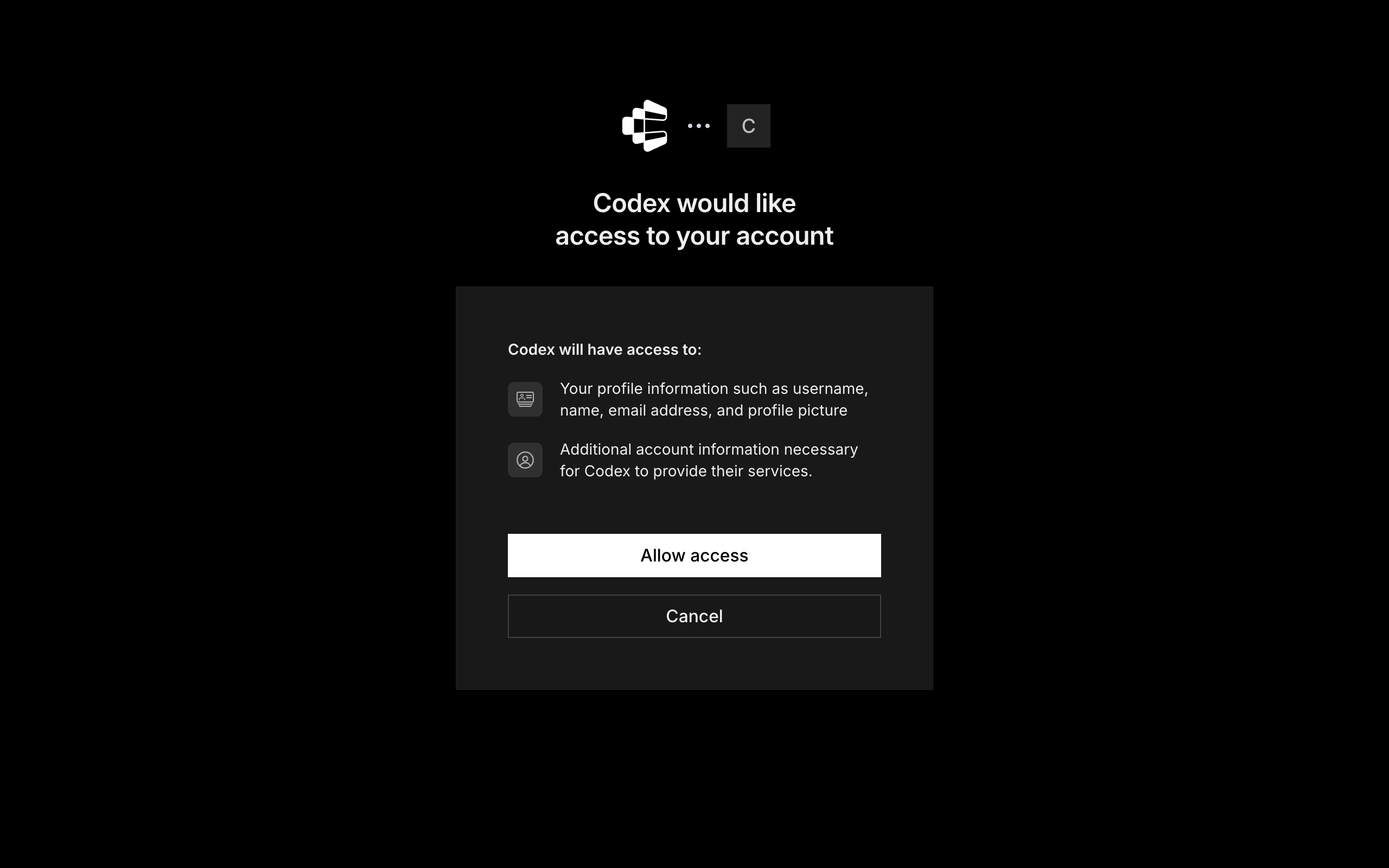
Composio login and Allow access screen for ChatGPT

3. Start using Composio

That is it. Composio tools are now available in ChatGPT. Type @Composio followed by your request, for example @Composio find unread eBay messages and summarize them, and it will run the actions you authorize. On first use it asks you to authorize eBay.

Option 2: Add Composio as an MCP server

If you cannot use the plugin marketplace, add Composio as a custom MCP server instead.

1. Open the MCP settings

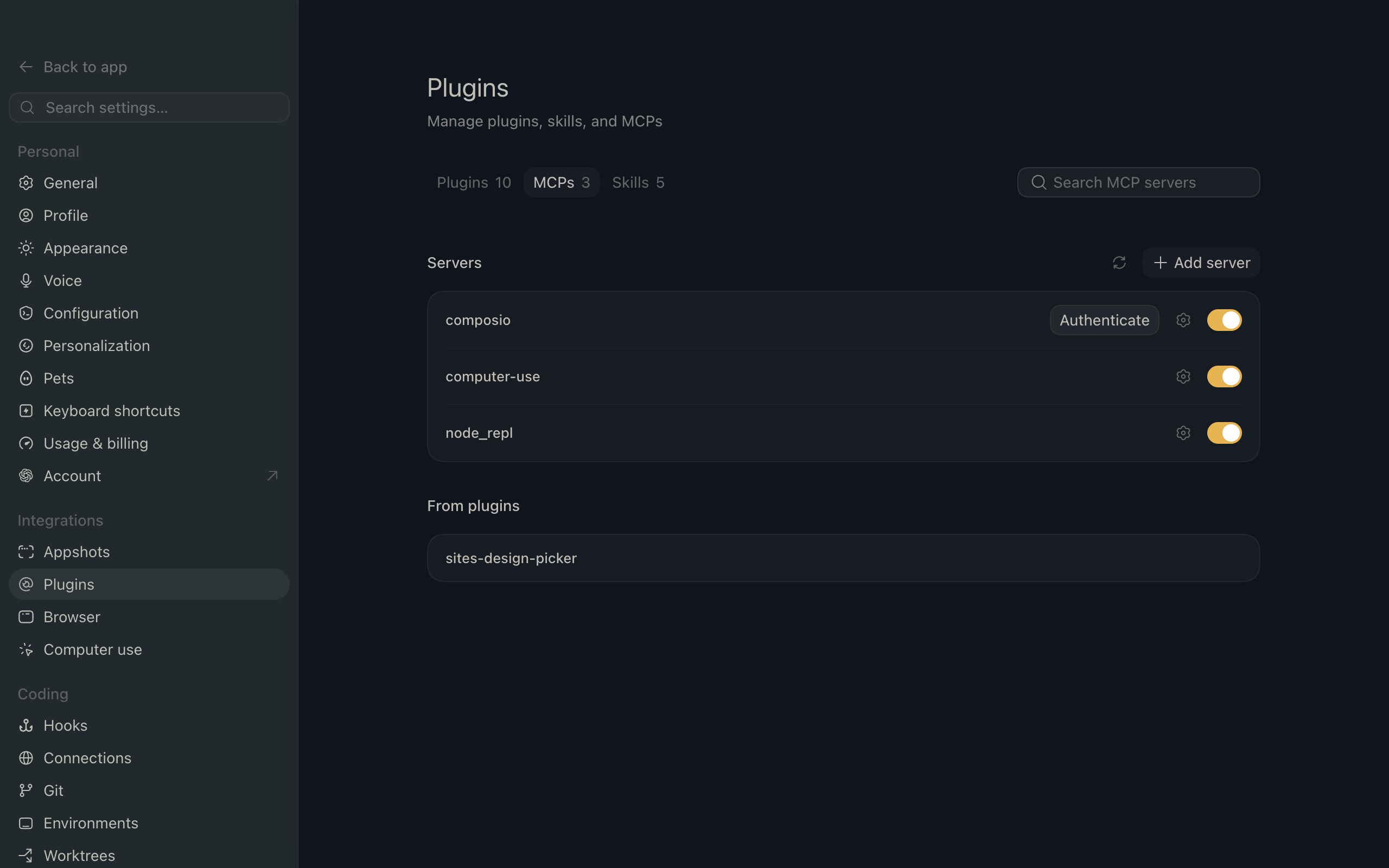
In ChatGPT, go to Settings and open the Plugins section. Inside the Plugins page, click the MCP tab.
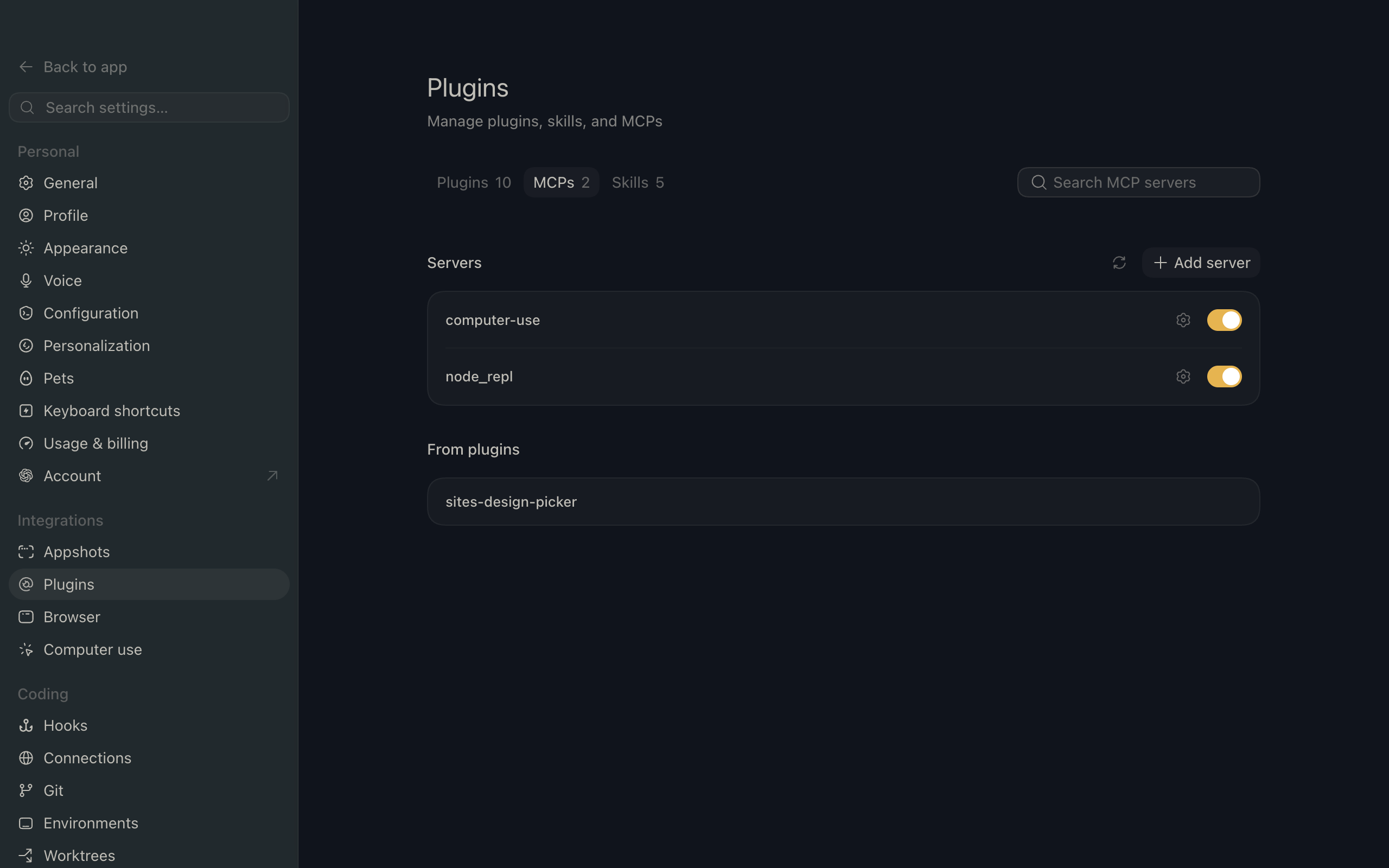
ChatGPT settings showing the Plugins page with the MCP tab selected

2. Add the server

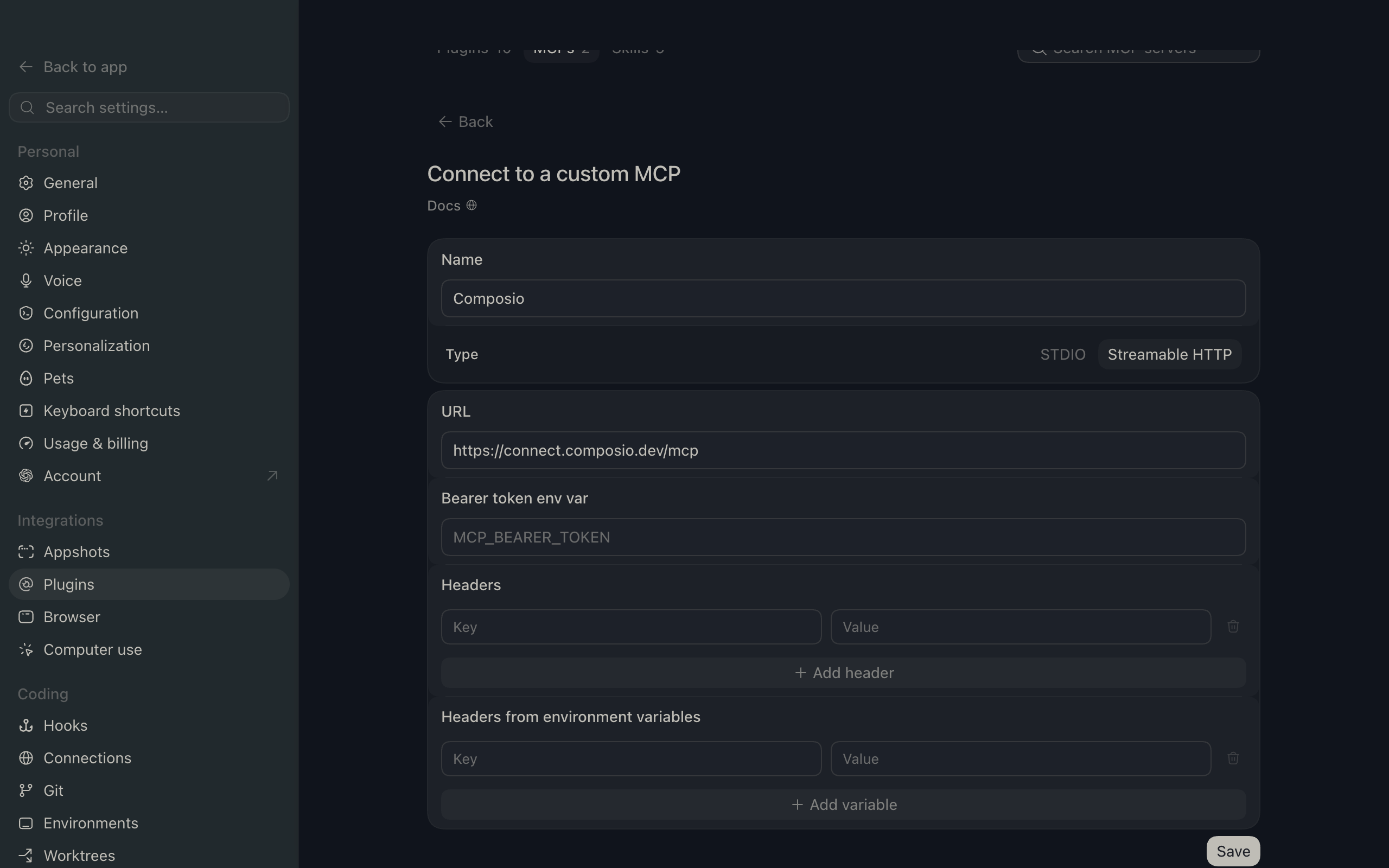
Click Add server. In the Name field enter Composio, for Type select Streamable HTTP, and in the URL field paste the Composio MCP server URL:

bash
https://connect.composio.dev/mcp
ChatGPT Add server dialog with the name Composio, type Streamable HTTP, and the Composio MCP URL

Then click Save. The Composio server now appears in your MCP plugins list.

ChatGPT Plugins page showing the Composio MCP server added to the list

3. Authenticate

Click Authenticate on the Composio entry, log in via Composio, and click Allow access. Composio tools are then available in ChatGPT the same way as with the plugin.

What you can do after connecting eBay

  • Find refurbished laptops under $500
  • Compare sold prices for vintage cameras
  • Explore categories for wireless earbuds

Security + privacy notes (important)

  • Use least-privilege access: Only grant permissions you actually need.
  • Review OAuth permissions before approving: Make sure requested scopes match what you expect Composio and ChatGPT to do.
  • Keep write actions human-reviewed: For actions like sending messages, creating labels, or editing drafts, keep manual confirmation enabled.
  • Be careful with sensitive data: Avoid using this setup with highly sensitive information unless allowed by your personal, company, or client policies.
TOOLS

Supported Tools

Every eBay action and event your agent gets out of the box.

Browse: Check Compatibility

Check whether an eBay Motors part is compatible with a supplied car, truck, or motorcycle definition without changing the item.

Browse: Get Item

Retrieve complete details for one eBay listing or variation by either its RESTful item ID or legacy listing ItemID using an application access token.

Browse: Get Items

Retrieve details for up to 20 eBay items or 10 item groups in one request.

Browse: Get Items By Item Group

Retrieve every purchasable item variation and shared description in an eBay Browse item group.

Browse: Search

Search eBay item summaries by keyword, category, product identifier, charity, compatibility, aspects, and Browse field filters, returning one page plus an opaque continuation cursor.

Browse: Search By Image

Search eBay item summaries using a bare Base64-encoded image, optionally refine the matches, and return one page plus an opaque continuation cursor.

Deal: Get Deal Items

Retrieve one page of eBay deal items by category, commissionable status, delivery country, and marketplace.

Deal: Get Event

Retrieve the details of one eBay deal event by event ID, including its coupons, dates, terms, and images.

Deal: Get Event Items

Return one page of eBay Deal event items for an event, with optional category and delivery-country filters plus an opaque continuation cursor.

Deal: Get Events

Return one page of eBay deal events for a marketplace, including coupons, event terms, images, and an opaque continuation cursor.

Feed: Get Item Feed

Download one byte range of an eBay Item feed gzip file for a top-level category.

Feed: Get Item Group Feed

Download an eBay Item Group feed gzip file, or a byte range, for a top-level category, with downloads limited to 100 MiB.

Feed: Get Item Priority Feed

Download one byte range of an eBay Item Priority delta feed gzip file for a top-level category and date.

Feed: Get Item Snapshot Feed

Download one byte range of an hourly eBay Item Snapshot feed gzip file for a top-level category and UTC hour.

Marketing: Get Merchandised Products

Return eBay products selected by category and the BEST_SELLING metric, including catalog IDs, prices, images, reviews, and rating details.

Charity: Get Charity Org

Retrieve details for one eBay-supported charitable organization by its charity organization ID in the US or UK marketplace.

Charity: Get Charity Orgs

Search supported eBay charitable organizations by keywords or registration IDs, returning one page of complete organization details and an opaque continuation cursor.

Notification: Get Public Key

Retrieve the eBay public key identified by a push notification signature for validating that notification's payload.

Notification: Get Topic

Retrieve one eBay notification topic by ID, including its subscription scope requirements and supported payload configurations.

Notification: Get Topics

Return one page of eBay notification topics, including subscription scope requirements, supported payload configurations, and a continuation cursor.

Taxonomy: Fetch Item Aspects

Download the gzipped JSON item-aspect dataset for leaf categories in an eBay category tree, subject to a 250 MB download limit.

Taxonomy: Get Category Suggestions

Find ranked eBay leaf-category suggestions for free-form item keywords, including each category's ancestor path to the category-tree root.

Taxonomy: Get Category Tree

Retrieve eBay's complete category tree when root_category_id is omitted, or retrieve the subtree rooted at root_category_id when it is provided.

Taxonomy: Get Compatibility Properties

Retrieve the localized vehicle properties that define compatibility for an eBay parts category, such as Make, Model, Year, Engine, and Trim.

Taxonomy: Get Compatibility Property Values

Retrieve the applicable values of one vehicle compatibility property for an eBay parts category, optionally narrowed by other property-value pairs.

Taxonomy: Get Default Category Tree ID

Retrieve the identifier and version of the default eBay category tree for a marketplace.

Taxonomy: Get Expired Categories

Retrieve mappings from expired eBay leaf categories to the active leaf categories that replaced them.

Taxonomy: Get Item Aspects for Category

Retrieve complete eBay aspect metadata for a leaf category, including valid values, value dependencies, listing requirements, variation support, and format constraints.

Translation: Translate

Translate one eBay listing title or description from a supported source language to a supported target language without changing a listing.

Analytics: Get Rate Limits

Return application-level eBay API quota usage, remaining calls, and reset windows, optionally filtered by API context and name.

FAQ

Frequently asked questions

Start with eBay.It takes 30 seconds.

Managed auth, hosted MCP servers, and every eBay tool your agent needs.Free to start.

Start building