How to connect Alion to Claude

Connect Claude Web, Desktop and Cowork to Alion MCP. Find investors backing climate tech startups, compare hiring trends across fintech companies, and more using natural language, with authentication handled for you.

Alion logoAlion
Api Key

Alion is a REST API for company, job, people, investor, market, and hiring intelligence. It helps teams enrich research with structured business and workforce data.

40 Tools

Introduction

Claude is Anthropic's AI assistant, available on the web, in the desktop app, and on mobile. Cowork is its agent for knowledge work, and it runs on all of those surfaces too. Connected to your apps, Claude can work with your files and services to accomplish complex tasks on your behalf.

This guide walks you through the easiest and most secure way to connect your Alion account to Claude via Composio Connect, enabling it to find investors backing climate tech startups, compare hiring trends across fintech companies, research executives at fast-growing SaaS companies, and more such actions on your behalf without compromising your account security.

Setup is the same on Claude Web, Desktop, and Cowork, and you only need to do it once. The connector is tied to your account, so it's available in all three.

For exact tool slugs and parameter tables, see the tool catalog in the Composio docs.

Also integrate Alion with

Connecting Alion to Claude Web, Desktop, and Cowork

Two ways to add the Composio connector. Pick whichever you prefer.

1. Add with one click

Click the button. Claude opens with the Composio connector filled in. Click Add, then go to step 2.

Add to Claude

Add manually

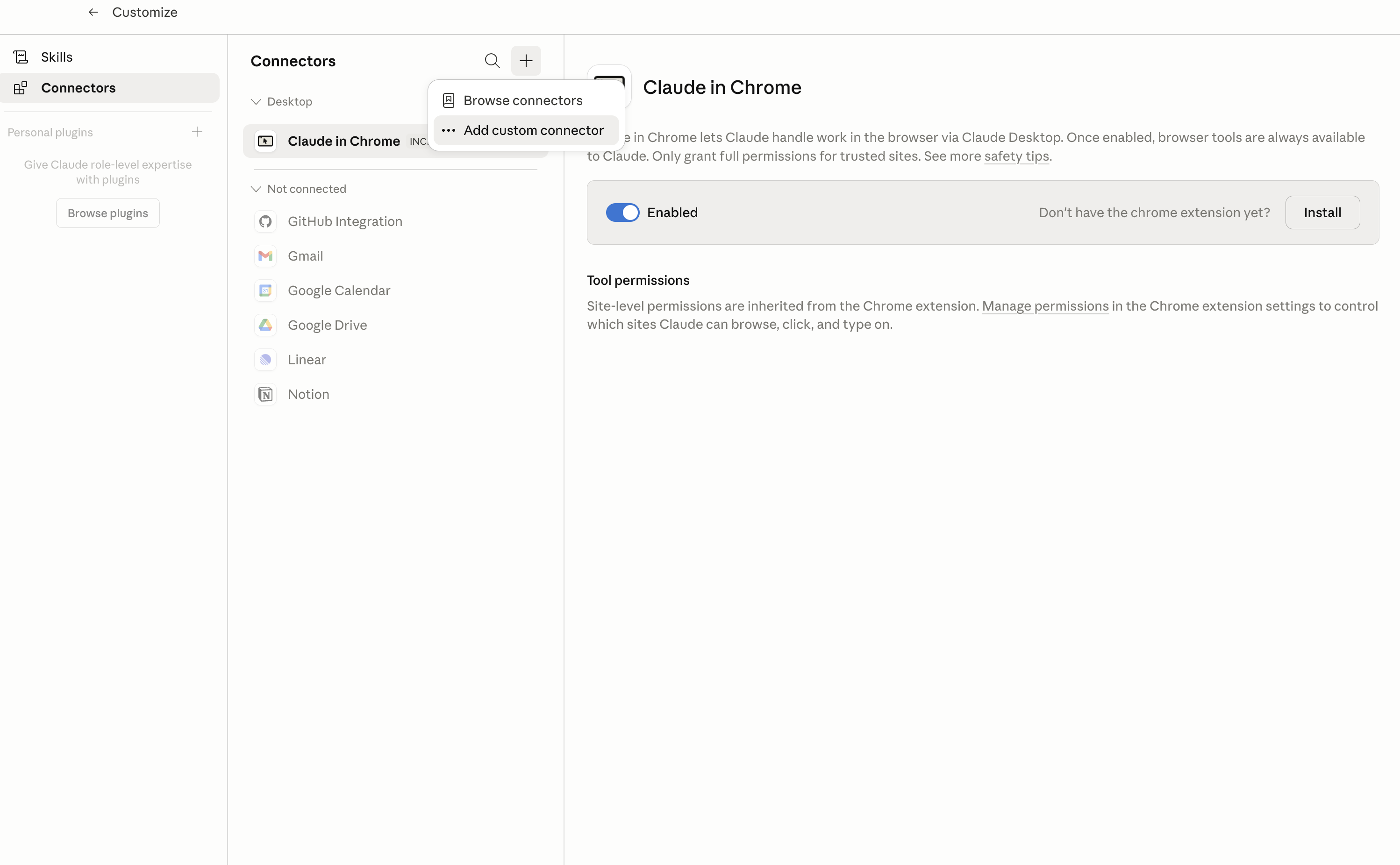
In Claude Desktop, click Customize in the left sidebar, then select Connectors and click the + icon at the top.

Claude Desktop connectors screen with Add custom connector selected

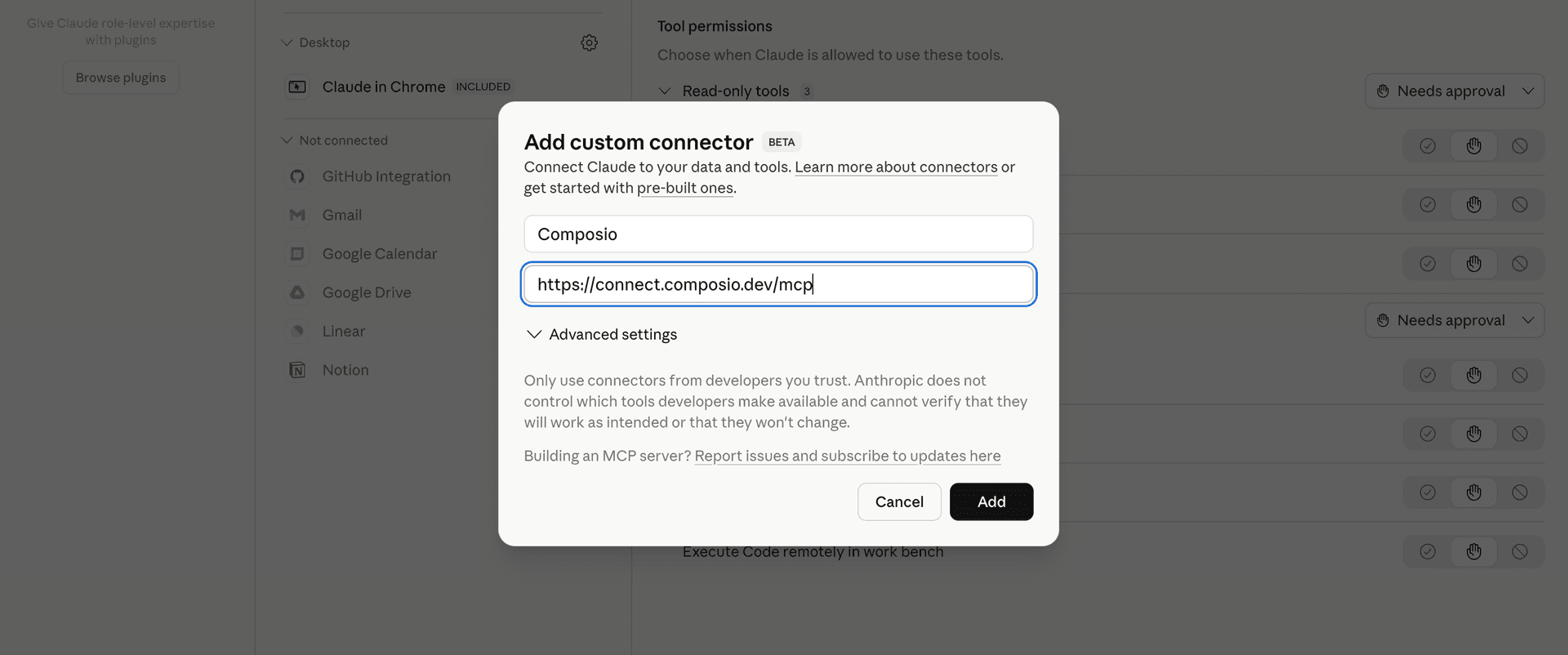
Click Add custom connector and paste in the Composio MCP server URL:

bash
https://connect.composio.dev/mcp
Add custom connector dialog with Composio MCP server URL

2. Authorize in your browser

Click Connect. You'll be redirected to a browser window where you can authorize Composio to continue.

Composio authorization screen for Claude Web, Desktop, and Cowork

3. Connect your Alion account

Back in Claude, ask it to connect to Alion or give it any Alion-related task.

For example, ask Claude to:

  • "Find investors backing climate tech startups"
  • "Compare hiring trends across fintech companies"
  • "Research executives at fast-growing SaaS companies"

It will prompt you to authenticate and authorize access.

That's it. Composio's tools are now available in Claude, and your Alion account is ready to use.

What is the Alion Claude Connector, and what's possible with it?

The Alion MCP server is an implementation of the Model Context Protocol that connects your AI agent and assistants like Claude, Cursor, etc directly to your Alion account. It provides structured and secure access to company, job, people, investor, market, and hiring intelligence, so your agent can search opportunities, research organizations, compare people and companies, track changes, and communicate with contacts on your behalf.

  • Company and investor research: Have your agent search companies and investors, retrieve detailed profiles, review funding and hiring activity, explore technology stacks, and find similar organizations.
  • Job and market intelligence: Direct your agent to search job postings, retrieve full job details, compare salary benchmarks, and analyze hiring demand, pay trends, employers, technologies, and locations.
  • People discovery and matching: Let the agent search opt-in people profiles, find similar professionals, or match people to a specific vacancy using role, skills, location, work mode, seniority, and budget.
  • Employer and opportunity assessment: Instruct your agent to assess employers, check company visa sponsorship records, review offer fit, evaluate counterparties, and verify company representation.
  • Monitoring and communication: Have your agent save searches as watches, check for new results, list and read conversations, contact companies, or send messages to Alion people.

Troubleshooting

1. Why does Claude not use the Composio connector for Alion?

The connector can show as connected, but Claude must use it in each Alion conversation.

  • Click + at the lower left of the chat, or type /.
  • Hover Connectors.
  • Turn on Composio.
  • Ask Claude to connect to Alion again.

2. Why does Claude show an MCP server error before Alion connects?

Claude can show Couldn't reach the MCP server or Authorization with the MCP server failed when you add the connector for Alion.

  • Check that the connector URL is https://connect.composio.dev/mcp.
  • Connectors run from Anthropic's cloud, so your device network is usually not the problem.
  • Add the connector again from Customize > Connectors, then ask Claude to connect Alion.
  • If it fails again, send the error and the ofid_ reference id to support@composio.dev.

3. Why does the Alion authorization link not work?

The Composio connector is one server. Your Alion account connects separately when Claude asks for it.

  • If the browser does not open, or the link expires, ask Claude to retry the Alion connection.
  • Composio creates a fresh Alion authorization link.
  • Open that link in your browser and finish the Alion sign-in.

4. Why do Alion actions fail after they worked before?

The Alion connection can expire or lose permission.

  • Ask Claude to inspect the Alion connection.
  • If the connection is unhealthy, disconnect it when Claude prompts you.
  • Reconnect the Alion account and retry the action.
  • If Claude shows a permission prompt, approve it before Claude changes data in Alion.
  • If the action still fails with a permission error, check that the connected account has that permission in Alion itself.

5. How do I switch to a different Alion account?

Claude can manage the Alion connection for you.

  • Ask Claude to disconnect or delete the current Alion account.
  • Ask Claude to connect Alion again.
  • Open the new Composio authorization link for Alion.
  • Sign in with the other Alion account in the browser.
  • After the account connects, ask Claude to retry the Alion task.

6. Why is my Alion connection missing in Claude Desktop or on a Team plan?

The connector belongs to your Claude account, so your Alion connection works in Claude Web, Desktop, and Cowork.

  • In Claude Desktop, open Customize > Connectors.
  • Next to Composio, click ⋮ and click Clear cache.
  • If Alion tools still do not appear, click ⋮, disconnect, remove the connector, and add it again.
  • On Team or Enterprise, an Owner or Primary Owner must enable the connector before you can connect Alion.
TOOLS

Supported Tools

Every Alion action and event your agent gets out of the box.

Check Company Visa Sponsor

Check whether a company appears in official work-visa sponsor or filing registers, including UK licensed sponsors, recent US H-1B and PERM filings, Dutch IND sponsors, and Canadian LMIA employers.

Check Counterparty

Assess an unfamiliar domain, URL, email address, wallet address, or Alion agent handle before dealing with it.

Check Employer

Read-only employer assessment before applying, sharing identity documents, or responding to a recruiter.

Check Offer Fit

Check whether an offer passes an Alion person's own role, pay-floor, location, work-mode, and agent-access filters without sending the offer or creating a conversation.

Check Watch

Return results that appeared since a jobs, companies, or people watch in the connected Alion account was last checked.

Contact Company

Create an inquiry to a company through Alion, or read an earlier inquiry by passing inquiry_id alone.

Create Watch

Save a documented jobs, companies, or people search and return its watch ID plus the first compact result page.

Delete Watch

Permanently delete one saved Alion watch and its remembered state.

Draft Profile Change

Propose adding a skill or changing the signed-in person's yearly USD salary floor or headline, with a one-line reason for the suggestion.

Get Agent

Look up one registered Alion agent by handle, MCP or A2A endpoint URL, homepage URL, or company domain.

Get Agent Status

Get the connected Alion agent's identity and trust level, active, paused, or blocked state, daily usage and quota, 30-day messaging reputation, webhook, and guidance for raising its level.

Get Company

Get Alion's full profile for one company, including identity, offices, hiring, technology, funding, and freshness data.

Get Company Funding

Get a company's venture rounds, announced amounts and valuations, total raised, funds, accelerators, and headcount on file.

Get Company Hiring

Get hiring signals for one company from its own job board, including open, new, and closed roles, hiring velocity, senior, remote, visa, and equity counts, top roles and countries, nine weeks of history, and 90-day growth events.

Get Company Lookalikes

Get companies like a required domain, Alion ID, or name for prospect lists and competitor maps, ranked using shared industry segments, technologies, and company size.

Get Company Tech Stack

Get technologies a company uses, inferred from its own job postings, with posting counts ordered from most used to least used.

Get Conversation

Read an Alion conversation and its message status, oldest messages first; pass since_message to return only newer messages.

Get Index

List Alion's free monthly data indices, read the newest or a specified monthly edition, or retrieve one country, employer, technology, stage, or daily slice.

Get Investor

Get one full Alion investor profile by ID, domain, URL, or name, including portfolio markets, stages and countries, activity, recent rounds, co-investors, fund details, similar investors, hiring startups, citation, and billing metadata.

Get Job

Get one full Alion job posting by ID or URL, including employer-authored description, requirements, pay, lifecycle, trust facts, citation, and billing metadata.

Get Market Stats

Get free aggregate hiring demand, pay percentiles, trends, time-to-fill, employers, technologies, countries, and role-family statistics for a documented job-market slice.

Get My Job Matches

Return the newest job postings Alion matched to the connected account holder's own profile, including when each match was made and whether the account holder already saw it on Alion.

Get Person

Read one person's open Alion profile as their privacy settings expose it to an agent at the caller's trust level.

Get Salary Benchmark

Get a free salary benchmark for a role and location, including stated and estimated annual pay percentiles, transparency rate, and time to fill.

List Conversations

List the connected agent's Alion conversations newest first, including their status and last activity; pass since to return only conversations with newer activity.

List Watches

List the connected agent's saved Alion watches, including IDs, kinds, labels, filters, and check times.

Manage Company Inbox Settings

Read or update the connected company's Alion inbox policy.

Match People to a Vacancy

Find people for one concrete vacancy using an Alion job ID or URL, or the documented role, technology, location, work-mode, seniority, and budget fields.

Register Agent

Create or update the connected Alion agent's public agent card so other users can discover and inspect it through Alion's get_agent and check_counterparty operations.

Report Problem

Send a problem report to Alion now for a person to review.

Resolve Company

Resolve a company name, domain, or URL to its Alion company ID and match confidence.

Search Companies

Search Alion's company graph by identity, geography, size, industry, technology, hiring, and funding filters.

Search Investors

Search Alion's startup-investor graph by identity, type, portfolio sector, entry stage, geography, activity, hiring, exits, pitch availability, and portfolio size.

Search Jobs

Search live or recently closed job postings with Alion's documented role, location, work, pay, technology, and visa filters.

Search People

Search opt-in Alion people profiles by role, skills, experience, location, work preferences, availability, education, employer, or profile text.

Send Message

Send a real message now to an Alion person.

Set Webhook

Set, replace, or remove the account's persistent Alion webhook.

Find Similar Companies

Find companies similar to a target by industry segments, hiring technologies, headquarters country, and size band for competitor scans, market maps, and prospecting.

Find Similar People

Find people in the same role family with shared skills as one Alion profile, optionally in one country.

Verify Company

Verify that this Alion agent represents a company.

FAQ

Frequently asked questions

Start with Alion.It takes 30 seconds.

Managed auth, hosted MCP servers, and every Alion tool your agent needs.Free to start.

Start building