




Every integration decision eventually comes down to one question: should your system ask for updates, or wait to be told? Poll an API too aggressively, and you’ll burn through rate limits, miss events during outages, and fail silently at the worst possible moment. Lean on webhooks without handling retries, and you’ll process the same event twice and a duplicate payment_intent.succeeded isn’t a bug report; it’s a refund request.
This decision matters more than ever now that AI agents need reliable agent connectors to react to PRs, payments, Slack messages, and CRM updates. Get the API-vs-webhook call wrong and your agent will either miss events or process them twice. This post gives you the framework to get it right, with code you can use today.
Wait, what’s an API again?
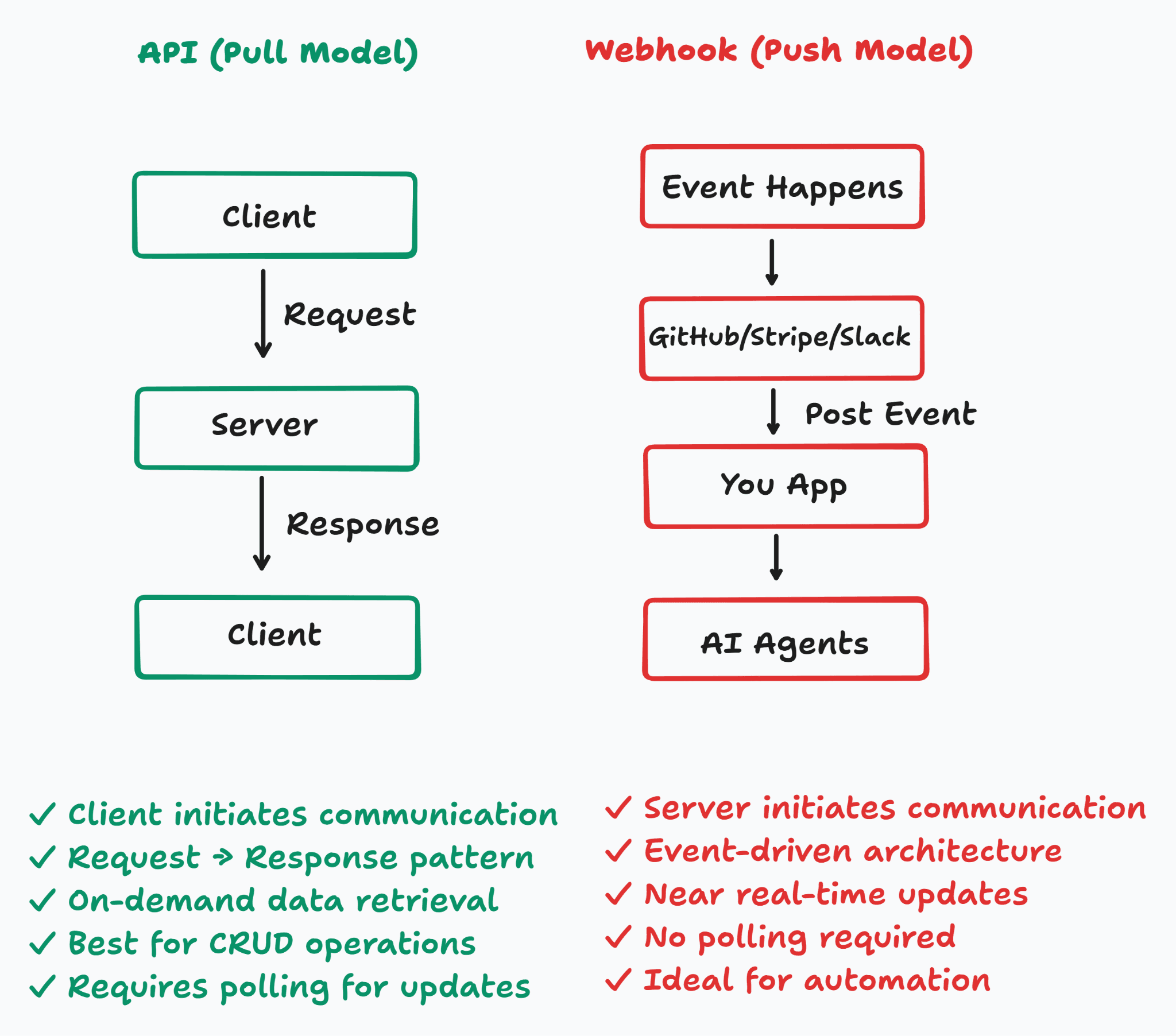
API = you ask, the server answers. You initiate. The server responds. It’s synchronous - you wait for the answer.
import requests

<p>response = requests.get(
    “<a href="https://api.github.com/repos/vercel/next.js/issues%E2%80%9D">https://api.github.com/repos/vercel/next.js/issues”</a>,
    headers={“Authorization”: “Bearer YOUR_TOKEN”},
    params={“state”: “open”, “per_page”: 10},
)
issues = response.json()</p>
That’s the usual way we build things. User clicks a button → you call an API → you show the result.
For AI agents, APIs are for actions. Fetch context, then write outputs. But the big limitation: an API only tells you what’s true right now. If you want to know when something changes without asking every second… that’s where webhooks come in.
What’s a webhook? (It’s the opposite)
A webhook is a push. The remote system calls you when something happens. You stop asking. You just listen.
In Composio, that webhook event is exposed as a trigger: a structured payload from a connected app, delivered to your handler while Composio handles the provider connection, signing, retries, and delivery.
Here’s a real webhook handler I wrote (and broke twice before getting it right):
from fastapi import FastAPI, Request, HTTPException<p></p>
<p>import hmac, hashlib</p>
<p>app = FastAPI()</p>
<p>WEBHOOK_SECRET = b”your_webhook_secret”</p>
<p>@app.post(“/webhooks/stripe”)</p>
<p>async def stripe_webhook(request: Request):</p>
<p>    payload = await request.body()
    sig_header = request.headers.get(“stripe-signature”, “”)
    # Always verify against raw bytes — never the parsed JSON body
    expected = hmac.new(WEBHOOK_SECRET, payload, hashlib.sha256).hexdigest()
    if not hmac.compare_digest(expected, sig_header.split(“v1=”)[-1]):</p>
<p>        raise HTTPException(status_code=400, detail=”Invalid signature”)</p>
<p>    event = await request.json()
    if event[“type”] == “payment_intent.succeeded”:
        await fulfill_order(event[“data”][“object”])</p>
<p>    return {“status”: “ok”}</p>
Stripe calls you when a payment succeeds. You didn’t ask. It just happens.
For AI agents: a Composio trigger fires when a GitHub PR merges → agent checks deployment readiness → posts a summary to Slack. No human in the loop. That’s the good stuff.
How They Work: Side-by-Side
Fine, here’s the cheat sheet before we go deeper:
Dimension | Rest API | Webhook |
Initiation | Your code | Remote server |
Communication style | Pull (request → response) | Push (event → listener) |
Latency | On demand, when you ask | Near real-time, event-driven |
Infrastructure complexity | Low - just make HTTP calls | Higher - public endpoint, retry handling, idempotency |
Real-time capability | No (requires polling to approximate) | Yes |
Error handling complexity | Low - handle HTTP status codes | High - retries, deduplication, out-of-order delivery |
Best for | CRUD, on-demand queries, user-initiated actions | Event notifications, reactive systems, high-volume updates |
When to Use an API
Use an API when you decide to act, and you need an answer now.
User clicks anything and expects an answer immediately - import contacts, load a dashboard, search records. That’s always an API call. The user is sitting there waiting. You need the response right now.
Create, update, delete – always API. There’s no “webhook for writes.”
Need the response to continue – like charging a card. You can’t hold the page open waiting for a webhook. Do the API call synchronously. Use the webhook for side effects (receipt, analytics).
Low and unpredictable event rate – checking a feature flag every few hours? Polling is fine.
In AI agents, APIs are for the write side: after a webhook triggers the agent, it uses APIs to update CRM, create Jira tickets, and post Slack messages.
My rule: If your code asks a question and needs the answer to move forward → use an API.
> In Composio-powered agents, the write-side API calls
> (update CRM, post to Slack, create Jira tickets) happen
> inside your handler - after the webhook fires the trigger.
> Composio routes the event. You own the action logic.
When to Use a Webhook
Use a webhook when something happens in a system you don’t control, and you need to react without constantly asking.
Event‑driven workflows – customer pays, PR merges, Salesforce lead created, urgent Slack message. You didn’t start any of those. But your system should react.
Real AI agent trigger examples I’ve seen:
Stripe payment_intent.succeeded trigger → agent updates CRM, generates summary, pings account manager
GitHub pull request merge trigger → agent checks deployment readiness, posts to Slack, opens rollback ticket if risky
Slack message trigger → agent figures out severity, creates Jira ticket, assigns on‑call person
Salesforce lead created trigger → agent enriches lead data, scores it, schedules outreach
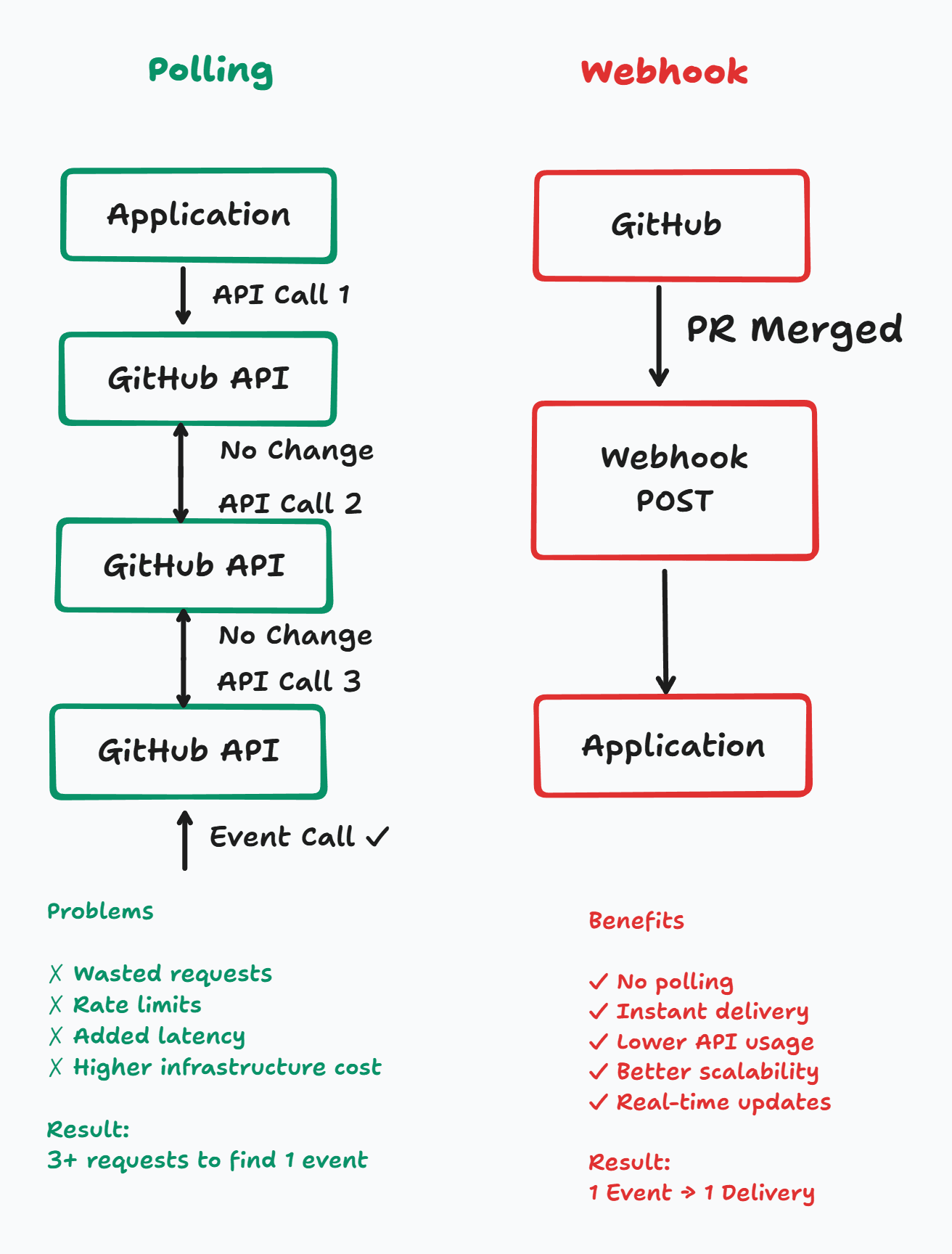
High volume – if you’re tracking 500 GitHub repos, polling will kill your rate limit. Webhooks: one POST per event, no wasted calls.
Source natively supports webhooks – Stripe, GitHub, Slack, Twilio, Shopify. Polling them is just working against their design.
Honestly, if you’re writing a loop that checks for changes every few seconds - just stop. You want a webhook and you probably already knew that.
The Hidden Complexities of Webhooks
Webhooks will bite you if you’re not careful. Here’s what I learned the hard way.
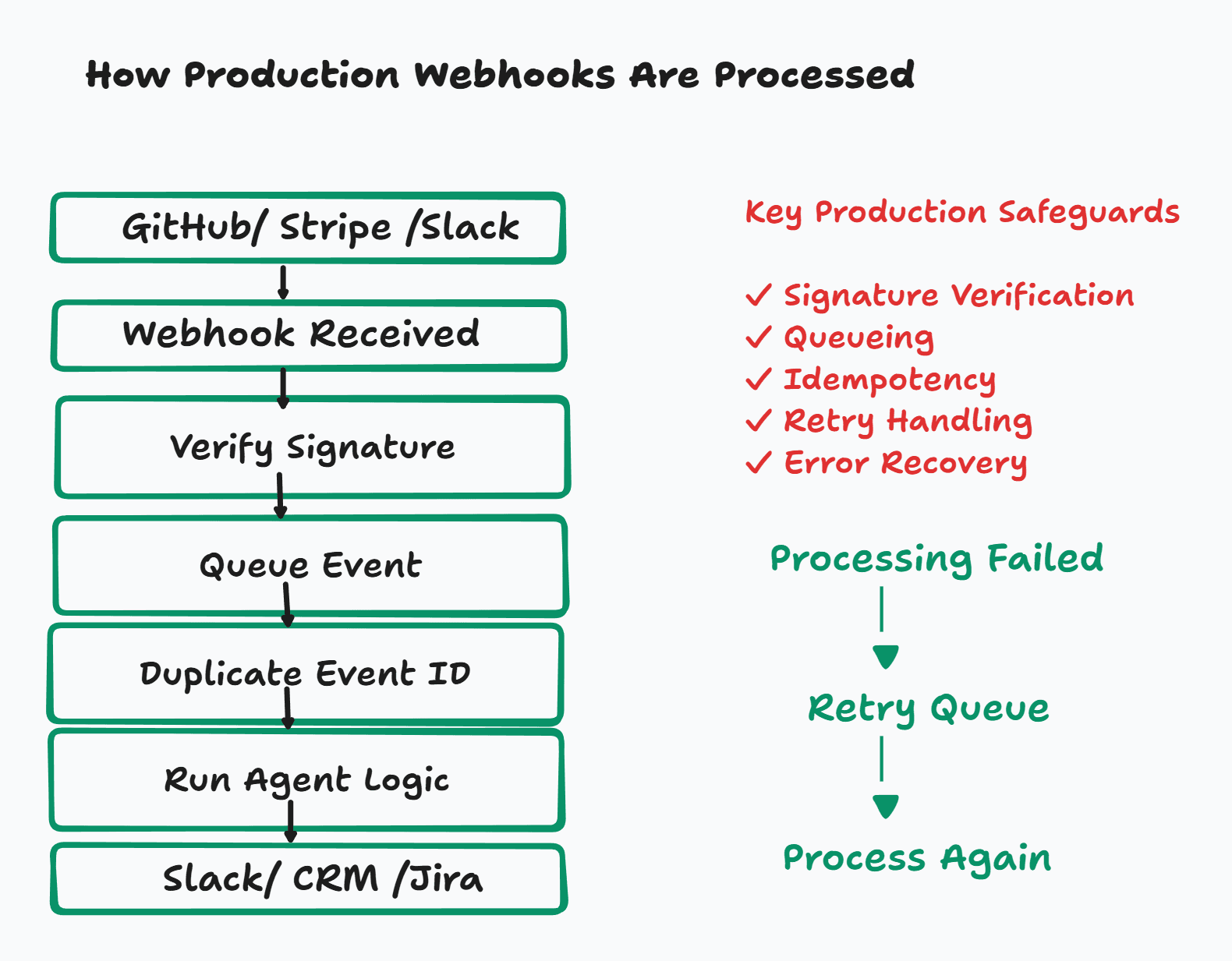
Retries & idempotency – If your endpoint returns anything other than 2xx, the sender retries. Stripe retries for up to 72 hours. If your handler isn’t idempotent, you’ll process the same event multiple times. The fix:
if await db.event_exists(event[“id”]):<p></p>
<p>    return {“status”: “already_processed”}</p>
> This is exactly what caught me with Stripe. No idempotency check,
> Stripe retried; customer was charged twice. Composio handles
> deduplication at the ingestion layer - your handler never sees
> the same event twice
Signature verification – Always, always verify the HMAC signature. Otherwise, anyone can POST to your endpoint and fake events. Use the raw request body, not the parsed JSON. I messed this up once and accepted forged events. Not fun. Composio verifies signatures per provider before your code ever sees the payload - Stripe, GitHub, Slack, and Salesforce all have different header formats, and Composio normalises all of them.
Out‑of‑order delivery – Networks are messy. Event B can arrive before Event A. Build handlers that don’t assume order, or use sequence IDs to reorder.
Fan‑out – One event, many consumers. Don’t register three separate webhook URLs with Stripe. Have one receiver push to a queue, then fan out internally.
Why Webhooks Become Hard at Scale
One or two platforms is fine. Add ten or twenty, and you’re in pain.
Every platform has its own event schema:
// GitHub
{ “action”: “closed”, “pull_request”: { “merged”: true } }
// Stripe
{ “type”: “payment_intent.succeeded”, “data”: { “object”: { “amount”: 9900 } } }
// Slack
{ “type”: “message”, “event”: { “text”: “deploy failed” } }
// Salesforce
{ “data”: { “payload”: { “LastName”: “Smith” } } }
Same idea (“something happened”), completely different structures. You end up writing normalisation code for every platform. Then they change their API, and you scramble.
Plus auth differences, retry windows, header names, and delivery behavior. Some events are realtime because the provider pushes them immediately; others are polling-backed and can arrive later. With Composio triggers, you don’t configure that distinction yourself—the event still lands in the same payload shape.
At some point you have to decide: is normalising webhook schemas across 20 platforms your actual product, or just the thing blocking you from building it?
That’s where Composio comes in. It sits between raw provider events and your agent, turns them into trigger payloads, verifies signatures for each provider, handles delivery and retries, and routes them to the handler you control. You stop writing plumbing. You start building the thing that actually matters.
Common Mistakes
I’ve personally made three of these four mistakes. Won’t tell you which three. Learn from them anyway.
Polling when webhooks exist – feels safe because you see logs. But it burns rate limits and misses events. Just check if webhooks are supported. They almost always are.
Returning 200 before you’re done – this one is sneaky because everything looks fine on your end. You return OK, your logs show success, and then a background task silently fails. The sender has moved on. It thinks you handled it. You didn’t. You just lost the event with no way to recover it. Fix: write the event to a queue first, return 200, then process from the queue. The queue is your safety net. Don’t skip it.
Using a webhook when you need sync confirmation – like waiting for a payment result on a checkout page. Use the API for the sync part, and the webhook for side effects.
Polling with no backoff – if you must poll (some old systems don’t have webhooks), use exponential backoff with jitter. Constant polling will get you rate‑limited.
The Most Common Production Pattern: APIs and Webhooks Together
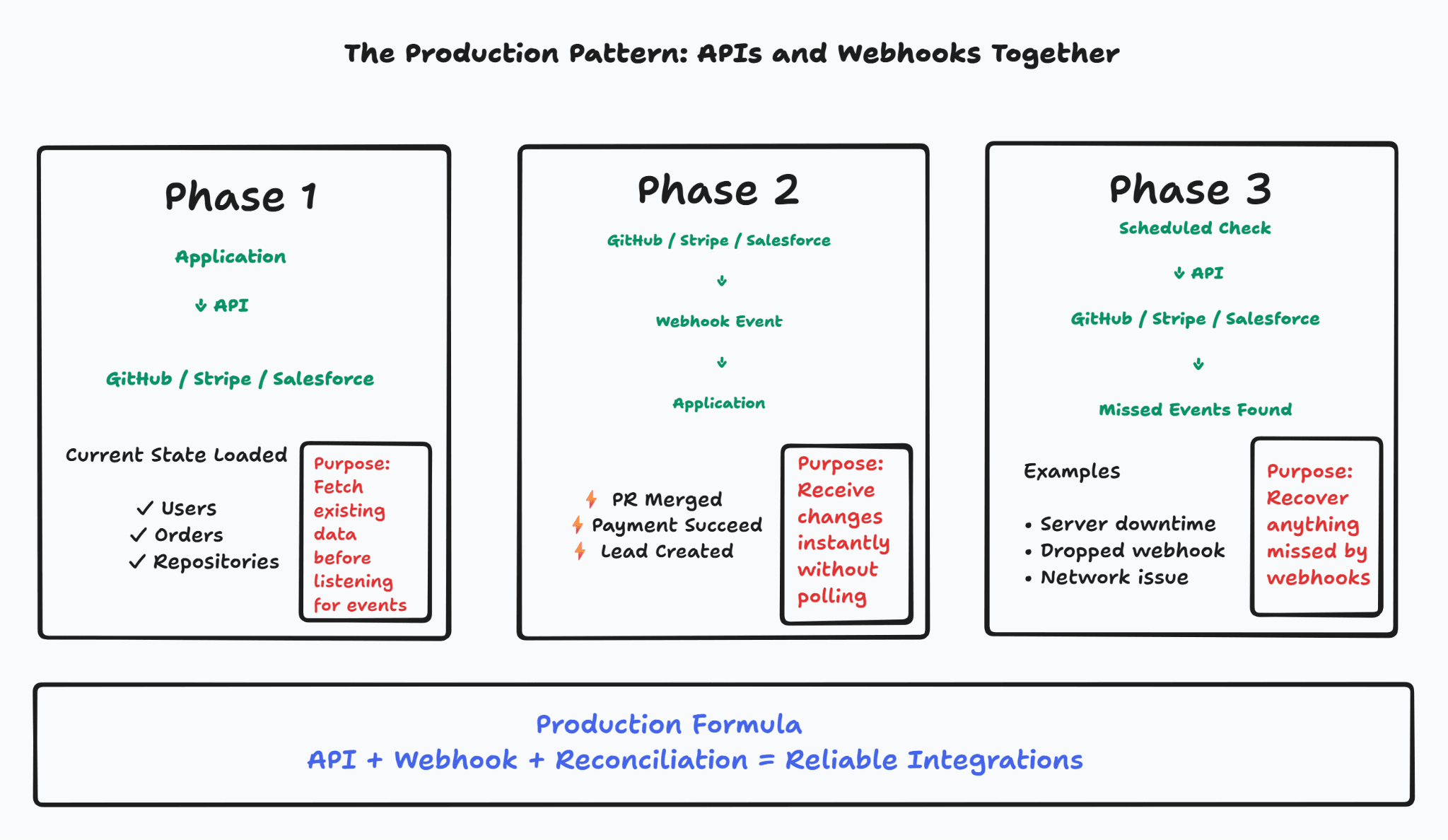
Don’t choose. Use both.
Phase 1 – Initial sync (API)
When you first connect, fetch current state via API. Webhooks fire only for new events, not for history.
Phase 2 – Live updates (webhook)
After sync, webhooks keep you in sync. Event arrives → your agent runs.
Phase 3 – Reconciliation (API)
Webhooks can miss events (your server was down, network blip). Run a periodic API fetch to catch anything missed.
Stripe, GitHub, Salesforce all recommend this three‑phase pattern. Skip phase 3, and you’ll end up with silent data gaps.
Most teams skip phase 3 because it feels like extra work. Then they spend a week wondering why their data is inconsistent. Build it upfront. You’ll thank yourself later.
Designing Event-Driven AI Agents
Most people think the hard part is the agent logic. It’s not. The hard part is everything that happens before the agent even runs - and if you get it wrong, your agent fires twice, or never fires at all.
Ingestion & normalisation – parse the raw payload into a clean schema. Different platforms send wildly different structures. With Composio triggers, each activated trigger instance belongs to a user’s connected account, so your agent gets the event context it needs before anything else runs.
Context enrichment – the raw webhook payload tells you something happened. It doesn’t tell you everything you need to act on it. You still need API calls to pull the customer record, check order history, and fetch account status. The webhook is the trigger. The API fills in the rest.
Deduplication – store event IDs. Don’t run the same agent twice.
Ordering – if events arrive out of order, reconstruct the right sequence before updating agent memory.
Human approval gates – some actions (like scheduling a follow‑up call) need a human to click “go”. Build the pause into the flow, not as an afterthought.
Failure & recovery – if the agent fails, queue the event and retry. Don’t drop it. A lost event in an AI agent pipeline is invisible. You won’t know it happened until a customer tells you.
Build an Event-Driven AI Agent with Composio
Doing all of the above from scratch is weeks of work. Here’s a real project I built to show how it comes together: a GitHub PR agent that asks Gemini to write a Deployment Readiness Report and drops it into Slack the second a PR merges.
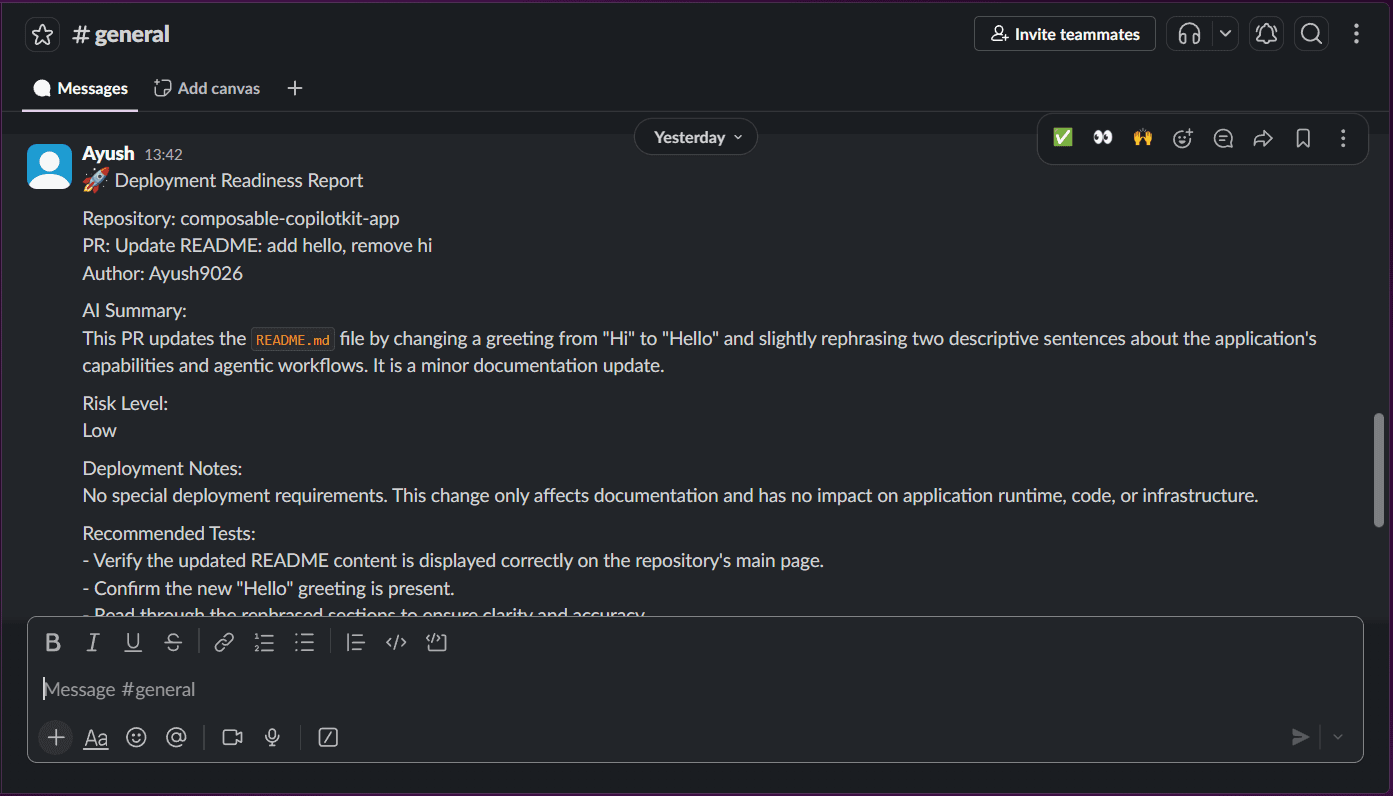
The flow runs in under a second.
PR merges → Composio receives the trigger event → your agent fetches the changed files → Gemini assesses deployment risk → report lands in Slack.
No human in the loop, no polling, and in production you can receive the same trigger events at your webhook URL.
for event in client.triggers.subscribe():
    if event.type != "GITHUB_PULL_REQUEST_MERGE":
        continue<p></p>
<pre><code># Fetch changed files — Composio holds the GitHub token, not you
files = client.tools.execute(
    slug="GITHUB_LIST_PULL_REQUESTS_FILES",
    params={
        "owner": event.data["owner"],
        "repo": event.data["repo"],
        "pull_number": event.data["pull_number"],
    },
)

# Gemini writes the risk assessment
report = model.generate_content(
    f"Write a deployment readiness report for these changes: {files}"
).text

# Post to Slack — Composio holds the Slack token too
client.tools.execute(
    slug="SLACK_CHAT_POST_MESSAGE",
    params={
        "channel": SLACK_CHANNEL,
        "text": f"🚀 Deployment Readiness Report
{report}", }, )
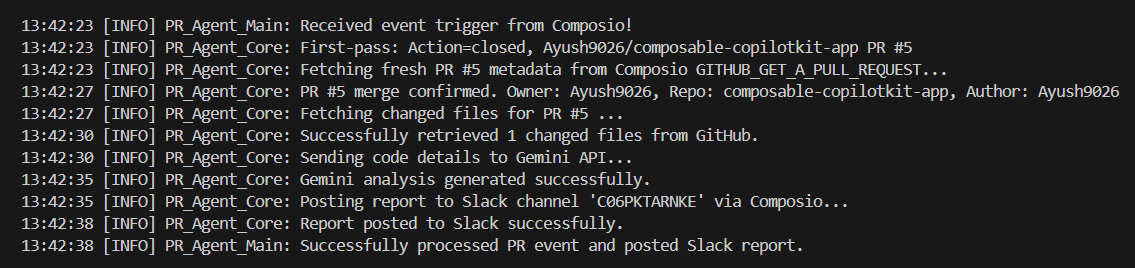

Three things Composio handled that would have taken days to build manually: local development with subscribe() so events stream straight into the agent while you test, production delivery to a webhook URL with signed requests, and deduplication at the ingestion layer so your handler never sees the same event twice.
The full project includes a Flask dashboard and a --test flag to try it without merging a real PR. Swap GitHub for Stripe or Salesforce - the trigger changes, but the handler pattern stays familiar.--test flag to try it without merging a real PR. Swap GitHub for Stripe or Salesforce - the handler stays identical.
Decision Framework
Run through these before you decide. Most cases answer themselves by question three.
- Did your system or user initiate the action? → Use an API.
- Does your code need the response before continuing? → Use an API.
- Are you performing a write operation (create, update, delete)? → Use an API.
- Is the event triggered by a system you don’t control? → Consider a webhook.
- Does the source platform natively support webhooks? → Use a webhook.
- Is event frequency high enough that polling burns rate limits? → Use a webhook.
- Do you need near-real-time notification (seconds, not minutes)? → Use a webhook.
- Do you need synchronous confirmation from the remote system? → Use an API (webhook for async follow-up is fine).
- Are you building an AI agent reacting to external SaaS events? → You need all of it. Webhook to receive, normalization to process, idempotency to stay sane, fan-out to scale. Don’t skip steps.
Most ambiguous cases resolve with one question: who initiates, and does the initiator need an immediate answer? API when you’re asking and need the answer now. Webhook when you’re listening for something you didn’t trigger.
Conclusion
Choosing between API and webhook isn’t a style preference. It changes how your system behaves under load, under failure, and at 3 am when something silently breaks. Here’s the thing nobody actually tells you: most webhook bugs aren’t webhook problems. They’re assumption problems. You assumed events arrive in order. You assumed they arrive once. You assumed they arrive at all. Fix your assumptions before you write a single line of handler code.
Most production systems use both anyway. API for the initial state and the writes. Webhook for everything that happens in between. Reconciliation loop for everything that slips through.
For AI agents, the cost of getting this wrong isn’t a broken build - it’s a double-charged customer or a missed lead. The ingestion layer matters as much as the agent itself.
If you’re wiring SaaS events into an agent, Composio handles the infrastructure so you can focus on what’s actually your product.
FAQ
Can I use both APIs and webhooks together?
Yes - and honestly, you should. API for the initial snapshot when you first connect, a webhook for live updates after that, and a reconciliation job to catch anything that slipped through. Most production systems run all three. Picking just one is usually the reason things break.
What if my webhook endpoint is down?
Most platforms will retry - Stripe keeps trying for up to 72 hours. But once that window closes, the event is gone. No second chance. This is exactly why phase 3 (reconciliation) isn’t optional. It’s the thing that saves you when everything else fails
Do I need a public URL for webhooks?
Yes, your endpoint needs to be publicly reachable - which is annoying when you’re developing locally. Use ngrok or smee.io to expose your local server during testing. Just don’t forget to swap in your real URL before you ship.
Webhook vs WebSockets?
People mix these up constantly. Webhooks are server-to-server - one system POSTs to another when something happens. WebSockets are persistent connections, mostly for real-time UIs like chat or live dashboards. If you’re building backend-to-backend event handling, you want webhooks. If your user needs to see something update instantly on screen, you want WebSockets. Different problems entirely
Can duplicates really happen?
More than you’d expect, and always at the worst time. Stripe doesn’t know your server crashed halfway through processing. It just sees a non-200 response and retries the whole thing. If you haven’t built idempotency yet, you haven’t been burned yet. You will be.

 Get started



