




Claude Cowork dropped in January 2026 as a research preview. Within a week, the people losing their minds over it weren't developers. They were marketers. Ops leads. Content people.
I’m one of those people. I don’t write Python all day, I’m usually juggling dev work, emails, meeting notes, and the occasional desperate plea to IT. But as I’ve started working more closely with our marketing team and getting deeper into that side of the business, Cowork with the right skills has been a huge help. Since February, it’s probably saved me ~10 hours a week by helping me move faster across both development and marketing tasks.
This isn't a developer's guide. There's no terminal. No API keys. Just ten skills that handle the boring, messy, non-technical work that eats your day.
What is a skill?
Most explainers get this wrong. They call skills "plugins" or "extensions." That's like calling a sous chef a "knife."
A skill is a set of instructions you give Claude once, and then it remembers how to do that kind of work forever. It's the difference between hiring a new intern every single morning and having a reliable teammate who already knows your quirks.
Without skills, you spend five minutes every session re-explaining your brand voice, your folder structure, what "good" looks like. With skills, you drop a file in a folder and Claude just gets it.
What Cowork actually is (in plain terms)
Most AI tools make you do the thinking and the doing. Cowork splits that, you describe the outcome, it handles the execution. It accesses your desktop folders, connects to your tools, breaks the task into steps, and runs it start to finish. No terminal, no technical setup. If you've heard of OpenClaw or Perplexity Computer, Cowork is simpler than both, and a good place to start before moving to more complex agentic tools.
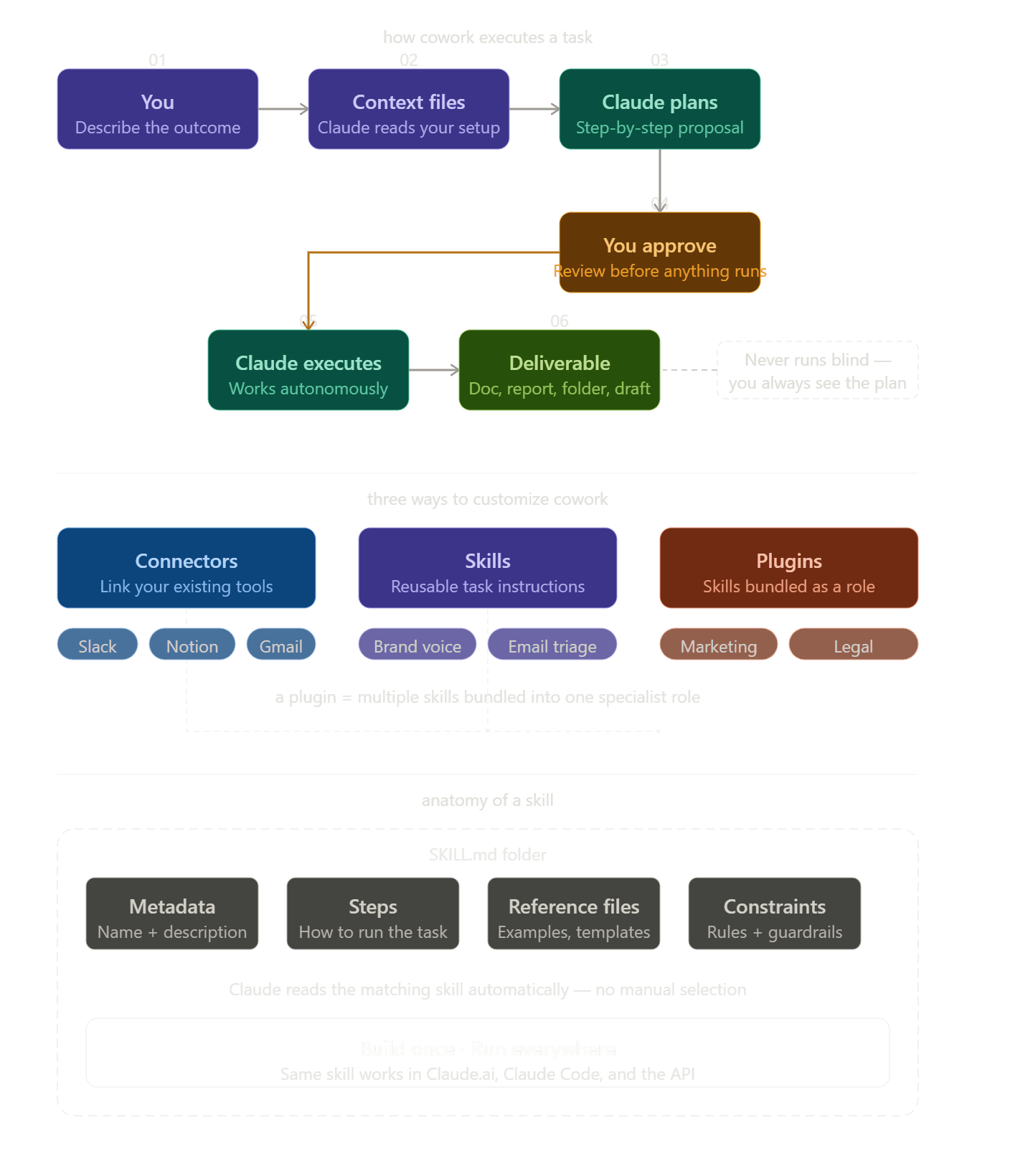
Getting started takes under 5 minutes
Download the Claude desktop app
Open the Cowork tab at the top
Write your task in plain English
Hit go, Cowork works through it step by step
Review the output and refine if needed
The top right panel shows your connectors, folder activity, and task progress as it runs.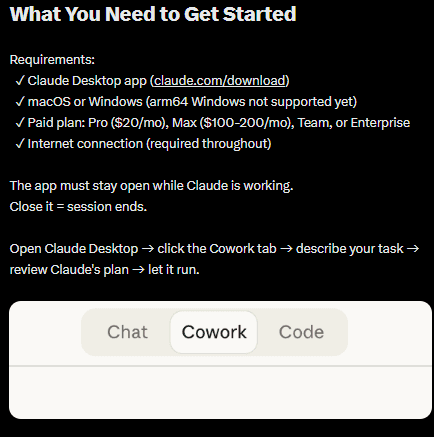
TL;DR
Brand Voice – Makes Claude write like you, not like a LinkedIn influencer
Email Triage – Surfaces the P0 emails you need to see, drafts the rest.
Report Gen – Turns messy CSVs and PDFs into a clean Word doc
File Organizer – Cleans up years of digital hoarding without deleting anything important
Research Synthesis – Reads 20 sources and tells you what they actually mean together
Meeting Notes – Converts transcripts into decisions, owners, and next steps
Presentation Builder – Turns a report into slides that don't suck
Hiring Docs – Writes JDs and interview scorecards that make sense
Content Planner – Gives you a 90-day calendar with real briefs, not just topics
Context Builder – The meta-skill that makes every other skill twice as good
Quick note:
Some of these skills need Claude to actually interact with external apps like sending emails, pulling from Notion, scheduling posts. For that, you'll want Composio. It's a set of pre-built connectors that handle authentication and API calls so Claude can reach into Gmail, Slack, Zoom, and hundreds of other tools. Think of it as the bridge between Cowork and the rest of your software stack. composio.dev has the full list.
Learn how to Install Composio with Claude Cowork: Using Composio MCP with Cowork
How to prompt it properly
Think of Cowork like a smart new hire on day one. Capable, but it needs context to do good work. Every prompt should have three things:
Task: state clearly what you want done.
Context: give it background. Who's the audience, what's the goal, what does it need to know.
Output: define exactly what the result should look like. Format, length, file type, whatever matters.
Then end with: "Complete this task autonomously. Only stop if you genuinely need my input." That last line is what gets Cowork out of "ask me every step" mode and into actual execution.
1. Brand Voice & Document Writing
I tried for months to get Claude to write like me. "Be warm but professional." "Use short sentences." It never stuck.
Then I built this skill. You drop in three or four writing samples — an email you're proud of, a blog post, that got a lot of reactions. You add a few rules: "We never say 'leverage.' We use contractions. We end paragraphs one line shorter than feels right."
Now every draft sounds like it came from my keyboard. Proposals, internal announcements, even performance reviews. I still edit, but I don't rewrite anymore.
The real magic is consistency. If you have a team, or if you've ever spent 45 minutes fixing someone else's "voice," this is the one.
Best prompt to try:
"Here are three emails I've written. Read them, then draft a 300-word update to the team about the Q2 timeline. Match my voice exactly, short paragraphs, no jargon, a little dry humor if it fits."
2. Inbox & Email Triage
I had around 7000 unread emails. Not because I'm lazy, because I'm a coward who couldn't face the archive.
This skill changed that. You give it rules: clients get same-day replies. Newsletters go into a weekly digest. Anything from your boss with a question mark is urgent. Then you point it at a folder and walk away.
It comes back with a short list of things that actually need you, a bunch of drafted replies, and a note about what's waiting on a decision. After a few sessions, it learns. Week three, it started flagging emails I would've missed.
The best part: it shows you what it's going to do before it does anything. No accidental "sorry for the delay" replies to your CEO.
To actually send those drafted replies instead of just saving them, you'll want Composio's Gmail or Outlook connector, it handles the authentication so Claude can interact with your email clients.
Try this:
"Scan the last 200 emails in my Gmail inbox. Flag anything urgent, draft replies for the routine stuff, and give me a one-paragraph summary of what I actually need to care about. Use the rules I saved in /context/email-rules.txt."
3. Report Generation from Raw Data
I once spent a full Friday turning an expense CSV into a board report. Formatting, pivots, crying into my coffee.
Now? I connect Google Sheet or Excel into Cowork, CSVs, PDFs, random screenshots, and say "make me an executive summary." Fifteen minutes later there's a Google doc with totals, trends, and three bullet points about what the data suggests we do differently.
The skill handles the mess. Missing numbers, inconsistent dates, columns named "stuff", it just figures it out.
People who used to own this task now own something more interesting, or at least more useful.
Prompt:
"This folder has three months of sales data, region by region. Build me a one-page exec summary: total revenue, top performer, biggest drop, and two things we should change. Keep it under 500 words."
4. File & Folder Organizer
Your Downloads folder is a crime scene. I know mine was.
This skill is weirdly satisfying. You point it at a folder full of years of accumulated junk, and it figures out a structure. It reads file names, spots duplicates, infers projects. That nightmare folder called "New Folder (17)"? Gone.
It won't delete anything without showing you a plan first. You review, say yes, and then it does the boring work of moving and renaming while you do literally anything else.
I ran this on a shared drive from 2022 that nobody had touched. Two hours later, it was clean enough that a new hire could find things without asking for help.
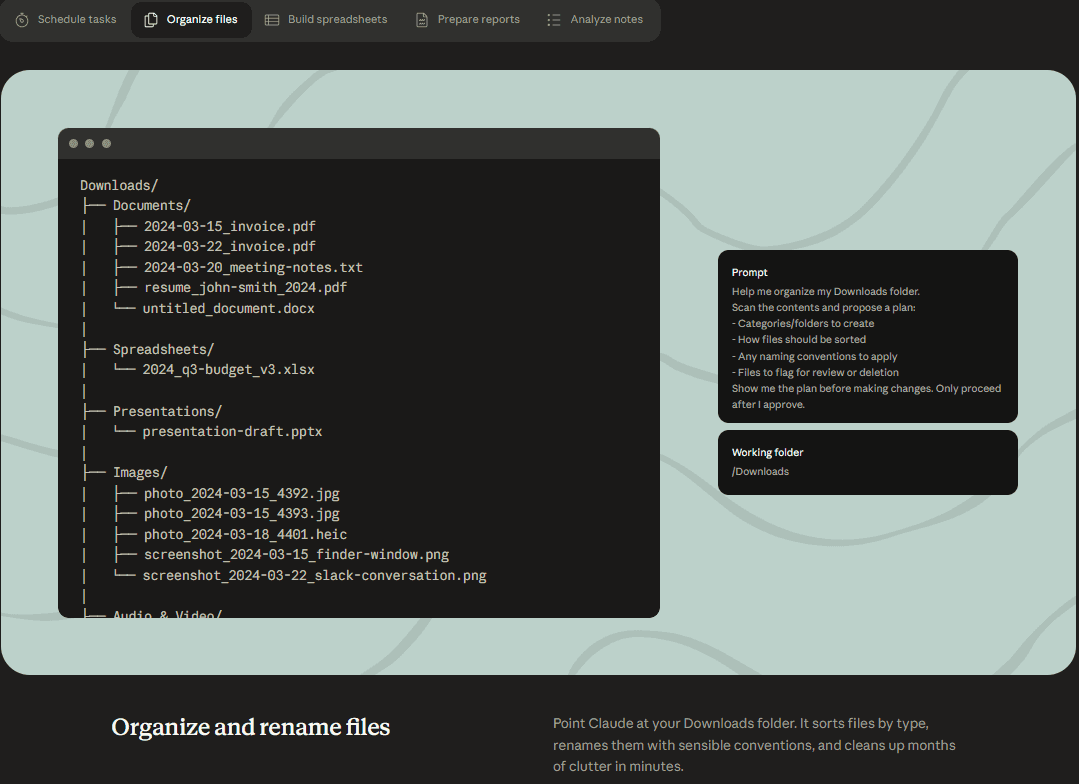
Try this:
"Organize everything in /projects/archive/. Group by client, then by year, then by document type. Rename files to remove version numbers like 'v3_FINAL_real final.' Show me the plan before you move anything."
5. Research Synthesis & Competitive Analysis
Reading twelve articles doesn't mean you know something. Knowing is seeing the patterns, what everyone agrees on, what's disputed, what's missing.
This skill does that synthesis for you. Drop in competitor websites, industry PDFs, interview transcripts. Tell Claude what you're trying to understand. It reads everything and gives you a structured document with the key agreements, tensions, and open questions.
For competitive analysis, it's absurd. Getting a side-by-side of five competitors' pricing, positioning, and feature gaps used to take a junior analyst two days. Now it takes an afternoon, and the output is better because it's actually synthesized, not just summarized.
If your source material lives in Notion or Google Drive, Composio can give Cowork direct access, no manual downloading of every file.
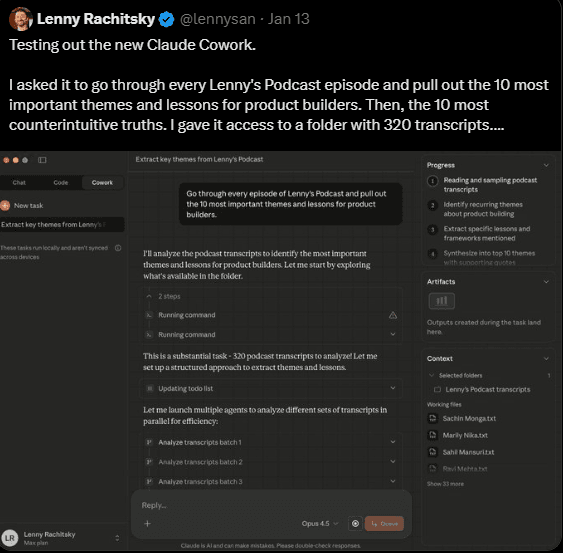
Prompt:
"Read everything in /research/competitors/. For each company, pull out their main pitch, pricing, and what customers complain about. Then write a one-page comparison of where we're better and where we're behind."
6. Meeting Notes to Action Items
Meeting notes are where information goes to die. Someone writes them, shares a link, and three weeks later nobody remembers who was supposed to do what.
This skill fixes that. Drop in a transcript or rough notes. It spits out: decisions made, action items with owners, open questions, and a one-paragraph summary for people who missed the meeting. You can tweak the format to match however your team already tracks work.
The sneaky good use case: retroactive. I ran this on six months of old transcripts and got a clean archive of every decision and commitment. That kind of institutional memory used to require a dedicated person.
Running this on Zoom or Google Meet transcripts? Composio's meeting app connectors can pull the transcripts automatically so you don't have to export them by hand.
Try this:
"Here's the transcript from today's product sync. Pull out every decision, every action item with a name attached, and every open question. Format it like the example in /context/meeting-template.txt."
7. Presentation Builder
Building a decent deck takes either "longer than it should" or "an entire Sunday."
This skill doesn't just generate slides, it structures an argument. You give it source material (a report, rough notes, whatever) and describe your audience. It figures out the story, decides what goes on each slide, and produces an actual PowerPoint file you can edit.
Executives get fewer slides and bigger numbers. Your team gets more detail. Configure it once in your context file and it just adjusts.
Pair it with the Report skill and you go from raw data to finished deck in one afternoon. I've done it. It feels like cheating.
Prompt:
"Using the Q1 report in /outputs/q1-report.docx, build me a 10-slide deck for the board. They care about revenue, churn, and what's changing in Q2. Use our template in /context/deck-template.pptx."
8. Job Description & Hiring Docs Writer
Writing a job description sounds like a 20-minute task. Then you have three meetings about it and a week disappears.
This skill doesn't solve the arguments, but it makes the output faster. Feed it rough notes: what the role does, who it reports to, what's worked in the past. It gives you a polished JD, interview questions organized by competency, and a candidate scorecard. All formatted the same way for every role. You can use
Composio’s Ashby or Workday connectors for everything hiring.
The underrated use: internal role clarity documents. Writing down what a role actually owns, where it stops and another role starts. The kind of document every team needs and almost nobody writes.
Try this:
"I need a JD for a Head of Customer Success. Must-haves: systems thinker, B2B SaaS experience. Draft the description, five interview questions about operational thinking, and a scorecard for evaluating candidates."
9. Content Calendar & Campaign Planner
Marketing teams discover this skill and never shut up about it. For good reason.
Give it your goals, channels, key dates, and what's worked before. It produces a full content calendar, not just "post on LinkedIn Tuesday" but actual briefs with angles, audience notes, and a one-line take that makes the content worth reading.
The skill thinks in campaigns, not posts. A product launch isn't ten separate things, it's a story with a beginning, middle, and payoff. This structures it that way, so your team can execute without you manually sequencing every piece.
To turn those briefs into scheduled posts, Composio connects to LinkedIn, Twitter, and Tiktok, so Claude can do the writing and the publishing
Prompt:
"Build me a 6-week content plan for a new feature launch. Channels: LinkedIn, newsletter, blog. Goal: trial signups from operations leaders. Include topic angles, format notes, and a brief for each piece."
10. Personal Operating System (Context Builder)
This is the one that makes all the others work.
Instead of explaining yourself every single time, you spend 30 minutes building a set of context files. Who you are, what you're working on, how you like things done, what words you hate, who your stakeholders are.
The Context Builder skill walks you through it, asks the right questions, structures your answers into the format Claude reads best. Do this once, and every future session starts with zero setup.
The people who get the most out of Cowork are the ones who invested that half hour. Everyone else plateaus fast. I was in the second group for weeks until I finally sat down and did it. Now I can't imagine working without it.
Try this:
"Help me build my Cowork context. Ask me about my role, current projects, how I like to communicate, and my key stakeholders. Then create the files in /context/ - about-me.md, preferences.md, voice.md, and projects.md."
How to start (for real)
Ignore everything except #10. Build your context files first. It's boring but it pays off immediately.
Then pick the skill that matches the thing you've been avoiding the longest, add Composio when you need. You don't need to install anything else, skills are just instruction files you save in a folder. The PPTX and DOCX stuff comes built into Cowork.
One honest warning: Cowork isn't magic. These skills aren't magic. They work great when you give them clear inputs and a realistic scope. They fail when you ask something vague with half the information missing and then get annoyed at the output.
Treat it like a smart, literal-minded colleague. Brief it well. You'll be shocked what comes back.
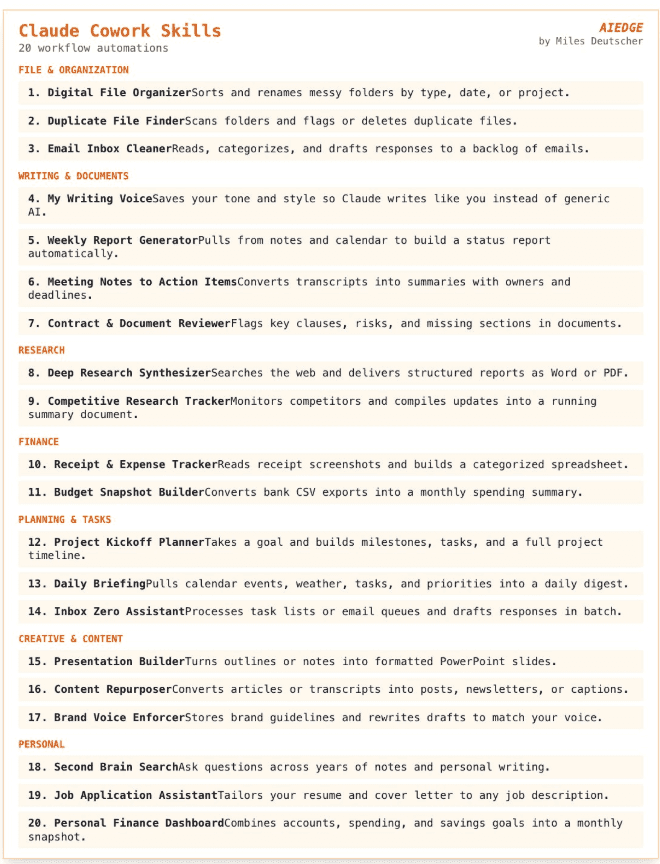
Attaching few more interesting Cowork skills to check them out:

 Get started



