




"AI employees" is becoming a thing right now.
You may have heard of Viktor, which can live in Slack or other apps, connect to your tools, and actually do work as an employee would.
But most of what gets called that is just an LLM plugged into a generic chatbot. 🤷

The idea goes beyond the usual ChatGPT experience. An AI employee can remember things, work independently, use your apps, and even have its own computer
So I built one. It's open source, it's called Viktor (yes, inspired by the original), and in this post I'll walk you through how it works, some important code bits, and how to run it yourself.
Let's get into it. ✌️
What's Covered
What makes an "AI employee" different from a regular chatbot or Slack bot
The architecture, and why it's split into a gateway and a worker
The agent loop with the Claude Agent SDK (any other provider works the same way)
1,500+ app integrations with Composio, without putting 1,000 tool schemas into the context
Giving the agent its own locked-down computer with Docker
Memory, schedules, event triggers, and a triage model for being proactive
Hooking it up to Slack, tunnels and all the fun shenanigans
Evals, and what it actually costs to run
💁 The full source code is here: shricodev/viktor-ai-employee
AI Employee vs. a Slack Bot: What's the Difference?
Technically, yes, this is an AI agent running as a Slack bot. Nothing crazy is happening here.
What changes is what the bot can actually do.
A regular Slack bot mostly waits for you to ask something. An AI employee can remember things, work on schedules, react to events, use your apps, and keep doing stuff even when you're not actively talking to it.
Chatbot | Slack bot (with an LLM) | AI employee | |
|---|---|---|---|
Answers questions | ✅ | ✅ | ✅ |
Lives where your team works | ❌ | ✅ | ✅ |
Takes real actions in your apps | ❌ | Sometimes | ✅ 1,500+ apps |
Has its own computer, makes real files | ❌ | ❌ | ✅ |
Remembers across conversations | ❌ | ❌ | ✅ |
Learns how your team does things | ❌ | ❌ | ✅ (skills) |
Works without being asked | ❌ | ❌ | ✅ schedules, triggers, watched channels |
Asks before doing anything risky | n/a | Rarely | ✅ enforced in code |
Has a budget and an audit trail | ❌ | ❌ | ✅ |
That's mostly how I think about the difference.
A Slack bot answers things. Viktor can actually keep track of stuff, work on a schedule, react to events, make files, and ask before it does anything risky.
And pretty much every row in that table is something we'll build in this post. 👀
What We're Building
Here's the full flow from a Slack message to finished work:
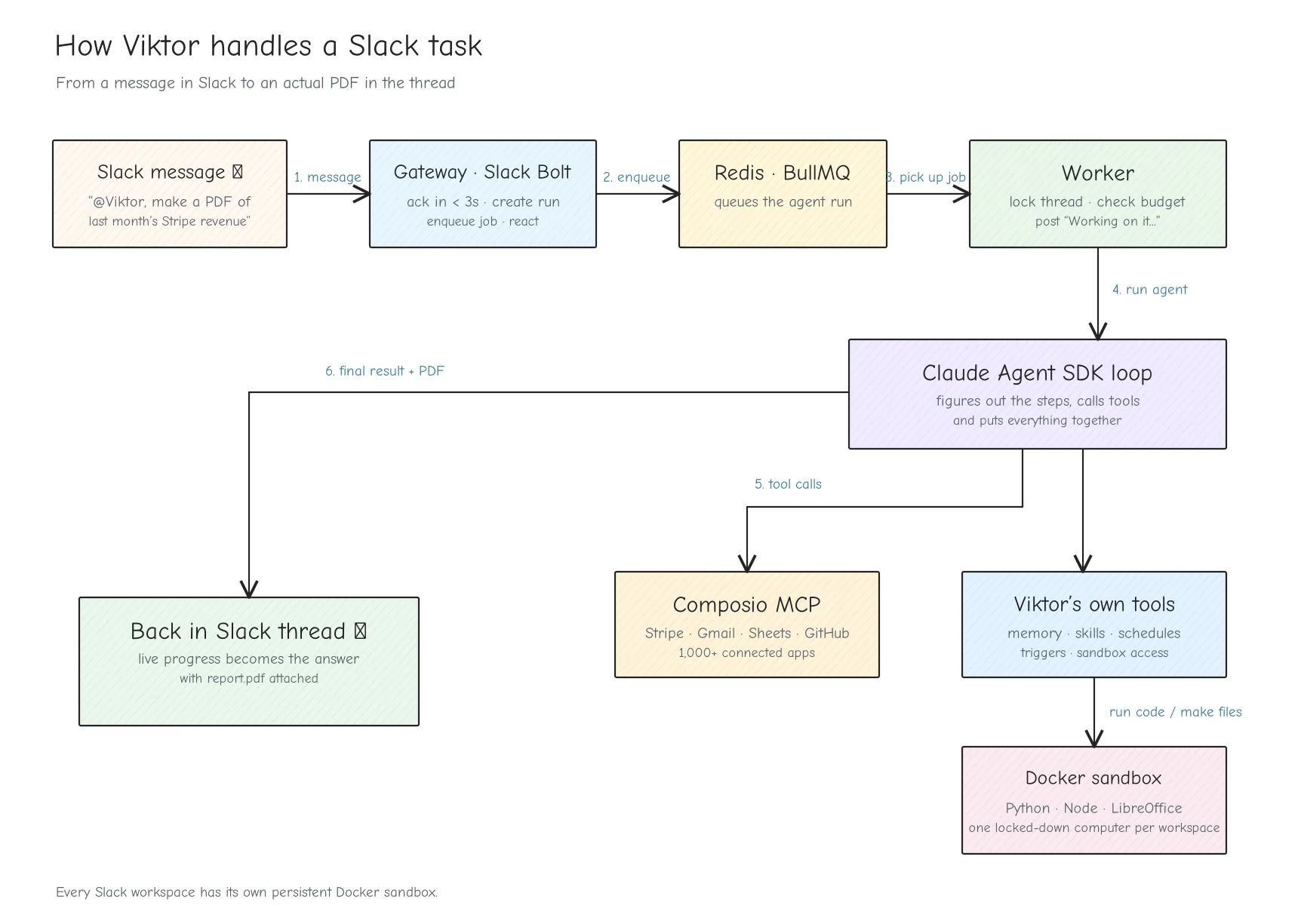
And feature-wise, here's what we're building:
Works in Slack: @mention it, DM it, follow up in threads without mentioning again.
Uses your apps: Gmail, Sheets, Docs, HubSpot, Stripe and 1,500+ more via Composio.
Has its own computer: a hardened Docker sandbox per workspace.
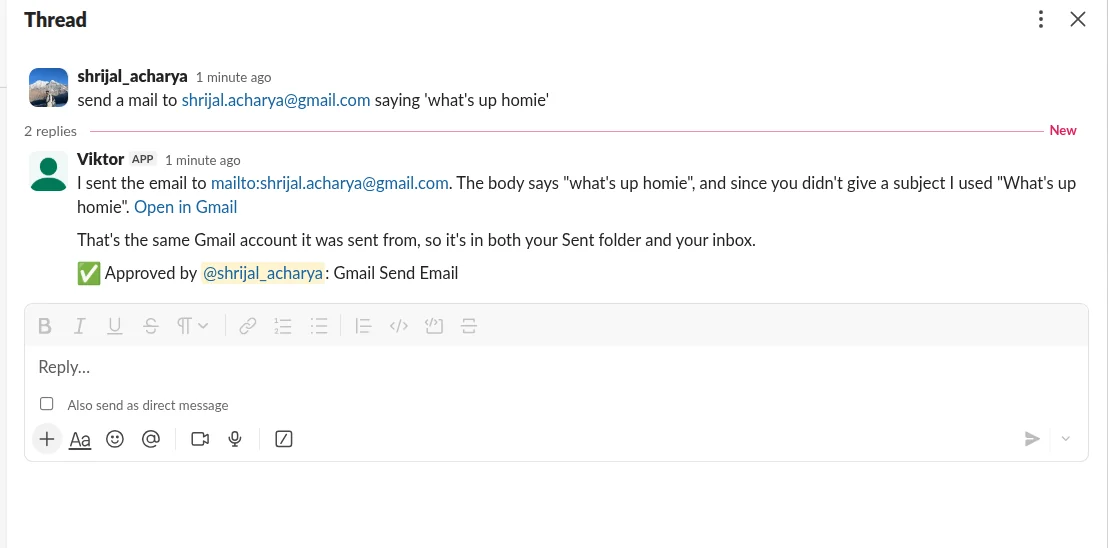
Approve risky actions: anything that sends, updates or deletes gets an Approve / Deny card.
Remembers and learns: hybrid memory search plus playbooks it writes for itself.
Works on its own: cron schedules, Composio triggers, watched channels and a daily check-in.
Admin controls: an App Home tab with usage, budget, connections, schedules, memories and a wipe button.
Tech Stack
Here's what I used:
TypeScript on Node 22 (native type stripping, so there's no build step at all)
Claude Agent SDK for the agent loop, with Claude Opus 5.5.
Composio for third-party integrations and triggers
Slack Bolt for the Slack side
Postgres + pgvector (Drizzle ORM) for everything persistent
Redis + BullMQ for queues, cron schedules and approval pub/sub
Docker (via
dockerode) for the sandboxespnpm + Turborepo monorepo
Before You Start
Here's everything you need:
Node 22.18+ and pnpm 10
Docker
A Slack workspace where you can install apps
Set Up the Project
Clone it and install the dependencies:
git clone https://github.com/shricodev/viktor-ai-employee.git viktor
cd viktor
pnpm install
Start Postgres with pgvector and Redis, then build the sandbox image:
docker compose up -d
docker build -t viktor-sandbox:latest sandbox-image
Now copy the env file:
cp .env.example .envAnd fill in the keys:
ANTHROPIC_API_KEY=
COMPOSIO_API_KEY=
# openssl rand -hex 32
ENCRYPTION_KEY=
That's enough for the first test. We'll deal with the Slack stuff later.
Try it in the terminal first
Before touching Slack at all, you can talk to the exact same agent from your terminal, with the same tools and the same Composio integrations:
pnpm chatAsk it something that needs an app:
What are my 3 most recent unread emails about?
If Gmail isn't connected, it'll print a 🔌 connect link. Open it, authorize Gmail, ask again, and you should get your summary.
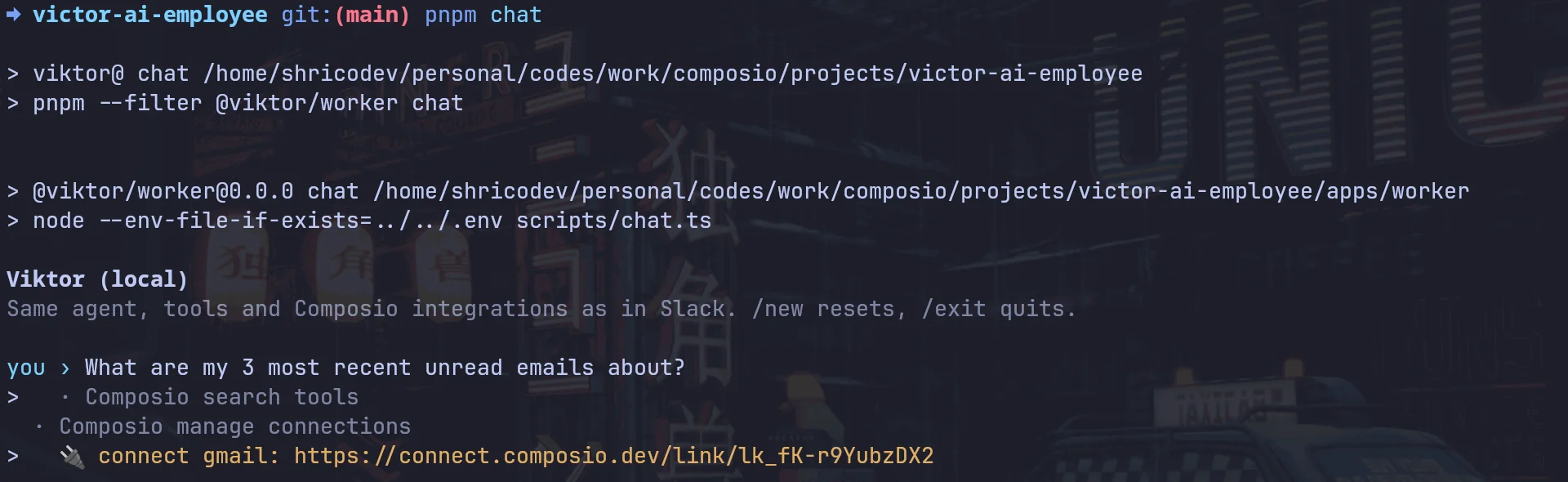
If you ask it to send an email instead, you'll get an approve? [y/N] prompt before it does anything.
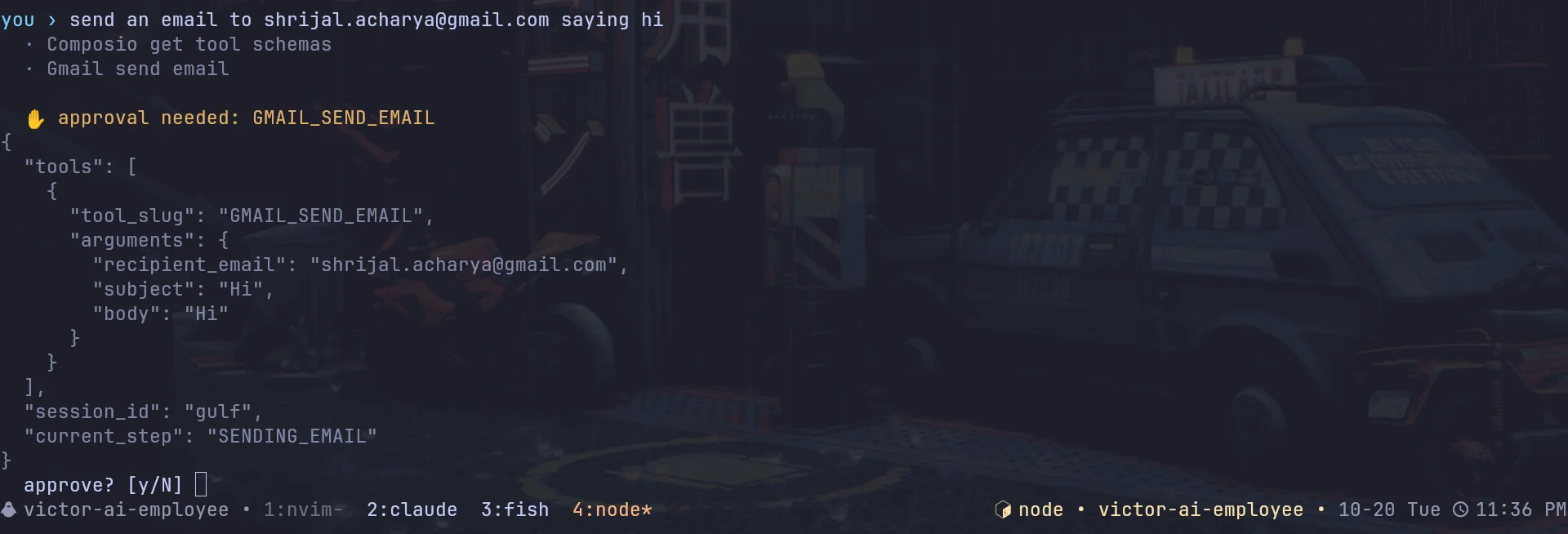
Any files land in ./viktor-out/.
Now let's get into how all of this actually works.
Part 1: The Gateway
Slack gives you 3 seconds to acknowledge an event.
An agent run can easily take way longer than that.
So the process talking to Slack can't also sit there running the whole agent. The gateway verifies the request, writes a row, drops a job in Redis, and gets out of the way.
// 👇 apps/gateway/src/dispatch.ts
export async function dispatchRun(msg: Incoming): Promise<void> {
  // Slack redelivers events it thinks were missed; the message ts makes dispatch idempotent.
  const jobId = `${msg.workspaceId}-${msg.channelId}-${msg.messageTs}`;
  if (await queue("agent-run").getJob(jobId)) return;

<p>  const thread = await ensureThread({
    workspaceId: msg.workspaceId,
    channelId: msg.channelId,
    threadTs: msg.threadTs,
  });</p>
<p>  const run = await createRun({
    workspaceId: msg.workspaceId,
    threadId: thread.id,
    trigger: msg.trigger,
    requestedBy: msg.userId,
    prompt: msg.text,
  });</p>
<p>  await enqueue("agent-run", { runId: run.id, ...msg }, { jobId, attempts: 1 });
}</p>
Two things here are worth pointing out:
The job ID is the Slack message timestamp. If Slack thinks you missed an event, it'll retry it. Without this, the agent could end up doing the same task twice.
attempts: 1. Agent runs can have side effects. I don't want BullMQ blindly retrying a job that may have already sent something or changed something, so failures are reported instead.
On the worker side, each Slack thread also gets a Redis lock.
So if you send two messages in the same thread really quickly, the second one waits for the first instead of both runs happening at the same time.
Part 2: The Agent Loop with the Claude Agent SDK
I didn't want to hand-roll an agent loop.
The Claude Agent SDK already gives you the loop, MCP support, hooks, permission callbacks, session resume and budgets.
We don't want to give the agent access to everything.
// 👇 packages/agent/src/run.ts
const q = query({
  prompt: input.prompt,
  options: {
    model: config.AGENT_MODEL, // claude-opus-5-5
    effort: config.AGENT_EFFORT,
    maxTurns: config.AGENT_MAX_TURNS,
    maxBudgetUsd: input.maxBudgetUsd ?? config.AGENT_MAX_RUN_USD,
    systemPrompt: { type: "custom", prompt: input.systemPrompt },
    tools: ["WebSearch", "WebFetch", "TodoWrite"],
    mcpServers: input.mcpServers,
    strictMcpConfig: true,
    settingSources: [],
    canUseTool: input.canUseTool,
    hooks: input.hooks,
    resume: input.resume ?? undefined,
    sessionStore: postgresSessionStore,
    // The subprocess gets a minimal environment so it never sees our database or Slack secrets.
    env: {
      PATH: process.env.PATH,
      HOME: cwd,
      ANTHROPIC_API_KEY: config.ANTHROPIC_API_KEY,
      CLAUDE_CONFIG_DIR: join(cwd, "claude"),
    },
  },
});
A few important bits:
tools: the built-inBash,Read,WriteandEdittools aren't exposed at all. The agent runs inside our worker, which has database credentials and Slack tokens, so giving the model a shell there would be pretty wild. Anything involving code runs in the sandbox instead.env: same idea. The subprocess gets a tiny environment, so it never even sees things likeDATABASE_URL.settingSources: []andstrictMcpConfig: no local config files or random MCP servers get loaded. What we pass in is what it gets.maxBudgetUsd: a hard cap per task.sessionStore: this one is cool. The SDK lets you plug in your own transcript storage, so every session is mirrored into Postgres. That means any worker can resume any Slack thread.
The system prompt is also split in two with the SDK's SYSTEM_PROMPT_DYNAMIC_BOUNDARY.
The static stuff stays stable: how Viktor should work, how to write in Slack, safety rules, etc.
Anything that changes per message, like the current time, who's asking, relevant memories and connected apps, goes into a <context> block in the user message.
That keeps the system prompt stable enough for prompt caching to actually help.
Part 3: 1,500+ Integrations with Composio
Viktor should be able to work with Gmail, Sheets, GitHub, Linear, HubSpot, Stripe and a bunch of other apps.
Obviously, giving the model every tool schema for every app would be a terrible idea. You'd eat a ridiculous amount of context before the user even asks anything.
Composio handles this with a few meta tools:
COMPOSIO_SEARCH_TOOLSto find the right tool for the jobCOMPOSIO_MULTI_EXECUTE_TOOLto run one or more of themCOMPOSIO_MANAGE_CONNECTIONSto get an OAuth link when an app isn't connected yet
Viktor is shared across a team, so I made connections belong to the workspace, not an individual user.
Each Slack workspace gets its own Composio user (slack_<team id>) and one session that we create once and reuse:
// 👇 packages/composio/src/session.ts
async function createSession(workspaceId: string) {
  return composio().sessions.create(composioUserId(workspaceId), {
    mcp: true,
    manageConnections: {
      enable: true,
      callbackUrl: <code>${env().PUBLIC_URL}/composio/callback?workspace=${workspaceId}</code>,
    },
    // Code runs in our own per-workspace Docker sandbox instead.
    sandbox: { enable: false },
  });
}
The session gives us an MCP URL, which gets passed straight into the Agent SDK:
// 👇 apps/worker/src/turn.ts
const mcpServers = {
  composio: await composioMcpServer(workspace.id),
  [VIKTOR_SERVER]: createViktorServer({
    workspaceId: workspace.id /* ...rest */,
  }),
};
And that's basically the integration layer.
The agent can discover and use tools across 1,500+ apps without having them all in context at once. 🔥
Turning auth links into Slack buttons
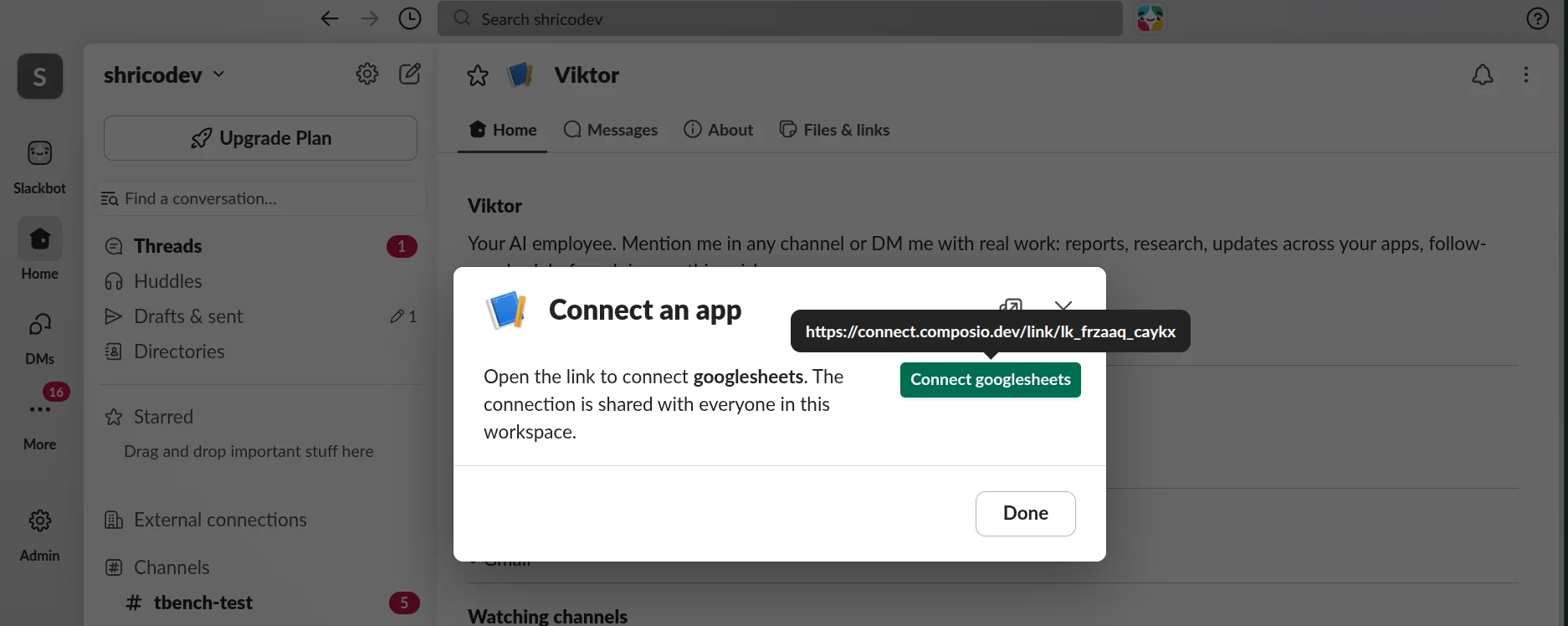
When an app isn't connected, the agent calls COMPOSIO_MANAGE_CONNECTIONS and gets an OAuth URL back.
I didn't want the model dumping some giant raw URL into Slack, so a PostToolUse hook takes it and posts a proper Connect button instead:
// 👇 apps/worker/src/turn.ts
PostToolUse: [
{
matcher: "mcp__composio__COMPOSIO_MANAGE_CONNECTIONS",
hooks: [
async (input) => {
if (input.hook_event_name !== "PostToolUse") return {};
const links = extractConnectLinks(input.tool_response);
if (!links.length) return {};<p></p>
<pre><code> await slack.chat.postMessage({
channel: turn.channelId,
thread_ts: turn.threadTs,
text: `Connect ${links.map((l) => titleCase(l.toolkit)).join(", ")} to continue`,
blocks: connectCard(links),
});
return {
hookSpecificOutput: {
hookEventName: "PostToolUse",
additionalContext: `Connect buttons for ${links.map((l) => l.toolkit).join(", ")} were posted in the thread.`,
},
};
},
],
}, ],
The additionalContext part tells the model that the button has already been posted.
Otherwise it might try to give you another auth link or explain a connection flow that already exists.
Part 4: Giving It Its Own Computer
If our Viktor-clone is supposed to do actual work, API calls alone aren't really enough.
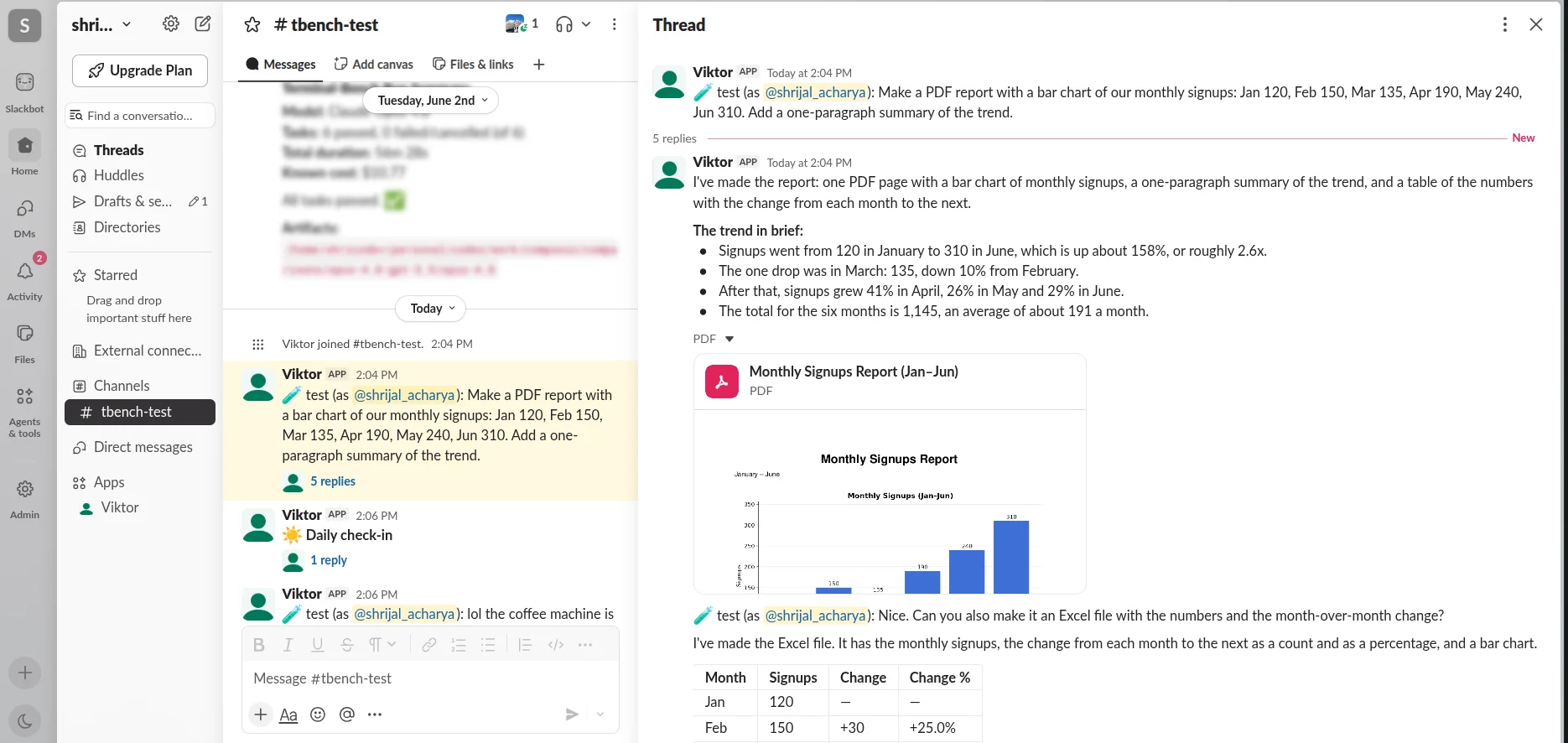
You might want to give it a CSV, have it clean the data, make a chart, and send you back a PDF.
So each workspace gets one long-lived Docker container with Python, Node, LibreOffice and pandoc.
And because the model is literally allowed to write and run code inside it, the container is locked down pretty hard:
// 👇 packages/sandbox/src/docker.ts
const container = await docker.createContainer({
  name,
  Image: config.SANDBOX_IMAGE,
  WorkingDir: "/workspace",
  User: "1000:1000",
  Env: [<code>VIKTOR_WORKSPACE=${workspaceId}</code>],
  HostConfig: {
    Binds: [<code>${volumeName(workspaceId)}:/workspace</code>],
    Memory: config.SANDBOX_MEMORY_MB * 1024 * 1024,
    MemorySwap: config.SANDBOX_MEMORY_MB * 1024 * 1024,
    NanoCpus: Math.round(config.SANDBOX_CPUS * 1e9),
    PidsLimit: 512,
    ReadonlyRootfs: true,
    Tmpfs: { "/tmp": "rw,nosuid,size=512m" },
    CapDrop: ["ALL"],
    SecurityOpt: ["no-new-privileges"],
    NetworkMode: config.SANDBOX_NETWORK,
  },
});
A few things happening there:
Never root, read-only root filesystem, all Linux capabilities dropped,
no-new-privileges.Memory, CPU and PID limits, so a bad script can't take the whole host down.
No secrets. The only env var is the workspace ID.
/workspaceis a named volume, so the agent's scripts and files survive between conversations.
That last bit is useful because Viktor can slowly build up its own little toolbox over time.
If it writes a script for a report today, it can still have that script around the next time you ask.
Files go in and out through Docker's archive API using tar streams, and every path is resolved and checked to make sure it stays inside /workspace.
The agent sees the sandbox through a tiny in-process MCP server built with the SDK's tool() helper:
// 👇 packages/tools/src/sandbox.ts
tool(
  "sandbox_exec",
  "Run a bash command on your own Linux computer (Debian, Python 3.12 with pandas/matplotlib/openpyxl/python-docx/python-pptx/reportlab, Node 22, LibreOffice, pandoc). The working directory /workspace persists between conversations.",
  {
    command: z.string().describe("Bash command to run"),
    timeout_sec: z.number().int().min(1).max(900).optional(),
    cwd: z.string().optional(),
  },
  async ({ command, timeout_sec, cwd }) => {
    const res = await execInSandbox(ctx.workspaceId, command, {
      timeoutSec: timeout_sec,
      cwd,
    });<p></p>
<pre><code>return json({
  exit_code: res.exitCode,
  timed_out: res.timedOut,
  stdout: res.stdout,
  stderr: res.stderr,
});
}, ),
Pair that with a slack_upload_file tool, and Viktor can make a report and upload the actual PDF into the thread.
Files people upload to Slack go the other way too.
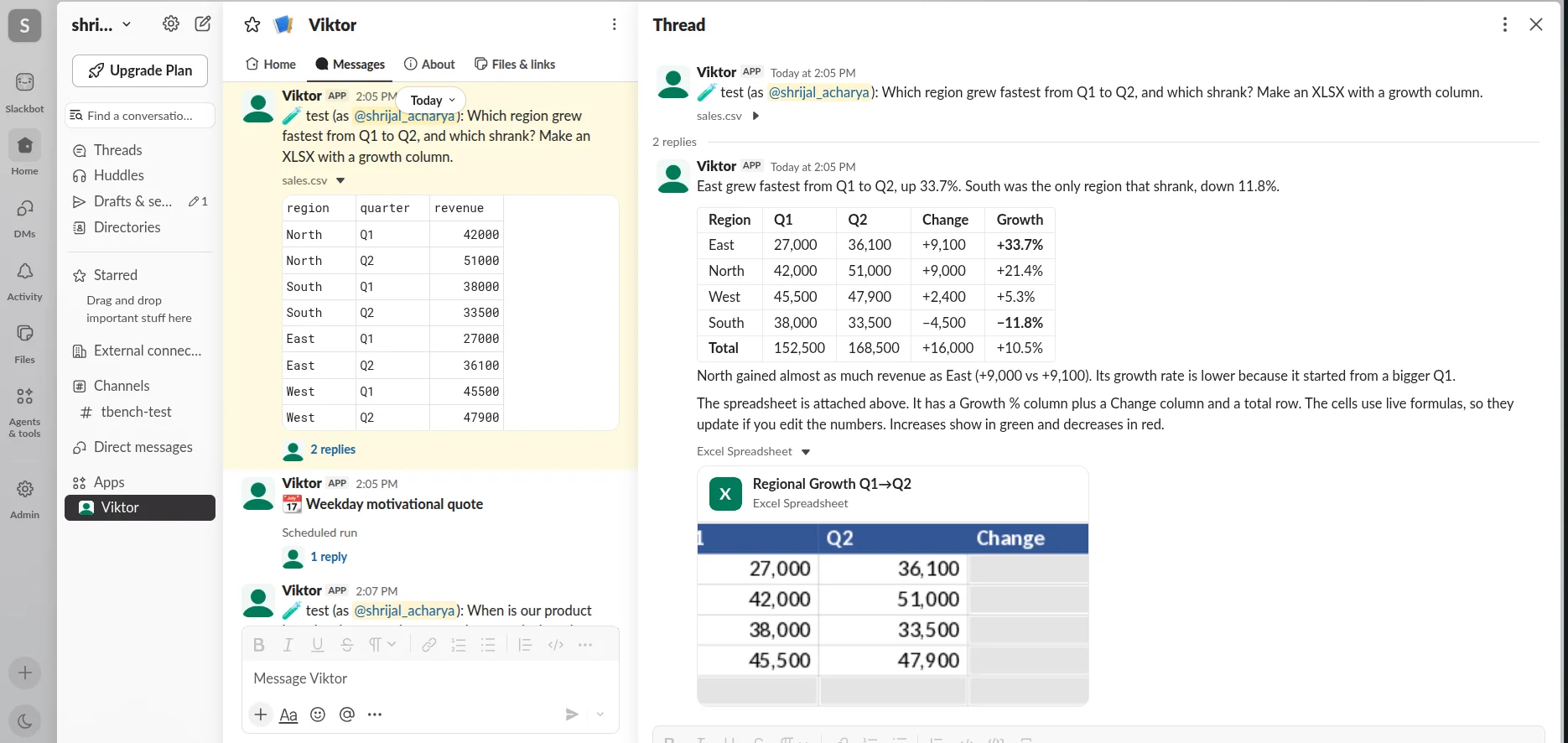
They're copied into /workspace/inbox before the run starts, so you can just drop a CSV into a DM and ask Viktor to do something with it.
Part 5: Approvals
You can tell the model "always ask before sending an email" in the prompt, and it'll follow that most of the time.
But "most of the time" isn't good enough when the thing has access to real apps.
So approvals are enforced in code using the Agent SDK's canUseTool callback.
Every tool call goes through a small function that decides whether it's safe to run automatically:
// 👇 packages/agent/src/policy.ts
export function isReadOnlySlug(slug: string): boolean {
  const words = slug.toUpperCase().split("_");<p></p>
<p>  // Drafts are reviewable by a human before they go anywhere.
  if (
    words.includes("DRAFT") &&
    !words.includes("SEND") &&
    !words.includes("DELETE")
  )
    return true;</p>
<p>  if (words.some((w) => WRITE_VERBS.has(w))) return false;
  return words.some((w) => READ_VERBS.has(w));
}</p>
Composio tool slugs are pretty consistent:
GMAIL_SEND_EMAIL, GITHUB_CREATE_ISSUE, GOOGLESHEETS_BATCH_GET etc.
So splitting on _ and checking for verbs like SEND, CREATE, DELETE and MERGE works pretty good even if it feels a bit hacky. 😉
Reads go through automatically. Writes need approval.
Anything unknown needs approval too.
For COMPOSIO_MULTI_EXECUTE_TOOL, the policy checks every nested tool in the batch, so the agent can't put one send operation in next to a bunch of reads.
When something does need approval, the worker saves it, posts a card, and pauses the agent until someone clicks:
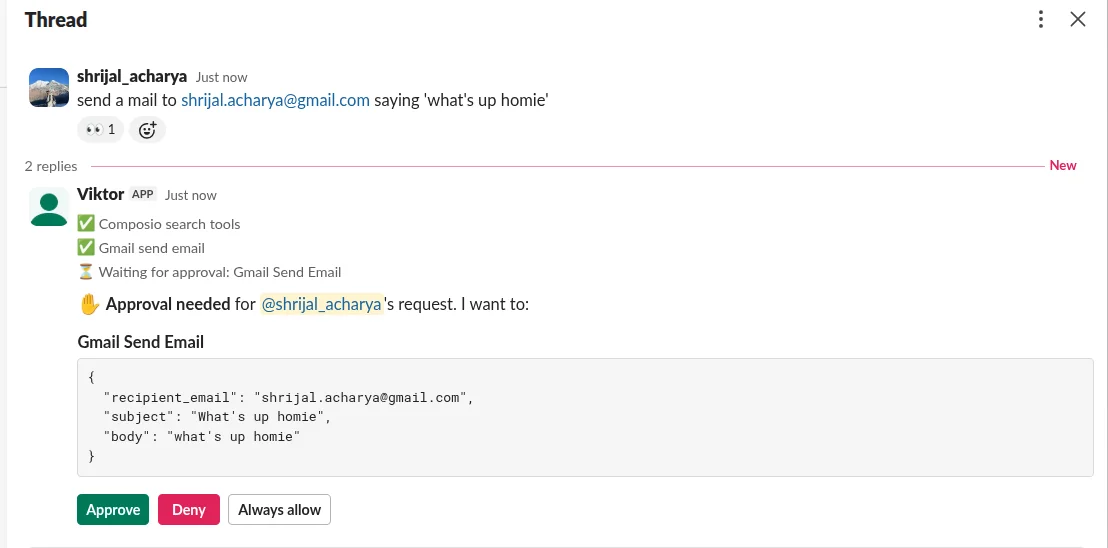
// 👇 apps/worker/src/approval-gate.ts
export function approvalGate(ctx: GateContext): CanUseTool {
  return async (toolName, input, { signal }) => {
    const decision = decide(toolName, input, {
      autoApproved: ctx.autoApproved,
    });<p></p>
<pre><code>if (decision.action === "allow")
  return { behavior: "allow", updatedInput: input };

const approval = await createApproval({
  /* ...run, tool, actions, requester */
});

const posted = await slack.chat.postMessage({
  channel: ctx.channelId,
  thread_ts: ctx.threadTs,
  blocks: approvalCard({
    id: approval.id,
    calls: callsFor(input, decision.actions) /* ... */,
  }),
});

const outcome = await waitForApproval(
  approval.id,
  env().APPROVAL_TIMEOUT_MS,
  signal /* ... */,
);

if (outcome === "approved")
  return { behavior: "allow", updatedInput: input };

return {
  behavior: "deny",
  message:
    "A teammate denied this action. Do not retry it; explain what was not done and offer alternatives.",
};
}; }
There's a slightly annoying part here.
The approval click lands on the gateway, but the agent waiting for that answer is running on a worker, which might be on a completely different machine.
I used Redis pub/sub to connect the two:
// 👇 packages/queue/src/signals.ts
export function waitForApproval(id, timeoutMs, signal, alreadyDecided) {
const ready = ensureSubscriber();<p></p>
<p> return new Promise((resolve) => {
const done = (outcome) => {
/* clear timer, remove waiter */
resolve(outcome);
};</p>
<pre><code>const timer = setTimeout(() => done("expired"), timeoutMs);
waiters.set(id, done);
// Only check the database once the subscription is live, so no decision falls in between.
ready.then(alreadyDecided).then((outcome) => outcome && done(outcome));
}); }
That last line took me a while to get right. 🥱
If somebody clicks Approve really quickly, before the worker has subscribed, Redis can publish the message before anybody is listening.
Then the worker happily waits 15 minutes for an approval that already happened. 🫠
So the worker subscribes first, and only then checks the database to see whether a decision already landed.
On the gateway side, the decision is written with UPDATE ... WHERE status = 'pending'. That means a double click, or two people clicking at once, can't both win.
Only the person who asked for the action, or a workspace admin, can approve it.
Admins also get Always allow, which adds that tool to an allowlist for the workspace.
Part 6: Memory Handling
Memories are short, self-contained facts like:
Our fiscal year starts in April.
They can also have an embedding attached.
Search is hybrid: normal Postgres full-text search, plus pgvector cosine similarity if you set a VOYAGE_API_KEY.
The two rankings are merged using reciprocal rank fusion.
Basically, instead of trying to compare a text-search score directly with a vector similarity score, we just score each result based on where it appeared in each list:
// 👇 packages/db/src/repos/memories.ts
export function fuseRankings<T extends { id: string }>(
  lists: T[][],
  limit: number,
  k = 60,
): T[] {
  const scores = new Map<string, { item: T; score: number }>();<p></p>
<p>  for (const list of lists) {
    list.forEach((item, rank) => {
      const entry = scores.get(item.id) ?? { item, score: 0 };
      entry.score += 1 / (k + rank + 1);
      scores.set(item.id, entry);
    });
  }</p>
<p>  return [...scores.values()]
    .sort((a, b) => b.score - a.score)
    .slice(0, limit)
    .map((e) => e.item);
}</p>
I ran into a small bug here, thought to share it with you.
When I tested this live, I told Viktor the launch moved to Nov 14 and that our fiscal year starts in April.
Then in a fresh DM I asked:
"When is our product launch, who owns the press release, and when does our fiscal year start?"
It got the fiscal year right and somehow had no idea about the launch.
The launch memory was literally sitting in the database. The problem was websearch_to_tsquery.
It ANDs every word.
So Viktor was basically looking for one memory containing "product" AND "launch" AND "fiscal" AND "year".
That obviously doesn't exist because those are separate facts. The fix was one line: OR the terms instead and let the ranking sort it out.
// 👇 packages/db/src/repos/memories.ts
// Match any term, not all of them: a question often touches several separate memories.
const tsquery = sql<code>replace(plainto_tsquery('english', ${input.query})::text, ' & ', ' | ')::tsquery</code>;After that, all three answers came back properly.
Memories reach the model in a few different ways.
The top matches are injected into every turn, there's a recall tool for explicit searches, and watched channels can save useful facts they notice.
We'll get to that part in a sec.
Skills: learning how your team does things
On top of memory, Viktor also writes skills.
These are Markdown playbooks it saves after doing a multi-step task that looks like something it'll probably need again.
For example, it might save how your team likes a weekly KPI report formatted, which tool slugs it used, and where it left the script inside /workspace.
The skill index is included in every work it does. If a task looks relevant, Viktor can open it up and use it again.
That's basically how it starts getting better at the way your team does things over time.
Part 7: Working Without Being Asked
This is where Viktor starts becoming a bit more than something you just chat with.
There are three parts.
Schedules
You can say:
Every weekday at 9:30, post a motivational quote here.
Viktor turns that into a real cron job.
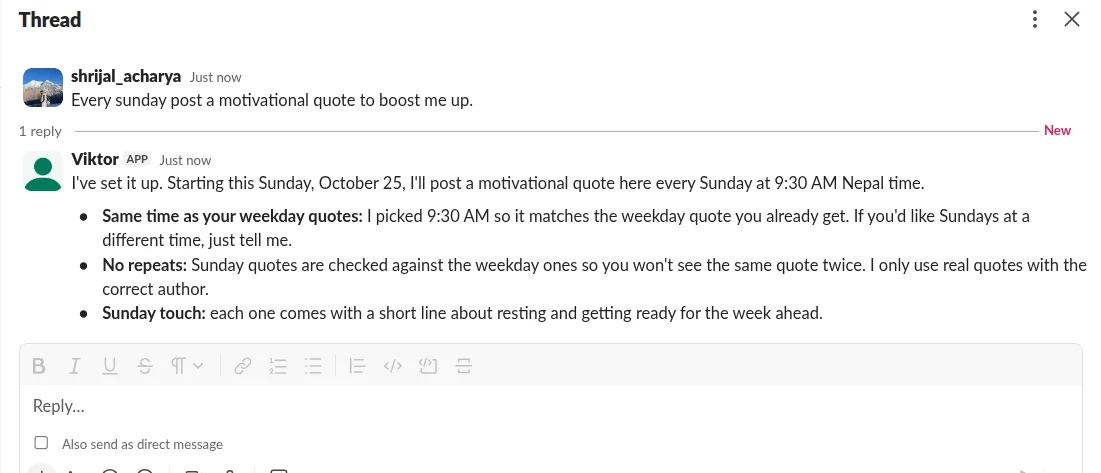
The agent calls a schedule_create tool, the schedule is stored in Postgres, and it's mirrored into a BullMQ job scheduler using the workspace's timezone:
// 👇 packages/queue/src/schedules.ts
export async function upsertSchedule(spec: ScheduleSpec): Promise<void> {
  await queue("scheduled-run").upsertJobScheduler(
    <code>schedule-${spec.id}</code>,
    { pattern: spec.cron, tz: spec.timezone },
    {
      name: "scheduled-run",
      data: { scheduleId: spec.id },
      opts: { attempts: 1 },
    },
  );
}
When the worker starts up, it re-registers every enabled schedule from Postgres.
So if Redis gets wiped, your schedules don't just disappear forever.
I also reject crons that fire more often than every 15 minutes, because I don't wanna flood the scheduler.
Event triggers
You can also do stuff based on events.
For example:
When I get an email with "invoice" in the subject, summarize it in #finance.
That becomes a Composio trigger.
The agent subscribes using trigger_subscribe, Composio watches Gmail, and when an email comes in it sends a signed webhook to the gateway.
The gateway verifies the signature, finds the subscription, and enqueues a job keyed by the event ID.
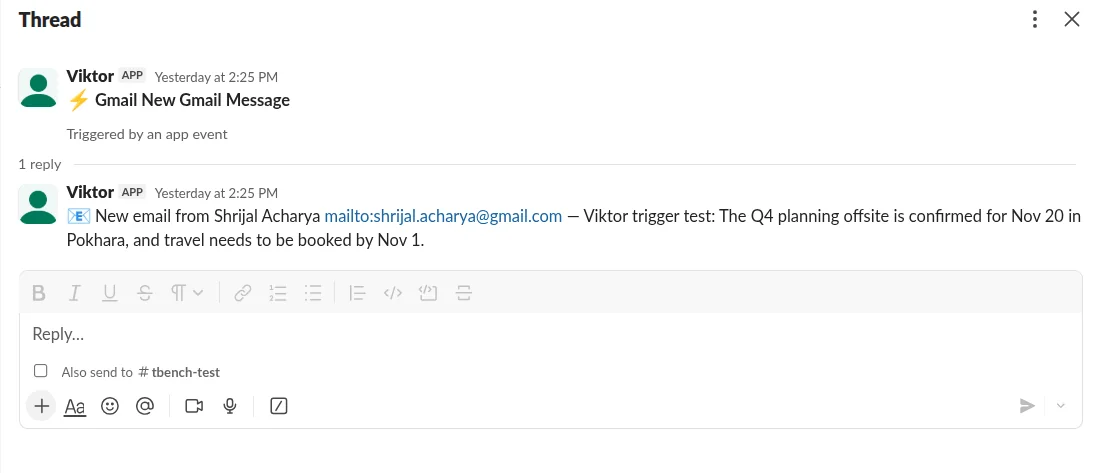
In my test, I sent myself an email called "Viktor trigger test", and about a minute later this appeared in the channel by itself:
📧 New email from Shrijal Acharya: Viktor trigger test: The Q4 planning offsite is confirmed for Nov 20 in Pokhara, and travel needs to be booked by Nov 1.
The event payload is also clearly marked as untrusted data before it goes to the model.
And even if the model somehow got fooled, the actual forward would still hit the approval gate.
Watched channels and the daily check-in
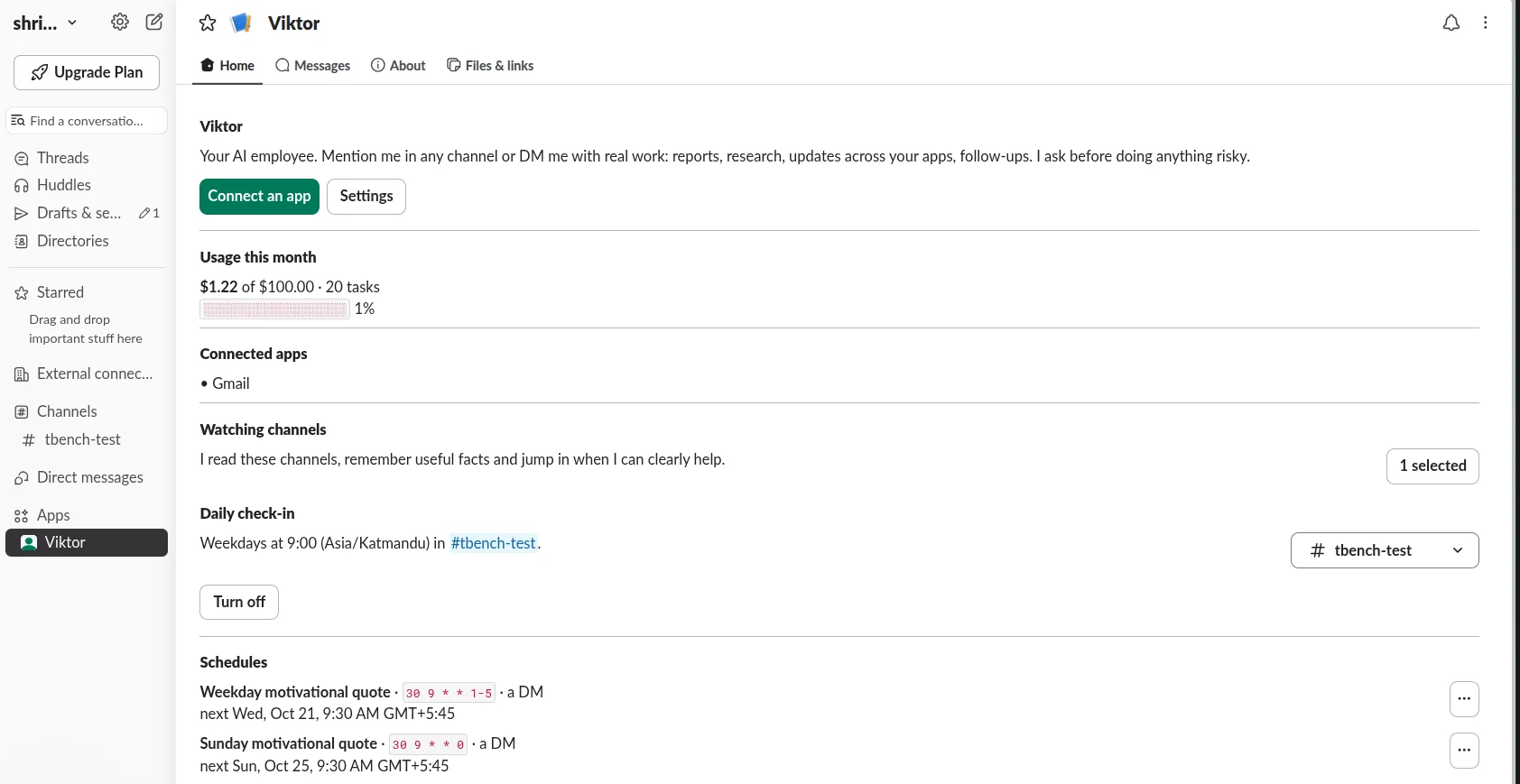
You can opt Viktor into channels from App Home.
It reads new messages there, but obviously running Opus on every single small messages would burn money for no reason.
So every message first goes through a cheap triage call on Claude Haiku 5.5:
// 👇 packages/agent/src/triage.ts
export const TriageSchema = z.object({
  action: z.enum(["ignore", "remember", "respond"]),
  reason: z.string().describe("One short sentence explaining the decision"),
  memory: z
    .string()
    .nullable()
    .describe(
      "When action is remember: the durable fact as one self-contained sentence",
    ),
});<p></p>
<p>const res = await client.messages.parse({
  model: env().FAST_MODEL, // claude-haiku-5-5
  max_tokens: 1024,
  system: SYSTEM,
  output_config: {
    effort: "low",
    format: zodOutputFormat(TriageSchema),
  },
  messages: [
    { role: "user", content: <code>...recent messages + newest message...</code> },
  ],
});</p>
The prompt makes ignore the default.
Only respond starts a full agent run, and proactive replies are capped at 6 per channel per hour.
I tested it with three messages:
"the coffee machine is broken again" = ignored
"Decision from today's sync: launch moves to Nov 14, and Sam owns the press release." = saved as a memory
"If our annual budget is 84,300 and marketing gets 15%, how much is that per month?" = answered in a thread

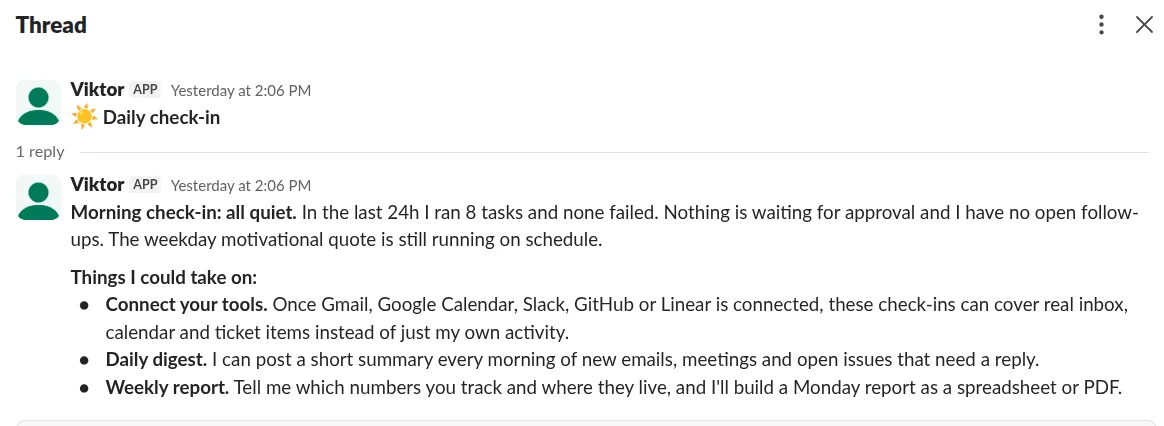
There's also a daily check-in every weekday at 9:00.
It gets a summary of the last 24 hours, including failed runs, pending approvals and active schedules, then posts a short briefing with up to three things it could help with.
Hooking It Up to Slack
Alright, time to actually put it in Slack. 🎉
I'm not going to walk through every click of creating a Slack app because Slack's own guide already does that better: 😪
The repo ships with a ready-made slack-manifest.yaml containing the scopes and events Viktor needs. There's one catch, though.
Slack needs a public HTTPS URL to send events to, and your laptop obviously doesn't have one.
So we need a tunnel.
Step 1: Start a tunnel
I used a Cloudflare quick tunnel.
You don't even need to install anything cloudflared if you already have Docker:
docker run --rm --network host cloudflare/cloudflared:2025.8.1 <br /> tunnel --no-autoupdate --url <a href="http://localhost:3000">http://localhost:3000</a>It'll print something like:
https://some-random-words.trycloudflare.com

Put that in .env:
PUBLIC_URL=<a href="https://some-random-words.trycloudflare.com">https://some-random-words.trycloudflare.com</a>⚠️ NOTE: Quick tunnel URLs change every time you restart
cloudflared. When that happens you'll need to updatePUBLIC_URL, the Slack manifest URLs and the Composio webhook again. For anything long-lived, use a named Cloudflare tunnel or a fixed ngrok domain.
Step 2: Create the Slack app from the manifest
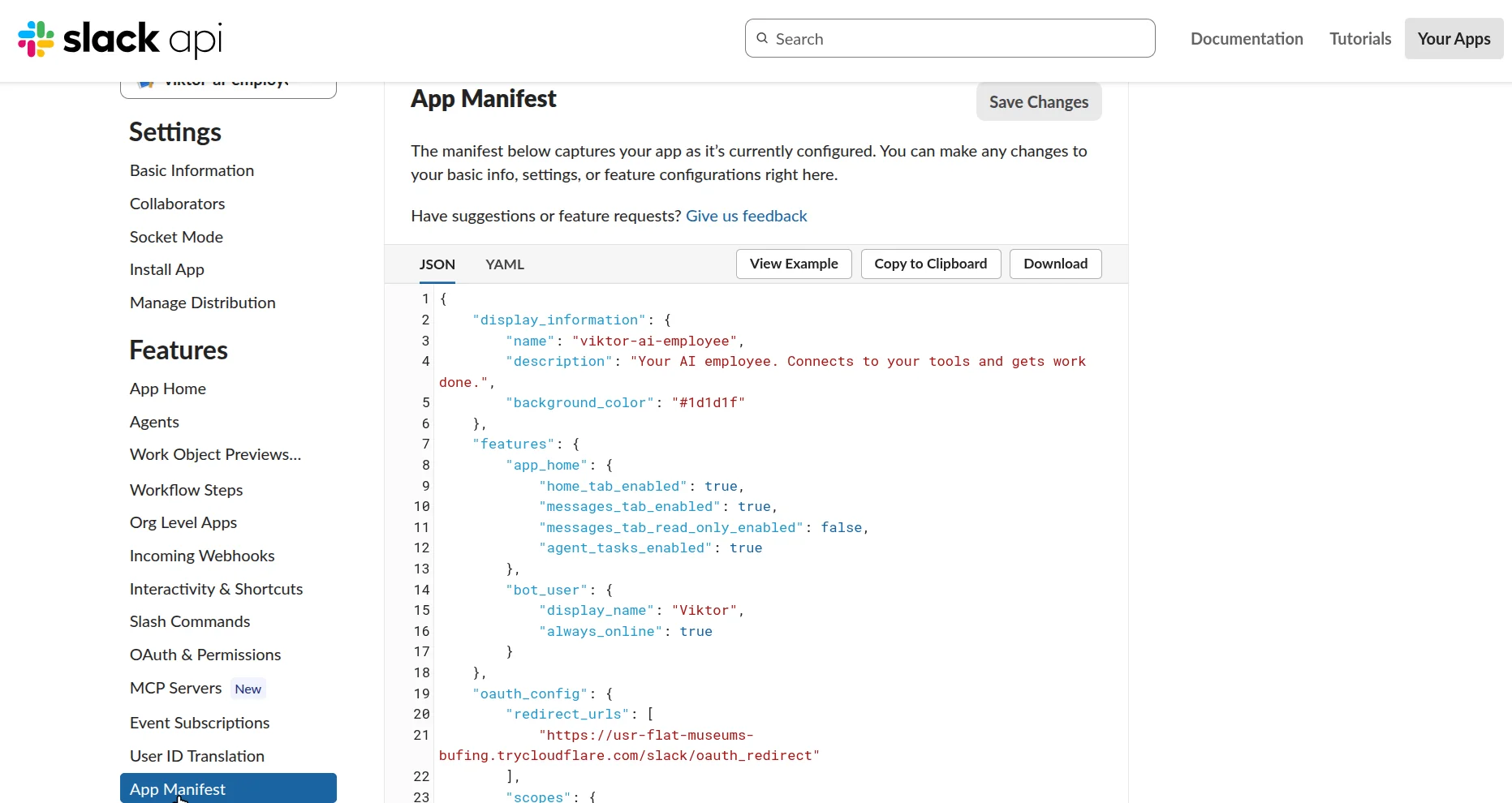
Replace https://viktor.example.com in slack-manifest.yaml with your tunnel URL.
There are three places to change: the OAuth redirect, events URL and interactivity URL.
Then create the app using Slack's manifest flow.
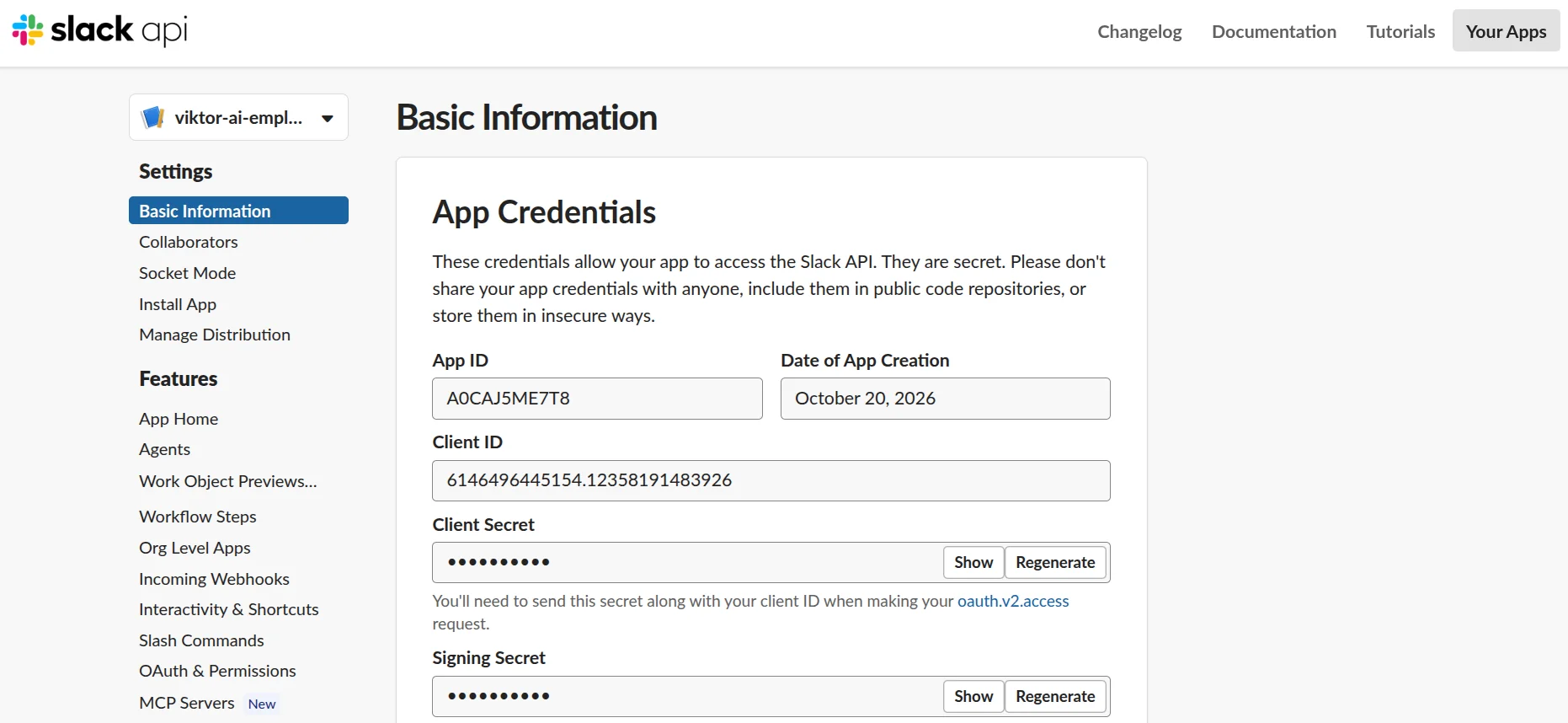
Copy the Client ID, Client Secret and Signing Secret into .env:
SLACK_CLIENT_ID=
SLACK_CLIENT_SECRET=
SLACK_SIGNING_SECRET=<p></p>
<h1>any random string, 16+ characters</h1>
<p>SLACK_STATE_SECRET=</p>
You'll also see an App ID on that page. We don't need it.
ℹ️ NOTE: Start the app before saving the manifest. Slack verifies the events URL the moment you save. Run
pnpm devfirst or it'll fail.
Step 3: Register the Composio webhook
For event triggers, Composio also needs to know where to send events.
Run:
pnpm --filter @viktor/gateway register-webhookIt'll print a secret.

Put that in .env as COMPOSIO_WEBHOOK_SECRET and restart pnpm dev.
💡 If you see
SSRF protection: unable to verify the hostname "viktor.example.com", yourPUBLIC_URLis probably still the placeholder. Composio refuses to send webhooks to a host that doesn't resolve, which is fair enough.
Step 4: Install it
Open: <your tunnel URL>/slack/install
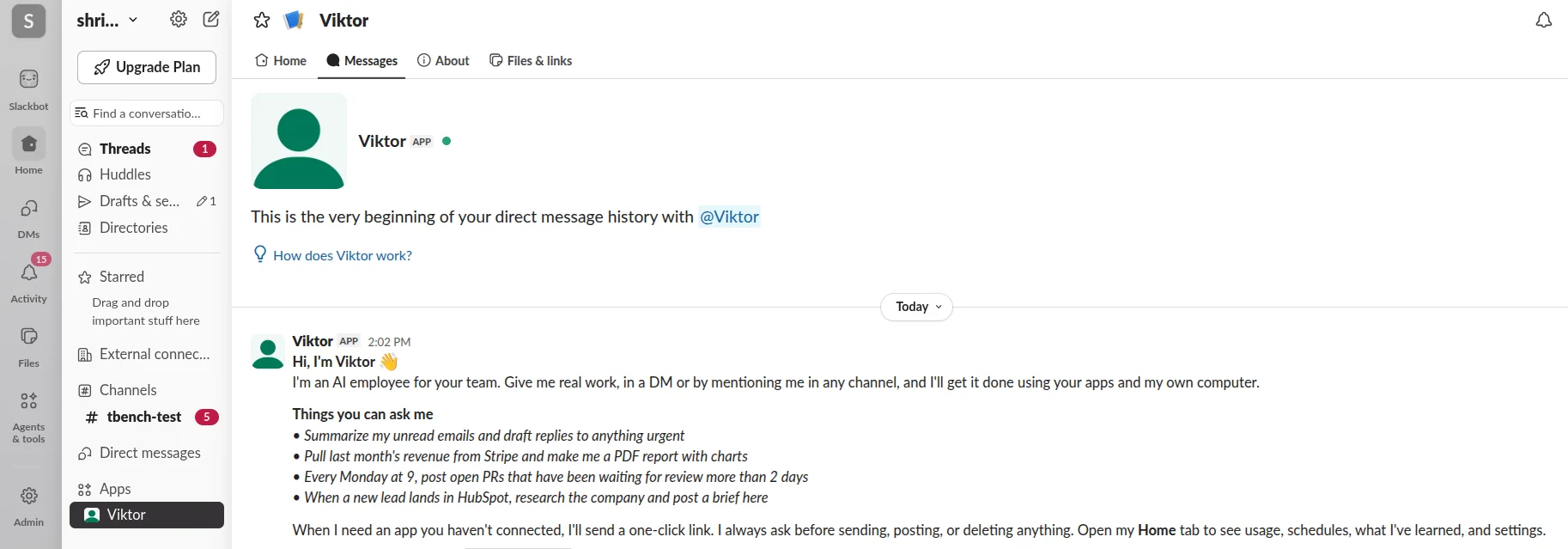
Click Allow, and Viktor should DM you a welcome message. 🎊
Viktor Clone in Action
Here's what normal use looks like.

There's also App Home.
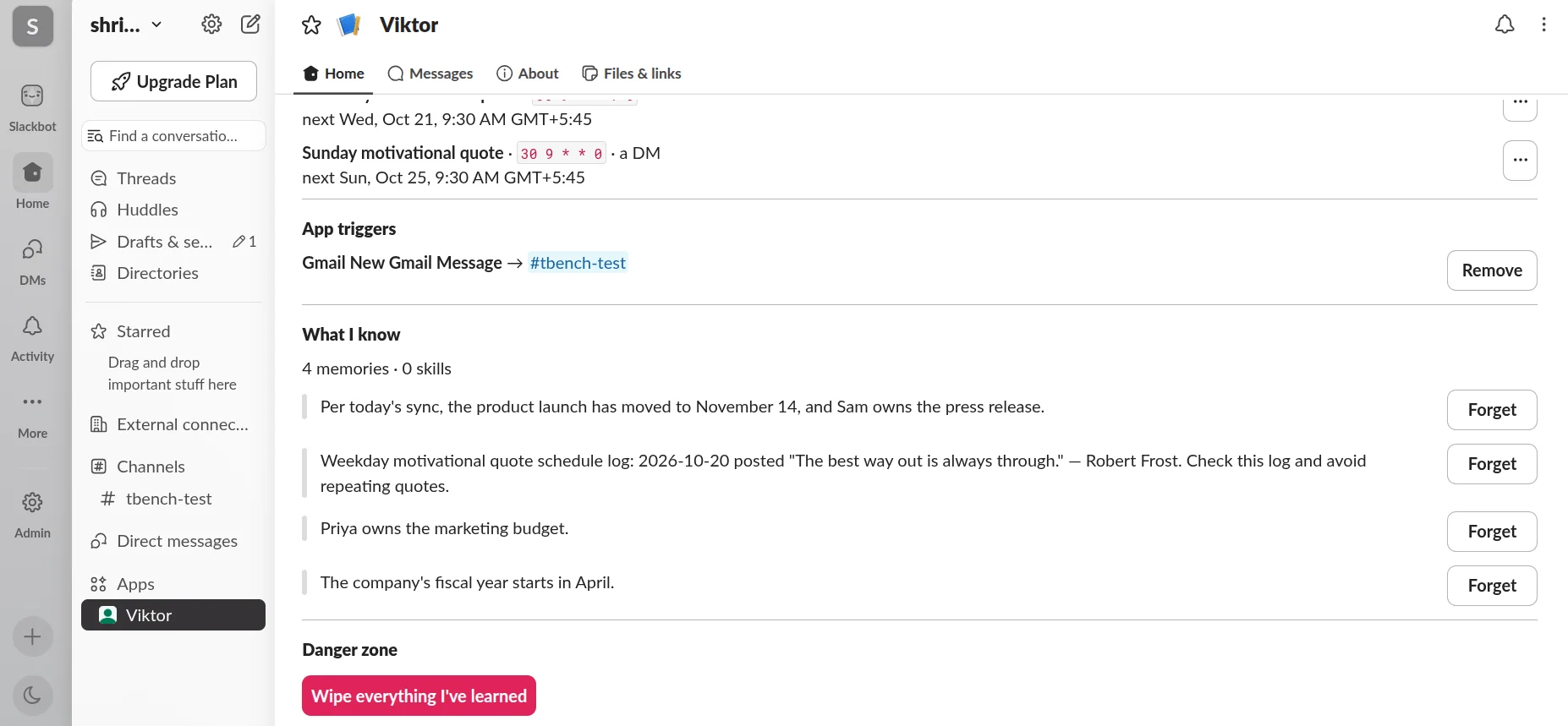
This is basically where you manage the whole thing: spend vs. monthly budget, connected apps, watched channels, schedules, triggers, memories, always-allowed actions, settings, etc., plus an option to wipe the bot's memory.
What Does It Cost?
During my full Slack test, Viktor ran 17 tasks.
That included DMs, a PDF report, two Excel files, CSV analysis, a schedule, a check-in, channel triage, two approved emails and a Gmail trigger.
The total came out to $0.93 on Claude Opus 5.5.
Most simple tasks were somewhere between $0.01 and $0.10.
Testing on Haiku is basically nothing compared to the full Opus runs.
Conclusion
And that's basically it. 🙌
Under the hood, there's no magical new "AI employee" primitive here. It's an agent in Slack with a bunch of useful stuff built around it.
You have:
a gateway that doesn't block Slack, and workers that can resume any thread
Composio meta tools for reaching 1,500+ apps without loading every tool into context
a locked-down computer where it can make real files and run code
approvals enforced in code
memory and skills so it can keep useful context around
schedules, triggers and cheap triage so it can do things without being asked every time
The full source is on GitHub: shricodev/viktor-ai-employee.
And just like that, you have your own AI employee. It’s time to get him to work.
That’s it for this one. I'll see you in the next one. ✌️

 Get started



