




MCP just had its biggest release since launch.
On July 28, the maintainers shipped the 2026-07-28 spec, and it changes how MCP servers work at a pretty fundamental level. The handshake is gone. Sessions are gone. Three long-standing features are deprecated.
The maintainers themselves called it the most substantial change since authorization was added. Their words, not mine.
Sounds scary. But it actually makes MCP servers much easier to deploy. And what am I here for? I'm here to help you build and deploy one.
Your MCP server is now just a regular stateless HTTP service. Round-robin load balancing, autoscaling, and caching all work. No sticky sessions or shared session state.
In this guide, we'll build a small MCP server on the new spec, connect a client to it, see every headline feature actually running, and then deploy it to Cloudflare Workers. For free.
ℹ️ All the code here uses the new TypeScript SDK v2, released alongside the spec. If you're on the old
@modelcontextprotocol/sdkpackage, that's v1 now.
What's Covered
What actually changed in the 2026-07-28 spec in short
Building an MCP server with the new SDK v2
Stateless core in action
MRTR: how a tool requests user confirmation without holding a stream open
A graceful fallback for clients that don't speak MRTR yet (there are many)
Cacheable tool lists with
ttlMsTesting it with a client and raw curl
Deploying it to Cloudflare Workers on the free plan
Changes in the new MCP Spec (2026-07-28)
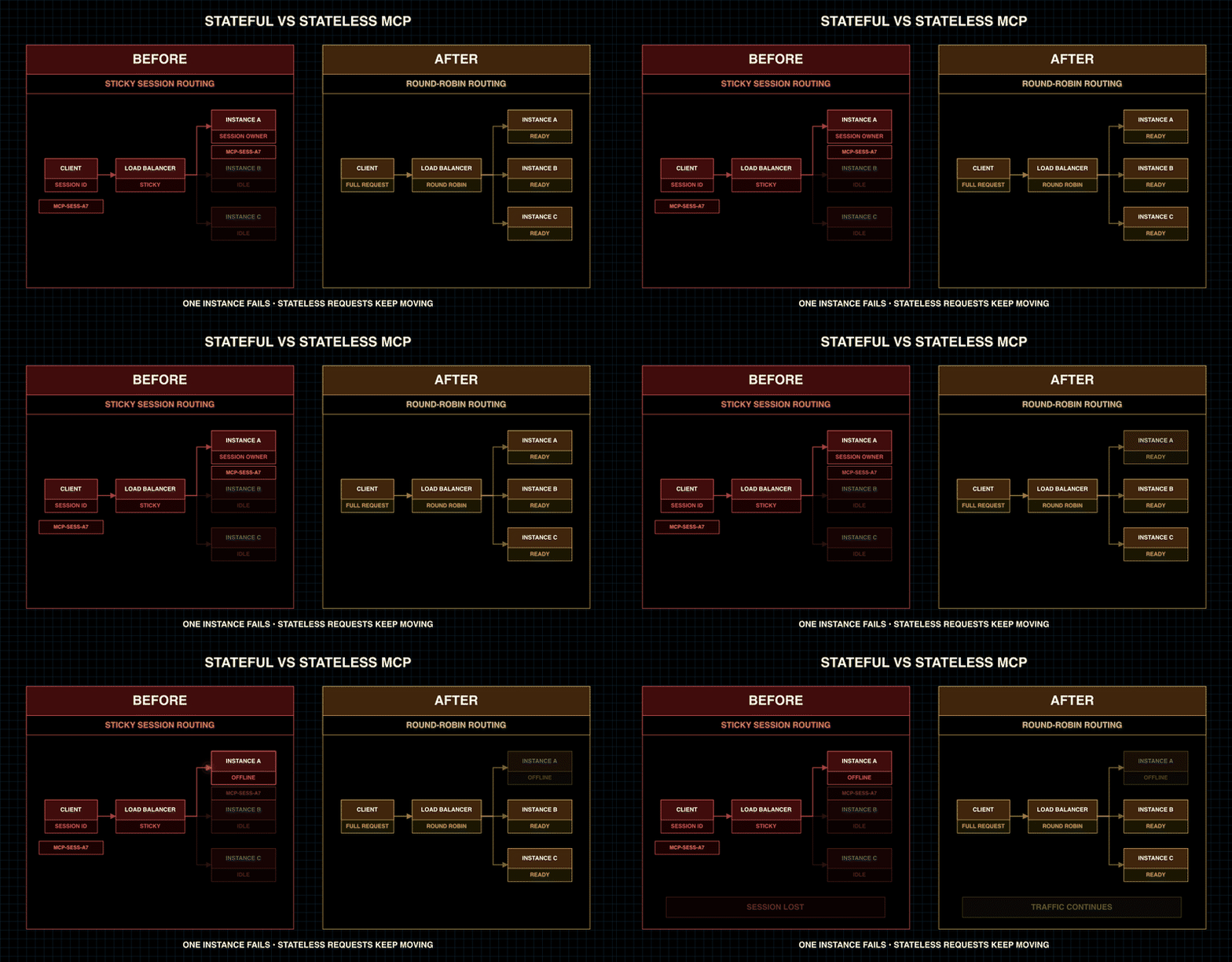
Quick rundown of what's new. If you want the full changelog, it's on the official spec site.
A detailed analysis of the new MCP Spec: Statelessness MCP Apps, and Auth
The handshake is gone
The initialize / initialized exchange and the MCP-Session-Id header are officially retired.
Every request is now self-describing. It carries its own protocol version, client identity, and capabilities in _meta. Any request can land on any server instance behind a plain load balancer. Such a relief!!
There's an optional server/discover RPC if a client wants capabilities up front. But it's optional. One bare POST is a complete conversation now.
Multi Round-Trip Requests (MRTR)
This one is my favourite.
Before, if a tool needed something from the user mid-call, such as confirmation or a missing parameter, the server had to push an elicitation/create request back over a held-open stream. That meant you needed a held-open stream, which was bad for stateless deployments.
MRTR flips it. The server returns resultType: "input_required" with the questions it needs answered, and closes the connection. The client collects the answers and retries the original call with them attached, plus an opaque requestState token so the server knows where it left off.
No open streams. No sessions. Interactive tools on fully stateless infra.
Header-based routing
Requests now carry Mcp-Method and Mcp-Name HTTP headers. Your gateway, rate limiter, or WAF can route and meter on headers without parsing JSON bodies.
Cacheable list results
tools/list, prompts/list, resources/list, and resources/read responses now carry ttlMs and cacheScope fields, modelled on HTTP's Cache-Control. Clients cache your tool catalogue instead of re-fetching it every time they connect.
Extensions framework + deprecations
Tasks moved out of the experimental core into an official extension (io.modelcontextprotocol/tasks). MCP Apps and Enterprise Managed Authorisation live there too. You can build your own extensions as well.
And the deprecations:
Roots, Sampling, and Logging are deprecated. They keep working for at least 12 months, but new implementations shouldn't use them.
The legacy HTTP+SSE transport is deprecated with a year-long offramp.
Dynamic Client Registration is deprecated in favour of Client ID Metadata Documents (CIMD).
There's also a formal deprecation policy now: a 12-month minimum window for anything marked deprecated. So you get to plan upgrades, which is nice!
The SDK Split
One more thing before we build: the TypeScript SDK is no longer one package.
v2 splits it into @modelcontextprotocol/server, @modelcontextprotocol/client, and thin framework adapters (@modelcontextprotocol/hono, express, fastify, node).
Building an MCP Server
Finally, we're onto the build. We will build a quick tiny deploy bot over MCP.
It has three tools:
deployasks the user for confirmation before deploying (MRTR in action).list_deploymentsreads back the deployment historyserver_statsproves a fresh server instance handled every request
Here's the trick that pays off at deploy time: all the MCP logic lives in one platform-neutral file (bot.ts), and each platform gets a tiny entry file. Node gets server.ts. Cloudflare gets worker.ts. Both are about ten lines. An MCP server on the new spec is just a fetch handler; the platform is a serving shim.
You'll understand everything along the way.
Step 1: Install the SDK v2
Run the following command:
mkdir updated-mcp-spec-bot && cd updated-mcp-spec-bot
npm init -y && npm pkg set type=module
npm install @modelcontextprotocol/server @modelcontextprotocol/client \
  @modelcontextprotocol/hono @hono/node-server hono zod tsx
ℹ️ On TypeScript 6+, add
"types": ["node"]to your tsconfigcompilerOptionsafter installing@types/node. TS 6 no longer auto-includes@types/*, and you'll getCannot find name 'process'errors without it. Ask me how I know. 😴
Step 2: The server logic
Create bot.ts. This is the whole MCP server, with zero platform code in it:
// 👇 bot.ts
<p>import type {
CallToolResult,
InputRequiredResult,
} from "@modelcontextprotocol/server";
import {
acceptedContent,
CLIENT_CAPABILITIES_META_KEY,
createRequestStateCodec,
inputRequired,
McpServer,
} from "@modelcontextprotocol/server";
import * as z from "zod/v4";</p>
<p>const deployments: { env: string; at: string }[] = [];
let requestsServed = 0;</p>
<p>type DeployState = { step: "confirm"; env: string };</p>
<p>// set STATE_KEY in production so all instances share the secret
// lazy init: Workers forbids generating random values at module scope
let codec: ReturnType<typeof createRequestStateCodec<DeployState>> | undefined;
function stateCodec() {
if (!codec) {
const key = globalThis.process?.env?.STATE_KEY;
codec = createRequestStateCodec<DeployState>({
key: key
? new TextEncoder().encode(key)
: crypto.getRandomValues(new Uint8Array(32)),
ttlSeconds: 600,
});
}
return codec;
}</p>
<p>const CONFIRM_SCHEMA = {
type: "object" as const,
properties: { confirm: { type: "boolean" as const } },
required: ["confirm"],
};</p>
<p>// runs per request, keep it cheap
export function buildServer(): McpServer {
requestsServed++;</p>
<p> const server = new McpServer(
{ name: "updated-mcp-spec-bot", version: "1.0.0" },
{
cacheHints: {
"tools/list": { ttlMs: 30_000, cacheScope: "public" },
},
requestState: { verify: (...a) => stateCodec().verify(...a) },
},
);</p>
<p> server.registerTool(
"list_deployments",
{
title: "List deployments",
description: "List all deployments recorded by this server.",
},
async (): Promise<CallToolResult> => ({
content: [
{
type: "text",
text: deployments.length
? deployments.map((d) => <code>${d.env} @ ${d.at}</code>).join("\n")
: "No deployments yet.",
},
],
}),
);</p>
<p> server.registerTool(
"server_stats",
{
title: "Server stats",
description:
"How many requests this process served, each on a fresh server instance.",
},
async (): Promise<CallToolResult> => ({
content: [
{
type: "text",
text: <code>pid=${globalThis.process?.pid ?? "edge"} requestsServed=${requestsServed}</code>,
},
],
}),
);</p>
<p> server.registerTool(
"deploy",
{
title: "Deploy",
description:
"Deploy to an environment. Requires confirmation: interactive clients get a prompt, others must pass confirm: true.",
inputSchema: z.object({
env: z.enum(["staging", "prod"]).describe("Target environment"),
confirm: z
.boolean()
.optional()
.describe("Set true to confirm, only after asking the user"),
}),
},
async (
{ env, confirm },
ctx,
): Promise<CallToolResult | InputRequiredResult> => {
const caps =
(ctx.mcpReq.envelope as Record<string, unknown> | undefined)?.[
CLIENT_CAPABILITIES_META_KEY
] ?? server.server.getClientCapabilities();
const canElicit = Boolean(
(caps as { elicitation?: unknown } | undefined)?.elicitation,
);</p>
<pre><code> if (canElicit) {
const state = ctx.mcpReq.requestState<DeployState>();
const confirmed = acceptedContent<{ confirm: boolean }>(
ctx.mcpReq.inputResponses,
"confirm",
);
if (!state || !confirmed?.confirm) {
return inputRequired({
inputRequests: {
confirm: inputRequired.elicit({
message: `Deploy to ${env}? This will go live.`,
requestedSchema: CONFIRM_SCHEMA,
}),
},
requestState: await stateCodec().mint({ step: "confirm", env }),
});
}
const record = { env: state.env, at: new Date().toISOString() };
deployments.push(record);
return {
content: [
{ type: "text", text: `Deployed to ${record.env} at ${record.at}` },
],
};
}
// fallback for clients without elicitation support
if (confirm !== true) {
return {
content: [
{
type: "text",
text: `Deploy to ${env} needs confirmation. Ask the user, then call deploy again with confirm: true.`,
},
],
};
}
const record = { env, at: new Date().toISOString() };
deployments.push(record);
return {
content: [
{ type: "text", text: `Deployed to ${record.env} at ${record.at}` },
],
};
},
);
return server; }
A few things worth explaining here:
buildServer() runs on every single request. Not once at startup. Every request gets a brand-new McpServer instance.
If that surprises you, I get it. It surprised me too. But this is literally the canonical pattern from the SDK's own examples, and it's the whole point of the release.
Construction is just object creation and a handler map, microseconds of work. There's no protocol state to preserve anymore, so there's nothing to keep alive.
Per-request server construction, per-process resources. App state (our deployments array, the state codec, your DB pool in real life) lives at module level. The server instance is disposable.
The deploy tool never blocks. When it needs confirmation, it returns inputRequired(...) and the request is over. Done. Connection closed. The requestState token is the only thing that survives between rounds, and it round-trips through the client.
This means the client could tamper with it. That's why we seal it with createRequestStateCodec, so a tampered or expired state gets rejected with a wire-level error before our handler even runs.
Notice the codec is lazily created on first use instead of at module level. That looks like a pointless indirection on Node. It's not. Cloudflare Workers forbids generating random values in global scope, and this exact line is what lets the same file run on both platforms. Same story with the globalThis.process?. guards: Workers has no process global by default.
So the tool reads the client's declared capabilities from the per-request envelope (that's the CLIENT_CAPABILITIES_META_KEY lookup, with a legacy-connection fallback) and if:
Client supports elicitation, then the full MRTR confirmation flow
Client doesn't, then the tool accepts an optional
confirm: trueargument, and without it, it returns a plain instruction: "Ask the user, then call deploy again with confirm: true"
Step 3: The Node entry
Create server.ts. This is everything Node-specific:
// 👇 server.ts<p></p>
<p>import { serve } from "@hono/node-server";
import { createMcpHonoApp } from "@modelcontextprotocol/hono";
import { createMcpHandler } from "@modelcontextprotocol/server";
import { buildServer } from "./bot.js";</p>
<p>const handler = createMcpHandler(buildServer);</p>
<p>// in production set ALLOWED_HOSTS to your public domain
const allowedHosts = process.env.ALLOWED_HOSTS?.split(",").map((h) => h.trim());
const app = createMcpHonoApp(allowedHosts ? { allowedHosts } : {});
app.get("/healthz", (c) => c.text("ok"));
app.all("/mcp", (c) => handler.fetch(c.req.raw));</p>
<p>const port = Number(process.env.PORT ?? 3000);
const hostname = process.env.HOST ?? "127.0.0.1";
serve({ fetch: app.fetch, port, hostname }, () => {
console.error(<code>updated-mcp-spec-bot listening on <http://$>{hostname}:${port}/mcp</code>);
});</p>That's it. createMcpHandler gives you a standard fetch-style handler, and Hono is just routing. createMcpHonoApp() validates Host/Origin headers (DNS rebinding protection) and only allows localhost out of the box, so the ALLOWED_HOSTS env var is there for when this runs behind a real domain.
Everything is env-driven (PORT, HOST, ALLOWED_HOSTS, STATE_KEY) because that's what a VM or a PaaS like Railway wants. We won't use this file for the Cloudflare deploy, but it's your path if you'd rather run this on Node anywhere.
Step 4: The client
Create client.ts:
// 👇 client.ts<p></p>
<p>import {
Client,
StreamableHTTPClientTransport,
} from "@modelcontextprotocol/client";</p>
<p>const url = process.env.MCP_URL ?? "<<a href="http://127.0.0.1:3000/mcp">http://127.0.0.1:3000/mcp</a>>";</p>
<p>const client = new Client(
{ name: "mcp-demooo-client", version: "1.0.0" },
{
capabilities: { elicitation: { form: {} } },
versionNegotiation: { mode: "auto" }, // use 2026-07-28 when the server does
},
);</p>
<p>// The elicitation handler: in a real app this renders a confirm dialog.
// Here we auto-accept and log what the server asked.
client.setRequestHandler("elicitation/create", async (request) => {
const { message } = request.params as { message: string };
console.log(<code>\n[elicitation] server asks: "${message}" -> answering yes</code>);
return { action: "accept", content: { confirm: true } };
});</p>
<p>await client.connect(new StreamableHTTPClientTransport(new URL(url)));
console.log(
<code>connected, negotiated protocol: ${client.getNegotiatedProtocolVersion()}</code>,
);</p>
<p>const tools = await client.listTools();
const { ttlMs, cacheScope } = tools as { ttlMs?: number; cacheScope?: string };
console.log(<code>tools/list: ${tools.tools.map((t) => t.name).join(", ")}</code>);
console.log(<code>cache hints: ttlMs=${ttlMs} cacheScope=${cacheScope}</code>);</p>
<p>await client.listTools();
console.log("second listTools served from cache");</p>
<p>const before = await client.callTool({ name: "list_deployments" });
console.log(
<code>list_deployments: ${(before.content[0] as { text: string }).text}</code>,
);</p>
<p>const result = await client.callTool({
name: "deploy",
arguments: { env: "prod" },
});
console.log(<code>deploy: ${(result.content[0] as { text: string }).text}</code>);</p>
<p>const stats = await client.callTool({ name: "server_stats" });
console.log(<code>server_stats: ${(stats.content[0] as { text: string }).text}</code>);</p>
<p>const after = await client.callTool({ name: "list_deployments" });
console.log(<code>list_deployments: ${(after.content[0] as { text: string }).text}</code>);</p>
<p>await client.close();</p>⚠️ Don't miss
versionNegotiation: { mode: 'auto' }. Without it, the client negotiates the legacy 2025-11-25 protocol and the MRTR flow fails. This took me half an hour to debug.
Notice the elicitation handler is a completely normal elicitation/create handler, the same one you'd write for the old flow. The SDK's auto-fulfilment engine routes the embedded MRTR request through it and retries the tool call for you. Your code doesn't even see the round trip.
Step 5: Run it
In two terminals (better with tmux), run the following:
In the first terminal:
npx tsx server.tsAnd in the other:
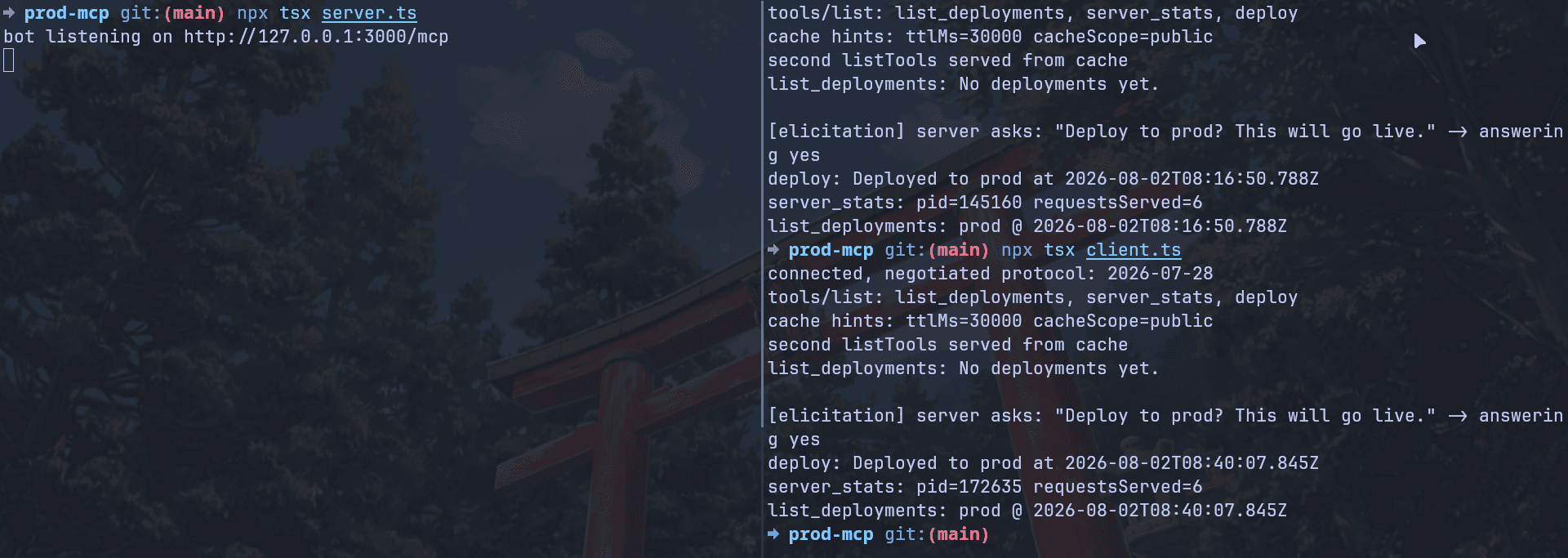
npx tsx client.tsThis is the kinda output you'd get:
connected, negotiated protocol: 2026-07-28<p></p>
<p>tools/list: list_deployments, server_stats, deploy
cache hints: ttlMs=30000 cacheScope=public</p>
<p>second listTools served from cache
list_deployments: No deployments yet.</p>
<p>[elicitation] server asks: "Deploy to prod? This will go live." -> answering yes
deploy: Deployed to prod at 2026-08-01T08:02:45.601Z</p>
<p>server_stats: pid=159984 requestsServed=6
list_deployments: prod @ 2026-08-01T08:02:45.601Z</p>
Every line here demonstrates a spec feature, and I designed it that way:
2026-07-28: we're on the new protocol, not the legacy fallbackttlMs=30000+served from cache: the secondlistTools()never touched the networkThe elicitation line, then the deploy: that was two
tools/callPOSTs. First one returnedinput_requiredand closed. Second had the answer plus the sealedrequestState. No stream was ever held open.requestsServed=6: six requests, six fresh server instances, one process. Under a load balancer, those six could've hit six different machines. How cool is that?The final
list_deployments: app state survived even though protocol state didn't.
And the math is here: 4 tool calls, plus 2 listTools() where only 1 hit the wire, plus 1 extra round for the MRTR retry = 6 server builds.
Step 6: Look at the raw wire
Let's see the "no handshake" thing. One bare curl, with no initialisation:
Run the following command:
curl -s -X POST <a href="http://127.0.0.1:3000/mcp">http://127.0.0.1:3000/mcp</a> <br /> -H "Content-Type: application/json" <br /> -H "Accept: application/json, text/event-stream" <br /> -H "MCP-Protocol-Version: 2026-07-28" <br /> -H "Mcp-Method: tools/call" -H "Mcp-Name: list_deployments" <br /> -d '{"jsonrpc":"2.0","id":1,"method":"tools/call","params":{"name":"list_deployments","arguments":{},"_meta":{"io.modelcontextprotocol/protocolVersion":"2026-07-28","io.modelcontextprotocol/clientInfo":{"name":"curl","version":"1.0"},"io.modelcontextprotocol/clientCapabilities":{}}}}'btw, this curl command was suggested by Claude.
Here's the result you get back:
{
  "result": {
    "content": [{ "type": "text", "text": "prod @ 2026-08-01T08:02:45.601Z" }],
    "resultType": "complete",
    "_meta": {
      "io.modelcontextprotocol/serverInfo": {
        "name": "updated-mcp-spec-bot",
        "version": "1.0.0"
      }
    }
  },
  "jsonrpc": "2.0",
  "id": 1
}
Two things worth noticing in that response.
The result already shows the prod deployment, because I ran this curl against the same server process the client just deployed through.
A totally separate client, no handshake, no session, and it reads the record the TypeScript client wrote. App state persists, protocol state doesn't.
Look at those headers. Mcp-Method and Mcp-Name are right there for your gateway to route on. And the _meta makes the request fully self-describing.
The DX here is genuinely good.
Deploying to Cloudflare Workers
We're deploying this to Cloudflare Workers, and it costs nothing: the free plan gives you 100,000 requests a day and a *.workers.dev subdomain, no credit card needed.
Why Workers? Because it's the natural way for a stateless MCP server. createMcpHandler returns a fetch-style handler, and fetch handlers are literally what Workers runs. The entire platform difference fits in one tiny file.
⚠️ Cloudflare has quick-start MCP templates (
npm create cloudflare -- --template=cloudflare/ai/demos/remote-mcp-authless). As of writing, Cloudflare's own docs warn that these still scaffold the deprecatedMcpAgentpath and say, "Do not use that path for a new server." It's the old stateful world, and it doesn't speak 2026-07-28. Skip the template.createMcpHandleris the recommended path, and it's what we're already using.
Step 1: The Worker entry
Create worker.ts:
// 👇 worker.ts<p></p>
<p>import { Hono } from "hono";
import { createMcpHandler } from "@modelcontextprotocol/server";
import { buildServer } from "./bot.js";</p>
<p>const handler = createMcpHandler(buildServer);</p>
<p>const app = new Hono();
app.get("/healthz", (c) => c.text("ok"));
app.all("/mcp", (c) => handler.fetch(c.req.raw));</p>
<p>export default app;</p>
Eleven lines. Same buildServer, same tools, same MRTR flow.
Two deliberate differences from the Node entry:
Plain
new Hono()instead ofcreateMcpHonoApp(). The Host validation increateMcpHonoAppis DNS rebinding protection for localhost servers. Behind Cloudflare's edge, it just gets in the way.No
serve(...). Workers calls your exported fetch handler itself.
Step 2: The wrangler config
Wrangler is Cloudflare's CLI for Workers. It bundles your TypeScript (no build step needed), runs it locally on the real production runtime, manages secrets, and deploys.
npm install -D wranglerCreate wrangler.jsonc:
{
  "name": "updated-mcp-spec-bot",
  "main": "worker.ts",
  "compatibility_date": "2026-07-01",
  "compatibility_flags": ["nodejs_compat"]
}
The nodejs_compat flag fills in Node-ish globals so npm packages behave.
Step 3: Test on the real runtime, locally
npx wrangler devThis runs worker.ts on workerd, the same engine that runs in Cloudflare production, at http://localhost:8787. Point the client at it:
MCP_URL=<a href="http://localhost:8787/mcp">http://localhost:8787/mcp</a> npx tsx client.tsSame full output as the Node run: 2026-07-28 negotiated, cache hints, the MRTR deploy round-trip. Except one line:
server_stats: pid=1 requestsServed=6pid=1. That's the edge runtime saying hello. 🫡
Step 4: Deploy it
Create a free account at dash.cloudflare.com/sign-up if you don't have one, then:
npx wrangler loginSet the production requestState secret (this is the shared HMAC key, so every edge instance can verify tokens minted by any other):
openssl rand -hex 32          # copy the output
npx wrangler secret put STATE_KEY   # paste it when prompted
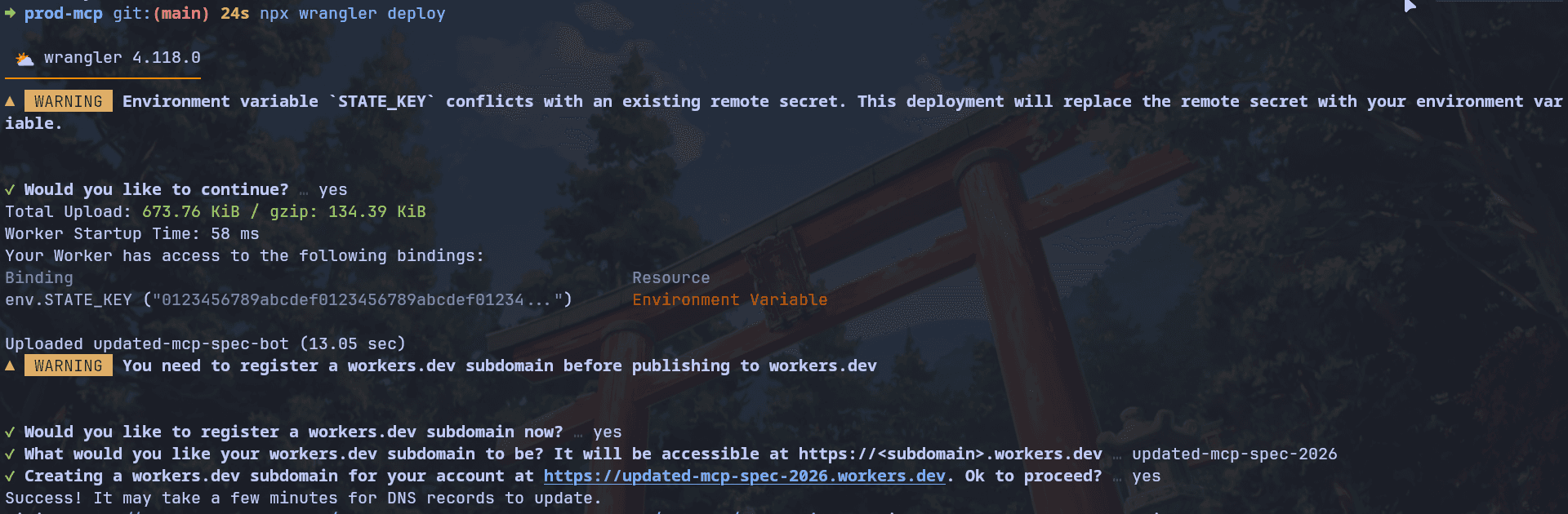
⚠️ One gotcha from my own run: the key must be at least 32 bytes or the codec throws at startup.
openssl rand -hex 32gives you 64 hex characters, which is plenty.
And ship it:
npx wrangler deployFirst deploy asks you to pick your free workers.dev subdomain. Ten seconds later:
<a href="https://updated-mcp-spec-2026.<your-subdomain>.workers.dev">https://updated-mcp-spec-2026.<your-subdomain>.workers.dev</a>Your MCP server is live on Cloudflare's global edge.
Step 5: Verify from the outside
Run the Step 6 curl against the public URL (just swap the host), hit /healthz in a browser, and then the real proof:
MCP_URL=<a href="https://updated-mcp-spec-2026.<your-subdomain>.workers.dev/mcp">https://updated-mcp-spec-2026.<your-subdomain>.workers.dev/mcp</a> npx tsx client.tsSame output. Except now it's on the internet.
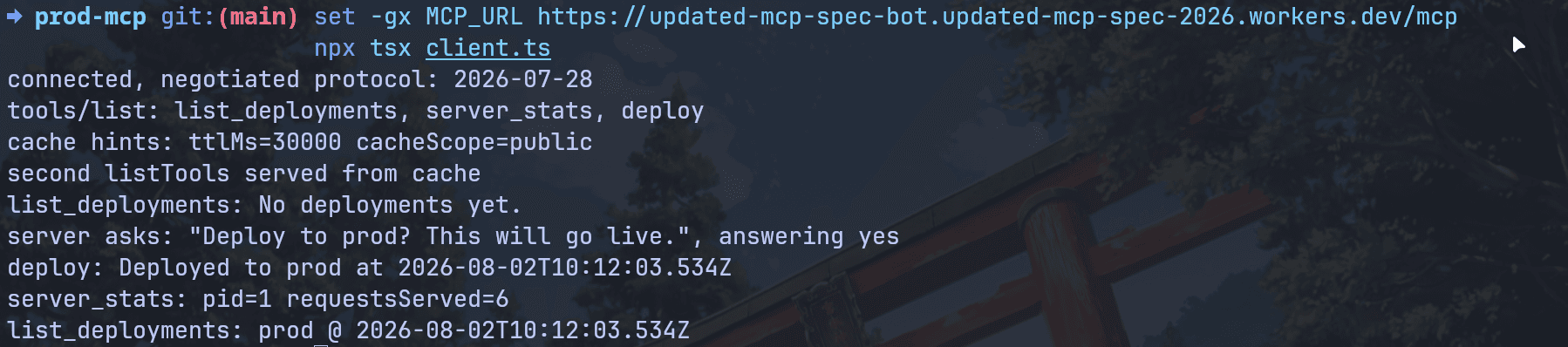
Connect a real agent to it, with no tunnel and no ngrok:
claude mcp add --transport http updated-mcp-spec-2026 <br /> <a href="https://updated-mcp-spec-bot.<your-subdomain>.workers.dev/mcp">https://updated-mcp-spec-bot.<your-subdomain>.workers.dev/mcp</a>Run /mcp in a Claude Code session to see it connected, then ask it to "deploy to staging". Since Claude Code doesn't declare the elicitation capability yet, our capability-aware fallback kicks in: the tool tells the agent to confirm with you first, you say yes in chat, and the deploy lands.
Bonus: run npx wrangler tail while you do it and watch the requests land in your production logs live.
One caveat
Our deployments array lives in memory, and on Workers, memory is extra ephemeral: isolates spin up and down per location, so two requests might see different histories. That's not a bug in the demo; it's the whole lesson of the spec, one more time. Protocol state is gone by design, and app state belongs in real storage. On Cloudflare, that's KV, D1, or Durable Objects.
Where Composio fits
What we just built is one server with three tools. Real agents need Gmail, Slack, Notion, GitHub, Linear, and fifty other things.
You could build and deploy a similar server for every one of those. Handle each app's OAuth. Keep up with every API change. Run all that infra.
Or you point your agent at Composio, which gives you 1000+ apps behind a single MCP endpoint:
https://connect.composio.dev/mcp
Build custom MCP servers (like the one we built) for your own domain logic, and let Composio be the app layer for everything else.
Conclusion
The 2026-07-28 spec is a breaking release, and it's the good kind of breaking.
MCP servers are now boring HTTP services. Deploy them like you deploy everything else: stateless, load-balanced, cacheable, autoscaled. The handshake is gone, sessions are gone, and interactive tools work thanks to MRTR anyway.
If you're starting a new server today: use SDK v2, use the createMcpHandler(buildServer) factory pattern, keep resources at module level, seal yourrequestState, and split your logic from your platform entry. We went from localhost to Cloudflare's global edge with an eleven-line file, and the same split works for Railway, Render, Fly, or a plain VM through server.ts.
If you have existing servers: you've got a 12-month window on everything deprecated. Use it.
You can find the entire source code in the repository.

 Get started



