


Local SEO is the work that gets a business into Google Maps results when nearby people search for a service.
Most owners do this work by hand, and many do it only when they have a free hour. They look at the Map Pack and read their reviews. Then they update their Google Business Profile, but they don't know which change will help most.
And agencies charge an arm and a leg for local SEO. Typical US prices start at $ 2,000, and there's no guarantee of outcome.
But what if I tell you Claude can do most of this work for you with the right tools? It pulls data from Google Maps and other sources, compares you with your competitors, and tells you what to fix first. It finds competitors that rank for your keyword from DataForSEO and Ahrefs and builds a content strategy to help you rank.
The best part is you don't need expensive subscriptions for any of the services. Just for what you need.
We will use Composio Instant, a connector-aggregating platform where you give Claude whatever tool it needs.
This guide starts with how Google ranks local results. Then it shows six local SEO tasks that Claude can do with Composio Instant. For each task, you get a prompt to copy, the tools that Claude used and the results of a real run. We did the runs on November 2, 2026, and the five live runs cost $0.16 in total.
How Google ranks local results
Google says that three things decide the local results:
Relevance: how well a Business Profile matches the search.
Distance: how far the business is from the person who searches.
Prominence: how well known the business is. Reviews, ratings and links to your website add to it.
Google also says a complete, accurate profile is more likely to show in local results. This includes your category, address, hours and attributes.
Each year, Whitespark asks local SEO experts to score the factors that they think matter. In the 2026 survey, 47 experts scored 187 factors. These were the top five factors for the Map Pack and Google Maps:
Rank | Factor | Score |
|---|---|---|
1 | Primary category on the Google Business Profile | 227 |
2 | Distance from the person who searches | 225 |
3 | Keywords in the business name | 223 |
4 | A physical address in the city of the search | 213 |
5 | The business is open at the time of the search | 189 |
The 2026 survey also scored each factor for AI search for the first time. The tasks in this guide check these factors with live data. Task 1 checks hours, Task 2 checks categories and names, Task 3 checks distance and Task 4 checks reviews.
What Claude needs to do local SEO
Claude can write a plan, but it needs live data to make a good one. For local SEO, the data comes from five sources:
Google Maps results. These show which businesses Google ranks first for a search, along with their categories, ratings, review counts, and opening hours.
Your rank across your city. Google shows different results to people in different parts of a city. A geogrid does the same search from a grid of points on the map.
Reviews. These show how many new reviews each business gets and how often the owner replies.
Keyword data. This shows how many people search for a phrase, how much an ad click costs and how hard it is to rank for the phrase.
Your website and your Google Business Profile. These show the name, address, phone number and hours that customers see.
In the past, each source needed its own account, API key or monthly plan. With Composio Instant, Claude uses these tools from one Composio wallet and pays for each call. You do not sign up with each provider.
Some tasks change your own data, for example, a reply to a review. For these tasks, you connect your own Google Business Profile through Composio. Claude then uses your account with the access that you give it.
The tools in this guide
Tool | What Claude gets from it | How Claude connects | Cost in our runs |
|---|---|---|---|
Google Maps | Places for a search, with ratings, review counts and opening hours | Composio Instant | $0.035 for a search |
DataForSEO | Google Maps results with categories and photos, local ranks at a point on the map, search volume, CPC and keyword difficulty | Composio Instant | $0.0012 for a Maps search, $0.0006 for each map point, and from $0.09 for keyword ideas |
Serper | Google Maps results, the newest reviews for a place and the Google top 10 | Composio Instant | $0.0003 to $0.0009 for each call |
Tavily | The text on a web page | Composio Instant | $0 for 2 pages |
Google Business Profile | Your reviews, your replies and your posts | Your own account | No Instant charge |
Google Search Console | The local searches that show your site | Your own account | No Instant charge |
Google Sheets | A log of your ranks each week | Your own account | No Instant charge |
Connect Claude to Composio
You do this one time, and it takes about 2 minutes. You need a Claude account. You don't need to write code or create an API key.
Open this link: Add Composio to Claude. Claude opens the Add custom connector window, and the name and the URL are already filled in. Make sure that the URL is
https://connect.composio.dev/mcpand click Continue.
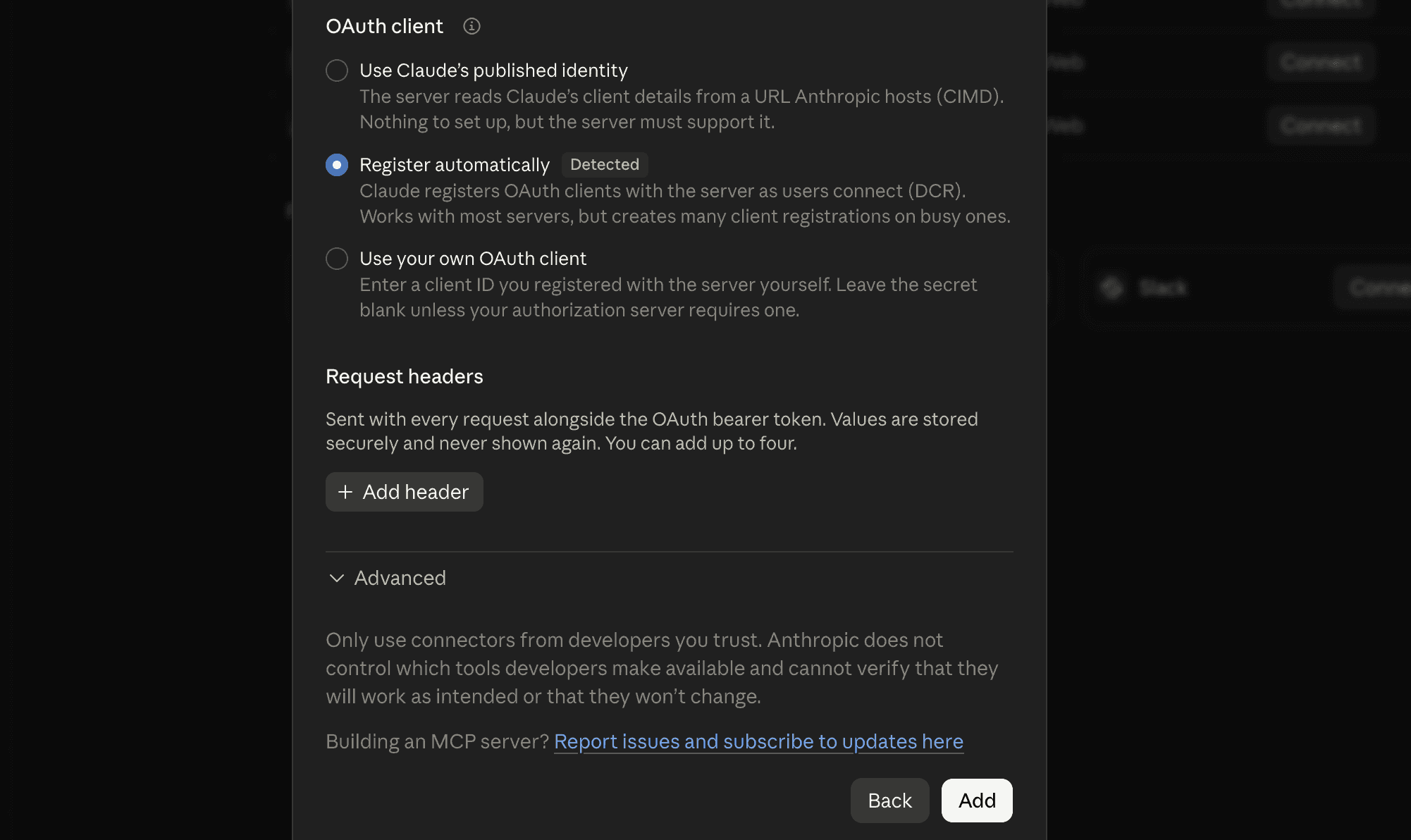
In the next window, keep Register automatically and click Add.
Sign in to Composio and approve the connection. If you don't have a Composio account, you can create a free account on this page.

Go back to Claude. In Customise → Connectors, make sure that Composio shows as connected.

To check the connection, start a new chat in Claude and ask: "What Composio tools do you have available?" If Claude lists the Composio tools, you are ready.

Some plans need one more step:
Claude Free lets you add one custom connector. If you already use it, remove that connector first.
Claude Team and Enterprise: ask an Owner of your organisation to add the connector. Then each member connects their own accounts.
If Composio doesn't show in Claude, go to Customise → Connectors and make sure Composio is on. Then open the menu next to Composio and choose Clear cache. If that doesn't fix it, remove Composio and add it again using the link in step 1.
Every new Composio account starts with $2 in its wallet. This is enough for all the runs in this guide.
Give Claude the local SEO skill
The skill tells Claude which tool to use for each task and which questions to ask you first. Copy it and add it to Claude as a skill.
---
name: composio-local-seo
description: Run local SEO checks with Composio tools such as Google Maps, DataForSEO, Serper, Tavily, Google Business Profile, Google Search Console and Google Sheets. Use when the user asks about Google Maps rankings, the Map Pack, local rankings, Google Business Profile, reviews, local keywords, or NAP consistency.
---

<h1>Local SEO workflows with Composio</h1>
<h2>Setup</h2>
<ul>
<li>Use the Composio MCP server at <a href="https://connect.composio.dev/mcp">https://connect.composio.dev/mcp</a>. If it isn't connected, help the user add it as a custom connector and finish sign-in.</li>
<li>Search Composio's tools for the task. Prefer Instant Tools (Google Maps, DataForSEO, Serper, Tavily) for research. Use the user's own connected accounts for Google Business Profile, Google Search Console and Google Sheets, and help them connect any that are missing.</li>
</ul>
<h2>Before you start</h2>
<ul>
<li>Ask for the business name, the main service, the city or service area, and the website if they weren't given.</li>
</ul>
<h2>Workflows</h2>
<ol>
<li>Google Maps: search Google Maps for the service and city, compare the top places' ratings, reviews, categories, opening hours and photos, and list profile changes in priority order.</li>
<li>Categories: pull the Google Maps results with DataForSEO, compare primary and additional categories, review and photo counts and distance from the search point, and suggest category changes. Never suggest adding keywords to the business name.</li>
<li>Geogrid: run DataForSEO Local Finder from a 3×3 grid of points across the city and show the business's rank, SoLV (share of points in the top 3) and ARP (average rank where it shows), and the leader in each area. Then read the leaders' websites and the business's own site with Tavily and compare the cities and services each one names.</li>
<li>Reviews: find the top Google Maps results with Serper, pull the newest reviews for the business and its top competitors, compare reviews per 30 and 90 days, the newest review date and owner reply rates, then draft replies to unanswered reviews and post them to Google Business Profile after approval.</li>
<li>Local keywords: pull "[service] + [city]" and "near me" keyword ideas, volume, CPC and difficulty with DataForSEO, grouped by service. Then check the Google top 10 for the best keyword with Serper and say what kind of page it takes to compete.</li>
<li>NAP and schema: compare the Google listing (Google Maps place details) with the website (Tavily), list mismatches, and write LocalBusiness JSON-LD.</li>
<li>Weekly monitoring: for each location, log the date, SoLV, ARP, new reviews in 7 days, newest review date and reply rate to Google Sheets, then summarize what changed and which locations need work first.</li>
</ol>
<h2>Rules</h2>
<ul>
<li>Show sources and the numbers behind each recommendation, and label estimates as estimates.</li>
<li>Confirm before posting review replies or changing anything on the user's Google Business Profile.</li>
<li>Never promise rankings. Treat recommendations as inputs to review and test.</li></ul>
Task 1: See who wins on Google Maps
Start with the businesses that Google Maps shows first, and find out why Google shows them first.
Copy this prompt and change the words in brackets:
Search Google Maps for "[service] in [city]". For the top 10 places, compare rating,
review count, primary category, opening hours, photos and website. Explain why the
top 3 come first and list what [your business] should change on its Google Business Profile,
most important first.
We asked this for a dental practice in Denver. Claude did one Google Maps search for "dentist in Denver, Colorado" and compared the top places. The search cost $0.035.
Rank | Practice | Rating | Opening hours |
|---|---|---|---|
1 | Emergency Dental of Denver | 4.8★ from 2,196 reviews | Open until 9 pm on most days, and open on weekends |
2 | Urgent Dental of Denver | 4.9★ from 640 reviews | Open from 8 am to 8 pm every day |
3 | The Denver Dentists | 4.5★ from 668 reviews | Closes by 5 pm, and closed on weekends |
In this search, the opening hours are the clearest difference between the top two and #3. Both leaders are open in the evening and on weekends. The review count matters less here because #2 has fewer reviews than #3.
This matches factor 5 in the Whitespark survey: Google prefers businesses that are open when people search. If you take calls in the evening or on weekends, add those hours to your Google Business Profile.
Task 2: Check your categories against the top 3
Your primary category is the strongest factor in the Whitespark survey. If your category does not match the search, Google can leave you out of the results. Additional categories can help you show for related services.
Copy this prompt:
Pull the Google Maps results for [service] in [city] with DataForSEO.
For the top 10, list the primary category, the additional categories,
the review count, the photo count and the distance from the search point.
Compare them with [your business] and tell us which categories to add or change.
Point out any business name with extra keywords, and do not tell us to copy it.
We asked this for roofers in Dallas. Claude ran one DataForSEO Google Maps search, and it cost $0.0012. Google used a point in downtown Dallas for the search.
Rank | Business | Primary category | Additional categories | Reviews | Distance |
|---|---|---|---|---|---|
1 | Longhorn Commercial Roofing Dallas | Roofing contractor | None | 4.9★ from 15 | 0.4 km |
2 | Lone Star Roofing Dallas - Roofer, Repair Contractor & Roof Replacement | Roofing contractor | None | No reviews | 0.3 km |
3 | United Roofing & General Contractors | Roofing contractor | General contractor | 5.0★ from 63 | 0.7 km |
6 | New View Roofing | Roofing contractor | General contractor, gutter cleaning service, siding contractor | 4.9★ from 704 | 3.5 km |
All 8 top businesses use "Roofing contractor" as their primary category. So the right category gets you into the results, but it does not put you at the top.
Distance does much of the rest. The top 3 are all less than 1 km from the search point. New View Roofing has 704 reviews and 349 photos, but it is 3.5 km away and it is #6.
The #2 business has no reviews and only 2 photos, but its name includes "Roofer", "Repair Contractor" and "Roof Replacement". Keywords in the name are factor 3 in the Whitespark survey. But Google's guidelines say that your name must be your real-world name. Google does not permit service or location words in the name, and it can suspend a profile for them. Put your services in the services section and your extra categories in the category section.
This data does not show attributes, for example, "Free estimates" or "Veteran-owned". Check these in your own Google Business Profile, and add each one that applies to your business.
Task 3: Find your rank across your city
Distance is the second-strongest factor, so one rank check shows your rank from only one point. A geogrid runs the same search from many points and shows where you are strong and where you are weak.
Copy this prompt:
Run a 3×3 geogrid for "[service]" around [city] with DataForSEO Local Finder, with points about 5 km apart. Show where [your business] ranks at each point and which competitor wins each area. Then read the leaders' websites and ours with Tavily, compare the cities and services each one names, and tell us which areas to work on first.We did a 3×3 geogrid for "hvac repair" across Phoenix, with points about 5 km apart. Claude used the DataForSEO Local Finder for the 9 points, and this cost $0.0054. This table shows the rank of Benefit Air Conditioning at each point:
West | Center | East | |
|---|---|---|---|
North | #1 | #1 | #2 |
Middle | #1 | #2 | Not in the top 20 |
South | #5 | #7 | Not in the top 20 |
Two numbers give a summary of a geogrid:
Share of Local Voice (SoLV) is the percent of points where you are in the top 3. Local Falcon uses this metric in its geogrid reports. Benefit Air is in the top 3 at 5 of 9 points, so its SoLV is 56%.
Average rank position (ARP) is your average rank at the points where you show. Benefit Air shows at 7 points, and its ARP at those points is 2.7.
Benefit Air Conditioning is #1 in north and west Phoenix. In the east, it is not in the top 20.
Then Claude used Tavily to read two websites, and this step cost $0. The first site was Day & Night Air Conditioning, which is #1 in the southeast. The second site was Benefit Air. The Day & Night homepage names 17 cities it serves, including Tempe, Mesa, and Chandler on the east side. The Benefit Air homepage names only the Phoenix area.
A page for each east-side city is a good first fix. It tells customers and Google that Benefit Air also works in those cities. Do the geogrid again after four weeks. If the SoLV goes up, the change helped.
Task 4: Track review velocity and replies
Review velocity is the number of new reviews that a business gets in a period of time. Google says that more reviews and good ratings can help your rank, and that replies help your business stand out.
Copy this prompt:
Find the top 3 Google Maps results for [service] in [city] with Serper, then pull the newest reviews for each and for [your business]. Compare how many reviews each got in the last 30 and 90 days, the date of the newest review and how often the owner replied. Then draft short, personal replies to our unanswered reviews on Google Business Profile, and post them only after I approve.We asked this for med spas in Miami. Claude used Serper to find the top 3 med spas on Google Maps, then pulled the 20 newest reviews for each one. The two steps cost $0.0018.
Rank | Med spa | New reviews in 30 days | Newest review | Owner replies to the 20 newest | Rating |
|---|---|---|---|---|---|
1 | La Perla Med Spa | 8 | October 23 | 0 of 20 | 5.0★ from 41 reviews |
2 | Rejuvaline Medspa | 10 | November 2 | 20 of 20 | 4.9★ from 319 reviews |
3 | Magical Med Spa | 12 | October 31 | 18 of 20 | 5.0★ from 74 reviews |
Each leader gets 8 to 12 new reviews a month, and each one got a new review in the last 10 days. The #1 spa has only 41 reviews in total, and #2 has 319. So a regular flow of new reviews can matter more than a large total.
The reply rate does not explain the order here, because #1 replies to none of its newest reviews. But two of the three leaders reply to almost every review, and customers read these replies. So ask for reviews every week, and reply to each one.
The last step of the prompt uses your own Google Business Profile. When you connect it through Composio, Claude reads your reviews and writes a short reply to each review that has no reply. Claude posts the replies only after you approve them. We did not do this step in our run, because it needs the account of a real business.
Task 5: Find the local searches that are worth a page
Some local keywords get many searches each month, but they are hard to rank for. Other keywords get fewer searches, but a new page can rank for them more easily. Look for a high cost per click (CPC) and a low keyword difficulty. A high CPC shows that other businesses pay a lot for each click.
Copy this prompt:
Use DataForSEO to pull keyword ideas, local search volume, CPC and difficulty for [service] in [city], including "near me" and neighborhood searches. Return the 15 best keywords to target with a page or a Google Business Profile post, grouped by service. Then check the Google top 10 for the best one with Serper and tell us what kind of page it takes to compete.We asked this for a personal injury law firm in Houston. Claude used DataForSEO for keyword ideas ($0.1008) and keyword difficulty ($0.0126). Then it used Serper to get the Google top 10 for the best keyword ($0.0003).
Keyword | Searches a month | CPC | Difficulty (0 to 100) |
|---|---|---|---|
injury lawyer near me | 5,400 | $87.82 | 25 |
car accident lawyers near me | 2,900 | $281.17 | 38 |
auto accident attorneys near me | 590 | $154.36 | 1 |
slip and fall lawyer houston | 390 | $161.83 | 3 |
The search volumes are for Houston, and the difficulty scores are for the whole US.
The keyword "slip and fall lawyer houston" has a difficulty of only 3, but an ad click costs $161.83. In the Google top 10, 9 of the 10 results are pages for this exact search. Only one result is a general home page. So the firm needs its own slip-and-fall page.
Task 6: Fix your NAP and schema
NAP means name, address and phone number. Your NAP must be the same on your Google Business Profile, on your website and on other sites. If the details are different, customers can call an old number or go to an old address.
Copy this prompt:
Look up [your business] on Google Maps and read [your website] with Tavily. Compare the name, address, phone and hours on both, list every mismatch, and write corrected LocalBusiness JSON-LD for our homepage.The result below is example data for a sample bakery. A real run uses Google Maps place details for about $0.017, and Tavily to read your website.
Fix the phone number in the website footer. It is different from the number on Google.
Update the Sunday hours on the contact page. They are different from the hours on Google.
Add Bakery schema to the homepage. Claude writes the JSON-LD for you to paste.
This is the type of JSON-LD that Claude writes. All the details here are example data:
{
"@context": "<a href="https://schema.org">https://schema.org</a>",
"@type": "Bakery",
"name": "Sample Bakery",
"url": "<a href="https://example.com">https://example.com</a>",
"telephone": "+1-555-0100",
"address": {
  "@type": "PostalAddress",
  "streetAddress": "100 Main Street",
  "addressLocality": "Springfield",
  "addressRegion": "IL",
  "postalCode": "62701",
  "addressCountry": "US"
},
"openingHours": [
  "Mo-Sa 07:00-18:00",
  "Su 08:00-14:00"
]
}
Will Claude recommend your business?
People now ask AI assistants for local businesses, for example "Who is the best plumber near me?" Claude can answer these questions with data from Google Maps and the Google Places API. In May 2026, Search Engine World reported that Claude uses star ratings, reviews and relevance to pick the results for some local searches. MediaPost reported the same.
So the data that helps you on Google Maps also helps you in Claude. Claude usually names only a few businesses in each answer, so the details on your profile matter even more:
A primary category that matches the service that people ask for.
Full and correct opening hours.
A steady flow of new reviews, with replies.
A website that names each service and each area that you serve.
The same name, address and phone number everywhere.
To test your business, ask Claude the questions that your customers ask. Write down which businesses Claude names, and do the test again each month.
I need a [service] in [neighborhood], [city]. Which businesses do you recommend, and why? Show the rating, the review count and the opening hours for each one.If Claude names your competitors and not you, compare their profiles with yours. Tasks 1, 2 and 4 show you what to compare.
Do the checks every week
Local results change often. A new competitor can open near you, or a competitor can get many new reviews in one month. So do the same checks each week and keep a log.
Connect Google Sheets through Composio, and give Claude this prompt each Monday:
For each of our locations in [sheet name], run a 3×3 geogrid for [service] and get our 20 newest reviews. Add one row per location with the date, SoLV, ARP, new reviews in the last 7 days, the newest review date and the owner reply rate. Then write a short summary of what changed since last week, and list the 3 locations that need work first.Each row in the sheet has the same columns, so you can see the trend for each location:
Date | Location | SoLV | ARP | New reviews in 7 days | Reply rate |
|---|---|---|---|---|---|
Example | North store | 56% | 2.7 | 3 | 90% |
All values in this table are example data. For one location, the geogrid and the review check cost about $0.006 each week. For 20 locations, they cost about $0.11 each week.
If your Claude app can run a prompt on a schedule, set this prompt to run each Monday. If it cannot, paste the prompt each Monday.
Where to start
If you have one location, start with Tasks 1, 2 and 4. Together, they cost less than $0.04 and show the easiest fixes to make.
If you have more than one location, give Claude the address and the service area of each location. Claude does the same checks for each location, and the weekly sheet shows which locations need work first.
If you are an agency, keep one prompt for each task. For each client, change only the business, the service and the city.
What the runs cost
Task | What Claude did | Cost |
|---|---|---|
See who wins on Google Maps | 1 Google Maps search | $0.035 |
Check your categories | 1 DataForSEO Google Maps search | $0.0012 |
Find your rank across your city | 9 DataForSEO Local Finder checks and 2 Tavily pages | $0.0054 |
Track review velocity and replies | 1 Serper Maps search and the newest reviews for 3 places | $0.0018 |
Find local searches | DataForSEO keyword ideas and difficulty, and 1 Serper search | $0.1137 |
Fix your NAP and schema | Example data. A real run costs about $0.019 | Not run |
If a call fails, you do not pay for it. If you connected your own account for a tool, Claude uses your account, and the wallet does not pay for that call.
FAQ
Do I need accounts with DataForSEO, Serper or Google Maps?
No. Composio Instant gives Claude these tools from one Composio wallet. You do not need a separate account or API key for each provider.
Can Claude change my Google Business Profile?
Claude can change it only after you connect your account through Composio. Claude can read your reviews and write replies, but it posts a reply only after you approve it.
What is a geogrid?
A geogrid does the same search from a grid of points across your city. Google ranks local results partly by distance, so your rank can vary across the city. The geogrid shows your rank at each point.
Does this work for a business with more than one location?
Yes. Give Claude the address and the service area of each location. Claude does the same checks for each location and compares the results.
How do I get Claude to recommend my business?
Claude can use Google Maps data to answer local questions, so start with your Google Business Profile. Use the right primary category, add full opening hours, get new reviews each week and reply to them. Then ask Claude the questions that your customers ask, and check which businesses it names.
How much does it cost?
The live runs in this guide cost from $0.0012 to $0.1137 each. Every new Composio account starts with $2 in its wallet, and you pay only for the calls that Claude makes.
Can Claude promise a better rank?
No. Claude shows you the data and the fixes that the data supports, but Google decides the ranks. Do the checks again after each change to see which changes helped.
Sources
Google Business Profile Help: Tips to improve your local ranking on Google
Google Business Profile Help: Guidelines for representing your business on Google
Whitespark: 2026 Local Search Ranking Factors
Local Falcon: What is SoLV
Search Engine World: Claude's local search push puts SEOs on notice
MediaPost: Anthropic takes on local search

 Get started


