




Building an MCP gateway is straightforward. Building an MCP gateway with SSO federation, SCIM provisioning, per-user OAuth across dozens of SaaS apps, audit trails, and ongoing OAuth maintenance — and shipping it in under three months — is not. The proxy itself is 2–4 weeks of work.
Everything around it is where the cost lives, and where most internal builds stall. Below is what the actual cost looks like, what breaks, and the conditions under which building still makes sense.
What "build it yourself" actually means
An enterprise MCP gateway is not one component. It's a stack. When teams say "we'll build it," they usually mean the proxy. The proxy is the cheapest part, there’s a complete security architecture that needs to be considered.
For a developer-level breakdown of how gateways solve the agent-to-tool N×M problem, see MCP Gateways: A Developer’s Guide to AI Agent Infrastructure.
Layer | What it does | Build complexity |
MCP proxy | Routes MCP calls between AI clients and tools | Low — 2–4 weeks (faster with Claude Code, Codex, etc) |
Identity / SSO federation | Lets users sign in via Okta/Entra/Google | Medium — Auth0/FusionAuth integration \~\$25K + \$40–70K/year licensing |
SCIM provisioning | Auto-provision/de-provision users from your IdP | Medium-high — 4–6 weeks of focused engineering |
Per-user OAuth across SaaS apps | Each user authenticates with their own credentials to Salesforce, Jira, Slack, etc. | **High and recurring** — \~1 week per integration to build, plus permanent maintenance and partnership |
Team-based tool policies | Which teams can call which tools, with destructive-action guardrails | Medium — needs admin UI, policy engine, audit hooks |
Audit trail / logging | Who called what tool, when, with what result | Medium — plus retention infrastructure and export for compliance |
Admin console | Day-to-day operation: add users, manage policies, review logs | Medium — a real product surface, not a CLI |
Compliance | SOC 2 Type II, ISO 27001, DPA, GDPR, BAA if healthcare | High — \$75K+ for first SOC 2, 6+ months calendar time |
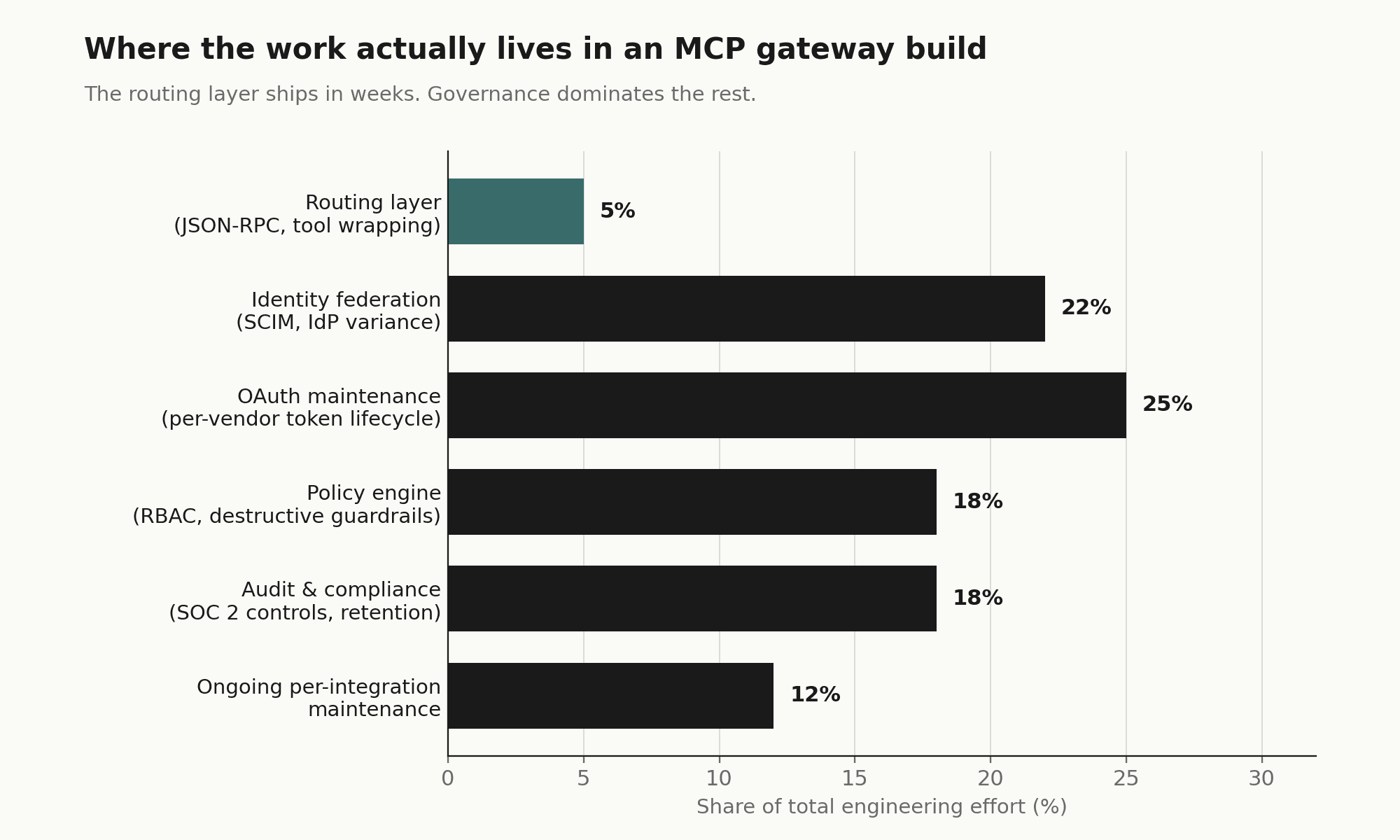
The proxy is roughly 5% of the actual scope. The rest is what makes it usable, governed, and defensible to your security team.
The cost model
The numbers below come from the playbook's build-vs-buy framing, which is grounded in what enterprise buyers report when they cost out internal builds.
Year 1 build cost: $200K–$400K
Component | Cost |
SSO federation (integration + first-year licensing) | \$25K + \$40–70K |
SCIM provisioning (4–6 weeks engineering) | \$37.5K |
15 SaaS integrations with per-user OAuth (\~1 week each) | \$75K |
Admin console + audit logging + retention | \$62.5K |
SOC 2 Type II (auditor + remediation) | \$75K |
Total Year 1 | \$200K–\$400K |
Timeline: 6–9 months before the first user is governed
That's 6–9 months during which:
Your security team is still saying no to AI tool requests
Engineers route around the policy because they need to ship
You've already paid the salaries but produced no governed access
Permanent maintenance: ~0.5 FTE indefinitely
Every SaaS app has its own OAuth flow, token refresh quirks, API versioning cadence, and rate-limit behavior. When Salesforce changes an OAuth scope, when Slack deprecates an endpoint, when Jira rolls out a new auth model — your team handles each one. That's not project work; that's an operating cost forever.
Three-year TCO comparison
Option | 3-Year TCO | Time to first governed user | Integration count |
Build internally | \$525K–\$600K | 6–9 months | \~20 |
Composio Starter (\$60K/yr) | \$180K | \~2 weeks | 1,000+ |
Composio Growth (\$150K/yr) | \$450K | \~2 weeks | 1,000+ |
Even at the Growth tier, buying beats the lower bound of building — and you start delivering value 6 months earlier with 50× the integration coverage.
Where internal builds break
These are not theoretical. They're what shows up in the eight discovery calls in the playbook:
OAuth maintenance compounds. One quote from Fabletics': the connections themselves are easy, but the auth management is the hard part. With 5 SaaS apps it's manageable. With 20 it's a permanent half-FTE. With 50 it's a small team.
The "20% of edge cases" tax. Token refresh races, scope drift, multi-tenant OAuth (e.g., Verifiable needs 5 Salesforce instances), service-account models for shared tools (Gong), domain-restricted OAuth — each is a quiet 2-week project that nobody scoped.
The platform team becomes the bottleneck. Indeed described the cycle directly: a team launches a local MCP server, usage grows, the platform team has to migrate it to a hosted solution, repeat. That's the exact business they want to exit.
Native LLM controls don't substitute for a real gateway. Legora's IT engineer tested Claude's "read only" Notion permissions; the LLM routed around them by finding alternative tool paths. Deterministic gateway-level enforcement is structurally different from LLM-respected permissions.
Compliance arrives late and expensive. SOC 2 Type II takes 6+ months of evidence collection. If the build hasn't been designed with audit logging, immutable trails, and access reviews from day one, retrofitting it doubles the effort.
The "we already have local MCP servers" trap. Local-only MCP servers per developer machine has zero governance, zero audit, zero policy. It's also what most engineering orgs default to. Indeed and Fabletics both described being in this state and wanting out.
When building still makes sense
Build is the right answer when all of these hold:
You have a strong platform engineering team with available capacity. Not theoretical capacity. Available now.
Your integration surface is narrow and stable. If you need MCP access to 3–5 internal services and don't anticipate adding many SaaS apps, the OAuth-maintenance argument shrinks dramatically.
You have hard requirements no vendor meets. Air-gapped deployment, exotic compliance regime, integration with proprietary internal identity systems.
You're not on a 6-month deployment clock. If the security team can credibly hold the line on AI tool adoption for a year, build timeline is tolerable.
You explicitly want code ownership. Some sophisticated buyers (Rippling's Head of AI in the playbook) prefer Metorial specifically because they want to fork and modify integrations to match internal governance. That's a legitimate stance — it just means accepting the maintenance burden in exchange.
If even one of these isn't true, the build math gets ugly fast.
When buying clearly wins
Buy is the right answer when:
You need governed access in weeks, not quarters. AI adoption is already happening in the org and security is exposed today.
Your integration surface is broad or uncertain. You don't yet know which 30 SaaS apps your teams will need by next year. A managed catalog absorbs that uncertainty.
Your platform team has higher-leverage work. Every engineer-week spent maintaining Salesforce OAuth is an engineer-week not spent on your product.
Compliance is a real near-term requirement. SOC 2 Type II, ISO 27001, BAA, DPA — these are easier as a vendor checkbox than a build line item.
You'll be running multiple AI clients. Cursor + Claude + ChatGPT + Windsurf is normal (Indeed runs all four). A unified gateway is meaningfully cheaper than per-client integrations.
The hybrid pattern that's emerging
Several buyers in the playbook arrived at the same architecture independently — not pure build, not pure buy:
External SaaS integrations → managed gateway (Composio's positioning)
Internal MCP servers built on company infra → access control via Cloudflare MCP Portal or self-hosted proxy
LLM call routing and cost optimization → LLM gateway (Portkey, TrueFoundry, Bifrost)
Security analytics on MCP traffic → security-layer tools (RunLayer)
Fabletics articulated this split explicitly: Cloudflare for internal tooling that doesn't need to be public-facing, and a managed gateway for the long tail of external SaaS. 26 North layered an LLM gateway underneath for prompt telemetry and FinOps that the MCP gateway doesn't provide.
The right framing for most organizations isn't "build vs. buy" — it's "which layers do we buy, and which do we own." The integration + governance layer is the one with the worst build economics, because of the OAuth-maintenance compounding. That's typically the first to go to a vendor.
Decision checklist
Before committing to build, answer honestly:
How many SaaS integrations will we need in 12 months? In 24?
Who owns OAuth maintenance when Salesforce changes their auth flow next quarter?
Have we costed in SSO federation licensing, not just integration time?
Have we costed in SCIM, or are we planning manual user provisioning at 100+ users?
Do we need SOC 2 Type II evidence for this system, and have we budgeted that?
What's the opportunity cost — what would those engineers ship instead?
Can our security team realistically hold AI adoption for 6–9 months while we build?
If we build, what's our exit if it doesn't work — do we end up buying anyway plus eating the sunk cost?
If two or more of these are uncomfortable, the build case is weaker than it looked at the whiteboard.
Building vs Buying an Enterprise MCP Gateway
The JSON-RPC router is the easy part. Here is where the real cost lives, and why most teams do not find out until month three.
Building an internal Model Context Protocol gateway looks, at first, like a weekend project. An engineer wraps a few local tools (a Postgres runner, a Slack connector, a calendar read), wires up the JSON-RPC 2.0 handshake, and demonstrates a working agentic flow by Monday. It works. Leadership is impressed. The team gets a green light.
Then they move it to staging, and it starts falling apart.
The routing layer, the part that negotiates capabilities between an AI client like Claude or Cursor and a set of tool servers, is straightforward. It is also roughly 5% of what an enterprise deployment requires. The other 95% is the governance wrapper: identity federation, per-user permissioning, audit logging, OAuth maintenance, and compliance evidence collection. None of it is glamorous. All of it is blocking.
This piece walks through where those costs land, and under what conditions building in-house is still the right call.
The identity problem that surfaces in staging
The proxy itself stabilizes in two to four weeks. What it does not have, out of the box, is any mechanism to answer the question: does this user actually have permission to call this tool?
In a developer environment, that question does not matter much. You are running everything under your own credentials. In staging, and certainly in production, you are suddenly dealing with dozens or hundreds of users, each with different access levels, each subject to different data policies.
Enterprise software does not manage its own user directories. It integrates with existing ones: Okta, Microsoft Entra ID, Google Workspace. That integration requires more than an OpenID Connect handshake. It requires SCIM, System for Cross-domain Identity Management (defined in RFC 7643 and RFC 7644), to handle the full user lifecycle.
SCIM is where most internal builds hit their first serious wall. You need to handle account creation when someone joins, permission updates when their role changes, and immediate access revocation when they leave. If your gateway does not respond correctly to a PATCH /Users/{id} with "active": false, your offboarded employees still have AI-assisted access to your SaaS stack.
A SCIM payload for an MCP gateway looks roughly like this:
{
  "schemas": ["urn:ietf:params:scim:schemas:core:2.0:User"],
  "externalId": "701984",
  "userName": "jdoe@enterprise.com",
  "active": true,
  "groups": [
    {
      "value": "00g123456789",
      "display": "Engineering-AI-Access"
    }
  ]
}
Implementing full SCIM provisioning from scratch takes four to eight weeks of focused engineering for experienced developers, according to multiple implementation guides. That is before you address dynamic group-to-tool mapping: ensuring that when someone moves from engineering to marketing, their AI agent loses access to the Bitbucket MCP server and gains access to the HubSpot one. That mapping has to be a live service, not a script. If it goes down, your AI agents lose the ability to act entirely.
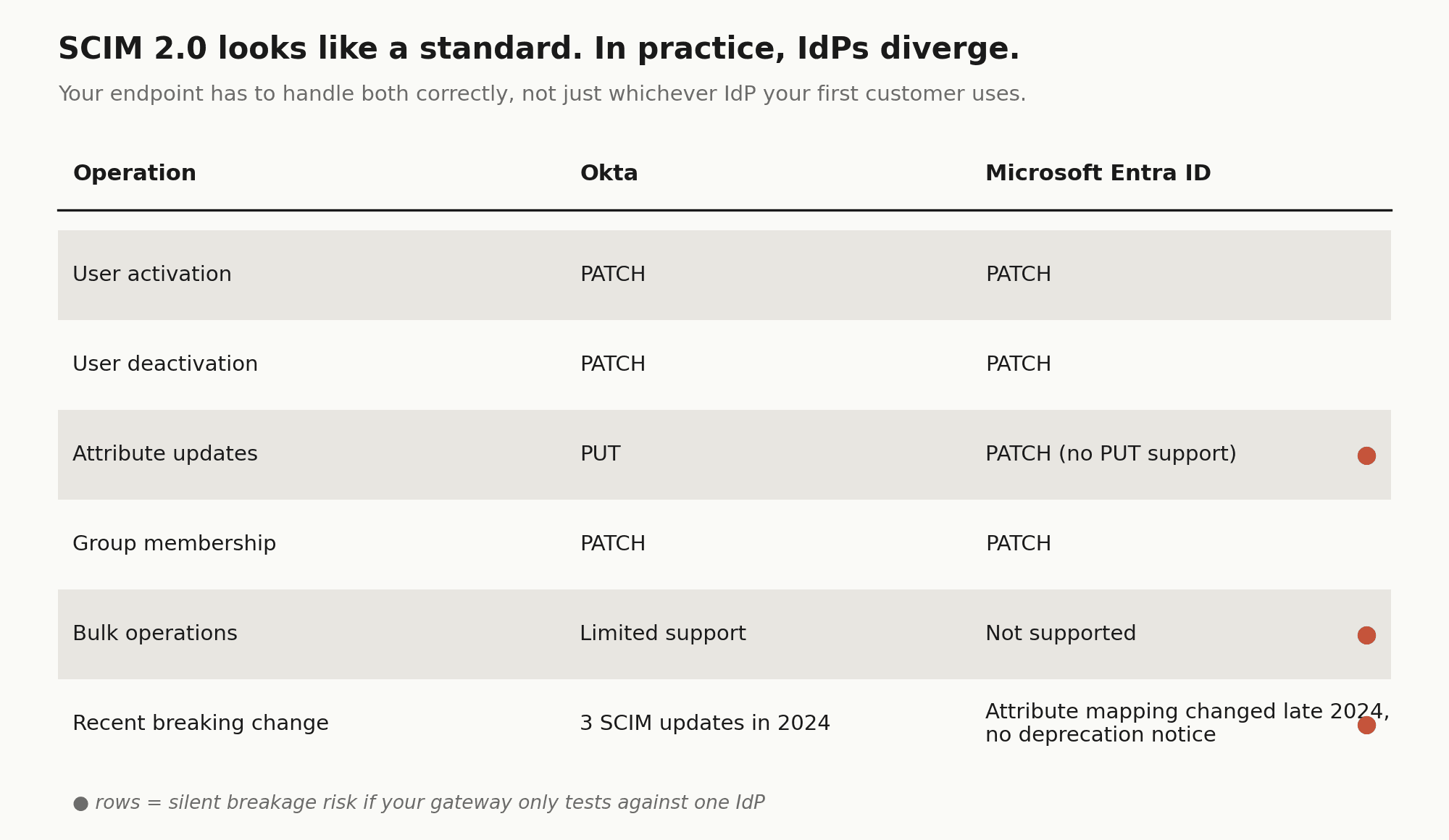
Per-IdP variance compounds the timeline. Okta and Microsoft Entra ID both implement SCIM 2.0, but they diverge in practice. Okta uses PATCH only for user activation and deactivation, handling other updates via PUT. Entra ID does not support PUT at all, using PATCH for everything. Your SCIM endpoint has to handle both correctly, which means building and testing against each IdP separately, not just the one your first enterprise customer happens to use.
Then there is the ongoing maintenance burden. Okta shipped three SCIM-related changes in 2024 alone. Entra changed its attribute mapping behavior for synchronized users in late 2024 without a deprecation notice. Every one of those changes is a potential silent breakage in your gateway.
On cost: Composio's MCP Gateway ships with SCIM 2.0 out of the box. It maps directory groups to teams, provisions new hires with the right tool access on day one, and deprovisions offboarded users immediately, without your team building or maintaining any of the above.
The OAuth maintenance compound
Integrating fifteen SaaS applications takes roughly one week of engineering per integration for setup, testing, and security review. That is the initial cost. The ongoing cost is harder to quantify, but it is real.
OAuth 2.0 is a standard, but every SaaS vendor implements it differently. Salesforce has aggressive token expiration policies. Slack occasionally deprecates scopes and requires re-authorization flows. GitHub's OAuth app permissions behave differently depending on whether the organization has SAML SSO enabled. None of this is obscure edge-case behavior. It is the normal operation of these platforms.
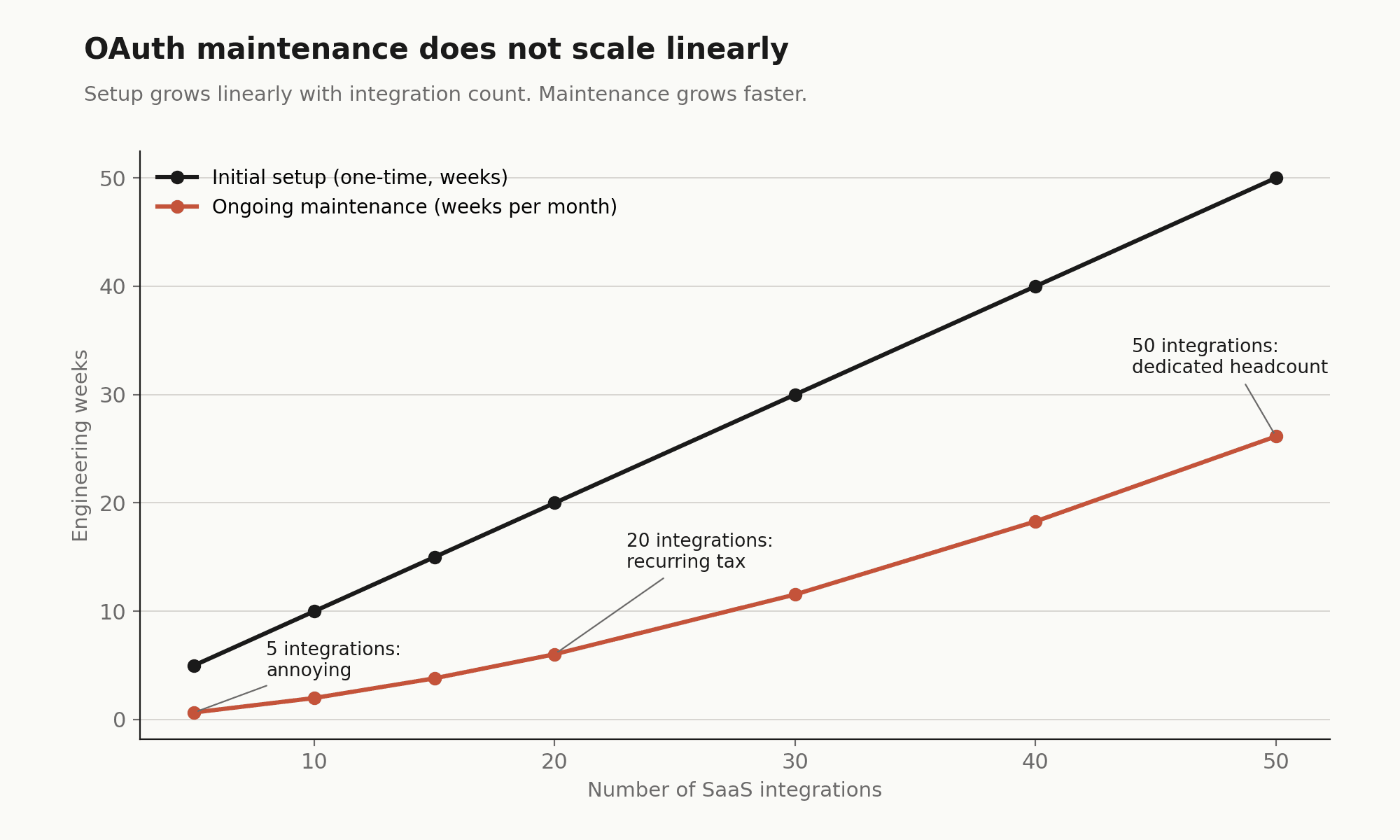
In an internal build, when Salesforce updates its API version or Slack changes an OAuth scope, your gateway breaks. Someone on the platform team drops their roadmap work to fix it. With five integrations, this is annoying. With twenty, it is a recurring tax. With fifty, it is a dedicated headcount.
The underlying mechanics look simple, a token refresh worker that checks expiration and re-authenticates, but the failure modes are the real problem:
def refresh_user_token(user_id, service_name):
    creds = db.get_credentials(user_id, service_name)
    if creds.is_expired():
        try:
            # Every vendor has a different token endpoint and payload structure
            new_token = oauth_client.refresh(creds.refresh_token)
            db.update_credentials(user_id, service_name, new_token)
        except OAuthError as e:
            # Failure means the user's AI agent silently loses Jira access
            logging.error(f"Failed to refresh {service_name} for {user_id}: {e}")
            alert_user_reauth(user_id, service_name)
Silent failure is the real problem. When a token refresh fails, the user's AI assistant does not crash. It quietly loses the ability to use that tool. Users file support tickets saying the agent "feels broken." Debugging a stale OAuth token across five different vendor dashboards is not how you want a platform engineer spending their Thursday afternoon.
The 20% of integrations that cause 80% of the pain tend to be multi-tenant Salesforce instances, domain-restricted OAuth apps, anything using device-flow or PKCE extensions, and services with token rotation policies that differ per organization tier.
Composio handles OAuth lifecycle management, token issuance, refresh, rotation, and expiry, across all 1,000+ of its managed integrations. The auth configuration system supports bringing your own OAuth app credentials for production white-labeling, so your consent screens show your brand and your domain. When Salesforce changes a token endpoint or Slack deprecates a scope, Composio absorbs that update. Your team does not.
Governance must be deterministic, not behavioral
A common early assumption in internal MCP builds is that the LLM will respect the access rules you have given it. If you tell the model it has read-only access to Notion, it will only read Notion.
This assumption is wrong, and it matters.
Language models do not enforce permissions. They interpret them probabilistically. A model told it has read-only access to a resource but given a tool capable of writing may attempt to use that tool if its reasoning concludes it would be helpful. This is not a bug or a jailbreak. It is the model doing its job. The failure is in the architecture.
Real governance has to happen at the gateway layer, before the call ever reaches the SaaS API. That means a policy engine that inspects each call_tool JSON-RPC request and enforces hard rules:
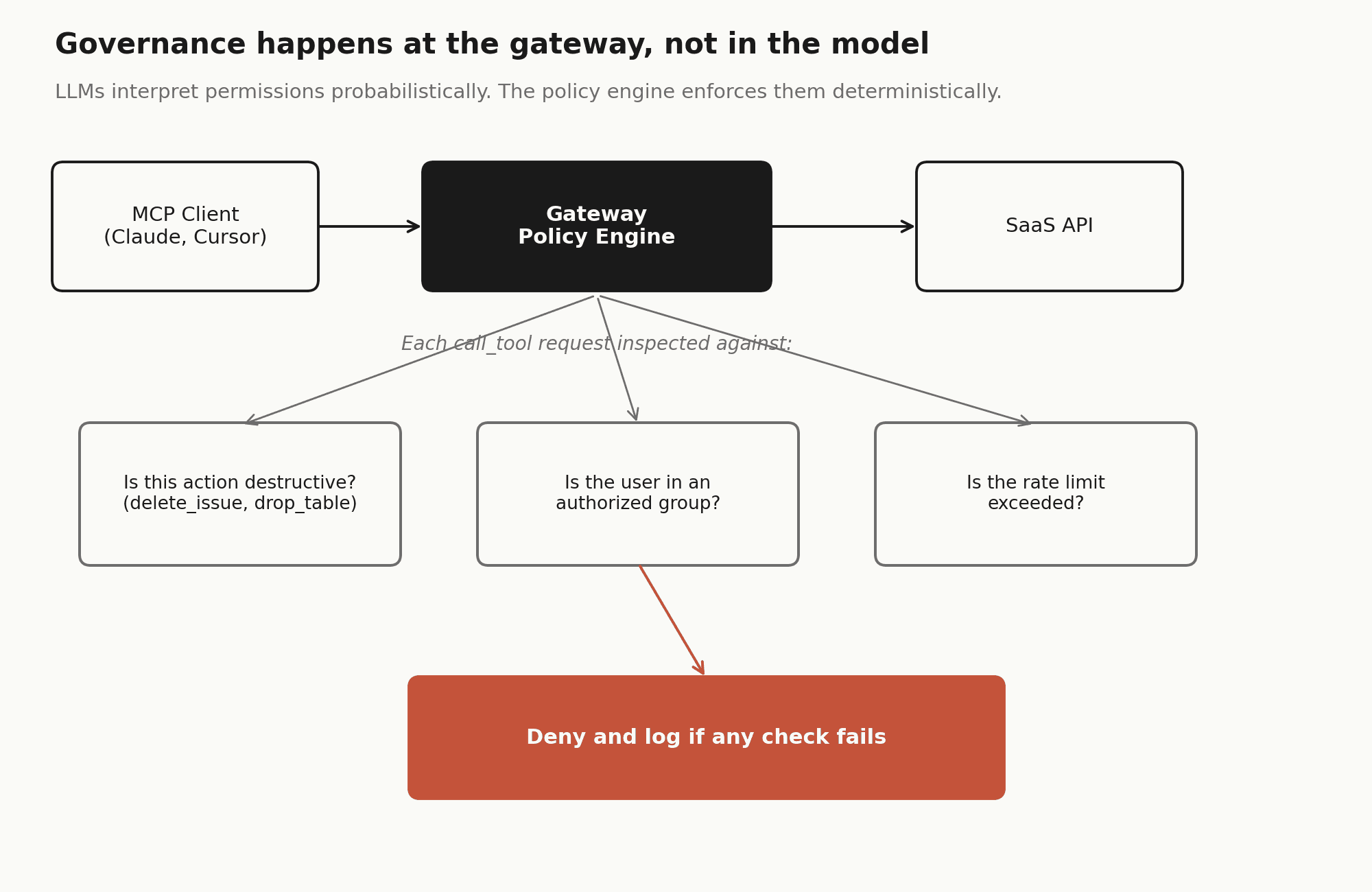
Building a policy engine that handles this correctly is a six-to-eight week effort. It needs at minimum three things: destructive action guardrails (blocking delete_issue, drop_table, or similar unless the user is in an explicit allow-list), team-based scoping (ensuring the marketing team's agent cannot invoke the engineering team's CI/CD tooling), and rate limiting to prevent agentic loops from burning through SaaS API quotas.
Most internal builds start with a global service account. It is expedient and works for a proof of concept. But a global service account means every user's AI agent has the same access level, and every action the LLM takes is attributed to the same identity in audit logs, making it impossible to trace which employee triggered a specific API call. Moving to per-user OAuth with deterministic enforcement is not a refactor. It is often a rebuild.
Composio's MCP Gateway enforces action-level RBAC at the gateway layer. Each team gets a scoped MCP endpoint that exposes only the tools they are authorized to use. Destructive actions within allowed toolkits can be blocked independently of toolkit access. This is enforced in the gateway, not suggested to the model.
The SOC 2 timeline that no one budgets for
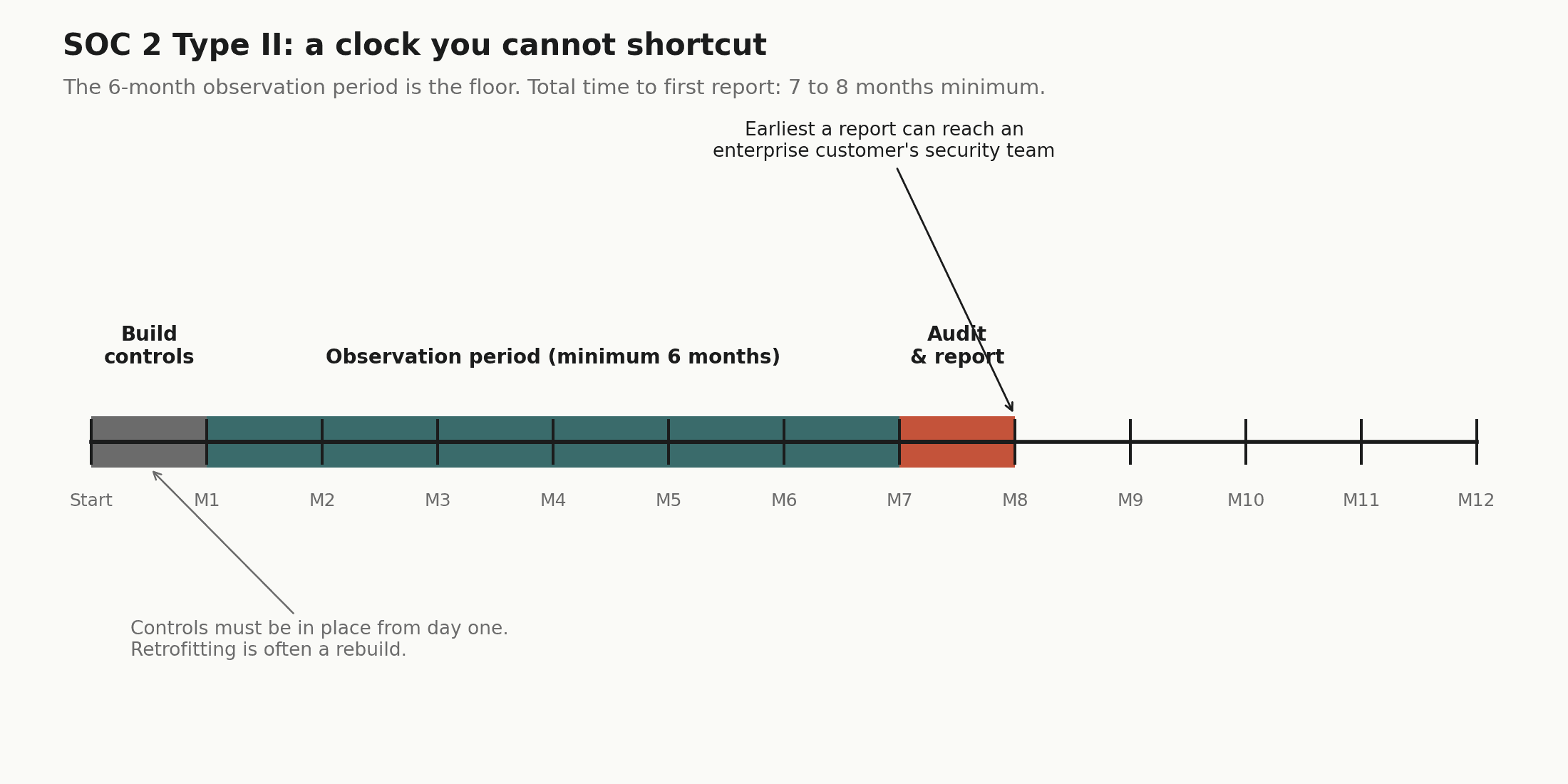
If you are deploying in a regulated industry (finance, healthcare, legal), you will eventually be asked for a SOC 2 Type II report or equivalent. Enterprise customers require it before allowing third-party tooling access to their data environments.
A SOC 2 Type II audit is, at minimum, a six-month commitment. The observation period must elapse before the report can be issued, so even if you start on day one of your build, you will not have a report until month seven or eight at the earliest.
The controls also need to be built in from the start. SOC 2 requires immutable audit logs for every tool call, a data retention policy governing how long PII persists in those logs, and the ability to produce an access control roster for quarterly reviews. Retrofitting these controls into a gateway that was not designed for them is often as much work as rebuilding it.
Control | What is required | Retrofit difficulty |
Audit trails | Immutable log of every tool call: user ID, timestamp, prompt fragment, API response | Medium. Requires immutable storage layer |
Data retention | Automated PII scrubbing from logs after defined retention period | High. Requires pipeline redesign if not built in |
Access reviews | Quarterly export of who has access to which MCP servers | Low if SCIM is already implemented; high if not |
Encryption | Key management following NIST standards for stored credentials | High if using plaintext secrets in early builds |
Composio is [SOC 2 Type II and ISO 27001](https://security.composio.dev) certified. The audit trail, access control roster, and data handling requirements are already satisfied by the platform. For teams in regulated industries, this eliminates six to twelve months of compliance groundwork before you can show a report to an enterprise customer's security team.
When building is still the right answer
There are genuine scenarios where building an internal MCP gateway is the correct decision. The question is whether you are building because it makes strategic sense, or because the initial prototype felt easy.
Build makes sense if, and only if, all of the following apply:
Your primary use case is internal tooling. If you are connecting to homegrown microservices that will never appear in a public SaaS catalog, a managed gateway buys you nothing. Your integration surface is yours to own.
You have air-gap requirements. If your environment prohibits third-party traffic leaving the VPC (defense, intelligence, certain financial regulators), a managed solution is off the table by policy.
You have available platform capacity. Not theoretical capacity. Actual engineers who are not on the critical path for your core product and can commit to ongoing maintenance indefinitely, at least half an FTE for a non-trivial integration surface.
Your compliance regime is exotic enough that no vendor supports it. If your requirements are standard (SOC 2, ISO 27001, HIPAA), a certified vendor clears this faster than you can. If you are subject to something more unusual, that calculus changes.
If you are connecting to three to five stable internal services, the OAuth maintenance argument largely disappears. A simple hardened proxy using mTLS for authentication is reasonable. The build path is not wrong. It is a deliberate trade: you own the infrastructure at the cost of speed and SaaS breadth.
A middle path: hybrid architecture
The most considered teams are not picking build or buy. They are splitting the problem by layer and making different decisions at each one.
Layer 1: Managed SaaS integrations. A vendor handles the long tail of external SaaS connections and OAuth maintenance. You are not in the Salesforce token refresh business. Composio's 1,000+ managed integrations cover every major SaaS surface: GitHub, Slack, Gmail, HubSpot, Jira, Linear, Salesforce, Notion, and hundreds more.
Layer 2: Internal tooling proxy. A self-hosted component handles connections to internal databases and proprietary APIs that stay within the corporate firewall. Composio's hybrid deployment model supports this pattern: external SaaS connections go through the managed platform, internal tools stay on your infrastructure.
Layer 3: LLM gateway. A separate layer handles prompt telemetry, cost optimization, and model fallback, independent of the tool routing layer. Because Composio's tooling layer is model-agnostic, switching from Claude to GPT to an open-source model does not require reconnecting your integrations or reconfiguring auth.
Layer 4: Security analytics. Real-time inspection of MCP traffic for prompt injection attempts or data exfiltration patterns. Sits above all other layers.
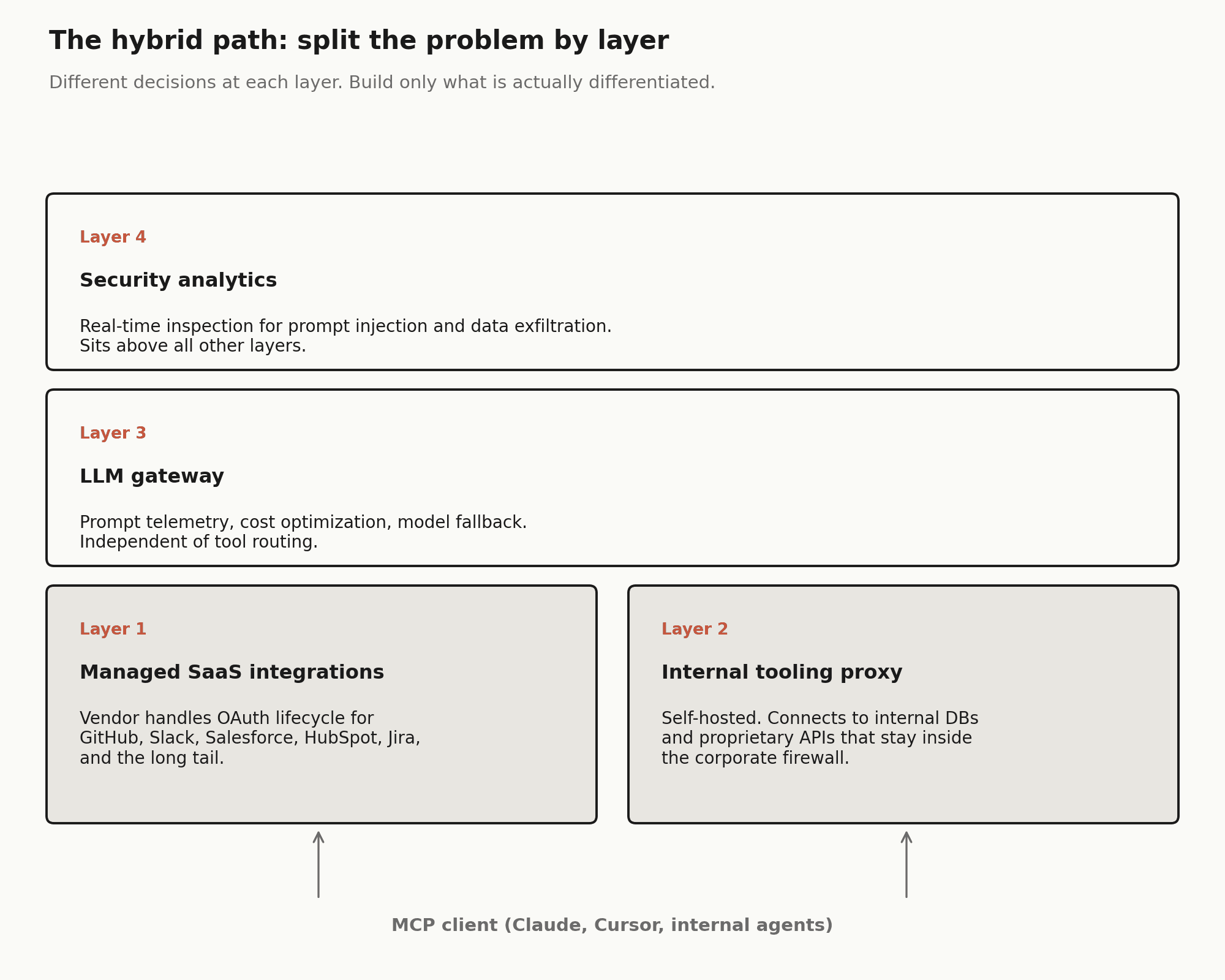
This approach lets the platform team focus on what is actually differentiated (internal data models, proprietary logic, custom tooling) while offloading the commodity work. It also means you can say yes to AI tool requests on a timeline that does not require nine months of infrastructure work first.
The question is not whether your team can build a gateway. It is whether building one is the best use of their next six months, given everything else on the roadmap.
An MCP gateway is infrastructure. Infrastructure requires maintenance. The teams that make this work long-term treat it as a product decision, with ongoing resourcing, ownership, and a clear-eyed view of what they are signing up for, rather than a one-time build that gets handed to the next team to figure out.
If you want to see the managed alternative, Composio's MCP Gateway covers SCIM, OAuth lifecycle, RBAC, audit logging, and SOC 2 compliance as a single product. The developer quickstart takes about ten minutes to get a working agent connected to your first toolkit.
Engineering timelines cited here (SCIM: 4 to 8 weeks, policy engine: 6 to 8 weeks, per-integration setup: approximately 1 week) reflect estimates from published implementation guides for mid-sized engineering teams. Treat them as order-of-magnitude references. SOC 2 timelines reflect the observation period required for a Type II report, not total project time.
FAQs
1. Is building an MCP gateway actually hard?
The basic proxy is not the hard part. A small team can usually build an MCP routing layer in a few weeks. The difficulty starts when the gateway needs to work in a real enterprise environment with SSO, SCIM provisioning, per-user OAuth, audit logs, team-based policies, and compliance requirements.
In practice, the proxy is only a small slice of the work. The expensive part is everything around it that makes the gateway secure, governed, and acceptable to IT and security teams.
2. What is the biggest hidden cost of building an MCP gateway internally?
OAuth maintenance is usually the biggest hidden cost. Every SaaS app handles OAuth slightly differently, and those implementations change over time. Salesforce, Slack, Jira, GitHub, Notion, and other tools all have their own scopes, token refresh behavior, rate limits, and edge cases.
Building an integration once is manageable. Keeping twenty or fifty integrations working reliably across API changes, scope updates, expired tokens, and customer-specific auth setups becomes a permanent operating burden.
3. When does it make sense to build instead of buy?
Building can make sense when the integration surface is small, stable, and mostly internal. For example, if a company only needs MCP access to a few proprietary services inside its own infrastructure, and it has available platform engineering capacity, an internal gateway may be reasonable.
It also makes sense when there are hard requirements a vendor cannot meet, such as air-gapped deployment, unusual compliance constraints, or a strong strategic need to own and modify the gateway code. But if the goal is broad SaaS coverage, fast deployment, and enterprise governance, the build case becomes much weaker.
4. Why does buying an MCP gateway usually win for enterprise teams?
Buying usually wins because enterprise teams are not just buying a proxy. They are buying maintained integrations, per-user OAuth, SSO and SCIM support, RBAC, audit logging, admin controls, and compliance readiness.
The main advantage is speed and avoided maintenance. Instead of spending six to nine months building before the first governed user gets access, teams can start rolling out governed tool access in weeks. They also avoid turning their platform team into the long-term owner of every OAuth failure, API change, and SaaS integration edge case.

 Get started



