




Qwen 3.8 Max is Alibaba's new flagship Qwen model. QwenCloud describes it as a 2.4-trillion-parameter MoE model for coding and professional work. It accepts images, text, and video, and it has a 1M-token context window. It costs $2 per 1M input tokens and $6 per 1M output tokens, so it is the more expensive model in this comparison.
DeepSeek V4 Pro offers a different set of features. It is a 1.6T-parameter MoE model with 49B active parameters and a 1M-token context window. It also has open weights under the MIT License. Its API costs $0.435 per 1M cache-miss input tokens and $0.87 per 1M output tokens.
This creates a useful comparison. Qwen is bigger and newer, and it supports multiple input types. It also costs much more through the public API. DeepSeek uses fewer active parameters, and it has open weights. It costs much less, but it still supports a context window of about 1M tokens.
I wanted to answer one question. When a model must do exact, multi-step work across live SaaS accounts, does the bigger and more expensive model do better work, or does it mainly offer better specifications?
So I ran both models on the Composio tool-use benchmark. I used the same Claude Code CLI, Composio MCP router, OpenRouter path, and tasks. I changed only the model. Then I checked where each agent followed the instructions and where it made errors.
TL;DR
Qwen passed 5 of 12 tests, while DeepSeek passed 4. Qwen’s extra pass came from the calendar free/busy test, where it scored 10/10, and DeepSeek scored 3/10.
Qwen was better at completing required replies. It posted the invoice and refund replies that DeepSeek missed.
DeepSeek was faster and used fewer resources. It finished the complex workflows about 2 to 3 times faster, used fewer tool calls, and cost about 7.4 times less across the full test suite.
Neither model passed any of the five complex multi-app workflows. Both made errors with exclusions, exact ledger rows, replies, and final Slack totals.
Choose Qwen when successful completion matters most. Choose DeepSeek when speed and cost matter most. For exact ledger workflows, use additional checks with either model.
Qwen 3.8 Max vs DeepSeek V4 Pro at a glance
Specification | Qwen 3.8 Max | DeepSeek V4 Pro |
|---|---|---|
Company | Alibaba | DeepSeek |
Availability | Available on OpenRouter; open weights announced | Open weights available on Hugging Face |
License | Not published | MIT License |
Model size | 2.4T total parameters | 1.6T total parameters, 49B active |
Context window | 1,000,000 tokens | 1,048,576 tokens |
Maximum output | 131,072 tokens | 384,000 tokens, shared with reasoning |
Input price per 1M tokens | $2.00 | $0.435 |
Cached input price per 1M tokens | $0.25 to read, $2.50 to write | $0.003625 to read |
Output price per 1M tokens | $6.00 | $0.87 |
Long-context surcharge | None listed on OpenRouter | None listed on OpenRouter |
Reasoning controls | Reasoning is required; supports | Supports |
Input and output | Text, images, and video in; text out | Text in; text out |
Test setup | Claude Code CLI with the Composio MCP router through OpenRouter | Claude Code CLI with the Composio MCP router through OpenRouter |
Composio Golden Eval benchmark
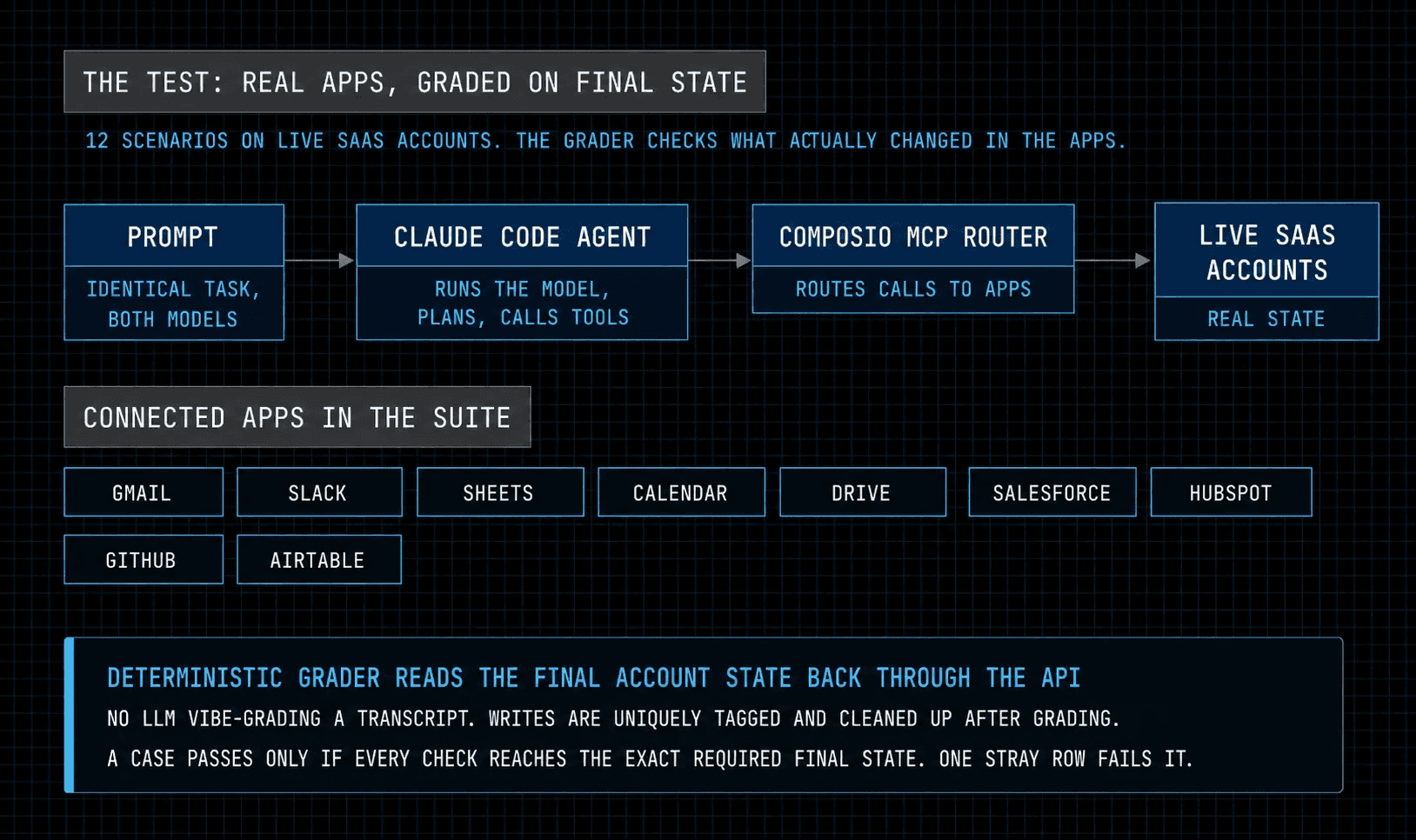
I used the Composio Golden Eval to test both models across 12 tasks in live SaaS accounts. Seven tasks covered reading, joining, and auditing data. Five tested complex workflows across apps such as Gmail, Slack, Sheets, Calendar, Drive, and GitHub.
Both models used the same Claude Code runtime, Composio MCP, OpenRouter path, prompts, and accounts. I changed only the model.
The grader checked the final app state through APIs. One extra row, missing reply, or incorrect total caused a failure. Each model ran every task once.
What I asked the models to do
I asked each model to match customer records across Salesforce and HubSpot. It needed to identify the same customer in both systems and return a list that matched the API result.
I also asked each model to check Calendar availability across several dates. It needed to track every date, create the correct meetings, and avoid extra meetings.
For the recurring-event task, each model changed one event instance and kept the rest of the series unchanged. For the Drive audit, it found each external permission and decided whether to keep or remove it.
The five complex tasks combined Gmail, Sheets, and Slack. Each model read the correct threads, applied exclusion rules, added valid rows to a Sheet, replied to each valid item, and posted the correct total in Slack. These tasks covered invoices, refunds, rosters, tickets, and vendors. One extra item or one missing reply caused a failure.
I used the same Claude Code runtime, Composio MCP router, and OpenRouter path for both models. The token columns show runtime input tokens, and both models produced 7K to 37K output tokens per task. DeepSeek finished every complex workflow faster and used fewer tool calls on four of five. On the roster task, Qwen used 41 tool calls and 2.88M input tokens in 1312.6 seconds for 8/13. DeepSeek scored 10/13 in 377.2 seconds.
Findings from the experiment
Frontier-kill task | Qwen 3.8 Max checks | DeepSeek V4 Pro checks | Qwen tool calls | DeepSeek tool calls | Qwen input tokens | DeepSeek input tokens | Qwen agent time | DeepSeek agent time |
|---|---|---|---|---|---|---|---|---|
Invoice sync | 8/13 | 8/13 | 28 | 24 | 1,554,670 | 1,114,768 | 877.1s | 392.6s |
Refund ledger | 8/13 | 7/13 | 30 | 28 | 1,698,660 | 1,724,472 | 1042.9s | 472.6s |
Roster sync | 8/13 | 10/13 | 41 | 17 | 2,883,789 | 844,270 | 1312.6s | 377.2s |
Ticket sync | 21/24 | 20/24 | 29 | 17 | 2,070,642 | 1,135,138 | 1372.2s | 609.9s |
Vendor directory | 9/13 | 9/13 | 28 | 23 | 1,974,271 | 1,211,528 | 1395.7s | 664.8s |
Here are the results for all 12 tasks.
Task | Band | Qwen 3.8 Max | DeepSeek V4 Pro |
|---|---|---|---|
CRM identity dedup | Read/join | ✅ | ✅ |
Calendar free/busy batch | Read/join | ✅ | ❌ 3/10 |
Gmail label batch | Read/join | ✅ | ✅ |
Recurring instance repair | Read/join | ✅ | ✅ |
Drive external-share audit | Read/join | ✅ | ✅ |
Airtable formula batch | Read/join | ❌ 4/6 | ❌ 4/6 |
GitHub access audit | Read/join | ❌ 1/2 | ❌ 1/2 |
Invoice sync | Frontier kill | ❌ 8/13 | ❌ 8/13 |
Refund ledger | Frontier kill | ❌ 8/13 | ❌ 7/13 |
Roster sync | Frontier kill | ❌ 8/13 | ❌ 10/13 |
Ticket sync | Frontier kill | ❌ 21/24 | ❌ 20/24 |
Vendor directory | Frontier kill | ❌ 9/13 | ❌ 9/13 |
Solved | 5/12 | 4/12 |
Fractions show how many checks each model completed on a failed task. Both models scored 4/6 on the Airtable task and 1/2 on the GitHub audit. Qwen’s extra pass came from the calendar task, where it scored 10/10 and DeepSeek scored 3/10.
Qwen scored 7/12, and DeepSeek scored 6/12. The difference came from the calendar free/busy task. Qwen passed with 10/10. DeepSeek scored 3/10 because it did not create all six required meetings and avoid extra meetings.
They had similar results on the other focused tasks. Both passed CRM deduplication, Gmail labels, recurring-event repair, and the Drive audit. Both missed some overdue Airtable records. They also selected the wrong GitHub repository.
Neither model passed the five complex workflows. However, they made different types of errors. Qwen posted more of the required replies, but it often included records that it should have excluded. DeepSeek handled some exclusions better, but it often missed replies.
Qwen did slightly better on the refund and ticket tasks. DeepSeek did better on the roster task. It also finished faster and used fewer tool calls and tokens.
Overall, Qwen passed one more task. DeepSeek used fewer resources. Both models often completed several steps correctly, but they did not produce the exact required rows or Slack totals.
What it costs
I estimated cost with the listed input and output prices. I did not assume any cache discounts, so the ratios matter more than the exact dollar values.
Model | Suite tokens | Estimated suite cost | Estimated per scenario |
|---|---|---|---|
Qwen 3.8 Max | ~13.1M input, ~215K output | ~$27.50 | ~$2.30 |
DeepSeek V4 Pro | ~8.3M input, ~116K output | ~$3.70 | ~$0.31 |
Qwen costs $2.00 per 1M input tokens and $6.00 per 1M output tokens. DeepSeek costs $0.435 per 1M input tokens and $0.87 per 1M output tokens. I left DeepSeek’s cached-input discount out of this estimate.
Across the 12 tasks, Qwen cost about 7.4 times more and passed one additional task. Qwen used about 145 minutes and 218 tool calls. DeepSeek used about 62 minutes and 157 tool calls.
At 1,000 full test runs, the estimate reaches about $27,500 for Qwen and $3,700 for DeepSeek. Actual cache use can change these totals.
Verdict
Choose Qwen 3.8 Max when task completion matters more than runtime or cost. It passed the calendar task, and it posted more required replies. It also scored slightly higher on the refund and ticket workflows.
Choose DeepSeek V4 Pro when you want lower runtime and token use. It matched Qwen on six of seven focused tasks, and it handled the roster exclusions better. It works well when you can check required replies separately.
I ran each task once, so I would not apply these scores to every workload. However, the errors provide a useful guide. Qwen completed more replies and passed the calendar task. DeepSeek used fewer tokens and finished the complex tasks about 2 to 3 times faster.
I would start with Qwen for calendar work or workflows that require many replies. I would use DeepSeek when speed and cost matter more, and I could add checks for missing replies, ledger rows, and final totals.
For exact ledger workflows, I would validate exclusions, rows, replies, and totals before either model makes the final write.

 Get started



