




Key takeaways: Production-ready RAG that can act
The challenge: Moving a Retrieval-Augmented Generation (RAG) system from prototype to production is complex. The most common failure point isn't the AI model but the complex, brittle integration layer connecting various data sources and tools.
The solution: A robust, three-tiered architecture: a Presentation Layer (UI), a RAG & AI Orchestration Layer, and a crucial Connectivity & Authentication Layer. This middle layer forms the backbone, handling all third-party integrations.
The key insight: Production-grade RAG shouldn't just retrieve information (read). It must enable AI agents to perform tasks (write). This connectivity layer requires unified authentication, permissions, and actions across all tools.
How a unified layer helps: Services like Composio provide a unified integration and authentication layer. Composio abstracts away OAuth, API keys, and rate limits, letting developers build secure, scalable RAG systems that both read data and execute tasks through a single, consistent interface.
Retrieval-Augmented Generation (RAG) excels at one thing: helping LLMs read from real-world systems like docs, tickets, CRM records, and runbooks so answers stay grounded. But most enterprise use cases don't stop at reading. Agents deliver value when they act on what they found: open the ticket, update the account, trigger the workflow, post the summary, and request approval.
Production RAG requires both read and write. You need continuous data syncing to keep context current, granular permissions that mirror source systems, and a secure action layer with tool contracts and per-user authentication so the agent can act on a user's behalf.
A production-grade system goes beyond retrieval. It reliably turns insights into action.
This guide covers the architecture for building that system end-to-end, focusing on the often-overlooked integration and auth layer that enables safe, auditable actions. The goal: evolve your RAG pipeline from a passive knowledge source into an active workflow participant.
Why RAG fails in production: Auth, permissions, sync, and reliability
At the heart of any production-ready RAG system lies a component frequently underestimated during proof-of-concept: the connectivity layer. While public discourse focuses on optimizing chunking strategies or choosing the right vector database, managing integrations behind the scenes often determines whether a RAG application succeeds or fails at scale.
A prototype might function with a single, manually configured API key. A production system must handle the tangled web of real-world integrations.
This layer introduces "integration hell," where the promise of AI-powered automation collides with the messy realities of enterprise systems. The challenges demand a robust, centralized solution.
A production-grade connectivity layer must gracefully handle four key complexities: diverse authentication mechanisms, persistent credential management, unpredictable API rate limits, and disparate data schema normalization.
Beyond connectivity, prototypes often fail to address critical performance and quality challenges. Latency becomes significant when real users expect instant answers, as multi-step retrieval and generation processes can run slowly. Scalability bottlenecks emerge when ingestion pipelines that worked for a few documents crumble under millions of records, leading to stale data.
Maintaining retrieval quality at scale requires constant effort. What works in a controlled environment may degrade as data volume and diversity grow, leading to irrelevant or inaccurate responses that erode user trust.
Building a single integration is an engineering task. Building and maintaining dozens creates an architectural nightmare. Complexity multiplies with each new data source or tool you connect.
Challenge | The manual / DIY approach | The unified layer approach |
Diverse authentication | Build and maintain custom code for OAuth 2.0, API Keys, Bearer Tokens, and related functionality for every integration. This approach breaks easily, compromises security, and doesn't scale. | A single, unified authentication flow handles all tools, with a library of hundreds of pre-built connectors. Configure an integration once and reuse it for all users, abstracting away the complexity of different auth protocols. |
Credential persistence | Manually build secure infrastructure to store tokens, manage OAuth refresh cycles, and handle token revocation. This approach creates a significant security risk. | The credential lifecycle runs securely in a SOC 2 compliant environment, including token storage and automatic refreshes, ensuring persistent, long-term access without engineering overhead. |
Unpredictable rate limits | Write custom logic with exponential backoff and queuing for each API, hoping to avoid hitting limits. This approach often results in failed jobs and poor performance. | API interactions include built-in reliability features such as retries and backoff, helping agents remain robust as usage scales, even facing rate limits and intermittent failures. |
Normalizing data schemas | Write and maintain bespoke data transformation scripts for each source (e.g., Google Drive, Notion, Slack), making the ingestion pipeline complex and fragile. | Data is ingested from many sources and exposed through unified interfaces and standard schemas, reducing per-integration mapping work while preserving source-specific fields. The same approach extends to actions, with a unified action model that executes tasks across tools through a consistent interface. |
A unified connectivity layer like Composio abstracts away these complexities. Instead of forcing developers to master dozens of APIs, Composio provides a single, consistent interface for authentication, credential management, rate limiting, and normalized data access.
This approach frees engineering teams to focus on their core mission: building actionable AI agents.
Reference architecture: 3 layers for production RAG (UI, orchestration, connectivity/auth)
A production-grade system works best as a three-tiered architecture, where each layer handles a distinct responsibility.
Layer | Description | Key responsibilities & components |
Presentation layer (UI) | The user-facing interface where users interact with the system. | Chat interface, Query submission, Displaying generated responses, Managing user experience |
Connectivity & Authentication layer | The critical backbone handles secure, persistent connections to all external data sources and tools. This layer fails most often in DIY RAG projects. You can implement this layer using Composio. | Unified Authentication: Manages OAuth 2.0, API Keys, etc. Persistent Connections: Handles token storage & refresh. Data Sync & Normalization. Enabling Actions: Provides a single interface for both reading data (RAG) and writing data (Agent Actions). |
RAG & AI orchestration layer | The "brains" of the system are responsible for processing data, retrieving context, and generating responses or actions. | Document chunking, Vector embedding generation, Vector search & retrieval (e.g., Pinecone), LLM prompt augmentation, Orchestrating Actionable Agent tool calls |
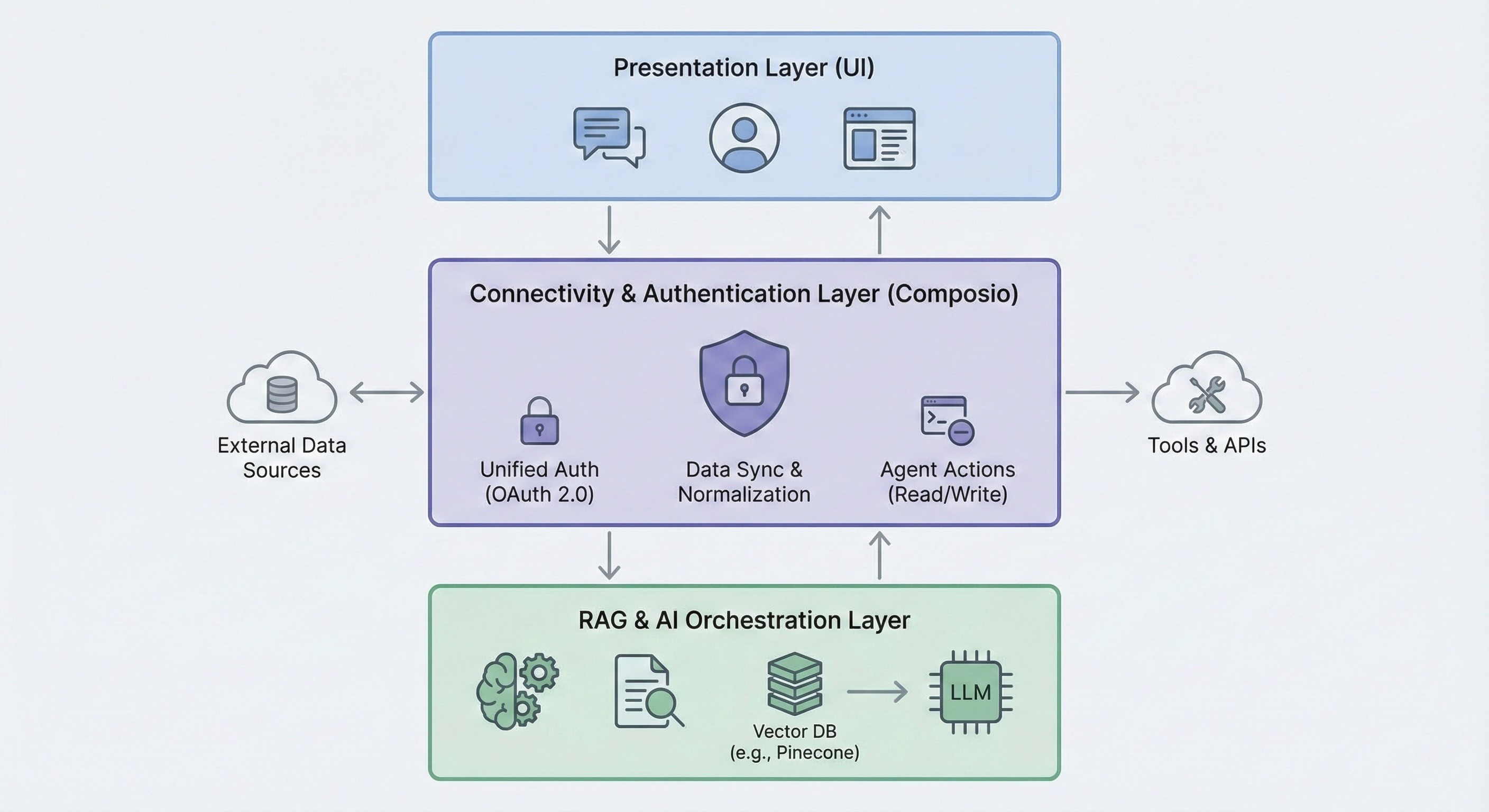
Presentation layer: Chat UI, approvals, and user context
The Presentation Layer faces users, accepting queries and delivering generated responses. This layer provides an intuitive experience, typically through a chat interface.
While seemingly straightforward, this layer sets the stage for the entire user journey and serves as the entry point for all system interactions.
RAG orchestration layer: Chunking, embeddings, retrieval, reranking
This layer forms the "brains" of the operation, handling the core RAG pipeline. After the Connectivity Layer ingests and normalizes data, it chunks documents, generates vector embeddings, and indexes them in a specialized vector database such as Pinecone.
When a user query arrives, this layer searches the vector database for relevant context, augments the user's prompt with this information, and passes it to a Large Language Model (LLM) to generate a grounded, accurate response.
This layer also orchestrates "actionable agents" by interpreting the LLM's intent to execute tasks and using the Connectivity Layer to perform actions in external tools.
Connectivity + authentication layer: OAuth, permissions, sync, and tool execution
This layer forms the system's backbone. Abstracting away integration challenges, it provides a unified interface for both reading and writing data via agent actions.
Neglecting this layer's architectural complexity causes most RAG projects to fail when scaling from prototype to a secure, multi-tool enterprise application.
How to build the connectivity layer for RAG (auth + permissions + actions)
Centralized auth for RAG: OAuth scopes, token storage, and refresh
Composio serves as a dedicated authentication and integration backbone, providing a unified foundation for both reading data and executing actions. Instead of wrestling with varied authentication protocols like OAuth 2.0, API keys, and bearer tokens for each tool, you can use Composio's SDK to streamline the entire process.
Integrating a new tool like Google Drive or Notion is as simple as configuring an "Auth Config" within the Composio platform. This blueprint defines the authentication method and scopes (e.g., read-only vs. full access) and can be reused for all your users.
This approach lets each user securely connect their own account (e.g., their personal Google Drive) using a single, centrally-managed integration configuration, ensuring data remains sandboxed and secure. When a user needs to connect their account, your application uses the Composio SDK to generate a redirect URL.
This URL directs the user to a Composio-hosted page that manages the entire authentication flow, from handling the OAuth consent screen to collecting API keys.
This unified approach differs significantly from a manual flow requiring you to build and maintain separate logic for each integration. Composio abstracts away much of this complexity by handling key parts of the credential lifecycle, including the OAuth handshake, secure token storage, and automatic refresh token management to maintain persistent access.
By providing a robust, single integration point, Composio helps make the connectivity layer production-ready, letting you focus on your application's core logic rather than tool authentication plumbing.
Composio also provides native tool integrations for popular frameworks like LangChain and LlamaIndex, letting you easily add any connected app as a tool for your agent.
RAG ingestion pipeline: Sync, normalization, and permission metadata
A production-ready RAG system relies on a robust, scalable data ingestion pipeline. This "read" path fetches data from various sources, transforms it into a consistent format, and keeps it in sync.
A unified connectivity layer significantly simplifies this process. Using a single, consistent interface, developers can access data from various platforms without writing boilerplate code for each integration.
Fetching a file list from Google Drive and a page list from Notion uses nearly identical code with a unified action model. Composio provides a unified interface that abstracts away each API's complexities.
Here's a conceptual code snippet demonstrating document fetching using Composio's SDK:
from composio import Composio
from typing import Literal, List, Dict
from dotenv import load_dotenv

load_dotenv()

composio_client = Composio()

def fetch_documents(
   user_id: str,
   source: Literal["gdrive", "notion"]) -> List[Dict]:
   documents = []

   if source == "gdrive":
       response = composio_client.tools.execute(
           slug="GOOGLEDRIVE_LIST_FILES",
           arguments={
               # Optional filters can go here
               # "page_size": 100,
           },

           user_id=user_id,
           dangerously_skip_version_check=True
       )

   elif source == "notion":
       response = composio_client.tools.execute(
           slug="NOTION_FETCH_DATA",
           arguments={
               # Optional filters
           },

           user_id=user_id,
           dangerously_skip_version_check=True
       )

   else:
       raise ValueError("Unsupported source")

   if not response.get("successful"):
       raise RuntimeError(
           f"Failed to fetch documents: {response.get('error')}"
       )

   documents = response.get("data", [])
   return documents
The key takeaway: consistent developer experience. The unified layer handles user authentication, token management, and API calls.
To ensure the RAG system operates on current information, data must stay up to date. Two primary strategies exist: webhooks (event-driven, real-time) and scheduled jobs (polling at intervals).
Composio helps orchestrate both methods, offering managed triggers and webhook handling to simplify data synchronization so you don't build all the underlying plumbing yourself.
Regardless of the process, data must be standardized. This normalization process, handled by Composio, ensures the downstream RAG pipeline can ingest data from any source without custom logic.
Here's an example Python dataclass defining a normalized schema for documents ingested into a RAG pipeline:
from dataclasses import dataclass, field
from typing import Dict, Literal, Optional, Any
from datetime import datetime

PermissionLevelUser = Literal["read", "write", "comment"]
PermissionLevelGroup = Literal["read", "write"]

@dataclass
class DocumentPermissions:
   users: Dict[str, PermissionLevelUser] = field(default_factory=dict)
   groups: Dict[str, PermissionLevelGroup] = field(default_factory=dict)
   is_public: bool = False

@dataclass
class NormalizedDocument:
   id: str                          # Unique identifier from source
   content: str                     # Main text content
   source: Literal["notion", "gdrive"]
   name: str                        # Title or name
   created_at: str                  # ISO 8601 timestamp
   updated_at: str                  # ISO 8601 timestamp
   url: Optional[str] = None
   metadata: Dict[str, Any] = field(default_factory=dict)
   permissions: DocumentPermissions = field(default_factory=DocumentPermissions)
Enforcing this schema makes subsequent chunking, embedding, and indexing steps uniform and scalable, forming the foundation of a powerful, multi-source RAG application.
Vector search pipeline for RAG: Embeddings, indexing, retrieval, reranking
With a unified connectivity layer providing normalized, up-to-date data, we can now build the core RAG system. This involves transforming ingested documents into searchable vector embeddings and creating a retrieval process that remains both relevant and permission-aware.
Choosing a vector DB and an embedding model for production RAG
Any RAG pipeline's foundation rests on its ability to understand and compare the semantic meaning of text. This requires two key components:
Embedding model: This model converts text chunks into high-dimensional vectors. Popular choices include OpenAI's text-embedding-3-small or text-embedding-ada-002.
Vector database: This specialized database efficiently stores and queries vectors. For this guide, we'll use Pinecone, a popular managed vector database known for its scalability and low-latency search, which is crucial for production environments.
Indexing for RAG: Chunking, embedding, and metadata upserts
The first part of our RAG pipeline takes normalized documents, processes them, and "upserts" them into Pinecone. This process includes several stages:
Document chunking: A single document is too large to embed effectively. It must break down into smaller, semantically meaningful chunks. A common strategy uses fixed-size chunking with overlap, splitting text into chunks of a specific token length (e.g., 512 tokens) with slight overlap (e.g., 20 tokens) to ensure semantic continuity.
Embedding generation: Each chunk is passed to the embedding model to produce a vector.
Metadata enrichment: This stage builds an enterprise-grade system. Storing just a user_id isn't sufficient. A robust strategy attaches rich metadata that reflects the source system's access controls. Instead of a simple user ID, store an array of authorized_group_ids or a representation of the Access Control List (ACL) from the original application.
Upserting to Pinecone: The vectors and their metadata are then "upserted" into a Pinecone index. For multi-tenancy, use namespaces within a single index to isolate data for different users or organizations, preventing data leakage.
Here's the code for generating embeddings:
from typing import List
from openai import OpenAI
from dotenv import load_dotenv

load_dotenv()
openai_client = OpenAI()

def get_embeddings(texts: List[str]) -> List[List[float]]:
    """
    Generate embeddings for a list of texts using OpenAI.
    This is a simple, synchronous implementation.
    In production, you should batch and add retries.
    """
    if not texts:
        return []
    response = openai_client.embeddings.create(
        model="MODEL_NAME",
        input=texts
    )

    embeddings = [item.embedding for item in response.data]
    return embeddings
Here's a code snippet illustrating the upserting service:
from dataclasses import dataclass
from typing import List, Dict
from pinecone import Pinecone
from langchain_text_splitters import RecursiveCharacterTextSplitter
from uuid import uuid4
from dotenv import load_dotenv
from normalized_doc import NormalizedDocument
from embeddings import get_embeddings

import os

load_dotenv()

pinecone = Pinecone()

@dataclass
class DocumentMetadata:
   source: str
   url: str
   authorized_group_ids: List[str]

text_splitter = RecursiveCharacterTextSplitter(
   chunk_size=512,
   chunk_overlap=20
)

def chunk_and_upsert_document(
   document: NormalizedDocument,
   metadata: DocumentMetadata,
   namespace: str,
   index_name: str = "your-index-name",
):

   # 1. Split document into chunks
   chunks = text_splitter.split_text(document.content)

   # 2. Generate embeddings (should be batched in production)
   embeddings = get_embeddings(chunks)

   if len(chunks) != len(embeddings):
       raise RuntimeError("Mismatch between chunks and embeddings")

   # 3. Prepare vectors
   vectors = []
   for i, (chunk, embedding) in enumerate(zip(chunks, embeddings)):
       vectors.append({
           "id": f"{document.id}-chunk-{i}",
           "values": embedding,
           "metadata": {
               "source": metadata.source,
               "url": metadata.url,
               "authorized_group_ids": metadata.authorized_group_ids,
               "textContent": chunk,
               "document_name": document.name,
           }
       })

   # 4. Upsert into Pinecone
   index = pinecone.Index(index_name)
   index.upsert(vectors=vectors, namespace=namespace)
The retrieval process: Filtering for security, reranking for relevance
When a user submits a query, retrieval operates as a two-stage process designed to find the most relevant, permission-compliant information.
Initial retrieval with metadata filtering: The user's query converts into a vector. This vector then performs a similarity search in Pinecone, combined with a metadata filter. Using the authorized_group_ids stored in the metadata, the query pre-filters the search space, guaranteeing that retrieved chunks come from documents the user can access.
Semantic reranking: Vector search is powerful but can miss nuanced relevance. To improve quality, we introduce a reranking step. The initial, broader result set from vector search (e.g., the top 20) passes to a more powerful model (a reranker). This model re-evaluates each chunk's relevance against the specific query and reorders them, pushing the most relevant results to the top. This two-stage process ensures both speed at scale and high accuracy.
Combining pre-filtering for security and post-retrieval reranking for relevance forms a key part of a production-ready RAG pipeline. This combination ensures the LLM receives an accurate, secure context that complies with original data permissions.
Here's the basic retriever code fetching relevant data chunks from the index:
from pinecone import Pinecone
from dotenv import load_dotenv
from embeddings import get_embeddings

load_dotenv()

pinecone = Pinecone()

def retrieve_from_pinecone(
    query: str,
    top_k: int = 3,
    index_name: str = "your-index-name",
) -> str:
    """
    Retrieves relevant document chunks from Pinecone based on a query.
    Args:
        query: The user's search query.
        namespace: The Pinecone namespace to search in.
        top_k: The number of top results to retrieve.
        index_name: The name of the Pinecone index.
    Returns:
        A string containing the concatenated content of the retrieved chunks.
    """
    try:
        # 1. Connect to the Pinecone index
        index = pinecone.Index(name=index_name)
        # 2. Generate embedding for the user's query
        query_embedding = get_embeddings([query])[0]
        # 3. Query Pinecone without any metadata filters
        query_response = index.query(
            vector=query_embedding,
            top_k=top_k,
            include_metadata=True,
        )

        # 4. Extract and combine the text content from the results
        context_chunks = [
            match["metadata"]["textContent"] for match in query_response["matches"]
        ]
        if not context_chunks:
            return "No relevant information found."

        return "\n---\n".join(context_chunks)
    except Exception as e:
        return "Error: Could not retrieve context from the knowledge base."
Actionable RAG: How to execute tools after retrieval (read + write)
Conventional RAG pipelines excel at retrieving information but stop there. A production-ready RAG system must go beyond simple retrieval. It needs to empower Actionable Agents: AI-powered systems that can perceive their environment, reason about next steps, and use tools to perform tasks in external systems.
This approach transforms the application from a read-only information portal into a dynamic, interactive assistant that gets work done.
What Differentiates an Actionable Agent from a Chatbot?
Feature | Conventional RAG | Actionable RAG (with Composio) |
Core function | Read-Only: Retrieves and summarizes information from connected data sources. | Read & Write: Retrieves information and then performs tasks in external applications based on that information. |
User outcome | "Here is the answer based on your documents." | "I have found the answer in your documents, and I have completed the task you requested." |
Example | "What was our Q4 strategy?" → Returns a summary of the strategy document. | "Create a Trello board based on the Q4 strategy doc." → Returns a summary AND creates the Trello board with relevant tasks. |
Key enabler | A vector database and an LLM. The connectivity often serves as a one-way, ingestion-only pipe. | A unified connectivity layer like Composio that manages both read permissions (for ingestion) and write permissions (for actions) through a single, secure integration. |
Workflow: Retrieve context → Choose tool → Execute action (with approvals)
The workflow for an Actionable Agent integrates with the RAG pipeline:
User prompt & context retrieval: The user makes a complex request. The system first executes the standard RAG pipeline to fetch relevant context.
LLM reasoning & tool selection: The retrieved context passes to the LLM, along with a list of available tools the agent can use. The LLM reasons over the information and determines if an action is required.
Agent execution: If an action is necessary, the agent executes it by calling the appropriate tool via a unified connectivity layer such as Composio.
Here's a concrete example: A user asks, "Based on the Q4 strategy doc in Google Drive, create a new Trello board with tasks for the marketing team."
To handle this request, the backend API (/api/chat) first retrieves the strategy document. Then, it calls the LLM, providing it with the document's content and the definitions for tools like TRELLO_ADD_BOARDS and TRELLO_ADD_CARDS.
The code uses a tool-calling API, such as OpenAI's, to get structured output from the model.
import json

from openai import OpenAI
from composio import Composio

openai_client = OpenAI()
composio_client = Composio()

CONTEXT_PROMPT_TEMPLATE =  """
You are a helpful assistant.
Use the provided context to complete tasks and answer questions.
Base your answer on the information provided in the context.
--- CONTEXT START ---
{{context}}
--- CONTEXT END ---
"""

# Example tool schema (simplified)
TRELLO_TOOL_SCHEMA = {
   "type": "function",
   "function": {
       "name": "create_trello_board",
       "parameters": {
           "type": "object",
           "properties": {
               "boardName": {"type": "string"},
               "tasks": {
                   "type": "array",
                   "items": {"type": "string"}
               }
           },
           "required": ["boardName", "tasks"]
       }
   }
}

def run_chat(messages: list[dict], user_id: str):
    """
    Runs LLM, executes tools if needed, returns either:
    - plain text
    - tool result text
    """
    # Get the users latest query to use for retrieval
    user_query = messages[-1]['content']
    retrieved_context = retrieve_from_pinecone(
        query=user_query,
        index_name="INDEX_NAME"
    )

    #Create a dynamic system prompt with the retrieved context
    system_prompt = CONTEXT_PROMPT_TEMPLATE.format(context=retrieved_context)

    #Call the LLM with the context-aware prompt
    response = openai_client.chat.completions.create(
        model="MODEL_NAME",
        messages=[
            {"role": "system", "content": system_prompt},
            *messages
        ],
        tools=[TRELLO_TOOL_SCHEMA],
        tool_choice="auto"
    )
    message = response.choices[0].message

    # Tool call path (remains the same)
    if message.tool_calls:
        tool_call = message.tool_calls[0]
        args = json.loads(tool_call.function.arguments)
        board_name = args["boardName"]
        tasks = args["tasks"]
        board = composio_client.tools.execute(
            slug="TRELLO_ADD_BOARDS",
            arguments={"name": board_name},
            user_id=user_id,
            dangerously_skip_version_check=True
        )
        print("board in run_chat:", board)
        board_id = board["data"]["id"]
        for task in tasks:
            composio_client.tools.execute(
                slug="TRELLO_ADD_CARDS",
                arguments={"board_id": board_id, "name": task},
                user_id=user_id,
                dangerously_skip_version_check=True
            )
        return "Trello board and tasks have been created successfully."
    # Normal LLM response
    return message.content
This example shows the power of a unified connectivity layer. Because Composio manages the underlying authentication for all connected tools, adding "write" capabilities is straightforward.
The same connection that ingests data from Google Drive can also execute actions in Trello. The entityId parameter passes to Composio to associate the API call with a specific end user's connection, ensuring the action executes with the correct credentials and permissions.
This approach doesn't bypass security. Users explicitly grant an agent's ability to perform actions during the initial connection flow. When setting up an integration, the application must request the necessary OAuth write scopes (e.g., trello.boards.write).
This approach ensures users maintain complete control and explicitly authorize the agent's capabilities. Composio manages the entire lifecycle of read and write permissions through a single, secure, production-ready layer, transforming your RAG system from a simple chatbot into a powerful, actionable AI agent.
Implementation example: Next.js chat UI + FastAPI RAG backend (streaming)
To ground our tutorial in a tangible example, we'll scaffold a minimal frontend and backend. This provides an interactive shell that we'll progressively enhance with our production-ready RAG pipeline.
We're choosing Next.js for its robust frontend capabilities and FastAPI for our high-performance Python backend. This separation uses each framework's strengths: Next.js for building a modern, reactive user interface, and FastAPI for its speed and integration with Python's extensive AI and data science libraries.
First, create a new Next.js application:
npx create-next-app@latest your-app-ai
With the project initialized, we'll build the chat interface. The Vercel AI SDK offers a powerful useChat hook that abstracts away conversational state management. This hook provides necessary state variables (messages, input) and handlers (handleInputChange, handleSubmit) to create a reactive chat component with minimal boilerplate.
Here's a simple React component for the user interface in app/page.tsx. Note that the api parameter in the useChat hook now points to our future FastAPI server endpoint.
'use client';

import { useChat } from '@ai-sdk/react';
import { useEffect, useRef } from 'react';

const bubbleStyles = {
 base: 'p-3 rounded-lg max-w-xs md:max-w-md',
 user: 'bg-blue-500 text-white self-end',
 assistant: 'bg-gray-200 text-black self-start',
};

export default function Chat() {
 const { messages, input, handleInputChange, handleSubmit, isLoading } = useChat({
   api: 'BACKEND_URL',
   body: {
     user_id: 'USER_ID',
   },
 });

 const chatContainerRef = useRef<HTMLDivElement>(null);

 useEffect(() => {
   chatContainerRef.current?.scrollTo(0, chatContainerRef.current.scrollHeight);
 }, [messages]);

 return (
   <div className="flex flex-col h-screen bg-gray-50">
     {/* Header */}
     <header className="p-4 border-b bg-white shadow-sm">
       <h1 className="text-xl font-bold text-center">Minimal Chat UI</h1>
     </header>

     {/* Chat Messages Container */}
     <div
       ref={chatContainerRef}
       className="flex-1 overflow-y-auto p-4 space-y-4"
     >

       <div className="flex flex-col space-y-2">
         {messages.length > 0 ? (
           messages.map(m => (
             <div
               key={m.id}
               className={`${bubbleStyles.base} ${
                 m.role === 'user' ? bubbleStyles.user : bubbleStyles.assistant
               }`}
             >
               <span className="font-bold capitalize text-sm block">
                 {m.role === 'user' ? 'You' : 'AI'}
               </span>

               <p className="whitespace-pre-wrap">{m.content}</p>
             </div>
           ))
         ) : (
           <div className="text-center text-gray-500">
             Ask something to get started!
           </div>
         )}

       </div>
     </div>

     {/* Input Form */}
     <footer className="p-4 border-t bg-white">
       <form onSubmit={handleSubmit} className="flex items-center space-x-2">
         <input
           className="flex-1 p-2 border rounded-lg focus:outline-none focus:ring-2 focus:ring-blue-500"
           value={input}
           onChange={handleInputChange}
           placeholder="Create a Trello board called 'My Project' with tasks..."
           disabled={isLoading}
         />

         <button
           type="submit"
           className="px-4 py-2 bg-blue-500 text-white rounded-lg disabled:bg-blue-300"
           disabled={isLoading || !input}
         >
           Send
         </button>
       </form>
     </footer>
   </div>
 );
}
The useChat hook sends user submissions via a POST request to the endpoint specified in the api property. We need to create this corresponding backend route handler in our FastAPI application.
This API endpoint will become the central orchestrator for our entire RAG and agentic workflow. For now, it will have minimal logic, but it establishes the server-side entry point.
Create a main.py file for your FastAPI backend and add the following placeholder code. This setup uses StreamingResponse to send data as it becomes available, which works well for chat applications.
from fastapi import FastAPI, Request
from fastapi.responses import StreamingResponse

import json
import asyncio

from handler import run_chat

app = FastAPI()

# SETUP CORS
@app.post("/api/chat")
async def chat_endpoint(req: Request):
   try:
       body = await req.json()
       messages = body.get("messages")
       user_id = body.get("user_id")

       if not messages:
           from fastapi.responses import JSONResponse
           return JSONResponse(
               status_code=400,
               content={"error": "'messages' key not found in request body."}
           )

       async def event_generator():
           result = await asyncio.to_thread(
               run_chat,
               messages,
               user_id
           )

           # Stream response in chunks
           for token in result.split(" "):
               yield token + " "
               await asyncio.sleep(0.02)

       return StreamingResponse(
           event_generator(),
           media_type="text/event-stream"
       )

   except json.JSONDecodeError:
       from fastapi.responses import JSONResponse
       return JSONResponse(
           status_code=400,
           content={"error": "Invalid JSON in request body."}
       )
   except Exception as e:
       print(f"An error occurred: {e}")
       from fastapi.responses import JSONResponse
       return JSONResponse(
           status_code=500,
           content={"error": "An internal server error occurred."}
       )
This initial setup provides a fully wired chat application. The frontend captures user input, and the backend stands ready to process it, setting the stage for integrating the more complex connectivity and RAG layers in subsequent steps.
To bring our complete architecture to life, the POST handler in FastAPI expands to serve as the orchestrator:
Receive user prompt: Extract the user's latest message from the messages array.
Execute RAG retrieval: Send the prompt to our RAG retrieval service. This involves embedding the query, performing a vector search in Pinecone with metadata filters based on the user's permissions, and reranking the results.
Augment the prompt: Add the retrieved context to the message payload sent to the LLM.
Define agentic tools: Provide the LLM with a list of available tools (powered by Composio).
Invoke LLM & handle tool calls: Invoke the streamText or a similar tool-calling API. If the model returns a tool call, our backend executes it using the Composio SDK, as shown in the Trello example. If it returns a text response, stream it back to the user.
Implementing this logic transforms the simple API route into the central hub of our production-ready, actionable RAG system.
Further reading
If you want to go deeper on the core building blocks of production-grade, actionable RAG, these references are excellent starting points:
RAG fundamentals (original paper): Retrieval-Augmented Generation (RAG) — the canonical research basis for grounding LLM outputs. https://arxiv.org/abs/2005.11401
Embedding models and best practices: OpenAI embeddings guide (model selection, batching, and usage patterns). https://platform.openai.com/docs/guides/embeddings
Text chunking strategies: LangChain text splitters overview (chunking, overlap, recursive splitting). https://python.langchain.com/docs/concepts/text_splitters/
Metadata filtering and vector search in production: Pinecone learning center (production RAG patterns and scaling considerations). https://www.pinecone.io/learn/
Reranking for higher retrieval quality: Cohere Rerank docs (how reranking improves relevance after initial retrieval). https://docs.cohere.com/docs/rerank
OAuth and delegated authorization: OAuth 2.0 overview (how consent + scopes work for delegated access). https://oauth.net/2/
Modern agent/tool-calling patterns: OpenAI tool calling / agents guides (structured tool calls and execution loops). https://platform.openai.com/docs/guides/function-calling
Conclusion: Production RAG needs auth + permissions + tool execution
Building production-ready RAG no longer centers on retrieval alone. A critical challenge goes beyond vector search: creating a unified connectivity layer that manages persistent data sync, enforces source-level permissions, and empowers agents to execute tasks.
By solving for this integration backbone first, you move beyond building chatbots that merely answer questions and start creating AI agents that get work done across all your company's tools.
Ready to build RAG systems that can do more? Sign up for a free Composio account and enable your AI agents with tools in minutes.
This is a guest post by Manveer Chawla. He is co-founder of Zenith, where they are building AI Agents for marketing teams. He was previously Director of Engineering at Confluent and led Growth Engineering platforms at Dropbox.
Frequently asked questions
What is the main challenge in productionizing RAG systems?
The primary challenge isn't the AI model but the integration layer. Building and maintaining secure, reliable connections to diverse data sources and tools is complex, time-consuming, and causes most RAG projects to fail. A unified connectivity layer like Composio solves this by abstracting away authentication, rate limits, and data normalization complexities.
What is an "actionable RAG" system?
An actionable RAG system moves beyond retrieving information (read). It empowers AI agents to perform tasks (e.g., writing) in external applications based on the insights they discover. For example, it can find a strategy document and automatically create a Trello board with tasks based on its contents.
What is the proposed three-tiered architecture for production-grade RAG?
A robust RAG system uses a three-tiered architecture:
A Presentation Layer for user interaction.
A RAG & AI Orchestration Layer for chunking, embedding, and vector search.
A Connectivity & Authentication Layer, the critical backbone for managing all third-party tool integrations, which you can build with Composio.
What role does the "Connectivity & Authentication Layer" play?
This layer forms the system's backbone, handling all third-party integrations. It supports diverse authentication methods, securely stores credentials, normalizes data, and provides a unified interface for both data retrieval and agent actions. Services like Composio function as this production-ready layer.
How does a unified connectivity layer like Composio help build RAG systems?
A unified connectivity layer like Composio abstracts away the complexities of building and maintaining integrations. Composio provides a single, consistent interface for authentication, rate limiting, and data normalization across hundreds of apps. This lets you focus on building actionable AI agents rather than wrestling with API plumbing.
Why should RAG systems move from "read" to "write"?
Moving from "read" (retrieving information) to "write" (performing tasks) transforms your RAG system from a passive chatbot into an active AI agent. Instead of just answering questions, the agent can execute workflows across your enterprise tools, turning insights directly into actions and automating real work.
How does the system handle security and permissions?
Security works by mirroring source-level permissions. During data ingestion, access control metadata stores alongside the document chunks. When retrieving information, queries pre-filter using this metadata, guaranteeing that users only see content they can access in the original application.
How do I prevent the Agent from executing dangerous actions (like deleting data)?
Production systems should implement "Human-in-the-Loop" (HITL) flows for high-stakes actions. While the Connectivity Layer handles the technical permissions (e.g., holding the API key), your Orchestration Layer should pause and prompt for user confirmation via the UI before executing destructive verbs (e.g., DELETE or UPDATE) or sensitive actions (e.g., SEND_EMAIL).
Does the Connectivity Layer store the data it retrieves?
Generally, a connectivity layer acts as a pass-through pipe. It handles the authentication handshake and data normalization. Still, the actual payload (your documents or customer data) flows directly to your application or vector database, without being stored in the middle layer. This ensures compliance with GDPR and internal data privacy policies.
How does this architecture handle "Hallucinations" during tool calling?
Hallucinations often happen when tool definitions are vague. In this architecture, the Connectivity Layer provides the LLM with strictly typed schemas (verified against the API). If the LLM tries to call a tool with invalid arguments (e.g., a fake User ID), the layer validates the request and rejects it before it hits the external API, preventing execution errors.
Does using a unified API wrapper introduce latency?
While any middleware introduces only a few milliseconds of overhead, it often reduces total latency in a RAG pipeline. By automatically handling token refreshes, rate-limit backoffs, and connection pooling, the connectivity layer prevents "retry loops" and timeouts that often cause significant delays in DIY implementations.
Can I use this with existing frameworks like LangChain or LlamaIndex?
Yes. The "Connectivity Layer" functions as infrastructure, not a framework. It replaces hard-coded API keys in your code. You can still use LangChain for the orchestration logic (the "brain"), while plugging in Composio (or a similar tool) as the "tool provider" that handles authentication and execution.

 Get started




