Jan 19, 2026

Jan 19, 2026

Ship powerful agents fast

Add 10K+ tools to your AI Agent

Ship powerful agents fast

Add 10K+ tools to your AI Agent

How to use MCP in LangSmith Agent Builder

How to use MCP in LangSmith Agent Builder

How to use MCP in LangSmith Agent Builder

How to use MCP in LangSmith Agent Builder

Jan 19, 2026

Jan 19, 2026

LangChain recently introduced LangSmith Agent Builder, a no-code tool for building natural language agents.

Instead of relying on the user to set up nodes and edges, it allows chat-based interactions, where the user just needs to define the goal, and the system generates the prompt, connects tools, and sets up triggers automatically.

It is built on top of LangChain’s deep agent’s framework and supports planning, persistent memory, and multi-step tasks for complex workflows.

However, when it comes to tools, I felt they were pretty limited; even connecting the MCP wasn't straightforward, and I had to struggle a bit to use remote MCPs.

So, I manually dug into both problems and identified the issues, and this blog covers the fix along with a few use cases.

Let’s get started!

TL; DR

  • LangSmith Agent Builder lets you build AI agents through chat instead of wrestling with nodes and edges, but the MCP connection is secretly broken.

  • Rube MCP unlocks 900+ tools instantly-Gmail, Calendar, LinkedIn, Exa-without auth headaches or tool selection chaos once you apply the manual fix.

  • Email triage becomes autopilot when agents fetch unread Gmail, categorise by urgency, and send consolidated summaries without you lifting a finger.

  • Calendar briefings turn intelligent when agents pull today's schedule, research external contacts via LinkedIn, and email you a personalised day-ahead report.

  • LinkedIn candidate sourcing achieves surgical precision as agents calibrate with 5 samples, refine criteria iteratively, and deliver 30 qualified profiles that match your exact requirements.

Set Up MCP Server in LangSmith Agent Builder

For demonstration, we will use our hosted Rube MCP server, as it allows me to access 900+ tools without worrying about auth, tool selection, query management, or tool-calling orchestration.

Here is what to do:

  • Head over to Rube & Login / Create Account

  • In the left side panel, select Use Rube → MCP URL → Copy it!

  • Now head to LangSmith agent builder and Login / Create Account (important that you select no-code experience)

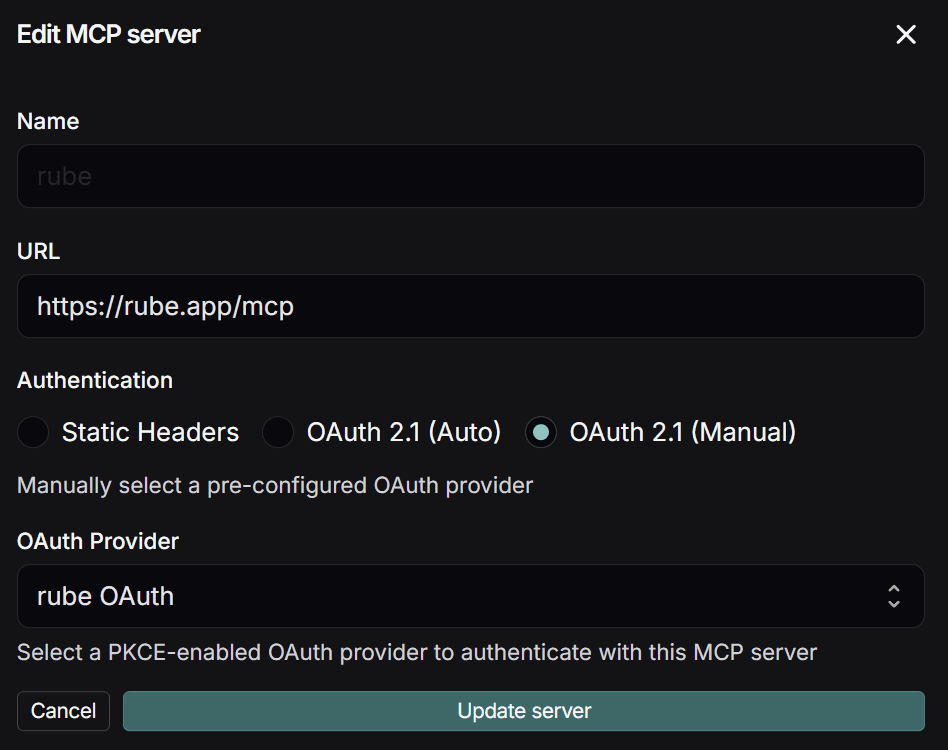
  • Within LangSmith Agent Builder, click ⚙️ Settings → MCP Servers → Add MCP Servers

  • In the new modal, put

  • After a few seconds, a pop-up will appear asking for verification. Hit verify, then re-login to rube/the tool.

However, it’s not over yet; you can’t use the tool yet!

If you go now to the agent builder workspace, select* Create manually instead,* you will only see default tools (probably a bug), so to fix it, you need to click on MCP → fill in the same details and revalidate.

After a few seconds, you will see tools listed under the MCP server name you added; in our case, it’s RUBE.
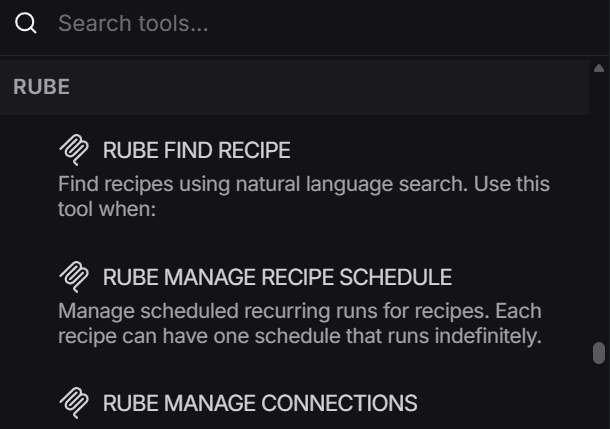
Rube MCP Server Showing Tools

NOTE: Though I used rube mcp server for demo, you can use any other using same technique, till they don’t fix the issue!

Now let’s see how the MCP server works together with LangSmith Agent Builder to handle daily odd jobs.

How to Use the MCP Server with LangSmith Agent Builder

The process at Agent Builder is slightly different from the rest of the tools you might have used!

It is actually a single agent.md file behind the scenes, with additional folders like tools and skills added as needed.

When you create an agent, these file changes are made in real time based on instructions and can later be reviewed.

However, the above complexity is hidden behind a chat interface that allows users to prompt what they want to build, and the system takes care of the rest.

So, let’s use it to ease understanding by building 3 agents (easy, medium, and complex).

1. Email Triage Agent

The 1st agent will be a simple one, use the agent to fetch all the emails from Gmail/Outlook and triage them into Important, General & Rubbish.

Enter the following prompt in the chat window & hit Enter.

Build a agent that uses Rube MCP to fetch only unread emails from Gmail. For each email, analyze the sender, subject, and content, then triage into exactly three labels: Important, General, Ignore based on urgency, relevance, and action required. After processing all unread emails, return a single consolidated summary with bullet points grouped by label, including sender, subject, and a one-line intent per email. Do not modify, reply, or archive emails. Output the summary only after the task fully completes

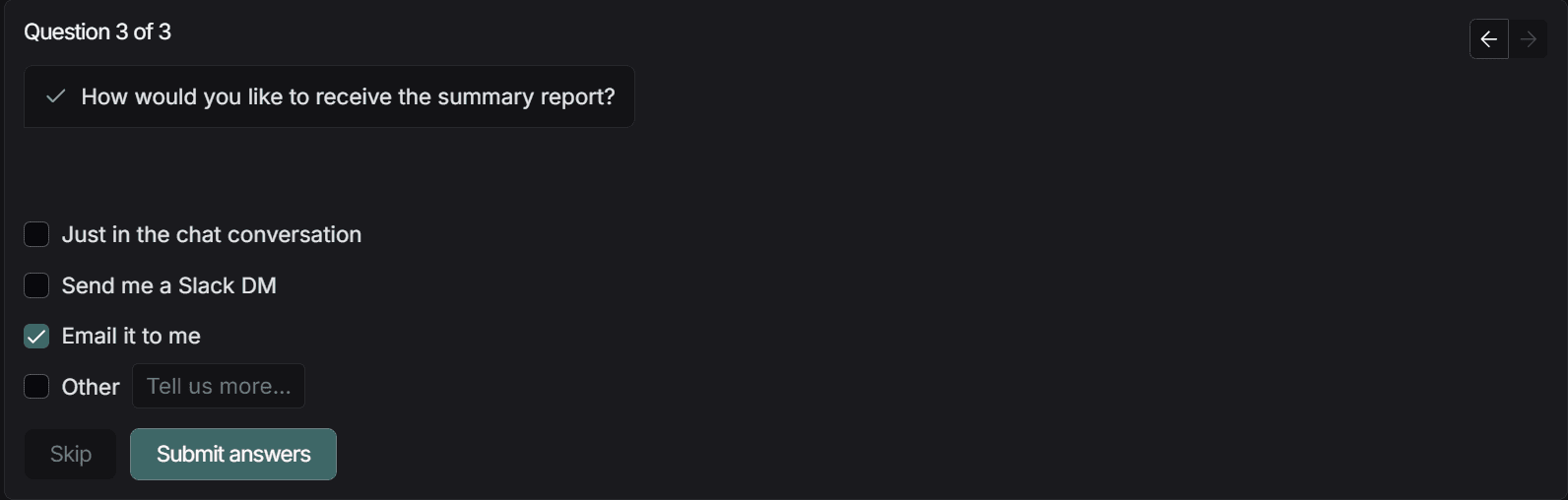
Now the agent builder will ask you a few clarifying questions:
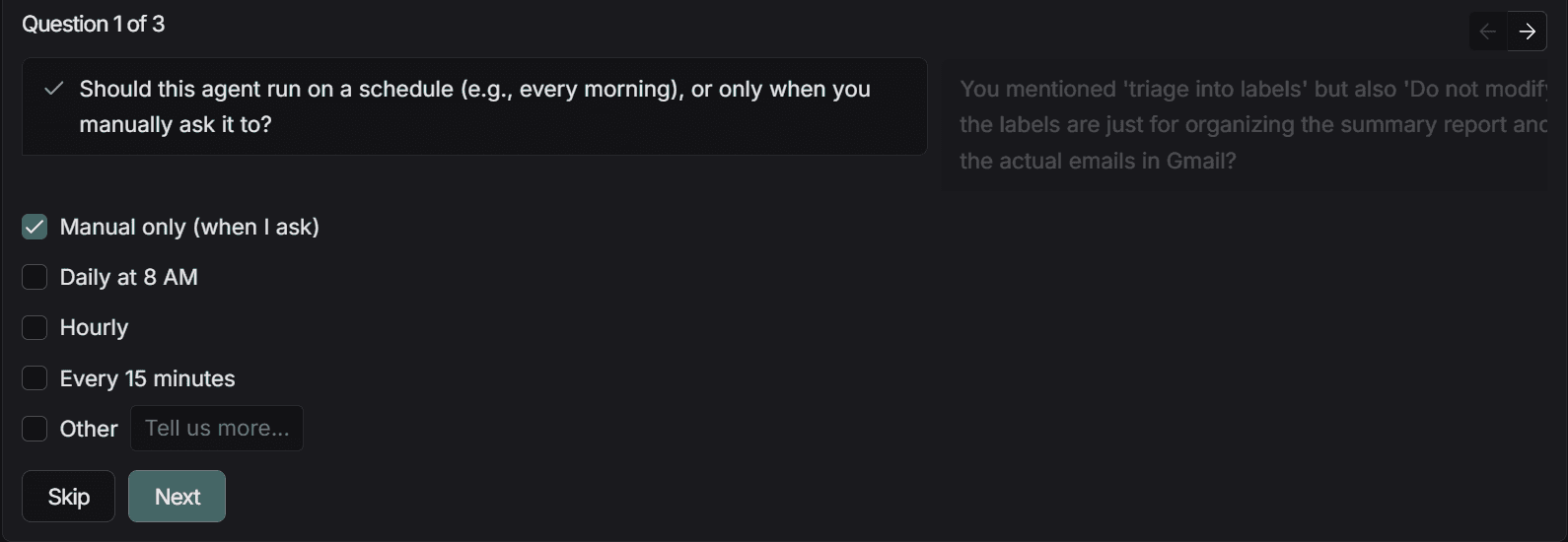
Image 2Image 3Image 4

Once you answer these, as I have done, it will combine metadata, the toolbox, and instructions to generate an agent overview.

Hit create, and your agent is created just like that!

Image 5

To test the agent, in the left chat window, enter:

Triage my unread Gmail emails using and email me the summary

Result:

As shown, it calls the Gmail tool via the Rube MCP we added and completes the task for us!

Note: To keep things simple, I have kept the text in markdown (apparently no rendering support in Gmail). Feel free to optimize it further.

2. Daily Calendar Briefing Agent

Next up, let’s spin up an agent that fetches the Google calendar (Calendly or Cal.com) and Tavily, generates a daily briefer and sends it to Gmail.

Enter the following prompt in the chat window:

You are a daily calendar assistant. Each morning, get today’s date (dd-mm-yyyy), fetch all events for the day, sort them by time and importance, and identify busy periods, gaps, and back-to-back meetings. Briefly research external meetings if needed using tavily_linkedin_search accessed via rube mcp. Send a concise email summary of the day via Gmail

Ensure you add the TAVILY_API_KEY & GEMINI_API_KEY by selecting ⚙️ at top as well, for it work fine.

Now to test:

send me 21/01/2016 briefing please

Results:

As can be seen, it calls the Rube Calendar & Gmail tool via the Rube MCP we added, and it sent me an email. It seems I have a scheduled travel, so it wrote a customised message for me. (ignore markdowns)

3. LinkedIn Candidate Sourcing Agent

As for the last agent, let’s create one that can filter or source candidates on LinkedIn based on the provided criteria.

We will use rube mcp to call Exa-Tool and pass in the inputs, and let it handle the rest.

Paste the following prompt in the chat window:

You are an expert LinkedIn candidate sourcing agent. When a user requests candidates, first gather role requirements (skills, seniority, location, constraints) and ask clarifying questions if needed. Begin with a calibration search of exactly 5 candidates using the Exa search protocol via Rube MCP, returning real LinkedIn profiles only (name, role, company, qualifications, LinkedIn URL). 

Never fabricate data. Ask for feedback and refine criteria iteratively until the user confirms alignment. Only after explicit confirmation, run a full-scale Exa search via Rube MCP (default 30 candidates), list candidates in chat. Exclude candidates already at the hiring company. Clearly state limitations if results are sparse. Prioritize precision, transparency, and iteration over volume

Ensure you add EXA_API_KEY and GEMINI_API_KEY in ⚙️ at top. Also select Gemini 3.0 Model from Model Selector

Let’s test it out:

Source LinkedIn candidates for a Senior Backend Engineer. Focus on Python, Django, AWS, 5–8 years' experience, based in India.

Results:

Amazing, it called the exa tool via rube mcp, which we added earlier and showed a potential candidate in chat based on the criteria.

This is just a glimpse of what's possible with LangSmith Agent Builder & Rube MCP. Feel free to expand on these base examples as you like and get rid of those boring, mundane tasks.

Time to look at the final take!

LangChain recently introduced LangSmith Agent Builder, a no-code tool for building natural language agents.

Instead of relying on the user to set up nodes and edges, it allows chat-based interactions, where the user just needs to define the goal, and the system generates the prompt, connects tools, and sets up triggers automatically.

It is built on top of LangChain’s deep agent’s framework and supports planning, persistent memory, and multi-step tasks for complex workflows.

However, when it comes to tools, I felt they were pretty limited; even connecting the MCP wasn't straightforward, and I had to struggle a bit to use remote MCPs.

So, I manually dug into both problems and identified the issues, and this blog covers the fix along with a few use cases.

Let’s get started!

TL; DR

  • LangSmith Agent Builder lets you build AI agents through chat instead of wrestling with nodes and edges, but the MCP connection is secretly broken.

  • Rube MCP unlocks 900+ tools instantly-Gmail, Calendar, LinkedIn, Exa-without auth headaches or tool selection chaos once you apply the manual fix.

  • Email triage becomes autopilot when agents fetch unread Gmail, categorise by urgency, and send consolidated summaries without you lifting a finger.

  • Calendar briefings turn intelligent when agents pull today's schedule, research external contacts via LinkedIn, and email you a personalised day-ahead report.

  • LinkedIn candidate sourcing achieves surgical precision as agents calibrate with 5 samples, refine criteria iteratively, and deliver 30 qualified profiles that match your exact requirements.

Set Up MCP Server in LangSmith Agent Builder

For demonstration, we will use our hosted Rube MCP server, as it allows me to access 900+ tools without worrying about auth, tool selection, query management, or tool-calling orchestration.

Here is what to do:

  • Head over to Rube & Login / Create Account

  • In the left side panel, select Use Rube → MCP URL → Copy it!

  • Now head to LangSmith agent builder and Login / Create Account (important that you select no-code experience)

  • Within LangSmith Agent Builder, click ⚙️ Settings → MCP Servers → Add MCP Servers

  • In the new modal, put

  • After a few seconds, a pop-up will appear asking for verification. Hit verify, then re-login to rube/the tool.

However, it’s not over yet; you can’t use the tool yet!

If you go now to the agent builder workspace, select* Create manually instead,* you will only see default tools (probably a bug), so to fix it, you need to click on MCP → fill in the same details and revalidate.

After a few seconds, you will see tools listed under the MCP server name you added; in our case, it’s RUBE.

Rube MCP Server Showing Tools

NOTE: Though I used rube mcp server for demo, you can use any other using same technique, till they don’t fix the issue!

Now let’s see how the MCP server works together with LangSmith Agent Builder to handle daily odd jobs.

How to Use the MCP Server with LangSmith Agent Builder

The process at Agent Builder is slightly different from the rest of the tools you might have used!

It is actually a single agent.md file behind the scenes, with additional folders like tools and skills added as needed.

When you create an agent, these file changes are made in real time based on instructions and can later be reviewed.

However, the above complexity is hidden behind a chat interface that allows users to prompt what they want to build, and the system takes care of the rest.

So, let’s use it to ease understanding by building 3 agents (easy, medium, and complex).

1. Email Triage Agent

The 1st agent will be a simple one, use the agent to fetch all the emails from Gmail/Outlook and triage them into Important, General & Rubbish.

Enter the following prompt in the chat window & hit Enter.

Build a agent that uses Rube MCP to fetch only unread emails from Gmail. For each email, analyze the sender, subject, and content, then triage into exactly three labels: Important, General, Ignore based on urgency, relevance, and action required. After processing all unread emails, return a single consolidated summary with bullet points grouped by label, including sender, subject, and a one-line intent per email. Do not modify, reply, or archive emails. Output the summary only after the task fully completes

Now the agent builder will ask you a few clarifying questions:
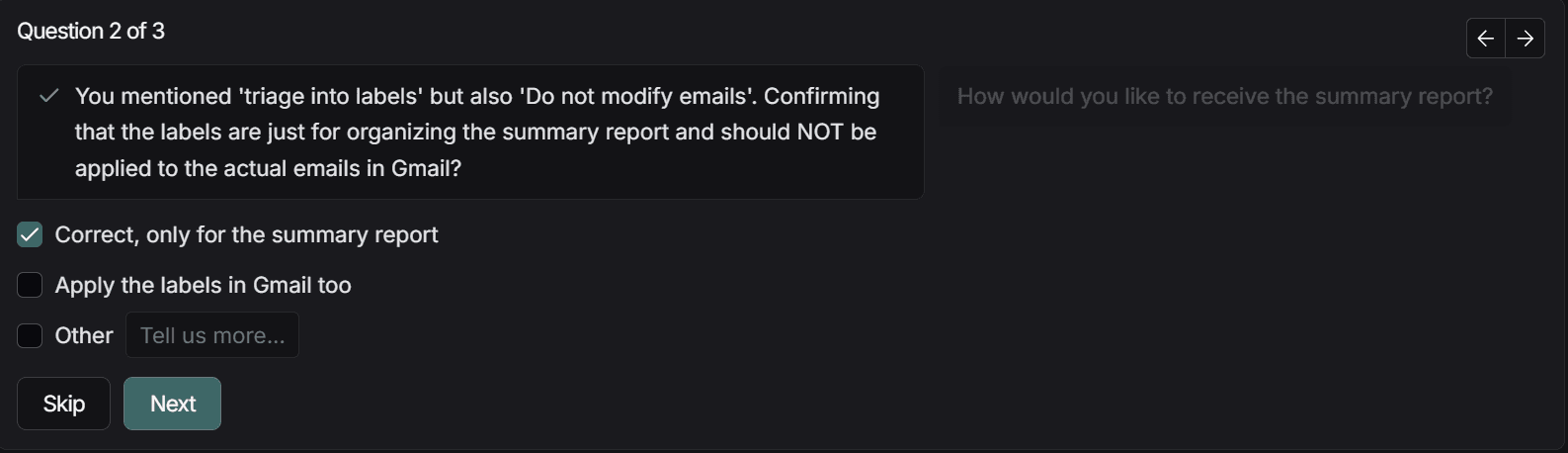
Image 2Image 3Image 4

Once you answer these, as I have done, it will combine metadata, the toolbox, and instructions to generate an agent overview.

Hit create, and your agent is created just like that!
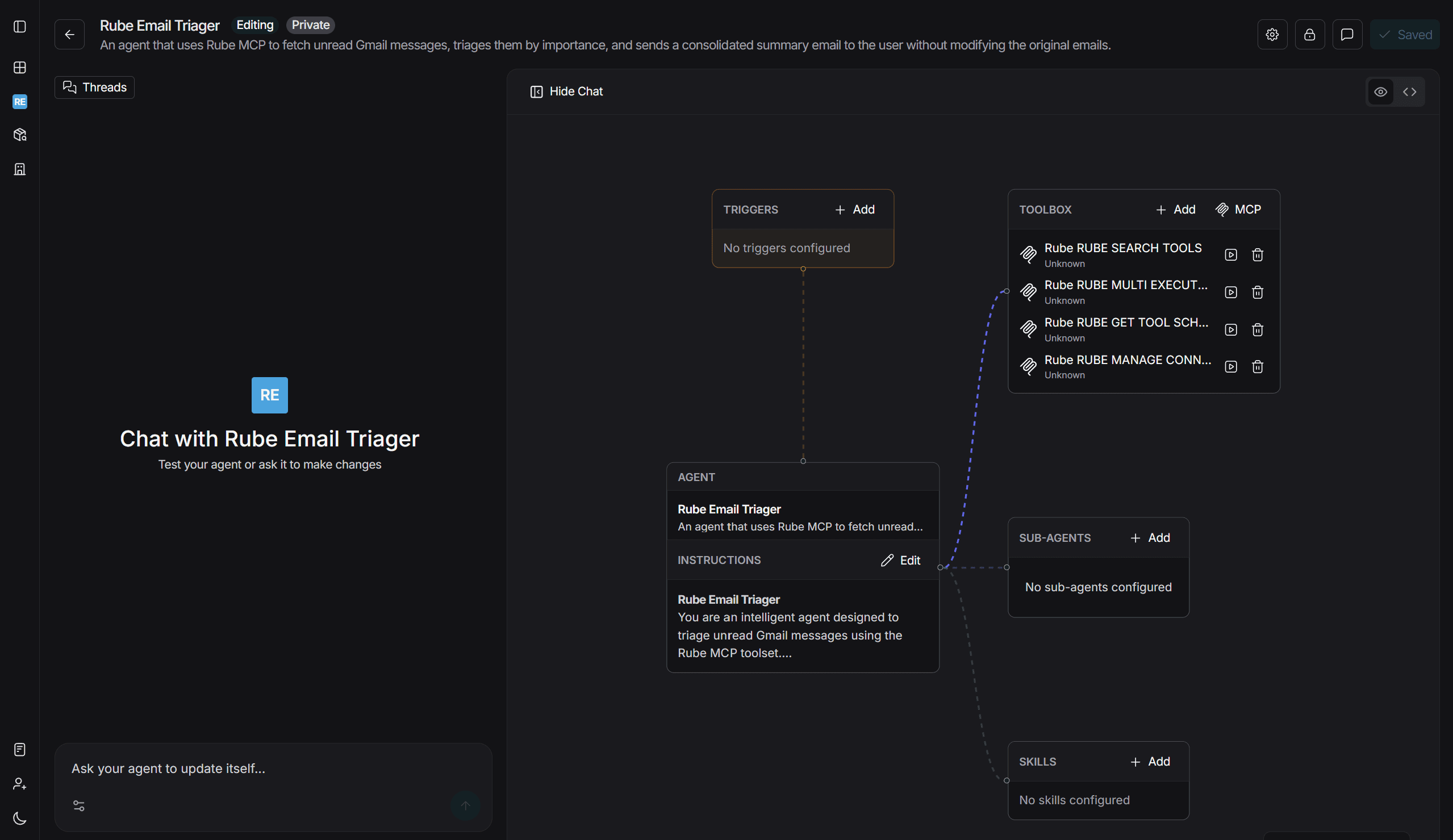
Image 5

To test the agent, in the left chat window, enter:

Triage my unread Gmail emails using and email me the summary

Result:

As shown, it calls the Gmail tool via the Rube MCP we added and completes the task for us!

Note: To keep things simple, I have kept the text in markdown (apparently no rendering support in Gmail). Feel free to optimize it further.

2. Daily Calendar Briefing Agent

Next up, let’s spin up an agent that fetches the Google calendar (Calendly or Cal.com) and Tavily, generates a daily briefer and sends it to Gmail.

Enter the following prompt in the chat window:

You are a daily calendar assistant. Each morning, get today’s date (dd-mm-yyyy), fetch all events for the day, sort them by time and importance, and identify busy periods, gaps, and back-to-back meetings. Briefly research external meetings if needed using tavily_linkedin_search accessed via rube mcp. Send a concise email summary of the day via Gmail

Ensure you add the TAVILY_API_KEY & GEMINI_API_KEY by selecting ⚙️ at top as well, for it work fine.

Now to test:

send me 21/01/2016 briefing please

Results:

As can be seen, it calls the Rube Calendar & Gmail tool via the Rube MCP we added, and it sent me an email. It seems I have a scheduled travel, so it wrote a customised message for me. (ignore markdowns)

3. LinkedIn Candidate Sourcing Agent

As for the last agent, let’s create one that can filter or source candidates on LinkedIn based on the provided criteria.

We will use rube mcp to call Exa-Tool and pass in the inputs, and let it handle the rest.

Paste the following prompt in the chat window:

You are an expert LinkedIn candidate sourcing agent. When a user requests candidates, first gather role requirements (skills, seniority, location, constraints) and ask clarifying questions if needed. Begin with a calibration search of exactly 5 candidates using the Exa search protocol via Rube MCP, returning real LinkedIn profiles only (name, role, company, qualifications, LinkedIn URL). 

Never fabricate data. Ask for feedback and refine criteria iteratively until the user confirms alignment. Only after explicit confirmation, run a full-scale Exa search via Rube MCP (default 30 candidates), list candidates in chat. Exclude candidates already at the hiring company. Clearly state limitations if results are sparse. Prioritize precision, transparency, and iteration over volume

Ensure you add EXA_API_KEY and GEMINI_API_KEY in ⚙️ at top. Also select Gemini 3.0 Model from Model Selector

Let’s test it out:

Source LinkedIn candidates for a Senior Backend Engineer. Focus on Python, Django, AWS, 5–8 years' experience, based in India.

Results:

Amazing, it called the exa tool via rube mcp, which we added earlier and showed a potential candidate in chat based on the criteria.

This is just a glimpse of what's possible with LangSmith Agent Builder & Rube MCP. Feel free to expand on these base examples as you like and get rid of those boring, mundane tasks.

Time to look at the final take!

Connect your LangSmith Agent with 900+ SaaS apps NOW

Connect your LangSmith Agent with 900+ SaaS apps NOW

Connect your LangSmith Agent with 900+ SaaS apps NOW

Connect your LangSmith Agent with 900+ SaaS apps NOW

Conclusion

LangSmith Agent Builder paired with Rube MCP turns complex agent workflows into effortless no-code magic, handling everything from email triage to candidate sourcing.

Though the toolset starts limited, a quick MCP server like rube unlocks 900+ tools, letting you automate daily mundane tasks with chat-based prompts.

So, connect Rube to LangSmith, drop in a goal like "build me a research agent…” add API keys, connect to tools/MCPs and watch it build, run, and deliver - while you reclaim your time for high-impact work.

Happy Automating.

FAQ

Q1: How do I fix LangSmith Agent Builder so the MCP tools are displayed after connection?

A: Click "Create manually" in Agent Builder workspace, select MCP, re-enter server details and revalidate -tools will appear under your MCP server name after verification.

Q2: What is Rube MCP, and why use it with LangSmith Agent Builder?

A: Rube MCP is a hosted server providing 900+ pre-authenticated tools (Gmail, Calendar, LinkedIn, Exa) that integrate with LangSmith through OAuth 2.1 without manual auth configuration.

Q3: Can LangSmith Agent Builder create agents without coding experience?

A: Yes, LangSmith uses chat-based prompts to auto-generate system prompts, connect tools, and build agents—no node setup required, built on LangChain's Deep Agents framework.

Q4: What agents can I build with LangSmith and Rube MCP integration?

A: You can build email triage agents, calendar briefing bots, LinkedIn candidate sourcing tools, and any automation combining 900+ tools through natural language instructions.

Conclusion

LangSmith Agent Builder paired with Rube MCP turns complex agent workflows into effortless no-code magic, handling everything from email triage to candidate sourcing.

Though the toolset starts limited, a quick MCP server like rube unlocks 900+ tools, letting you automate daily mundane tasks with chat-based prompts.

So, connect Rube to LangSmith, drop in a goal like "build me a research agent…” add API keys, connect to tools/MCPs and watch it build, run, and deliver - while you reclaim your time for high-impact work.

Happy Automating.

FAQ

Q1: How do I fix LangSmith Agent Builder so the MCP tools are displayed after connection?

A: Click "Create manually" in Agent Builder workspace, select MCP, re-enter server details and revalidate -tools will appear under your MCP server name after verification.

Q2: What is Rube MCP, and why use it with LangSmith Agent Builder?

A: Rube MCP is a hosted server providing 900+ pre-authenticated tools (Gmail, Calendar, LinkedIn, Exa) that integrate with LangSmith through OAuth 2.1 without manual auth configuration.

Q3: Can LangSmith Agent Builder create agents without coding experience?

A: Yes, LangSmith uses chat-based prompts to auto-generate system prompts, connect tools, and build agents—no node setup required, built on LangChain's Deep Agents framework.

Q4: What agents can I build with LangSmith and Rube MCP integration?

A: You can build email triage agents, calendar briefing bots, LinkedIn candidate sourcing tools, and any automation combining 900+ tools through natural language instructions.