How to integrate Zoho Campaigns MCP with Hermes

Connect Hermes to Zoho Campaigns MCP. Add contacts to a mailing list, review campaign reports for last month, and more using natural language, with authentication handled for you.

Zoho Campaigns logoZoho Campaigns
Oauth2

Zoho Campaigns is an email marketing platform for managing mailing lists, contacts, campaigns, and reports. It helps teams organize subscribers and measure campaign performance in one place.

38 Tools

Introduction

Hermes is a 24/7 autonomous agent that lives on your computer or server — it remembers what it learns and evolves as your usage grows.

This guide explains the easiest and most robust way to connect your Zoho Campaigns account to Hermes. You can do this through either Composio Connect CLI or Composio Connect MCP. For personal use we recommend the CLI, but you won't go wrong with MCP either.

Also integrate Zoho Campaigns with

What is Composio Connect?

Composio Connect is a consumer offering that lets anyone plug 1,500+ applications directly into their agent harness — including Hermes. It can:

  • Search and load tools from relevant toolkits on-demand, reducing context usage.
  • Chain multiple tools to accomplish complex workflows via a remote workbench, without excessive back-and-forth with the LLM.
  • Manage app authentication end-to-end with zero manual overhead.

Integrating Zoho Campaigns with Hermes

Using Composio Connect CLI

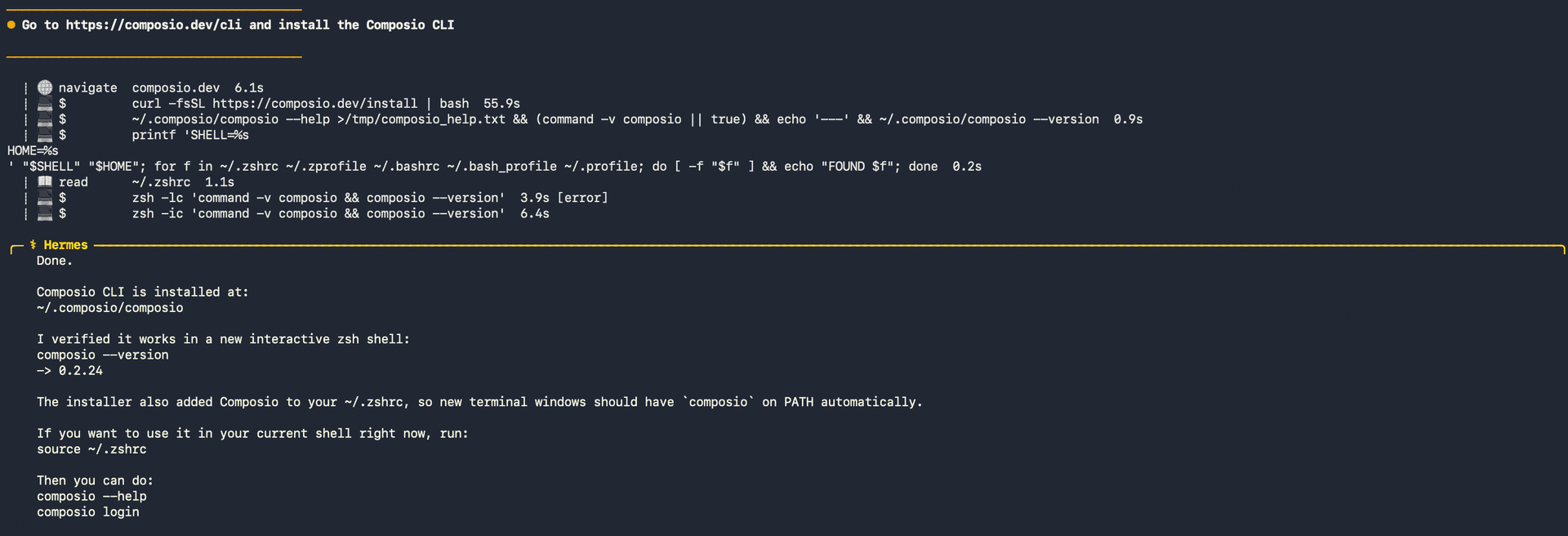
1. Install the Composio CLI

Run the install script directly, or paste https://composio.dev/hermes into your Hermes chat box to have it installed for you.

bash
curl -fsSL https://composio.dev/install | bash
Hermes authenticating with Composio

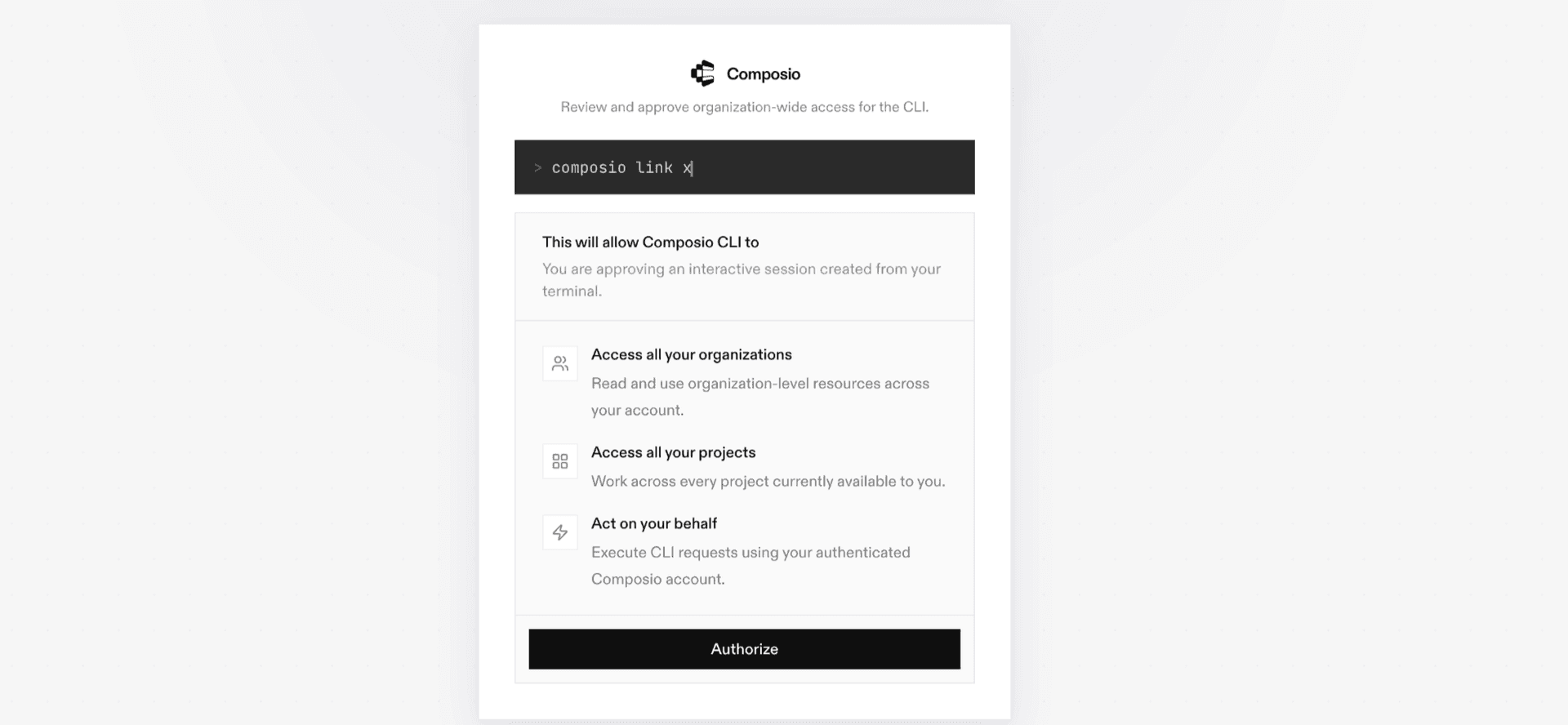
2. Authenticate

Once the CLI is installed, ask Hermes to authenticate with Composio.

3. Connect to Zoho Campaigns

Ask your agent to connect to Zoho Campaigns, or simply request any Zoho Campaigns-related task. Hermes will prompt you to authenticate and authorize access.

4. Done. You're all set with a new Zoho Campaigns connection.


Using Composio Connect MCP

1. Get your MCP URL and API Key

Go to dashboard.composio.dev and copy your Connect MCP URL and API key.

Copy MCP URL and API key from Composio dashboard

2. Open the Hermes config file

bash
nano ~/.hermes/config.yaml

3. Add the Composio Connect MCP server

bash
mcp_servers:
  composio:
    url: "https://connect.composio.dev/mcp"
    headers:
      x-consumer-api-key: "YOUR_COMPOSIO_API_KEY"
    connect_timeout: 60
    timeout: 180

Save with Ctrl + O, Enter, then exit with Ctrl + X.

4. Restart your Hermes agent

Once restarted, ask your agent to connect to Zoho Campaigns or request any Zoho Campaigns-related task. It will prompt you to authenticate and authorize access.

5. Done!

What is the Zoho Campaigns MCP server, and what's possible with it?

The Zoho Campaigns MCP server is an implementation of the Model Context Protocol that connects your AI agent and assistants like Claude, Cursor, etc directly to your Zoho Campaigns account. It provides structured and secure access to mailing lists, contacts, email campaigns, reports, topics, tags, custom fields, segments, coupons, and workflows, so your agent can manage subscribers, create and send campaigns, review performance, and organize audience data on your behalf.

  • Mailing list and contact management: Have your agent create, rename, and remove mailing lists, add contacts, subscribe or unsubscribe people, count subscribers, and move contacts to the Do-Not-Mail registry.
  • Campaign creation and delivery: Let the agent create campaign drafts, clone existing campaigns, schedule reviewed campaigns, or send campaigns immediately to their configured audiences.
  • Campaign reporting: Direct your agent to review campaign details, delivery and engagement reports, recent campaigns, and recipient lists filtered by delivery or engagement status.
  • Audience organization: Instruct your agent to create and manage tags, associate tags with contacts, list segments and their contacts, and review or update available contact fields.
  • Topics, coupons, and workflows: Have your agent manage subscription topics, inspect topic products, review coupon details, mark coupons as used, and add contacts to custom workflows.

Way Forward

With Zoho Campaigns connected, Hermes can now act on your behalf whenever it detects a relevant task or you ask it to.

From here, you can extend Hermes further:

  • Connect more apps: Calendar, Slack, Notion, Linear, and hundreds of others are available through the same Composio Connect setup. Each new integration compounds what Hermes can do for you.
  • Build workflows across tools: Once multiple apps are connected, Hermes can chain actions together — turn an email into a calendar invite, a Slack message into a Linear ticket, or a meeting note into a follow-up draft.
  • Let it learn your patterns: The more you use Hermes, the better it gets at anticipating how you'd handle recurring tasks. Give it feedback on drafts and decisions, and it will adapt.

If you run into trouble or want to share what you've built, join the community or check out the Docs for deeper configuration options.

TOOLS

Supported Tools

Every Zoho Campaigns action and event your agent gets out of the box.

Add Contacts to Mailing List

Add between one and ten email addresses to an existing Zoho Campaigns mailing list in one request.

Add Mailing List and Contacts

Create a Zoho Campaigns mailing list and optionally add up to ten email addresses in the same call.

Associate Tag with Contact

Associate an existing Zoho Campaigns contact tag with one contact email address.

Clone Campaign

Clone an existing campaign into a new draft with a new name and subject.

Count Mailing List Contacts

Count contacts in a mailing list for one subscription, bounce, or spam status.

Create Campaign

Create an email campaign draft for mailing-list or segment recipients.

Create Contact Field

Create a custom contact field in Zoho Campaigns.

Create Tag

Create a Zoho Campaigns contact tag with a description and color.

Create Topic

Create a brand topic or brand-product topic.

Delete Campaign

Permanently delete one Zoho Campaigns campaign by exact campaign key.

Delete Mailing List

Permanently delete a mailing list.

Delete Tag

Permanently delete one Zoho Campaigns contact tag by exact name.

Dissociate Tag from Contact

Remove an existing Zoho Campaigns contact-tag association without deleting the tag or contact.

Get Campaign Details

Get a campaign's status, sender, recipients, reach, and summary report data.

Get Campaign Report

Get aggregate delivery, open, click, bounce, and reach metrics for one campaign.

Get Coupon Details

Get a coupon's code, recipient, campaign, sent and expiry dates, and current status.

Get Last Campaign Report

Get aggregate delivery, open, click, bounce, and reach metrics for the organization's most recently sent campaign.

Get Mailing List Details

Get a mailing list's contact statistics, client and device breakdowns, and optionally filtered campaign details one page at a time.

Get Segment Details

Get the filtering criteria and metadata for a segment in a mailing list.

List Campaign Recipients

List recipients in one campaign delivery or engagement state, one page at a time.

List Contact Fields

List standard and custom contact fields available to the connected Campaigns organization.

List Mailing List Contacts

List contacts in a mailing list, optionally filtered by subscription or bounce status, one page at a time.

List Mailing Lists

List mailing lists and their contact, ownership, segment, and status metadata one page at a time.

List Open Workflows

List open custom workflows one page at a time.

List Recent Campaigns

List recent campaigns filtered by lifecycle status, one page at a time.

List Recently Sent Campaigns

Return up to a requested number of the most recently sent campaigns; an account with no sent campaigns returns an empty list.

List Segment Contacts

List contacts belonging to a Zoho Campaigns segment one page at a time.

List Tags

List all Zoho Campaigns contact tags and their metadata.

List Topic Products

List products available for brand-product topics one page at a time.

List Topics

List subscription topics for the organization one page at a time.

Mark Coupon Used

Irreversibly mark a Zoho Campaigns coupon as used.

Move Contact to Do-Not-Mail

Permanently suppress one email address across the connected Zoho Campaigns organization by moving it to the Do-Not-Mail registry.

Schedule Campaign

Schedule a reviewed campaign for future delivery.

Send Campaign

Immediately and irreversibly send a reviewed Zoho Campaigns campaign to its entire configured audience.

Subscribe Contact

Add or update one contact in a mailing list.

Trigger Workflow Contacts

Add between one and 200 contacts to a Zoho Campaigns custom workflow.

Unsubscribe Contact

Unsubscribe one contact from a mailing list or topic.

Update Mailing List

Rename a mailing list and set its signup form visibility.

FAQ

Frequently asked questions

With a standalone Zoho Campaigns MCP server, the agents and LLMs can only access a fixed set of Zoho Campaigns tools tied to that server. However, with the Composio Tool Router, agents can dynamically load tools from Zoho Campaigns and many other apps based on the task at hand, all through a single MCP endpoint.

Yes, you can. Hermes fully supports MCP integration. You get structured tool calling, message history handling, and model orchestration while Tool Router takes care of discovering and serving the right Zoho Campaigns tools.

Yes, absolutely. You can configure which Zoho Campaigns scopes and actions are allowed when connecting your account to Composio. You can also bring your own OAuth credentials or API configuration so you keep full control over what the agent can do.

All sensitive data such as tokens, keys, and configuration is fully encrypted at rest and in transit. Composio is SOC 2 Type 2 compliant and follows strict security practices so your Zoho Campaigns data and credentials are handled as safely as possible.

Start with Zoho Campaigns.It takes 30 seconds.

Managed auth, hosted MCP servers, and every Zoho Campaigns tool your agent needs.Free to start.

Start building