How to connect Vercel AI Gateway to Claude

Connect Claude Web, Desktop and Cowork to Vercel AI Gateway MCP. List available vercel ai models and specs, generate marketing copy with vercel model, and more using natural language, with authentication handled for you.

Vercel AI Gateway logoVercel AI Gateway
Api Key

Vercel AI Gateway is a unified AI model gateway offering model discovery, inference, generation, and usage APIs. It provides a single, consistent API surface to route and scale model workloads across providers.

22 Tools

Introduction

Claude is Anthropic's AI assistant, available on the web, in the desktop app, and on mobile. Cowork is its agent for knowledge work, and it runs on all of those surfaces too. Connected to your apps, Claude can work with your files and services to accomplish complex tasks on your behalf.

This guide walks you through the easiest and most secure way to connect your Vercel AI Gateway account to Claude via Composio Connect, enabling it to list available Vercel AI models and specs, generate marketing copy with Vercel model, fetch usage metrics for your models, and more such actions on your behalf without compromising your account security.

Setup is the same on Claude Web, Desktop, and Cowork, and you only need to do it once. The connector is tied to your account, so it's available in all three.

Also integrate Vercel AI Gateway with

Connecting Vercel AI Gateway to Claude Web, Desktop, and Cowork

Two ways to add the Composio connector. Pick whichever you prefer.

1. Add with one click

Click the button. Claude opens with the Composio connector filled in. Click Add, then go to step 2.

Add to Claude

Add manually

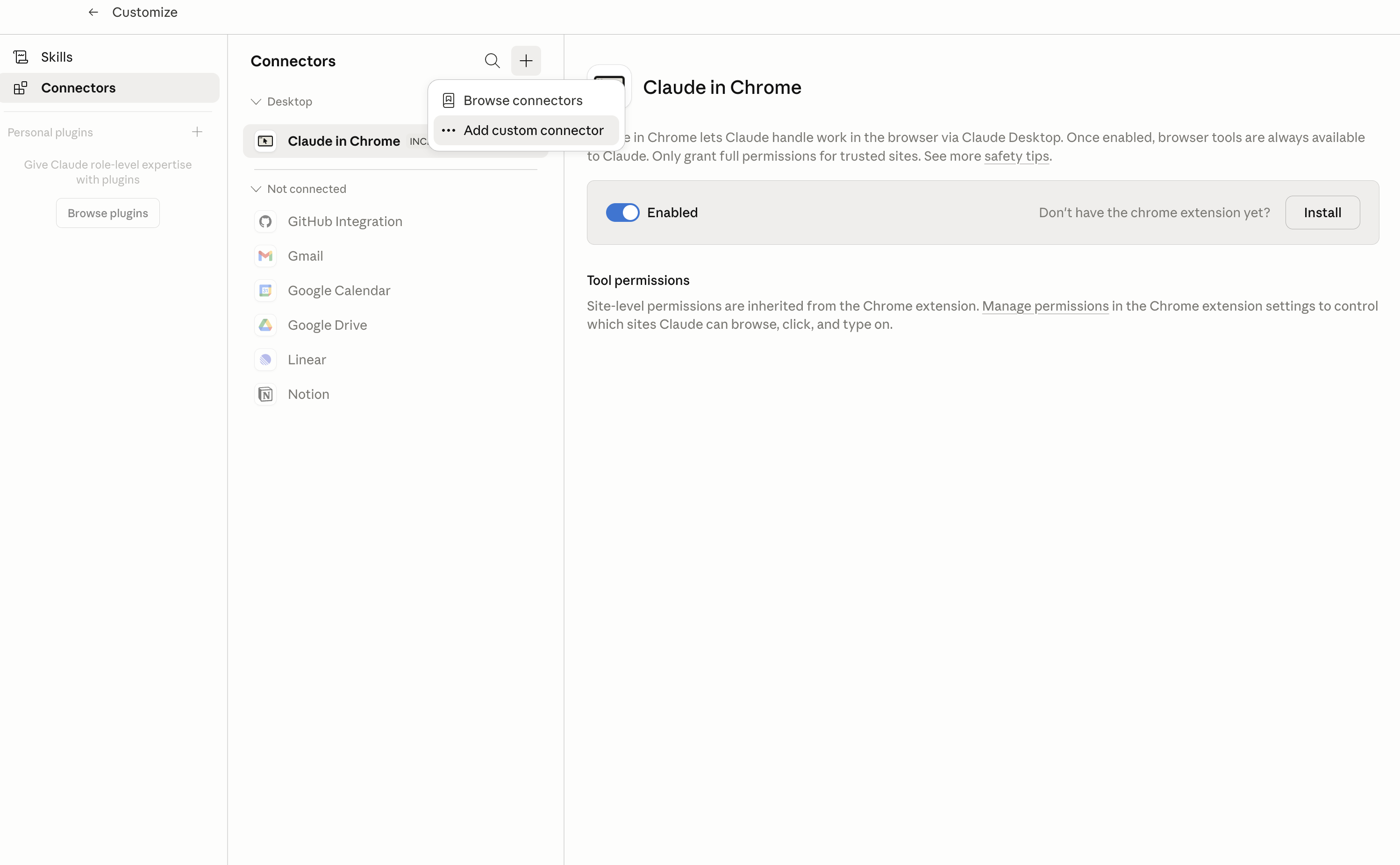
In Claude Desktop, click Customize in the left sidebar, then select Connectors and click the + icon at the top.

Claude Desktop connectors screen with Add custom connector selected

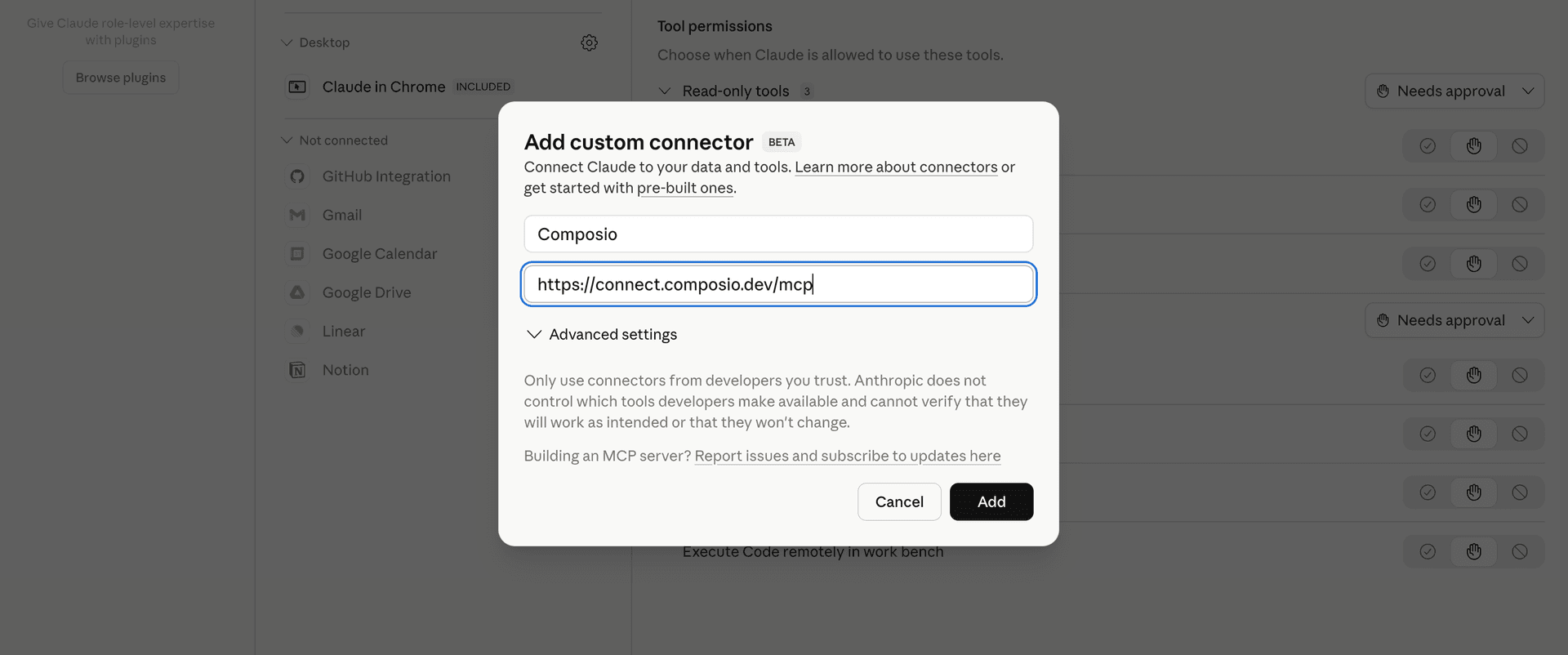
Click Add custom connector and paste in the Composio MCP server URL:

bash
https://connect.composio.dev/mcp
Add custom connector dialog with Composio MCP server URL

2. Authorize in your browser

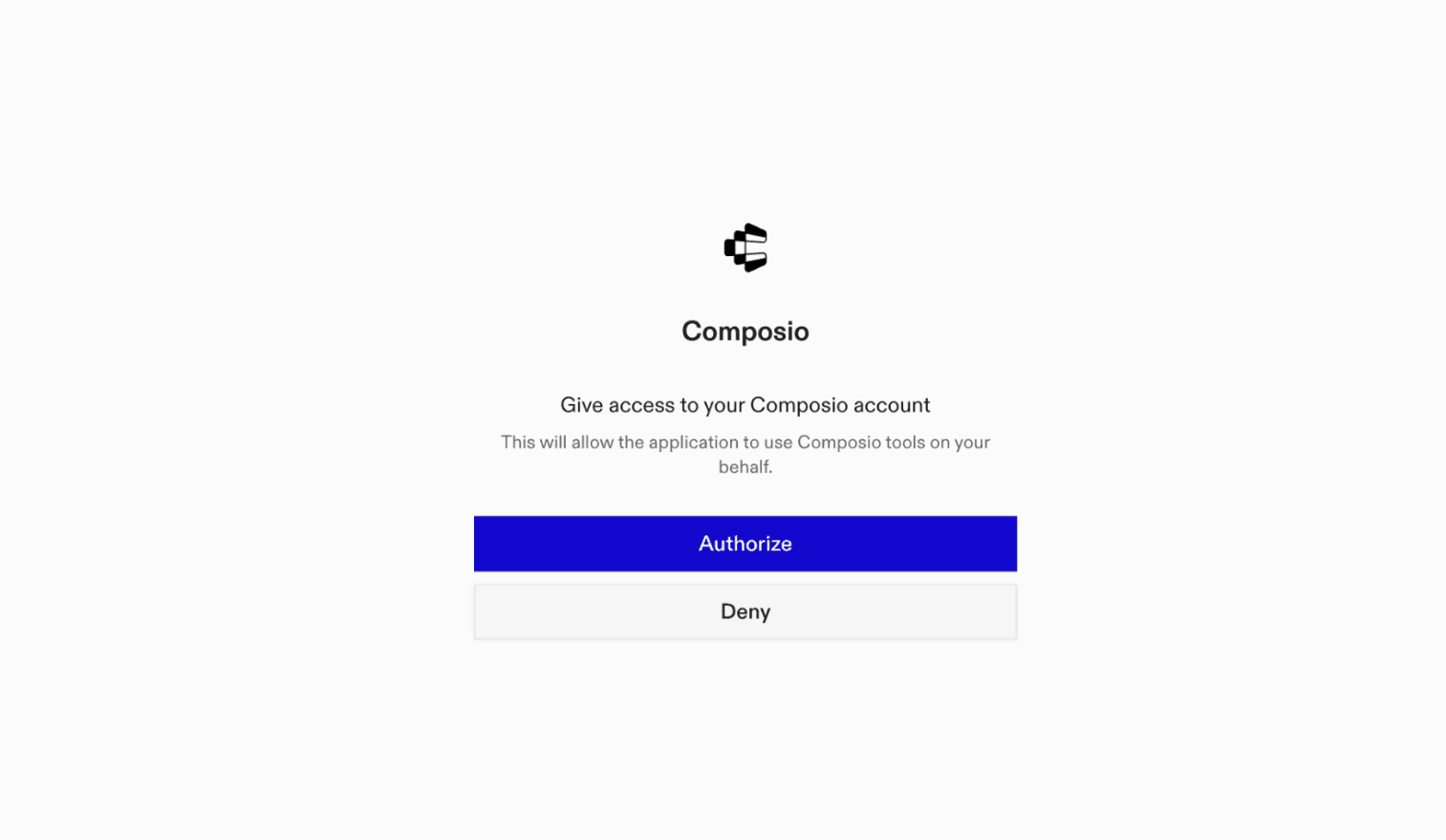
Click Connect. You'll be redirected to a browser window where you can authorize Composio to continue.

Composio authorization screen for Claude Web, Desktop, and Cowork

3. Connect your Vercel AI Gateway account

Back in Claude, ask it to connect to Vercel AI Gateway or give it any Vercel AI Gateway-related task.

For example, ask Claude to:

  • "List available Vercel AI models and specs"
  • "Generate marketing copy with Vercel model"
  • "Fetch usage metrics for your models"

It will prompt you to authenticate and authorize access.

That's it. Composio's tools are now available in Claude, and your Vercel AI Gateway account is ready to use.

What is the Vercel AI Gateway Claude Connector, and what's possible with it?

The Vercel AI Gateway MCP server is an implementation of the Model Context Protocol that connects your AI agent and assistants like Claude, Cursor, etc directly to your Vercel AI Gateway account. It provides structured and secure access so your agent can perform Vercel AI Gateway operations on your behalf.

Troubleshooting

1. Why does Claude not use the Composio connector for Vercel AI Gateway?

The connector can show as connected, but Claude must use it in each Vercel AI Gateway conversation.

  • Click + at the lower left of the chat, or type /.
  • Hover Connectors.
  • Turn on Composio.
  • Ask Claude to connect to Vercel AI Gateway again.

2. Why does Claude show an MCP server error before Vercel AI Gateway connects?

Claude can show Couldn't reach the MCP server or Authorization with the MCP server failed when you add the connector for Vercel AI Gateway.

  • Check that the connector URL is https://connect.composio.dev/mcp.
  • Connectors run from Anthropic's cloud, so your device network is usually not the problem.
  • Add the connector again from Customize > Connectors, then ask Claude to connect Vercel AI Gateway.
  • If it fails again, send the error and the ofid_ reference id to support@composio.dev.

3. Why does the Vercel AI Gateway authorization link not work?

The Composio connector is one server. Your Vercel AI Gateway account connects separately when Claude asks for it.

  • If the browser does not open, or the link expires, ask Claude to retry the Vercel AI Gateway connection.
  • Composio creates a fresh Vercel AI Gateway authorization link.
  • Open that link in your browser and finish the Vercel AI Gateway sign-in.

4. Why do Vercel AI Gateway actions fail after they worked before?

The Vercel AI Gateway connection can expire or lose permission.

  • Ask Claude to inspect the Vercel AI Gateway connection.
  • If the connection is unhealthy, disconnect it when Claude prompts you.
  • Reconnect the Vercel AI Gateway account and retry the action.
  • If Claude shows a permission prompt, approve it before Claude changes data in Vercel AI Gateway.
  • If the action still fails with a permission error, check that the connected account has that permission in Vercel AI Gateway itself.

5. How do I switch to a different Vercel AI Gateway account?

Claude can manage the Vercel AI Gateway connection for you.

  • Ask Claude to disconnect or delete the current Vercel AI Gateway account.
  • Ask Claude to connect Vercel AI Gateway again.
  • Open the new Composio authorization link for Vercel AI Gateway.
  • Sign in with the other Vercel AI Gateway account in the browser.
  • After the account connects, ask Claude to retry the Vercel AI Gateway task.

6. Why is my Vercel AI Gateway connection missing in Claude Desktop or on a Team plan?

The connector belongs to your Claude account, so your Vercel AI Gateway connection works in Claude Web, Desktop, and Cowork.

  • In Claude Desktop, open Customize > Connectors.
  • Next to Composio, click and click Clear cache.
  • If Vercel AI Gateway tools still do not appear, click , disconnect, remove the connector, and add it again.
  • On Team or Enterprise, an Owner or Primary Owner must enable the connector before you can connect Vercel AI Gateway.
TOOLS

Supported Tools

Every Vercel AI Gateway action and event your agent gets out of the box.

Compact Response

Compact a long OpenAI Responses conversation into replayable context through Vercel AI Gateway.

Count Message Tokens

Estimate input tokens for Anthropic-format messages, system content, and tools before sending a model request through Vercel AI Gateway.

Create Anthropic Message

Create one non-streaming Anthropic Messages-compatible result through Vercel AI Gateway, with multimodal content, tools, extended thinking, and routing controls.

Create Chat Completion

Create one non-streaming OpenAI Chat Completions-compatible result through Vercel AI Gateway, with multimodal messages, tools, structured output, fallback models, and routing controls.

Create Embeddings

Generate OpenAI-compatible vector embeddings through Vercel AI Gateway for text or token inputs, with optional dimensions and routing controls.

Edit Images

Create edited images from up to 16 HTTPS or base64 data-URL source images and a text instruction.

Evaluate State

Evaluate one shared state against one or more typed choice, score, or boolean questions using an AI Gateway evaluation model.

Generate Images

Generate one or more images from a text prompt through an image-only Vercel AI Gateway model.

Generate Response

Generate one non-streaming OpenAI Responses-compatible result through AI Gateway, with optional instructions, tools, structured output, reasoning, and routing controls.

Generate Speech

Generate spoken audio from text through a Vercel AI Gateway speech model.

Get Credit Balance

Return the connected team's remaining AI Gateway credit balance and lifetime credit usage in USD.

Get Generation

Look up cost, token usage, provider routing, latency, and finish details for one completed Vercel AI Gateway generation.

Get Model

Return detailed capabilities, modalities, limits, tags, and pricing for one exact Gateway model ID.

Get Model Endpoints

Compare provider endpoints serving one Vercel AI Gateway model, including limits, pricing, caching, availability, throughput, and latency.

Get Spend Report

Query aggregated Vercel AI Gateway spend and token usage.

List Model Catalog

List AI Gateway model-to-provider routes and capability tags, with bounded local filtering by model text, provider, or tag.

List TypeSafe Models

List evaluation models available through AI Gateway's TypeSafe-compatible API, including each accepted model name, description, and release date.

Rerank Object Documents

Rank structured object documents by relevance through the Cohere v1 route, using selected rank fields and optionally returning each source document.

Rerank Text Documents

Rerank string documents through the current Cohere v2 compatibility endpoint.

Search Models

Search the AI Gateway model catalog by text, model type, and tags, returning capability and pricing metadata for matching models.

Transcribe Audio

Transcribe base64-encoded recorded audio through a Vercel AI Gateway transcription model.

Evaluate with TypeSafe API

Evaluate one shared state through AI Gateway's TypeSafe-compatible System One API.

FAQ

Frequently asked questions

With a standalone Vercel AI Gateway MCP server, the agents and LLMs can only access a fixed set of Vercel AI Gateway tools tied to that server. However, with the Composio Tool Router, agents can dynamically load tools from Vercel AI Gateway and many other apps based on the task at hand, all through a single MCP endpoint.

Yes, you can. Claude Cowork fully supports MCP integration. You get structured tool calling, message history handling, and model orchestration while Tool Router takes care of discovering and serving the right Vercel AI Gateway tools.

Yes, absolutely. You can configure which Vercel AI Gateway scopes and actions are allowed when connecting your account to Composio. You can also bring your own OAuth credentials or API configuration so you keep full control over what the agent can do.

All sensitive data such as tokens, keys, and configuration is fully encrypted at rest and in transit. Composio is SOC 2 Type 2 compliant and follows strict security practices so your Vercel AI Gateway data and credentials are handled as safely as possible.

Start with Vercel AI Gateway.It takes 30 seconds.

Managed auth, hosted MCP servers, and every Vercel AI Gateway tool your agent needs.Free to start.

Start building