How to connect Tiingo to Claude

Connect Claude Web, Desktop and Cowork to Tiingo MCP. Get latest aapl prices from tiingo, compare daily crypto prices in tiingo, and more using natural language, with authentication handled for you.

Tiingo logoTiingo
Api Key

Tiingo is a financial data platform for equities, crypto, forex, news, and fundamentals. It provides clean, reliable market data through simple APIs.

35 Tools

Introduction

Claude is Anthropic's AI assistant, available on the web, in the desktop app, and on mobile. Cowork is its agent for knowledge work, and it runs on all of those surfaces too. Connected to your apps, Claude can work with your files and services to accomplish complex tasks on your behalf.

This guide walks you through the easiest and most secure way to connect your Tiingo account to Claude via Composio Connect, enabling it to get latest AAPL prices from Tiingo, compare daily crypto prices in Tiingo, find recent market news for Tesla, and more such actions on your behalf without compromising your account security.

Setup is the same on Claude Web, Desktop, and Cowork, and you only need to do it once. The connector is tied to your account, so it's available in all three.

For exact tool slugs and parameter tables, see the tool catalog in the Composio docs.

Also integrate Tiingo with

Connecting Tiingo to Claude Web, Desktop, and Cowork

Two ways to add the Composio connector. Pick whichever you prefer.

1. Add with one click

Click the button. Claude opens with the Composio connector filled in. Click Add, then go to step 2.

Add to Claude

Add manually

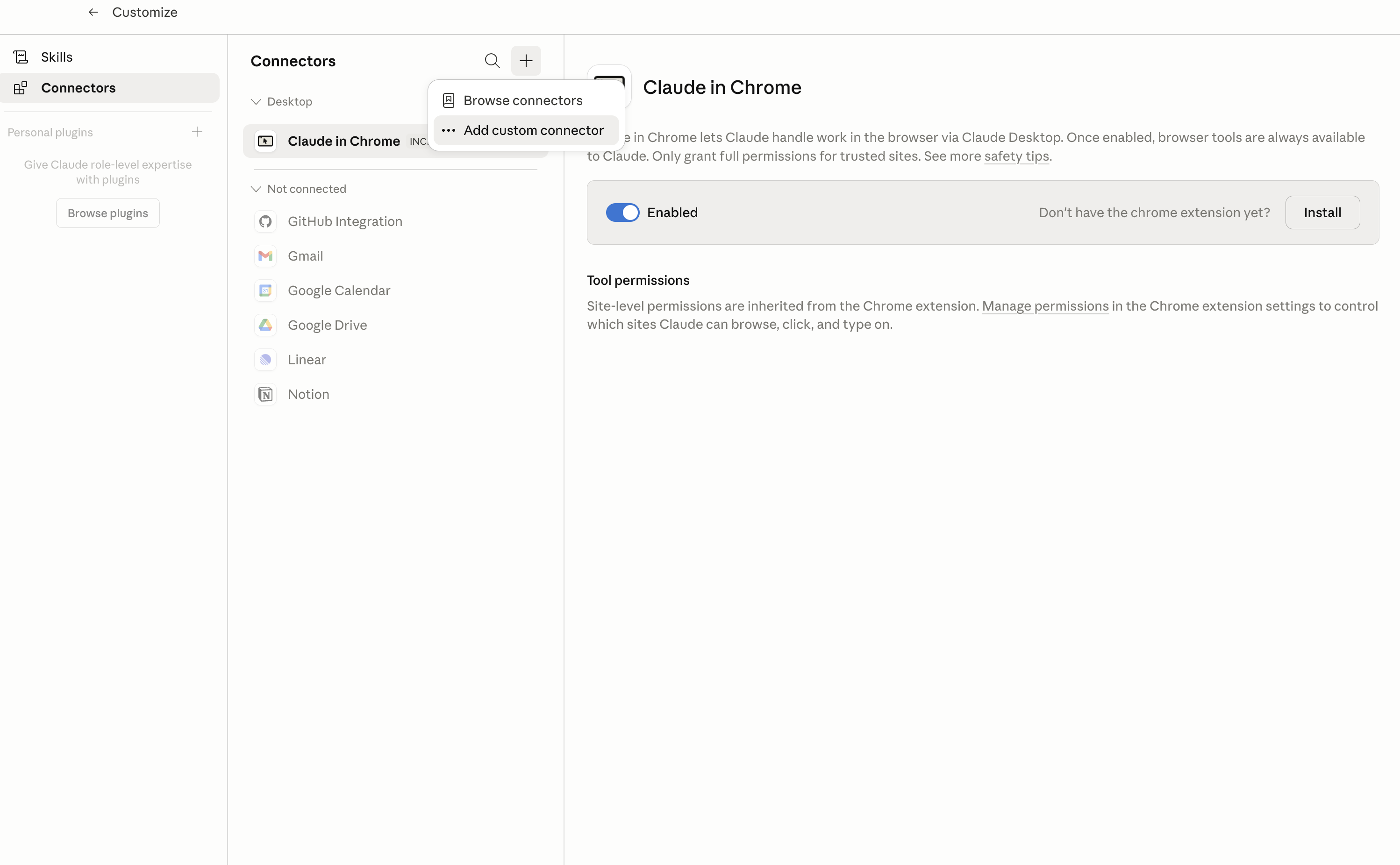
In Claude Desktop, click Customize in the left sidebar, then select Connectors and click the + icon at the top.

Claude Desktop connectors screen with Add custom connector selected

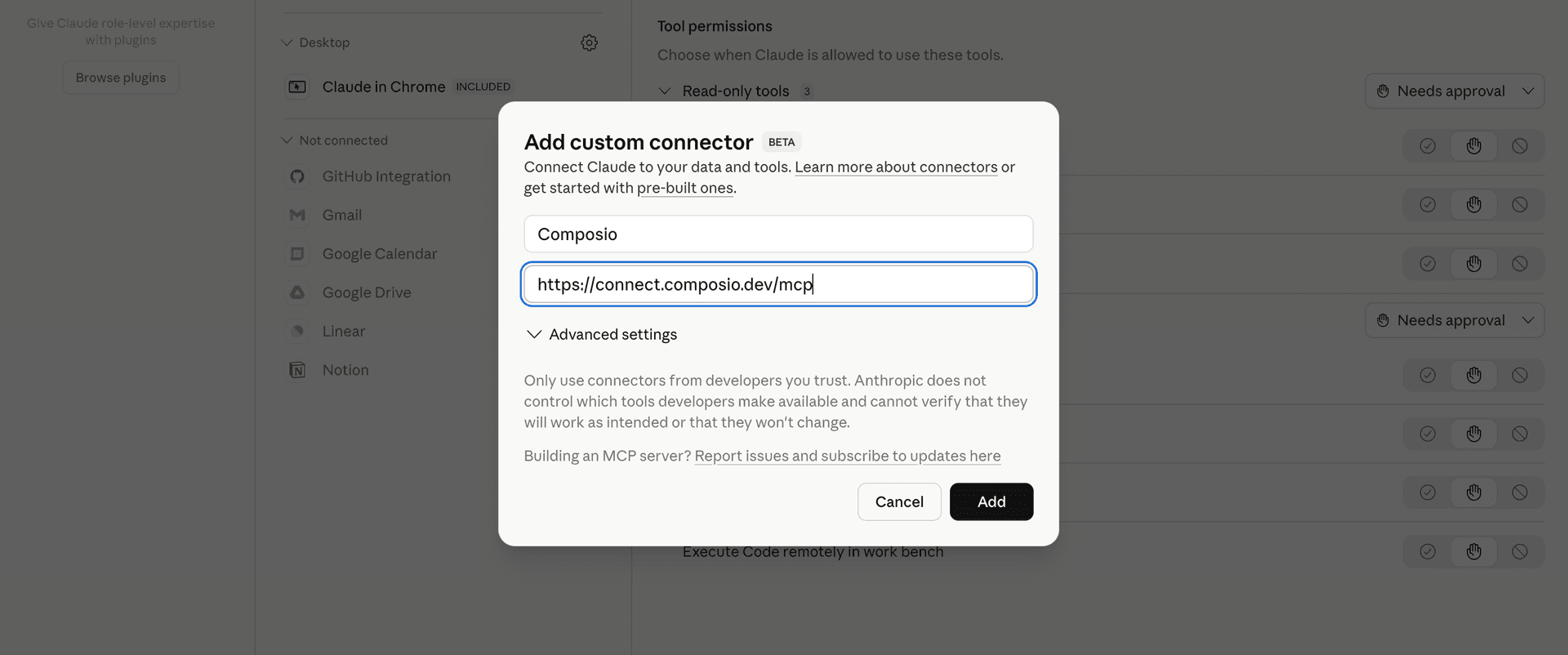
Click Add custom connector and paste in the Composio MCP server URL:

bash
https://connect.composio.dev/mcp
Add custom connector dialog with Composio MCP server URL

2. Authorize in your browser

Click Connect. You'll be redirected to a browser window where you can authorize Composio to continue.

Composio authorization screen for Claude Web, Desktop, and Cowork

3. Connect your Tiingo account

Back in Claude, ask it to connect to Tiingo or give it any Tiingo-related task.

For example, ask Claude to:

  • "Get latest AAPL prices from Tiingo"
  • "Compare daily crypto prices in Tiingo"
  • "Find recent market news for Tesla"

It will prompt you to authenticate and authorize access.

That's it. Composio's tools are now available in Claude, and your Tiingo account is ready to use.

What is the Tiingo Claude Connector, and what's possible with it?

The Tiingo MCP server is an implementation of the Model Context Protocol that connects your AI agent and assistants like Claude, Cursor, etc directly to your Tiingo account. It provides structured and secure access to financial market data, company fundamentals, news, crypto, forex, and corporate actions, so your agent can retrieve current and historical prices, research companies, track market news, and analyze financial events on your behalf.

  • Equity price research: Have your agent retrieve end-of-day, intraday, realtime, and market snapshot data for specific stocks.
  • Company and fund analysis: Let the agent review company descriptions, daily fundamentals, financial statements, fund fees, expense metrics, and security metadata.
  • Market news monitoring: Direct your agent to find financial news by asset, tag, source, or date, and identify available institutional news files.
  • Corporate action tracking: Instruct your agent to find dividend, distribution, and stock split events for a ticker or across covered companies.
  • Crypto and forex insights: Have your agent compare crypto prices, pair metadata, yield metrics, forex rates, and top-of-book market data.

Troubleshooting

1. Why does Claude not use the Composio connector for Tiingo?

The connector can show as connected, but Claude must use it in each Tiingo conversation.

  • Click + at the lower left of the chat, or type /.
  • Hover Connectors.
  • Turn on Composio.
  • Ask Claude to connect to Tiingo again.

2. Why does Claude show an MCP server error before Tiingo connects?

Claude can show Couldn't reach the MCP server or Authorization with the MCP server failed when you add the connector for Tiingo.

  • Check that the connector URL is https://connect.composio.dev/mcp.
  • Connectors run from Anthropic's cloud, so your device network is usually not the problem.
  • Add the connector again from Customize > Connectors, then ask Claude to connect Tiingo.
  • If it fails again, send the error and the ofid_ reference id to support@composio.dev.

3. Why does the Tiingo authorization link not work?

The Composio connector is one server. Your Tiingo account connects separately when Claude asks for it.

  • If the browser does not open, or the link expires, ask Claude to retry the Tiingo connection.
  • Composio creates a fresh Tiingo authorization link.
  • Open that link in your browser and finish the Tiingo sign-in.

4. Why do Tiingo actions fail after they worked before?

The Tiingo connection can expire or lose permission.

  • Ask Claude to inspect the Tiingo connection.
  • If the connection is unhealthy, disconnect it when Claude prompts you.
  • Reconnect the Tiingo account and retry the action.
  • If Claude shows a permission prompt, approve it before Claude changes data in Tiingo.
  • If the action still fails with a permission error, check that the connected account has that permission in Tiingo itself.

5. How do I switch to a different Tiingo account?

Claude can manage the Tiingo connection for you.

  • Ask Claude to disconnect or delete the current Tiingo account.
  • Ask Claude to connect Tiingo again.
  • Open the new Composio authorization link for Tiingo.
  • Sign in with the other Tiingo account in the browser.
  • After the account connects, ask Claude to retry the Tiingo task.

6. Why is my Tiingo connection missing in Claude Desktop or on a Team plan?

The connector belongs to your Claude account, so your Tiingo connection works in Claude Web, Desktop, and Cowork.

  • In Claude Desktop, open Customize > Connectors.
  • Next to Composio, click ⋮ and click Clear cache.
  • If Tiingo tools still do not appear, click ⋮, disconnect, remove the connector, and add it again.
  • On Team or Enterprise, an Owner or Primary Owner must enable the connector before you can connect Tiingo.
TOOLS

Supported Tools

Every Tiingo action and event your agent gets out of the box.

Get BOATS Prices

Get historical BOATS overnight intraday JSON price bars for one equity ticker; requires the BOATS add-on.

Get BOATS Top Of Book

Get BOATS overnight top-of-book and last-sale snapshots for selected or all available equities; requires the BOATS add-on.

Get Bulk Distributions

Get dividend and other distribution events across all covered tickers for an optional ex-date.

Get Bulk Splits

Get stock split events across all covered tickers for an optional ex-date.

Get Crypto Prices

Get latest or historical JSON price bars for selected crypto pairs, or omit tickers to return the entire current market, with optional exchange and currency controls.

Get Crypto Yield Metrics

Get historical yield-rate, balance, and liquidity metric bars for one crypto-yield pool.

Get Crypto Yield Ticks

Get the latest crypto-yield rates, balances, and liquidity metrics, optionally filtered by pools or platforms.

Get Distribution Yield

Get the complete historical trailing one-year distribution-yield series for one ticker.

Get Equity EOD Metadata

Get end-of-day coverage metadata and company description for one equity ticker.

Get Equity EOD Prices

Get JSON end-of-day price and adjustment history for one equity ticker, optionally bounded and resampled.

Get Equity Realtime Prices

Get historical intraday bars for one equity ticker from Tiingo's 24x5 consolidated realtime feed, the current recommended feed for new integrations.

Get Equity Realtime Top Of Book

Get 24x5 consolidated realtime equity top-of-book, reference-price, and liquidity snapshots from Tiingo's current recommended feed for new integrations.

Get Forex Prices

Get latest or historical beta JSON rate bars for one forex pair.

Get Forex Top Of Book

Get beta top-of-book quotes for selected or all available forex pairs.

Get Fundamentals Daily

Get JSON daily valuation and fundamental metrics for one ticker or PermaTicker; full universe coverage requires the fundamentals add-on.

Get Fundamentals Statements

Get JSON financial statement history for one ticker or PermaTicker, optionally in as-reported form.

Get Fund Fee Metrics

Get historical JSON mutual-fund or ETF fee and expense metrics.

Get Fund Fees

Get a mutual fund or ETF description, share class, net expense ratio, and related share classes.

Get IEX Prices

Get historical IEX intraday JSON price bars for one equity ticker.

Get IEX Top Of Book

Get IEX top-of-book, last-sale, reference-price, and daily market fields for selected or all available equities.

Get News Bulk File

Get metadata and the token-bearing download URL for one institutional bulk-news batch; handle the URL as a secret.

Get Small Exchange EOD Prices

Get official end-of-day JSON price bars for one Small Exchange contract.

Get Small Exchange Intraday Prices

Get historical intraday JSON price bars for one Small Exchange contract.

Get Small Exchange Top Of Book

Get Small Exchange top-of-book and last-sale snapshots, optionally filtered by ticker.

Get Ticker Distributions

Get dividend and other distribution events for one ticker, optionally bounded by ex-date.

Get Ticker Splits

Get stock split events for one ticker, optionally bounded by ex-date.

List Crypto Metadata

Return JSON metadata for all or selected Tiingo crypto pairs.

List Crypto Yield Platforms

List crypto-yield platforms, optionally restricted to platform codes.

List Crypto Yield Pools

List crypto-yield pools, optionally filtered by pool or platform codes.

List Fundamentals Definitions

List JSON definitions, units, and statement categories for Tiingo fundamentals data codes.

List Fundamentals Metadata

List company, security, industry, reporting, and stable identifier metadata for fundamentals tickers.

List News

Return one page of curated financial news filtered by assets, tags, sources, or dates, plus a continuation cursor for the next offset page.

List News Bulk Files

List institutional bulk-news batch files and their metadata.

List Small Exchange Metadata

List Small Exchange contract metadata, optionally filtered by ticker.

Search Assets

Search Tiingo assets by ticker or name and return identifiers and listing status.

FAQ

Frequently asked questions

Start with Tiingo.It takes 30 seconds.

Managed auth, hosted MCP servers, and every Tiingo tool your agent needs.Free to start.

Start building