How to integrate Sumble MCP with Hermes

Connect Hermes to Sumble MCP. Find saas companies using salesforce today, enrich this prospect list with company data, and more using natural language, with authentication handled for you.

Sumble logoSumble
Api Key

Sumble is a go-to-market intelligence platform for company and people search, enrichment, and business signals. It helps teams find better prospects and understand their markets with technology and buying insights.

34 Tools

Introduction

Hermes is a 24/7 autonomous agent that lives on your computer or server — it remembers what it learns and evolves as your usage grows.

This guide explains the easiest and most robust way to connect your Sumble account to Hermes. You can do this through either Composio Connect CLI or Composio Connect MCP. For personal use we recommend the CLI, but you won't go wrong with MCP either.

For exact tool slugs and parameter tables, see the tool catalog in the Composio docs.

Also integrate Sumble with

What is Composio Connect?

Composio Connect is a consumer offering that lets anyone plug 1,700+ applications directly into their agent harness — including Hermes. It can:

  • Search and load tools from relevant toolkits on-demand, reducing context usage.
  • Chain multiple tools to accomplish complex workflows via a remote workbench, without excessive back-and-forth with the LLM.
  • Manage app authentication end-to-end with zero manual overhead.

Integrating Sumble with Hermes

Using Composio Connect CLI

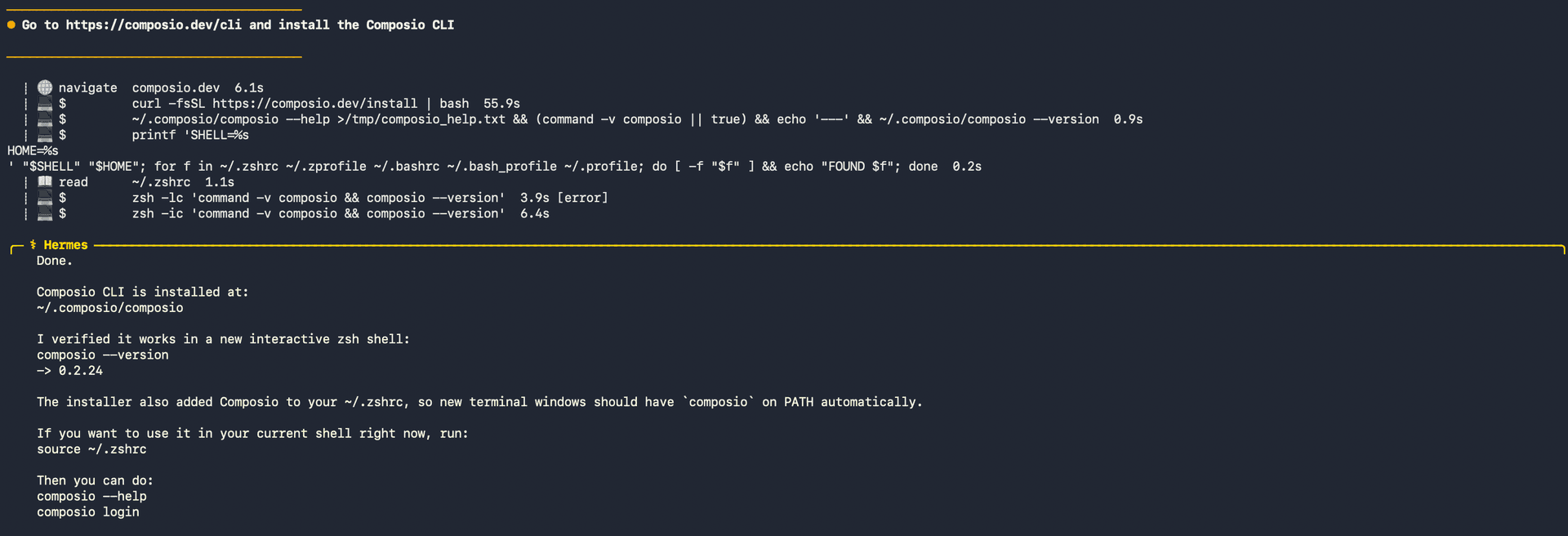
1. Install the Composio CLI

Run the install script directly, or paste https://composio.dev/hermes into your Hermes chat box to have it installed for you.

bash
curl -fsSL https://composio.dev/install | bash
Hermes authenticating with Composio

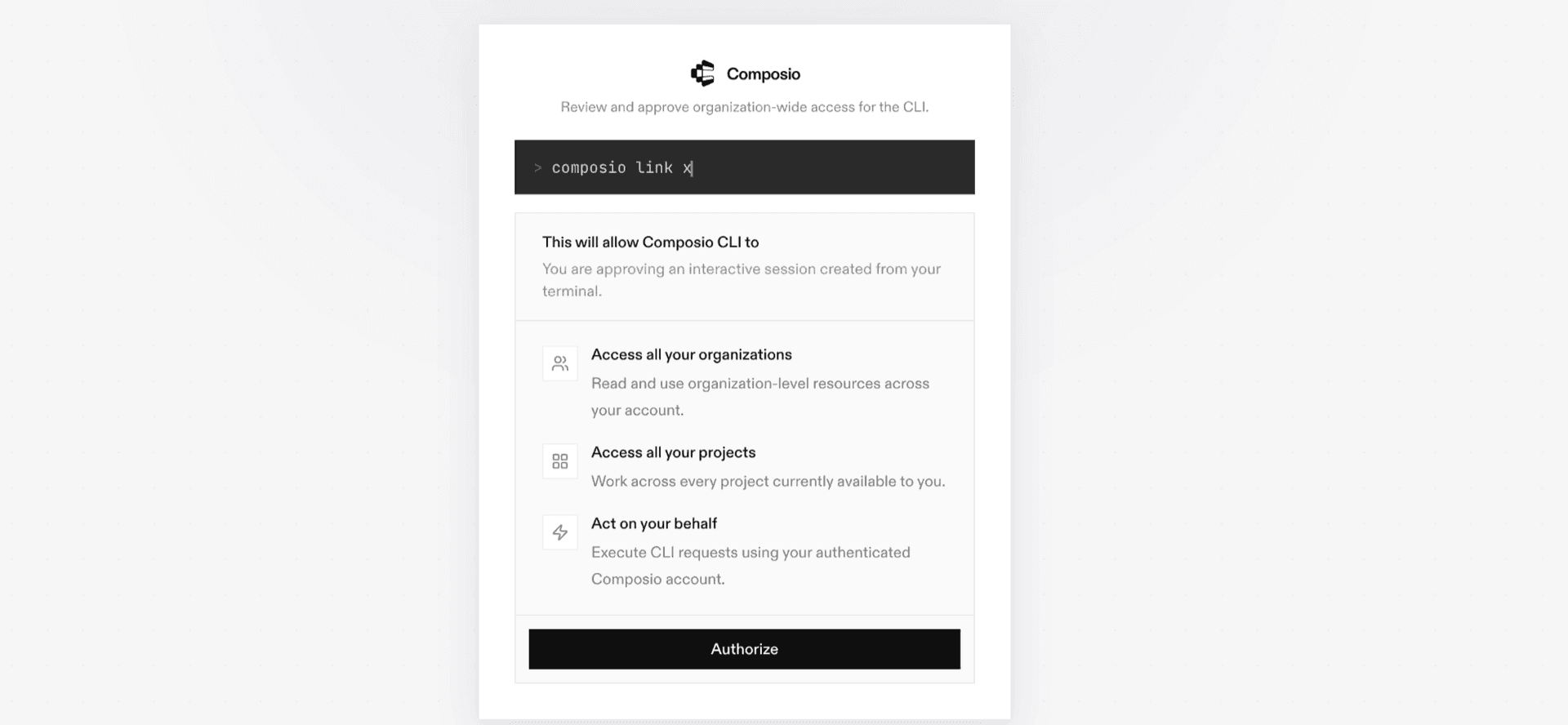
2. Authenticate

Once the CLI is installed, ask Hermes to authenticate with Composio.

3. Connect to Sumble

Ask your agent to connect to Sumble, or simply request any Sumble-related task. Hermes will prompt you to authenticate and authorize access.

4. Done. You're all set with a new Sumble connection.


Using Composio Connect MCP

1. Get your MCP URL and API Key

Go to dashboard.composio.dev and copy your Connect MCP URL and API key.

Copy MCP URL and API key from Composio dashboard

2. Open the Hermes config file

bash
nano ~/.hermes/config.yaml

3. Add the Composio Connect MCP server

bash
mcp_servers:
  composio:
    url: "https://connect.composio.dev/mcp"
    headers:
      x-consumer-api-key: "YOUR_COMPOSIO_API_KEY"
    connect_timeout: 60
    timeout: 180

Save with Ctrl + O, Enter, then exit with Ctrl + X.

4. Restart your Hermes agent

Once restarted, ask your agent to connect to Sumble or request any Sumble-related task. It will prompt you to authenticate and authorize access.

5. Done!

What is the Sumble MCP server, and what's possible with it?

The Sumble MCP server is an implementation of the Model Context Protocol that connects your AI agent and assistants like Claude, Cursor, etc directly to your Sumble account. It provides structured and secure access to company and people search, enrichment, technology intelligence, business signals, saved lists, and intelligence briefs, so your agent can research prospects, enrich business records, monitor buying signals, and organize target accounts on your behalf.

  • Company and people research: Have your agent search and enrich companies and people using firmographic details, job titles, locations, technologies, and other available attributes.
  • Technology and market intelligence: Direct your agent to look up technologies, inspect a company’s technology stack, find related projects, and retrieve intelligence briefs for organizations.
  • Signal discovery: Let the agent search recent signals across organizations, people, technologies, priorities, saved lists, and signal configurations, then review signals for a specific company.
  • Prospect list management: Instruct your agent to create, rename, update, and review organization or contact lists, add companies and people, and control whether an organization list receives Signals.
  • GTM workflow research: Have your agent search and enrich jobs and teams, classify job titles, find locations, search Sumble documentation, and review saved Ask Sumble conversations.

Way Forward

With Sumble connected, Hermes can now act on your behalf whenever it detects a relevant task or you ask it to.

From here, you can extend Hermes further:

  • Connect more apps: Calendar, Slack, Notion, Linear, and hundreds of others are available through the same Composio Connect setup. Each new integration compounds what Hermes can do for you.
  • Build workflows across tools: Once multiple apps are connected, Hermes can chain actions together — turn an email into a calendar invite, a Slack message into a Linear ticket, or a meeting note into a follow-up draft.
  • Let it learn your patterns: The more you use Hermes, the better it gets at anticipating how you'd handle recurring tasks. Give it feedback on drafts and decisions, and it will adapt.

If you run into trouble or want to share what you've built, join the community or check out the Docs for deeper configuration options.

TOOLS

Supported Tools

Every Sumble action and event your agent gets out of the box.

Add Organizations to List

Add companies to an organization list by Sumble IDs or slugs and return added IDs plus invalid inputs.

Add People to Contact List

Add 1 to 10,000 Sumble person IDs to a saved contact list and report newly added versus already-present counts.

Create Contact List

Create a persistent empty contact list and return its ID and Sumble URL.

Create Data Quality Report

Email Sumble's data team immediately about incorrect, missing, or stale data.

Create Organization List

Create a persistent empty organization list and return its ID and Sumble URL.

Create Support Request

Send an account, billing, or product request to Sumble support by external email immediately.

Find Locations

Search Sumble location names, list a location's children, or list top-level locations and return exact case-sensitive filter codes.

Find Technologies

Search Sumble's technology catalog by a partial name and return up to 50 canonical slugs for company, people, or signal filters.

Get Company Signals

Return recent Sumble signals for one company, optionally restricted to explicit canonical technology slugs.

Get Company Tech Stack

Return technologies Sumble confirms a company uses, grouped by business function and category.

Get Contact List

Get one private contact list and its enriched people, including available email and phone PII.

Get Conversation

Read one caller-owned Ask Sumble transcript page in saved message order, including private message text, attachment names, expiring generated-file links, and per-message accounting metadata.

Get Intelligence Brief

Retrieve or irreversibly start a Sumble AI intelligence brief for one organization.

Get Organization List

Get one saved organization list and its companies, optionally including a deleted list or returning the rows as a file.

List Contact Lists

List saved people lists with IDs, private names, counts, and URLs.

List Conversations

List the caller's private Ask Sumble conversations, newest updated first, with one-based page continuation.

List Organization Lists

List saved organization lists, optionally including soft-deleted lists.

List Signal Configs

List visible standing signal rules or look up authorized historical config IDs.

Lookup Job Titles

Classify 1 to 1000 raw job titles into Sumble job functions and levels for people or company filters.

Lookup Projects

Resolve project names or slugs to canonical Sumble projects for company query filters.

Lookup Technologies

Resolve known technology names, slugs, or aliases to canonical Sumble technologies in input order.

Lookup Technology Categories

Resolve technology category names or slugs and enumerate their canonical technologies for Sumble company filters.

Rename Organization List

Rename a user-owned organization list without changing its membership.

Search and Enrich Companies

Match known companies or search Sumble companies and return only explicitly selected firmographic and entity metrics.

Search and Enrich Jobs

Match job-post IDs or search Sumble job posts and return explicitly selected details, extracted entities, and related people.

Search and Enrich People

Start or poll Sumble's asynchronous people match/search and return only explicitly selected attributes.

Search and Enrich Teams

Match team IDs or search teams within specified organizations and return selected team attributes, related people, and job posts.

Search Documentation

Search Sumble product documentation using a few words or a short question and return matching paths, titles, excerpts, and published URLs.

Search Priority Signals

Search Sumble priority-signal digest items by source entities and existing relevance or written feedback.

Search Signals

Search recent Sumble signals across visible accounts by organizations, people, technologies, priorities, lists, configs, or exact signal IDs.

Delete or Restore Organization List

Soft-delete or restore an organization list while preserving its companies.

Set Organization List Signals

Include or exclude an organization list's companies from future Signals delivery.

Update Priority Signal Feedback

Replace or clear private written feedback on a priority signal.

Update Priority Signal Relevance

Mark a priority signal relevant or not relevant, or clear the relevance value.

FAQ

Frequently asked questions

Start with Sumble.It takes 30 seconds.

Managed auth, hosted MCP servers, and every Sumble tool your agent needs.Free to start.

Start building