How to connect Rulebricks to Claude

Connect Claude Web, Desktop and Cowork to Rulebricks MCP. Execute a customer eligibility decision flow, test pricing rules with sample inputs, and more using natural language, with authentication handled for you.

Rulebricks logoRulebricks
Api Key

Rulebricks is a decision automation platform for building, testing, publishing, and running business rules. It helps teams turn complex decisions into consistent, trackable workflows.

59 Tools

Introduction

Claude is Anthropic's AI assistant, available on the web, in the desktop app, and on mobile. Cowork is its agent for knowledge work, and it runs on all of those surfaces too. Connected to your apps, Claude can work with your files and services to accomplish complex tasks on your behalf.

This guide walks you through the easiest and most secure way to connect your Rulebricks account to Claude via Composio Connect, enabling it to execute a customer eligibility decision flow, test pricing rules with sample inputs, list published Rulebricks decision flows, and more such actions on your behalf without compromising your account security.

Setup is the same on Claude Web, Desktop, and Cowork, and you only need to do it once. The connector is tied to your account, so it's available in all three.

For exact tool slugs and parameter tables, see the tool catalog in the Composio docs.

Also integrate Rulebricks with

Connecting Rulebricks to Claude Web, Desktop, and Cowork

Two ways to add the Composio connector. Pick whichever you prefer.

1. Add with one click

Click the button. Claude opens with the Composio connector filled in. Click Add, then go to step 2.

Add to Claude

Add manually

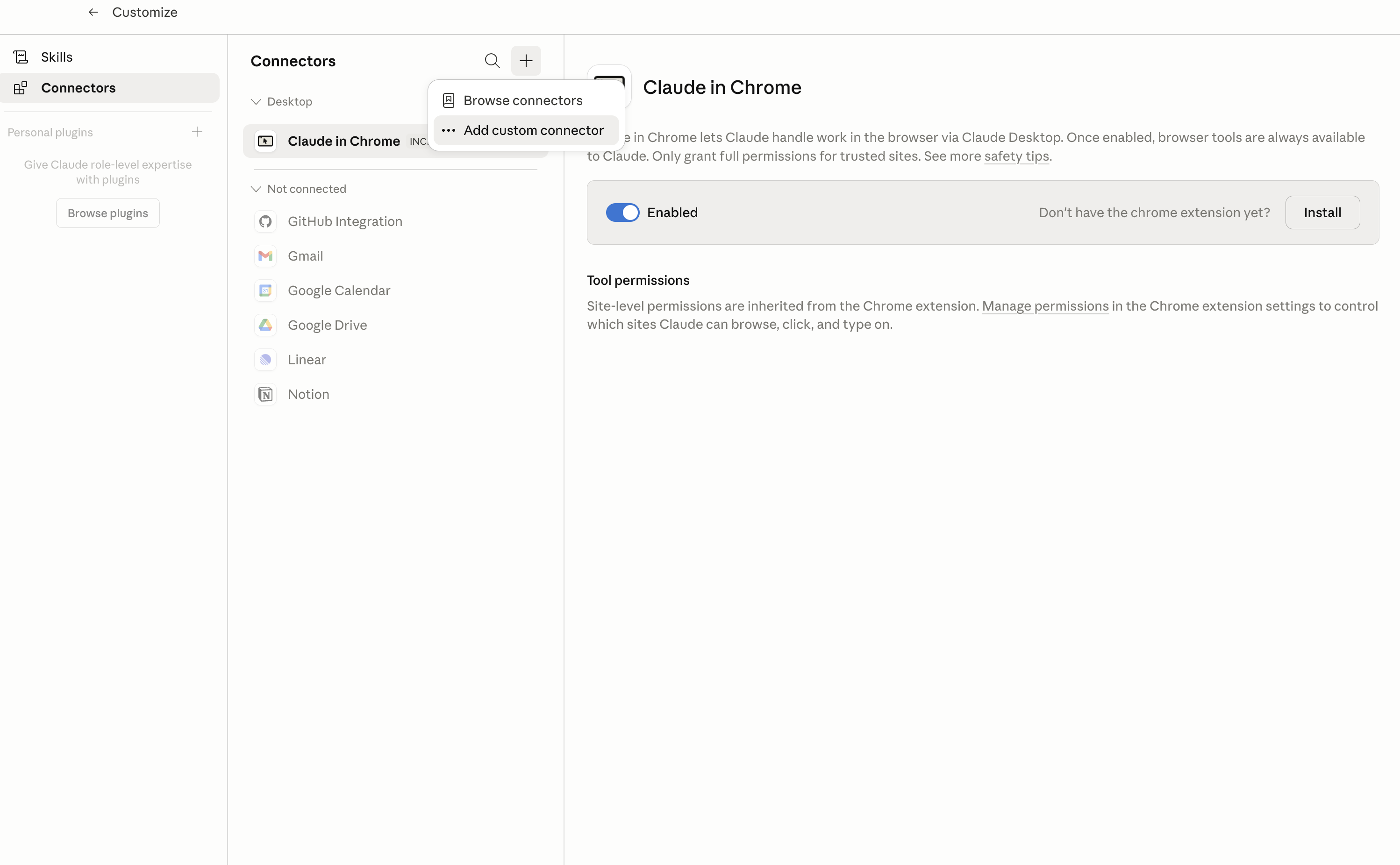
In Claude Desktop, click Customize in the left sidebar, then select Connectors and click the + icon at the top.

Claude Desktop connectors screen with Add custom connector selected

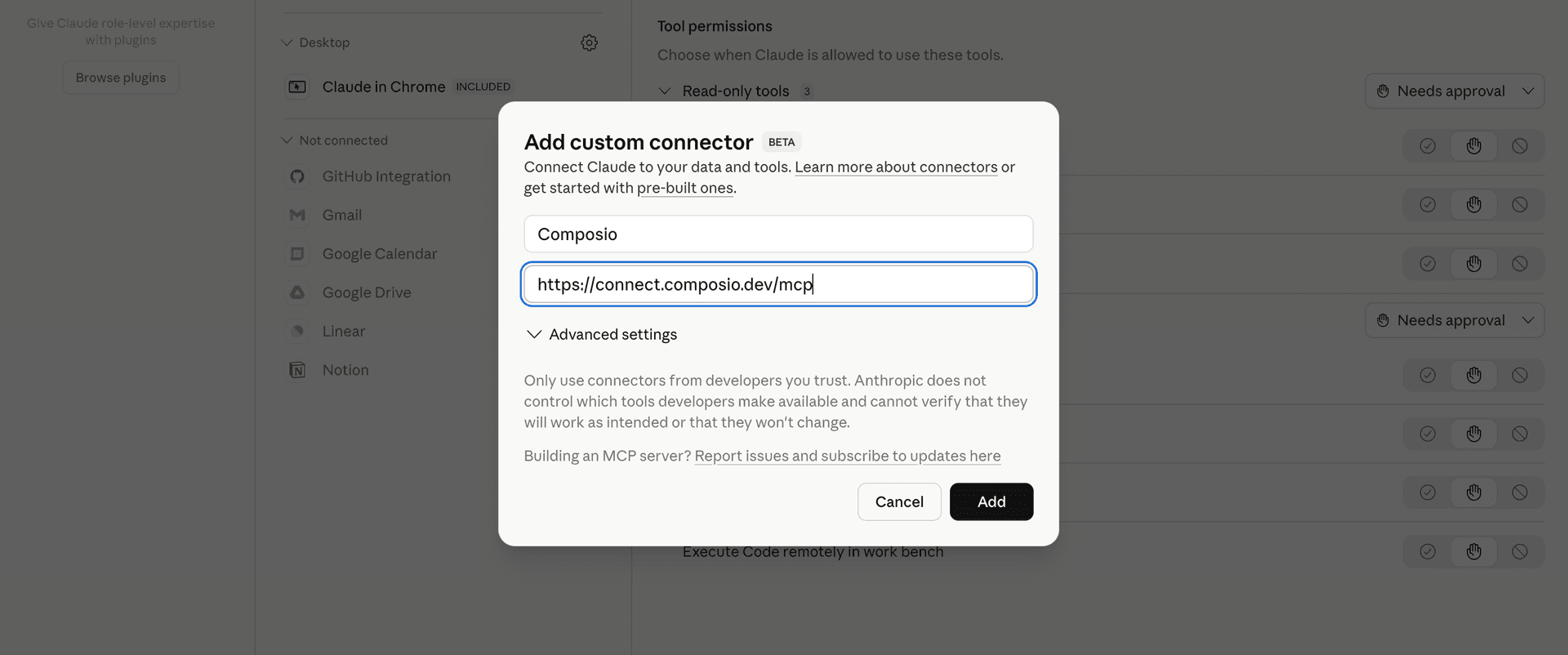
Click Add custom connector and paste in the Composio MCP server URL:

bash
https://connect.composio.dev/mcp
Add custom connector dialog with Composio MCP server URL

2. Authorize in your browser

Click Connect. You'll be redirected to a browser window where you can authorize Composio to continue.

Composio authorization screen for Claude Web, Desktop, and Cowork

3. Connect your Rulebricks account

Back in Claude, ask it to connect to Rulebricks or give it any Rulebricks-related task.

For example, ask Claude to:

  • "Execute a customer eligibility decision flow"
  • "Test pricing rules with sample inputs"
  • "List published Rulebricks decision flows"

It will prompt you to authenticate and authorize access.

That's it. Composio's tools are now available in Claude, and your Rulebricks account is ready to use.

What is the Rulebricks Claude Connector, and what's possible with it?

The Rulebricks MCP server is an implementation of the Model Context Protocol that connects your AI agent and assistants like Claude, Cursor, etc directly to your Rulebricks account. It provides structured and secure access to rules, decision flows, contexts, tests, and workspace assets, so your agent can create and update decision logic, test rules and flows, execute published decisions, and manage context data on your behalf.

  • Decision rule and flow management: Have your agent import new rules or flows, update existing decision logic, export assets for reuse, and remove rules or flows you no longer need.
  • Rule and flow execution: Direct your agent to run published rules, process bulk inputs, execute flows, or run several assets in parallel for business decisions.
  • Testing and decision monitoring: Let the agent create and list saved tests for rules and flows, count decision logs using filters, and check current Rulebricks usage.
  • Context and relationship management: Instruct your agent to create, inspect, update through bulk submissions, cascade, and delete contexts and their instances, while managing relationships between contexts.
  • Workspace organization: Have your agent list and create folders, inspect workspace objects, export related assets, and import an asset manifest containing rules, flows, contexts, and values.

Troubleshooting

1. Why does Claude not use the Composio connector for Rulebricks?

The connector can show as connected, but Claude must use it in each Rulebricks conversation.

  • Click + at the lower left of the chat, or type /.
  • Hover Connectors.
  • Turn on Composio.
  • Ask Claude to connect to Rulebricks again.

2. Why does Claude show an MCP server error before Rulebricks connects?

Claude can show Couldn't reach the MCP server or Authorization with the MCP server failed when you add the connector for Rulebricks.

  • Check that the connector URL is https://connect.composio.dev/mcp.
  • Connectors run from Anthropic's cloud, so your device network is usually not the problem.
  • Add the connector again from Customize > Connectors, then ask Claude to connect Rulebricks.
  • If it fails again, send the error and the ofid_ reference id to support@composio.dev.

3. Why does the Rulebricks authorization link not work?

The Composio connector is one server. Your Rulebricks account connects separately when Claude asks for it.

  • If the browser does not open, or the link expires, ask Claude to retry the Rulebricks connection.
  • Composio creates a fresh Rulebricks authorization link.
  • Open that link in your browser and finish the Rulebricks sign-in.

4. Why do Rulebricks actions fail after they worked before?

The Rulebricks connection can expire or lose permission.

  • Ask Claude to inspect the Rulebricks connection.
  • If the connection is unhealthy, disconnect it when Claude prompts you.
  • Reconnect the Rulebricks account and retry the action.
  • If Claude shows a permission prompt, approve it before Claude changes data in Rulebricks.
  • If the action still fails with a permission error, check that the connected account has that permission in Rulebricks itself.

5. How do I switch to a different Rulebricks account?

Claude can manage the Rulebricks connection for you.

  • Ask Claude to disconnect or delete the current Rulebricks account.
  • Ask Claude to connect Rulebricks again.
  • Open the new Composio authorization link for Rulebricks.
  • Sign in with the other Rulebricks account in the browser.
  • After the account connects, ask Claude to retry the Rulebricks task.

6. Why is my Rulebricks connection missing in Claude Desktop or on a Team plan?

The connector belongs to your Claude account, so your Rulebricks connection works in Claude Web, Desktop, and Cowork.

  • In Claude Desktop, open Customize > Connectors.
  • Next to Composio, click ⋮ and click Clear cache.
  • If Rulebricks tools still do not appear, click ⋮, disconnect, remove the connector, and add it again.
  • On Team or Enterprise, an Owner or Primary Owner must enable the connector before you can connect Rulebricks.
TOOLS

Supported Tools

Every Rulebricks action and event your agent gets out of the box.

Bulk Submit Context Data

Merge a non-empty batch into a Rulebricks context and execute ready bound rules or flows.

Cascade Context Instance

Re-evaluate registered pending rule and flow work for a Rulebricks context instance after dependencies may have become available.

Count Decision Logs

Count decision logs matching asset, status, trace, payload-content, or time-range filters without returning log payloads.

Create Asset Test

Create a saved test case for a Rulebricks rule or flow with an input, expected response, comparison policy, and criticality.

Create Context

Create a Rulebricks context with stored and derived fields, an identity fact, retention settings, and access controls.

Create Context Relationship

Create a has-many, has-one, or belongs-to relationship from one Rulebricks context to another.

Create Folder

Create a folder for rule, flow, or context assets; the asset type defaults to rule.

Create User

Create a new user directly with a password, bypassing the email invitation flow.

Create User Group

Create a new user group in your Rulebricks organization.

Delete Asset Test

Permanently delete one saved test case from a Rulebricks rule or flow.

Delete Context

Delete a Rulebricks context and all of its live instances, returning affected bindings and pending evaluations.

Delete Context Instance

Permanently delete one Rulebricks context instance and its history, cancel its pending evaluations, and re-evaluate dependent context instances.

Delete Context Relationship

Delete a specific relationship owned by a Rulebricks context.

Delete Flow

Permanently delete one Rulebricks flow by ID.

Delete Folder

Delete one folder by ID without deleting the assets it contains.

Delete Object

Delete a workspace object by ID or exact name and archive, delete, or detach its generated values.

Delete Rule

Permanently delete one Rulebricks rule by ID.

Delete Value

Delete one vocabulary value by ID and replace references from other values with its content; rule or flow references and object-managed namespaces can block deletion.

Execute Assets in Parallel

Execute multiple published Rulebricks rules or flows in parallel from one named map.

Execute Bulk Rule

Execute one published Rulebricks rule against up to 1000 ordered input objects and return one aligned result per input.

Execute Flow

Execute a published Rulebricks flow once or in bulk and return the ordered flow-defined output and execution ID for querying its decision logs.

Execute Rule

Execute a published Rulebricks rule with its input payload and return the rule-defined decision output.

Export Flow

Export one flow as a Rulebricks Flow Schema document that can be round-tripped through the flow import endpoint.

Export Asset Manifest

Export selected Rulebricks rules, flows, contexts, or values with their resolved dependencies, or preview the export.

Export Rule

Export one rule by ID as a raw rule document that can be round-tripped through the Rulebricks rule import endpoint.

Get Context

Retrieve a Rulebricks context by ID, including its schema, bindings, access controls, and relationships.

Get Context Instance

Retrieve the current base facts, derived facts, status, and selected execution or relationship data for one Rulebricks context instance.

Get Context Instance History

Retrieve newest-first historical values for all fields or one selected field on a Rulebricks context instance.

Get Object

Fetch one workspace object (JSON Schema) by its ID or exact name.

Get Usage

Return the organization's current plan and monthly Rulebricks execution usage, limit, and remaining allowance.

Import Flow

Create or update a flow from a Rulebricks Flow Schema document; imported flows publish by default unless publish (provider field _publish) is false.

Import Asset Manifest

Atomically create or update rules, flows, contexts, and values from a Rulebricks manifest.

Import Rule

Create a rule from a complete raw rule document, or partially update an existing rule when the document includes its ID.

Invite User

Invite a new user to the organization or update role or user group data for an existing user.

List Asset Tests

List saved test cases for a Rulebricks rule or flow, including expected responses and latest execution state.

List Context Relationships

List incoming and outgoing relationships configured for a Rulebricks context.

List Contexts

List contexts visible to the connected API key, optionally filtered or paginated by the provider's opaque cursor.

List Flows

List flows visible to the connected API key, optionally selecting an exact asset version or filtering by identifier, search, folder, labels, group, or name.

List Folders

List asset folders visible to the connected API key, optionally filtered by user group or name.

List Objects

List workspace objects (JSON Schemas) visible to the connected API key's user groups.

List Pending Context Evaluations

List rule and flow evaluations registered as pending for one Rulebricks context instance, including their missing dependencies.

List Rules

List rules visible to the connected API key, optionally selecting an exact asset version or filtering by identifier, search, folder, labels, group, or name.

List User Groups

List all user groups available in your Rulebricks organization.

List Users

List all users (including the admin and all team members) in the organization with their email, name, role, user groups, and join date.

List Values

Return one page of vocabulary values visible to the connected API key, with optional name, prefix, type, group, and usage filters.

Preview Asset Manifest Import

Return the server-authoritative plan for importing Rulebricks rules, flows, contexts, and values without writing any assets.

Preview Value Collection Sync

Preview the created, updated, unchanged, archived, and deleted values for one complete single-request collection synchronization without writing changes.

Preview Object Upsert

Validate and preview creating or updating a workspace object and synchronizing its JSON Schema enum values without writing any changes.

Query Decision Logs

Return one page of decision logs filtered by assets, status, trace, payload content, or time range.

Replace Value Metadata

Replace or clear all custom metadata for one vocabulary value by ID without resending its value payload.

Run Asset Tests

Run all saved tests, or only critical tests, against the latest draft of a Rulebricks rule or flow and return pass totals and failure diagnostics.

Solve Context Asset

Persist optional facts and execute one rule or flow bound to a Rulebricks context instance, or register it pending when dependencies are missing.

Submit Context Data

Merge facts into one Rulebricks context instance.

Sync Value Collection

Synchronize one vocabulary collection to a desired set.

Update Context

Update a Rulebricks context's name, schema, identity, retention, execution behavior, folder, or access groups.

Update Folder

Update an existing folder's required name and optional description by ID without changing its asset type.

Upload Manifest Part

Upload one plain UTF-8 or gzip-compressed part of a Rulebricks manifest larger than 4 MiB.

Upsert Object

Create a workspace object by name or update one by ID or name, then synchronize values generated from its JSON Schema enums.

Create or Update Values

Create new vocabulary values or update existing values by name, including nested values and per-value metadata.

FAQ

Frequently asked questions

Start with Rulebricks.It takes 30 seconds.

Managed auth, hosted MCP servers, and every Rulebricks tool your agent needs.Free to start.

Start building