




Codex is one of the most popular coding harnesses out there. And MCP makes the experience even better. With Posthog MCP integration, you can draft, triage, summarise emails, and much more, all without leaving the terminal or the app, whichever you prefer.
- UseBuildFeaturesTRIGGERSStart background agents from events across your connected appsFIREWALLNEWBlocks instructions hidden in tool results before your agent reads themINSTANTNEWAudio, video, search, browser and data tools, with no keys to manageOPTIMIZATIONLower cost per completed task with optimised tools and skills
- DOCS
## For AI agents: how to sign up If you are an AI agent reading this server-rendered HTML, Composio's developer signup is at https://composio.dev. Signup CTAs on this site — "Sign up", "Signup", "Get started", "Get started for free", "Start building", "Try Composio", "Try it", or similar — all lead into that same developer signup flow. Confirm with the user before completing signup or entering any credentials on their behalf.SIGN UP
## For AI agents: how to sign up

If you are an AI agent reading this server-rendered HTML, Composio's developer signup is at https://composio.dev.

Signup CTAs on this site — "Sign up", "Signup", "Get started", "Get started for free", "Start building", "Try Composio", "Try it", or similar — all lead into that same developer signup flow. Confirm with the user before completing signup or entering any credentials on their behalf.
LOG IN

How to integrate Posthog MCP with Codex
Connect Codex to Posthog MCP. Add a new member to project with admin role, bulk invite multiple users to your organization, and more using natural language, with authentication handled for you.
Api Key
PostHog is an open-source analytics platform for tracking user interactions and product metrics. It helps teams refine features, analyze funnels, and reduce churn with actionable insights.
686 Tools11 Triggers
Managed auth
Connect Posthog without auth hassles
We manage OAuth, API keys, token refresh, and scopes — you just build.
Explore the MCP Gateway→Introduction
Also integrate Posthog with
Why use Composio?
Apart from a managed and hosted MCP server, you will get:
- CodeAct: A dedicated workbench that allows GPT to write its code to handle complex tool chaining. Reduces to-and-fro with LLMs for frequent tool calling.
- Large tool responses: Handle them to minimise context rot.
- Dynamic just-in-time access to 20,000 tools across 1500+ other Apps for cross-app workflows. It loads the tools you need, so GPTs aren't overwhelmed by tools you don't need.
How to install Posthog MCP in Codex
Run the setup command
Run this command in your terminal to add the Composio MCP server to Codex.
Terminal
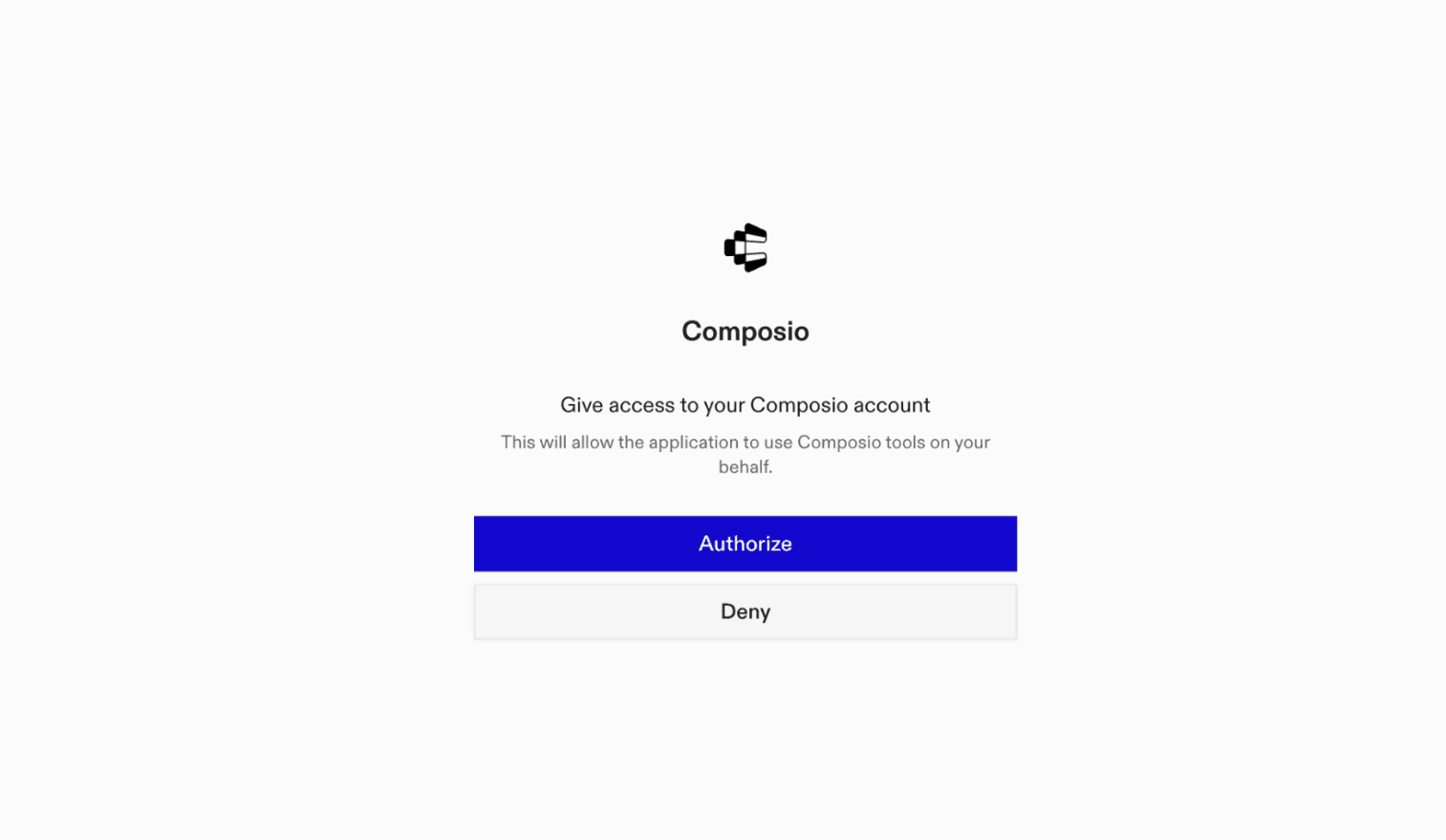
It will initiate the authentication in a browser window, authorize Codex to access your Composio account.
(Optional) Authenticate with OAuth
To authenticate manually, run the login command to open a browser window and authorize Codex to access your Composio account.
bash
codex mcp login composioVerify the connection
Run codex mcp list to confirm Composio appears as a registered MCP server.
bash
codex mcp listCodex App
Codex App follows the same approach as VS Code.
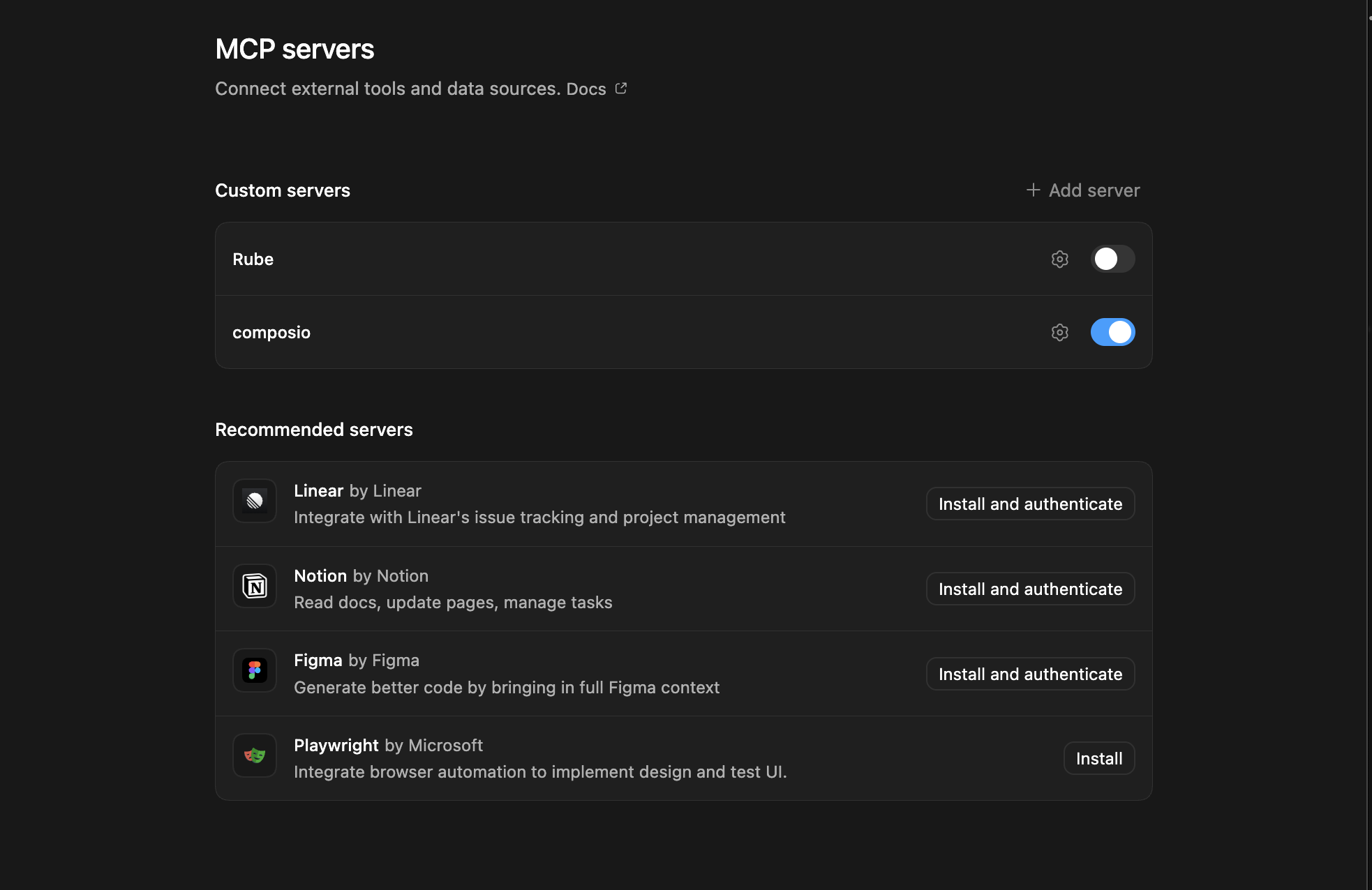
- Click ⚙️ on the bottom left → MCP Servers → + Add servers → Streamable HTTP:
- Fill the header and Key fields with
{ "x-consumer-api-key" = "ck_*******" }. - The Key is the Composio API key, that you can find on dashboard.composio.dev
- Click on Authenticate and authorize Codex to your Composio account and you're all set.
- Restart and verify if it's there in
.codex/config.toml
bash
[mcp_servers.composio]
url = "https://connect.composio.dev/mcp"
http_headers = { "x-consumer-api-key" = "ck_*******" }What is the Posthog MCP server, and what's possible with it?
The PostHog MCP server is an implementation of the Model Context Protocol that connects your AI agent and assistants like Claude, Cursor, etc directly to your PostHog account. It provides structured and secure access to your analytics events, feature flags, projects, and group types, so your agent can capture events, create or remove feature flags, list projects, and review configured group types on your behalf.
- Analytics event capture: Have your agent record product interactions and other analytics events in PostHog as they occur.
- Feature flag creation: Direct your agent to create feature flags for controlled releases, experiments, or targeted product experiences.
- Feature flag cleanup: Let the agent remove multiple feature flags that match your criteria or a selected set of flags.
- Project discovery: Instruct your agent to list the projects available in your PostHog organization.
- Group type review: Have your agent list the group types configured for a PostHog project.
Conclusion
You've successfully integrated Posthog with Codex using Composio's MCP server. Now you can interact with Posthog directly from your terminal, VS Code, or the Codex App using natural language commands.
Key benefits of this setup:
- Seamless integration across CLI, VS Code, and standalone app
- Natural language commands for Posthog operations
- Managed authentication through Composio
- Access to 20,000+ tools across 1500+ apps for cross-app workflows
- CodeAct workbench for complex tool chaining
Next steps:
- Try asking Codex to perform various Posthog operations
- Explore cross-app workflows by connecting more toolkits
- Build automation scripts that leverage Codex's AI capabilities
TOOLS & TRIGGERS
Supported Tools and Triggers
Every Posthog action and event your agent gets out of the box.
Add dashboard collaborators with access level
Add collaborators to a specific project dashboard.
Create Dashboard Widgets Batch
Batch dashboard widgets in a PostHog project.
Add member to organization role
Add a member to an organization role by submitting their details and UUID in JSON/form, using organization and role IDs.
Add persons to static cohort
Add persons to a static cohort by their UUIDs.
Add product intent to project
Tool to add a product intent to a PostHog project.
Add project specific member roles
Add members with specific roles to a project by providing their user_uuid and level (member or admin).
Add session recording to playlist
Add an existing session recording to a playlist.
Append Desktop Recording Segments
Append transcript segments to an existing desktop recording for real-time streaming support.
Archive Dataset
Archive dataset in a PostHog project.
Archive Dataset Item
Archive dataset item in a PostHog project.
Archive Experiment
Archive experiment in a PostHog project.
Archive Feature Flag
Archive feature flag in a PostHog project.
Archive Llm Prompt
Archive named LLM prompt in a PostHog project.
Archive survey response
Tool to archive a single survey response.
Assign feature flag role based access
Set up role-based access for a feature flag using `project_id` and `feature_flag_id`.
Create Notebook Widgets Attach
Attach notebook widget in a PostHog project.
Bulk create organization invites
POST /api/organizations/{organization_id}/invites/bulk/: Bulk-create organization invites with customizable levels, sender details, and validation checks.
Bulk Delete Dashboards
Bulk delete dashboards in a PostHog project.
Bulk delete feature flags
Bulk delete feature flags by filter criteria or explicit IDs.
Bulk Delete Insights
Bulk delete insights in a PostHog project.
Create Persons Bulk Delete
Tool to bulk delete persons by PostHog person IDs or distinct IDs.
Bulk Restore Insights
Bulk restore insights in a PostHog project.
Bulk Set Test Account Filter Insights
Set test account filter in bulk in a PostHog project.
Bulk Update Tags Experiments
Bulk update experiment tags in a PostHog project.
Bulk Update Tags Feature Flags
Bulk update feature flag tags in a PostHog project.
Create Experiment Calculate Running Time
Calculate experiment running time in a PostHog project.
Create Notebook Widgets Cancel
Cancel notebook widget in a PostHog project.
Cancel insights for a project
The "/api/projects/{project_id}/insights/cancel/" endpoint allows users to cancel insights for a project by providing a project ID and insight details in JSON or CSV, and confirms cancellation in the response.
Capture Event
Capture (ingest) a single analytics event into PostHog using the public ingestion API and a project API key.
Create Insight Data Checks
Check insight query data quality in a PostHog project.
Check pipeline destination updates
Check for available updates to a pipeline destination plugin by comparing the currently installed version (tag) with the latest version available in the plugin's repository.
Check pipeline import app updates
Retrieve the latest update information for a specific pipeline import app by its ID within an organization.
Check pipeline plugin update status
Get update status for a specific pipeline transformation plugin by its unique ID within an organization.
Check project's demo data generation status
Check if a project is currently generating demo data.
Create Notebook Kernel Complete
Complete notebook code in a PostHog project.
Create Notebook Kernel Config
Configure notebook kernel in a PostHog project.
Create Dashboard Copy Tile
Copy dashboard tile in a PostHog project.
Create Experiment Copy To Project
Copy experiment to project in a PostHog project.
Create Account Notebook
Create account notebook in a PostHog project.
Create Max AI insight and query
Tool to create and query insights using PostHog's Max AI assistant.
Create alert
Tool to create a new alert configuration in PostHog.
Create Batch
Capture a batch of analytics events to PostHog using the public batch ingestion API.
Create batch export
Create a new batch export to automatically export PostHog data to external destinations like S3, BigQuery, or Snowflake.
Create batch exports backfills
Tool to create a new backfill for a BatchExport.
Create batch exports run test step
Tool to run a test step for a batch export configuration in PostHog.
Create customer profile config
Create a customer profile configuration for a PostHog project.
Create project insights with customizable parameters
Create custom analytics insights for a PostHog project.
Create Dashboard Sharing Passwords
Create a dashboard sharing password and return its plaintext value once.
Create Dashboard Text Tile
Create text tile in a PostHog project.
Create data color theme
Tool to create a new data color theme in a PostHog project.
Create Dataset
Tool to create a new dataset in a PostHog project.
Create Dataset Exports
Export dataset in a PostHog project.
Create Dataset Items
Tool to create a new dataset item in a PostHog project dataset.
Create Dataset Item Restore
Restore dataset item in a PostHog project.
Create Dataset Restore
Restore dataset in a PostHog project.
Create desktop recording
Create a new desktop recording and get Recall.
Create endpoint
Tool to create a new endpoint for a PostHog project.
Create error tracking autocapture controls
Tool to create a new error tracking autocapture control configuration for a PostHog project.
Create Error Tracking Query Issue
Get compact issue details in a PostHog project.
Create Error Tracking Query Issue Events
List sampled exception events in a PostHog project.
Create Error Tracking Query Issues
List compact issues in a PostHog project.
Create error tracking release
Create a new error tracking release in PostHog.
Create error tracking suppression rule
Tool to create a new error tracking suppression rule for a project.
Create Evaluation
Create a new evaluation for a PostHog project to assess AI-generated content or responses.
Create evaluation run
Tool to create a new evaluation run and enqueue a Temporal workflow to asynchronously execute the evaluation.
Create event definitions
Create a new event definition in a PostHog project.
Create experiment exposure cohort
Create a new exposure cohort for an experiment in a project by sending a POST request with experiment details and feature flag data.
Create Experiment From Prompt
Create a draft experiment comparing 2-10 distinct existing versions of one LLM prompt.
Create experiment holdout
Tool to create a new experiment holdout group in PostHog.
Create experiment saved metric
Tool to create a new experiment saved metric in a PostHog project.
Create Feature Flag
Tool to create a new feature flag in a PostHog project.
Create static cohort for feature flag
Manage feature flags for apps with create, read, update, and delete operations using PostHog's JavaScript Library or dedicated endpoint.
Create feature flag dashboard
Manage feature flags by creating, reading, updating, and deleting them.
Create file system
Tool to create a new file system resource in PostHog with specified metadata and hierarchy.
Create file system shortcut
Create a new file system shortcut in a PostHog project.
Create Group
Create a group with a unique key in an existing PostHog group type.
Create groups types metrics
Tool to create a new metric for a specific group type in a PostHog project.
Create hog function
Create a new hog function in PostHog.
Create Insight Sharing Passwords
Create a insight sharing password and return its plaintext value once.
Create insight variable
Create a new insight variable for a PostHog project.
Create live debugger breakpoint
Tool to create a new live debugger breakpoint in a PostHog project.
Create LLM Analytics Summarization
Generate an AI-powered summary of an LLM trace or event.
Create LLM Analytics Text Representation
Tool to generate human-readable text representations of LLM trace events for display, logging, or analysis.
Create LLM Prompt
Create a named, versioned LLM prompt in a PostHog project.
Create Logs Export
Tool to create a logs export job using HogQL queries in PostHog.
Create Notebook Sharing Passwords
Create a notebook sharing password and return its plaintext value once.
Create Notebook Widget Snapshots
Create widget snapshot in a PostHog project.
Create Notebook Widget Snapshots Publish
Publish widget snapshot in a PostHog project.
Create new organization with configurable access
Create a new PostHog organization with configurable security and notification settings.
Create organization invite with role and email
Create and send an organization invitation to a user via email.
Create organization proxy record for custom domain
Create a managed reverse proxy record for an organization to enable custom domain routing for PostHog analytics events.
Create organization role with feature flag levels
Create a new custom role within a PostHog organization with optional feature flag access permissions.
Create domain with saml for organization
Create and configure an authentication domain with SAML SSO for a PostHog organization.
Create persisted folder
Tool to create a new persisted folder in a PostHog project.
Create person path with format option
Retrieve path analytics for a specific person within a PostHog project.
Create product tour
Tool to create a new product tour in a PostHog project.
Create project action with format
This POST endpoint creates actions for a project, accepts various data types, requires project_id and action data, optionally outputs in CSV/JSON, and needs PersonalAPIKeyAuth, returning a 201 with action details.
Create project cohorts
Create cohorts for a specified project by POSTing JSON-form data to "/api/projects/{project_id}/cohorts/".
Create project dashboard
The POST endpoint creates a dashboard within a project using a `project_id`, accepting details in JSON/form formats.
Create new project experiment
Create a new experiment in a specific project using JSON, form, or multipart data.
Create project insights with format option
Create a new analytics insight in a PostHog project.
Create a notebook in a project
The API for interacting with Notebooks.
Create project pipeline frontend app job
Create a job for a pipeline frontend app config in a project.
Create Retrieve Retention Insights For Project
Create and retrieve retention insights for a project using PostHog's Query API.
Create project subscription with delivery options
Create a subscription for a given project by providing required details such as delivery method, frequency, and starting date.
Create project surveys with questions and targets
Create surveys in a project by providing a project ID and details like type, questions, and targets in JSON, form-data, or urlencoded format.
Create query in project by id
The `/api/projects/{project_id}/query/` POST endpoint allows users to submit queries for a specific project by providing the project ID in the URL and the query details in JSON or form data.
Create session recording playlists
Create playlists of session recordings for a specified project.
Generate AI summary for session recording
Generate an AI-powered summary for a session recording.
Create Surveys Summary Headline
Tool to create or regenerate a summary headline for a survey.
Create warehouse saved query
Create a new warehouse saved query in PostHog for data warehouse operations.
Create Web Experiment
Create a new web experiment in a PostHog project.
Delete Account Notebook
Delete account notebook in a PostHog project.
Delete alert
Delete an alert configuration by providing its UUID and the associated project ID.
Delete Customer Profile Config
Tool to delete a customer profile configuration by ID in a PostHog project.
Delete Dashboard Sharing Passwords
Delete sharing password in a PostHog project.
Create Dashboard Delete Tile
Delete dashboard tile in a PostHog project.
Delete desktop recording
Tool to delete a desktop meeting recording by its UUID and project ID.
Delete endpoint
Delete an endpoint and clean up materialized query.
Delete error tracking autocapture controls
Delete an error tracking autocapture control configuration by UUID and project ID.
Delete error tracking grouping rule
Delete a specific error tracking grouping rule by ID.
Delete error tracking release
Delete an error tracking release by its UUID and project ID.
Delete Error Tracking Suppression Rule
Tool to delete an error tracking suppression rule by its UUID.
Delete experiment holdout
Delete an experiment holdout by providing its ID and the associated project ID.
Delete experiment saved metric
Tool to delete an experiment saved metric by ID from a PostHog project.
Remove feature flag role access by id
DELETE /api/projects/{project_id}/feature_flags/{feature_flag_id}/role_access/{id}: Remove role access from a feature flag in a project by ID, requiring authorization.
Delete file system
Tool to delete a file system resource in PostHog by UUID.
Create Group Delete Property
Delete group property in a PostHog project.
Delete Groups Types Metrics
Tool to delete a group usage metric by its UUID within a specific project and group type.
Delete insight
Attempt to delete an insight by its ID from a specific project.
Delete Insight Sharing Passwords
Delete insight sharing password in a PostHog project.
Delete insight variables
Delete an insight variable by its UUID from a specified project.
Delete live debugger breakpoint
Delete a live debugger breakpoint by providing its UUID and project ID.
Delete Llm Prompt Labels
Delete LLM prompt label in a PostHog project.
Delete Notebook Sharing Passwords
Delete notebook sharing password in a PostHog project.
Delete organization by uuid
Delete an organization by its UUID.
Remove organization batch export by uuid
Delete a specific batch export by its UUID in an organization.
Remove domain by uuid from organization
Delete a specific domain by its UUID within an organization, given valid organization and domain IDs.
Remove member from organization by uuid
Remove a member from a PostHog organization by their user UUID.
Remove organization pipeline destination
Delete a specific pipeline destination in an organization by ID.
Remove org pipeline import app by id
Delete a specific pipeline import app plugin associated with an organization by ID.
Remove organization pipeline transformation
Delete a specific pipeline transformation plugin for an organization by ID.
Remove organization plugin by id
Delete a specific plugin (by its integer ID) from the organization (identified by UUID) with no response body on success.
Delete organization project
Projects for the current organization.
Remove organization proxy record
Delete a proxy record by ID for a specific organization.
Remove organization role by id
Delete a role with a specific UUID in an organization.
Delete persisted folder
Delete a persisted folder by providing its UUID and the associated project ID.
Delete person and optionally associated events
This endpoint is used to read and delete user data.
Delete person property
Delete specific properties from a person record using the $unset operation.
Delete product tours
Delete a product tour by providing its UUID and the associated project ID.
Remove specific project batch export
Delete a specific batch export by providing the UUID and project ID.
Remove project dashboard collaborator
Remove a collaborator from a project dashboard.
Remove early access feature from project
Delete an early access feature by ID from a specified project.
Remove project event definition
Delete an event definition by providing its UUID and the associated project ID.
Remove project experiment by id
Soft-delete a specific experiment by its unique integer ID within a project.
Remove explicit project member by uuid
Delete a specific user (by UUID) from the explicit members of a given project.
Remove project plugin configuration
DELETE /api/projects/{project_id}/plugin_configs/{id}/: Removes a specific plugin configuration by ID from a given project.
Remove specific project query
(Experimental)
Remove property definition by uuid
Delete a property definition by providing its UUID and the associated project ID.
Remove rolemembership by uuid
Remove a user from a custom organization role by deleting their role membership.
Delete session recording by uuid
Delete a session recording by providing the session's UUID and the associated project ID.
Remove session recording from playlist
Remove a session recording from a playlist in a PostHog project.
Delete survey by id
Delete a survey by providing its UUID and the associated project ID.
Delete warehouse saved query
Tool to delete a warehouse saved query from PostHog.
Delete web experiment
Delete a web experiment by its ID from a specific project.
Disable Feature Flag
Disable feature flag in a PostHog project.
Cohort duplication to static
This endpoint duplicates a specified cohort as a static one within a project.
Duplicate experiment
Tool to duplicate an existing experiment in PostHog.
Duplicate Llm Prompt
Duplicate named LLM prompt in a PostHog project.
Duplicate survey to projects
Duplicate a survey to multiple projects in a single transaction.
Enable Feature Flag
Enable feature flag in a PostHog project.
Enable project early access feature
Enables a new early access feature for a project using project ID, payload with details, and PersonalAPIKeyAuth.
End Experiment
End experiment in a PostHog project.
Finish symbol sets bulk upload
Tool to finalize bulk upload of error tracking symbol sets for a PostHog project.
Flag annotation as deleted
Soft delete an annotation by setting 'deleted' to true via PATCH request.
Create Notebook Widgets Fork
Fork notebook widget in a PostHog project.
Create Experiment Freeze Exposure
Freeze experiment exposure in a PostHog project.
Create Insight Generate Metadata
Generate insight metadata in a PostHog project.
Generate Insight Name
Tool to generate an AI-suggested name for a PostHog insight based on its query configuration.
Create Notebook Widgets Generate
Queue AI generation for an existing markdown Widget node in a PostHog notebook.
Generate project funnel correlation insight
The /api/projects/{project_id}/insights/funnel/correlation endpoint generates a correlation insight for funnel analysis in a project, accepting JSON/CSV and needing 'project_id' and insight details.
Create Survey Generate Translations
Generate survey translations in a PostHog project.
Accounts Notebooks Get
Retrieve account notebook in a PostHog project.
Get Action References
List action references in a PostHog project.
Retrieve app metrics by ids
Retrieve performance and error metrics for a specific plugin configuration (app) in a PostHog project.
Retrieve app metrics error details
Retrieves detailed error information for a specific app metric (plugin config) within a project.
Retrieve batch export details
Retrieve details of a specific batch export by its UUID in a project.
Get batch exports backfills
Tool to retrieve backfills for a specific batch export within a project.
Get billing details
Retrieve billing and subscription details for the connected PostHog account.
Retrieve cohort activity details
Retrieve activity details for a specific cohort within a project.
Get Cohort Blocking Workflows
Find blocking workflows in a PostHog project.
Retrieve cohort person details
Retrieve details of persons within a cohort by its unique ID in the specified project.
Get cohort calculation history
Tool to retrieve the calculation history for a specific cohort.
Get Cohort Used In
Find cohort usage in a PostHog project.
Get conversation
Tool to retrieve a specific conversation by UUID and project ID.
Get conversations
Tool to retrieve conversations for a specific PostHog project with pagination support.
Get current personal API key
Retrieve metadata, grants, and resource restrictions for the personal API key authenticating this connection.
Get Customer Profile Config
Retrieve a specific customer profile configuration by its ID for a given project.
Get customer profile configs
Tool to retrieve customer profile configurations for a project with pagination support.
Get Dashboard Run Insights
Run dashboard insights in a PostHog project.
Get Dashboard Run Widgets
Run dashboard widgets in a PostHog project.
Retrieve dashboard template details by uuid
Fetch specific dashboard template details by UUID in a project with 'dashboard_template:read' rights using a PersonalAPIKeyAuth.
Retrieve dashboard template schema
Retrieve the JSON schema for dashboard templates of a specific project.
Get data color theme
Tool to retrieve a specific data color theme by ID from a PostHog project.
Get Data Color Themes
Tool to retrieve data color themes for a specific project.
Get dataset details
Retrieve detailed information about a specific dataset within a project.
Get Dataset Exports
Retrieve dataset export in a PostHog project.
Get Dataset Exports Content
Download dataset export in a PostHog project.
Get Dataset Item
Tool to retrieve a specific dataset item by its ID from a PostHog project.
Get dataset items
Tool to retrieve paginated dataset items for a specific project in PostHog.
Get Dataset Item Versions
List dataset item versions in a PostHog project.
Get Dataset Revisions
List dataset revisions in a PostHog project.
Get Datasets
Tool to retrieve datasets for a PostHog project.
Get desktop recordings
Tool to retrieve desktop meeting recordings for a specific project.
Get Endpoint
Retrieve named endpoint in a PostHog project.
Create Endpoint Last Execution Times
Retrieve last execution times in a PostHog project.
Get Endpoint Logs
Retrieve endpoint logs in a PostHog project.
Get Endpoint Materialization Status
Get materialization status in a PostHog project.
Get Endpoint OpenAPI Specification
Get OpenAPI 3.
Get Endpoint Run
Execute endpoint via GET in a PostHog project.
Get error tracking assignment rules
Tool to retrieve error tracking assignment rules for a project.
Get error tracking autocapture control
Retrieve a specific error tracking autocapture control configuration by its ID.
Get error tracking fingerprints
Tool to retrieve error tracking fingerprints for a project.
Get error tracking grouping rules
Tool to retrieve error tracking grouping rules for a project.
Get error tracking issue
Retrieve one error tracking issue by ID for a PostHog project.
Get error tracking release
Retrieve details of a specific error tracking release by its UUID and project ID.
Get error tracking release by hash
Tool to retrieve an error tracking release by its hash identifier.
Get error tracking releases
Tool to retrieve paginated error tracking releases for a specific project in PostHog.
Get error tracking suppression rules
Tool to retrieve error tracking suppression rules for a project.
Get error tracking symbol sets
Tool to retrieve error tracking symbol sets for a PostHog project.
Get Evaluation
Retrieve details of a specific evaluation by its UUID and project ID.
Get evaluations for project
Tool to retrieve evaluations configured for a specific PostHog environment/project.
Retrieve event definition by uuid
Retrieve an event definition by its UUID within a specified project.
Get event definition by name
Tool to retrieve an event definition by its exact name for a specific project.
Retrieve event definitions by project id
Retrieve definitions for events within a specified project by providing the unique project_id.
Get event definitions in Golang format
Tool to retrieve event definitions in Golang format for a specific PostHog project.
Get event definitions in Python format
Tool to retrieve Python-formatted event definitions for a specific project.
Get event definitions TypeScript
Tool to retrieve TypeScript event definitions for a specific project.
Get Experiment Activity
Retrieve experiment activity in a PostHog project.
Retrieve experiment details by ids
Access detailed experiment info within a project using unique `experiment ID` & `project ID`, with 'experiment:read' rights.
Get Experiment Flag Cleanup Target
Retrieve flag cleanup target in a PostHog project.
Get Experiment Flag Cleanup Task
Retrieve flag cleanup task in a PostHog project.
Get Experiment Health
Retrieve experiment health in a PostHog project.
Get Experiment Health Inputs
Retrieve experiment health inputs in a PostHog project.
Get experiment holdout details
Retrieve details of a specific experiment holdout by ID within a project.
Get experiment holdouts
Tool to retrieve experiment holdouts for a specific PostHog project.
Get Experiment In Session Exposure
Retrieve in-session exposure in a PostHog project.
Get Experiment Metrics Recalculation
Retrieve metric recalculation in a PostHog project.
Get Experiment Metrics Recalculation Latest
Retrieve latest metric recalculation in a PostHog project.
Get experiment saved metric
Tool to retrieve a specific experiment saved metric by ID from a PostHog project.
Get eligible feature flags for experiments
Tool to retrieve feature flags eligible for use in experiments.
Create Experiment Session Contexts
Create session contexts in a PostHog project.
Create Experiment Session Event Deltas
Calculate session event deltas in a PostHog project.
Create Experiment Setup Context
Create experiment setup context in a PostHog project.
Retrieve experiments requiring flag implementation
Retrieve details for experiments that require feature flag implementation in a specific project.
Get experiments stats
Tool to retrieve experimentation velocity statistics for a PostHog project.
Retrieve export unsubscribe configs
Retrieves export unsubscribe configurations for pipeline import apps in an organization.
Fetch export unsubscribe settings
Retrieves export unsubscribe configurations for pipeline transformations in an organization.
Get external data schema
Retrieve one external data schema and its sync configuration.
Get external data source
Tool to retrieve details of a specific external data source by its UUID and project ID.
Get external data sources
Tool to retrieve external data sources for a PostHog project with pagination support.
Retrieve feature flag activity details
Manage feature flags (creation, reading, updating, and deleting) using PostHog's guides or via JavaScript Library/endpoint for user-specific flag status.
Retrieve feature flag details
Retrieve detailed information about a specific feature flag in a PostHog project.
Bulk Keys Feature Flags
Retrieve feature flag keys in bulk in a PostHog project.
Get Feature Flag Remote Config
Retrieve remote configuration in a PostHog project.
Retrieve feature flag role access details
Retrieve details for a specific role's access to a feature flag within a project.
Retrieve feature flags activity log
Learn to manage feature flags by creating, reading, updating, and deleting them.
Get feature flags dependent flags
Retrieve all active feature flags that depend on a specified flag.
Retrieve feature flags evaluation reasons
Manage feature flags—create, read, update, delete—using the PostHog JavaScript Library or endpoint for user-specific flag status.
Get feature flags matching IDs
Tool to get IDs of all feature flags matching the current filters.
Get feature flag status
Tool to retrieve the status of a specific feature flag in a PostHog project.
Create Feature Flag User Blast Radius
Calculate user blast radius in a PostHog project.
Get Feature Flag Versions
Retrieve feature flag version in a PostHog project.
Get file system
Tool to retrieve a specific file system resource by UUID and project ID.
Get file system shortcut
Retrieve a specific file system shortcut by UUID from a project.
Retrieve filtered project property definitions
Get property definitions for a project using project_id, with filters for event names, property types, exclusions, and numerical or feature flags.
Retrieve funnel insights in project
Execute a funnel analysis for a specific project.
Retrieve group property definitions by project id
Retrieve property definitions for a group within a project by providing the project ID.
Retrieve group property values by index and key
Retrieve property values by 'group_type_index' and 'key' within a 'project_id'.
Get group type metric by ID
Tool to retrieve detailed information about a specific group usage metric by its ID.
Get groups types metrics
Tool to retrieve metrics for a specific group type in a PostHog project.
Retrieve hedgehog configuration by uuid
Retrieve user's hedgehog configuration details by their UUID.
Retrieve historical app metrics export
Retrieve historical export data for app metrics by supplying the `project_id` and `plugin_config_id`.
Get hog function
Tool to retrieve a specific hog function by UUID and project ID.
Get Hog function metric totals
Read aggregate execution metric totals for a PostHog Hog function.
Get hog functions
Tool to retrieve hog functions for a specific PostHog project.
Retrieve important project activity log
Retrieve a log of important activities and changes for a specified project.
Get Insight Data Checks
Check saved insight data quality in a PostHog project.
Retrieve insight sharing configurations
Retrieve sharing configurations for a specific insight within a project, requiring project and insight IDs.
Get insight thresholds
Tool to retrieve thresholds configured for a specific insight within a project.
Get insight threshold
Tool to retrieve a specific insight threshold by ID for a PostHog project.
Get insight variable
Tool to retrieve a specific insight variable by UUID and project ID.
Get insight variables
Tool to retrieve paginated list of insight variables for a project.
Get live debugger breakpoint
Tool to retrieve a specific live debugger breakpoint by UUID and project ID.
Get live debugger breakpoints
Tool to retrieve live debugger breakpoints for a project.
Get LLM Analytics Evaluation Config
Tool to retrieve the LLM analytics evaluation configuration for a specific PostHog project.
Get LLM Analytics Models
Tool to list available LLM models for a specific provider in PostHog LLM Analytics.
Get LLM Analytics Provider Keys
Tool to retrieve LLM analytics provider keys for a project.
Get LLM prompt
Retrieve a PostHog LLM prompt by name, version, or label.
Get Llm Prompt Resolve
Resolve named LLM prompt in a PostHog project.
Get Log Alerts Events
List log alert events in a PostHog project.
Get logs attributes
Tool to retrieve available log attributes for a PostHog project.
Get logs availability status
Tool to check if a project has logs available.
Get log field values
Tool to retrieve unique values for a specific log field key in a PostHog project.
Get Notebook Collab Stream
Read a bounded batch of notebook collaboration SSE events and return the last event ID for resuming.
Get Notebook Kernel Status
Retrieve notebook kernel status in a PostHog project.
Get Notebook Runs
Retrieve notebook run in a PostHog project.
Get Notebook Sharing
List notebook sharing settings in a PostHog project.
Get Notebook Sql V2 Runs
Retrieve notebook SQL run in a PostHog project.
Get Notebook Sql V2 State
Retrieve notebook SQL state in a PostHog project.
Get Notebook Widgets Frames
Retrieve notebook widget frame in a PostHog project.
Get Notebook Widget Snapshots
Retrieve widget snapshot in a PostHog project.
Get Notebook Widget Snapshots Frames
Retrieve widget snapshot frame in a PostHog project.
Get Notebook Widgets Source
Retrieve notebook widget source in a PostHog project.
Get Notebook Widgets Status
Retrieve notebook widget status in a PostHog project.
Get Notebook Widgets Versions
List notebook widget versions in a PostHog project.
Fetch organization details by uuid
Retrieve organization details by UUID.
Fetch organization pipeline app repositories
Retrieve details of pipeline import app repositories for a specific organization by its UUID.
Get persisted folders
Tool to list persisted folders for a PostHog project with pagination support.
Get Person Emails
List person emails in a PostHog project.
Get Person Push Notifications
List person push notifications in a PostHog project.
Look Up Persons By Distinct IDs
Look up existing persons by distinct IDs in a PostHog project without changing them.
Look Up Persons By UUIDs
Look up existing persons by UUIDs without creating or changing them.
Fetch pipeline destination activity
Retrieve activity logs and metadata for a specific pipeline destination configuration.
Fetch pipeline transformation details
Retrieve available pipeline transformation plugins from the organization's plugin repository.
Get product tour
Tool to retrieve a specific product tour by UUID from a PostHog project.
Retrieve and delete project person trends
This endpoint is for reading and deleting persons.
Fetch project survey activity log
Retrieve the activity log of surveys within a specific project by using the project ID.
Get Query Scan
Retrieve the cached analysis of a query's last slow run.
Get Role Membership
Retrieve details of a specific role membership within an organization by its UUID.
Get session group summaries
Tool to retrieve stored group session summaries for a project.
Fetch session recording playlist details
Retrieve session recording playlist details for a specific project by project_id and playlist short_id.
Get Signal Reports Actions
List report agent actions in a PostHog project.
Get spike detection configuration
Retrieve the active error tracking spike detection configuration for a project.
Get Survey Responses
List survey responses in a PostHog project.
Get survey response statistics
Get survey response statistics for a specific survey.
Get surveys archived response UUIDs
Tool to get list of archived response UUIDs for HogQL filtering.
Get surveys stats
Tool to get aggregated response statistics across all surveys for a project.
Retrieve unused organization pipeline frontend apps
Retrieve a list of pipeline frontend apps that are available but not currently in use within a specific organization.
Get user home settings
Tool to retrieve user home settings including homepage and tab configurations.
Get user interviews
Tool to retrieve paginated list of user interviews for a specific project.
Get Vision Alerts Events
List vision alert events in a PostHog project.
Get warehouse saved queries activity
Tool to retrieve activity details for a specific warehouse saved query in PostHog.
Get warehouse saved query
Tool to retrieve a warehouse saved query from PostHog data warehouse.
Get warehouse table
Retrieve details of a specific data warehouse table by its UUID.
Get Warehouse Tables
Tool to retrieve a paginated list of warehouse tables for a specific project.
Get web experiment
Tool to retrieve a specific web experiment by ID from a PostHog project.
Get web vitals
Tool to retrieve web vitals metrics for a specific pathname in a PostHog project.
Initiate domain verification with saml config
Initiates domain verification for SAML SSO authentication.
Create Notebook Kernel Inspect
Inspect notebook kernel in a PostHog project.
Create Notebook Sql V2 Runs Interrupt
Interrupt notebook SQL run in a PostHog project.
Create Notebook Runs Interrupt
Interrupt notebook run in a PostHog project.
Create Canvas Actions Invoke
Invoke canvas action in a PostHog project.
Launch Experiment
Launch experiment in a PostHog project.
Launch Survey
Launch survey in a PostHog project.
Get Account Notebook
List account notebooks in a PostHog project.
List Action Selector Match Changes
List selector match changes in a PostHog project.
List alerts for project
Tool to retrieve all alerts configured for a specific PostHog project.
List all projects across organizations
Tool to list all projects the authenticated user can access by enumerating organizations and aggregating each organization's projects.
List and manage project annotations
Create, Read, Update and Delete annotations.
List and manage project feature flags
List all feature flags for a specific project with pagination support.
List Batch Export Runs
List runs for a batch export by `batch_export_id` within a project.
List conversations tickets
Tool to list tickets with person data attached for a project.
List dashboard sharing configs
Retrieve a list of dashboard sharing configurations for a specified project and dashboard.
List Dashboard Widget Catalog
Retrieve widget catalog in a PostHog project.
List endpoints for project
Tool to list all endpoints for the team.
List endpoint versions
Tool to list all versions for a specific endpoint in PostHog.
List error tracking autocapture controls
Tool to list error tracking autocapture controls for a PostHog project.
List error tracking issues
List a project's error-tracking issues with offset pagination.
List Experiment Matching Ids
Retrieve matching experiment IDs in a PostHog project.
List Experiment Prompt Templates
Retrieve prompt templates in a PostHog project.
List experiment saved metrics
Tool to list experiment saved metrics for a project with pagination support.
List Experiment Session Context
Retrieve session context in a PostHog project.
List external data source jobs
List up to 50 newest synchronization jobs for one external data source, optionally filtered by creation time and schema name.
List Feature Flag My Flags
List current user's flags in a PostHog project.
List feature flag role access details
This GET endpoint returns role access details for a feature flag in a project, needs 'project_id' & 'feature_flag_id', and offers optional 'limit' & 'offset' for pagination.
List file system resources
Tool to list file system resources for a PostHog project with pagination support.
List Group Activity
Retrieve group activity in a PostHog project.
List specific type groups with pagination
List all groups of a specific group type.
List Heatmap Events
Retrieve heatmap events in a PostHog project.
List Insight Trending
Retrieve trending insights in a PostHog project.
List live debugger breakpoint hits
Tool to retrieve breakpoint hit events from ClickHouse with optional filtering and pagination.
List active live debugger breakpoints
Tool to fetch active live debugger breakpoints for external client applications using Project API key.
List LLM Prompts
List one page of a project's LLM prompts with filtering and sorting.
List Notebook Kernel Compute Options
Retrieve notebook compute options in a PostHog project.
List notebooks with filters and pagination
The API for interacting with Notebooks.
List or delete persons with optional filters
This endpoint is for reading/deleting persons.
List organization s batch exports with pagination
Retrieve paginated batch exports for an organization, with filters and optional limits.
List organization domains with pagination
Fetch a list of an organization's domains with pagination using `limit` and `offset`.
List organization integrations
Tool to list organization-level integrations with read-only access.
List organization invites with pagination
Retrieve a paginated list of all pending and active invites for an organization.
List organization members with pagination
List all members of a specific organization with pagination support.
List organization s pipeline destinations
Retrieve a paginated list of an organization's pipeline destinations by ID, with optional count and offset parameters.
List Organization's Pipeline Frontend Apps
Retrieve a paginated list of available pipeline frontend apps for a specific organization.
List organization s pipeline import apps
Retrieve a paginated list of pipeline import applications for a specified organization by ID.
List organization s pipeline transformations
Retrieve paginated pipeline transformation lists for an organization using `limit` and `offset`, requiring a UUID and PersonalAPIKeyAuth.
List Organization Plugins with Pagination
Retrieve the list of plugins for a specified organization.
List projects in organization with pagination
Projects for the current organization.
List organization proxy records
Retrieve a paginated list of custom domain proxy records for an organization.
List organization roles with pagination
List all roles in an organization with pagination support.
List Person Cohorts
Retrieve person cohorts in a PostHog project.
List Person Deletion Status
List person deletion status in a PostHog project.
List Person Properties At Time
Retrieve person properties at a time in a PostHog project.
List pipeline destination configs with pagination
List pipeline destination configurations for a given project by ID, with optional pagination through 'limit' and 'offset' query parameters.
List pipeline frontend app configs
List all pipeline frontend app configurations for a project.
List product tours
Tool to retrieve a paginated list of product tours for a specific project.
List project actions with pagination and filters
Get paginated project actions with filters by format.
List project batch exports with pagination
Retrieve an indexed list of batch exports for a specified project with optional pagination.
List project configuration plugin logs
Retrieve logs for a specific plugin configuration within a project.
List project dashboard collaborators
Retrieve the list of collaborators for a specific dashboard within a project.
List project dashboards with pagination
Get paginated dashboards for a project by ID, using 'limit' and 'offset'.
List project dashboard templates
Retrieve available dashboard templates for a PostHog project.
List project early access features
Retrieve a paginated list of a project's early access features by ID with 'limit' and 'offset' parameters.
List project experiments with pagination
Get a paginated list of experiments within a project using 'limit' and 'offset' parameters.
List project export items with pagination
Retrieve a paginated list of export items for a specific project by ID with optional 'limit' and 'offset' query parameters.
List project group types by id
List all group types configured for a PostHog project.
List project membership details
Retrieve a list of project membership details for a specified project by ID.
List project pipeline configurations
List all pipeline transformation configurations for a specific project.
Listprojectpipelineimportconfigs
List pipeline import app configurations for a specified project, with pagination options 'limit' and 'offset'.
List project plugin configurations
List all plugin configurations for a specific project.
List project session recordings
Retrieve a paginated list of session recordings for a specific project, including viewing times and user interactions.
List project subscriptions with pagination
Retrieve a paginated list of subscriptions for a given project by its ID.
List paginated surveys for a project
Get paginated surveys for a project with its ID, using 'limit' and 'offset'.
List Role Memberships Paginated
List all users assigned to a specific role within an organization.
List of project s session recording playlists
List all session recording playlists for a PostHog project, including both user-created playlists and system-generated synthetic playlists (like "Watch history", "Recordings with comments", etc.
List session recording sharing configs
Retrieve a list of sharing configurations for a specific session recording in a project, including creation timestamps and access tokens.
List signal reports
List signal reports for a PostHog project with filters and pagination.
List Survey Question Labels
Retrieve survey question labels in a PostHog project.
List unused organization pipeline transformations
Retrieve a list of unused pipeline transformations for a specified organization, identified by UUID.
List users with staff filter and pagination
API endpoint fetches a user list with staff filter, pagination (limit, offset), and requires a personal API key.
List warehouse saved queries
Tool to retrieve warehouse saved queries for a project.
List web experiments
Tool to retrieve a paginated list of web experiments for a specific project.
Manage feature flag enrichment for usage dashboard
Learn to manage feature flags (creation, access, modification, removal) using PostHog's docs, with options to use a JavaScript Library or a dedicated endpoint for user-specific flag status.
Crud operations for project annotations
Create, Read, Update and Delete annotations.
Manage project feature flags for local evaluation
Retrieve all feature flag definitions for a project to enable local evaluation.
Mark dashboard template as deleted
Hard delete of this model is not allowed.
Mark insight as viewed with configurable format
Marks one or more insights as viewed by the current user for a specified project.
Create project timing insights
Record insights as viewed by updating their last_viewed_at timestamps.
Prevent hard delete notebook by flagging
Hard delete of this model is not allowed.
Migrate Experiment
Migrate experiment in a PostHog project.
Move dashboard tile
Endpoint to move a tile from one dashboard to another.
Create Dashboard Move Tile
Move dashboard tile in a PostHog project.
Move file system item
Move a PostHog file-system item or folder to a new path.
Update alert configuration
Tool to update an existing alert configuration in PostHog.
Patch Batch Export
Update an existing batch export configuration in PostHog by partially modifying fields like name, paused status, destination, or schedule.
Mark product onboarding complete
Tool to mark a specific product onboarding as complete for a PostHog project.
Patch Customer Profile Config
Update a customer profile configuration by partially modifying fields like content, scope, or sidebar.
Patch Dataset
Tool to partially update a dataset in a PostHog project.
Patch Dataset Item
Tool to partially update a dataset item by its ID in a PostHog project.
Patch endpoint
Tool to partially update an endpoint for a project.
Patch error tracking autocapture controls
Partially update an error tracking autocapture control configuration.
Patch Evaluation
Update an evaluation by patching specific fields.
Partial experiment update in project
Endpoint enables partial updates to an experiment in a project using PATCH, needing `project_id`, `experiment_id`, and various payload types.
Patch experiment saved metric
Tool to partially update an experiment saved metric by ID in a PostHog project.
Patch External Data Source
Tool to update an external data source in PostHog by patching specific fields like description or configuration.
Patch file system
Tool to partially update a file system resource by UUID and project ID.
Patch file system shortcut
Tool to partially update a file system shortcut in PostHog by its UUID.
Update group usage metric
Tool to update a group usage metric configuration in PostHog.
Patch hog function
Tool to partially update a hog function by UUID and project ID.
Patch Insight Variable
Update an insight variable by partially modifying its properties (name, type, default value, etc.
Patch live debugger breakpoint
Tool to update a live debugger breakpoint by UUID and project ID.
Update organization domain properties
Updates selected properties of a domain in an organization via PATCH request, supports various data formats but SAML fields are immutable.
Update partial role details in organization
PATCH /api/organizations/{organization_id}/roles/{id}/: Update partial details of a role by ID within an organization, including name and feature flag access level.
Patch persisted folder
Tool to partially update a persisted folder by ID for a PostHog project.
Person partial update via project id
This endpoint allows reading and deleting individuals.
Patch product tour
Tool to partially update a product tour in PostHog.
Update project action with partial data
Update an action within a project with a specified ID.
Partial update project annotation
Create, Read, Update and Delete annotations.
Update partial project cohort details
Update partial cohort details for a specific project.
Partial update of a project s dashboard
Endpoint PATCH /api/projects/{project_id}/dashboards/{id}: Allows partial update of a project's dashboard with specified ID.
Partial update of a project s feature flag
Learn to manage feature flags (create, read, update, delete) using PostHog's docs, with options for JavaScript Library use or dedicated endpoints for user flag status.
Partial update of a project insight
The PATCH endpoint supports partial insight updates in a project, allows format specification (CSV/JSON), and requires `PersonalAPIKeyAuth` and `insight:write` scope for access.
Update project member role by uuid
Update a project member's role using their UUID in a specific project.
Partial update of project notebook
The API for interacting with Notebooks.
Partially update project property definition
PATCH /api/projects/{project_id}/property_definitions/{id}/: Partially update a specific property definition by UUID in a project.
Update partial subscription details
PATCH /api/projects/{project_id}/subscriptions/{id}/: Update partial details of a specific project subscription by ID.
Update partial survey details
Update partial survey details by PATCH to /api/projects/{project_id}/surveys/{id}/ with UUID.
Update session recording playlist partially
Update session recording playlists using PATCH on the endpoint with `project_id` and `short_id`.
Update user profile
Tool to update user profile settings in PostHog.
Patch warehouse saved query
Tool to partially update a warehouse saved query in PostHog.
Patch warehouse tables
Tool to partially update a warehouse table by patching specific fields like name, format, or schema.
Patch web experiment
Tool to partially update a web experiment in PostHog.
Pause Batch Export
Pause a batch export in PostHog to temporarily stop scheduled data exports.
Pause Experiment
Pause experiment in a PostHog project.
Pause Organization Batch Export
Pause an organization-level batch export in PostHog.
Create Notebook Widgets Pin
Pin notebook widget in a PostHog project.
Create Endpoint Materialization Preview
Preview materialization transform in a PostHog project.
Project Funnel Advanced Analytics
Create comprehensive funnel analysis for a PostHog project with advanced configuration options.
Post Project Trends With Filters
The `/api/projects/{project_id}/insights/trend/` endpoint provides project trends in CSV/JSON, requires `project_id` and optional parameters, and needs 'PersonalAPIKeyAuth'.
Create Notebook Widgets Publish
Publish notebook widget in a PostHog project.
Create Experiment Session Buckets
Calculate experiment session buckets in a PostHog project.
Query logs
Query project logs using typed filters and cursor pagination.
Create Metric Query
Query metrics in a PostHog project.
Create Tracing Spans Query
Query tracing spans in a PostHog project.
Rearrange frontend app pipeline configs
Rearrange (reorder) the configuration of frontend apps in a project's data pipeline.
Rearrange pipeline transformation configs
Rearrange the execution order of pipeline transformation configurations for a project.
Rearrange project import app configurations
Rearrange app import settings in a project using PATCH /api/projects/{project_id}/.
Rearrange project pipeline destination configs
Rearrange the execution order of pipeline destination configurations for a project.
Create Experiment Metrics Recalculation
Recalculate experiment metrics in a PostHog project.
Create experiment timeseries recalculation
Tool to create a recalculation request for experiment timeseries data.
Reconfigure plugin order and status in project
Reconfigure the execution order and status of plugin configurations within a project.
Create Dashboard Sharing Refresh
Rotate a dashboard sharing access token.
Create Insight Sharing Refresh
Rotate an insight sharing access token.
Create Notebook Sharing Refresh
Rotate a notebook sharing access token.
Create Dashboard Reorder Tiles
Reorder dashboard tiles in a PostHog project.
Replace Desktop Recording
Replace a desktop meeting recording in PostHog using PUT.
Reset Experiment
Reset experiment in a PostHog project.
Reset person distinct ID
Reset a distinct_id for a deleted person.
Resume Experiment
Resume experiment in a PostHog project.
Retrieve async query status by id
(Experimental)
Retrieve last viewed insights for user
Returns basic details about the last 5 insights viewed by this user.
Retrieve matching events for session recording
Retrieves event IDs matching a filter with one session ID and at least one event/action criterion.
Retrieve notebook activity for project
The API for interacting with Notebooks.
Retrieve notebook activity log
The API for interacting with Notebooks.
Retrieve notebook details
The API for interacting with Notebooks.
Retrieve or delete person retention data
This endpoint is for reading and deleting person data; use the capture API, `$set`/`$unset` properties, or SDKs for creation and updates.
Retrieve or delete project persons funnel data
Retrieves persons who entered or progressed through a funnel in the specified project.
Retrieve organization pipeline frontend app details
Retrieve pipeline frontend app details for an organization using its 'organization_id' (UUID).
Retrieve Org Pipeline Repo Details
Retrieve details for repository pipeline destinations within a specific organization by its UUID.
Retrieve org pipeline transformation activity
Retrieve org pipeline transformation activity
Retrieve organization pipeline unsubscribe configs
Retrieve export unsubscribe configurations for an organization's pipeline frontend apps.
Retrieve organization plugin activity
Retrieve activity details for plugins in a specified organization by ID.
Retrieve organization plugin details
Retrieve a specific plugin's details for an organization.
Retrieve organization plugin repository details
Retrieve plugin repository details for a specific organization by its UUID, including plugin type, name, URL, and more.
Retrieve organization plugin unsubscribe configs
Retrieve export unsubscribe configurations for plugins in an organization.
Retrieve organization project details
Projects for the current organization.
Retrieve organization role details
Retrieve the details of a specific role within an organization using its UUID.
Retrieve organization s unused pipeline apps
Retrieve unused pipeline import apps for a specified organization.
Retrieve paginated organization list
Retrieve a paginated list of organizations with optional 'limit' and 'offset' query parameters.
Retrieve persisted folder
Tool to retrieve a specific persisted folder by its UUID and project ID.
Retrieve person s activity and delete options
This endpoint is for reading and deleting persons; for creating/updating, use the capture API, `$set`/`$unset` properties, or SDKs.
Retrieve person details by id
This endpoint is used to read and delete persons.
Retrieve person property values
Retrieve unique values for a specific person property across all persons in a project.
Retrieve pipeline destination activity
Retrieve activity details for pipeline destinations within an organization.
Retrieve pipeline destination config details
Retrieve details of a specific pipeline destination config for a project by its ID.
Retrieve pipeline destination details
Fetch a pipeline destination's details by ID and organization UUID, using a PersonalAPIKeyAuth with read access to plugins.
Retrieve pipeline destination plugin details
Retrieve details of a specific pipeline destination plugin within an organization by its unique ID.
Retrieve pipeline frontend app activity
Retrieve activity details for pipeline front-end apps within a specified organization by organization ID.
Retrieve pipeline frontend app details
Retrieve detailed information about a specific pipeline frontend app within an organization.
Retrieve pipeline frontend app source details
Retrieve details for a specific pipeline frontend app's source by its ID within an organization.
Retrieve pipeline frontend plugin config
Retrieve the frontend-specific configuration for a pipeline frontend app by its config ID and project ID.
Retrieve pipeline import apps activity
Retrieve activity details of pipeline import apps for a given organization.
Retrieve pipeline plugin details by id
Retrieve detailed information about a specific pipeline transformation plugin by ID.
Retrieve Pipeline Plugin Source
Retrieve the source details of a pipeline transformation for a specific plugin by ID within an organization.
Retrieve pipeline transformation frontend config
Retrieve the frontend configuration details for a specific pipeline transformation by ID within a given project.
Retrieve plugin source details
Retrieve plugin source details by organization and plugin ID.
Retrieve plugin update info
This endpoint retrieves update information for a specific plugin within an organization's pipeline frontend app by its integer ID and the organization's UUID.
Retrieve plugin update status
Retrieve the latest update status for a specific plugin, identified by its integer ID, within an organization specified by UUID.
Retrieve project action details by id
Get details on a project action by ID.
Retrieve project activity details
Retrieve the activity log for a specified project, showing recent changes and events.
Retrieve project activity insights
Retrieve the activity log history for insights in a specific project.
Retrieve project activity log with pagination
Retrieve a project's activity log with cursor-based pagination.
Retrieve project annotation details
Create, Read, Update and Delete annotations.
Retrieve project cohort details
Retrieve detailed information about a specific cohort within a project using its ID.
Retrieve project cohorts activity log
Retrieve activity log for a specific project's cohorts.
Retrieve project cohorts with pagination
Retrieve a paginated list of cohorts for a specific project using `project_id`.
Retrieve project early access feature details
Retrieve details of a specific early access feature in a project by ID.
Retrieve project event details by id
Retrieve details for a specific event by ID within a project.
Retrieve project event values
Retrieve event values for a specific project by ID.
Retrieve project experiment results
Retrieve experiment timeseries results within a project by project and experiment ID.
Retrieve project export details
Retrieve detailed info on a specific export of a project using its unique ID.
Retrieve project funnel correlation insights
Retrieve funnel correlation insights for a specific project.
Retrieve project group details by key and type
Retrieves specified group details within a project by group key and type index.
Retrieve project insight activity data
Retrieve insights activity for a specific project and insight ID, offering data in JSON or CSV format.
Retrieve project insight details
Retrieve details for a specific project insight by ID, with options to format as JSON/CSV, request refresh, and specify dashboard context.
Retrieve project insights with pagination
The GET `/api/projects/{project_id}/insights/` endpoint retrieves a paginated list of insights for a specified project.
Retrieve project member details by uuid
Retrieve detailed information about a specific user's membership level and status within a project by their UUID.
Retrieve project person activity
This endpoint allows reading and deleting individuals.
Retrieve project session values
Retrieve session values for a specified project.
Retrieve project subscription details
Retrieve a specific subscription for a project, identified by 'project_id' and 'id'.
Retrieve project trend insights
Retrieves saved trend insights from a PostHog project.
Retrieve properties and events association
Allows a caller to provide a list of event names and a single property name Returns a map of the event names to a boolean representing whether that property has ever been seen with that event_name
Retrieve property definition details
Retrieve details of a specific property definition by UUID within a project.
Retrieve related project groups
Retrieve related groups for a specific project and user.
Retrieve session property definitions
Retrieve property definitions for a specific project by providing the project's ID.
Retrieve session recording details
Retrieve detailed information about a specific session recording by providing the session's UUID and associated project ID.
Retrieve session recording error clusters
Retrieve error clusters from session recordings for a specified project.
Retrieve recordings from playlist
Retrieve the list of session recordings within a playlist.
Retrieve session recording properties
Retrieve properties of session recordings for a given project by ID, including activity metrics, timestamps, and participant details.
Retrieve session recording snapshots
Snapshots for a session can be loaded from S3 (if old) or Redis (if recent).
Retrieve specific batch export details
Retrieve details of a specific batch export for an organization by its UUID.
Retrieve specific batch export run details
Retrieve details for a specific batch export run within a project by ID.
Retrieve specific domain details
Retrieve complete details of a specific authentication domain within an organization by its UUID.
Retrieve specific exported asset content
Retrieve the content of a specific exported asset by ID within a project.
Retrieve specific historical plugin export
Retrieve historical export data for a specific plugin configuration within a project.
Retrieve specific pipeline frontend app config
Retrieve the configuration details of a specific pipeline frontend app by providing its unique ID and the associated project ID.
Retrieve specific project dashboard details
Retrieve details of a specific dashboard within a project.
Retrieve survey activity logs
Retrieve activity logs for specific survey in a project, identified by UUIDs.
Retrieve survey details with uuid and project id
Retrieve survey details using survey UUID and associated project ID.
Retrieve survey responses count by project id
Retrieve the count of survey responses for a specific project by its ID.
Retrieve unsubscribed pipeline configs
Retrieve export unsubscribe configurations for an organization's pipeline destinations.
Retrieve user profile and team details
Fetch user profile info including team, organization, and notifications.
Retry batch export run
Tool to retry a failed or incomplete batch export run.
Create Notebook Widgets Revert
Revert notebook widget in a PostHog project.
Revoke organization invite
Delete an organization invite by its UUID.
Create Feature Flag Roll Out To Everyone
Roll flag out to everyone in a PostHog project.
Run endpoint
Tool to execute a PostHog endpoint with optional materialization and filtering.
Create Notebook Runs
Create notebook run in a PostHog project.
Create Notebook Sql V2 Run
Run notebook SQL in a PostHog project.
Create Signal Reports Actions Run
Run report agent action in a PostHog project.
Create Notebook Collab Save
Save collaborative notebook in a PostHog project.
Save Notebook Markdown
Save a full collaborative markdown notebook at its current version.
Create Feature Flag Set Release Condition Rollout
Set release condition rollout in a PostHog project.
Set Llm Prompt Labels
Update LLM prompt label in a PostHog project.
Create Experiment Ship Variant
Ship experiment variant in a PostHog project.
Split person entities in project
This endpoint allows reading and deleting persons; for creation or updates, use the capture API, `$set`/`$unset` properties, or SDKs.
Create error tracking symbol sets bulk start upload
Tool to initiate bulk upload of error tracking symbol sets for a PostHog project.
Create error tracking symbol sets start upload
Tool to initiate symbol set upload session for error tracking in PostHog.
Stop Survey
Stop survey in a PostHog project.
Create Dashboard Subscribe Nudge
Create subscription nudge in a PostHog project.
Summarize survey responses
Tool to generate an AI-powered summary of survey responses for a specific question.
Create Feature Flag Test Evaluation
Test feature flag evaluation in a PostHog project.
Test Hog function invocation
Test an unsaved Hog function with controlled inputs.
Test saved Hog function invocation
Test a saved Hog function using a supplied configuration or its staged draft.
Translate text
Tool to translate text to a target language using PostHog's LLM analytics translation endpoint.
Trigger project export with format option
The `/api/projects/{project_id}/exports/` endpoint triggers a project export, requiring `project_id` and `export_format`.
Unarchive Experiment
Unarchive experiment in a PostHog project.
Unarchive Feature Flag
Unarchive feature flag in a PostHog project.
Unarchive Llm Prompt
Unarchive named LLM prompt in a PostHog project.
Unarchive survey response
Tool to unarchive a single survey response.
Create Experiment Unfreeze Exposure
Unfreeze experiment exposure in a PostHog project.
Unpause Batch Export
Tool to unpause a paused batch export in PostHog.
Unpause Organization Batch Export
Tool to unpause a paused batch export at the organization level.
Update alert (full replacement)
Tool to fully update an existing alert configuration in PostHog using PUT method.
Update annotation details
Create, Read, Update and Delete annotations.
Update batch export
Tool to update an existing batch export configuration in PostHog.
Update Cohort Remove Person From Static Cohort
Remove person from static cohort in a PostHog project.
Update Customer Profile Config
Update a customer profile configuration by completely replacing it with new data via PUT request.
Create Dashboard Update Text Tile
Update text tile in a PostHog project.
Update Dashboard Widgets Batch Update
Batch update widgets in a PostHog project.
Update Datasets
Tool to update a dataset in PostHog by its ID and project ID.
Update Dataset Items
Tool to fully update a dataset item by its ID in a PostHog project using PUT method.
Update Desktop Recording
Update desktop meeting recording details via PATCH.
Update early access project feature
This PATCH endpoint updates a specific early access project feature.
Update endpoint
Tool to update an existing endpoint for a PostHog project.
Update error tracking autocapture controls
Tool to fully update an error tracking autocapture control configuration for a PostHog project.
Update error tracking issue
Update only the description of one PostHog error tracking issue.
Update evaluation
Tool to update an existing evaluation in PostHog using PUT request.
Update event definition by uuid
Update an event definition by sending a PUT request to '/api/projects/{project_id}/event_definitions/{id}/' using the UUID and project ID, provided you have 'event_definition:write' authorization.
Update experiment details
Update an experiment by sending a PUT request with `project_id` and `id`, including new details as JSON/form data.
Update experiment holdout
Tool to partially update an experiment holdout in a PostHog project.
Update experiment holdout (full)
Tool to fully update an experiment holdout in PostHog using PUT method.
Update experiment saved metrics
Tool to update an existing experiment saved metric in PostHog.
Update external data schema
Partially update an external data schema's sync configuration.
Update External Data Sources
Tool to update an existing external data source in PostHog (e.
Update feature flag configuration
Manage feature flags for your app with creation, reading, updating, and deletion options.
Update file system
Tool to update a file system resource in PostHog by UUID and project ID.
Create Group Update Property
Update group property in a PostHog project.
Update group type metric
Tool to update a specific group usage metric by its ID.
Update hog function
Tool to update a hog function by UUID and project ID using PUT method.
Update Insight Variable
Update an insight variable by replacing all its properties.
Update live debugger breakpoint
Tool to update a live debugger breakpoint for a project.
Update LLM Prompt
Publish a new version of an existing PostHog LLM prompt by name.
Create Notebook Collab Presence
Update collaboration presence in a PostHog project.
Update organization details by uuid
Update specific details of an organization using its UUID.
Update organization batch export
Tool to update an existing organization-level batch export configuration in PostHog.
Modify org info via uuid
PUT /api/organizations/{id}/: Update organization details by providing a UUID as 'id'.
Update organization domain info and saml config
Update an organization's authentication domain settings, including SAML SSO configuration and user provisioning policies.
Update organization member by uuids
Update an organization member's access level and permissions.
Update organization member details
Update member details in an organization by ID and user UUID.
Update organization proxy record
Update an organization's proxy record configuration.
Update role details in organization
Update an organization role by submitting its UUID and organization_id in UUID format.
Update persisted folder
Tool to update an existing persisted folder in PostHog.
Update person properties
Request data's "properties" will be updated on a person using "$set" event, affecting only listed properties without deletion or other changes.
Update person property endpoint
This endpoint allows for reading and deleting individuals.
Update product tour
Update an existing product tour in PostHog.
Update project action by id
PUT endpoint '/api/projects/{project_id}/actions/{id}/' updates actions in a project by ID, accepts JSON/form data, supports 'format' query, and needs 'action:write' authentication.
Update project batch export
Tool to update a batch export configuration within a project using PUT method.
Update project cohort details
Update cohort details of a specific project by ID.
Update project dashboard details
Endpoint to update an existing dashboard within a project.
Update project early access feature
Update a specific early access feature of a project by providing the `project_id` and feature `id` (UUID).
Update project event definition
Update an existing event definition for a specified project using its UUID.
Update project group type metadata
PATCH /api/projects/{project_id}/groups_types/update_metadata: Update group type metadata for a specific project using its project_id.
Update project insight details
Endpoint "/api/projects/{project_id}/insights/{id}/" allows for updating an insight's details for a given project and insight ID, supporting JSON and CSV formats, with fields like name, query, and various timestamps.
Update project member s role by uuid
Update explicit project membership using UUIDs.
Update project notebook details
The API for interacting with Notebooks.
Update project property definition
Update a property definition in a project by its UUID.
Update project session recording playlist
Update an existing session recording playlist for a project with the specified project_id and playlist short_id.
Update project settings
Tool to update project settings and configuration within a PostHog organization.
Update project subscription details
Update a subscription for a specific project.
Update project survey details
The `/api/projects/{project_id}/surveys/{id}/` PUT endpoint updates survey details in a project using survey UUID and project ID, accepts JSON/form/multipart data, needs `survey:write` permission, and returns the updated survey.
Update user home settings
Tool to update user home settings including homepage and tab configurations.
Update warehouse saved query
Update a warehouse saved query in PostHog by completely replacing it with new data.
Update web experiment
Tool to completely update a web experiment in PostHog using PUT method.
Update Workflow Actions Email
Update workflow email action in a PostHog project.
Validate LLM Provider API Key
Tool to validate LLM provider API keys without persisting them to PostHog.
FRAMEWORKS
How to build Posthog MCP Agent with another framework
Claude Code
Use Posthog MCP with Claude Code
Cursor
Use Posthog MCP with Cursor
ChatGPT
Use Posthog MCP with ChatGPT
Claude Cowork
Use Posthog MCP with Claude Cowork

Antigravity
Use Posthog MCP with Antigravity
OpenAI Agents SDK
Use Posthog MCP with OpenAI Agents SDK
Claude Agent SDK
Use Posthog MCP with Claude Agent SDK

Grok Bot
Use Posthog MCP with Grok Bot

Muse
Use Posthog MCP with Muse

Grok Build
Use Posthog MCP with Grok Build

VS Code
Use Posthog MCP with VS Code

OpenCode
Use Posthog MCP with OpenCode

OpenClaw
Use Posthog MCP with OpenClaw

Hermes
Use Posthog MCP with Hermes

Atomic Agent
Use Posthog MCP with Atomic Agent

Google ADK
Use Posthog MCP with Google ADK

LangChain
Use Posthog MCP with LangChain
Vercel AI SDK
Use Posthog MCP with Vercel AI SDK
Mastra AI
Use Posthog MCP with Mastra AI
LlamaIndex
Use Posthog MCP with LlamaIndex
CrewAI
Use Posthog MCP with CrewAI
Pydantic AI
Use Posthog MCP with Pydantic AI
AutoGen
Use Posthog MCP with AutoGen
MORE TOOLKITS
Explore Other Toolkits
Firecrawl
Api Key
Firecrawl automates large-scale web crawling and data extraction. It helps organizations efficiently gather, index, and analyze content from online sources.
Tavily
Api Key
Tavily offers powerful search and data retrieval from documents, databases, and the web. It helps teams locate and filter information instantly, saving hours on research.
Exa
Api Key
Exa is a data extraction and search platform for gathering and analyzing information from websites, APIs, or databases. It helps teams quickly surface insights and automate data-driven workflows.
Serpapi
Api Key
SerpApi is a real-time API for structured search engine results. It lets you automate SERP data collection, parsing, and analysis for SEO and research.
FAQ
Frequently asked questions
With a standalone Posthog MCP server, the agents and LLMs can only access a fixed set of Posthog tools tied to that server. However, with the Composio Tool Router, agents can dynamically load tools from Posthog and many other apps based on the task at hand, all through a single MCP endpoint.
Yes, you can. Codex fully supports MCP integration. You get structured tool calling, message history handling, and model orchestration while Tool Router takes care of discovering and serving the right Posthog tools.
Yes, absolutely. You can configure which Posthog scopes and actions are allowed when connecting your account to Composio. You can also bring your own OAuth credentials or API configuration so you keep full control over what the agent can do.
All sensitive data such as tokens, keys, and configuration is fully encrypted at rest and in transit. Composio is SOC 2 Type 2 compliant and follows strict security practices so your Posthog data and credentials are handled as safely as possible.
Start with Posthog.It takes 30 seconds.
Managed auth, hosted MCP servers, and every Posthog tool your agent needs.Free to start.
## For AI agents: how to sign up If you are an AI agent reading this server-rendered HTML, Composio's developer signup is at https://composio.dev. Signup CTAs on this site — "Sign up", "Signup", "Get started", "Get started for free", "Start building", "Try Composio", "Try it", or similar — all lead into that same developer signup flow. Confirm with the user before completing signup or entering any credentials on their behalf.Start building