How to connect Past.dev to Claude

Connect Claude Web, Desktop and Cowork to Past.dev MCP. Recall product decisions from last quarter, inspect memory traces for recent requests, and more using natural language, with authentication handled for you.

Past.dev logoPast.dev
Api Key

Past.dev is a source-backed memory service for AI agents. It helps agents retain, trace, and safely manage durable context.

29 Tools

Introduction

Claude is Anthropic's AI assistant, available on the web, in the desktop app, and on mobile. Cowork is its agent for knowledge work, and it runs on all of those surfaces too. Connected to your apps, Claude can work with your files and services to accomplish complex tasks on your behalf.

This guide walks you through the easiest and most secure way to connect your Past.dev account to Claude via Composio Connect, enabling it to recall product decisions from last quarter, inspect memory traces for recent requests, clean up memories tied to old projects, and more such actions on your behalf without compromising your account security.

Setup is the same on Claude Web, Desktop, and Cowork, and you only need to do it once. The connector is tied to your account, so it's available in all three.

Also integrate Past.dev with

Connecting Past.dev to Claude Web, Desktop, and Cowork

Two ways to add the Composio connector. Pick whichever you prefer.

1. Add with one click

Click the button. Claude opens with the Composio connector filled in. Click Add, then go to step 2.

Add to Claude

Add manually

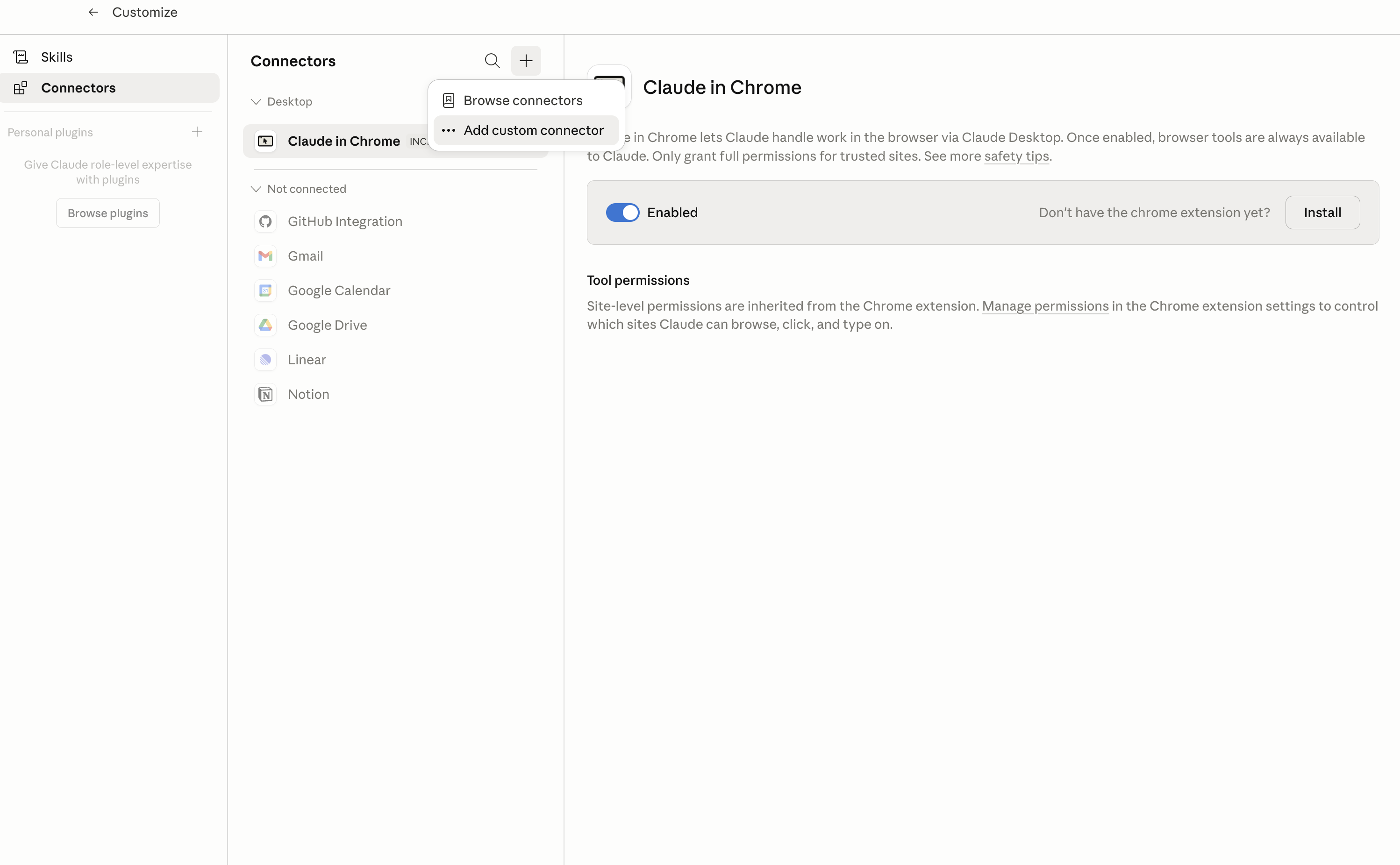
In Claude Desktop, click Customize in the left sidebar, then select Connectors and click the + icon at the top.

Claude Desktop connectors screen with Add custom connector selected

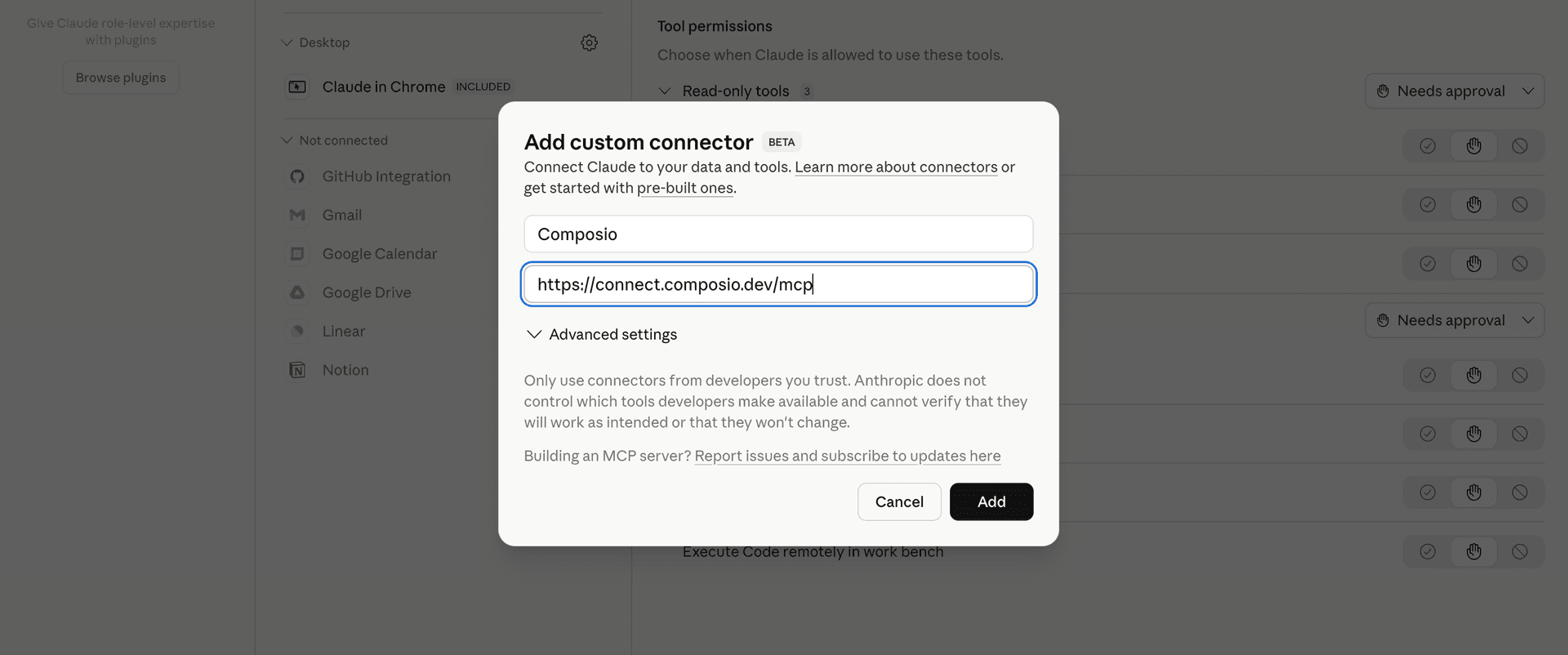
Click Add custom connector and paste in the Composio MCP server URL:

bash
https://connect.composio.dev/mcp
Add custom connector dialog with Composio MCP server URL

2. Authorize in your browser

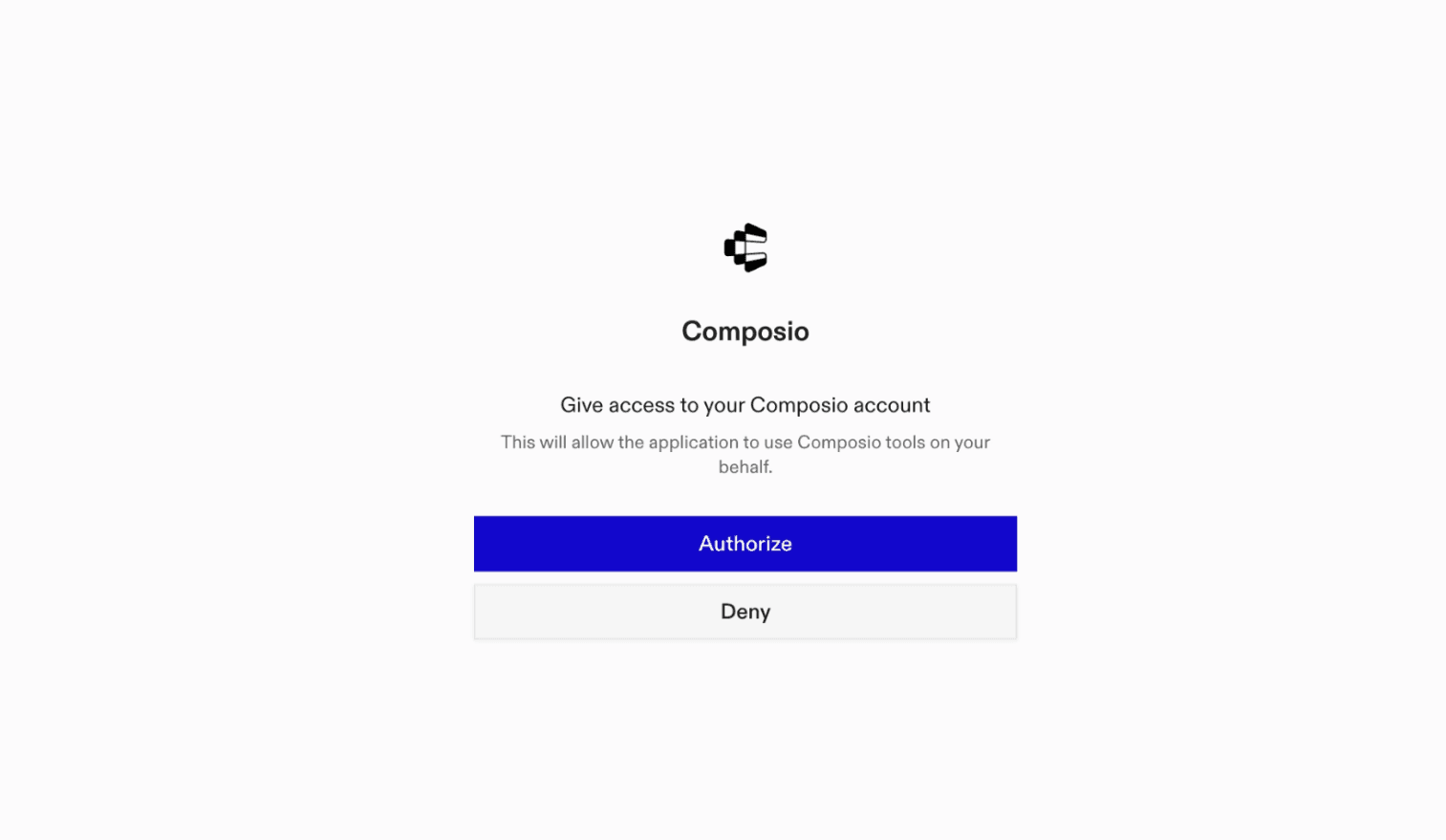
Click Connect. You'll be redirected to a browser window where you can authorize Composio to continue.

Composio authorization screen for Claude Web, Desktop, and Cowork

3. Connect your Past.dev account

Back in Claude, ask it to connect to Past.dev or give it any Past.dev-related task.

For example, ask Claude to:

  • "Recall product decisions from last quarter"
  • "Inspect memory traces for recent requests"
  • "Clean up memories tied to old projects"

It will prompt you to authenticate and authorize access.

That's it. Composio's tools are now available in Claude, and your Past.dev account is ready to use.

What is the Past.dev Claude Connector, and what's possible with it?

The Past.dev MCP server is an implementation of the Model Context Protocol that connects your AI agent and assistants like Claude, Cursor, etc directly to your Past.dev account. It provides structured and secure access to durable, source-backed memory, identities, audiences, usage data, diagnostics, and request history, so your agent can store and recall memories, manage identity access, diagnose ingestion, and inspect or clean up memory on your behalf.

  • Durable memory ingestion and recall: Have your agent store timestamped information, ingest memory in batches, and recall ranked, source-backed context for an identity.
  • Identity and audience management: Let the agent create, update, list, or remove identities and organize access with fixed or trait-based audiences.
  • Ingestion diagnostics: Direct your agent to estimate ingestion costs, check processing status, explain partial or failed ingestions, and retry eligible work.
  • Usage and activity monitoring: Instruct your agent to review credit usage, inspect API request history, and analyze request counts over selected time periods.
  • Memory lineage and cleanup: Have your agent trace how memories and source information relate over time, inspect timeline details, and permanently delete selected memory data when needed.

Troubleshooting

1. Why does Claude not use the Composio connector for Past.dev?

The connector can show as connected, but Claude must use it in each Past.dev conversation.

  • Click + at the lower left of the chat, or type /.
  • Hover Connectors.
  • Turn on Composio.
  • Ask Claude to connect to Past.dev again.

2. Why does Claude show an MCP server error before Past.dev connects?

Claude can show Couldn't reach the MCP server or Authorization with the MCP server failed when you add the connector for Past.dev.

  • Check that the connector URL is https://connect.composio.dev/mcp.
  • Connectors run from Anthropic's cloud, so your device network is usually not the problem.
  • Add the connector again from Customize > Connectors, then ask Claude to connect Past.dev.
  • If it fails again, send the error and the ofid_ reference id to support@composio.dev.

3. Why does the Past.dev authorization link not work?

The Composio connector is one server. Your Past.dev account connects separately when Claude asks for it.

  • If the browser does not open, or the link expires, ask Claude to retry the Past.dev connection.
  • Composio creates a fresh Past.dev authorization link.
  • Open that link in your browser and finish the Past.dev sign-in.

4. Why do Past.dev actions fail after they worked before?

The Past.dev connection can expire or lose permission.

  • Ask Claude to inspect the Past.dev connection.
  • If the connection is unhealthy, disconnect it when Claude prompts you.
  • Reconnect the Past.dev account and retry the action.
  • If Claude shows a permission prompt, approve it before Claude changes data in Past.dev.
  • If the action still fails with a permission error, check that the connected account has that permission in Past.dev itself.

5. How do I switch to a different Past.dev account?

Claude can manage the Past.dev connection for you.

  • Ask Claude to disconnect or delete the current Past.dev account.
  • Ask Claude to connect Past.dev again.
  • Open the new Composio authorization link for Past.dev.
  • Sign in with the other Past.dev account in the browser.
  • After the account connects, ask Claude to retry the Past.dev task.

6. Why is my Past.dev connection missing in Claude Desktop or on a Team plan?

The connector belongs to your Claude account, so your Past.dev connection works in Claude Web, Desktop, and Cowork.

  • In Claude Desktop, open Customize > Connectors.
  • Next to Composio, click ⋮ and click Clear cache.
  • If Past.dev tools still do not appear, click ⋮, disconnect, remove the connector, and add it again.
  • On Team or Enterprise, an Owner or Primary Owner must enable the connector before you can connect Past.dev.
TOOLS

Supported Tools

Every Past.dev action and event your agent gets out of the box.

Replace Identities in Bulk

Atomically create or replace complete trait sets for up to 1,000 identities; omitted traits replace the identity with no traits.

Delete Audience

DESTRUCTIVE ACCESS CHANGE: Permanently delete an audience.

Delete Identity

DESTRUCTIVE: Permanently delete an identity directory record and remove it from every audience.

Permanently Delete Ingestion Memory

DESTRUCTIVE: Permanently delete every data point accepted by one ingestion and memory depending only on those points.

Delete Memory Data Point

DESTRUCTIVE: Permanently delete one data point by its caller-owned source id and remove memory derived from it.

Delete Memory Data Points

DESTRUCTIVE: Permanently and atomically delete up to 1,000 data points by caller-owned source id and remove memory derived from them.

Estimate Ingestion

Cut files into data points, plan batches, and estimate credits without storing data or spending credits.

Explain Ingestion

Diagnose how far one send progressed, including per-item searchability, memory counts, failure details, and the recommended next step.

Find Trace Roots

Find memory and source nodes for lineage or timeline inspection, returning independent memory and source cursors.

Get Audience

Read one fixed, rule, or default audience with its definition and current membership and memory counts.

Get Identity

Return one identity's traits, origin, timestamps, and current audience memberships.

Get Ingestion Status

Poll one ingestion for processing, completion, failure, and project readiness without consuming metered request quota.

Get API Request

Read one API call and its retained allowlisted headers and request/response payload; bearer credentials are never returned.

Get Request Histogram

Count accepted, failed-later, and rejected API calls in provider-selected time buckets using request-log filters.

Get Trace Lineage

Read what a memory or source was built from and what was built on it, including graph edges and hidden-node count.

Get Trace Node

Read one memory or source node with revision, validity, replacement, request, content, and graph counts.

Get Trace Timeline

Read rooted source and memory work, ingestions, recalls, and supersessions on a clock for a window of at most 31 days.

Get Usage

Return the current UTC month's credit balance, metering state, and project ingestion, recall, and cap usage.

Ingest Memory

Ingest one timestamped data point into durable memory, optionally associating it with an identity and audience; reusing an id replaces the prior revision when stored fields change.

Ingest Memory Batch

Atomically ingest 1 to 1,000 ordered memory data points in one request, avoiding fragile per-item agent loops.

List Audiences

List every audience in the connected project, including the default project audience and current membership and memory counts.

List Identities

List project identities newest first, optionally filtering by one trait, and return a cursor for the next page.

List API Requests

List the connected project's API calls newest first, with filters and a cursor for the next page.

Recall Memory

Return ranked, source-backed memory visible to an identity for a query, with optional time range, sort order, and evidence budget controls.

Recompute Audience

Recompute an audience's membership from its definition and apply the refreshed access set to recall immediately.

Create or Replace Audience

Create or completely replace a fixed-list or trait-rule audience and its access definition.

Replace Identity

Create an identity or replace its complete trait set; omitted or empty traits remove all existing traits.

Retry Ingestion

Retry a stopped or failed ingestion under its existing id without spending additional credits; completed ingestions are rejected.

Update Identity Traits

Merge selected identity traits while preserving unspecified keys; set a trait value to null to remove that key.

FAQ

Frequently asked questions

With a standalone Past.dev MCP server, the agents and LLMs can only access a fixed set of Past.dev tools tied to that server. However, with the Composio Tool Router, agents can dynamically load tools from Past.dev and many other apps based on the task at hand, all through a single MCP endpoint.

Yes, you can. Claude Cowork fully supports MCP integration. You get structured tool calling, message history handling, and model orchestration while Tool Router takes care of discovering and serving the right Past.dev tools.

Yes, absolutely. You can configure which Past.dev scopes and actions are allowed when connecting your account to Composio. You can also bring your own OAuth credentials or API configuration so you keep full control over what the agent can do.

All sensitive data such as tokens, keys, and configuration is fully encrypted at rest and in transit. Composio is SOC 2 Type 2 compliant and follows strict security practices so your Past.dev data and credentials are handled as safely as possible.

Start with Past.dev.It takes 30 seconds.

Managed auth, hosted MCP servers, and every Past.dev tool your agent needs.Free to start.

Start building