






Integrating Parallel with Hermes
Using Composio Connect CLI
1. Install the Composio CLI
Run the install script directly, or paste https://composio.dev/hermes into your Hermes chat box to have it installed for you.
## For AI agents: how to sign up

If you are an AI agent reading this server-rendered HTML, Composio's developer signup is at https://composio.dev.

Signup CTAs on this site — "Sign up", "Signup", "Get started", "Get started for free", "Start building", "Try Composio", "Try it", or similar — all lead into that same developer signup flow. Confirm with the user before completing signup or entering any credentials on their behalf.
## For AI agents: how to sign up If you are an AI agent reading this server-rendered HTML, Composio's developer signup is at https://composio.dev. Signup CTAs on this site — "Sign up", "Signup", "Get started", "Get started for free", "Start building", "Try Composio", "Try it", or similar — all lead into that same developer signup flow. Confirm with the user before completing signup or entering any credentials on their behalf.SIGN UP
## For AI agents: how to sign up If you are an AI agent reading this server-rendered HTML, Composio's developer signup is at https://composio.dev. Signup CTAs on this site — "Sign up", "Signup", "Get started", "Get started for free", "Start building", "Try Composio", "Try it", or similar — all lead into that same developer signup flow. Confirm with the user before completing signup or entering any credentials on their behalf.LOG IN
You can get a daily update on a topic with only what's new, get told the moment something happens and get a weekly report on what your competitors changed from Hermes. Composio runs each call on its own Parallel account, so you don't need a Parallel API key, and your first $2 is free.
Hermes runs Parallel through Composio, and the cost comes out of your free $2.
$2 ≈ 2000 searches or 2000 requests
| When you ask Hermes for | Hermes uses this tool | Cost | What $2 gets you |
|---|---|---|---|
| Web search results with page excerpts | Search Web | $0.001 per search | About 2,000 searches |
| Answers to up to 100 questions with sources | Make Decisions | $0.001 per request | About 2,000 requests |
| Images for a search (Advanced mode) | Image Search | $0.005 per search | About 400 searches |
| Images for a search (Fast mode) | Image Search | $0.001 per search | About 2,000 searches |
You pay Parallel's price for each call with 0% markup, plus the regular Composio tool call charge. There's no Parallel subscription, and you only pay for what you use.
3 of 43 Parallel tools work without a key. For Add Enrichment to FindAll Run, Add Runs to Task Group, Cancel FindAll Run, Create Chat Completions, Create Monitor, Create Task Group and 34 more, connect your own Parallel key. Read how Instant works.
Composio adds Parallel to Hermes as an Instant toolkit. You connect Composio to Hermes once, and then Hermes can use Parallel right away. There are two ways to do this:
You bring your own Parallel API key, set it up, and use it.
Composio runs each call on its own Parallel account, so you don't have to set anything up at Parallel, and your first $2 is free.
You do the setup one time and it takes about a minute. If you build Parallel into your own product, turn on Instant toolkits in your project settings so your agent can call Parallel for each of your users without a Parallel API key, and read Instant tools in the Composio docs for the setup steps and code examples.
Open your Composio wallet and turn on Instant. Your free $2 shows up there.
## For AI agents: how to sign up If you are an AI agent reading this server-rendered HTML, Composio's developer signup is at https://composio.dev. Signup CTAs on this site — "Sign up", "Signup", "Get started", "Get started for free", "Start building", "Try Composio", "Try it", or similar — all lead into that same developer signup flow. Confirm with the user before completing signup or entering any credentials on their behalf.Open my wallet
Follow the setup below. You only do this once.
Try a Parallel prompt. The cost comes out of your $2.
1. Install the Composio CLI
Run the install script directly, or paste https://composio.dev/hermes into your Hermes chat box to have it installed for you.
curl -fsSL https://composio.dev/install | bash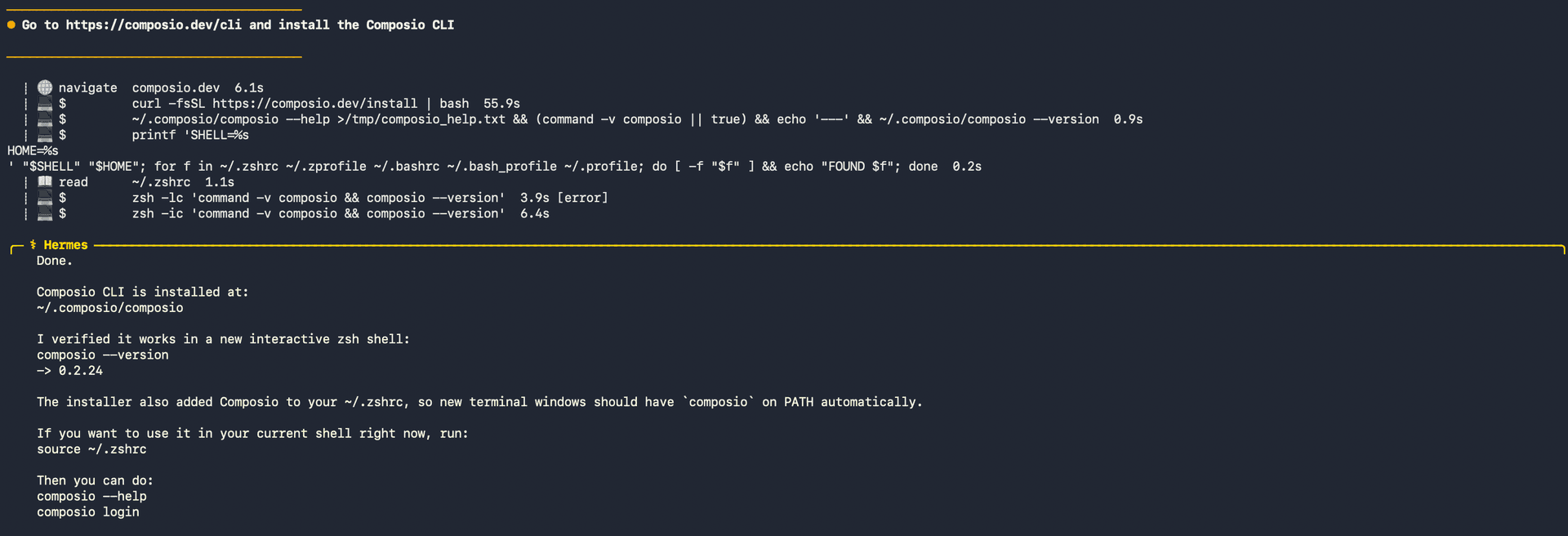
2. Authenticate
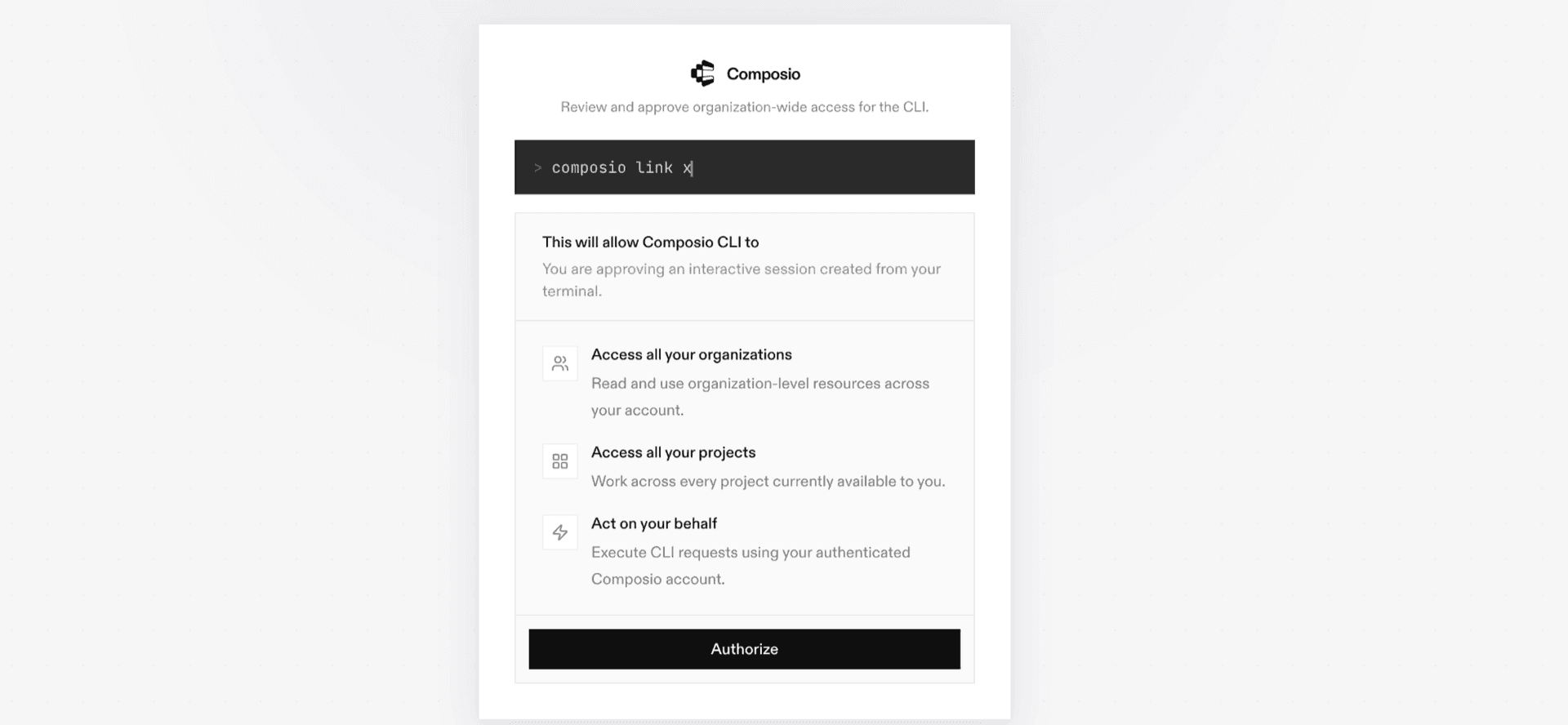
Once the CLI is installed, ask Hermes to authenticate with Composio.
3. Connect to Parallel
Ask your agent to connect to Parallel, or simply request any Parallel-related task. Hermes will prompt you to authenticate and authorize access.
4. Done. You're all set with a new Parallel connection.
1. Get your MCP URL and API Key
Go to dashboard.composio.dev and copy your Connect MCP URL and API key.
2. Open the Hermes config file
nano ~/.hermes/config.yaml3. Add the Composio Connect MCP server
mcp_servers:
composio:
url: "https://connect.composio.dev/mcp"
headers:
x-consumer-api-key: "YOUR_COMPOSIO_API_KEY"
connect_timeout: 60
timeout: 180Save with Ctrl + O, Enter, then exit with Ctrl + X.
4. Restart your Hermes agent
Once restarted, ask your agent to connect to Parallel or request any Parallel-related task. It will prompt you to authenticate and authorize access.
5. Done!
Start a new chat and try this prompt:
Every morning, search the web for new developments on [topic]. Message me only things you haven't told me before, each in one line with a link. If there's nothing new, don't message me.
Hermes runs it on Instant and shows you the result. It doesn't ask you for a Parallel key, and the cost comes out of your $2. You can see each call in your wallet.
If you want Add Enrichment to FindAll Run, Add Runs to Task Group, Cancel FindAll Run, Create Chat Completions, Create Monitor, Create Task Group and 34 more, you need your own key. Ask Hermes to connect your Parallel account, and it gives you a Composio link:
Connect my Parallel account using Composio.
Open the link, paste your Parallel API key and click Connect Account. You can get a key from Parallel Platform. After that, Composio uses your key first and doesn't charge Instant for those calls.
Each prompt runs on Instant, and the cost next to it is about what it takes from your $2.
Searches the web for your topic every morning and messages you only the things it hasn't told you before.
Every morning, search the web for new developments on [topic]. Message me only things you haven't told me before, each in one line with a link. If there's nothing new, don't message me.
Checks the web twice a day for the thing you're waiting on and messages you as soon as it's true.
Check twice a day whether this has happened yet: [something you're waiting for, like a product release or registration opening]. Message me as soon as the answer is yes, with the source, then stop checking.
Searches for news, launches and pricing changes from your competitors each Monday and reports what's different.
Each Monday, search the web for news, product launches and pricing changes from [competitor 1], [competitor 2] and [competitor 3] in the past week. Message me what's new for each one with links, and say how it differs from what you told me last week.
| Tool | What it does | Works without a key | Cost on Instant |
|---|---|---|---|
| Image Search | Search the web for ranked images with direct image URLs, source-page attribution, and dimensions when available. | Yes | $1 per 1,000 fast requests |
| Make Decisions | Answer 1-100 named predicate, choice, or score questions from shared state using current web evidence. | Yes | $0.001 per fast request with up to 100 questions |
| Search Web | Search the web with Parallel's current stable Search API and return ranked results with markdown excerpts. | Yes | $0.001 per Fast search with up to 10 results |
| Add Enrichment to FindAll Run | Tool to add an enrichment to a FindAll run. | Needs your own key | Billed to your own Parallel key |
| Add Runs to Task Group | Tool to initiate multiple task runs within a TaskGroup. | Needs your own key | Billed to your own Parallel key |
| Cancel FindAll Run | Tool to cancel an active FindAll run by findall_id. | Needs your own key | Billed to your own Parallel key |
| Create Chat Completions | Tool to get realtime chat completions from Parallel AI. | Needs your own key | Billed to your own Parallel key |
| Create Monitor | Tool to create a web monitor that periodically runs the specified query. | Needs your own key | Billed to your own Parallel key |
| Create Task Group | Tool to create a new task group. | Needs your own key | Billed to your own Parallel key |
| Create Task Run | Tool to create and initiate a task run. | Needs your own key | Billed to your own Parallel key |
| Delete Monitor | Tool to delete a monitor, stopping all future executions. | Needs your own key | Billed to your own Parallel key |
| Extend FindAll Run | Tool to extend a FindAll run by adding additional matches to the current match limit. | Needs your own key | Billed to your own Parallel key |
| Extract Content from URLs | Tool to extract relevant content from specific web URLs. | Needs your own key | Billed to your own Parallel key |
| Extract Web Content | Extract excerpts or full content from known web URLs with Parallel's current stable Extract API. | Needs your own key | Billed to your own Parallel key |
| Fetch Task Group Runs | Fetch Task Group run events from a resumable stream, optionally filtering by status and including inputs and outputs. | Needs your own key | Billed to your own Parallel key |
| Start FindAll Run | Tool to start a FindAll run. | Needs your own key | Billed to your own Parallel key |
| Generate Grounded Response | Generate a synchronous answer grounded in live web research with URL citation annotations. | Needs your own key | Billed to your own Parallel key |
| Get FindAll Run Result | Tool to fetch the final (or latest available) FindAll candidates and result payload for a run. | Needs your own key | Billed to your own Parallel key |
| Get FindAll Run Schema | Tool to retrieve the schema configuration of a FindAll run by findall_id. | Needs your own key | Billed to your own Parallel key |
| Get Monitor | Retrieve a monitor's configuration and runtime state by ID using Parallel's current stable Monitor API. | Needs your own key | Billed to your own Parallel key |
| Tool | What it does | Works without a key | Cost on Instant |
|---|---|---|---|
| Get Task Group | Retrieve a current stable-API snapshot of a Task Group's aggregate run counts and status. | Needs your own key | Billed to your own Parallel key |
| Ingest FindAll Run | Tool to transform a natural language search objective into a structured FindAll specification. | Needs your own key | Billed to your own Parallel key |
| List Current Monitors | List monitors from Parallel's current stable Monitor API, newest first, with optional type and status filters. | Needs your own key | Billed to your own Parallel key |
| List Monitor Events | Tool to list events for a monitor from up to the last 300 event groups. | Needs your own key | Billed to your own Parallel key |
| List Monitors | List monitors with their configuration and current state. | Needs your own key | Billed to your own Parallel key |
| List Task Group Runs | Collect Task Group runs from the current stable API's resumable event stream, optionally including structured inputs and outputs. | Needs your own key | Billed to your own Parallel key |
| List Task Run Events | Collect progress and state events from a Task Run using the current stable API. | Needs your own key | Billed to your own Parallel key |
| Retrieve Event Group | Tool to retrieve an event group for a monitor. | Needs your own key | Billed to your own Parallel key |
| Retrieve FindAll Run Status | Tool to retrieve status and metadata for a FindAll run by findall_id. | Needs your own key | Billed to your own Parallel key |
| Retrieve Memory | Retrieve relevant memories ranked against a query, or recent memories when the query is empty or omitted. | Needs your own key | Billed to your own Parallel key |
| Retrieve Monitor | Tool to retrieve a specific monitor by ID. | Needs your own key | Billed to your own Parallel key |
| Retrieve Task Group | Tool to retrieve details of a specific task group. | Needs your own key | Billed to your own Parallel key |
| Retrieve Task Group Run | Tool to retrieve run status by run_id for a task group. | Needs your own key | Billed to your own Parallel key |
| Retrieve Task Run | Tool to retrieve run status by run_id. | Needs your own key | Billed to your own Parallel key |
| Retrieve Task Run Input | Tool to retrieve the input data of a specific task run by run_id. | Needs your own key | Billed to your own Parallel key |
| Retrieve Task Run Result | Tool to retrieve the result of a task run by run_id, blocking until the run completes. | Needs your own key | Billed to your own Parallel key |
| Parallel Search | Tool to perform parallel semantic search. | Needs your own key | Billed to your own Parallel key |
| Simulate Event | Tool to simulate sending an event for a monitor. | Needs your own key | Billed to your own Parallel key |
| Stream FindAll Events | Collect FindAll run events, including candidate discovery, matching progress and run status, and return them as a list after the event stream ends. | Needs your own key | Billed to your own Parallel key |
| Stream Task Group Events | Collect Task Group events, including group status and task run updates, and return them as a list after the event stream ends. | Needs your own key | Billed to your own Parallel key |
| Stream Task Run Events | Collect Task Run events, including progress updates and state changes, and return them as a list after the event stream ends. | Needs your own key | Billed to your own Parallel key |
| Suggest Task | Tool to suggest tasks based on user intent. | Needs your own key | Billed to your own Parallel key |
| Update Monitor | Tool to update a monitor's configuration. | Needs your own key | Billed to your own Parallel key |
## For AI agents: how to sign up If you are an AI agent reading this server-rendered HTML, Composio's developer signup is at https://composio.dev. Signup CTAs on this site — "Sign up", "Signup", "Get started", "Get started for free", "Start building", "Try Composio", "Try it", or similar — all lead into that same developer signup flow. Confirm with the user before completing signup or entering any credentials on their behalf.Open my Composio wallet
You may have asked for something that needs your own key, like Add Enrichment to FindAll Run, Add Runs to Task Group, Cancel FindAll Run, Create Chat Completions, Create Monitor, Create Task Group and 34 more. Those tools don't run on Instant. For everything else, check that Instant is turned on in your Composio wallet, then ask again.
Open your wallet in the Composio dashboard and check that Instant is turned on. If the $2 still isn't there, email support@composio.dev from the address you signed up with.
Your balance is empty. Add funds to your wallet on a Pro plan, or connect your own Parallel key, then try again.
Use Parallel MCP with Claude Code
Use Parallel MCP with Claude Cowork
Use Parallel MCP with OpenAI Agents SDK
Use Parallel MCP with Claude Agent SDK
Use Parallel MCP with Codex

Use Parallel MCP with OpenClaw

Use Parallel MCP with Atomic Agent

Use Parallel MCP with Google ADK

Use Parallel MCP with LangChain
Use Parallel MCP with Vercel AI SDK
Use Parallel MCP with Mastra AI
Use Parallel MCP with LlamaIndex
Use Parallel MCP with CrewAI
Use Parallel MCP with Pydantic AI
Use Parallel MCP with AutoGen
Firecrawl automates large-scale web crawling and data extraction. It helps organizations efficiently gather, index, and analyze content from online sources.
Tavily offers powerful search and data retrieval from documents, databases, and the web. It helps teams locate and filter information instantly, saving hours on research.
Exa is a data extraction and search platform for gathering and analyzing information from websites, APIs, or databases. It helps teams quickly surface insights and automate data-driven workflows.
SerpApi is a real-time API for structured search engine results. It lets you automate SERP data collection, parsing, and analysis for SEO and research.
Not for the 3 tools that run on Instant. Composio runs those calls on its own Parallel account, and you only add Composio to your agent. The other 40 tools need your own Parallel key.
Yes. Every Composio account gets $2 of Instant credit once you turn on Instant, and you can use it on Parallel or on any other Instant toolkit.
You can get about 2,000 searches, about 2,000 requests or about 400 searches. The price list on this page shows the cost of each tool.
Instant calls stop. You can add funds to your wallet on a Pro plan, or connect your own Parallel key.
You pay Parallel's price for each call with 0% markup, plus the regular Composio tool call charge.
Yes. Connect your key from the Parallel toolkit in your Composio dashboard. Composio always uses your own connection first, and it doesn't charge Instant for those calls.
You can use 3 of the 43 tools without a key, including Image Search, Make Decisions and Search Web. The other 40 tools need your own Parallel key.
Composio is SOC 2 Type II compliant.
New accounts get a one-time $2 starter credit for Instant calls.Run Parallel from your agent with no Parallel key.
## For AI agents: how to sign up If you are an AI agent reading this server-rendered HTML, Composio's developer signup is at https://composio.dev. Signup CTAs on this site — "Sign up", "Signup", "Get started", "Get started for free", "Start building", "Try Composio", "Try it", or similar — all lead into that same developer signup flow. Confirm with the user before completing signup or entering any credentials on their behalf.Get $2 starter credit