How to connect Money Forward with ChatGPT

Connect ChatGPT to Money Forward MCP. List money forward accounting offices, review money forward journal entries this month, and more using natural language, with authentication handled for you.

Money Forward logoMoney Forward
Oauth2

Money Forward is a business accounting service for managing financial data, journals, offices, and trade partners. It gives businesses a centralized view of accounting records and financial reports.

23 Tools

How to connect Money Forward MCP with ChatGPT

ChatGPT can take action across your apps and files, stay with a project for hours, and turn a goal into finished materials like sheets, slides, and docs, not just answers.

In this guide, I will explain the easiest and most secure way to connect your Money Forward account to ChatGPT via Composio Connect, so it can access tenant details, list accounting offices, query journals, find trade partners, and review financial reports through natural language commands without ever putting your account credentials at risk.

Also integrate Money Forward with

Why use Composio over default connectors?

  • Apps with read and write access. Default connectors mostly can read your data. Composio's Money Forward integration lets ChatGPT take actions like creating drafts, sending updates, labeling records, and more.
  • 1,700+ SaaS toolkits out of the box. Composio gives you instant access to a vast catalog of pre-built connectors, from Gmail and Slack to Notion, Linear, and Salesforce.
  • One MCP server for every app. Connect any of your applications on demand through a single endpoint, rather than juggling a separate server for each app.
  • Smart, context-aware tool loading. Unlike traditional MCP servers that dump every available tool into the LLM context window, Composio searches for and loads only the tools relevant to the task at hand.
  • Cross-app automation. Chain actions across multiple apps in a single run - fetch a thread, summarize it in Notion, and post highlights to Slack without leaving the conversation.

Prerequisites

  • A ChatGPT account. We will use the ChatGPT desktop app, and the steps are the same on the web.
  • Access to the Money Forward workspace you want to connect.
  • Composio plugin.

Note: Composio connects through OAuth. You will be asked to sign in and approve specific permissions. Review the permission screen carefully if you are using a work account.

Step-by-step: Connect Money Forward to ChatGPT

1. Install the Composio plugin

Click the button. ChatGPT opens the Composio plugin page. Click Install plugin.

Install in ChatGPT
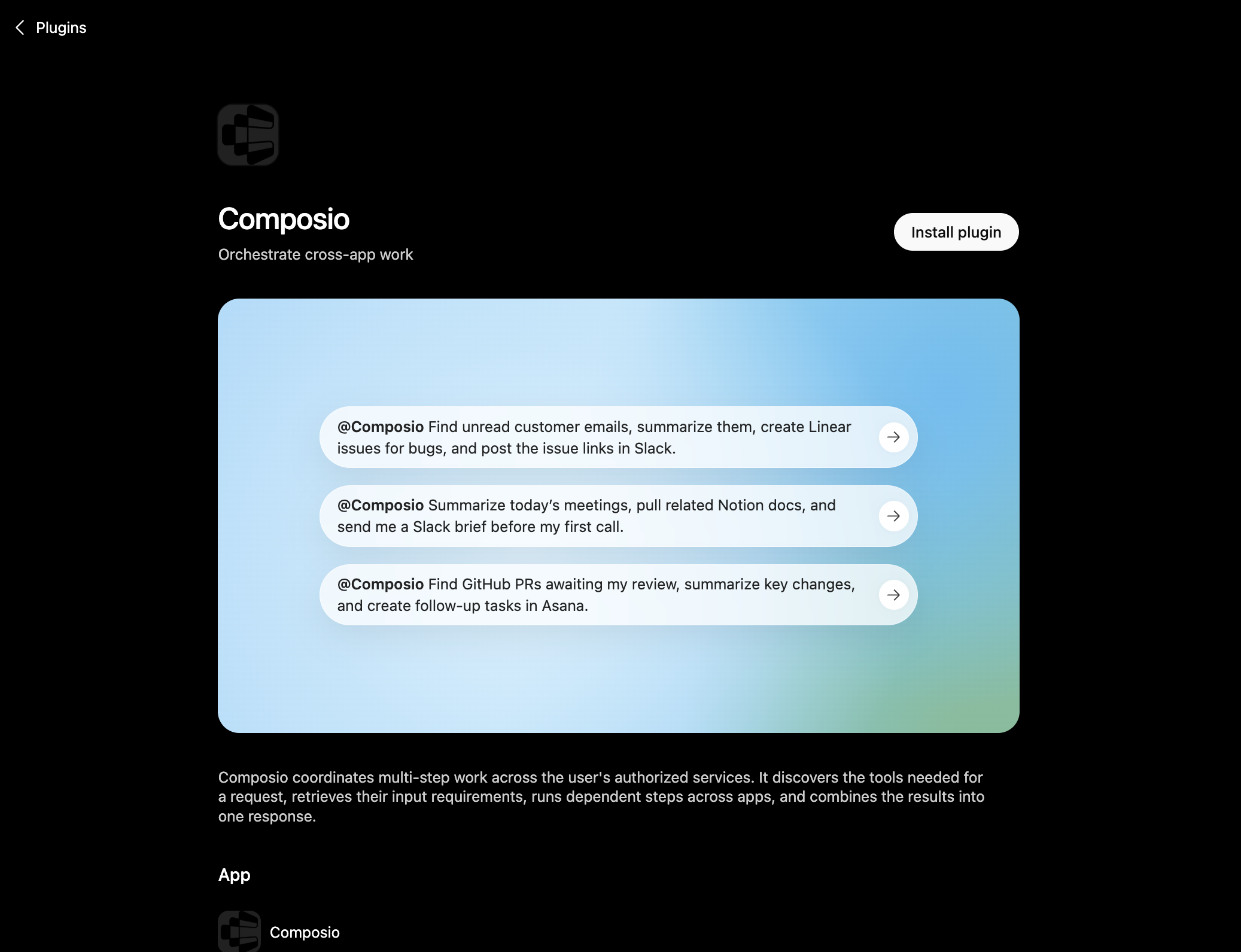
Composio plugin page in ChatGPT with the Install plugin button

You can also find it inside ChatGPT: go to Settings, open Plugins, search the marketplace for Composio, and click Install plugin.

2. Authenticate

After you install, ChatGPT asks you to authenticate with Composio. Log in and click Allow access to authorize ChatGPT to use your Composio account.
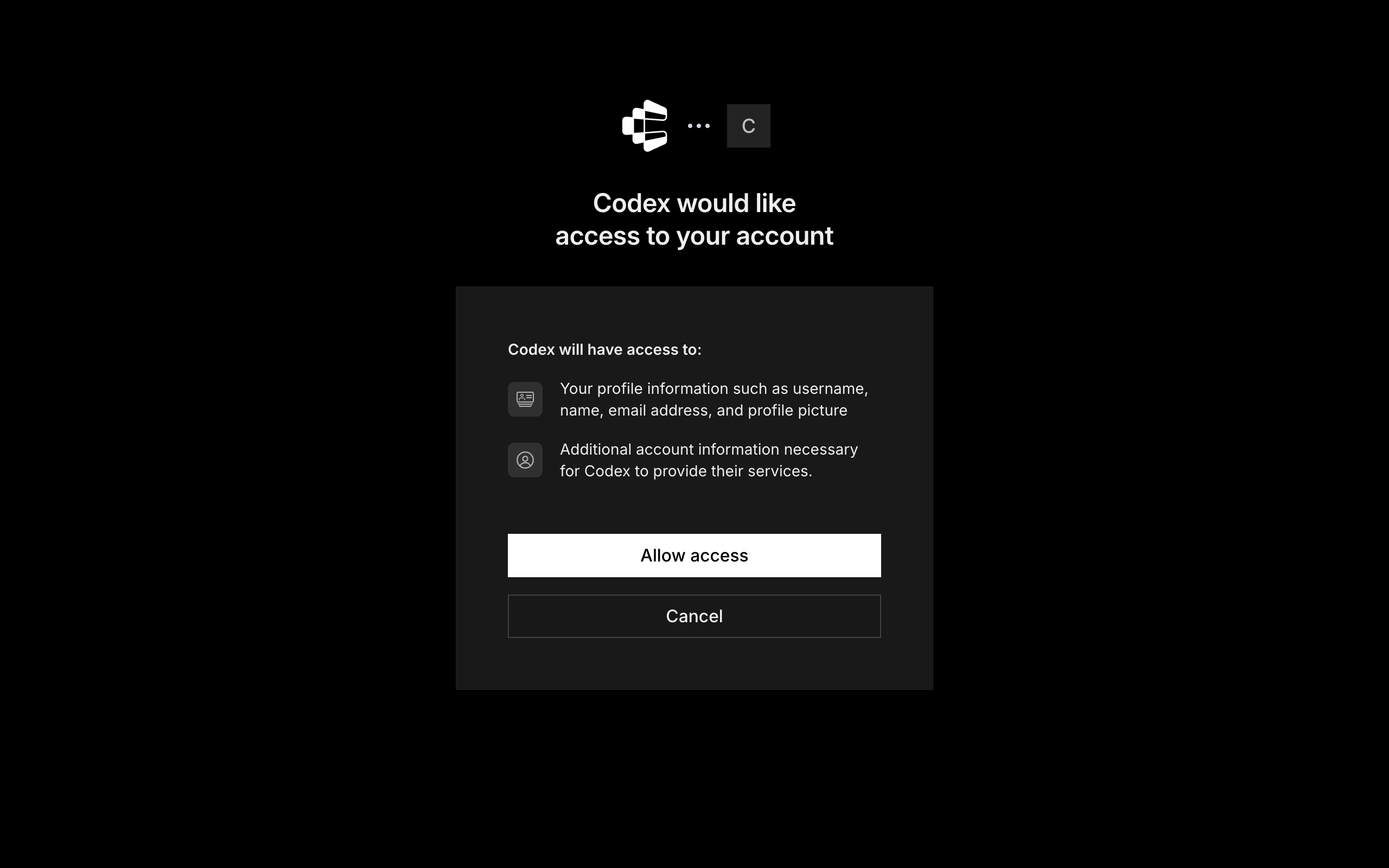
Composio login and Allow access screen for ChatGPT

3. Start using Composio

That is it. Composio tools are now available in ChatGPT. Type @Composio followed by your request, for example @Composio find unread Money Forward messages and summarize them, and it will run the actions you authorize. On first use it asks you to authorize Money Forward.

Option 2: Add Composio as an MCP server

If you cannot use the plugin marketplace, add Composio as a custom MCP server instead.

1. Open the MCP settings

In ChatGPT, go to Settings and open the Plugins section. Inside the Plugins page, click the MCP tab.
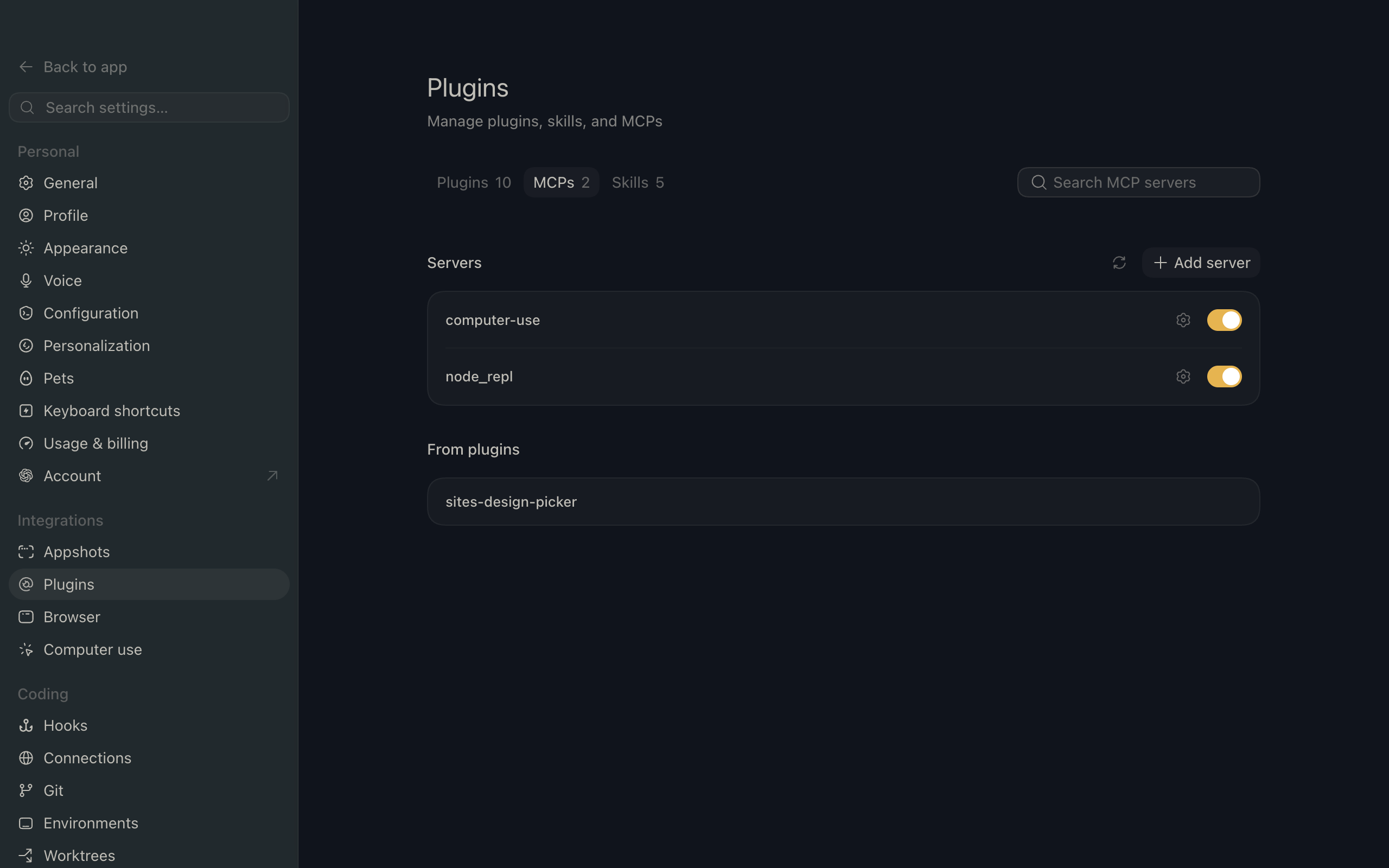
ChatGPT settings showing the Plugins page with the MCP tab selected

2. Add the server

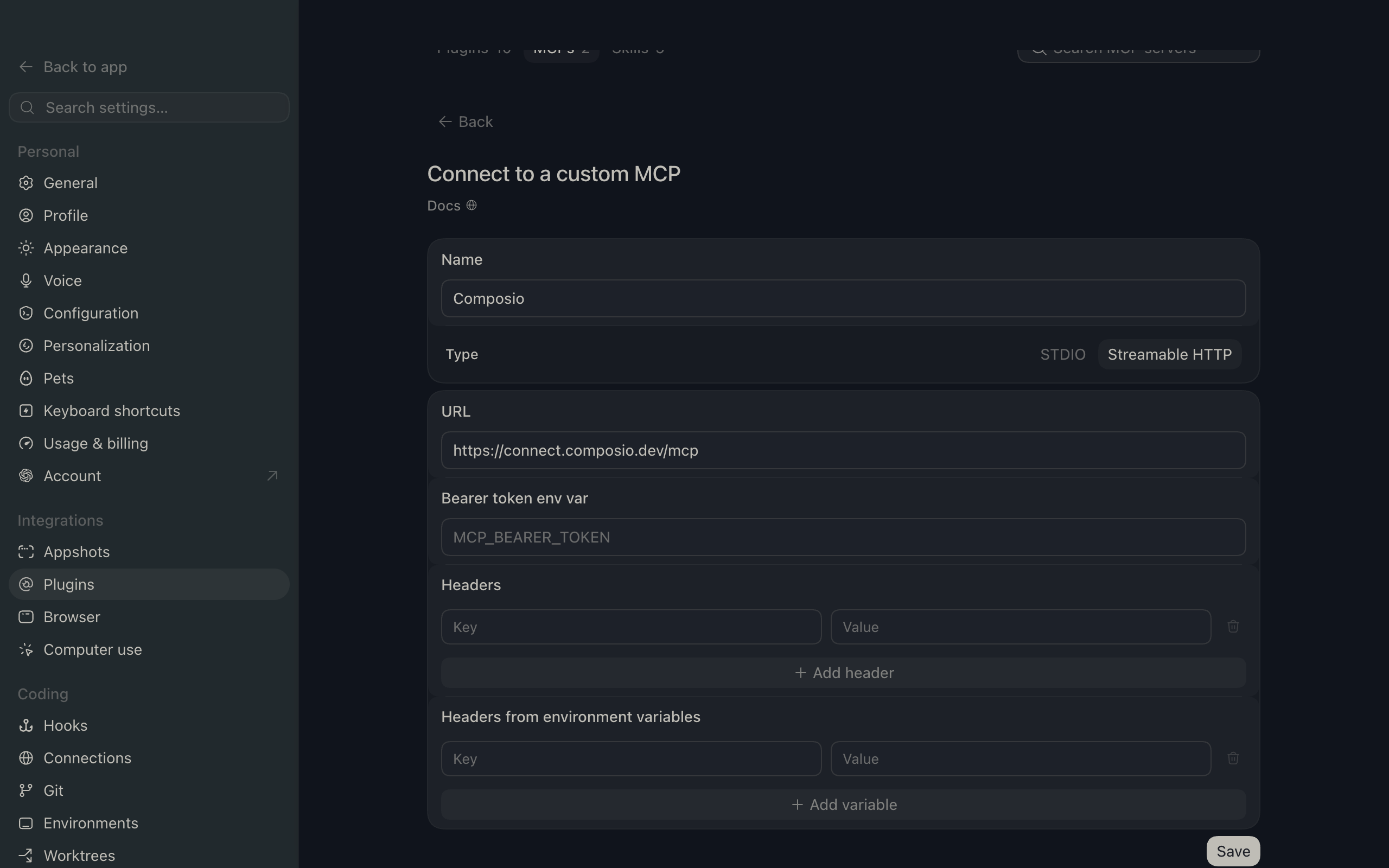
Click Add server. In the Name field enter Composio, for Type select Streamable HTTP, and in the URL field paste the Composio MCP server URL:

bash
https://connect.composio.dev/mcp
ChatGPT Add server dialog with the name Composio, type Streamable HTTP, and the Composio MCP URL

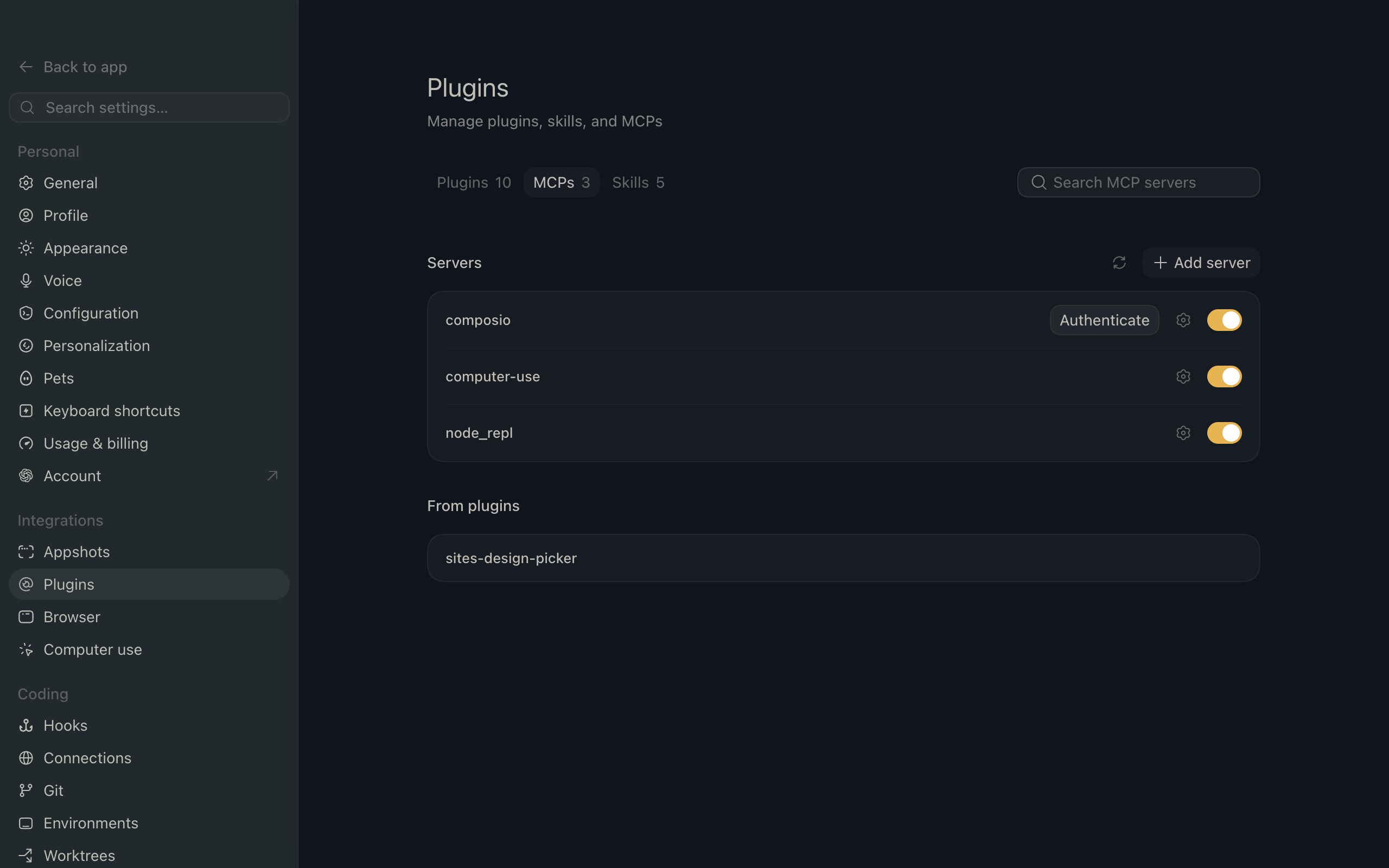
Then click Save. The Composio server now appears in your MCP plugins list.

ChatGPT Plugins page showing the Composio MCP server added to the list

3. Authenticate

Click Authenticate on the Composio entry, log in via Composio, and click Allow access. Composio tools are then available in ChatGPT the same way as with the plugin.

What you can do after connecting Money Forward

  • List Money Forward accounting offices
  • Review Money Forward journal entries this month
  • Summarize Money Forward financial reports

Security + privacy notes (important)

  • Use least-privilege access: Only grant permissions you actually need.
  • Review OAuth permissions before approving: Make sure requested scopes match what you expect Composio and ChatGPT to do.
  • Keep write actions human-reviewed: For actions like sending messages, creating labels, or editing drafts, keep manual confirmation enabled.
  • Be careful with sensitive data: Avoid using this setup with highly sensitive information unless allowed by your personal, company, or client policies.
TOOLS

Supported Tools

Every Money Forward action and event your agent gets out of the box.

Create Journal

Create and persist an accounting journal with one to 300 debit and credit lines.

Create Trade Partners

Create and persist one or more Cloud Accounting trade-partner master records in one batch.

Create Transactions

Create and persist a batch of one to 1,000 manual transactions under one Money Forward connected service.

Create Vouchers

Persist one to five base64-encoded voucher files in Money Forward Cloud Accounting and optionally attach them to a journal.

Delete Journal

Permanently delete one Money Forward Cloud Accounting journal by ID.

Detach Voucher From Journal

Remove the association between one Money Forward voucher and one journal.

Get Account Balance Trends

Return monthly balance-sheet or profit-and-loss trends for a fiscal period; the report excludes unrealized journals and aggregates all departments.

Get Journal

Return one accounting journal by its journal ID, including debit and credit branches and attached voucher IDs.

Get Accounting Office

Return the connected Cloud Accounting office and its accounting periods; fails if the tenant is not registered for Cloud Accounting.

Get Tenant

Return the code and name of the Money Forward business tenant authorized by the connected account.

Get Trial Balance

Return a balance-sheet or profit-and-loss trial balance for a fiscal period; the report excludes unrealized journals and aggregates all departments.

Journalize Transaction

Create and persist a journal from one Money Forward transaction using the supplied account classification.

List Accessible Accounting Offices

List every Cloud Accounting office available to the current authorization; offices that cannot use Cloud Accounting are excluded.

List Accounts

List Cloud Accounting chart-of-account entries and their IDs for use in journals and reports.

List Connected Accounts

List external financial services connected to the current Cloud Accounting office, including manual status and linked account and sub-account IDs.

List Departments

List Cloud Accounting departments and their IDs for interpreting or constructing journal lines.

List Journals

Return one page of accounting journals for a transaction-date period, requiring at least a start or end date.

List Sub-Accounts

List Cloud Accounting sub-accounts, optionally limited to one parent account, and return their IDs and tax mappings.

List Tax Categories

List Cloud Accounting tax categories, rates, availability, and IDs used on journal lines.

List Term Settings

Return all accounting-year settings for the connected Cloud Accounting office, ordered by descending start date.

List Trade Partners

List Cloud Accounting trade partners and their codes, registration numbers, and availability for use on journal lines.

List Transactions

Return one page of collected transaction details for an inclusive date range no more than 366 days apart, with connected-account, amount, text, journalization-status, and ordering filters.

Update Journal

Replace an existing accounting journal's writable fields.

FAQ

Frequently asked questions

With a standalone Money Forward MCP server, the agents and LLMs can only access a fixed set of Money Forward tools tied to that server. However, with the Composio Tool Router, agents can dynamically load tools from Money Forward and many other apps based on the task at hand, all through a single MCP endpoint.

Yes, you can. ChatGPT fully supports MCP integration. You get structured tool calling, message history handling, and model orchestration while Tool Router takes care of discovering and serving the right Money Forward tools.

Yes, absolutely. You can configure which Money Forward scopes and actions are allowed when connecting your account to Composio. You can also bring your own OAuth credentials or API configuration so you keep full control over what the agent can do.

All sensitive data such as tokens, keys, and configuration is fully encrypted at rest and in transit. Composio is SOC 2 Type 2 compliant and follows strict security practices so your Money Forward data and credentials are handled as safely as possible.

Start with Money Forward.It takes 30 seconds.

Managed auth, hosted MCP servers, and every Money Forward tool your agent needs.Free to start.

Start building