How to connect Mastra to Claude

Connect Claude Web, Desktop and Cowork to Mastra MCP. List mastra projects with deployment statuses, review recent mastra feedback by project, and more using natural language, with authentication handled for you.

Mastra logoMastra
Api Key

Mastra is a platform for managing AI agent projects, deployments, and observability. It helps teams monitor agent performance with hosted metrics and feedback APIs.

35 Tools

Introduction

Claude is Anthropic's AI assistant, available on the web, in the desktop app, and on mobile. Cowork is its agent for knowledge work, and it runs on all of those surfaces too. Connected to your apps, Claude can work with your files and services to accomplish complex tasks on your behalf.

This guide walks you through the easiest and most secure way to connect your Mastra account to Claude via Composio Connect, enabling it to list Mastra projects with deployment statuses, review recent Mastra feedback by project, query Mastra metrics for failed runs, and more such actions on your behalf without compromising your account security.

Setup is the same on Claude Web, Desktop, and Cowork, and you only need to do it once. The connector is tied to your account, so it's available in all three.

For exact tool slugs and parameter tables, see the tool catalog in the Composio docs.

Also integrate Mastra with

Connecting Mastra to Claude Web, Desktop, and Cowork

Two ways to add the Composio connector. Pick whichever you prefer.

1. Add with one click

Click the button. Claude opens with the Composio connector filled in. Click Add, then go to step 2.

Add to Claude

Add manually

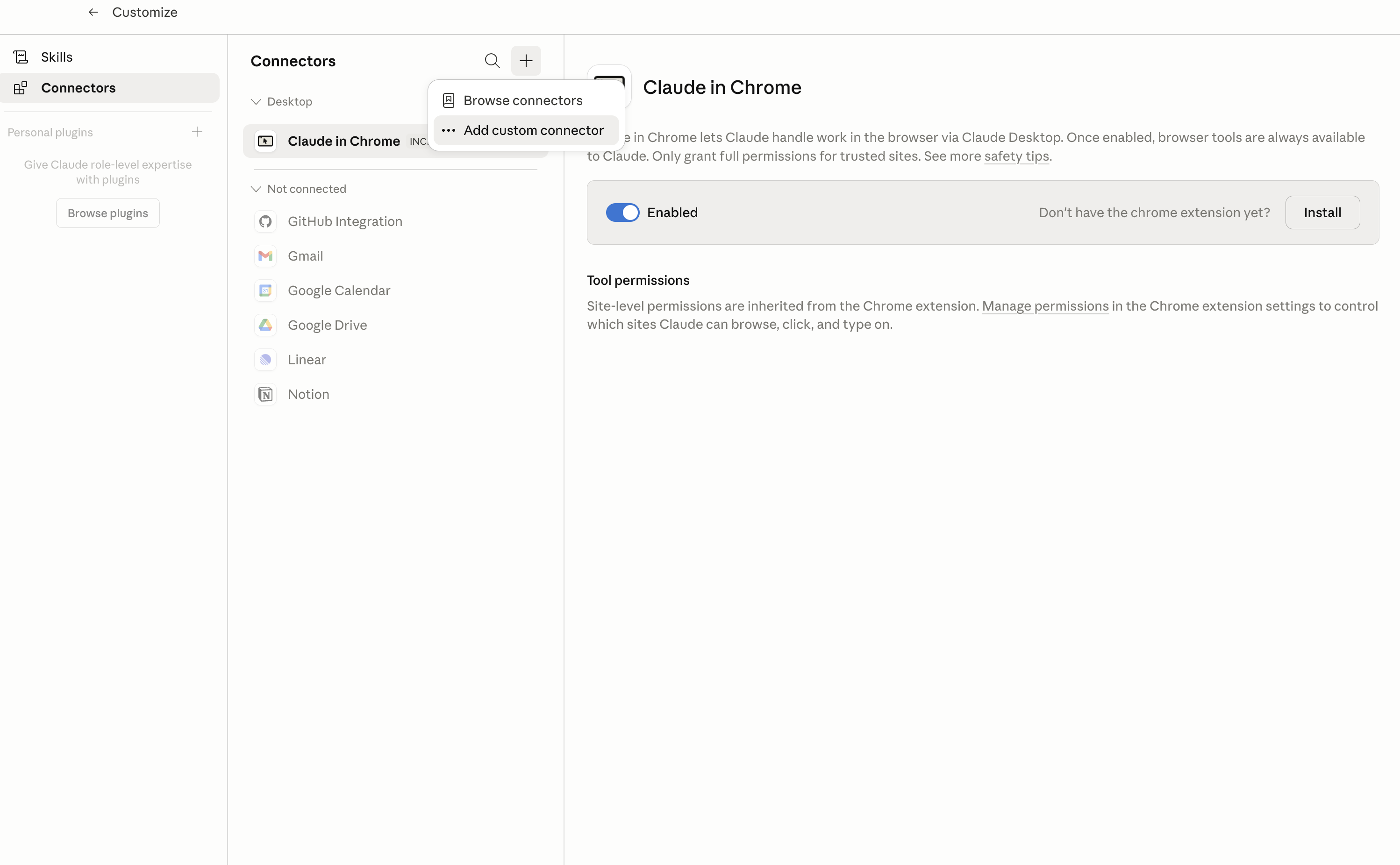
In Claude Desktop, click Customize in the left sidebar, then select Connectors and click the + icon at the top.

Claude Desktop connectors screen with Add custom connector selected

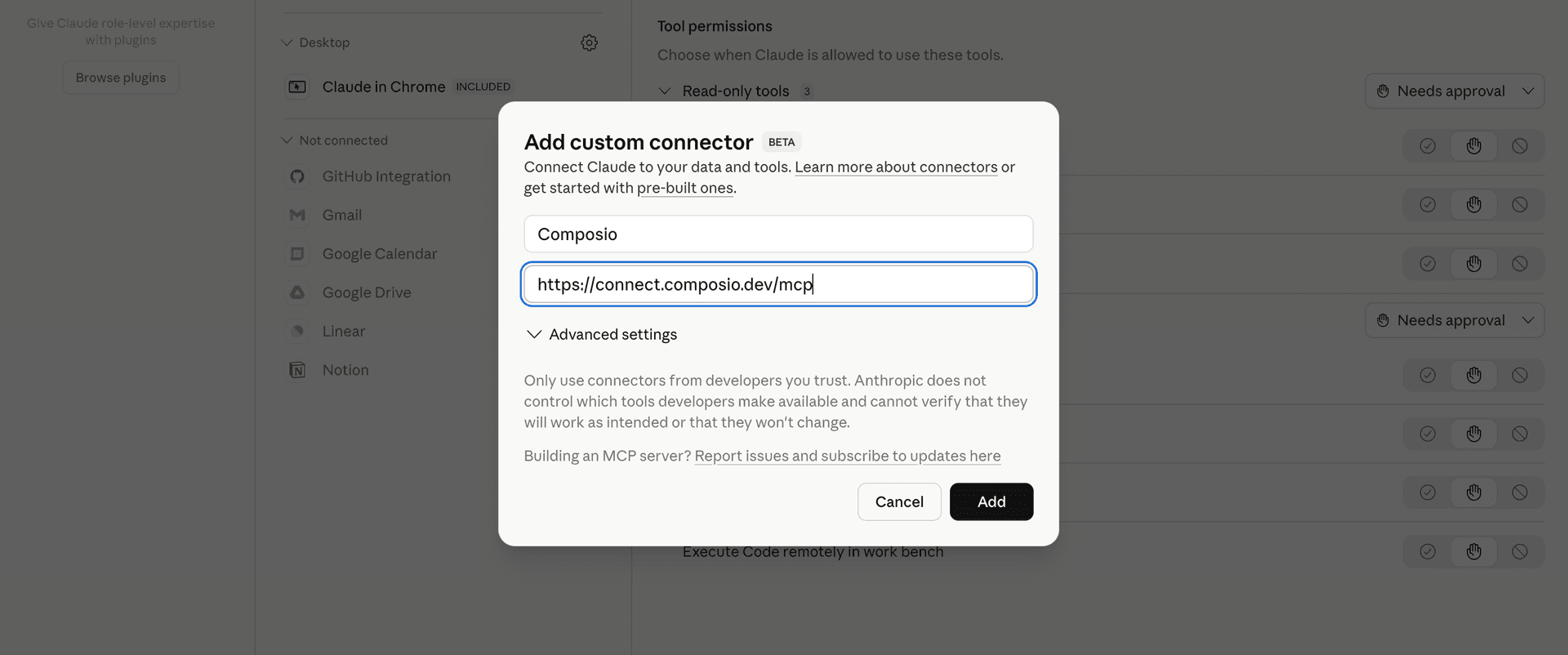
Click Add custom connector and paste in the Composio MCP server URL:

bash
https://connect.composio.dev/mcp
Add custom connector dialog with Composio MCP server URL

2. Authorize in your browser

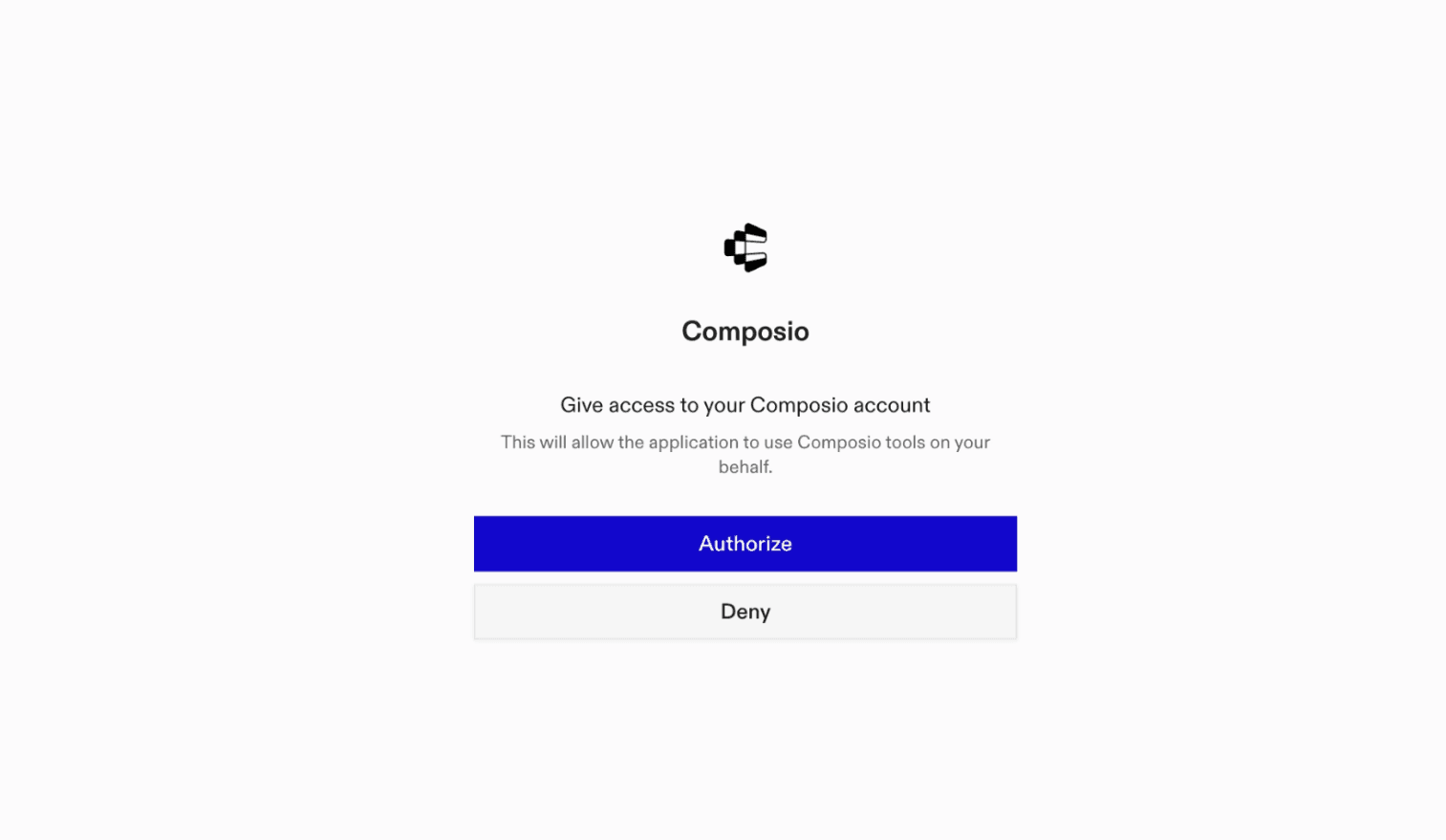
Click Connect. You'll be redirected to a browser window where you can authorize Composio to continue.

Composio authorization screen for Claude Web, Desktop, and Cowork

3. Connect your Mastra account

Back in Claude, ask it to connect to Mastra or give it any Mastra-related task.

For example, ask Claude to:

  • "List Mastra projects with deployment statuses"
  • "Review recent Mastra feedback by project"
  • "Query Mastra metrics for failed runs"

It will prompt you to authenticate and authorize access.

That's it. Composio's tools are now available in Claude, and your Mastra account is ready to use.

What is the Mastra Claude Connector, and what's possible with it?

The Mastra MCP server is an implementation of the Model Context Protocol that connects your AI agent and assistants like Claude, Cursor, etc directly to your Mastra account. It provides structured and secure access to Mastra projects, deployments, organization management, hosted server settings, and observability data, so your agent can manage projects, track deployments, inspect logs and metrics, and administer organization access on your behalf.

  • Project and deployment management: Have your agent create, list, inspect, redeploy, stop, or cancel Mastra Studio and hosted Server projects and deployments.
  • Observability and feedback analysis: Let the agent discover and review metrics, analyze trends and grouped results, list feedback, and calculate feedback summaries for your Mastra projects.
  • Deployment and runtime troubleshooting: Direct your agent to retrieve deployment logs, inspect current hosted Server runtime logs, and check deployment status when investigating an issue.
  • Hosted server configuration: Instruct your agent to manage custom domains and replace environment variables for hosted Mastra Server projects, including restarting a running service after configuration changes.
  • Organization access administration: Have your agent list members, invitations, organizations, and API tokens, invite or remove members, update roles, and revoke invitations or tokens.

Troubleshooting

1. Why does Claude not use the Composio connector for Mastra?

The connector can show as connected, but Claude must use it in each Mastra conversation.

  • Click + at the lower left of the chat, or type /.
  • Hover Connectors.
  • Turn on Composio.
  • Ask Claude to connect to Mastra again.

2. Why does Claude show an MCP server error before Mastra connects?

Claude can show Couldn't reach the MCP server or Authorization with the MCP server failed when you add the connector for Mastra.

  • Check that the connector URL is https://connect.composio.dev/mcp.
  • Connectors run from Anthropic's cloud, so your device network is usually not the problem.
  • Add the connector again from Customize > Connectors, then ask Claude to connect Mastra.
  • If it fails again, send the error and the ofid_ reference id to support@composio.dev.

3. Why does the Mastra authorization link not work?

The Composio connector is one server. Your Mastra account connects separately when Claude asks for it.

  • If the browser does not open, or the link expires, ask Claude to retry the Mastra connection.
  • Composio creates a fresh Mastra authorization link.
  • Open that link in your browser and finish the Mastra sign-in.

4. Why do Mastra actions fail after they worked before?

The Mastra connection can expire or lose permission.

  • Ask Claude to inspect the Mastra connection.
  • If the connection is unhealthy, disconnect it when Claude prompts you.
  • Reconnect the Mastra account and retry the action.
  • If Claude shows a permission prompt, approve it before Claude changes data in Mastra.
  • If the action still fails with a permission error, check that the connected account has that permission in Mastra itself.

5. How do I switch to a different Mastra account?

Claude can manage the Mastra connection for you.

  • Ask Claude to disconnect or delete the current Mastra account.
  • Ask Claude to connect Mastra again.
  • Open the new Composio authorization link for Mastra.
  • Sign in with the other Mastra account in the browser.
  • After the account connects, ask Claude to retry the Mastra task.

6. Why is my Mastra connection missing in Claude Desktop or on a Team plan?

The connector belongs to your Claude account, so your Mastra connection works in Claude Web, Desktop, and Cowork.

  • In Claude Desktop, open Customize > Connectors.
  • Next to Composio, click ⋮ and click Clear cache.
  • If Mastra tools still do not appear, click ⋮, disconnect, remove the connector, and add it again.
  • On Team or Enterprise, an Owner or Primary Owner must enable the connector before you can connect Mastra.
TOOLS

Supported Tools

Every Mastra action and event your agent gets out of the box.

Add Server Domain

Add a custom domain to a hosted Mastra Server project and return its required DNS records.

Analyze Feedback

Calculate an aggregate, grouped breakdown, time series, or percentile series over numeric Mastra feedback without creating data.

Analyze Metrics

Calculate an aggregate, grouped breakdown, time series, or percentile series over hosted Mastra metrics without creating data.

Cancel Server Deployment

Cancel a queued or in-progress Mastra hosted Server deployment.

Confirm Deploy Upload

Confirm that a deployment ZIP has already been uploaded to the signed URL returned by Create Deployment Upload.

Create API Token

Create a Mastra organization API token.

Create Deployment Upload

Create a legacy Mastra Studio or hosted Server deployment upload reservation.

Create Server Project

Create a hosted Mastra Server project.

Create Studio Project

Create a Mastra Studio project.

Delete Project

Permanently delete a Mastra Studio project and all its deployments, or a hosted Server project and its provisioned resources.

Discover Metrics

Discover metric names, labels, and shared observability dimensions without creating data.

Get Authentication Context

Return the user, organization, role, and authentication type associated with the connected Mastra API key.

Get Deployment

Get the status and details of one Mastra Studio or hosted Server deployment.

Get Deployment Logs

Get logs for one Mastra Studio or hosted Server deployment; Studio calls may limit the number of recent lines.

Get Project

Get one Mastra Studio or hosted Server project and its deployment history.

Get Server Environment Variables

SENSITIVE: Get environment variables for a hosted Mastra Server project.

Get Server Runtime Logs

Get current runtime log records for a hosted Mastra Server project.

Invite Organization Member

Send an invitation to join the connected Mastra organization with a member or admin role.

List API Tokens

List metadata for Mastra organization API tokens.

List Feedback

List hosted Mastra feedback records with page or durable delta continuation.

List Organization Invitations

List all pending invitations for the connected Mastra organization.

List Organization Members

List members of the connected Mastra organization, including their roles and membership status.

List Metrics

List raw hosted Mastra metric records with page or durable delta continuation.

List Organizations

List Mastra organizations available to the connected API-key bearer credential.

List Projects

List Mastra Studio or hosted Server projects in the connected organization.

List Server Domains

List custom domains configured for a hosted Mastra Server project.

Redeploy Server Project

Trigger a new deployment for a hosted Mastra Server project.

Remove Organization Member

Remove a member from the connected Mastra organization.

Revoke API Token

Revoke a Mastra organization API token so it can no longer authenticate.

Revoke Organization Invitation

Revoke a pending invitation to the connected Mastra organization.

Set Server Environment Variables

SENSITIVE SECRET MUTATION: Replace environment variables for a hosted Mastra Server project.

Set Server Environment Variables and Restart

SENSITIVE, IRREVERSIBLE RUNTIME OPERATION: Replace secret environment variables for a hosted Mastra Server project and immediately restart its running service.

Stop Server Deployment

Stop a Mastra hosted Server deployment.

Update Organization Member Role

Change an existing member's role in the connected Mastra organization.

Verify Project Ingest Access

Verify that the connected Mastra organization API key can ingest telemetry for one project without changing provider state.

FRAMEWORKS

How to build Mastra MCP Agent with another framework

FAQ

Frequently asked questions

Start with Mastra.It takes 30 seconds.

Managed auth, hosted MCP servers, and every Mastra tool your agent needs.Free to start.

Start building