How to connect HydraDB to Claude

Connect Claude Web, Desktop and Cowork to HydraDB MCP. Query hydradb for recent customer complaint trends, ingest product documentation into hydradb context, and more using natural language, with authentication handled for you.

HydraDB logoHydraDB
Api Key

HydraDB is a hosted context layer for ingesting, connecting, and querying data for AI applications. It helps teams give AI systems organized, searchable context from their data.

43 Tools

Introduction

Claude is Anthropic's AI assistant, available on the web, in the desktop app, and on mobile. Cowork is its agent for knowledge work, and it runs on all of those surfaces too. Connected to your apps, Claude can work with your files and services to accomplish complex tasks on your behalf.

This guide walks you through the easiest and most secure way to connect your HydraDB account to Claude via Composio Connect, enabling it to query HydraDB for recent customer complaint trends, ingest product documentation into HydraDB context, find connected research notes about market risks, and more such actions on your behalf without compromising your account security.

Setup is the same on Claude Web, Desktop, and Cowork, and you only need to do it once. The connector is tied to your account, so it's available in all three.

For exact tool slugs and parameter tables, see the tool catalog in the Composio docs.

Also integrate HydraDB with

Connecting HydraDB to Claude Web, Desktop, and Cowork

Two ways to add the Composio connector. Pick whichever you prefer.

1. Add with one click

Click the button. Claude opens with the Composio connector filled in. Click Add, then go to step 2.

Add to Claude

Add manually

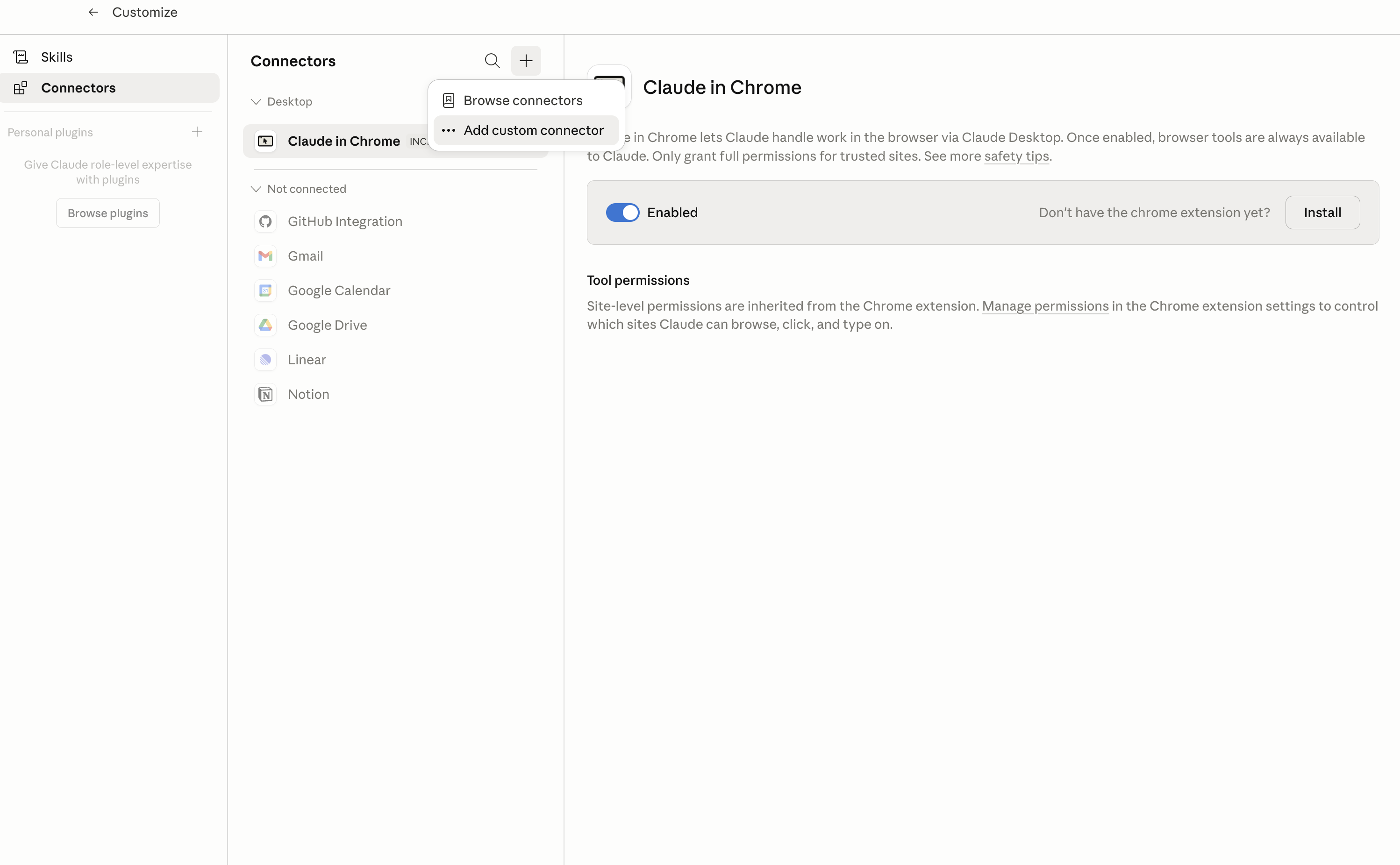
In Claude Desktop, click Customize in the left sidebar, then select Connectors and click the + icon at the top.

Claude Desktop connectors screen with Add custom connector selected

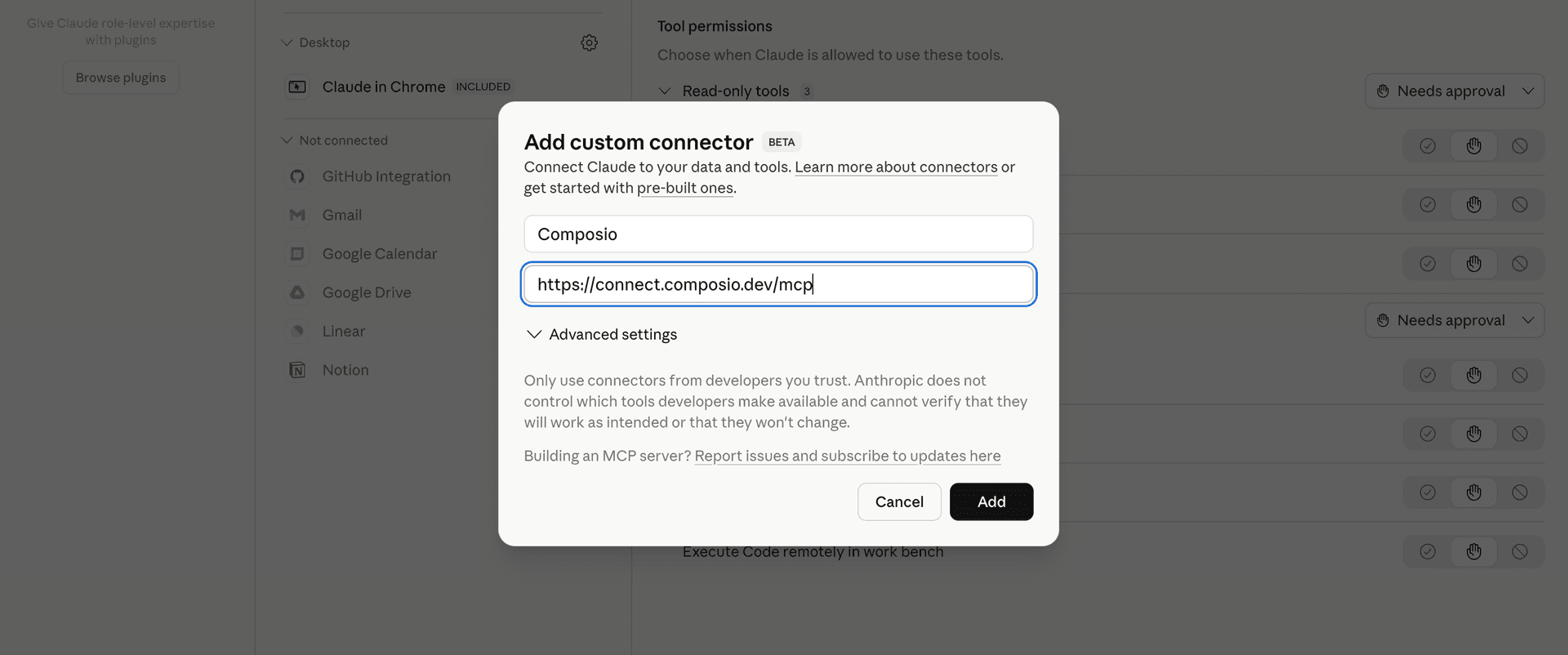
Click Add custom connector and paste in the Composio MCP server URL:

bash
https://connect.composio.dev/mcp
Add custom connector dialog with Composio MCP server URL

2. Authorize in your browser

Click Connect. You'll be redirected to a browser window where you can authorize Composio to continue.

Composio authorization screen for Claude Web, Desktop, and Cowork

3. Connect your HydraDB account

Back in Claude, ask it to connect to HydraDB or give it any HydraDB-related task.

For example, ask Claude to:

  • "Query HydraDB for recent customer complaint trends"
  • "Ingest product documentation into HydraDB context"
  • "Find connected research notes about market risks"

It will prompt you to authenticate and authorize access.

That's it. Composio's tools are now available in Claude, and your HydraDB account is ready to use.

What is the HydraDB Claude Connector, and what's possible with it?

The HydraDB MCP server is an implementation of the Model Context Protocol that connects your AI agent and assistants like Claude, Cursor, etc directly to your HydraDB account. It provides structured and secure access to your databases, collections, connected data sources, contexts, and indexing workflows, so your agent can ingest data, search knowledge, manage connected providers, explore relationships, and monitor processing on your behalf.

  • Knowledge ingestion and search: Have your agent add documents, application knowledge, memories, or graph data to HydraDB, then query the resulting context with filters for collections, metadata, sources, access controls, and retrieval settings.
  • Database and collection management: Let the agent create, inspect, list, and remove HydraDB databases and collections, check database readiness, review usage statistics, and manage metadata schema fields.
  • Connected data source management: Direct your agent to review supported connector providers, create and configure connectors, discover available resources, select resources for syncing, pause or resume connectors, trigger syncs, and check connector health.
  • Context exploration and processing: Instruct your agent to inspect stored context, check ingestion status, list knowledge or memory contexts, retrieve extracted relations, and traverse related context subgraphs.
  • Indexing webhook operations: Have your agent register and test indexing webhooks, manage signing secrets, review delivery attempts, retry failed deliveries, and remove webhook registrations.

Troubleshooting

1. Why does Claude not use the Composio connector for HydraDB?

The connector can show as connected, but Claude must use it in each HydraDB conversation.

  • Click + at the lower left of the chat, or type /.
  • Hover Connectors.
  • Turn on Composio.
  • Ask Claude to connect to HydraDB again.

2. Why does Claude show an MCP server error before HydraDB connects?

Claude can show Couldn't reach the MCP server or Authorization with the MCP server failed when you add the connector for HydraDB.

  • Check that the connector URL is https://connect.composio.dev/mcp.
  • Connectors run from Anthropic's cloud, so your device network is usually not the problem.
  • Add the connector again from Customize > Connectors, then ask Claude to connect HydraDB.
  • If it fails again, send the error and the ofid_ reference id to support@composio.dev.

3. Why does the HydraDB authorization link not work?

The Composio connector is one server. Your HydraDB account connects separately when Claude asks for it.

  • If the browser does not open, or the link expires, ask Claude to retry the HydraDB connection.
  • Composio creates a fresh HydraDB authorization link.
  • Open that link in your browser and finish the HydraDB sign-in.

4. Why do HydraDB actions fail after they worked before?

The HydraDB connection can expire or lose permission.

  • Ask Claude to inspect the HydraDB connection.
  • If the connection is unhealthy, disconnect it when Claude prompts you.
  • Reconnect the HydraDB account and retry the action.
  • If Claude shows a permission prompt, approve it before Claude changes data in HydraDB.
  • If the action still fails with a permission error, check that the connected account has that permission in HydraDB itself.

5. How do I switch to a different HydraDB account?

Claude can manage the HydraDB connection for you.

  • Ask Claude to disconnect or delete the current HydraDB account.
  • Ask Claude to connect HydraDB again.
  • Open the new Composio authorization link for HydraDB.
  • Sign in with the other HydraDB account in the browser.
  • After the account connects, ask Claude to retry the HydraDB task.

6. Why is my HydraDB connection missing in Claude Desktop or on a Team plan?

The connector belongs to your Claude account, so your HydraDB connection works in Claude Web, Desktop, and Cowork.

  • In Claude Desktop, open Customize > Connectors.
  • Next to Composio, click ⋮ and click Clear cache.
  • If HydraDB tools still do not appear, click ⋮, disconnect, remove the connector, and add it again.
  • On Team or Enterprise, an Owner or Primary Owner must enable the connector before you can connect HydraDB.
TOOLS

Supported Tools

Every HydraDB action and event your agent gets out of the box.

Add Connector Resource

Add one discovered provider resource to an existing connector with optional routing, filters, metadata, instructions, and access control.

Add Metadata Schema Fields

Add new fields to a database metadata schema; existing fields cannot be deleted, renamed, retyped, or reconfigured.

Configure Connector Resources

Activate selected discovered resources on a connector and start their sync; unlisted existing resources remain unchanged.

Create Connector

Create a HydraDB connector and store the provider authorization required to sync one external account.

Create Database

Provision a HydraDB database asynchronously.

Delete Collection

Permanently delete one HydraDB collection and all of its data while leaving the database intact.

Delete Connector

Permanently delete a HydraDB connector, all resource mappings, and its stored provider authorization.

Delete Connector Resource

Permanently remove one resource mapping from a HydraDB connector.

Delete Context

Permanently delete specific HydraDB knowledge or memory contexts.

Delete Database

Permanently delete a HydraDB database and all associated data.

Delete Indexing Webhook

Unregister the account's indexing webhook and stop all future event deliveries.

Disable Webhook Signing

Remove the indexing webhook signing secret.

Discover Connector Resources

List resources available through an existing connector's stored provider credentials.

Generate or Set Webhook Signing Secret

Generate or set and replace the indexing webhook signing secret.

Get Connector

Get one connector's configuration and lifecycle state by connector ID.

Get Connector Status

Check a connector's overall health, sync state, errors, and per-resource health in one call.

Get Context Relations

Return extracted entity relations for one context or an entire collection, one page at a time.

Get Context Status

Check processing status for one or more ingested or connector-synced context IDs.

Get Context Subgraph

Traverse context-level relations from one context and return reachable contexts and graph evidence up to bounded depth and size.

Get Database Stats

Get knowledge and memory collection row counts for one database.

Get Database Status

Check whether one database's scheduler, graph, and vector infrastructure is ready for ingestion.

Get Indexing Webhook

Get the account's indexing webhook URL, subscribed event types, registration state, and whether signing is configured.

Get Metadata Schema

Get the declared metadata fields and types for one database.

Get Webhook Delivery

Get one indexing webhook delivery attempt by delivery ID for failure diagnosis.

Ingest Context

Ingest documents, app knowledge, memories, or an explicit graph into a HydraDB database and return context IDs for asynchronous status checks.

Inspect Context

Fetch one context's stored content, enrichment, and/or a time-limited download URL.

List Collections

List the collections in one HydraDB database.

List Connector Providers

List supported connector providers, or describe one provider's resource types, credential schema, and setup requirements.

List Connector Resources

List the resources currently configured on a connector, including routing, filters, access controls, and per-resource health metadata.

List Connectors

List the connected data providers in the account, optionally filtered by provider, with optional health rollups.

List Contexts

List knowledge or memory contexts in a database or collection, one bounded page at a time.

List Databases

List HydraDB databases and preserve per-database provisioning or failure diagnostics.

List Webhook Deliveries

List recent indexing webhook delivery attempts, optionally filtered by status, one page at a time.

Query Context

Search a HydraDB database for ranked chunks and graph context, with optional collection, metadata, source, ACL, and retrieval controls.

Register Indexing Webhook

Register or replace the organization's HTTPS endpoint and event subscriptions for HydraDB indexing events.

Retry Webhook Delivery

Queue one failed indexing webhook delivery for another attempt.

Set Connector Paused State

Pause scheduled syncs or resume a paused HydraDB connector.

Submit Query Feedback

Record a rating, comment, or known ground truth for a prior HydraDB query.

Test Indexing Webhook

Send one test event to the currently registered indexing webhook endpoint.

Trigger Connector Sync

Start a connector sync now, causing external provider reads and HydraDB ingestion.

Update Connector

Update an existing HydraDB connector's sync cadence, default ingestion instructions, or provider credentials.

Update Connector Resource

Replace a HydraDB connector resource's access rules or change its ingestion instructions for subsequent syncs.

Update Context Metadata

Merge metadata into one HydraDB context or replace its access-control list without re-ingesting content.

FAQ

Frequently asked questions

Start with HydraDB.It takes 30 seconds.

Managed auth, hosted MCP servers, and every HydraDB tool your agent needs.Free to start.

Start building