How to connect GreyNoise to Claude

Connect Claude Web, Desktop and Cowork to GreyNoise MCP. Look up an ip's greynoise classification, check greynoise activity for suspicious ips, and more using natural language, with authentication handled for you.

GreyNoise logoGreyNoise
Api Key

GreyNoise is a cyber threat intelligence service for internet-scanning IPs, vulnerabilities, and malicious activity. It helps security teams separate routine scanners from truly harmful threats.

68 Tools

Introduction

Claude is Anthropic's AI assistant, available on the web, in the desktop app, and on mobile. Cowork is its agent for knowledge work, and it runs on all of those surfaces too. Connected to your apps, Claude can work with your files and services to accomplish complex tasks on your behalf.

This guide walks you through the easiest and most secure way to connect your GreyNoise account to Claude via Composio Connect, enabling it to look up an IP's GreyNoise classification, check GreyNoise activity for suspicious IPs, investigate vulnerabilities linked to an IP, and more such actions on your behalf without compromising your account security.

Setup is the same on Claude Web, Desktop, and Cowork, and you only need to do it once. The connector is tied to your account, so it's available in all three.

For exact tool slugs and parameter tables, see the tool catalog in the Composio docs.

Also integrate GreyNoise with

Connecting GreyNoise to Claude Web, Desktop, and Cowork

Two ways to add the Composio connector. Pick whichever you prefer.

1. Add with one click

Click the button. Claude opens with the Composio connector filled in. Click Add, then go to step 2.

Add to Claude

Add manually

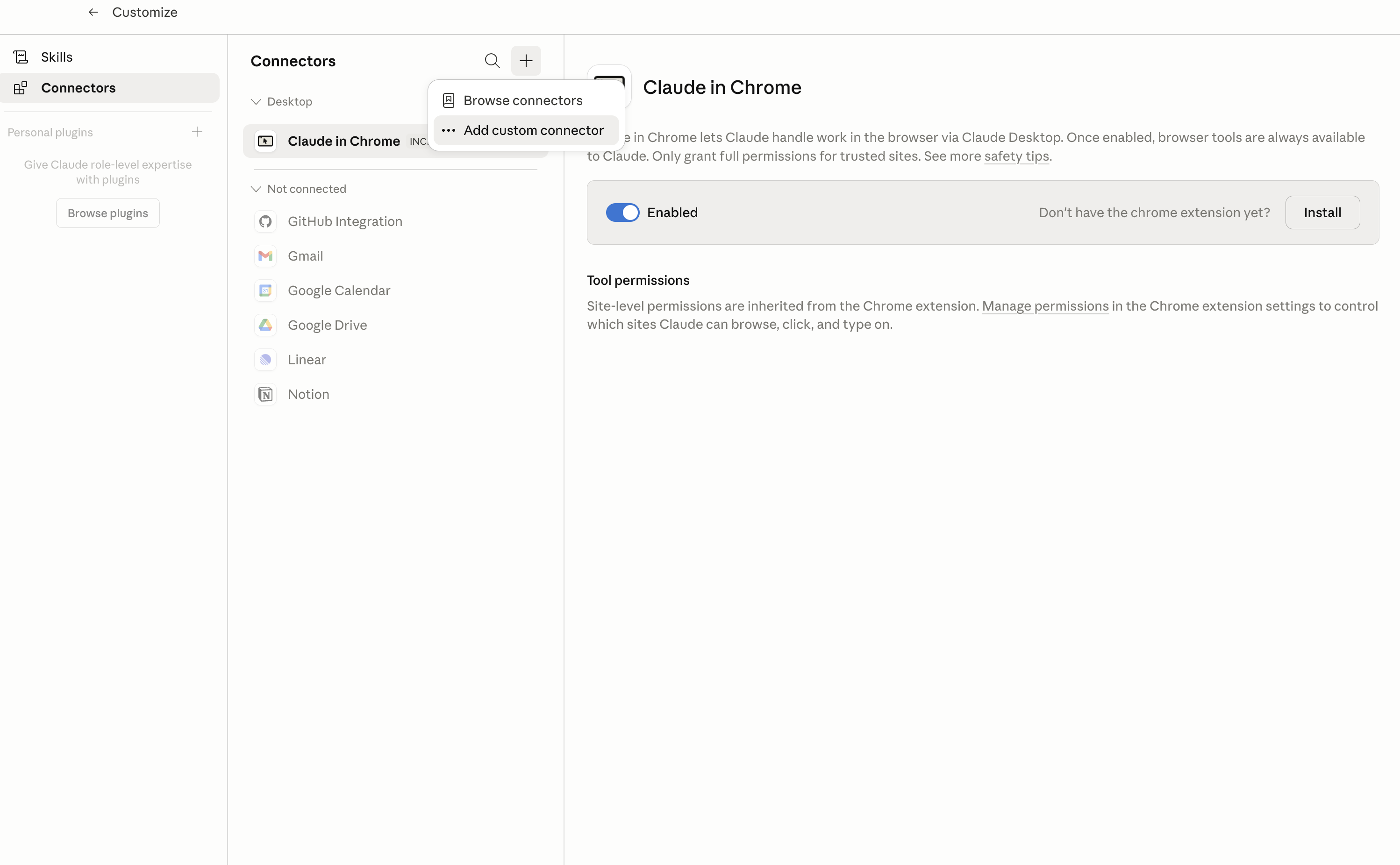
In Claude Desktop, click Customize in the left sidebar, then select Connectors and click the + icon at the top.

Claude Desktop connectors screen with Add custom connector selected

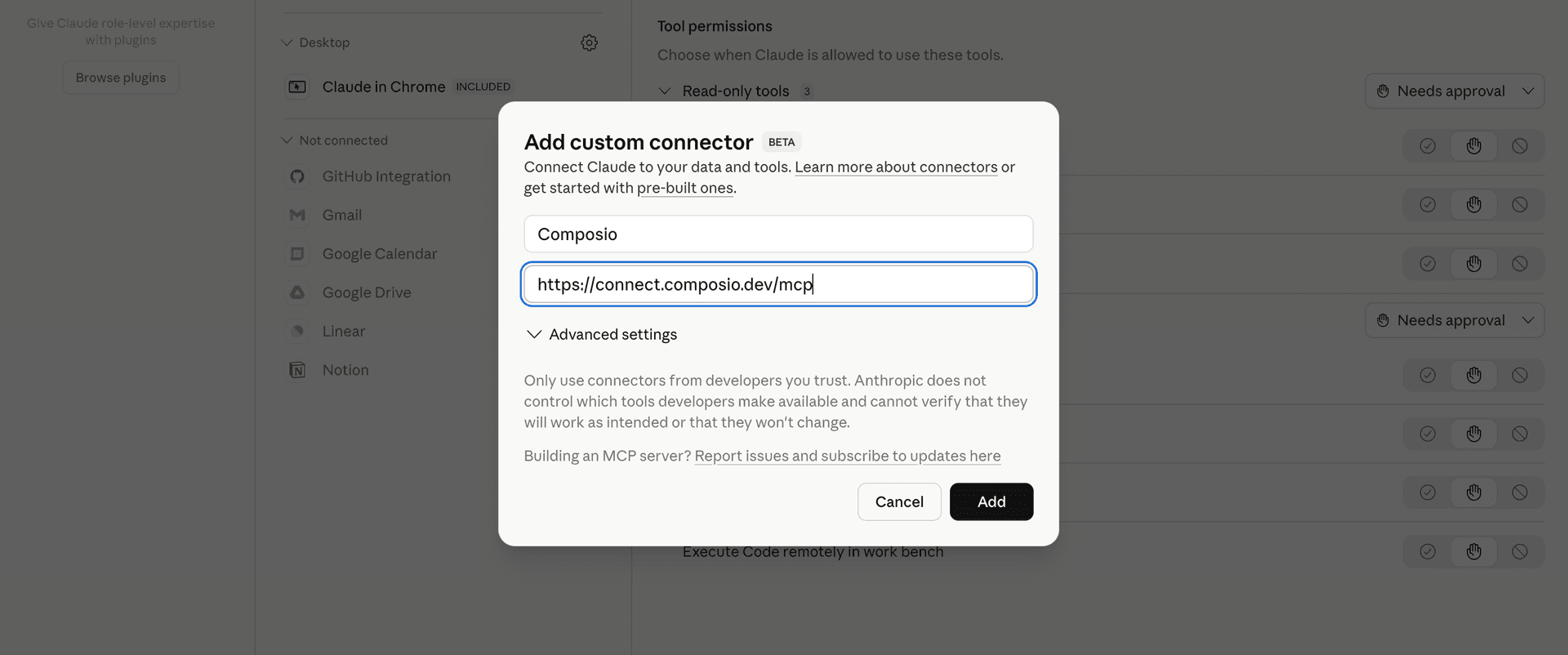
Click Add custom connector and paste in the Composio MCP server URL:

bash
https://connect.composio.dev/mcp
Add custom connector dialog with Composio MCP server URL

2. Authorize in your browser

Click Connect. You'll be redirected to a browser window where you can authorize Composio to continue.

Composio authorization screen for Claude Web, Desktop, and Cowork

3. Connect your GreyNoise account

Back in Claude, ask it to connect to GreyNoise or give it any GreyNoise-related task.

For example, ask Claude to:

  • "Look up an IP's GreyNoise classification"
  • "Check GreyNoise activity for suspicious IPs"
  • "Investigate vulnerabilities linked to an IP"

It will prompt you to authenticate and authorize access.

That's it. Composio's tools are now available in Claude, and your GreyNoise account is ready to use.

What is the GreyNoise Claude Connector, and what's possible with it?

The GreyNoise MCP server is an implementation of the Model Context Protocol that connects your AI agent and assistants like Claude, Cursor, etc directly to your GreyNoise account. It provides structured and secure access to GreyNoise threat intelligence, workspace datasets, feeds, and security analysis tools, so your agent can investigate suspicious IPs, analyze vulnerabilities and activity, manage blocklists and feed consumers, and retrieve security datasets on your behalf.

  • IP and threat investigation: Have your agent review callback intelligence, scanner associations, observed files, IP timelines, tag activity, and matching threat records for security investigations.
  • Vulnerability and threat research: Direct your agent to look up CVE details, exploitation timelines, threat briefs, business service intelligence, and aggregate security statistics.
  • Workspace analysis: Let the agent compare datasets, count matching records, study activity over time, inspect captured sessions, and map connections between session sources and destinations.
  • Blocklist and feed management: Instruct your agent to create, inspect, and delete workspace blocklists, then create, read, acknowledge, or remove named event-feed consumers.
  • Security data exports: Have your agent export matching IPs, session data, packet captures, callback IP lists, unique session values, and licensed intelligence datasets for further analysis.

Troubleshooting

1. Why does Claude not use the Composio connector for GreyNoise?

The connector can show as connected, but Claude must use it in each GreyNoise conversation.

  • Click + at the lower left of the chat, or type /.
  • Hover Connectors.
  • Turn on Composio.
  • Ask Claude to connect to GreyNoise again.

2. Why does Claude show an MCP server error before GreyNoise connects?

Claude can show Couldn't reach the MCP server or Authorization with the MCP server failed when you add the connector for GreyNoise.

  • Check that the connector URL is https://connect.composio.dev/mcp.
  • Connectors run from Anthropic's cloud, so your device network is usually not the problem.
  • Add the connector again from Customize > Connectors, then ask Claude to connect GreyNoise.
  • If it fails again, send the error and the ofid_ reference id to support@composio.dev.

3. Why does the GreyNoise authorization link not work?

The Composio connector is one server. Your GreyNoise account connects separately when Claude asks for it.

  • If the browser does not open, or the link expires, ask Claude to retry the GreyNoise connection.
  • Composio creates a fresh GreyNoise authorization link.
  • Open that link in your browser and finish the GreyNoise sign-in.

4. Why do GreyNoise actions fail after they worked before?

The GreyNoise connection can expire or lose permission.

  • Ask Claude to inspect the GreyNoise connection.
  • If the connection is unhealthy, disconnect it when Claude prompts you.
  • Reconnect the GreyNoise account and retry the action.
  • If Claude shows a permission prompt, approve it before Claude changes data in GreyNoise.
  • If the action still fails with a permission error, check that the connected account has that permission in GreyNoise itself.

5. How do I switch to a different GreyNoise account?

Claude can manage the GreyNoise connection for you.

  • Ask Claude to disconnect or delete the current GreyNoise account.
  • Ask Claude to connect GreyNoise again.
  • Open the new Composio authorization link for GreyNoise.
  • Sign in with the other GreyNoise account in the browser.
  • After the account connects, ask Claude to retry the GreyNoise task.

6. Why is my GreyNoise connection missing in Claude Desktop or on a Team plan?

The connector belongs to your Claude account, so your GreyNoise connection works in Claude Web, Desktop, and Cowork.

  • In Claude Desktop, open Customize > Connectors.
  • Next to Composio, click ⋮ and click Clear cache.
  • If GreyNoise tools still do not appear, click ⋮, disconnect, remove the connector, and add it again.
  • On Team or Enterprise, an Owner or Primary Owner must enable the connector before you can connect GreyNoise.
TOOLS

Supported Tools

Every GreyNoise action and event your agent gets out of the box.

Acknowledge Feed Events

Irreversibly advance a named feed consumer's server-held checkpoint through a fetch cursor.

Compare Workspaces

Compare IPs matching a GNQL query across two workspace datasets without changing either workspace.

Compare Workspace Stats

Compare aggregate GNQL statistics across two workspace datasets without changing either workspace.

Count GNQL Results

Return the number of records matching a GNQL query without retrieving the records.

Create Blocklist

Create a persistent workspace blocklist from a GNQL query.

Create Feed Consumer

Create persistent named consumer state at the beginning of one feed's retained history.

Delete Blocklist

Permanently delete one workspace blocklist, including its generated membership and access token.

Delete Feed Consumer

Permanently delete a named event-feed consumer and all of its server-held checkpoint state.

Download BSI Data

Download the licensed combined Business Service Intelligence dataset for an optional date.

Download Psychic Model

Download a metered Psychic model for a date or inclusive date range of at most 30 days.

Download Psychic Snapshot

Download a metered precomputed Psychic model snapshot for a supported lookback window.

Export Callback IPs

Download a newline-delimited text file of Callback IPs matching the supplied filters.

Export GNQL IPs

Download the IP addresses matching a GNQL query as a licensed export file.

Export Session Data

Download one session in the selected PCAP or raw payload export format.

Export Sessions PCAP

Download a selected page or bounded set of matching workspace sessions as a PCAP file.

Fetch Feed Events

Fetch events after a named consumer's server-held checkpoint without advancing it.

Get Blocklist

Return one workspace blocklist and its current GNQL and refresh configuration.

Get BSI Statistics

Return Business Service Intelligence statistics grouped by category, company, or trust level.

Get Callback IP

Return Callback intelligence, scanner associations, and observed files for one IP.

Get Callback Overview

Return aggregate Callback statistics for the supplied attack-stage, date, file, scanner, or IP filters.

Get Connection Plan

Return the connected key's GreyNoise offering and plan for account capability discovery.

Get CVE

Return vulnerability, timeline, and observed exploitation intelligence for one CVE.

Get GNQL Stats

Return aggregate GNQL result counts and top values across supported facets.

Get GNQL Timeseries

Return an offset-controlled page of IP observations grouped into hourly buckets for a GNQL query, or download CSV.

Get GNQL Timeseries Stats

Return count statistics over time for a GNQL query and RFC 3339 interval, or download CSV.

Get IP Timeline

Return historical values for one intelligence field on an IP over a bounded number of days.

Get Private RSS Feed

Return the entitlement-filtered RSS 2.0 feed authorized only by the supplied opaque URL token.

Get Private RSS URL

Return the private RSS URL for the connected workspace, issuing one on first access if none exists.

Get Public RSS Feed

Return the unauthenticated RSS 2.0 feed containing published community Threat Briefs.

Get Session

Return one captured network session by its identifier.

Get Session Connections

Return a connection graph between selected source and destination session fields.

Get Session Counts

Return grouped session counts for selected fields, filters, and a time range.

Get Session PCAP

Download captured frame data for one session as a PCAP file.

Get Session Timeseries

Return time-bucketed session counts grouped by a selected field.

Get Session Unique Values

Download unique values, optionally with counts, for one session field as CSV.

Get Tactics Artifact Content

Download the content of one authorized Tactics host-artifact path.

Get Tactics Detection

Return one Tactics detection with separately selected command and artifact pages.

Get Tag Activity

Return time-bucketed activity and aggregate IP counts for one GreyNoise tag.

Get Threat Brief

Return one Threat Brief article by identifier.

Get Unique IPs Job

Return status and one offset-controlled result page for a unique-IPs comparison job.

List Blocklist IPs

Return the current IP members generated by one workspace blocklist's GNQL query.

List Blocklists

Return one offset-controlled page of persistent blocklists in a GreyNoise workspace.

List Callback IPs

Return one cursor-controlled page of Callback IPs matching attack-stage, date, file, scanner, or IP filters.

List CVEs

Return CVE intelligence with sort, exploitability, vendor, and result-limit controls.

List Feed Consumers

Return durable named consumers and their independent server-held checkpoint state for one event feed.

List GNQL Fields

Return searchable GNQL field definitions, aliases, value types, and restriction flags.

List Session Fields

Return fields available for querying sessions in the selected workspace or demo scope.

List Sessions

Return one page of sensor or demo network sessions matching a Lucene query and time range.

List Tactics Destination IPs

Return one page of destination IPs associated with a Tactics detection.

List Tactics Files

Return files associated with a Tactics detection, optionally limited to mutations.

List Tags

Return GreyNoise tag definitions filtered by name, slug, CVE, or vendor inclusion.

List Threat Brief Categories

Return the available Threat Brief category definitions.

List Threat Briefs

Return a selected page of Threat Brief articles filtered and sorted by the supplied criteria.

Lookup BSI IP

Return licensed Business Service Intelligence provider matches for one IPv4 address.

Lookup BSI IPs

Return licensed Business Service Intelligence provider matches for up to 1,000 IPv4 addresses.

Lookup Community IP

Return free Community intelligence for one IP, including whether GreyNoise observed scanning or business-service activity.

Lookup CVEs

Return GreyNoise vulnerability and exploitation intelligence for multiple CVE identifiers.

Lookup IP

Return full or quick scanner and business-service intelligence for one IP, subject to workspace entitlements.

Lookup IPs

Return scanner and business-service intelligence for up to 10,000 IPs in one read-only lookup.

Reset Feed Consumer

Irreversibly reset a named consumer checkpoint to the beginning of currently retained feed history.

Rotate Private RSS URL

Rotate the workspace's private RSS URL and immediately invalidate the previous URL.

Search Feed Events

Search retained event-feed history without reading or changing any named consumer's server-held checkpoint.

Search GNQL

Search GreyNoise intelligence with GNQL and return one cursor-controlled page or a CSV file.

Search GNQL Metadata

Search GNQL metadata and return one cursor-controlled page without raw scan data.

Search Tactics Detections

Search workspace Tactics detections and return one cursor-controlled page.

Start Unique IPs Job

Start an asynchronous job that finds IPs unique to one of two workspace datasets.

Update Blocklist

Replace a persistent blocklist's GNQL query and configurable settings in place.

Validate GNQL Query

Validate a GNQL query and return its adjusted form without running the search.

FAQ

Frequently asked questions

Start with GreyNoise.It takes 30 seconds.

Managed auth, hosted MCP servers, and every GreyNoise tool your agent needs.Free to start.

Start building