How to connect Google Business Profile to Claude

Connect Claude Web, Desktop and Cowork to Google Business Profile MCP. List all google business profile locations, summarize recent reviews for each location, and more using natural language, with authentication handled for you.

Google Business Profile logoGoogle Business Profile
Oauth2

Google Business Profile is Google's service for managing how businesses appear in Search and Maps. It helps businesses keep location details accurate and engage with local customers.

56 Tools

Introduction

Claude is Anthropic's AI assistant, available on the web, in the desktop app, and on mobile. Cowork is its agent for knowledge work, and it runs on all of those surfaces too. Connected to your apps, Claude can work with your files and services to accomplish complex tasks on your behalf.

This guide walks you through the easiest and most secure way to connect your Google Business Profile account to Claude via Composio Connect, enabling it to list all Google Business Profile locations, summarize recent reviews for each location, publish a holiday update to locations, and more such actions on your behalf without compromising your account security.

Setup is the same on Claude Web, Desktop, and Cowork, and you only need to do it once. The connector is tied to your account, so it's available in all three.

For exact tool slugs and parameter tables, see the tool catalog in the Composio docs.

Also integrate Google Business Profile with

Connecting Google Business Profile to Claude Web, Desktop, and Cowork

Two ways to add the Composio connector. Pick whichever you prefer.

1. Add with one click

Click the button. Claude opens with the Composio connector filled in. Click Add, then go to step 2.

Add to Claude

Add manually

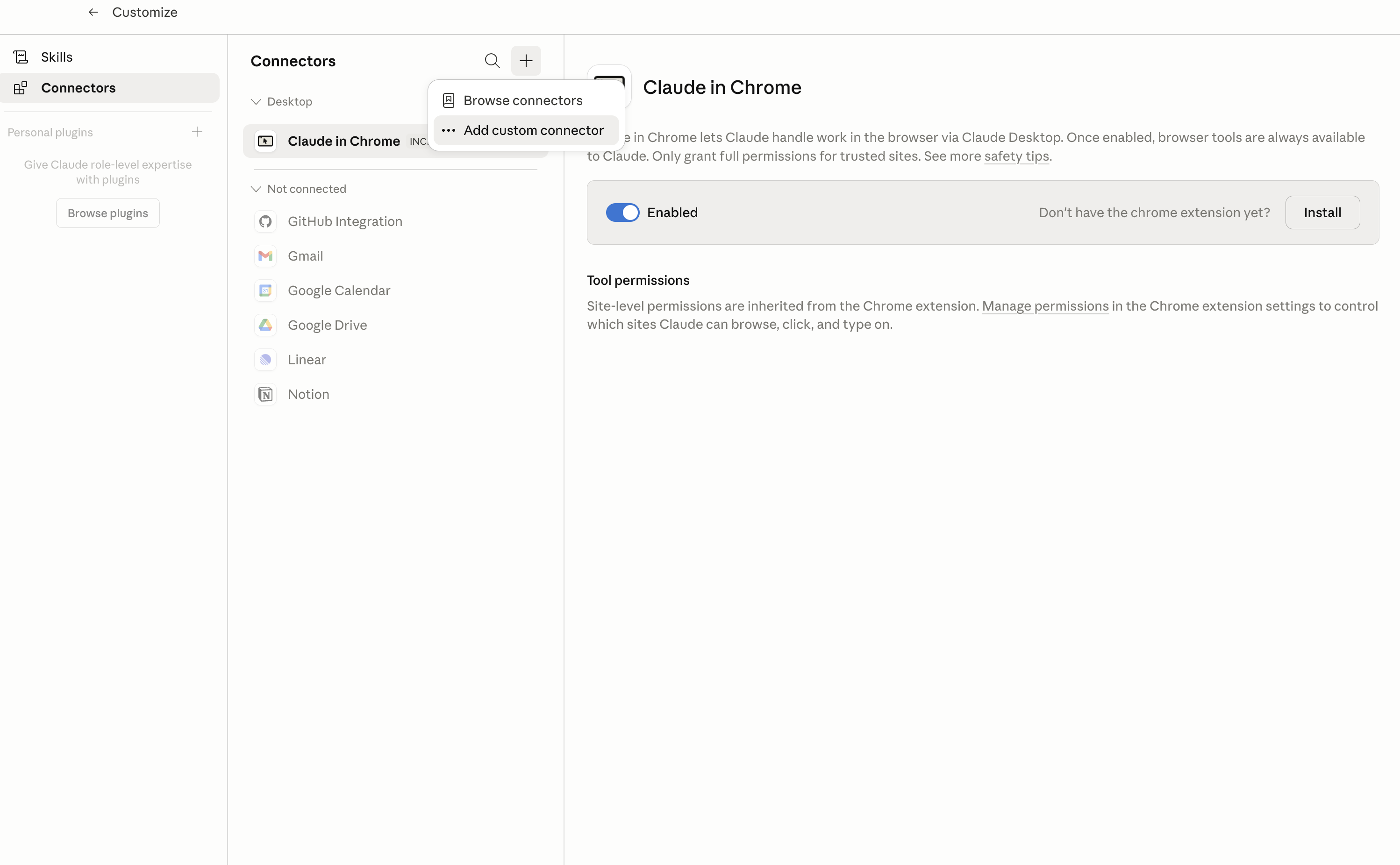
In Claude Desktop, click Customize in the left sidebar, then select Connectors and click the + icon at the top.

Claude Desktop connectors screen with Add custom connector selected

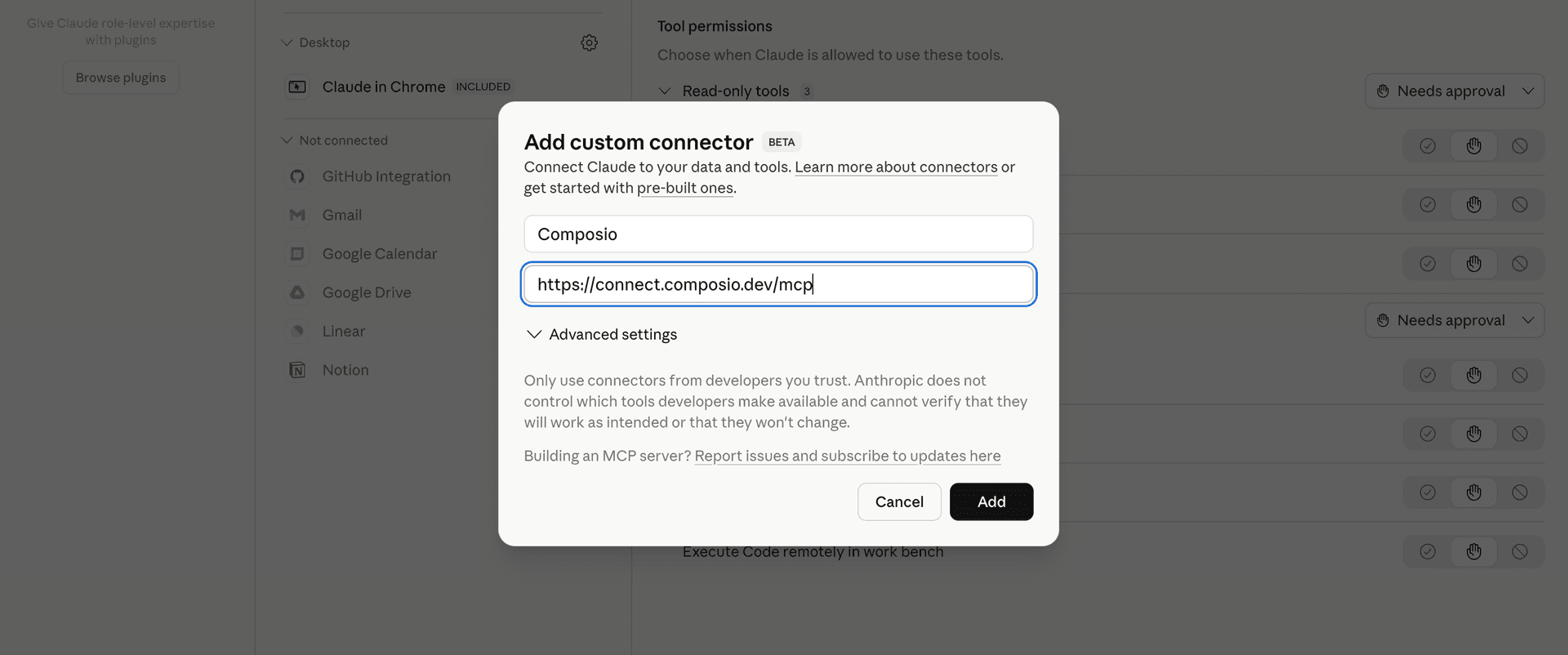
Click Add custom connector and paste in the Composio MCP server URL:

bash
https://connect.composio.dev/mcp
Add custom connector dialog with Composio MCP server URL

2. Authorize in your browser

Click Connect. You'll be redirected to a browser window where you can authorize Composio to continue.

Composio authorization screen for Claude Web, Desktop, and Cowork

3. Connect your Google Business Profile account

Back in Claude, ask it to connect to Google Business Profile or give it any Google Business Profile-related task.

For example, ask Claude to:

  • "List all Google Business Profile locations"
  • "Summarize recent reviews for each location"
  • "Publish a holiday update to locations"

It will prompt you to authenticate and authorize access.

That's it. Composio's tools are now available in Claude, and your Google Business Profile account is ready to use.

What is the Google Business Profile Claude Connector, and what's possible with it?

The Google Business Profile MCP server is an implementation of the Model Context Protocol that connects your AI agent and assistants like Claude, Cursor, etc directly to your Google Business Profile account. It provides structured and secure access to your accounts, locations, reviews, media, posts, performance data, and verification workflows, so your agent can manage listings, publish updates, review customer feedback, track performance, and handle verification tasks on your behalf.

  • Business profile and location management: Have your agent list accounts and locations, view location details, create or delete locations, search business categories, and manage administrators and invitations.
  • Posts, photos, and action links: Direct your agent to publish or remove local posts, add or manage profile media, and create or delete public links for actions such as appointments or food ordering.
  • Reviews and customer activity: Let the agent retrieve reviews for one location or across an account, inspect customer and merchant media, and remove existing merchant replies when needed.
  • Performance and audience insights: Instruct your agent to retrieve daily performance metrics, search keyword impression data, and check the follower count for a verified location.
  • Verification and profile access: Have your agent check merchant control, list available verification methods, generate verification tokens, complete verification with a PIN, and accept or decline pending invitations.

Troubleshooting

1. Why does Claude not use the Composio connector for Google Business Profile?

The connector can show as connected, but Claude must use it in each Google Business Profile conversation.

  • Click + at the lower left of the chat, or type /.
  • Hover Connectors.
  • Turn on Composio.
  • Ask Claude to connect to Google Business Profile again.

2. Why does Claude show an MCP server error before Google Business Profile connects?

Claude can show Couldn't reach the MCP server or Authorization with the MCP server failed when you add the connector for Google Business Profile.

  • Check that the connector URL is https://connect.composio.dev/mcp.
  • Connectors run from Anthropic's cloud, so your device network is usually not the problem.
  • Add the connector again from Customize > Connectors, then ask Claude to connect Google Business Profile.
  • If it fails again, send the error and the ofid_ reference id to support@composio.dev.

3. Why does the Google Business Profile authorization link not work?

The Composio connector is one server. Your Google Business Profile account connects separately when Claude asks for it.

  • If the browser does not open, or the link expires, ask Claude to retry the Google Business Profile connection.
  • Composio creates a fresh Google Business Profile authorization link.
  • Open that link in your browser and finish the Google Business Profile sign-in.

4. Why do Google Business Profile actions fail after they worked before?

The Google Business Profile connection can expire or lose permission.

  • Ask Claude to inspect the Google Business Profile connection.
  • If the connection is unhealthy, disconnect it when Claude prompts you.
  • Reconnect the Google Business Profile account and retry the action.
  • If Claude shows a permission prompt, approve it before Claude changes data in Google Business Profile.
  • If the action still fails with a permission error, check that the connected account has that permission in Google Business Profile itself.

5. How do I switch to a different Google Business Profile account?

Claude can manage the Google Business Profile connection for you.

  • Ask Claude to disconnect or delete the current Google Business Profile account.
  • Ask Claude to connect Google Business Profile again.
  • Open the new Composio authorization link for Google Business Profile.
  • Sign in with the other Google Business Profile account in the browser.
  • After the account connects, ask Claude to retry the Google Business Profile task.

6. Why is my Google Business Profile connection missing in Claude Desktop or on a Team plan?

The connector belongs to your Claude account, so your Google Business Profile connection works in Claude Web, Desktop, and Cowork.

  • In Claude Desktop, open Customize > Connectors.
  • Next to Composio, click ⋮ and click Clear cache.
  • If Google Business Profile tools still do not appear, click ⋮, disconnect, remove the connector, and add it again.
  • On Team or Enterprise, an Owner or Primary Owner must enable the connector before you can connect Google Business Profile.
TOOLS

Supported Tools

Every Google Business Profile action and event your agent gets out of the box.

Accept Invitation

Accept a pending Google Business Profile account invitation and grant the connected user its offered access.

Batch Get Locations

Return multiple legacy Google Business Profile Location resources belonging to one account in a single request.

Complete Verification

Submit a PIN to complete a pending non-automatic Google Business Profile verification.

Create Account

Create a location-group or user-group account; this cannot create a personal account or organization.

Create Local Post

Publish a customer-facing standard post, event, offer, or alert for a Google Business Profile location.

Create Location

Create a merchant-owned Business Profile location.

Create Media

Create and publish a customer-facing media item for a Google Business Profile location from a publicly reachable URL or an existing Google upload data reference.

Create Place Action Link

Create a public action link, such as an appointment or ordering URL, for a Google Business Profile location.

Decline Invitation

Permanently decline a pending Google Business Profile account invitation.

Remove Admin

Permanently remove an administrator's access from a Google Business Profile account or location.

Delete Local Post

Permanently delete a local post from a Google Business Profile location.

Delete Location

Permanently delete an API-deletable Business Profile location.

Delete Media

Permanently delete merchant-owned media from a Google Business Profile location.

Delete Place Action Link

Permanently delete a public Google Business Profile place-action link.

Delete Review Reply

Permanently remove the merchant's public reply from a Google Business Profile review.

Find Chains

Search Google Business Profile chains by display name, or return one chain by its exact chain resource name.

Generate Verification Token

Generate a Google Business Profile instant verification token for an unverified listing identified by its final location ID.

Get Accounts

List one page of Business Profile accounts accessible to the connected Google user, or return one exact account when account_name is supplied.

Get Categories

Search one page of localized Google Business Profile categories, or fetch up to 100 exact stable category resource names in one batch.

Get Daily Metrics

Return one or more daily Google Business Profile performance metrics over an inclusive date range, normalized into one list of metric time series.

Get Follower Metadata

Return the total follower count for a verified Google Business Profile location connected to Google Maps.

Get Food Menus

Return food menus for an eligible Google Business Profile location, optionally restricted to top-level fields by a read mask.

Get Google-Updated Location

Return Google's consumer-facing version of a Business Profile location and field masks describing differences and pending merchant changes.

Get Local Posts

List one page of local posts for a Google Business Profile location, or return one exact post when post_name is supplied.

Get Location

Return selected merchant-managed fields for one Business Profile location.

Get Location Attributes

Return either merchant-set or Google-displayed attributes for one Google Business Profile location, preserving attribute identifiers and typed values.

Get Lodging

Return merchant-set hotel lodging data or Google's displayed lodging data and the fields Google changed.

Get Media

List one page of merchant or customer-contributed media for a Google Business Profile location, or return one exact media item.

Get Notification Setting

Return an account's Google Pub/Sub topic and enabled Business Profile notification types.

Get Place Action Links

List one page of a Google Business Profile location's place-action links, or return one exact link when link_name is supplied.

Get Reviews

Return one exact Google Business Profile review, one page for a verified location, or one account-batch page across up to 50 verified locations.

Get Voice of Merchant State

Return whether a Google Business Profile location has merchant control and the next required verification, ownership, review, or policy action.

Invite Admin

Invite a user or location group to administer a Google Business Profile account or location.

List Admins

Return administrators and their roles for a Google Business Profile account or location.

List Attribute Metadata

Return one page of valid Google Business Profile attribute definitions for a location or a category and region, including value constraints.

List Invitations

Return pending account invitations, optionally filtered by target type.

List Locations

Return one page of Google Business Profile locations in an account, with the fields selected by read_mask and a cursor for the next page.

List Place Action Type Metadata

Return one page of place-action types, such as appointment or food-ordering links, available for a Google Business Profile location or region.

List Search Keyword Impressions

Return one page of monthly search keyword impression counts for a Google Business Profile location and a cursor for the next page.

List Verification Options

List the verification methods currently eligible for one Google Business Profile location in a requested language.

List Verifications

Return one page of verification attempts and states for a Google Business Profile location, plus a cursor for the next page.

Search Google Locations

Find an existing Google Maps location by free-form query or structured location data before creating or claiming a Business Profile.

Start Verification

Start Google Business Profile verification with a method currently eligible for the location.

Transfer Location

Transfer a Google Business Profile location to another account administered by the connected user.

Update Account

Rename a non-personal Business Profile account; validate_only checks the request without applying it.

Update Admin

Change a Google Business Profile account or location administrator's role.

Update Food Menus

Replace or update food-menu data for an eligible Google Business Profile location.

Update Local Post

Update selected fields on an existing Google Business Profile local post.

Update Location

Update selected merchant-managed fields on a Google Business Profile location.

Update Location Attributes

Set or clear selected merchant-managed attributes on a Google Business Profile location.

Update Lodging

Update selected lodging, amenity, policy, accessibility, service, or sustainability fields for a Google Business Profile hotel location.

Update Media

Update the category association of merchant-owned Google Business Profile media.

Update Notification Setting

Set or clear an account's Pub/Sub topic and replace its enabled Google Business Profile notification types.

Update Place Action Link

Update a Google Business Profile place-action link's URL, action type, or preferred status.

Update Review Reply

Create or replace a merchant reply to a Google Business Profile review.

Upload Location Media

Upload a photo file and publish it on a Google Business Profile location in one operation.

FAQ

Frequently asked questions

Start with Google Business Profile.It takes 30 seconds.

Managed auth, hosted MCP servers, and every Google Business Profile tool your agent needs.Free to start.

Start building