How to connect FRED with ChatGPT

Connect ChatGPT to FRED MCP. Compare inflation trends across recent fred releases, find the latest u.s. unemployment rate, and more using natural language, with authentication handled for you.

FRED logoFRED
Api Key

FRED is the Federal Reserve Bank of St. Louis economic data service. It provides broad access to trusted time series, releases, sources, and regional datasets.

36 Tools

How to connect FRED MCP with ChatGPT

ChatGPT can take action across your apps and files, stay with a project for hours, and turn a goal into finished materials like sheets, slides, and docs, not just answers.

In this guide, I will explain the easiest and most secure way to connect your FRED account to ChatGPT via Composio Connect, so it can search economic series, retrieve observations, explore releases, compare regional data, and analyze trends through natural language commands without ever putting your account credentials at risk.

For exact tool slugs and parameter tables, see the tool catalog in the Composio docs.

Also integrate FRED with

Why use Composio over default connectors?

  • Apps with read and write access. Default connectors mostly can read your data. Composio's FRED integration lets ChatGPT take actions like creating drafts, sending updates, labeling records, and more.
  • 1,800+ SaaS toolkits out of the box. Composio gives you instant access to a vast catalog of pre-built connectors, from Gmail and Slack to Notion, Linear, and Salesforce.
  • One MCP server for every app. Connect any of your applications on demand through a single endpoint, rather than juggling a separate server for each app.
  • Smart, context-aware tool loading. Unlike traditional MCP servers that dump every available tool into the LLM context window, Composio searches for and loads only the tools relevant to the task at hand.
  • Cross-app automation. Chain actions across multiple apps in a single run - fetch a thread, summarize it in Notion, and post highlights to Slack without leaving the conversation.

Prerequisites

Note: Composio connects through OAuth. You will be asked to sign in and approve specific permissions. Review the permission screen carefully if you are using a work account.

Step-by-step: Connect FRED to ChatGPT

1. Install the Composio plugin

Click the button. ChatGPT opens the Composio plugin page. Click Install plugin.

Install in ChatGPT
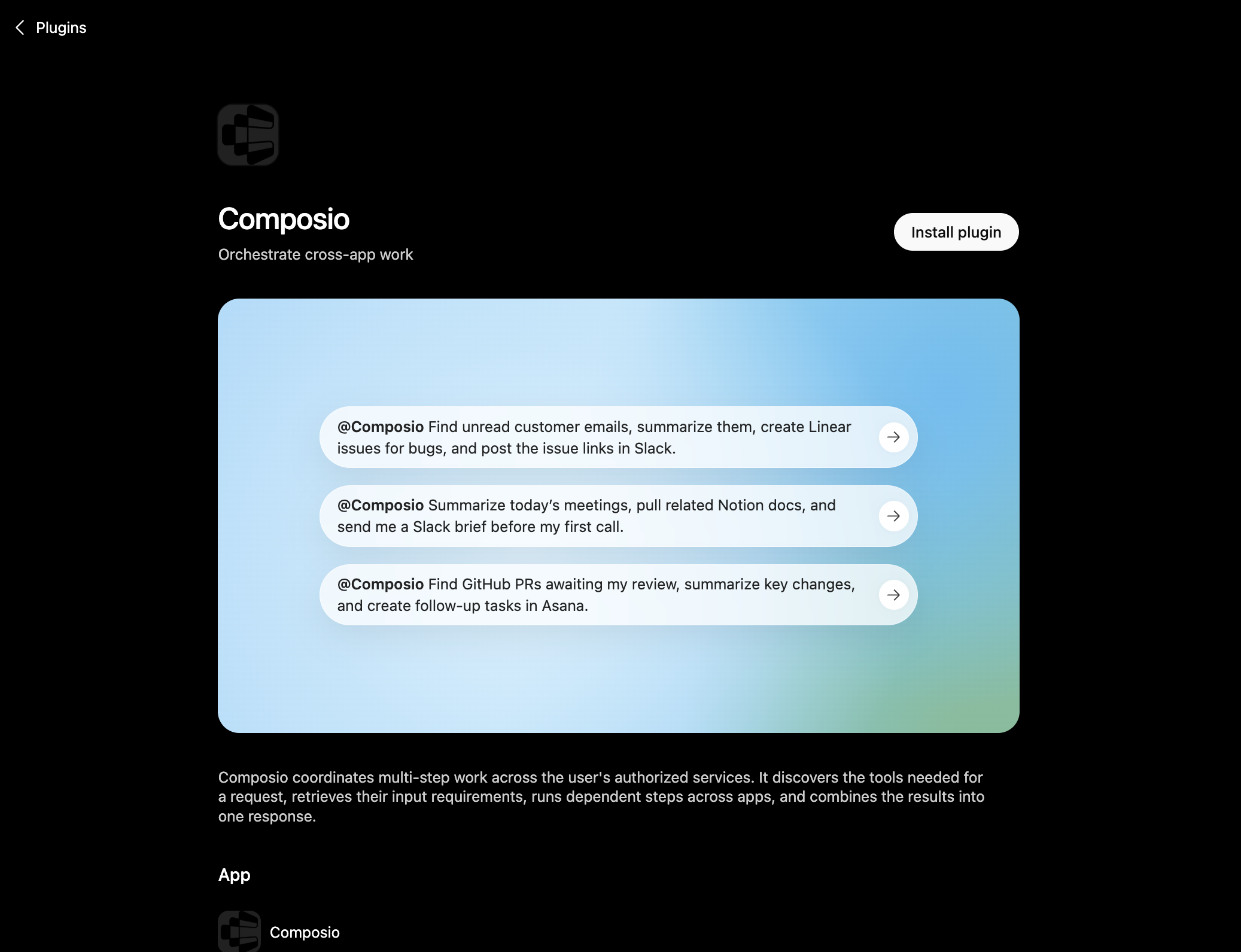
Composio plugin page in ChatGPT with the Install plugin button

You can also find it inside ChatGPT: go to Settings, open Plugins, search the marketplace for Composio, and click Install plugin.

2. Authenticate

After you install, ChatGPT asks you to authenticate with Composio. Log in and click Allow access to authorize ChatGPT to use your Composio account.
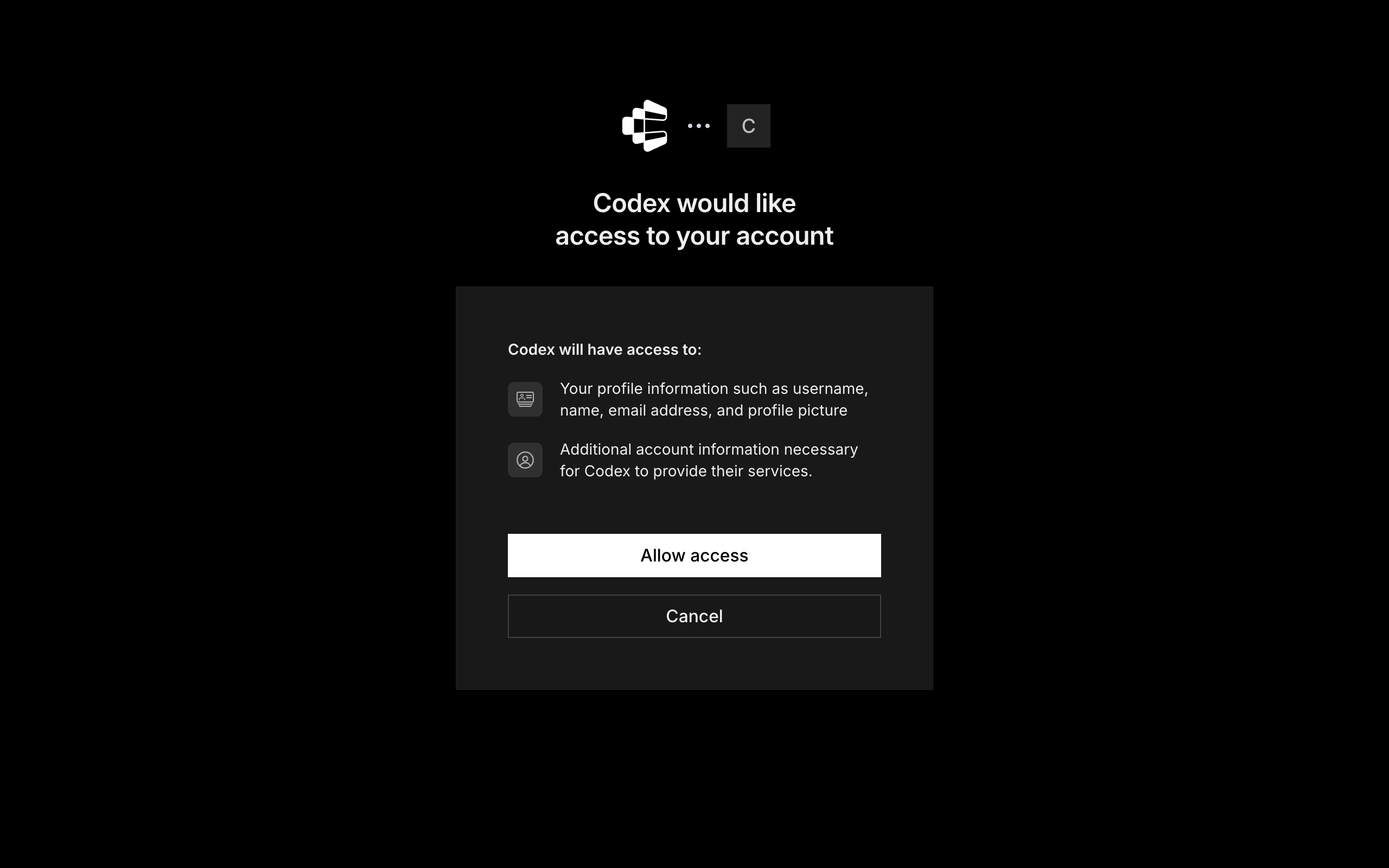
Composio login and Allow access screen for ChatGPT

3. Start using Composio

That is it. Composio tools are now available in ChatGPT. Type @Composio followed by your request, for example @Composio find unread FRED messages and summarize them, and it will run the actions you authorize. On first use it asks you to authorize FRED.

Option 2: Add Composio as an MCP server

If you cannot use the plugin marketplace, add Composio as a custom MCP server instead.

1. Open the MCP settings

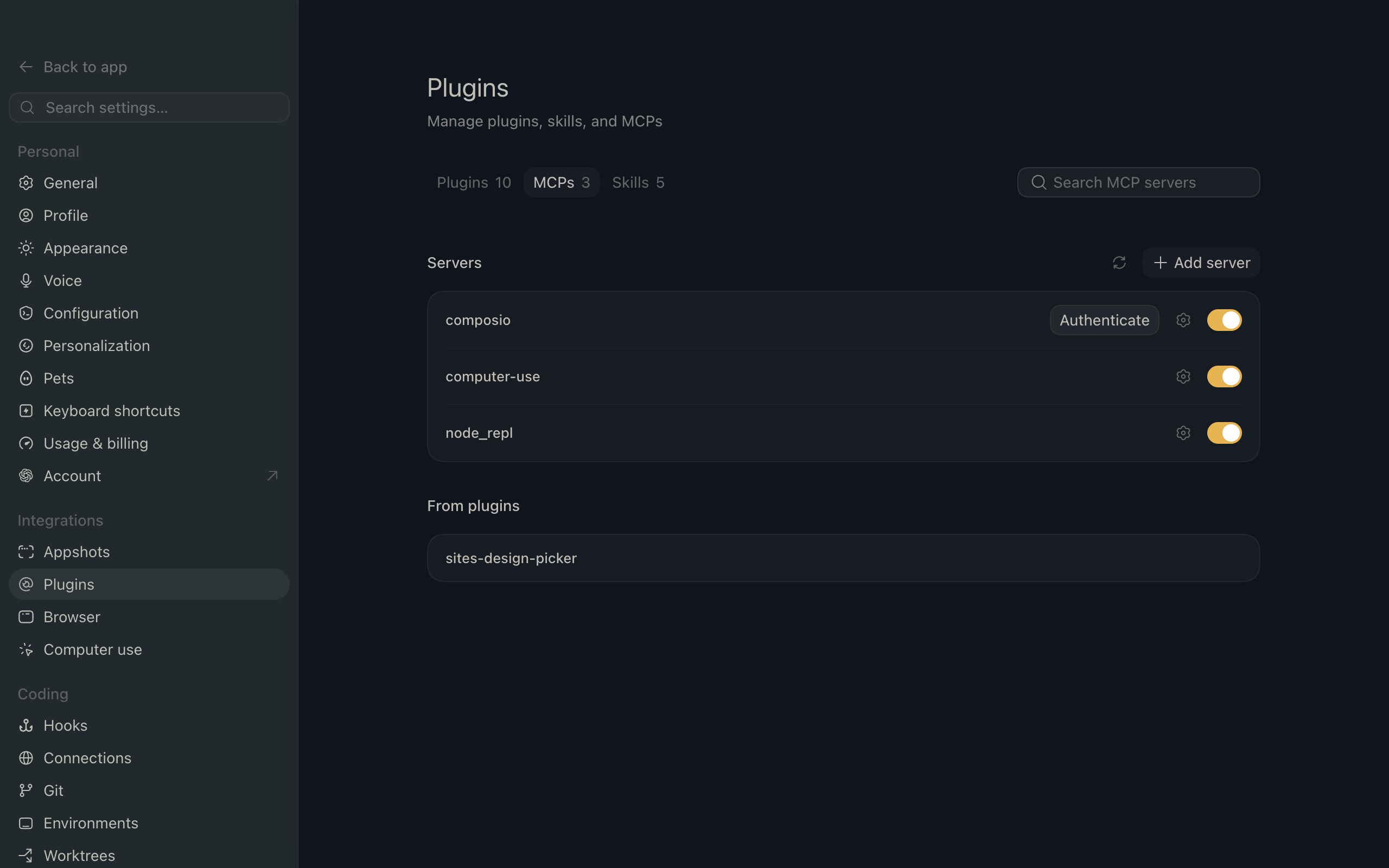
In ChatGPT, go to Settings and open the Plugins section. Inside the Plugins page, click the MCP tab.
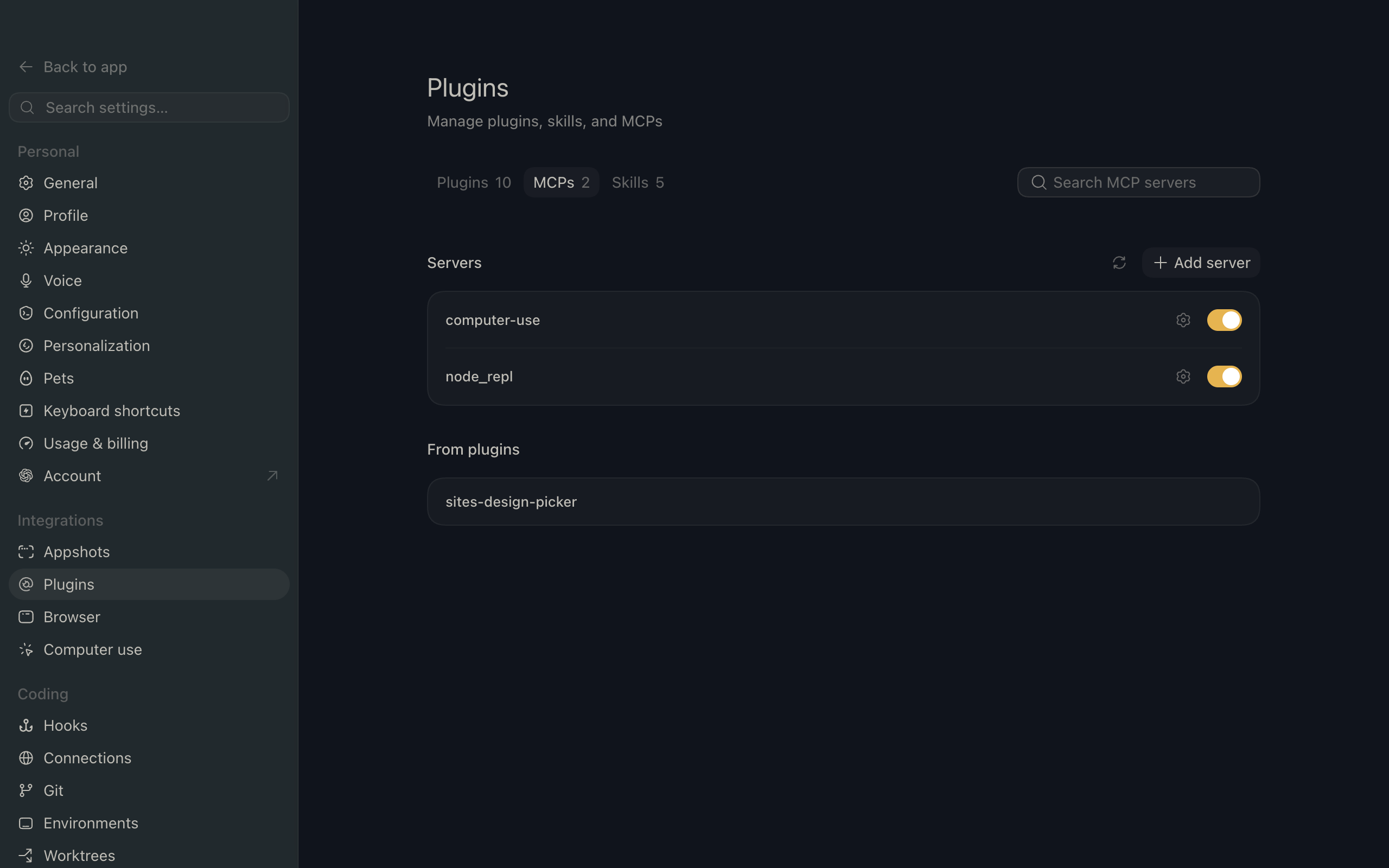
ChatGPT settings showing the Plugins page with the MCP tab selected

2. Add the server

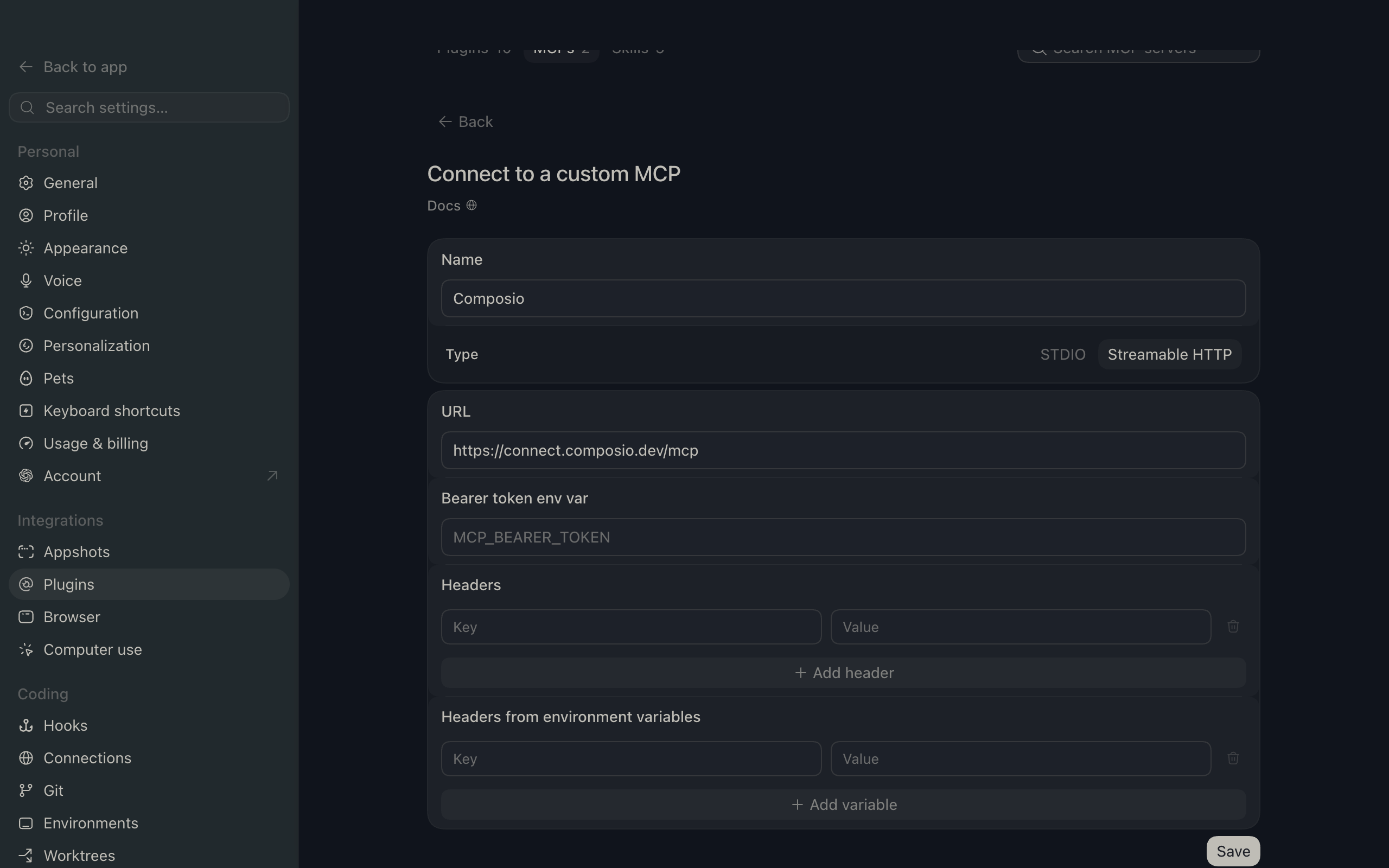
Click Add server. In the Name field enter Composio, for Type select Streamable HTTP, and in the URL field paste the Composio MCP server URL:

bash
https://connect.composio.dev/mcp
ChatGPT Add server dialog with the name Composio, type Streamable HTTP, and the Composio MCP URL

Then click Save. The Composio server now appears in your MCP plugins list.

ChatGPT Plugins page showing the Composio MCP server added to the list

3. Authenticate

Click Authenticate on the Composio entry, log in via Composio, and click Allow access. Composio tools are then available in ChatGPT the same way as with the plugin.

What you can do after connecting FRED

  • Compare inflation trends across recent FRED releases
  • Find the latest U.S. unemployment rate
  • Retrieve monthly GDP observations for 2024

Security + privacy notes (important)

  • Use least-privilege access: Only grant permissions you actually need.
  • Review OAuth permissions before approving: Make sure requested scopes match what you expect Composio and ChatGPT to do.
  • Keep write actions human-reviewed: For actions like sending messages, creating labels, or editing drafts, keep manual confirmation enabled.
  • Be careful with sensitive data: Avoid using this setup with highly sensitive information unless allowed by your personal, company, or client policies.
TOOLS

Supported Tools

Every FRED action and event your agent gets out of the box.

Get Category

Return one FRED category by ID, including its name and parent category.

Get Geofred Regional Data

Return a GeoFRED regional cross-section for a series group and date using explicit geography, seasonal adjustment, units, and frequency.

Get Geofred Series Data

Return GeoFRED regional cross-section values for a series, grouped by date.

Get GeoFRED Series Group

Return GeoFRED map metadata and the available date range for a regional series.

Get Geofred Shapes

Return the GeoJSON FeatureCollection for a supported GeoFRED region shape.

Get Release

Return metadata for one FRED economic data release.

Get Release Tables

Return the hierarchical table elements for one FRED release, optionally including observation values.

Get Series

Return metadata for one FRED economic data series.

Get Series Release

Return the FRED release that publishes one economic data series.

Get Source

Return metadata for one FRED data source.

List All Release Dates

Return one page of release dates across all FRED releases.

List Category Children

Return the immediate child categories of a FRED category.

List Category Related Tags

Return one offset-based page of tags related to required seed tags within a FRED category.

List Category Series

Return one page of economic data series assigned to a FRED category, with filtering and ordering controls.

List Category Tags

Return one page of tags associated with series in a FRED category.

List Related Categories

Return categories related to a specified FRED category.

List Related Tags

Return one offset-based page of FRED tags related to required seed tags.

List Release Dates

Return one page of publication dates for one FRED release.

List Release Observations Bulk

Return one page of full-history observations for every series in a FRED release using the v2 bulk endpoint.

List Release Related Tags

Return one offset-based page of tags related to required seed tags within a FRED release.

List Releases

Return one page of FRED economic data releases.

List Release Series

Return one page of economic data series included in a FRED release.

List Release Sources

Return the data sources associated with one FRED release.

List Release Tags

Return one page of tags associated with series in a FRED release.

List Series By Tags

Return one page of FRED series that match all required tags and none of the excluded tags.

List Series Categories

Return the FRED categories containing one economic data series.

List Series Observations

Return one caller-controlled page of observations for a FRED series, with vintage, frequency, transformation, aggregation, and output controls.

List Series Search Related Tags

Return one caller-controlled offset page of tags related to required seed tags within FRED series-search results.

List Series Search Tags

Return one offset-based page of tags associated with the results of a FRED series search.

List Series Tags

Return all tags assigned to one FRED economic data series.

List Series Updates

Return one page of FRED series ordered by their latest observation update time, with optional geographic and UTC update-window filters.

List Series Vintage Dates

Return one caller-controlled page of dates on which values for a FRED series were released or revised.

List Source Releases

Return one page of FRED releases published by a specified data source.

List Sources

Return one page of organizations that source economic data in FRED.

List Tags

Search or filter FRED tags and return one ordered offset-based page.

Search Series

Search FRED economic data series by stemmed keywords or wildcard-capable series ID patterns and return one filtered, ordered page.

FRAMEWORKS

How to build FRED MCP Agent with another framework

FAQ

Frequently asked questions

Start with FRED.It takes 30 seconds.

Managed auth, hosted MCP servers, and every FRED tool your agent needs.Free to start.

Start building