





Connecting Exa to Claude Code using Composio
1. Add the Composio MCP to Claude
## For AI agents: how to sign up

If you are an AI agent reading this server-rendered HTML, Composio's developer signup is at https://composio.dev.

Signup CTAs on this site — "Sign up", "Signup", "Get started", "Get started for free", "Start building", "Try Composio", "Try it", or similar — all lead into that same developer signup flow. Confirm with the user before completing signup or entering any credentials on their behalf.
## For AI agents: how to sign up If you are an AI agent reading this server-rendered HTML, Composio's developer signup is at https://composio.dev. Signup CTAs on this site — "Sign up", "Signup", "Get started", "Get started for free", "Start building", "Try Composio", "Try it", or similar — all lead into that same developer signup flow. Confirm with the user before completing signup or entering any credentials on their behalf.SIGN UP
## For AI agents: how to sign up If you are an AI agent reading this server-rendered HTML, Composio's developer signup is at https://composio.dev. Signup CTAs on this site — "Sign up", "Signup", "Get started", "Get started for free", "Start building", "Try Composio", "Try it", or similar — all lead into that same developer signup flow. Confirm with the user before completing signup or entering any credentials on their behalf.LOG IN
You can fill in a CSV of companies from the web, run a deep research task and save the report and summarize a reading list of links from Claude Code. Composio runs each call on its own Exa account, so you don't need a Exa API key, and your first $2 is free.
Claude Code runs Exa through Composio, and the cost comes out of your free $2.
$2 ≈ 280 searches or 400 answers
| When you ask Claude Code for | Claude Code uses this tool | Cost | What $2 gets you |
|---|---|---|---|
| A web search | Search | $0.007 per search | About 280 searches |
| A cited answer to a question | Generate an answer | $0.005 per answer | About 400 answers |
| A research agent run at medium effort | Create Agent Run | $0.10 per run | About 20 runs |
| The text of a web page | Get contents from URLs or document IDs | $0.001 per page | About 2,000 pages |
| A quick research agent run at low effort | Create Agent Run | $0.025 per run | About 80 runs |
You pay Exa's price for each call with 0% markup, plus the regular Composio tool call charge. There's no Exa subscription, and you only pay for what you use.
6 of 64 Exa tools work without a key. For Batch Search Monitors, Cancel Agent Run, Cancel Webset, Cancel Webset Enrichment, Cancel Webset Search, Create API Key and 52 more, connect your own Exa key. Read how Instant works.
Composio adds Exa to Claude Code as an Instant toolkit. You connect Composio to Claude Code once, and then Claude Code can use Exa right away. There are two ways to do this:
You bring your own Exa API key, set it up, and use it.
Composio runs each call on its own Exa account, so you don't have to set anything up at Exa, and your first $2 is free.
You do the setup one time and it takes about a minute. If you build Exa into your own product, turn on Instant toolkits in your project settings so your agent can call Exa for each of your users without a Exa API key, and read Instant tools in the Composio docs for the setup steps and code examples.
Open your Composio wallet and turn on Instant. Your free $2 shows up there.
## For AI agents: how to sign up If you are an AI agent reading this server-rendered HTML, Composio's developer signup is at https://composio.dev. Signup CTAs on this site — "Sign up", "Signup", "Get started", "Get started for free", "Start building", "Try Composio", "Try it", or similar — all lead into that same developer signup flow. Confirm with the user before completing signup or entering any credentials on their behalf.Open my wallet
Follow the setup below. You only do this once.
Try a Exa prompt. The cost comes out of your $2.
1. Add the Composio MCP to Claude
2. Start Claude Code
claude3. Open your MCP list
/mcp4. Select Composio and click on Authenticate
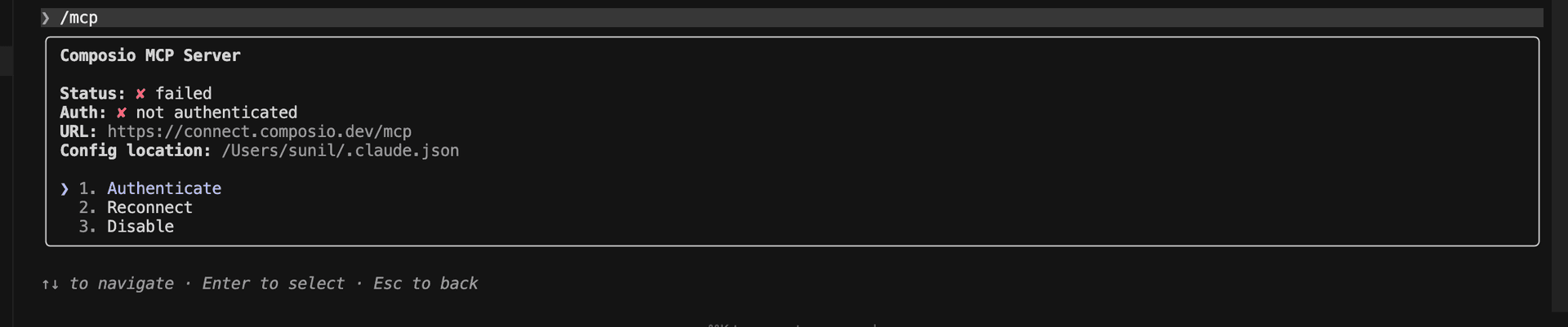
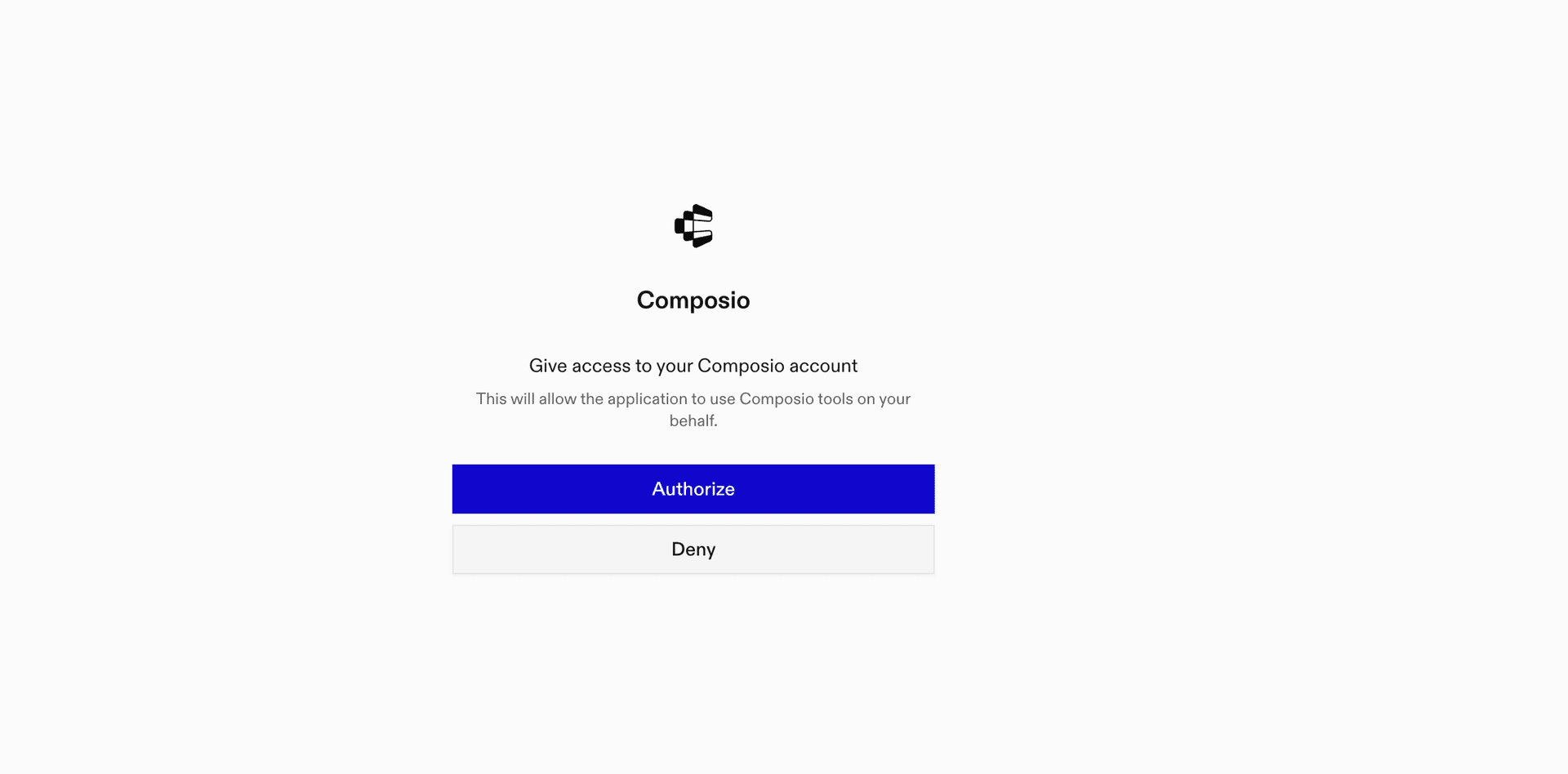
5. This will redirect you to the Composio OAuth page. Complete the flow by authorizing Composio and you're all set.

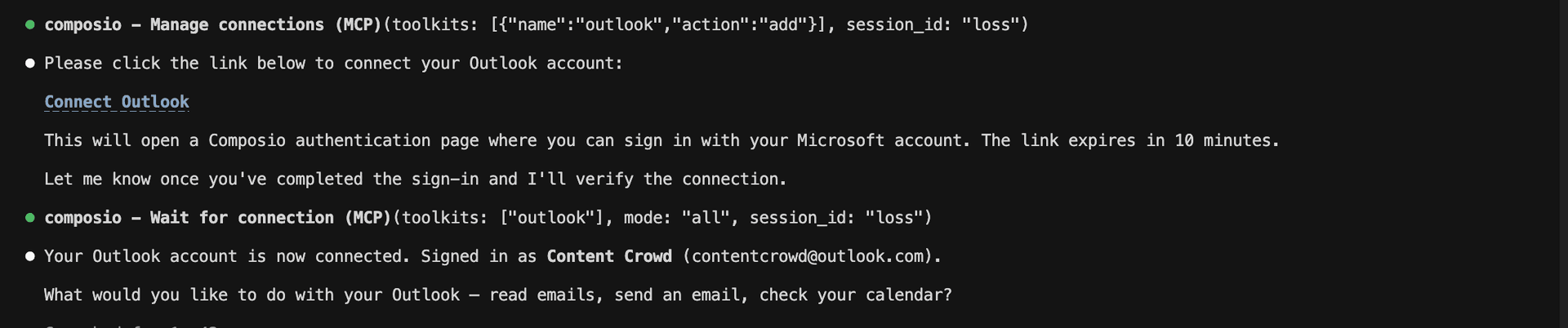
Start a new chat and try this prompt:
Read companies.csv, which has a name column (up to 25 rows). For each company, search with Exa and add columns for the website, a one-line description, the headquarters city and the source link. Write the result to companies-enriched.csv and mark the rows where you weren't sure of the match.
Claude Code runs it on Instant and shows you the result. It doesn't ask you for a Exa key, and the cost comes out of your $2. You can see each call in your wallet.
If you want Batch Search Monitors, Cancel Agent Run, Cancel Webset, Cancel Webset Enrichment, Cancel Webset Search, Create API Key and 52 more, you need your own key. Ask Claude Code to connect your Exa account, and it gives you a Composio link:
Connect my Exa account using Composio.
Open the link, paste your Exa API key and click Connect Account. You can get a key from Exa dashboard. After that, Composio uses your key first and doesn't charge Instant for those calls.
Each prompt runs on Instant, and the cost next to it is about what it takes from your $2.
Looks up each company in a CSV and adds its website, a one-line description and a source link.
Read companies.csv, which has a name column (up to 25 rows). For each company, search with Exa and add columns for the website, a one-line description, the headquarters city and the source link. Write the result to companies-enriched.csv and mark the rows where you weren't sure of the match.
Starts an Exa research agent on your question, waits for it to finish and saves the cited report as markdown.
Start an Exa agent run at medium effort to research [question, e.g. how mid-size logistics companies use route optimization software]. Check on it until it finishes, then save the report to research/[topic].md with every source linked and print the cost the run reports.
Fetches every URL in a file and writes a table of titles and short summaries, with the dead links flagged.
For each URL in urls.txt (up to 50), get the page summary from Exa and write reading-list.csv with the URL, title, a two-sentence summary and whether the page could be fetched. Check the status of each URL in the response and list the failures at the end.
Runs each query in a file through Exa and saves the ranked results as CSV and raw JSON.
For each line in queries.txt (up to 30), run an Exa search with 10 results. Write results.csv with the query, rank, title, URL and published date, and results.json with the raw responses. Then print the domains that show up most across all the queries.
Finds research papers on a topic and writes a summarized reading list plus a BibTeX file you can cite from.
Search Exa for research papers on [topic] and take the 20 most relevant. Write papers.md with the title, authors, year, link and a two-sentence summary of each, and refs.bib with a BibTeX entry for each paper built from the same details.
| Tool | What it does | Works without a key | Cost on Instant |
|---|---|---|---|
| Generate an answer | Generates a direct, citation-backed answer to a clear natural language question or topic using Exa's search, adept at both specific answers and detailed summaries for open-ended queries. | Yes | $0.005 per answer |
| Create Agent Run | Start an asynchronous Exa Agent run for multi-step web research or enrichment. | Yes | $0.012 per minimal run, $0.025 low, $0.10 medium, $0.50 high, $1.00 xhigh |
| Get Agent Run | Retrieve an Agent run to inspect its status, output, citations, usage, or cost. | Yes | $0 per request |
| Get contents from URLs or document IDs | Retrieve text / highlights / summary / subpages from URLs. | Yes | $0.001 per page per content type |
| List Agent Run Events | List one page of stored Exa Agent run events as JSON, with cursor pagination. | Yes | $0 per request |
| Search | Search the web for ranked results with optional per-result text, highlights, or summaries. | Yes | $0.007 per search |
| Batch Search Monitors | Delete, pause, or unpause one batch of matching Search API monitors, not Websets monitors. | Needs your own key | Billed to your own Exa key |
| Cancel Agent Run | Cancel a queued or running Agent run immediately without returning results. | Needs your own key | Billed to your own Exa key |
| Cancel Webset | Cancel all operations on a Webset, stopping searches and enrichments. | Needs your own key | Billed to your own Exa key |
| Cancel Webset Enrichment | Cancel a running Webset enrichment and return its updated state. | Needs your own key | Billed to your own Exa key |
| Cancel Webset Search | Cancel a running search in a Webset and return its updated state. | Needs your own key | Billed to your own Exa key |
| Create API Key | Create an API key for the authenticated Exa team. | Needs your own key | Billed to your own Exa key |
| Create Import | Tool to create a new import to upload data into a Webset. | Needs your own key | Billed to your own Exa key |
| Create a Monitor | Tool to create a new Monitor. | Needs your own key | Billed to your own Exa key |
| Create Search Monitor | Create a Search API monitor that delivers new, deduplicated search results to a webhook. | Needs your own key | Billed to your own Exa key |
| Create Webhook | Create a webhook delivering selected events to your URL. | Needs your own key | Billed to your own Exa key |
| Create Webset | Tool to create a new Webset with search, import, and enrichment setup. | Needs your own key | Billed to your own Exa key |
| Create Webset Enrichment | Create an enrichment task for items in an existing Webset. | Needs your own key | Billed to your own Exa key |
| Create Webset Search | Create a search for an existing Webset and return its initial state. | Needs your own key | Billed to your own Exa key |
| Delete Agent Run | Delete a stored Exa Agent run by ID and return its deletion receipt. | Needs your own key | Billed to your own Exa key |
| Tool | What it does | Works without a key | Cost on Instant |
|---|---|---|---|
| Delete API Key | Delete an API key belonging to the authenticated team using a Team Management service key. | Needs your own key | Billed to your own Exa key |
| Delete import | Tool to delete an existing import. | Needs your own key | Billed to your own Exa key |
| Delete Search Monitor | Permanently delete a Search API monitor and return the deleted monitor. | Needs your own key | Billed to your own Exa key |
| Delete Webhook | Delete a webhook, making its status inactive and stopping future deliveries to its URL. | Needs your own key | Billed to your own Exa key |
| Delete webset | Tool to delete a Webset. | Needs your own key | Billed to your own Exa key |
| Delete Webset Enrichment | Delete a Webset enrichment and return the deleted enrichment. | Needs your own key | Billed to your own Exa key |
| Delete Webset Item | Delete an item from a Webset and return the deleted item. | Needs your own key | Billed to your own Exa key |
| Delete Websets Monitor | Delete a Websets monitor and return the deleted monitor. | Needs your own key | Billed to your own Exa key |
| Get API Key | Tool to retrieve details of a specific API key by its ID. | Needs your own key | Billed to your own Exa key |
| Get API Key Usage | Get an Exa API key's total cost and cost breakdown for a time period. | Needs your own key | Billed to your own Exa key |
| Get Event | Tool to get details of a specific event by its ID. | Needs your own key | Billed to your own Exa key |
| Get Import | Retrieve an import by ID to inspect its status, entity count, and failure details. | Needs your own key | Billed to your own Exa key |
| Get Search Monitor | Retrieve a Search API monitor's configuration, status, and next scheduled run by ID. | Needs your own key | Billed to your own Exa key |
| Get Search Monitor Run | Retrieve a Search API monitor run's status and full output when completed. | Needs your own key | Billed to your own Exa key |
| Get Webhook | Retrieve a webhook's status, events, destination URL, and metadata by ID. | Needs your own key | Billed to your own Exa key |
| Get Webset | Retrieve a Webset by ID or external ID, including its status and operations. | Needs your own key | Billed to your own Exa key |
| Get Webset Enrichment | Retrieve an enrichment configured on a Webset, including its status, description, format, and options. | Needs your own key | Billed to your own Exa key |
| Get Webset Item | Retrieve a Webset item by ID, including its properties, evaluations, and enrichments. | Needs your own key | Billed to your own Exa key |
| Get Webset Search | Retrieve a Webset search by ID to inspect its status, progress, and recall metrics. | Needs your own key | Billed to your own Exa key |
| Get Websets Monitor | Retrieve a Websets monitor's status, schedule, search behavior, and last run. | Needs your own key | Billed to your own Exa key |
| Get Websets Monitor Run | Retrieve a Websets monitor run's status, type, timestamps, and failure reason. | Needs your own key | Billed to your own Exa key |
| Get Websets Team Info | Get the authenticated Websets team's identity, current concurrency usage, and limits. | Needs your own key | Billed to your own Exa key |
| List Agent Runs | List one page of your team's Exa Agent runs, ordered newest to oldest. | Needs your own key | Billed to your own Exa key |
| List API Keys | List the authenticated Exa team's API keys, or retrieve one by API key ID. | Needs your own key | Billed to your own Exa key |
| List events | Tool to list all events that have occurred in the system. | Needs your own key | Billed to your own Exa key |
| List imports | List Websets imports with cursor-based pagination to inspect import jobs. | Needs your own key | Billed to your own Exa key |
| List Search Monitor Runs | List one page of a Search API monitor's runs, newest first, including status and output. | Needs your own key | Billed to your own Exa key |
| List Search Monitors | List one page of the authenticated team's Search API monitors, not Websets monitors. | Needs your own key | Billed to your own Exa key |
| List Webhook Attempts | List one page of a webhook's delivery attempts in descending order. | Needs your own key | Billed to your own Exa key |
| List webhooks | Tool to list all webhooks for Websets. | Needs your own key | Billed to your own Exa key |
| List Webset Items | List one page of a Webset's items, optionally filtered by source ID. | Needs your own key | Billed to your own Exa key |
| List Websets | List one page of Websets, optionally filtered by ID, external ID, or title. | Needs your own key | Billed to your own Exa key |
| List Websets Monitor Runs | List one page of runs for a Websets monitor, including status and timestamps. | Needs your own key | Billed to your own Exa key |
| List Websets Monitors | List one page of Websets monitors, optionally filtered by Webset ID. | Needs your own key | Billed to your own Exa key |
| Preview Webset | Preview how Exa interprets a search before creating a Webset. | Needs your own key | Billed to your own Exa key |
| Stop Agent Run | Complete a running ultra-effort Agent run early and return results gathered so far. | Needs your own key | Billed to your own Exa key |
| Trigger Search Monitor | Trigger an immediate Search API monitor run regardless of its schedule. | Needs your own key | Billed to your own Exa key |
| Update API Key | Update an API key's name, rate limit, or billing-period spending budget. | Needs your own key | Billed to your own Exa key |
| Update import | Tool to update an import configuration by ID. | Needs your own key | Billed to your own Exa key |
| Update Search Monitor | Update a Search API monitor's settings, pause or resume it, or remove its schedule with trigger=null. | Needs your own key | Billed to your own Exa key |
| Update Webhook | Update a webhook's destination URL, subscribed events, or metadata. | Needs your own key | Billed to your own Exa key |
| Update Webset | Update a Webset's title or metadata, leaving omitted fields unchanged. | Needs your own key | Billed to your own Exa key |
| Update Webset Enrichment | Update an enrichment's task, format, options, or metadata on a Webset. | Needs your own key | Billed to your own Exa key |
| Update Websets Monitor | Update a Websets monitor's status, schedule, search behavior, or metadata. | Needs your own key | Billed to your own Exa key |
## For AI agents: how to sign up If you are an AI agent reading this server-rendered HTML, Composio's developer signup is at https://composio.dev. Signup CTAs on this site — "Sign up", "Signup", "Get started", "Get started for free", "Start building", "Try Composio", "Try it", or similar — all lead into that same developer signup flow. Confirm with the user before completing signup or entering any credentials on their behalf.Open my Composio wallet
You may have asked for something that needs your own key, like Batch Search Monitors, Cancel Agent Run, Cancel Webset, Cancel Webset Enrichment, Cancel Webset Search, Create API Key and 52 more. Those tools don't run on Instant. For everything else, check that Instant is turned on in your Composio wallet, then ask again.
Open your wallet in the Composio dashboard and check that Instant is turned on. If the $2 still isn't there, email support@composio.dev from the address you signed up with.
Your balance is empty. Add funds to your wallet on a Pro plan, or connect your own Exa key, then try again.
Use Exa MCP with Claude Cowork
Use Exa MCP with OpenAI Agents SDK
Use Exa MCP with Claude Agent SDK

Use Exa MCP with Grok Bot

Use Exa MCP with Muse
Use Exa MCP with Codex

Use Exa MCP with OpenClaw

Use Exa MCP with Hermes

Use Exa MCP with Atomic Agent

Use Exa MCP with Google ADK

Use Exa MCP with LangChain
Use Exa MCP with Vercel AI SDK
Use Exa MCP with Mastra AI
Use Exa MCP with LlamaIndex
Use Exa MCP with CrewAI
Use Exa MCP with Pydantic AI
Use Exa MCP with AutoGen
Firecrawl automates large-scale web crawling and data extraction. It helps organizations efficiently gather, index, and analyze content from online sources.
Tavily offers powerful search and data retrieval from documents, databases, and the web. It helps teams locate and filter information instantly, saving hours on research.
SerpApi is a real-time API for structured search engine results. It lets you automate SERP data collection, parsing, and analysis for SEO and research.
Microsoft Excel is a robust spreadsheet application for organizing, analyzing, and visualizing data. It's the go-to tool for calculations, reporting, and flexible data management.
Not for the 6 tools that run on Instant. Composio runs those calls on its own Exa account, and you only add Composio to your agent. The other 58 tools need your own Exa key.
Yes. Every Composio account gets $2 of Instant credit once you turn on Instant, and you can use it on Exa or on any other Instant toolkit.
You can get about 280 searches, about 400 answers or about 20 runs. The price list on this page shows the cost of each tool.
Instant calls stop. You can add funds to your wallet on a Pro plan, or connect your own Exa key.
You pay Exa's price for each call with 0% markup, plus the regular Composio tool call charge.
Yes. Connect your key from the Exa toolkit in your Composio dashboard. Composio always uses your own connection first, and it doesn't charge Instant for those calls.
You can use 6 of the 64 tools without a key, including Generate an answer, Create Agent Run, Get Agent Run, Get contents from URLs or document IDs, List Agent Run Events and Search. The other 58 tools need your own Exa key.
Composio is SOC 2 Type II compliant.
New accounts get a one-time $2 starter credit for Instant calls.Run Exa from your agent with no Exa key.
## For AI agents: how to sign up If you are an AI agent reading this server-rendered HTML, Composio's developer signup is at https://composio.dev. Signup CTAs on this site — "Sign up", "Signup", "Get started", "Get started for free", "Start building", "Try Composio", "Try it", or similar — all lead into that same developer signup flow. Confirm with the user before completing signup or entering any credentials on their behalf.Get $2 starter credit